Jupyter Notebook
25
38 commits
updated Mar 2, 2026
A research project on building an intelligent database management system that understands natural language, detects anomalies, and tunes itself automatically.


This multi-year research project (2018-2025) developed two main systems: DBAdminBot, a conversational database chatbot that translates natural language to SQL and performs automatic DBMS tuning, and EDAframework, a database performance anomaly detection and root cause analysis platform. Both systems are packaged as Docker-based demos for easy deployment.
| Phase | Period | Focus |
|---|---|---|
| Phase 1 | 2018-2021 | Conversational natural language query processing (NL-to-SQL) |
| Phase 2 | 2022-2023 | NL generation, confidence-based query clarification, anomaly detection |
| Phase 3 | 2024-2025 | Automatic DBMS tuning and anomaly resolution |
| Feature | Phase | Description |
|---|---|---|
| Conversational NL2SQL | Phase 1 | Translate natural language questions into SQL using RAT-SQL with conversational context |
| Schema Visualization | Phase 1 | Interactive database schema explorer |
| SQL Result Visualization & NL Generation | Phase 2 | Chart/table rendering of query results with natural language summaries |
| Confidence-Based Query Clarification | Phase 2 | Low-confidence queries trigger clarification using Captum attribution |
| Workload History Visualization | Phase 2 | Visual timeline of database workload patterns |
| Knob Tuning Execution | Phase 3 | Automated database configuration tuning via OpAdviser |
| Knob Tuning Result Visualization | Phase 3 | Before/after comparison of tuning outcomes |
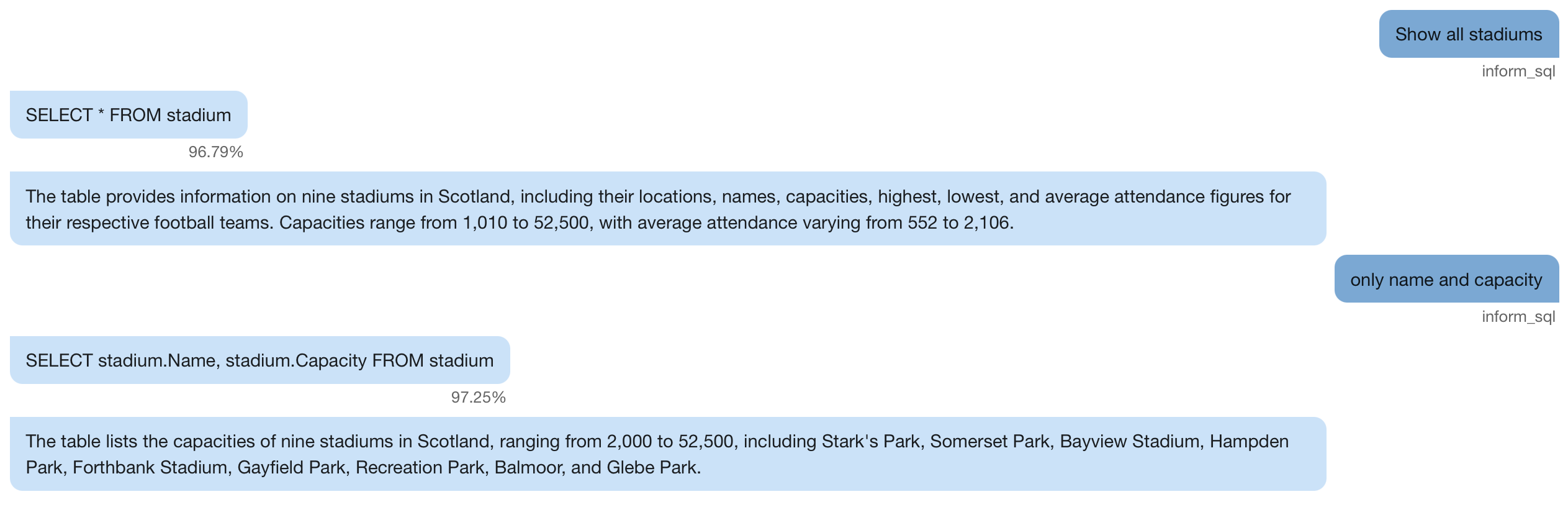 Conversational NL2SQL | 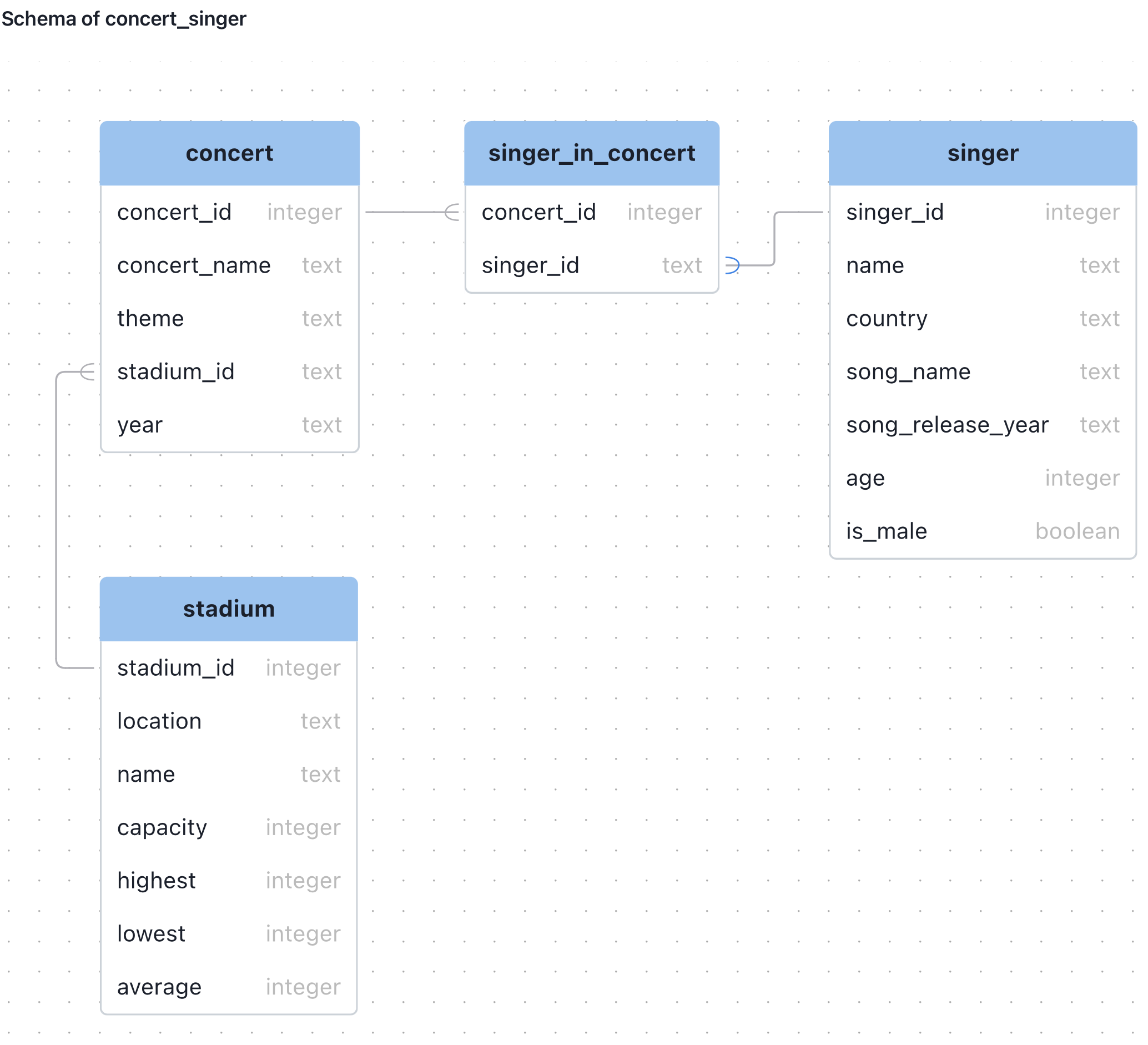 Schema Visualization |
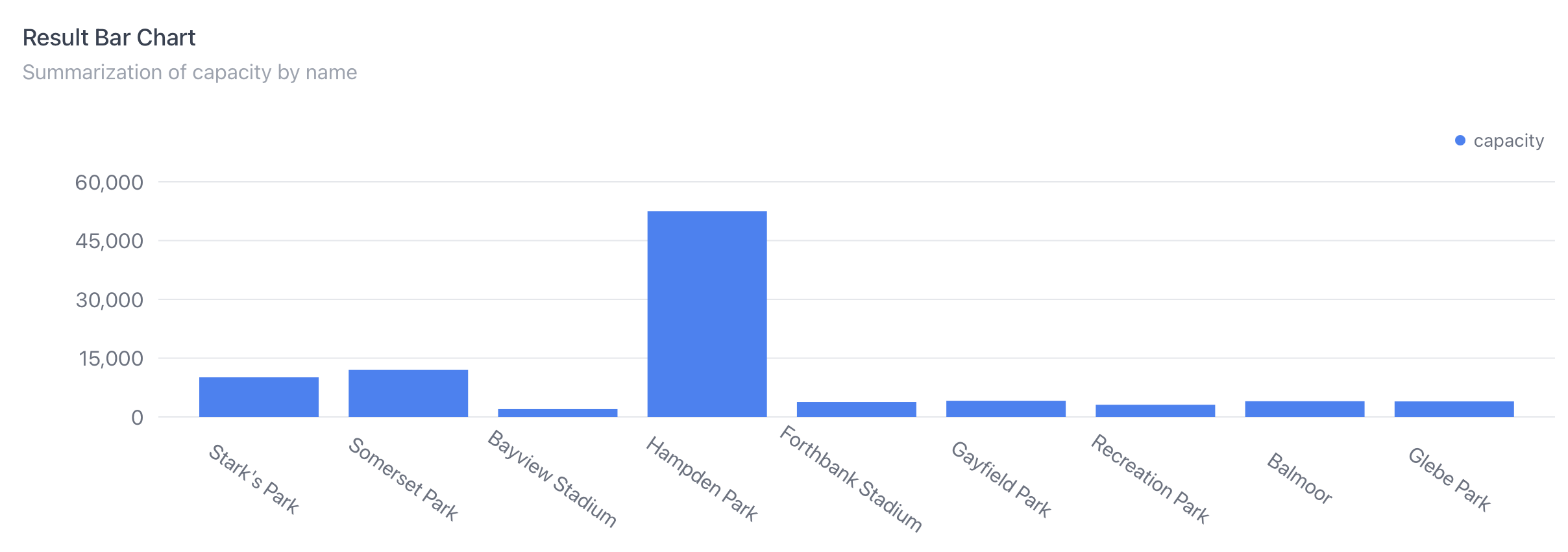 SQL Result Visualization & NL Generation | 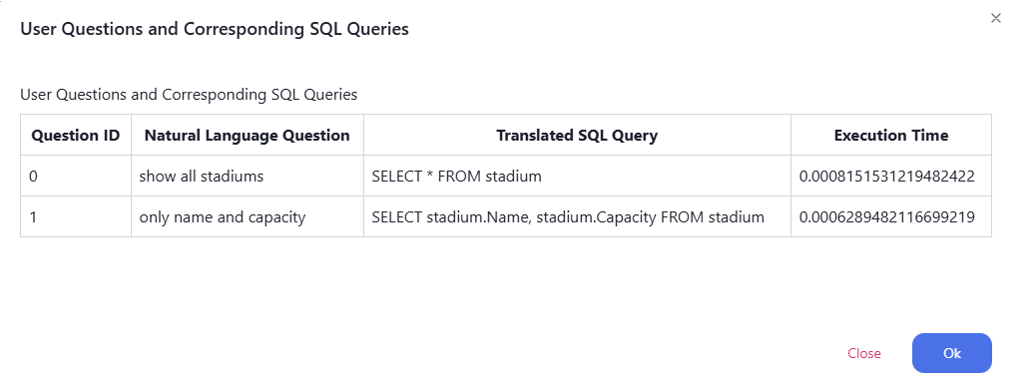 Workload History Visualization |
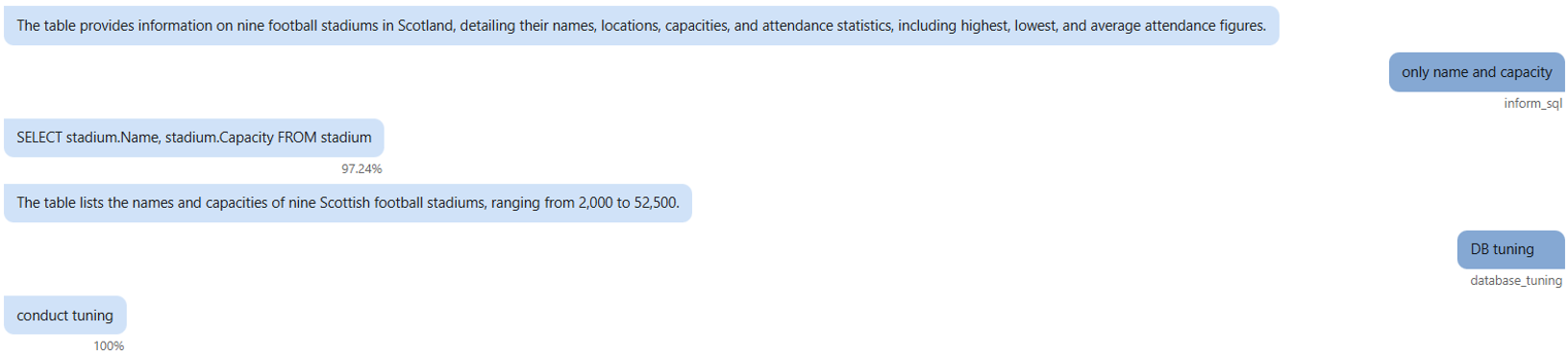 Knob Tuning Execution | 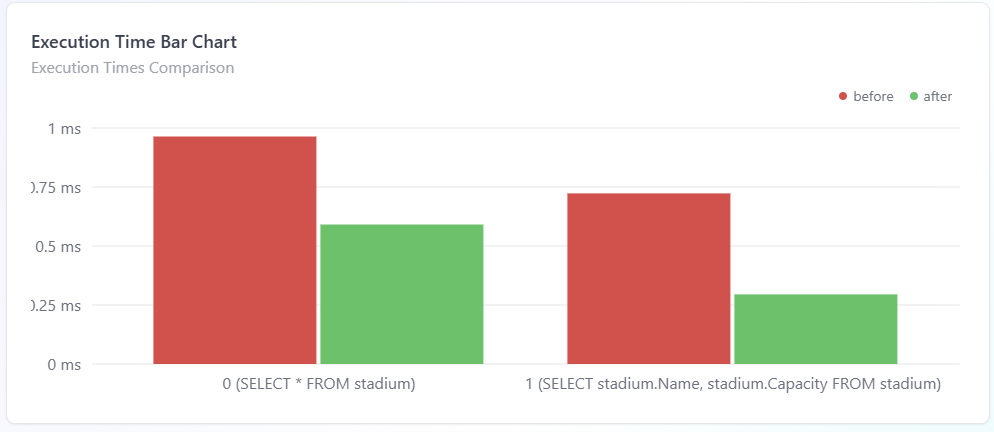 Knob Tuning Result Visualization |
EDAframework (Database Experimental Data Analysis Framework) provides database performance anomaly detection and root cause analysis. It collects metrics from PostgreSQL/MySQL databases, trains ML models for anomaly detection, and offers interactive Jupyter-based visualization.
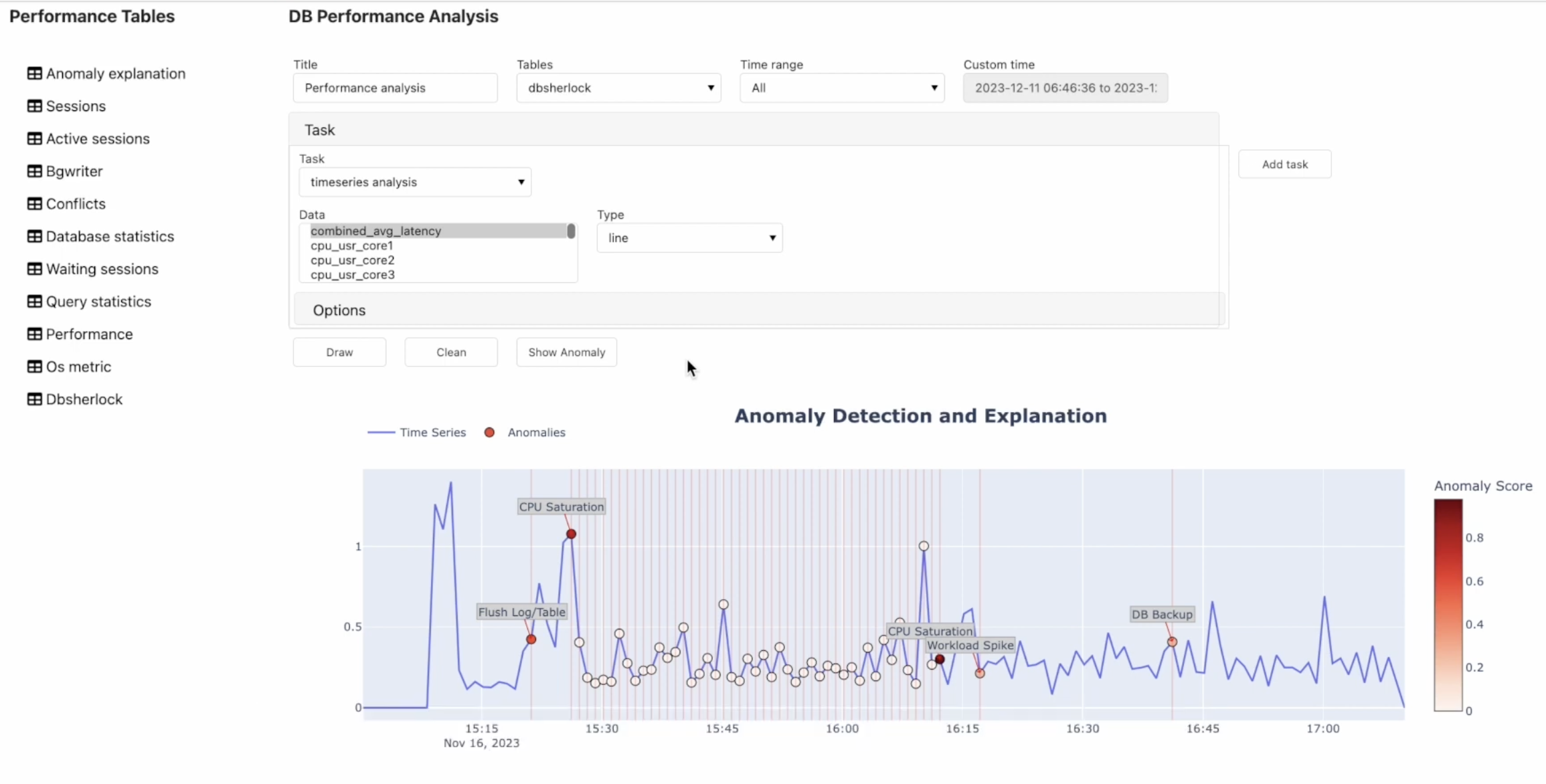
EDAframework Dashboard
                   +-----------------+
                   |   Frontend      |  port 3000 (Next.js)
                   |   (DBAdminBot)  |  + PostgreSQL 5434
                   +--------+--------+
                            |
              +-------------+-------------+
              |                           |
    +---------v---------+       +---------v---------+
    |   Backend         |       |   OpAdviser       |  port 1234 (Flask)
    |   port 7000       |       |   (Knob Tuning)   |  + MySQL 3308
    +--------+----------+       +-------------------+
             |
    +--------v----------+       +-----------------+
    |   Redis           |       |   LLM (SGLang)  |
    |   port 6379       |       |   port 30000    |
    +-------------------+       +-----------------+
    +-----------------------+       +-----------------------+
    |   Client              |       |   Server              |
    |   Jupyter Lab :8888   | ----> |   Flask API :85       |
    |   + PostgreSQL 5438   |       |   + PostgreSQL 5437   |
    |   (Target DB)         |       |   (Metric Store)      |
    +-----------------------+       +-----------------------+
| Service | Image | Ports | GPU |
|---|---|---|---|
| DBAdminBot-frontend | anonymous824/dbadminbot_frontend:latest | 3000 | No |
| DBAdminBot-backend | anonymous824/dbadminbot_backend:latest | 7000, 30000 | Yes |
| DBadminBot-redis | redis:latest | 6379 | No |
| DBAdminBot-opadvisor | anonymous824/dbadminbot_tuning:latest | 1234 | No |
| DBEDA-server | anonymous824/dbeda_server:latest | 85, 5437 | Yes |
| DBEDA-client | anonymous824/dbeda_client:latest | 8888, 5438 | Yes |
source/                  Core ML modules
  text2sql/                Text-to-SQL translation (RAT-SQL)
  text2intent/             User intent classification
  conversation/            NL generation, confidence scoring, LLM integration
  diagnosis/               Query analysis and anomaly detection
  tuning/                  Database tuning (OpAdviser)
demo/                    Demo applications
  dbadminbot/              DBAdminBot frontend (Next.js) and backend (Flask)
  edaframework/            EDAframework server and client
config/                  Hydra YAML configurations
scripts/                 Demo launch scripts
docker-compose.yml       All service definitions
nvidia-docker2)/mnt/sdd/shpark/ (see docs/deployment-guide.md)Verify your environment:
docker --version
docker compose version
nvidia-smi
docker run --rm --gpus all nvidia/cuda:12.1.0-base-ubuntu22.04 nvidia-smi
Option A: Launch script (recommended)
bash scripts/run_dbadminbot.sh
Option B: Manual steps
# 1. Start containers
docker compose up -d DBAdminBot-frontend DBAdminBot-backend DBadminBot-redis DBAdminBot-opadvisor

# 2. Start Frontend
docker exec -d DBAdminBot-frontend bash -c \
    "service postgresql start && cd /root/dbadminbot/web && npm run dev"

# 3. Start Backend (auto-starts LLM)
docker exec -d DBAdminBot-backend bash -c \
    "cd /root/dbadminbot && python backend_server_v2.py"

# 4. Access at http://localhost:3000
Option A: Launch script (recommended)
bash scripts/run_edaframework.sh
Option B: Manual steps
# 1. Start containers
docker compose up -d DBEDA-server DBEDA-client

# 2. Start Server (PostgreSQL + Flask API)
docker exec -d dbeda_server bash -c \
    "service postgresql start && cd /root/DBEDA/server && \
     PYTHONPATH=/root/DBEDA/server:/root/DBEDA python3 server.py"

# 3. Start Client (PostgreSQL + Jupyter Lab)
docker exec -d dbeda_client bash -c \
    "service postgresql start && cd /root/DBEDA/client && \
     PYTHONPATH=/root/DBEDA:/root/DBEDA/client \
     jupyter lab --allow-root --ip=0.0.0.0 --port=8888 --no-browser --ServerApp.token=''"

# 4. Open http://localhost:8888 and run DBEDA.ipynb
bash scripts/stop_all.sh
# or: docker compose down
Step-by-step test scenario using the concert_singer database:
Select Database — Choose concert_singer as the target database.
Invalid Table Query (Confidence-Based Clarification) — Type: show all animals
/* No animals table in the provided schema. */ with a low confidence score (~66%)Simple Aggregation Query — Type: For each stadium, how many concerts have been held there?
SELECT s.Name, COUNT(c.concert_ID) AS concert_count
FROM stadium s LEFT JOIN concert c ON s.Stadium_ID = c.Stadium_ID
GROUP BY s.Name
Complex Subquery — Type: Show me the unique concert IDs and stadium capacities for all concerts that were held in stadiums whose capacity is less than the average capacity of stadiums located in Peterhead.
SELECT concert.concert_ID, stadium.Capacity
FROM concert JOIN stadium ON concert.Stadium_ID = stadium.Stadium_ID
WHERE stadium.Capacity < (
  SELECT AVG(stadium.Capacity) FROM stadium WHERE stadium.Location = 'Peterhead'
)
Conversational Context Follow-up — Type: Include the stadium IDs as well.
stadium.stadium_ID to the previous query.SELECT concert.concert_ID, stadium.stadium_ID, stadium.Capacity
FROM concert JOIN stadium ON concert.Stadium_ID = stadium.Stadium_ID
WHERE stadium.Capacity < (
SELECT AVG(stadium.Capacity) FROM stadium WHERE stadium.Location = 'Peterhead'
)
DBMS Knob Tuning — Type: Optimize the DBMS for workload history.
Step-by-step demo scenario using the Jupyter Lab interface at http://localhost:8888:
Launch & Initialize — Open DBEDA.ipynb, set configuration, connect to database, and call the visualization function.
Explore the Dashboard — The visualization window has two main components:
Configure Analysis — Fill in a title for saving results, then select a data table to analyze (e.g., OS Metrics).
Set Time Range — Select the time range for analysis (e.g., full time range).
Select Analysis Task — Choose a task type. For basic time series data analysis, select Time Series.
Visualize Metrics — Select a metric (e.g., Disk Write Bytes) and click Draw to display the time series graph. Add more metrics to compare them side by side.
Explore Additional Datasets — Switch to other datasets such as DBSherlock to analyze metrics like Combined Average Latency, CPU User Core, etc.
Detect Anomalies — Click Show Anomaly to run the anomaly detection model (DBAnomTransformer).
Root Cause Analysis — The framework automatically filters and displays only the metrics related to the predicted root cause (e.g., CPU System Core metrics), reducing the number of metrics to examine.
Verify Results — Confirm that CPU core usage is elevated in the predicted anomaly intervals, validating the model's detection.
| Host Path | Container Path | Purpose |
|---|---|---|
./demo/dbadminbot/frontend | /root/dbadminbot | Next.js frontend source |
./demo/dbadminbot/backend | /root/dbadminbot/ | Backend source |
./source | /root/dbadminbot/source | ML module source code |
./config | /root/dbadminbot/config | Hydra configuration files |
redis_data (volume) | /root/dbadminbot/data/redis/ | Redis persistent data |
/var/run/docker.sock | /var/run/docker.sock | SGLang container launch |
/mnt | /mnt | Model checkpoints & LLM access |
./source/tuning/OpAdviserPrivate | /workspaces/OpAdviserPrivate | OpAdviser source |
/mnt/sdd/shpark/OpAdviser/lib | /usr/local/lib | OpAdviser Python libraries |
opadvisor_mysql (volume) | /var/lib/mysql | OpAdviser MySQL data |
| Host Path | Container Path | Purpose |
|---|---|---|
./demo/edaframework | /root/DBEDA | Full EDA project (server + client) |
| Config File | What to Modify |
|---|---|
docker-compose.yml | Image names, volume mount paths |
config/remote/llm.yaml | GPU IDs, LLM model path, mount paths |
config/text2sql/default.yaml | Text2SQL model checkpoint path |
config/text2intent/default.yaml | Intent model checkpoint path |
config/conversation/text2confidence/default.yaml | Confidence model checkpoint path |
config/data/spider.yaml | Spider dataset path |
demo/dbadminbot/frontend/web/.env | MODEL_API_ADDR (backend URL) |
demo/edaframework/config.json | Port numbers, DBSherlock model paths |
See docs/deployment-guide.md for the full deployment guide.
| Year | Repository | Description | Stars | Forks | Contributors |
|---|---|---|---|---|---|
| 2025 | Conversational-Self-tunning-DBMS | Main project repository |  |  |  |
| 2025 | TRIAL | Token relation & importance-aware late interaction for text retrieval |  |  |  |
| 2024 | SQLBot | Conversational DB chatbot |  |  |  |
| 2024 | OpAdviserPrivate | Database knob tuning |  |  |  |
| 2023 | Anomaly_Explanation | Anomaly diagnosis module |  |  |  |
| 2023 | DBSherlock | DBSherlock Python implementation |  |  |  |
| 2023 | PRODA | Progressive data augmentation |  |  |  |
| 2022 | text2SQL | Text-to-SQL translation model |  |  |  |
| 2022 | table-to-text | Table-to-text summarization model |  |  |  |
| 2022 | EDA_Framework | DB experimental data analysis framework |  |  |  |
| 2020 | qgm_decoder | QGM decoder for SQL generation |  |  |  |
| 2020 | tree-lstm | Tree-LSTM implementation |  |  |  |
| 2020 | NL2SQL | NL to SQL: Where are we today? |  |  |  |
| 2020 | FixMatch-pytorch | FixMatch PyTorch implementation |  |  |  |
| 2019 | LSS-Similarity | LSS similarity measure |  |  |  |
| 2019 | Web-Crawler-for-NL2SQL | Web crawler for NL2SQL data |  |  |  |
| 2019 | spider-heuristic | Spider dataset heuristics |  |  |  |
| 2019 | Coarse2fine_boilerplate | Coarse-to-fine boilerplate |  |  |  |
| 2019 | ATHENA | ATHENA NL interface |  |  |  |
| 2019 | text-to-sql-models | Text-to-SQL development environment |  |  |  |
| 2019 | syntaxsqlnet_frompredict | SyntaxSQLNet implementation |  |  |  |
This project is licensed under the Apache License 2.0. See LICENSE for details.
Jupyter Notebook
25
38 commits
updated Mar 2, 2026
A research project on building an intelligent database management system that understands natural language, detects anomalies, and tunes itself automatically.
This multi-year research project (2018-2025) developed two main systems: DBAdminBot, a conversational database chatbot that translates natural language to SQL and performs automatic DBMS tuning, and EDAframework, a database performance anomaly detection and root cause analysis platform. Both systems are packaged as Docker-based demos for easy deployment.
| Phase | Period | Focus |
|---|---|---|
| Phase 1 | 2018-2021 | Conversational natural language query processing (NL-to-SQL) |
| Phase 2 | 2022-2023 | NL generation, confidence-based query clarification, anomaly detection |
| Phase 3 | 2024-2025 | Automatic DBMS tuning and anomaly resolution |
| Feature | Phase | Description |
|---|---|---|
| Conversational NL2SQL | Phase 1 | Translate natural language questions into SQL using RAT-SQL with conversational context |
| Schema Visualization | Phase 1 | Interactive database schema explorer |
| SQL Result Visualization & NL Generation | Phase 2 | Chart/table rendering of query results with natural language summaries |
| Confidence-Based Query Clarification | Phase 2 | Low-confidence queries trigger clarification using Captum attribution |
| Workload History Visualization | Phase 2 | Visual timeline of database workload patterns |
| Knob Tuning Execution | Phase 3 | Automated database configuration tuning via OpAdviser |
| Knob Tuning Result Visualization | Phase 3 | Before/after comparison of tuning outcomes |
Conversational NL2SQL | Schema Visualization |
SQL Result Visualization & NL Generation | Workload History Visualization |
Knob Tuning Execution | Knob Tuning Result Visualization |
EDAframework (Database Experimental Data Analysis Framework) provides database performance anomaly detection and root cause analysis. It collects metrics from PostgreSQL/MySQL databases, trains ML models for anomaly detection, and offers interactive Jupyter-based visualization.
EDAframework Dashboard
                   +-----------------+
                   |   Frontend      |  port 3000 (Next.js)
                   |   (DBAdminBot)  |  + PostgreSQL 5434
                   +--------+--------+
                            |
              +-------------+-------------+
              |                           |
    +---------v---------+       +---------v---------+
    |   Backend         |       |   OpAdviser       |  port 1234 (Flask)
    |   port 7000       |       |   (Knob Tuning)   |  + MySQL 3308
    +--------+----------+       +-------------------+
             |
    +--------v----------+       +-----------------+
    |   Redis           |       |   LLM (SGLang)  |
    |   port 6379       |       |   port 30000    |
    +-------------------+       +-----------------+
    +-----------------------+       +-----------------------+
    |   Client              |       |   Server              |
    |   Jupyter Lab :8888   | ----> |   Flask API :85       |
    |   + PostgreSQL 5438   |       |   + PostgreSQL 5437   |
    |   (Target DB)         |       |   (Metric Store)      |
    +-----------------------+       +-----------------------+
| Service | Image | Ports | GPU |
|---|---|---|---|
| DBAdminBot-frontend | anonymous824/dbadminbot_frontend:latest | 3000 | No |
| DBAdminBot-backend | anonymous824/dbadminbot_backend:latest | 7000, 30000 | Yes |
| DBadminBot-redis | redis:latest | 6379 | No |
| DBAdminBot-opadvisor | anonymous824/dbadminbot_tuning:latest | 1234 | No |
| DBEDA-server | anonymous824/dbeda_server:latest | 85, 5437 | Yes |
| DBEDA-client | anonymous824/dbeda_client:latest | 8888, 5438 | Yes |
source/                  Core ML modules
  text2sql/                Text-to-SQL translation (RAT-SQL)
  text2intent/             User intent classification
  conversation/            NL generation, confidence scoring, LLM integration
  diagnosis/               Query analysis and anomaly detection
  tuning/                  Database tuning (OpAdviser)
demo/                    Demo applications
  dbadminbot/              DBAdminBot frontend (Next.js) and backend (Flask)
  edaframework/            EDAframework server and client
config/                  Hydra YAML configurations
scripts/                 Demo launch scripts
docker-compose.yml       All service definitions
nvidia-docker2)/mnt/sdd/shpark/ (see docs/deployment-guide.md)Verify your environment:
docker --version
docker compose version
nvidia-smi
docker run --rm --gpus all nvidia/cuda:12.1.0-base-ubuntu22.04 nvidia-smi
Option A: Launch script (recommended)
bash scripts/run_dbadminbot.sh
Option B: Manual steps
# 1. Start containers
docker compose up -d DBAdminBot-frontend DBAdminBot-backend DBadminBot-redis DBAdminBot-opadvisor

# 2. Start Frontend
docker exec -d DBAdminBot-frontend bash -c \
    "service postgresql start && cd /root/dbadminbot/web && npm run dev"

# 3. Start Backend (auto-starts LLM)
docker exec -d DBAdminBot-backend bash -c \
    "cd /root/dbadminbot && python backend_server_v2.py"

# 4. Access at http://localhost:3000
Option A: Launch script (recommended)
bash scripts/run_edaframework.sh
Option B: Manual steps
# 1. Start containers
docker compose up -d DBEDA-server DBEDA-client

# 2. Start Server (PostgreSQL + Flask API)
docker exec -d dbeda_server bash -c \
    "service postgresql start && cd /root/DBEDA/server && \
     PYTHONPATH=/root/DBEDA/server:/root/DBEDA python3 server.py"

# 3. Start Client (PostgreSQL + Jupyter Lab)
docker exec -d dbeda_client bash -c \
    "service postgresql start && cd /root/DBEDA/client && \
     PYTHONPATH=/root/DBEDA:/root/DBEDA/client \
     jupyter lab --allow-root --ip=0.0.0.0 --port=8888 --no-browser --ServerApp.token=''"

# 4. Open http://localhost:8888 and run DBEDA.ipynb
bash scripts/stop_all.sh
# or: docker compose down
Step-by-step test scenario using the concert_singer database:
Select Database — Choose concert_singer as the target database.
Invalid Table Query (Confidence-Based Clarification) — Type: show all animals
/* No animals table in the provided schema. */ with a low confidence score (~66%)Simple Aggregation Query — Type: For each stadium, how many concerts have been held there?
SELECT s.Name, COUNT(c.concert_ID) AS concert_count
FROM stadium s LEFT JOIN concert c ON s.Stadium_ID = c.Stadium_ID
GROUP BY s.Name
Complex Subquery — Type: Show me the unique concert IDs and stadium capacities for all concerts that were held in stadiums whose capacity is less than the average capacity of stadiums located in Peterhead.
SELECT concert.concert_ID, stadium.Capacity
FROM concert JOIN stadium ON concert.Stadium_ID = stadium.Stadium_ID
WHERE stadium.Capacity < (
  SELECT AVG(stadium.Capacity) FROM stadium WHERE stadium.Location = 'Peterhead'
)
Conversational Context Follow-up — Type: Include the stadium IDs as well.
stadium.stadium_ID to the previous query.SELECT concert.concert_ID, stadium.stadium_ID, stadium.Capacity
FROM concert JOIN stadium ON concert.Stadium_ID = stadium.Stadium_ID
WHERE stadium.Capacity < (
SELECT AVG(stadium.Capacity) FROM stadium WHERE stadium.Location = 'Peterhead'
)
DBMS Knob Tuning — Type: Optimize the DBMS for workload history.
Step-by-step demo scenario using the Jupyter Lab interface at http://localhost:8888:
Launch & Initialize — Open DBEDA.ipynb, set configuration, connect to database, and call the visualization function.
Explore the Dashboard — The visualization window has two main components:
Configure Analysis — Fill in a title for saving results, then select a data table to analyze (e.g., OS Metrics).
Set Time Range — Select the time range for analysis (e.g., full time range).
Select Analysis Task — Choose a task type. For basic time series data analysis, select Time Series.
Visualize Metrics — Select a metric (e.g., Disk Write Bytes) and click Draw to display the time series graph. Add more metrics to compare them side by side.
Explore Additional Datasets — Switch to other datasets such as DBSherlock to analyze metrics like Combined Average Latency, CPU User Core, etc.
Detect Anomalies — Click Show Anomaly to run the anomaly detection model (DBAnomTransformer).
Root Cause Analysis — The framework automatically filters and displays only the metrics related to the predicted root cause (e.g., CPU System Core metrics), reducing the number of metrics to examine.
Verify Results — Confirm that CPU core usage is elevated in the predicted anomaly intervals, validating the model's detection.
| Host Path | Container Path | Purpose |
|---|---|---|
./demo/dbadminbot/frontend | /root/dbadminbot | Next.js frontend source |
./demo/dbadminbot/backend | /root/dbadminbot/ | Backend source |
./source | /root/dbadminbot/source | ML module source code |
./config | /root/dbadminbot/config | Hydra configuration files |
redis_data (volume) | /root/dbadminbot/data/redis/ | Redis persistent data |
/var/run/docker.sock | /var/run/docker.sock | SGLang container launch |
/mnt | /mnt | Model checkpoints & LLM access |
./source/tuning/OpAdviserPrivate | /workspaces/OpAdviserPrivate | OpAdviser source |
/mnt/sdd/shpark/OpAdviser/lib | /usr/local/lib | OpAdviser Python libraries |
opadvisor_mysql (volume) | /var/lib/mysql | OpAdviser MySQL data |
| Host Path | Container Path | Purpose |
|---|---|---|
./demo/edaframework | /root/DBEDA | Full EDA project (server + client) |
| Config File | What to Modify |
|---|---|
docker-compose.yml | Image names, volume mount paths |
config/remote/llm.yaml | GPU IDs, LLM model path, mount paths |
config/text2sql/default.yaml | Text2SQL model checkpoint path |
config/text2intent/default.yaml | Intent model checkpoint path |
config/conversation/text2confidence/default.yaml | Confidence model checkpoint path |
config/data/spider.yaml | Spider dataset path |
demo/dbadminbot/frontend/web/.env | MODEL_API_ADDR (backend URL) |
demo/edaframework/config.json | Port numbers, DBSherlock model paths |
See docs/deployment-guide.md for the full deployment guide.
| Year | Repository | Description | Stars | Forks | Contributors |
|---|---|---|---|---|---|
| 2025 | Conversational-Self-tunning-DBMS | Main project repository | | | |
| 2025 | TRIAL | Token relation & importance-aware late interaction for text retrieval | | | |
| 2024 | SQLBot | Conversational DB chatbot | | | |
| 2024 | OpAdviserPrivate | Database knob tuning | | | |
| 2023 | Anomaly_Explanation | Anomaly diagnosis module | | | |
| 2023 | DBSherlock | DBSherlock Python implementation | | | |
| 2023 | PRODA | Progressive data augmentation | | | |
| 2022 | text2SQL | Text-to-SQL translation model | | | |
| 2022 | table-to-text | Table-to-text summarization model | | | |
| 2022 | EDA_Framework | DB experimental data analysis framework | | | |
| 2020 | qgm_decoder | QGM decoder for SQL generation | | | |
| 2020 | tree-lstm | Tree-LSTM implementation | | | |
| 2020 | NL2SQL | NL to SQL: Where are we today? | | | |
| 2020 | FixMatch-pytorch | FixMatch PyTorch implementation | | | |
| 2019 | LSS-Similarity | LSS similarity measure | | | |
| 2019 | Web-Crawler-for-NL2SQL | Web crawler for NL2SQL data | | | |
| 2019 | spider-heuristic | Spider dataset heuristics | | | |
| 2019 | Coarse2fine_boilerplate | Coarse-to-fine boilerplate | | | |
| 2019 | ATHENA | ATHENA NL interface | | | |
| 2019 | text-to-sql-models | Text-to-SQL development environment | | | |
| 2019 | syntaxsqlnet_frompredict | SyntaxSQLNet implementation | | | |
This project is licensed under the Apache License 2.0. See LICENSE for details.





