polywock/globalSpeed

Web extension to set a default speed for video and audio

See the code

README

Global Speed

Universal speed control for video and audio.
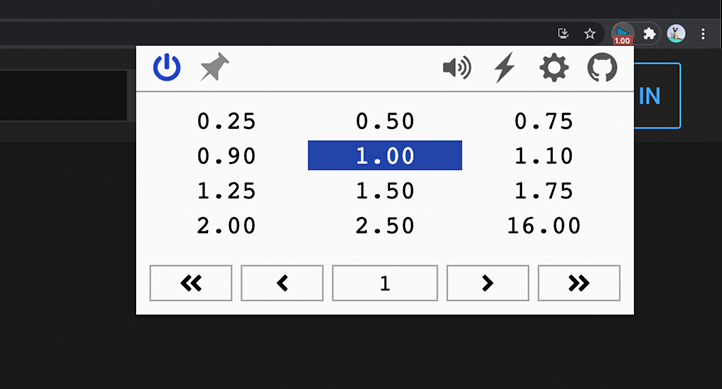
Install the Edge, Firefox, or Chrome extension.

Speed Control

  • Set the speed once and forget: it automatically applies to all video and audio
  • Define URL rules to auto-apply your favorite speeds on specific sites
  • Compatible with YouTube, Netflix, Spotify, podcast sites, and more

Media Hotkeys

  • Conveniently change speed through customizable shortcuts
  • Rewind/forward, frame-by-frame analysis, volume up/down and more
  • Support for multiple trigger modes, including context menu and global shortcuts; control background music or PiP videos while using another app

Filters & Effects

  • Netflix movie too dark? Brighten it and dial in the contrast
  • Video too quiet? Boost volume up to 600%
  • Listen to songs or shows in a new way with pitch shift
  • Optionally assign hotkeys to toggle filters and effects on the fly
    Audio Effects [Chromium Only]

Build

  1. npm install to install required dependencies.
  2. npm run dev build unpacked version.
  3. Load the unpacked folder
    1. Chrome: open extensions page, enable dev mode, load unpacked.
    2. Edge: open extensions page, load unpacked.
audio-speed
chrome-extension
firefox-addon
media-hotkeys
pitch-shift
speed-controller
video-speed
web-extension

polywock/globalSpeed

Web extension to set a default speed for video and audio

See the code

README

Global Speed

Universal speed control for video and audio.

Install the Edge, Firefox, or Chrome extension.

Speed Control

  • Set the speed once and forget: it automatically applies to all video and audio
  • Define URL rules to auto-apply your favorite speeds on specific sites
  • Compatible with YouTube, Netflix, Spotify, podcast sites, and more

Media Hotkeys

  • Conveniently change speed through customizable shortcuts
  • Rewind/forward, frame-by-frame analysis, volume up/down and more
  • Support for multiple trigger modes, including context menu and global shortcuts; control background music or PiP videos while using another app

Filters & Effects

  • Netflix movie too dark? Brighten it and dial in the contrast
  • Video too quiet? Boost volume up to 600%
  • Listen to songs or shows in a new way with pitch shift
  • Optionally assign hotkeys to toggle filters and effects on the fly
    Audio Effects [Chromium Only]

Build

  1. npm install to install required dependencies.
  2. npm run dev build unpacked version.
  3. Load the unpacked folder
    1. Chrome: open extensions page, enable dev mode, load unpacked.
    2. Edge: open extensions page, load unpacked.
audio-speed
chrome-extension
firefox-addon
media-hotkeys
pitch-shift
speed-controller
video-speed
web-extension

Significant stargazers

Paul Hinze

545 followers · starred Feb 2024

依云

2,972 followers · starred Oct 2024

Kevin Hwang

217 followers · starred Jun 2024

nobkd

74 followers · starred Jan 2025
