Your tasks, your server. An open-source, local-first task manager you can host yourself. Everything you expect from a commercial task app, without the subscription or the lock-in.
See the code

Your tasks, your server.
An open-source, local-first task manager you can host yourself. Everything you expect from a commercial task app, without the subscription or the lock-in.





▶ Try the demo (no sign-up) · Install in 2 minutes · Read the docs

No install: open the demo and press Try the demo. You get a private copy with sample data, deleted after a few hours.
On your machine or server:
docker run -d -p 8080:8080 -v opentodo-data:/data ghcr.io/pixari/opentodo:0.3
Open http://localhost:8080; the first visit creates your account. No configuration needed. Coolify, Compose and plain binaries are in Quick start.
If OpenTodo looks useful to you, a ⭐ on GitHub helps other people find it.
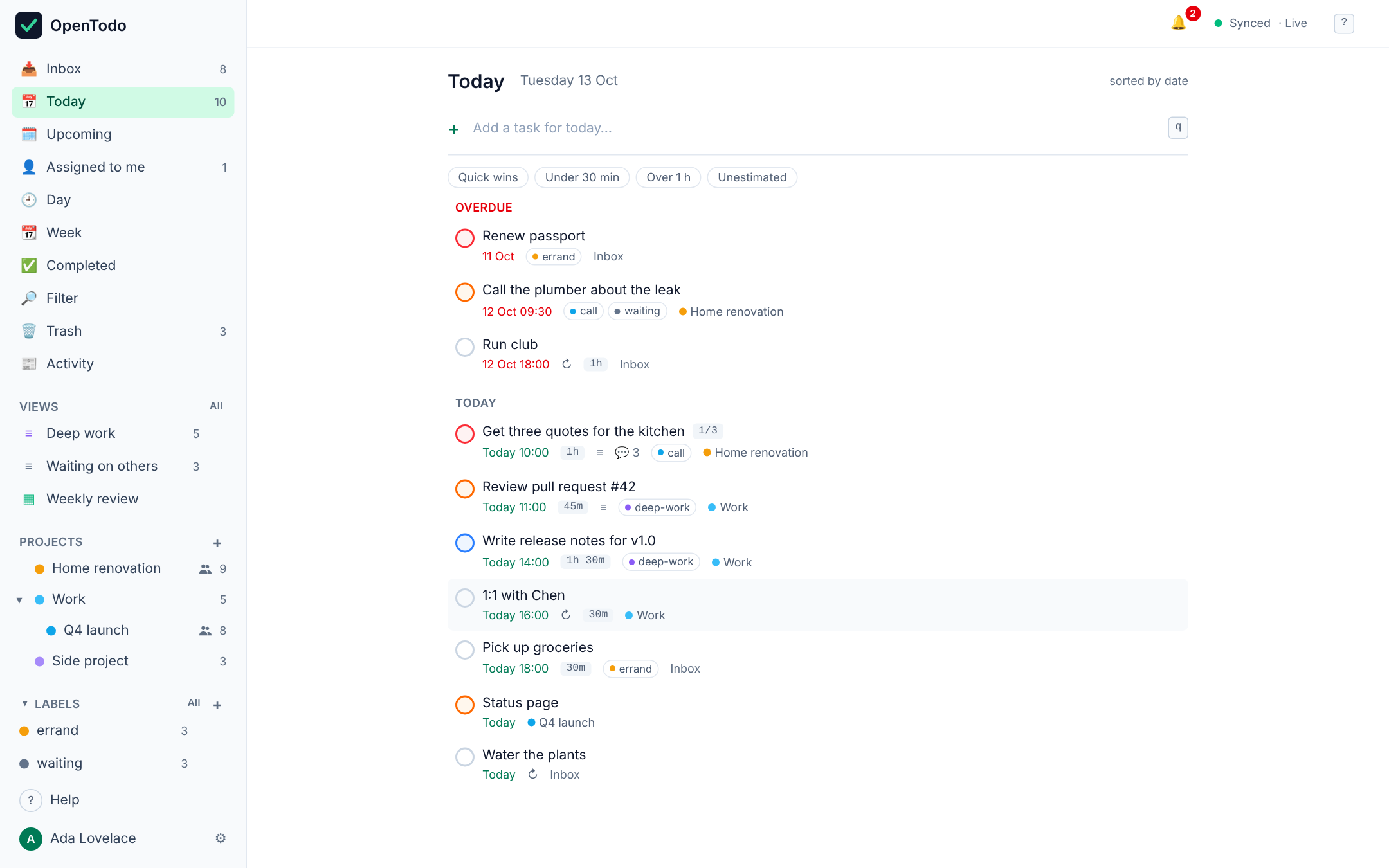
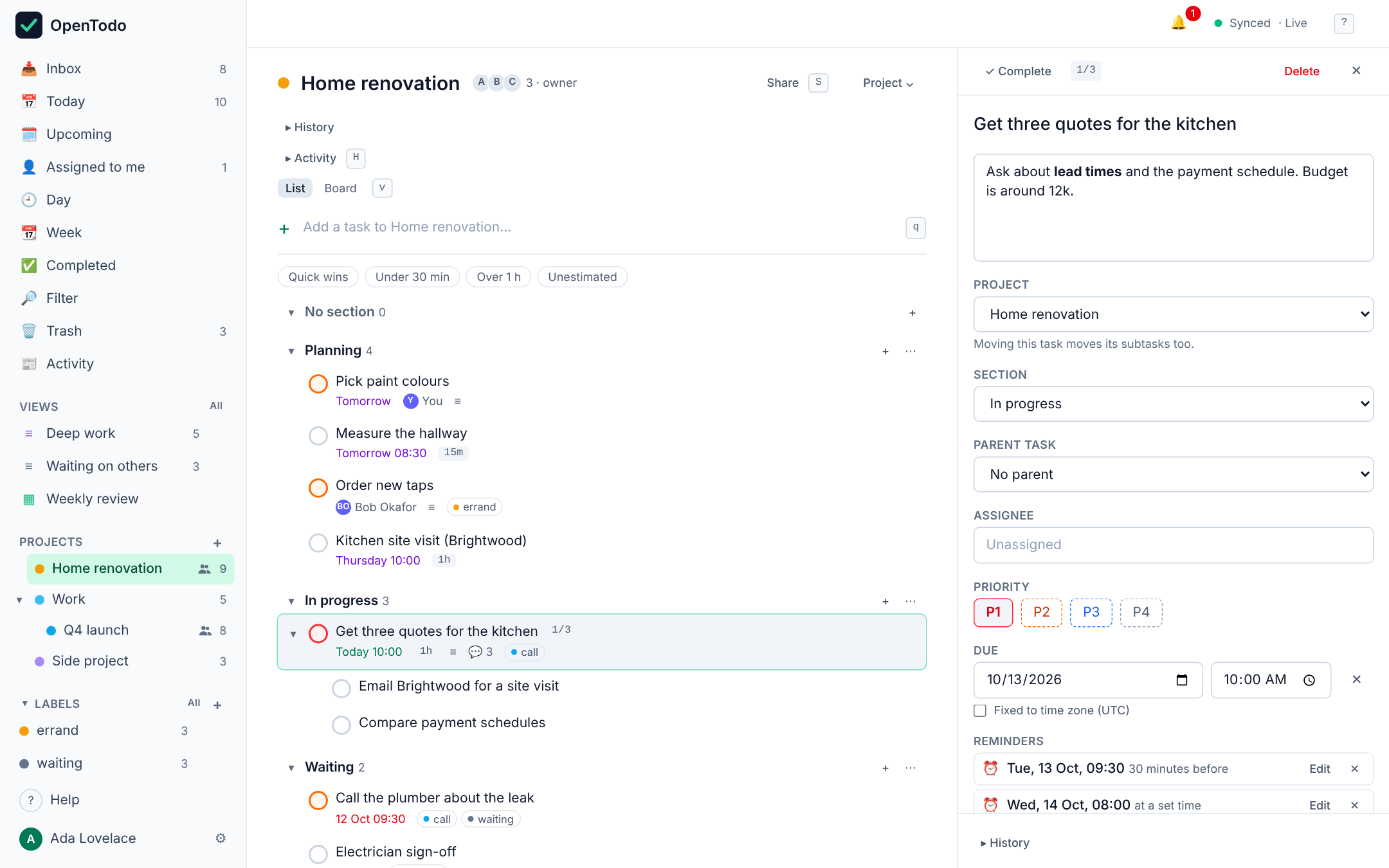
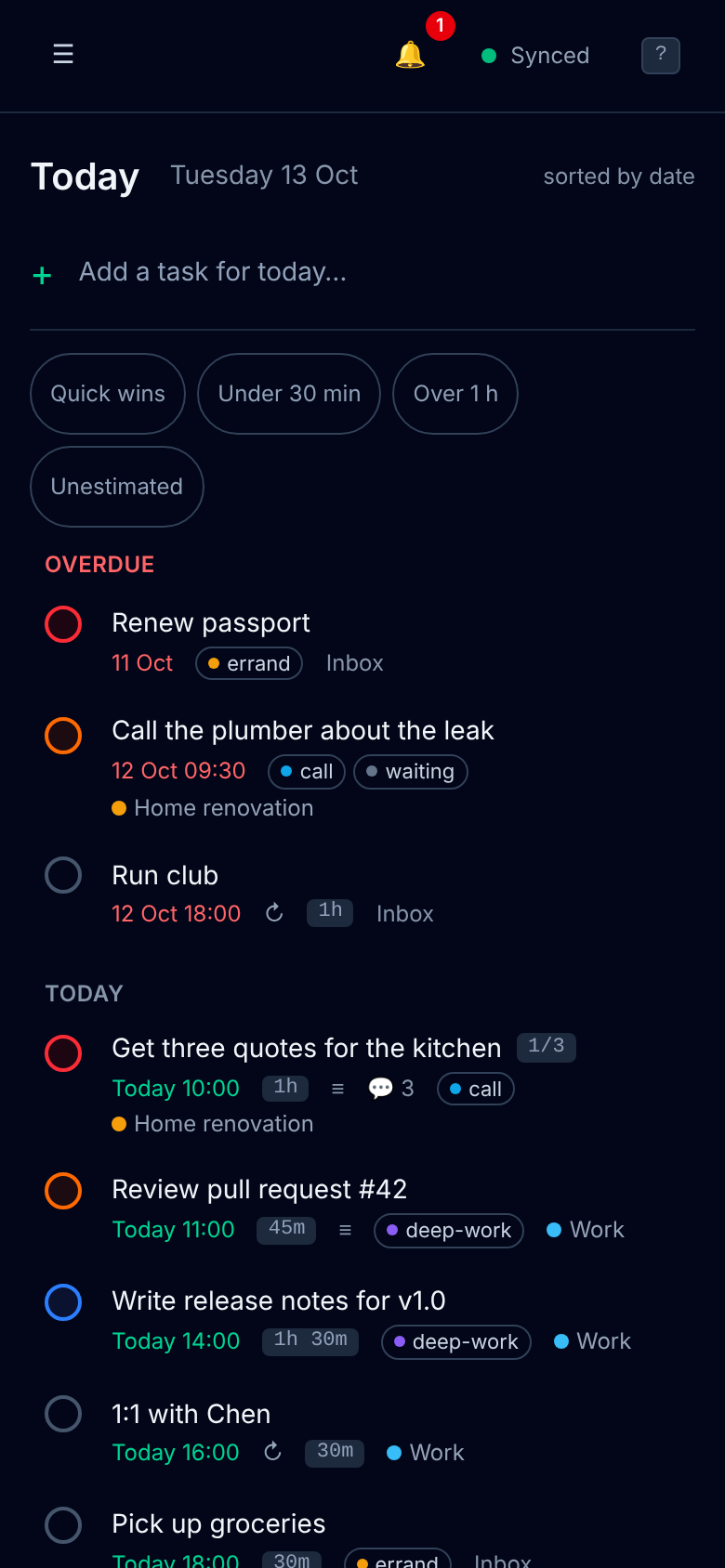
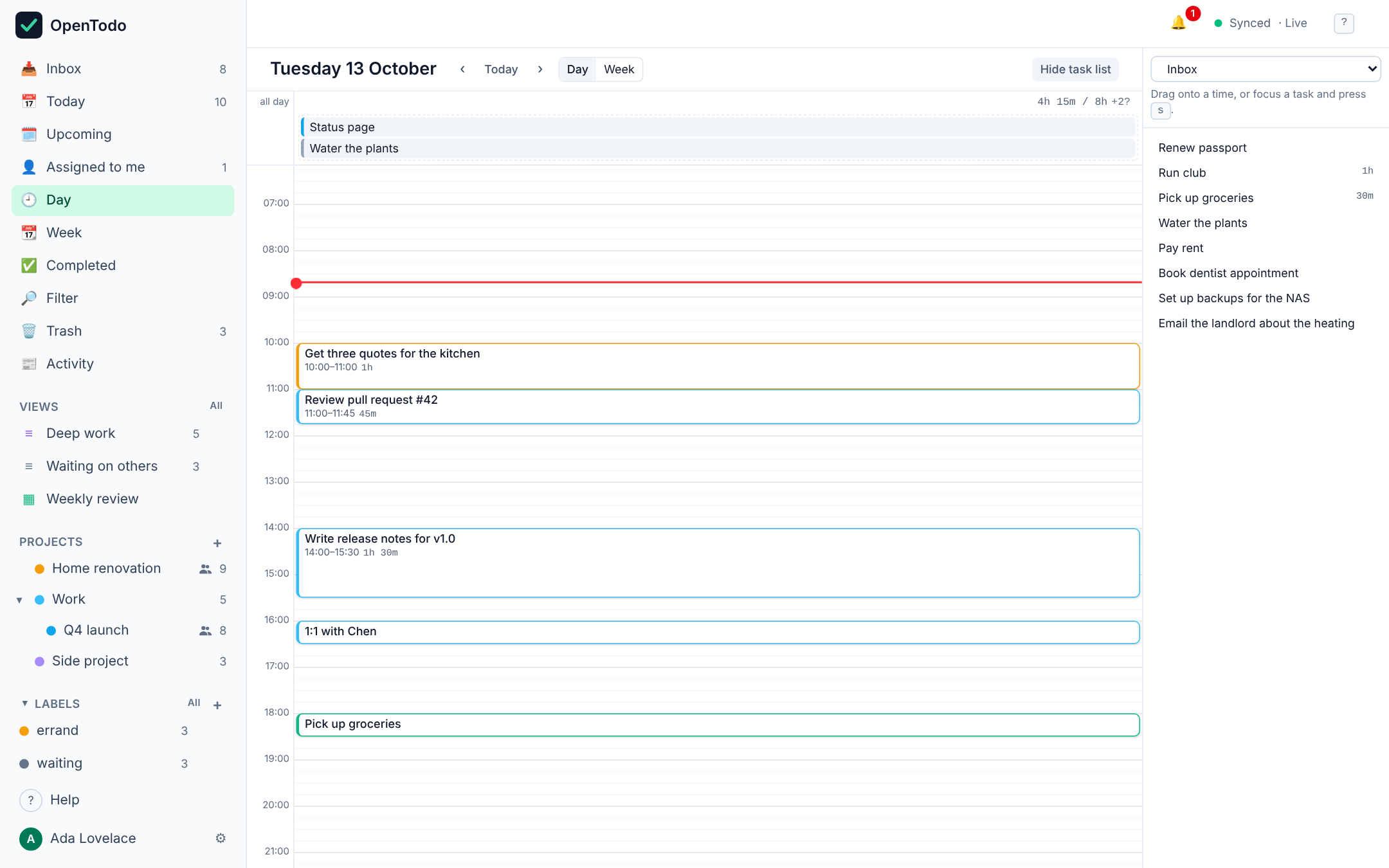
/data volume around a single SQLite file. Export to JSON at any time, import it (or a CSV, or another app's export) on any instance, and schedule encrypted backups to disk, S3 or WebDAV.ot CLI. Off by default, every change recorded and undoable, no AI vendor built in. See Use AI with OpenTodo.q to capture, j/k to move, c to complete, 1–4 for priority, g t for Today, ? for the full list, and optional Vim keybindings.openspec/, so behaviour is documented before it is built.OpenTodo is at 0.3: every feature on the roadmap is in, covered by automated tests, but some integrations still need real-world testing (CalDAV with specific apps, single sign-on providers, real phones). If you try it, tell us how it went in the call for testers.
How it's built: every feature starts as a written spec (OpenSpec), and much of the code was written with AI coding agents working from those specs. A strict CI checks every change: Go and web tests, spec validation, a phone-layout check in Chromium and WebKit, and accessibility checks. Everything is reviewed before it's merged, and the full history is public.
The highlights: quick add in plain language, projects with sections and boards, recurring tasks, reminders with push, filters and saved views, time blocking, shared projects with comments, CalDAV, webhooks, a REST API and CLI, passkeys, two-factor and single sign-on, optional end-to-end encryption.
q), with the view's context as defaults: today in Today, the current project in a project.Call Sarah next Wed 3pm #work @call p1 +30m sets the date, time, project, label, priority and estimate, with dismissible preview chips. English, German, French, Italian, Spanish and Portuguese. SyntaxShift+V; "hashtag home priority two" becomes #home p2. Uses the browser's own speech recognition; the server never receives audio. Voiceextension/ to a prefilled capture screen. Works offline, holds no token. Capturetodo+…@example.com) and it lands in the Inbox. Optional; the operator points OpenTodo at one IMAP mailbox. Emailot add "Call the plumber" --due tomorrow, ot today, --json for scripts. CLIdone/total progress; Tab and Shift+Tab indent and outdent.v toggles list and board), drag and drop on mouse and touch, or Shift+←/→.Alt+↑/↓, convergent across devices.L), per-label views and merging of duplicates.@work & due <= tomorrow & p1, evaluated on the device, live and offline. Filtersgg/G, dd and a : command line.z) for meetings and flights. See Floating vs fixed times.every weekday, every last weekday, every 3 days after completion, until 2026-12-31, for 10 times; skip or detach one occurrence. Recurrencee), Day and Week calendars (g d, g w) with a 15-minute grid, drag to schedule or resize, planned hours against your day length, full keyboard control.Shift+S); members edit offline and converge like your own devices; roles are enforced by the server. SharingShift+A), an Assigned to me view and in-app notifications. Assignment@mentions, and a per-task and per-project activity log derived from the sync history. Commentsg h) across every shared project, with unread counts that sync between your own devices only. Activity feedGET /api/v1/export.opentodo restore. BackupsHttpOnly sessions, strict origin checks, CSP, rate limits.OPENTODO_BASE_URL.A due date such as "pay rent on the 1st" or "call mum Sunday 18:00" is floating: it means that calendar day and clock time wherever you are, so it never moves when you travel. That is the default for every task.
Some times are instants: a stand-up at 09:00 Berlin time, a flight that departs at 14:35 in Lisbon. Open the task, set a time and tick Fixed to time zone (or press z): the time is pinned to your current zone. A device in Los Angeles then shows the stand-up at 00:00 with 09:00 Berlin as a hint, and Today, Upcoming, sorting, filters, reminders and the calendar all use the converted time, across daylight-saving changes. The API takes the same shape: "due":{"date":"2026-10-11","time":"09:00","tz":"Europe/Berlin"}.
No environment variable is required. Open the app, create the owner account, and you are done; everything else is optional.
docker run -d --name opentodo -p 8080:8080 -v opentodo-data:/data \
  ghcr.io/pixari/opentodo:0.3
Open http://localhost:8080 and create the owner account. Behind a reverse proxy, add -e OPENTODO_BASE_URL=https://todo.example.com (needed for Secure cookies, passkeys and web push). The image is published for linux/amd64 and linux/arm64. :0.2 follows the 0.2 releases; :latest follows the development branch. Details: docs/self-hosting/docker.md.
git clone https://github.com/pixari/opentodo.git
cd opentodo
cp .env.example .env          # optional, every value has a default
docker compose up -d
Data is kept in the opentodo-data volume.
https://github.com/pixari/opentodo, build pack Docker Compose.opentodo service; Coolify provisions HTTPS and passes the URL to the app.Or paste the one-click template deploy/coolify/opentodo.yaml as a Docker Compose resource (pending in Coolify's built-in service list). Details, including building from your fork: docs/self-hosting/coolify.md.
Download opentodo-<os>-<arch> from the latest release (Linux, macOS and Windows; check it with SHA256SUMS), or build it yourself:
chmod +x opentodo-linux-amd64 && ./opentodo-linux-amd64   # serves on :8080, data in ./data
# or from source (needs Go 1.26+ and Node 22+):
make build && ./bin/opentodo
The binary is fully static (CGO_ENABLED=0, pure-Go SQLite) and also offers opentodo restore, opentodo mfa-reset, opentodo reset-owner-password, opentodo healthcheck and opentodo version.
ot talks to any OpenTodo server over the REST API with a token it creates at login. It is a separate static binary (release assets for Linux, macOS and Windows, or go install github.com/pixari/opentodo/cmd/ot@latest) and is not part of the container image.
ot login https://todo.example.com
ot add "Call the plumber" --project Home --due tomorrow --time 09:00 --priority 2
ot today
ot done 8c2a                  # full id or unique prefix
ot list --json | jq '.[].title'
Full reference: docs/cli.md.
Every setting is an optional environment variable with a safe default; an invalid value stops startup with a message naming the variable. The container image sets OPENTODO_ADDR=:8080 and OPENTODO_DATA_DIR=/data. See .env.example for a commented template.
| Variable | Default | Purpose |
|---|---|---|
OPENTODO_ADDR | :8080 | Listen address |
OPENTODO_DATA_DIR | ./data (binary), /data (image) | Directory for the SQLite database, secrets, the VAPID key and local backups |
OPENTODO_BASE_URL | unset (inferred from requests) | Public URL. With https: Secure cookies, passkeys and web push; also used for strict origin checks and in invitation, reset and CalDAV links |
OPENTODO_ALLOW_SIGNUP | false | Let anyone create an account after the owner exists. Prefer invitations |
OPENTODO_SESSION_DAYS | 90 | Browser session lifetime in days |
OPENTODO_LOG_LEVEL | info | debug, info, warn or error |
OPENTODO_IMPORT_MAX_MB | 20 | Largest import file, 1–200 |
OPENTODO_TRASH_RETENTION_DAYS | 30 | Days a deleted task or project stays in the Trash before it is purged, 0–3650; 0 never purges automatically. See Purge |
OPENTODO_DEMO | unset (off) | true turns a dedicated instance into a public demo: a private, seeded sandbox per visitor, deleted after 2 h of inactivity, after 24 h and every night at 03:00 UTC; abusable features refused with 403 demo_restricted |
OPENTODO_DEMO_MAX_SANDBOXES, OPENTODO_DEMO_MAX_DB_MB | 500, 1024 | Optional demo tuning: live sandbox cap and the database size above which no new sandbox is created |
OPENTODO_TRUSTED_PROXIES | — | Optional: proxies in front of your reverse proxy whose X-Forwarded-For hops are skipped for rate limits and the audit log (IPs, CIDRs, cloudflare) |
OPENTODO_PUSH | on | off disables web push for reminders: no requests to push services; reminders still show in the app |
OPENTODO_WEBHOOKS_ALLOW_PRIVATE | unset | true/false presets the owner's "allow private network targets" webhook policy on first start; afterwards Settings decides |
OPENTODO_MCP | unset (off) | true presets the AI assistants (MCP) endpoint on first start; afterwards Settings → AI → AI assistants decides |
OPENTODO_MCP_WRITES | unset (off) | true presets "AI assistants may make changes" on first start; each user must still allow it and use an agent token. Afterwards Settings → AI → AI assistants decides |
OPENTODO_CALDAV | unset (off) | true presets the CalDAV endpoint on first start; afterwards Settings → Integrations → Calendar apps decides |
OPENTODO_OIDC_ISSUER, _CLIENT_ID, _CLIENT_SECRET, _DISPLAY_NAME, _SSO_ONLY | unset | Optional single sign-on settings; each one set overrides and locks that field in Settings → Administration → Single sign-on. The issuer must be https |
OPENTODO_EMAIL_ADDRESS, _IMAP_HOST, _IMAP_USER, _IMAP_PASSWORD (or _IMAP_PASSWORD_FILE) | unset (off) | Email to task: all four together turn it on; setting only some stops startup |
OPENTODO_EMAIL_IMAP_MAILBOX, _POLL_SECONDS, _PROCESSED | INBOX, 60, move:OpenTodo/Processed | Email to task tuning (minimum poll 15 s; _PROCESSED may be delete) |
OPENTODO_BACKUP_* | unset | Optional presets for scheduled backups (DESTINATION, SCHEDULE, TIME, WEEKDAY, KEEP, MAX_AGE_DAYS, COMPRESS, LOCAL_DIR, S3_*, WEBDAV_*, PASSPHRASE/PASSPHRASE_FILE), applied once; Settings → Data → Backups wins afterwards |
OPENTODO_PORT in .env only changes the host port published by docker-compose.yml. The ot client reads its own variables (OPENTODO_URL, OPENTODO_TOKEN, OPENTODO_PROFILE, OPENTODO_CONFIG), see docs/cli.md.
Sign-up stays closed after the owner account exists. To add a partner or a colleague, open Settings → Administration → Members, optionally enter their email, pick an expiry (1 hour to 30 days, default 7 days) and create an invitation. Copy the link (it is shown once) and send it however you like; OpenTodo sends no email. The link creates exactly one member account and then stops working; you can revoke a pending link at any time. Admins can create invitations too.
Manage accounts afterwards in Settings → Administration → Users: promote admins, deactivate and reactivate, issue password reset links, delete accounts, transfer ownership (docs/self-hosting/docker.md). If the owner forgets their password, opentodo reset-owner-password on the host prints a reset link. With single sign-on configured, people can also sign in through your identity provider. Set OPENTODO_BASE_URL so links point at your public URL. API details: docs/api.md.
┌───────────────────────── device ─────────────────────────┐      ┌──────────── server ────────────┐
│ React PWA  ──►  IndexedDB (source of truth)              │      │ Go binary + SQLite             │
│                 │ every edit = field ops {ts, device}    │ sync │  ops log (append-only)         │
│                 └► outbox ──────────────────────────────►├─────►│  fields (last-writer-wins)     │
│                 ◄─ ops from other devices ◄──────────────┤◄─────┤  REST, CalDAV, email, import   │
└──────────────────────────────────────────────────────────┘      │  all write through ops         │
                                                                  └────────────────────────────────┘
curl shows up on your phone right away.More in docs/architecture.md and docs/sync.md.
Read the docs with screenshots and search at opentodo.pixari.dev/docs, or in the app under Help (offline, matching your server's version). The same pages are Markdown in docs/:
ot for agentsmake dev # Go API on :8080 + Vite with hot reload on :5173
make check # vet, typecheck, Go + web + extension tests, docs check, OpenSpec validation (what CI runs)
make docs # regenerate the docs website and in-app help from docs/
Repository layout:
cmd/opentodo/        server entry point (serve, restore, mfa-reset, reset-owner-password, healthcheck, version)
cmd/ot/              command-line client entry point (logic in internal/cli)
internal/            Go packages: store, sync, auth, httpapi, caldav, mcp, email, push, backup, … (see docs/architecture.md)
web/                 React 19 + Vite + Tailwind PWA; builds into internal/web/dist
extension/           browser capture extension (Manifest V3, plain JS)
openspec/            specs (live behaviour contracts) and changes (proposals in flight and archived)
docs/                user, operator and protocol documentation
This repository uses OpenSpec. The current behaviour of the product is described in openspec/specs/<capability>/spec.md; each new feature is a change folder with a proposal, delta specs, a design and a task list. With Claude Code or any supported assistant:
/opsx:propose "natural language quick add"   # plan a change
/opsx:apply                                  # implement it
/opsx:archive                                # merge its specs into the live ones
Validate everything with npx @fission-ai/openspec validate --all --strict (also part of make check and CI).
The web app makes no network requests except to your own server: no analytics, crash reporters, update pings or third-party fonts. The server makes outbound requests only for features you configure:
OPENTODO_PUSH=off turns push off);The CalDAV and MCP endpoints only answer requests; they never call out. The audit log records security events (sign-ins, tokens, invitations, exports), never task content, and stores client addresses only if the owner turns that on; see SECURITY.md. With optional end-to-end encryption the server holds only ciphertext for task content.
Issues and pull requests are welcome. Please read CONTRIBUTING.md: changes that alter behaviour go through an OpenSpec change first. Security issues go to the address in SECURITY.md.
AGPL-3.0-only. You can run, study, modify and share OpenTodo freely. If you offer a modified version as a network service, you must offer its source under the same license. That is what keeps a self-hosted project from being quietly turned back into a subscription.
Your tasks, your server. An open-source, local-first task manager you can host yourself. Everything you expect from a commercial task app, without the subscription or the lock-in.
See the code
Your tasks, your server.
An open-source, local-first task manager you can host yourself. Everything you expect from a commercial task app, without the subscription or the lock-in.
▶ Try the demo (no sign-up) · Install in 2 minutes · Read the docs
No install: open the demo and press Try the demo. You get a private copy with sample data, deleted after a few hours.
On your machine or server:
docker run -d -p 8080:8080 -v opentodo-data:/data ghcr.io/pixari/opentodo:0.3
Open http://localhost:8080; the first visit creates your account. No configuration needed. Coolify, Compose and plain binaries are in Quick start.
If OpenTodo looks useful to you, a ⭐ on GitHub helps other people find it.
/data volume around a single SQLite file. Export to JSON at any time, import it (or a CSV, or another app's export) on any instance, and schedule encrypted backups to disk, S3 or WebDAV.ot CLI. Off by default, every change recorded and undoable, no AI vendor built in. See Use AI with OpenTodo.q to capture, j/k to move, c to complete, 1–4 for priority, g t for Today, ? for the full list, and optional Vim keybindings.openspec/, so behaviour is documented before it is built.OpenTodo is at 0.3: every feature on the roadmap is in, covered by automated tests, but some integrations still need real-world testing (CalDAV with specific apps, single sign-on providers, real phones). If you try it, tell us how it went in the call for testers.
How it's built: every feature starts as a written spec (OpenSpec), and much of the code was written with AI coding agents working from those specs. A strict CI checks every change: Go and web tests, spec validation, a phone-layout check in Chromium and WebKit, and accessibility checks. Everything is reviewed before it's merged, and the full history is public.
The highlights: quick add in plain language, projects with sections and boards, recurring tasks, reminders with push, filters and saved views, time blocking, shared projects with comments, CalDAV, webhooks, a REST API and CLI, passkeys, two-factor and single sign-on, optional end-to-end encryption.
q), with the view's context as defaults: today in Today, the current project in a project.Call Sarah next Wed 3pm #work @call p1 +30m sets the date, time, project, label, priority and estimate, with dismissible preview chips. English, German, French, Italian, Spanish and Portuguese. SyntaxShift+V; "hashtag home priority two" becomes #home p2. Uses the browser's own speech recognition; the server never receives audio. Voiceextension/ to a prefilled capture screen. Works offline, holds no token. Capturetodo+…@example.com) and it lands in the Inbox. Optional; the operator points OpenTodo at one IMAP mailbox. Emailot add "Call the plumber" --due tomorrow, ot today, --json for scripts. CLIdone/total progress; Tab and Shift+Tab indent and outdent.v toggles list and board), drag and drop on mouse and touch, or Shift+←/→.Alt+↑/↓, convergent across devices.L), per-label views and merging of duplicates.@work & due <= tomorrow & p1, evaluated on the device, live and offline. Filtersgg/G, dd and a : command line.z) for meetings and flights. See Floating vs fixed times.every weekday, every last weekday, every 3 days after completion, until 2026-12-31, for 10 times; skip or detach one occurrence. Recurrencee), Day and Week calendars (g d, g w) with a 15-minute grid, drag to schedule or resize, planned hours against your day length, full keyboard control.Shift+S); members edit offline and converge like your own devices; roles are enforced by the server. SharingShift+A), an Assigned to me view and in-app notifications. Assignment@mentions, and a per-task and per-project activity log derived from the sync history. Commentsg h) across every shared project, with unread counts that sync between your own devices only. Activity feedGET /api/v1/export.opentodo restore. BackupsHttpOnly sessions, strict origin checks, CSP, rate limits.OPENTODO_BASE_URL.A due date such as "pay rent on the 1st" or "call mum Sunday 18:00" is floating: it means that calendar day and clock time wherever you are, so it never moves when you travel. That is the default for every task.
Some times are instants: a stand-up at 09:00 Berlin time, a flight that departs at 14:35 in Lisbon. Open the task, set a time and tick Fixed to time zone (or press z): the time is pinned to your current zone. A device in Los Angeles then shows the stand-up at 00:00 with 09:00 Berlin as a hint, and Today, Upcoming, sorting, filters, reminders and the calendar all use the converted time, across daylight-saving changes. The API takes the same shape: "due":{"date":"2026-10-11","time":"09:00","tz":"Europe/Berlin"}.
No environment variable is required. Open the app, create the owner account, and you are done; everything else is optional.
docker run -d --name opentodo -p 8080:8080 -v opentodo-data:/data \
  ghcr.io/pixari/opentodo:0.3
Open http://localhost:8080 and create the owner account. Behind a reverse proxy, add -e OPENTODO_BASE_URL=https://todo.example.com (needed for Secure cookies, passkeys and web push). The image is published for linux/amd64 and linux/arm64. :0.2 follows the 0.2 releases; :latest follows the development branch. Details: docs/self-hosting/docker.md.
git clone https://github.com/pixari/opentodo.git
cd opentodo
cp .env.example .env          # optional, every value has a default
docker compose up -d
Data is kept in the opentodo-data volume.
https://github.com/pixari/opentodo, build pack Docker Compose.opentodo service; Coolify provisions HTTPS and passes the URL to the app.Or paste the one-click template deploy/coolify/opentodo.yaml as a Docker Compose resource (pending in Coolify's built-in service list). Details, including building from your fork: docs/self-hosting/coolify.md.
Download opentodo-<os>-<arch> from the latest release (Linux, macOS and Windows; check it with SHA256SUMS), or build it yourself:
chmod +x opentodo-linux-amd64 && ./opentodo-linux-amd64   # serves on :8080, data in ./data
# or from source (needs Go 1.26+ and Node 22+):
make build && ./bin/opentodo
The binary is fully static (CGO_ENABLED=0, pure-Go SQLite) and also offers opentodo restore, opentodo mfa-reset, opentodo reset-owner-password, opentodo healthcheck and opentodo version.
ot talks to any OpenTodo server over the REST API with a token it creates at login. It is a separate static binary (release assets for Linux, macOS and Windows, or go install github.com/pixari/opentodo/cmd/ot@latest) and is not part of the container image.
ot login https://todo.example.com
ot add "Call the plumber" --project Home --due tomorrow --time 09:00 --priority 2
ot today
ot done 8c2a                  # full id or unique prefix
ot list --json | jq '.[].title'
Full reference: docs/cli.md.
Every setting is an optional environment variable with a safe default; an invalid value stops startup with a message naming the variable. The container image sets OPENTODO_ADDR=:8080 and OPENTODO_DATA_DIR=/data. See .env.example for a commented template.
| Variable | Default | Purpose |
|---|---|---|
OPENTODO_ADDR | :8080 | Listen address |
OPENTODO_DATA_DIR | ./data (binary), /data (image) | Directory for the SQLite database, secrets, the VAPID key and local backups |
OPENTODO_BASE_URL | unset (inferred from requests) | Public URL. With https: Secure cookies, passkeys and web push; also used for strict origin checks and in invitation, reset and CalDAV links |
OPENTODO_ALLOW_SIGNUP | false | Let anyone create an account after the owner exists. Prefer invitations |
OPENTODO_SESSION_DAYS | 90 | Browser session lifetime in days |
OPENTODO_LOG_LEVEL | info | debug, info, warn or error |
OPENTODO_IMPORT_MAX_MB | 20 | Largest import file, 1–200 |
OPENTODO_TRASH_RETENTION_DAYS | 30 | Days a deleted task or project stays in the Trash before it is purged, 0–3650; 0 never purges automatically. See Purge |
OPENTODO_DEMO | unset (off) | true turns a dedicated instance into a public demo: a private, seeded sandbox per visitor, deleted after 2 h of inactivity, after 24 h and every night at 03:00 UTC; abusable features refused with 403 demo_restricted |
OPENTODO_DEMO_MAX_SANDBOXES, OPENTODO_DEMO_MAX_DB_MB | 500, 1024 | Optional demo tuning: live sandbox cap and the database size above which no new sandbox is created |
OPENTODO_TRUSTED_PROXIES | — | Optional: proxies in front of your reverse proxy whose X-Forwarded-For hops are skipped for rate limits and the audit log (IPs, CIDRs, cloudflare) |
OPENTODO_PUSH | on | off disables web push for reminders: no requests to push services; reminders still show in the app |
OPENTODO_WEBHOOKS_ALLOW_PRIVATE | unset | true/false presets the owner's "allow private network targets" webhook policy on first start; afterwards Settings decides |
OPENTODO_MCP | unset (off) | true presets the AI assistants (MCP) endpoint on first start; afterwards Settings → AI → AI assistants decides |
OPENTODO_MCP_WRITES | unset (off) | true presets "AI assistants may make changes" on first start; each user must still allow it and use an agent token. Afterwards Settings → AI → AI assistants decides |
OPENTODO_CALDAV | unset (off) | true presets the CalDAV endpoint on first start; afterwards Settings → Integrations → Calendar apps decides |
OPENTODO_OIDC_ISSUER, _CLIENT_ID, _CLIENT_SECRET, _DISPLAY_NAME, _SSO_ONLY | unset | Optional single sign-on settings; each one set overrides and locks that field in Settings → Administration → Single sign-on. The issuer must be https |
OPENTODO_EMAIL_ADDRESS, _IMAP_HOST, _IMAP_USER, _IMAP_PASSWORD (or _IMAP_PASSWORD_FILE) | unset (off) | Email to task: all four together turn it on; setting only some stops startup |
OPENTODO_EMAIL_IMAP_MAILBOX, _POLL_SECONDS, _PROCESSED | INBOX, 60, move:OpenTodo/Processed | Email to task tuning (minimum poll 15 s; _PROCESSED may be delete) |
OPENTODO_BACKUP_* | unset | Optional presets for scheduled backups (DESTINATION, SCHEDULE, TIME, WEEKDAY, KEEP, MAX_AGE_DAYS, COMPRESS, LOCAL_DIR, S3_*, WEBDAV_*, PASSPHRASE/PASSPHRASE_FILE), applied once; Settings → Data → Backups wins afterwards |
OPENTODO_PORT in .env only changes the host port published by docker-compose.yml. The ot client reads its own variables (OPENTODO_URL, OPENTODO_TOKEN, OPENTODO_PROFILE, OPENTODO_CONFIG), see docs/cli.md.
Sign-up stays closed after the owner account exists. To add a partner or a colleague, open Settings → Administration → Members, optionally enter their email, pick an expiry (1 hour to 30 days, default 7 days) and create an invitation. Copy the link (it is shown once) and send it however you like; OpenTodo sends no email. The link creates exactly one member account and then stops working; you can revoke a pending link at any time. Admins can create invitations too.
Manage accounts afterwards in Settings → Administration → Users: promote admins, deactivate and reactivate, issue password reset links, delete accounts, transfer ownership (docs/self-hosting/docker.md). If the owner forgets their password, opentodo reset-owner-password on the host prints a reset link. With single sign-on configured, people can also sign in through your identity provider. Set OPENTODO_BASE_URL so links point at your public URL. API details: docs/api.md.
┌───────────────────────── device ─────────────────────────┐      ┌──────────── server ────────────┐
│ React PWA  ──►  IndexedDB (source of truth)              │      │ Go binary + SQLite             │
│                 │ every edit = field ops {ts, device}    │ sync │  ops log (append-only)         │
│                 └► outbox ──────────────────────────────►├─────►│  fields (last-writer-wins)     │
│                 ◄─ ops from other devices ◄──────────────┤◄─────┤  REST, CalDAV, email, import   │
└──────────────────────────────────────────────────────────┘      │  all write through ops         │
                                                                  └────────────────────────────────┘
curl shows up on your phone right away.More in docs/architecture.md and docs/sync.md.
Read the docs with screenshots and search at opentodo.pixari.dev/docs, or in the app under Help (offline, matching your server's version). The same pages are Markdown in docs/:
ot for agentsmake dev # Go API on :8080 + Vite with hot reload on :5173
make check # vet, typecheck, Go + web + extension tests, docs check, OpenSpec validation (what CI runs)
make docs # regenerate the docs website and in-app help from docs/
Repository layout:
cmd/opentodo/        server entry point (serve, restore, mfa-reset, reset-owner-password, healthcheck, version)
cmd/ot/              command-line client entry point (logic in internal/cli)
internal/            Go packages: store, sync, auth, httpapi, caldav, mcp, email, push, backup, … (see docs/architecture.md)
web/                 React 19 + Vite + Tailwind PWA; builds into internal/web/dist
extension/           browser capture extension (Manifest V3, plain JS)
openspec/            specs (live behaviour contracts) and changes (proposals in flight and archived)
docs/                user, operator and protocol documentation
This repository uses OpenSpec. The current behaviour of the product is described in openspec/specs/<capability>/spec.md; each new feature is a change folder with a proposal, delta specs, a design and a task list. With Claude Code or any supported assistant:
/opsx:propose "natural language quick add"   # plan a change
/opsx:apply                                  # implement it
/opsx:archive                                # merge its specs into the live ones
Validate everything with npx @fission-ai/openspec validate --all --strict (also part of make check and CI).
The web app makes no network requests except to your own server: no analytics, crash reporters, update pings or third-party fonts. The server makes outbound requests only for features you configure:
OPENTODO_PUSH=off turns push off);The CalDAV and MCP endpoints only answer requests; they never call out. The audit log records security events (sign-ins, tokens, invitations, exports), never task content, and stores client addresses only if the owner turns that on; see SECURITY.md. With optional end-to-end encryption the server holds only ciphertext for task content.
Issues and pull requests are welcome. Please read CONTRIBUTING.md: changes that alter behaviour go through an OpenSpec change first. Security issues go to the address in SECURITY.md.
AGPL-3.0-only. You can run, study, modify and share OpenTodo freely. If you offer a modified version as a network service, you must offer its source under the same license. That is what keeps a self-hosted project from being quietly turned back into a subscription.



