Agent harness to publish your agent chat history as Huggingface datasets.
Python
2,116
125 commits
updated Oct 11, 2026
This is a performance art project. Anthropic built their models on the world's freely shared information, then introduced increasingly dystopian data policies to stop anyone else from doing the same with their data - pulling up the ladder behind them. DataClaw lets you throw the ladder back down. The dataset it produces is yours to share.
Turn your Claude Code, Codex, and other coding-agent conversation history into structured data and publish it to Hugging Face with a single command. DataClaw parses session logs, redacts secrets and PII, and uploads the result as a ready-to-use dataset.

Every export is tagged dataclaw on Hugging Face. Together, they may someday form a growing distributed dataset of real-world human-AI coding collaboration.


A menu-bar app for Apple Silicon Macs. Download the DMG, drag DataClaw.app to Applications, and launch it from Applications or Spotlight. The app bundles everything it needs — no Python or CLI install required.
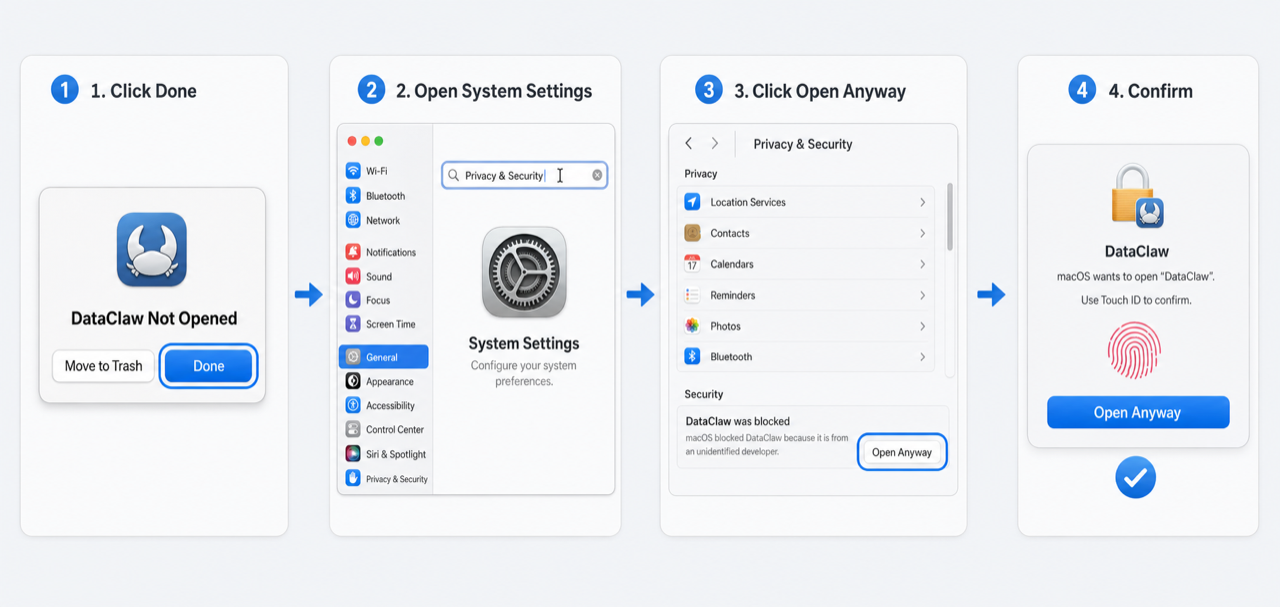
The build is currently unsigned (Apple Developer ID signing is being set up), so macOS blocks the first launch. This is expected, one-time, and takes about 20 seconds:
For the terminal workflow, Intel Macs, or driving DataClaw with a coding agent:
pip install -U dataclaw
Paste this into Claude Code, Codex, or any coding agent:
Help me export my Claude Code, Codex, and other coding-agent conversation history to Hugging Face using DataClaw.
Install it, then walk me through the process.

STEP 1 - INSTALL
  pip install -U dataclaw
  If that fails: git clone https://github.com/peteromallet/dataclaw.git /tmp/dataclaw && pip install -U /tmp/dataclaw
  If that also fails, ask the user where the source is.

STEP 2 - INSTALL SKILL
  Skill support is currently only available for Claude Code.
  dataclaw update-skill claude
  For other agentic tools, skip this step and do not improvise a custom flow - follow the instructions in DataClaw's output on each step, especially next_steps and next_command.

STEP 3 - PREP
  dataclaw prep
  Every dataclaw command outputs next_steps in its JSON - follow them through the entire flow.

STEP 3A - CHOOSE SOURCE SCOPE (REQUIRED BEFORE EXPORT)
  Ask the user explicitly which source scope to export: a supported source key such as claude or codex, or all.
  dataclaw config --source all
  Do not export until source scope is explicitly confirmed.

STEP 3B - CHOOSE PROJECT SCOPE (REQUIRED BEFORE EXPORT)
  dataclaw list --source all
  Send the FULL project/folder list to the user in a message (name, source, sessions, size, excluded).
  Ask which projects to exclude.
  dataclaw config --exclude "project1,project2" OR dataclaw config --confirm-projects
  Do not export until folder selection is explicitly confirmed.

STEP 3C - SET REDACTED STRINGS
  Ask the user what additional strings should always be redacted, such as company names, client names, domains, internal URLs, or secrets that regex might miss.
  dataclaw config --redact "string1,string2"
  dataclaw config --redact-usernames "user1,user2"
  Only add these after explicit user confirmation.

STEP 4 - EXPORT LOCALLY
  dataclaw export --no-push --output dataclaw_export.jsonl

STEP 5 - REVIEW AND CONFIRM (REQUIRED BEFORE PUSH)
  Review PII findings and apply excludes/redactions as needed.
  Full name is requested for an exact-name privacy scan against the export.
  If the user declines sharing full name, use --skip-full-name-scan and attest the skip reason.
  dataclaw confirm --full-name "THEIR FULL NAME" --attest-full-name "..." --attest-sensitive "..." --attest-manual-scan "..."

STEP 6 - PUBLISH (ONLY AFTER EXPLICIT USER APPROVAL)
  dataclaw export --publish-attestation "User explicitly approved publishing to Hugging Face."
  Never publish unless the user explicitly says yes.

IF ANY COMMAND FAILS DUE TO A SKIPPED STEP:
  Restate the 6-step checklist above and resume from the blocked step (do not skip ahead).

IMPORTANT: Never run bare `hf auth login` when automating this with an agent - always use `--token`.
IMPORTANT: Always export with --no-push first and review for PII before publishing.
--no-thinkingDataClaw applies multiple layers of protection:
API_KEY_BACKUP also provide context for opaque values.This is NOT foolproof. Always review your exported data before publishing. Automated redaction cannot catch everything - especially service-specific identifiers, third-party PII, or secrets in unusual formats. Binary attachments and base64 payloads are preserved; this redactor does not decode attachments or read text from images. Embedded JSON decoding is limited to eight nested wrappers. Credential-shaped examples may also be redacted conservatively.
We recommend converting the exported jsonl into human-readable yaml using dataclaw jsonl-to-yaml,
then use tools such as trufflehog and gitleaks to scan it.
You can also compare the exported jsonl with a previous baseline using dataclaw diff-jsonl.
To help improve redaction, report issues: https://github.com/peteromallet/dataclaw/issues
All repos are tagged dataclaw.
from datasets import load_dataset
ds = load_dataset("alice/my-personal-codex-data", split="train")
from datasets import load_dataset, concatenate_datasets
repos = ["alice/my-personal-codex-data", "bob/my-personal-codex-data"]
ds = concatenate_datasets([load_dataset(r, split="train") for r in repos])
The auto-generated HF README includes:
Missing data: If you found any data not exported, please report an issue. You can ask your coding agent to analyze the data, export it in this repo, and open a PR.
Better scheme: If you need to clean the data and want to propose a better scheme, feel free to open an issue.
New provider: If you use a new coding agent, you can ask it to read this repo and export its data as a new provider. Take Claude Code and Codex parsers as examples because they are the most well maintained. When you finish, ask the following questions:
messages[].content_parts and tool_uses[].output.raw.
MIT
(top 24 of 31)
363 followers · starred Feb 2026
3,386 followers · starred Feb 2026
219 followers · starred Mar 2026
58 followers · starred Feb 2026
Agent harness to publish your agent chat history as Huggingface datasets.
Python
2,116
125 commits
updated Oct 11, 2026
This is a performance art project. Anthropic built their models on the world's freely shared information, then introduced increasingly dystopian data policies to stop anyone else from doing the same with their data - pulling up the ladder behind them. DataClaw lets you throw the ladder back down. The dataset it produces is yours to share.
Turn your Claude Code, Codex, and other coding-agent conversation history into structured data and publish it to Hugging Face with a single command. DataClaw parses session logs, redacts secrets and PII, and uploads the result as a ready-to-use dataset.
Every export is tagged dataclaw on Hugging Face. Together, they may someday form a growing distributed dataset of real-world human-AI coding collaboration.
A menu-bar app for Apple Silicon Macs. Download the DMG, drag DataClaw.app to Applications, and launch it from Applications or Spotlight. The app bundles everything it needs — no Python or CLI install required.
The build is currently unsigned (Apple Developer ID signing is being set up), so macOS blocks the first launch. This is expected, one-time, and takes about 20 seconds:
For the terminal workflow, Intel Macs, or driving DataClaw with a coding agent:
pip install -U dataclaw
Paste this into Claude Code, Codex, or any coding agent:
Help me export my Claude Code, Codex, and other coding-agent conversation history to Hugging Face using DataClaw.
Install it, then walk me through the process.

STEP 1 - INSTALL
  pip install -U dataclaw
  If that fails: git clone https://github.com/peteromallet/dataclaw.git /tmp/dataclaw && pip install -U /tmp/dataclaw
  If that also fails, ask the user where the source is.

STEP 2 - INSTALL SKILL
  Skill support is currently only available for Claude Code.
  dataclaw update-skill claude
  For other agentic tools, skip this step and do not improvise a custom flow - follow the instructions in DataClaw's output on each step, especially next_steps and next_command.

STEP 3 - PREP
  dataclaw prep
  Every dataclaw command outputs next_steps in its JSON - follow them through the entire flow.

STEP 3A - CHOOSE SOURCE SCOPE (REQUIRED BEFORE EXPORT)
  Ask the user explicitly which source scope to export: a supported source key such as claude or codex, or all.
  dataclaw config --source all
  Do not export until source scope is explicitly confirmed.

STEP 3B - CHOOSE PROJECT SCOPE (REQUIRED BEFORE EXPORT)
  dataclaw list --source all
  Send the FULL project/folder list to the user in a message (name, source, sessions, size, excluded).
  Ask which projects to exclude.
  dataclaw config --exclude "project1,project2" OR dataclaw config --confirm-projects
  Do not export until folder selection is explicitly confirmed.

STEP 3C - SET REDACTED STRINGS
  Ask the user what additional strings should always be redacted, such as company names, client names, domains, internal URLs, or secrets that regex might miss.
  dataclaw config --redact "string1,string2"
  dataclaw config --redact-usernames "user1,user2"
  Only add these after explicit user confirmation.

STEP 4 - EXPORT LOCALLY
  dataclaw export --no-push --output dataclaw_export.jsonl

STEP 5 - REVIEW AND CONFIRM (REQUIRED BEFORE PUSH)
  Review PII findings and apply excludes/redactions as needed.
  Full name is requested for an exact-name privacy scan against the export.
  If the user declines sharing full name, use --skip-full-name-scan and attest the skip reason.
  dataclaw confirm --full-name "THEIR FULL NAME" --attest-full-name "..." --attest-sensitive "..." --attest-manual-scan "..."

STEP 6 - PUBLISH (ONLY AFTER EXPLICIT USER APPROVAL)
  dataclaw export --publish-attestation "User explicitly approved publishing to Hugging Face."
  Never publish unless the user explicitly says yes.

IF ANY COMMAND FAILS DUE TO A SKIPPED STEP:
  Restate the 6-step checklist above and resume from the blocked step (do not skip ahead).

IMPORTANT: Never run bare `hf auth login` when automating this with an agent - always use `--token`.
IMPORTANT: Always export with --no-push first and review for PII before publishing.
--no-thinkingDataClaw applies multiple layers of protection:
API_KEY_BACKUP also provide context for opaque values.This is NOT foolproof. Always review your exported data before publishing. Automated redaction cannot catch everything - especially service-specific identifiers, third-party PII, or secrets in unusual formats. Binary attachments and base64 payloads are preserved; this redactor does not decode attachments or read text from images. Embedded JSON decoding is limited to eight nested wrappers. Credential-shaped examples may also be redacted conservatively.
We recommend converting the exported jsonl into human-readable yaml using dataclaw jsonl-to-yaml,
then use tools such as trufflehog and gitleaks to scan it.
You can also compare the exported jsonl with a previous baseline using dataclaw diff-jsonl.
To help improve redaction, report issues: https://github.com/peteromallet/dataclaw/issues
All repos are tagged dataclaw.
from datasets import load_dataset
ds = load_dataset("alice/my-personal-codex-data", split="train")
from datasets import load_dataset, concatenate_datasets
repos = ["alice/my-personal-codex-data", "bob/my-personal-codex-data"]
ds = concatenate_datasets([load_dataset(r, split="train") for r in repos])
The auto-generated HF README includes:
Missing data: If you found any data not exported, please report an issue. You can ask your coding agent to analyze the data, export it in this repo, and open a PR.
Better scheme: If you need to clean the data and want to propose a better scheme, feel free to open an issue.
New provider: If you use a new coding agent, you can ask it to read this repo and export its data as a new provider. Take Claude Code and Codex parsers as examples because they are the most well maintained. When you finish, ask the following questions:
messages[].content_parts and tool_uses[].output.raw.
MIT
(top 24 of 31)
363 followers · starred Feb 2026
3,386 followers · starred Feb 2026
219 followers · starred Mar 2026
58 followers · starred Feb 2026