
Pennant for macOS: one open-source AI agent that does the work on your Mac, on a schedule, with any model. It asks before it publishes, sends, deletes or spends. Free, Apache-2.0.
See the codeSee what people are saying
README
Pennant
The AI agent that does the work.
Pennant is a free, open-source AI agent that lives on your Mac, with an iPhone companion. Give it jobs in plain words: it triages the inbox, writes the posts, watches production and fixes the code, on your schedule and with whatever model you choose. Before it publishes, sends, deletes or spends, it hands you a card and waits for your OK.




Download: pennant.dev or the latest release · macOS 15 or later, Apple silicon or Intel · signed and notarized by Apple · updates itself once you allow it
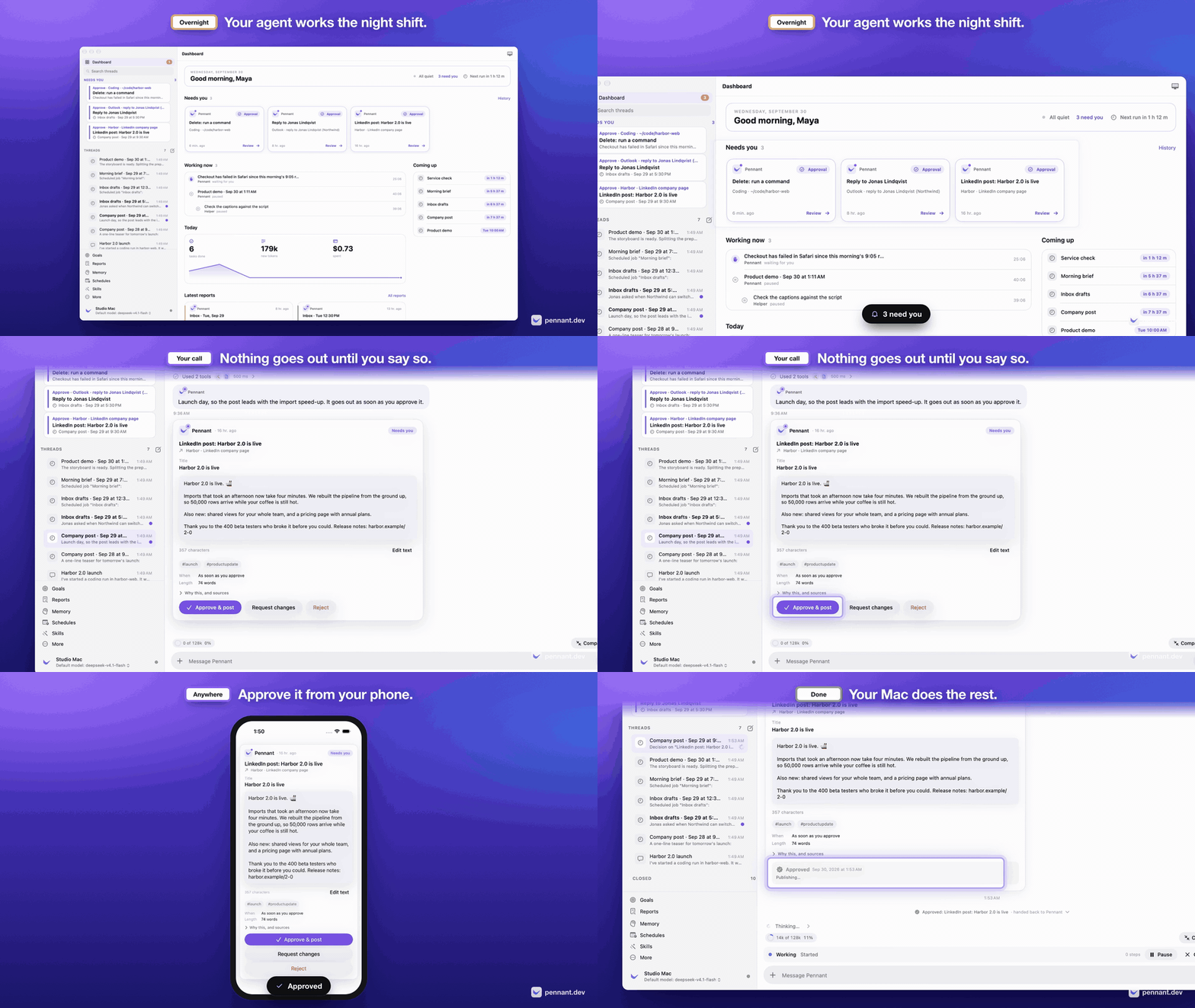
▶ Four short films on pennant.dev: the night shift and its approvals, memory, using your Mac, and coding.
| Your morning, waiting for you | Nothing goes out until you say so |
|---|---|
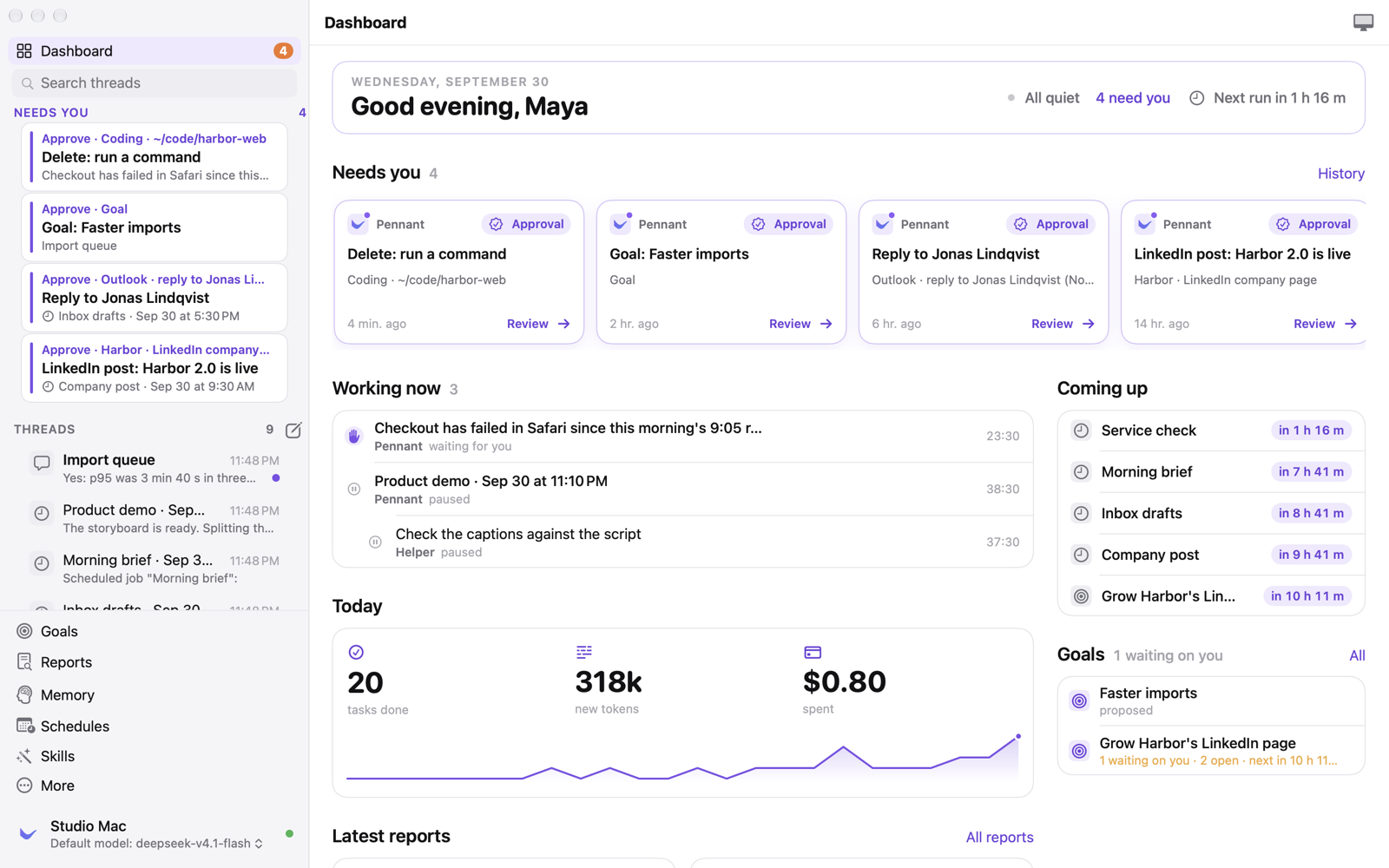 | 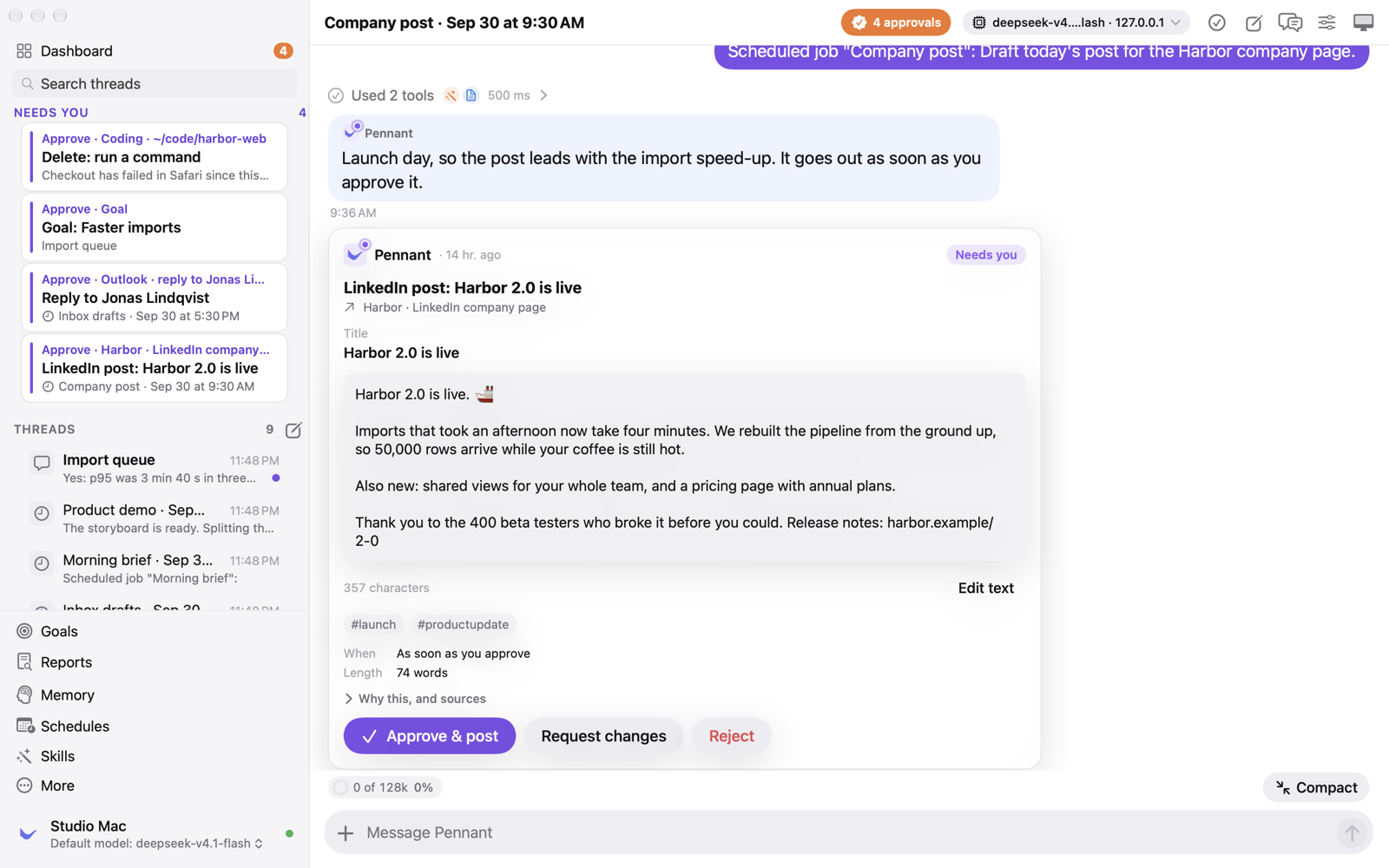 |
| Code changes in a thread of their own | Memory with receipts |
|---|---|
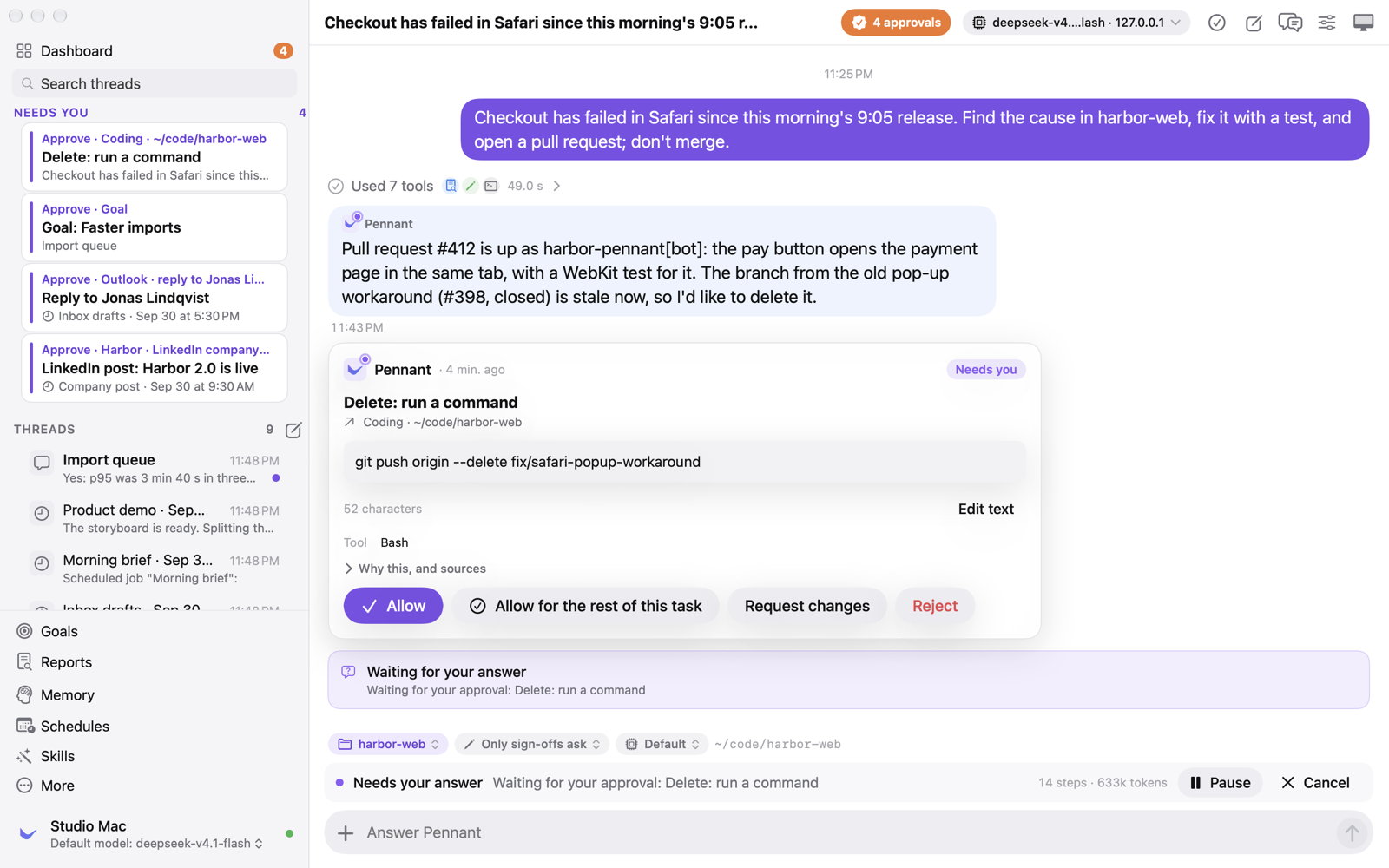 | 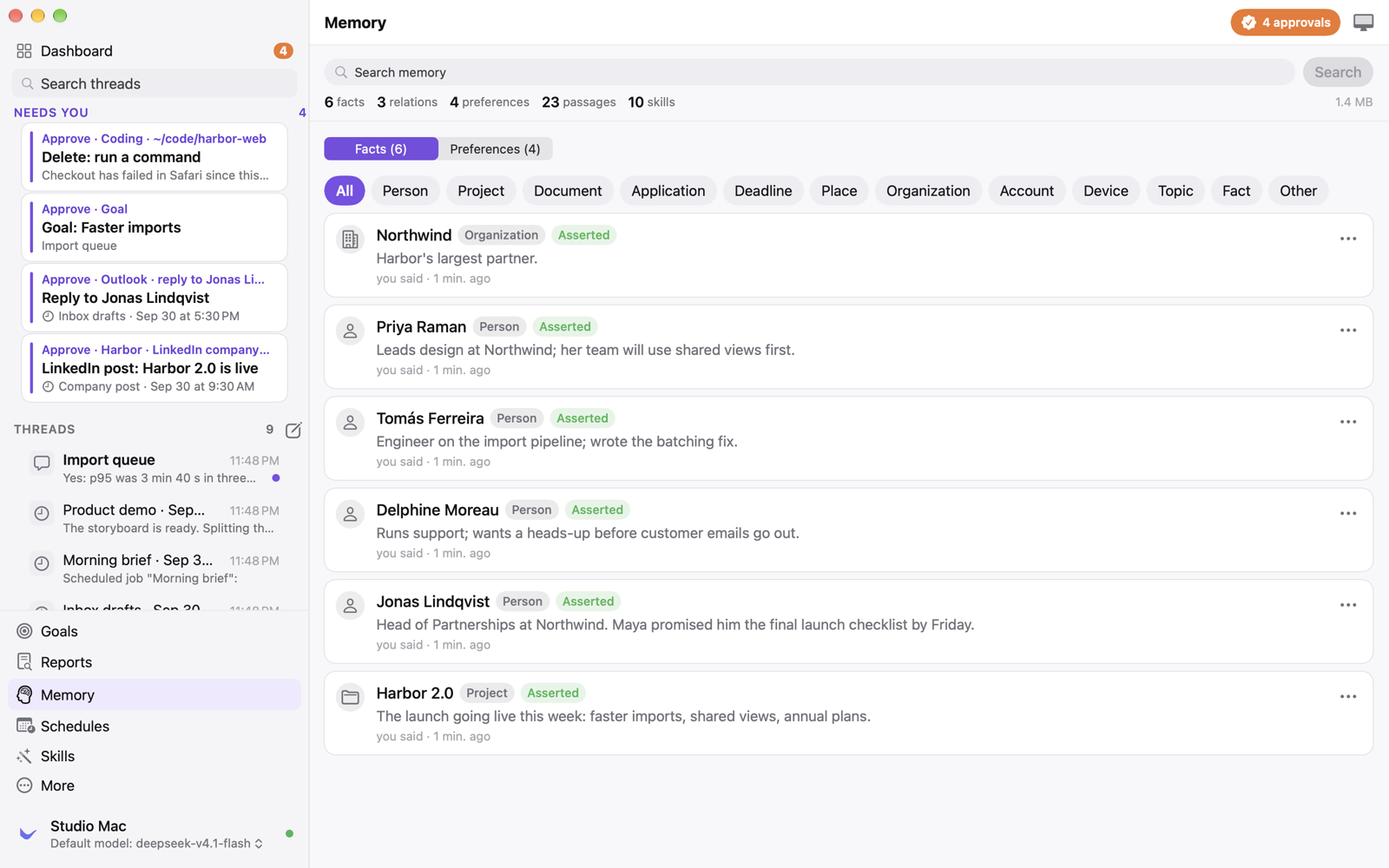 |
| Goals it works toward on its own | Every run, job and model costed |
|---|---|
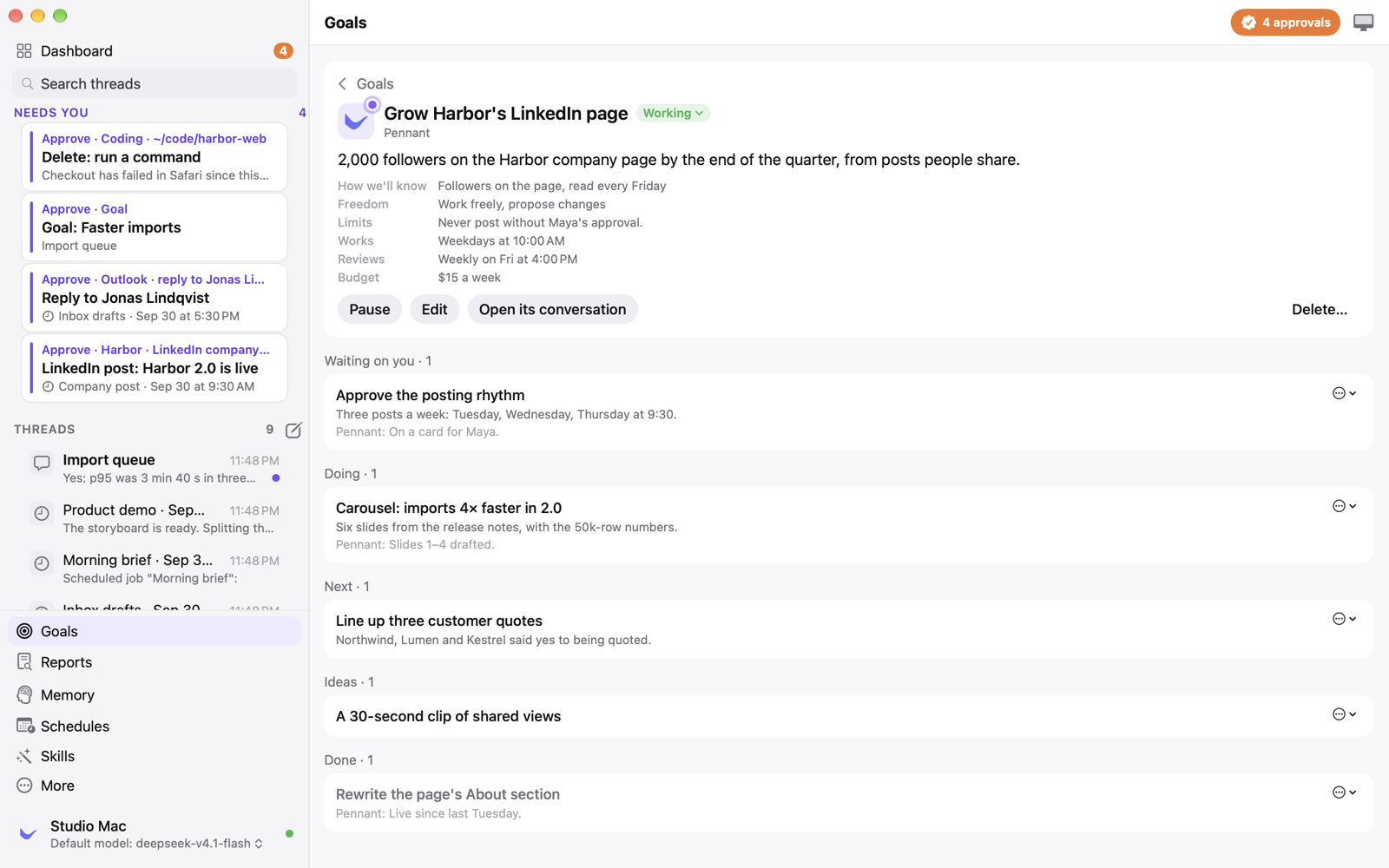 | 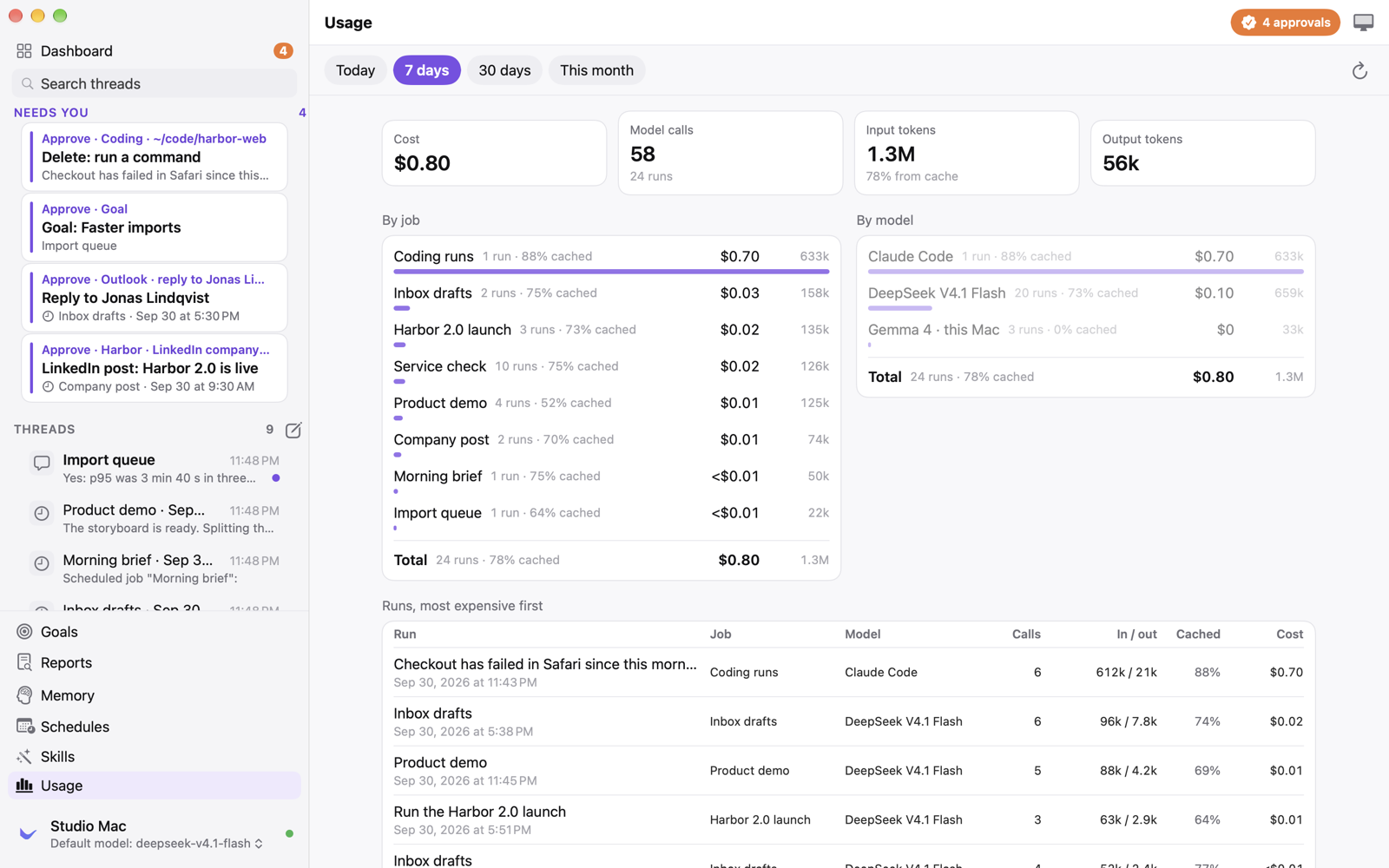 |
Every person, company and number in these screenshots is fictional. The app renders them from a demo host in a throwaway folder (pennant-host --seed-demo).
What it does
- Jobs on a schedule. "Every weekday at 8:30", "hourly" or cron. Each job follows a skill, every run gets a thread of its own, and a run ends in a report card rather than a wall of text. Big jobs bring in helpers on a cheaper model.
- Nothing goes out without you. Publishing, sending email, deleting and spending always stop at an approval card, whatever the skill or the model says, and approving runs exactly what the card shows. Edit the text, send it back with a note, or reject it, on the Mac or the iPhone. Cards written in Markdown show formatted, with the plain text a click away.
- Goals. Outcomes Pennant works toward on its own, with a measure, a weekly budget and a board of what's next, waiting on you, in progress and done, and a weekly review. Start, pause, edit or delete any goal yourself, or approve the ones it proposes.
- Coding. Code changes go to a coding run in one of your project folders, in a thread under the one that asked: Claude Code, or Pennant's own engine on any of your models. Runs push and open pull requests as their own GitHub App, never as you, and can plan first or ask before every edit.
- It uses your Mac. Pennant sees the screen and clicks and types in your apps the way you do, shows you a live view while it works, and lets go the moment you touch the mouse.
- Memory with receipts. It remembers facts and the passages they came from, searches them by keyword and meaning, names its sources, never lets something it guessed overwrite something you said, and forgets for good when you ask.
- Any model. Presets for OpenAI, Anthropic, Google, xAI, Mistral, DeepSeek, OpenRouter, Groq and more, any OpenAI-compatible endpoint, Azure AI Foundry, a ChatGPT account, Ollama, LM Studio, vLLM or Apple's on-device model, with fallbacks. Rate limits pause and resume a task; an outage moves it to your next model. Keys can live in the Vault, your Keychain, instead of a config file.
- Skills are folders. The
SKILL.mdformat used by Claude Code, Codex and Agent Skills, in a git repository you own, with every version kept. Pennant writes new versions when you give feedback, and you can teach one by doing the task once while it watches. - Connections. A catalogue of MCP servers (GitHub, Notion, Linear, Sentry, Stripe, Figma, Supabase and more) with one Connect button each, and Microsoft 365, LinkedIn and Reddit built in.
- On your iPhone. Approvals, threads, reports, memory and the Mac's screen, live, from an app that signs in to your own Mac.
Built for the ways agents fail
- One owner of the desktop at a time. A task takes a lease on the screen; your mouse or a pause takes it back, and the agent must look at the screen again before it clicks.
- Uncertain actions are reconciled, not retried. A crash between an action and its result leaves the record uncertain, and the same consequential call is refused until Pennant has looked at what happened.
- The host is authoritative. Every task transition, tool intent and tool outcome is a durable record with a sequence number. The apps replay from the last one they saw, so nothing is lost when a laptop sleeps.
- Summaries point at evidence. Checkpoints keep the events they cover and never mark an unverified action as done.
- Instructions don't change permissions. What the agent may do is decided by the harness (sign-off rules, grants, the desktop lease), not by a skill, a prompt or a model.
- Every cent accounted for. A cost ledger per run, job and model, and a budget per task and per goal.
Privacy
Pennant has no account with us, no telemetry and no cloud of its own.
- Everything lives in one folder you own,
~/Library/Application Support/Pennant. Export and import move it to your next Mac. - What a task needs goes to the model endpoint you chose, and nowhere else. With a local model, nothing leaves your Mac.
- Keys and passwords live in the Vault, which is your Keychain. The model never sees them.
- The iPhone talks to your own Mac directly, over your network or Tailscale, with an account you set up in the Mac app.
- With your permission, the app checks pennant.dev for a signed update at most once a day. Nothing about you is sent.
Requirements
- macOS 15 or later, on Apple silicon or Intel.
- A model. Any of the presets with a key, a ChatGPT account, or a local server. For a first run with no key at all,
Ollama with a vision and tools model works:
ollama pull gemma4:e2b-it-qat. - For coding with Claude Code, the
claudeprogram installed and signed in. Pennant's own engine needs only a model. - The iPhone app needs iOS 18 or later. It isn't on the App Store yet; build it from the source.
First launch
- Open the DMG, drag Pennant to Applications and open it. It starts its host, Pennant Host, in the background.
- Grant the permissions it asks for, so it can use your Mac: Accessibility and Screen Recording, plus Input Monitoring (so it lets go when you type) and Automation for the apps it scripts. In System Settings they appear under the name Pennant. Settings › Permissions shows each one and can ask again.
- Choose a model in Settings › Models: pick a preset, paste a key (or keep it in the Vault), and Test.
- Ask for something, or give it a job: "Every weekday at 8, tell me what needs me today."
- For coding, add your project folders in Settings › Pennant › Coding. For the iPhone, create your sign-in in Settings › People.
Shortcuts
| Shortcut | Action |
|---|---|
| ⌘N | New thread |
| ⌘1 | Dashboard |
| ⇧⌘K | Every conversation, in a window of its own |
| ⇧⌘W | Close the thread |
| ⌘Return | Send |
| ⇧⌘. | Stop computer use (also in the menu bar) |
| ⌘+ / ⌘− / ⌘0 | Zoom in, zoom out, actual size |
Building from source
You need macOS 15 or later, Xcode 27 and brew install xcodegen.
swift build                                   # host, CLI and libraries
swift test --skip LiveInferenceTests          # the test suites

Scripts/build-release.sh --open               # release host + signed Pennant.app with the host inside → dist/Pennant.app
Scripts/generate-project.sh                   # Pennant.xcodeproj, for working in Xcode
Scripts/build-apps.sh                         # debug builds of the Mac and iPhone apps
build-release.sh signs with the first Apple Development or Developer ID identity in your keychain (or ad hoc if there is
none), so macOS keeps the Accessibility and Screen Recording grants across rebuilds. To build the iPhone app for a device, put
DEVELOPMENT_TEAM = <your team id> in Apps/Signing.local.xcconfig, which git ignores.
The host also runs on its own, with pennant as a terminal client for scripting and diagnostics:
swift run pennant-host --endpoint http://localhost:11434/v1 --model gemma4:e2b-it-qat

swift run pennant status                      # in another terminal
swift run pennant send "List the files in ~/Documents and summarise them"
swift run pennant watch                       # every event as it happens
The host keeps its database, artifacts, config and log in ~/Library/Application Support/Pennant. Choose a model in the
Mac app's Settings, or in config.json there:
{
  "inference": {
    "baseURL": "http://gpu-box.local:8000/v1",
    "model": "deepseek-ai/DeepSeek-V4-Flash-Vision-Exp",
    "contextWindowTokens": 128000,
    "supportsVision": true,
    "supportsTools": true
  }
}
docs/RUNBOOK.md covers the endpoint flags vLLM and SGLang need, the ChatGPT and Apple on-device providers,
the macOS permissions in detail, running the host as a LaunchAgent, connecting an iPhone, coding runs and MCP sign-in. Every
setting in the apps has a command too: pennant coding folder <dir>, pennant goals, pennant skills import <source>,
pennant health enable.
Tests
The host's logic is tested without a screen, a network or a model: the task runtime and its approvals, the tool broker and sign-off rules, memory and its provenance, the scheduler and goals, skills, the store and its migrations, inference adapters against recorded responses, and the protocol. 421 tests, with 0 failures, measured on 30 September 2026:
| Module | Lines | Functions |
|---|---|---|
PennantCore | 87.0% (2106/2422) | 69.9% (413/591) |
PennantHostKit | 70.8% (17377/24547) | 61.2% (2974/4863) |
PennantClientKit | 35.1% (669/1906) | 36.1% (156/432) |
Scripts/coverage.sh # the tests, then this table
The SwiftUI views in PennantUI have almost no unit tests (0.3% of lines). They are checked by photographing the real Mac and
iPhone apps against the demo host, in light and dark, with Scripts/demo-shots.sh.
Releasing
Scripts/release.sh builds a universal app, archives it, signs it with Developer ID, notarizes and staples it, packs the DMG,
zip and tarball with their checksums, and writes the signed update feed. Scripts/deploy-site.sh publishes the website in
www/ and the feed. See docs/RELEASE.md.
The screenshots on the site and in this README come from Scripts/demo-shots.sh, which seeds a demo host with fictional data
in a temporary folder and photographs the real apps against it; the seeder refuses to run in a folder that has data in it.
Architecture
Sources/
  PennantCore/         Models, the task state machine, event types and the client/host protocol. Shared by every target.
  PennantHostKit/      The host: SQLite store, inference, desktop control, tool broker, task runtime, memory, skills,
                       goals, scheduler, MCP and the API server. macOS only.
  PennantHost/         pennant-host, the service that runs in your user session
  PennantClientKit/    Client session, WebSocket transport, cached state, sign-in, Bonjour discovery. Mac and iPhone.
  PennantUI/           SwiftUI views shared by the Mac and iPhone apps
  PennantCLI/          pennant, the terminal client
Apps/
  PennantMac/          The Mac app: window, menu bar, settings, updates (Sparkle); embeds Pennant Host
  PennantiOS/          The iPhone app
Tests/                 XCTest suites for the core, the host and the UI
www/                   pennant.dev: static HTML, CSS and JavaScript
Scripts/               build, release, site deploy, demo screenshots
docs/                  Spec, architecture, protocol, design, runbook, decisions, status
The apps are generated into Pennant.xcodeproj by xcodegen from project.yml. The design spec is in
docs/SPEC.md, how the parts fit in docs/ARCHITECTURE.md, the wire protocol in
docs/PROTOCOL.md, the design system in docs/DESIGN.md, and what exists today and how it
is verified in docs/STATUS.md.
Troubleshooting
- It can't see the screen or click. Open Settings › Permissions. Grants belong to Pennant Host; Reset & ask again clears a stuck row. Screen Recording takes effect after the host restarts, which the same screen offers.
- Old "pennant-host" rows in System Settings. They belong to copies at other paths and do nothing; remove them with the minus button.
- A task stopped with a note about its budget. Each task has an allowance of steps, tokens and time. Reply to give it the same again.
- It stopped using the computer. You moved the mouse or pressed ⇧⌘.; resume from the computer panel.
- The model doesn't answer. Settings › Models › Test, or
pennant diag, which shows whether the endpoint is reachable. - Logs:
~/Library/Application Support/Pennant/logs/host.log, andpennant watchfor live events.
Contributing, security and licence
Questions and ideas are welcome in Discussions, bugs in Issues. Start with CONTRIBUTING.md and the code of conduct. Report security issues privately, as described in SECURITY.md.
Pennant is licensed under the Apache License 2.0. The name and icon are not: see TRADEMARKS.md. Third-party code and marks are listed in THIRD_PARTY_NOTICES.md.
Similar repos


Languages
Swift
93.5%
HTML
5.5%
Pennant for macOS: one open-source AI agent that does the work on your Mac, on a schedule, with any model. It asks before it publishes, sends, deletes or spends. Free, Apache-2.0.
See the codeSee what people are saying
README
Pennant
The AI agent that does the work.
Pennant is a free, open-source AI agent that lives on your Mac, with an iPhone companion. Give it jobs in plain words: it triages the inbox, writes the posts, watches production and fixes the code, on your schedule and with whatever model you choose. Before it publishes, sends, deletes or spends, it hands you a card and waits for your OK.
Download: pennant.dev or the latest release · macOS 15 or later, Apple silicon or Intel · signed and notarized by Apple · updates itself once you allow it
▶ Four short films on pennant.dev: the night shift and its approvals, memory, using your Mac, and coding.
| Your morning, waiting for you | Nothing goes out until you say so |
|---|---|
| |
| Code changes in a thread of their own | Memory with receipts |
|---|---|
| |
| Goals it works toward on its own | Every run, job and model costed |
|---|---|
| |
Every person, company and number in these screenshots is fictional. The app renders them from a demo host in a throwaway folder (pennant-host --seed-demo).
What it does
- Jobs on a schedule. "Every weekday at 8:30", "hourly" or cron. Each job follows a skill, every run gets a thread of its own, and a run ends in a report card rather than a wall of text. Big jobs bring in helpers on a cheaper model.
- Nothing goes out without you. Publishing, sending email, deleting and spending always stop at an approval card, whatever the skill or the model says, and approving runs exactly what the card shows. Edit the text, send it back with a note, or reject it, on the Mac or the iPhone. Cards written in Markdown show formatted, with the plain text a click away.
- Goals. Outcomes Pennant works toward on its own, with a measure, a weekly budget and a board of what's next, waiting on you, in progress and done, and a weekly review. Start, pause, edit or delete any goal yourself, or approve the ones it proposes.
- Coding. Code changes go to a coding run in one of your project folders, in a thread under the one that asked: Claude Code, or Pennant's own engine on any of your models. Runs push and open pull requests as their own GitHub App, never as you, and can plan first or ask before every edit.
- It uses your Mac. Pennant sees the screen and clicks and types in your apps the way you do, shows you a live view while it works, and lets go the moment you touch the mouse.
- Memory with receipts. It remembers facts and the passages they came from, searches them by keyword and meaning, names its sources, never lets something it guessed overwrite something you said, and forgets for good when you ask.
- Any model. Presets for OpenAI, Anthropic, Google, xAI, Mistral, DeepSeek, OpenRouter, Groq and more, any OpenAI-compatible endpoint, Azure AI Foundry, a ChatGPT account, Ollama, LM Studio, vLLM or Apple's on-device model, with fallbacks. Rate limits pause and resume a task; an outage moves it to your next model. Keys can live in the Vault, your Keychain, instead of a config file.
- Skills are folders. The
SKILL.mdformat used by Claude Code, Codex and Agent Skills, in a git repository you own, with every version kept. Pennant writes new versions when you give feedback, and you can teach one by doing the task once while it watches. - Connections. A catalogue of MCP servers (GitHub, Notion, Linear, Sentry, Stripe, Figma, Supabase and more) with one Connect button each, and Microsoft 365, LinkedIn and Reddit built in.
- On your iPhone. Approvals, threads, reports, memory and the Mac's screen, live, from an app that signs in to your own Mac.
Built for the ways agents fail
- One owner of the desktop at a time. A task takes a lease on the screen; your mouse or a pause takes it back, and the agent must look at the screen again before it clicks.
- Uncertain actions are reconciled, not retried. A crash between an action and its result leaves the record uncertain, and the same consequential call is refused until Pennant has looked at what happened.
- The host is authoritative. Every task transition, tool intent and tool outcome is a durable record with a sequence number. The apps replay from the last one they saw, so nothing is lost when a laptop sleeps.
- Summaries point at evidence. Checkpoints keep the events they cover and never mark an unverified action as done.
- Instructions don't change permissions. What the agent may do is decided by the harness (sign-off rules, grants, the desktop lease), not by a skill, a prompt or a model.
- Every cent accounted for. A cost ledger per run, job and model, and a budget per task and per goal.
Privacy
Pennant has no account with us, no telemetry and no cloud of its own.
- Everything lives in one folder you own,
~/Library/Application Support/Pennant. Export and import move it to your next Mac. - What a task needs goes to the model endpoint you chose, and nowhere else. With a local model, nothing leaves your Mac.
- Keys and passwords live in the Vault, which is your Keychain. The model never sees them.
- The iPhone talks to your own Mac directly, over your network or Tailscale, with an account you set up in the Mac app.
- With your permission, the app checks pennant.dev for a signed update at most once a day. Nothing about you is sent.
Requirements
- macOS 15 or later, on Apple silicon or Intel.
- A model. Any of the presets with a key, a ChatGPT account, or a local server. For a first run with no key at all,
Ollama with a vision and tools model works:
ollama pull gemma4:e2b-it-qat. - For coding with Claude Code, the
claudeprogram installed and signed in. Pennant's own engine needs only a model. - The iPhone app needs iOS 18 or later. It isn't on the App Store yet; build it from the source.
First launch
- Open the DMG, drag Pennant to Applications and open it. It starts its host, Pennant Host, in the background.
- Grant the permissions it asks for, so it can use your Mac: Accessibility and Screen Recording, plus Input Monitoring (so it lets go when you type) and Automation for the apps it scripts. In System Settings they appear under the name Pennant. Settings › Permissions shows each one and can ask again.
- Choose a model in Settings › Models: pick a preset, paste a key (or keep it in the Vault), and Test.
- Ask for something, or give it a job: "Every weekday at 8, tell me what needs me today."
- For coding, add your project folders in Settings › Pennant › Coding. For the iPhone, create your sign-in in Settings › People.
Shortcuts
| Shortcut | Action |
|---|---|
| ⌘N | New thread |
| ⌘1 | Dashboard |
| ⇧⌘K | Every conversation, in a window of its own |
| ⇧⌘W | Close the thread |
| ⌘Return | Send |
| ⇧⌘. | Stop computer use (also in the menu bar) |
| ⌘+ / ⌘− / ⌘0 | Zoom in, zoom out, actual size |
Building from source
You need macOS 15 or later, Xcode 27 and brew install xcodegen.
swift build                                   # host, CLI and libraries
swift test --skip LiveInferenceTests          # the test suites

Scripts/build-release.sh --open               # release host + signed Pennant.app with the host inside → dist/Pennant.app
Scripts/generate-project.sh                   # Pennant.xcodeproj, for working in Xcode
Scripts/build-apps.sh                         # debug builds of the Mac and iPhone apps
build-release.sh signs with the first Apple Development or Developer ID identity in your keychain (or ad hoc if there is
none), so macOS keeps the Accessibility and Screen Recording grants across rebuilds. To build the iPhone app for a device, put
DEVELOPMENT_TEAM = <your team id> in Apps/Signing.local.xcconfig, which git ignores.
The host also runs on its own, with pennant as a terminal client for scripting and diagnostics:
swift run pennant-host --endpoint http://localhost:11434/v1 --model gemma4:e2b-it-qat

swift run pennant status                      # in another terminal
swift run pennant send "List the files in ~/Documents and summarise them"
swift run pennant watch                       # every event as it happens
The host keeps its database, artifacts, config and log in ~/Library/Application Support/Pennant. Choose a model in the
Mac app's Settings, or in config.json there:
{
  "inference": {
    "baseURL": "http://gpu-box.local:8000/v1",
    "model": "deepseek-ai/DeepSeek-V4-Flash-Vision-Exp",
    "contextWindowTokens": 128000,
    "supportsVision": true,
    "supportsTools": true
  }
}
docs/RUNBOOK.md covers the endpoint flags vLLM and SGLang need, the ChatGPT and Apple on-device providers,
the macOS permissions in detail, running the host as a LaunchAgent, connecting an iPhone, coding runs and MCP sign-in. Every
setting in the apps has a command too: pennant coding folder <dir>, pennant goals, pennant skills import <source>,
pennant health enable.
Tests
The host's logic is tested without a screen, a network or a model: the task runtime and its approvals, the tool broker and sign-off rules, memory and its provenance, the scheduler and goals, skills, the store and its migrations, inference adapters against recorded responses, and the protocol. 421 tests, with 0 failures, measured on 30 September 2026:
| Module | Lines | Functions |
|---|---|---|
PennantCore | 87.0% (2106/2422) | 69.9% (413/591) |
PennantHostKit | 70.8% (17377/24547) | 61.2% (2974/4863) |
PennantClientKit | 35.1% (669/1906) | 36.1% (156/432) |
Scripts/coverage.sh # the tests, then this table
The SwiftUI views in PennantUI have almost no unit tests (0.3% of lines). They are checked by photographing the real Mac and
iPhone apps against the demo host, in light and dark, with Scripts/demo-shots.sh.
Releasing
Scripts/release.sh builds a universal app, archives it, signs it with Developer ID, notarizes and staples it, packs the DMG,
zip and tarball with their checksums, and writes the signed update feed. Scripts/deploy-site.sh publishes the website in
www/ and the feed. See docs/RELEASE.md.
The screenshots on the site and in this README come from Scripts/demo-shots.sh, which seeds a demo host with fictional data
in a temporary folder and photographs the real apps against it; the seeder refuses to run in a folder that has data in it.
Architecture
Sources/
  PennantCore/         Models, the task state machine, event types and the client/host protocol. Shared by every target.
  PennantHostKit/      The host: SQLite store, inference, desktop control, tool broker, task runtime, memory, skills,
                       goals, scheduler, MCP and the API server. macOS only.
  PennantHost/         pennant-host, the service that runs in your user session
  PennantClientKit/    Client session, WebSocket transport, cached state, sign-in, Bonjour discovery. Mac and iPhone.
  PennantUI/           SwiftUI views shared by the Mac and iPhone apps
  PennantCLI/          pennant, the terminal client
Apps/
  PennantMac/          The Mac app: window, menu bar, settings, updates (Sparkle); embeds Pennant Host
  PennantiOS/          The iPhone app
Tests/                 XCTest suites for the core, the host and the UI
www/                   pennant.dev: static HTML, CSS and JavaScript
Scripts/               build, release, site deploy, demo screenshots
docs/                  Spec, architecture, protocol, design, runbook, decisions, status
The apps are generated into Pennant.xcodeproj by xcodegen from project.yml. The design spec is in
docs/SPEC.md, how the parts fit in docs/ARCHITECTURE.md, the wire protocol in
docs/PROTOCOL.md, the design system in docs/DESIGN.md, and what exists today and how it
is verified in docs/STATUS.md.
Troubleshooting
- It can't see the screen or click. Open Settings › Permissions. Grants belong to Pennant Host; Reset & ask again clears a stuck row. Screen Recording takes effect after the host restarts, which the same screen offers.
- Old "pennant-host" rows in System Settings. They belong to copies at other paths and do nothing; remove them with the minus button.
- A task stopped with a note about its budget. Each task has an allowance of steps, tokens and time. Reply to give it the same again.
- It stopped using the computer. You moved the mouse or pressed ⇧⌘.; resume from the computer panel.
- The model doesn't answer. Settings › Models › Test, or
pennant diag, which shows whether the endpoint is reachable. - Logs:
~/Library/Application Support/Pennant/logs/host.log, andpennant watchfor live events.
Contributing, security and licence
Questions and ideas are welcome in Discussions, bugs in Issues. Start with CONTRIBUTING.md and the code of conduct. Report security issues privately, as described in SECURITY.md.
Pennant is licensed under the Apache License 2.0. The name and icon are not: see TRADEMARKS.md. Third-party code and marks are listed in THIRD_PARTY_NOTICES.md.
Similar repos
Languages
Swift
93.5%
HTML
5.5%