
Free, fast, Lightroom-compatible RAW photo editor for Linux, macOS, and Windows.
See the codeSee what people are saying
README
 RAWmakase
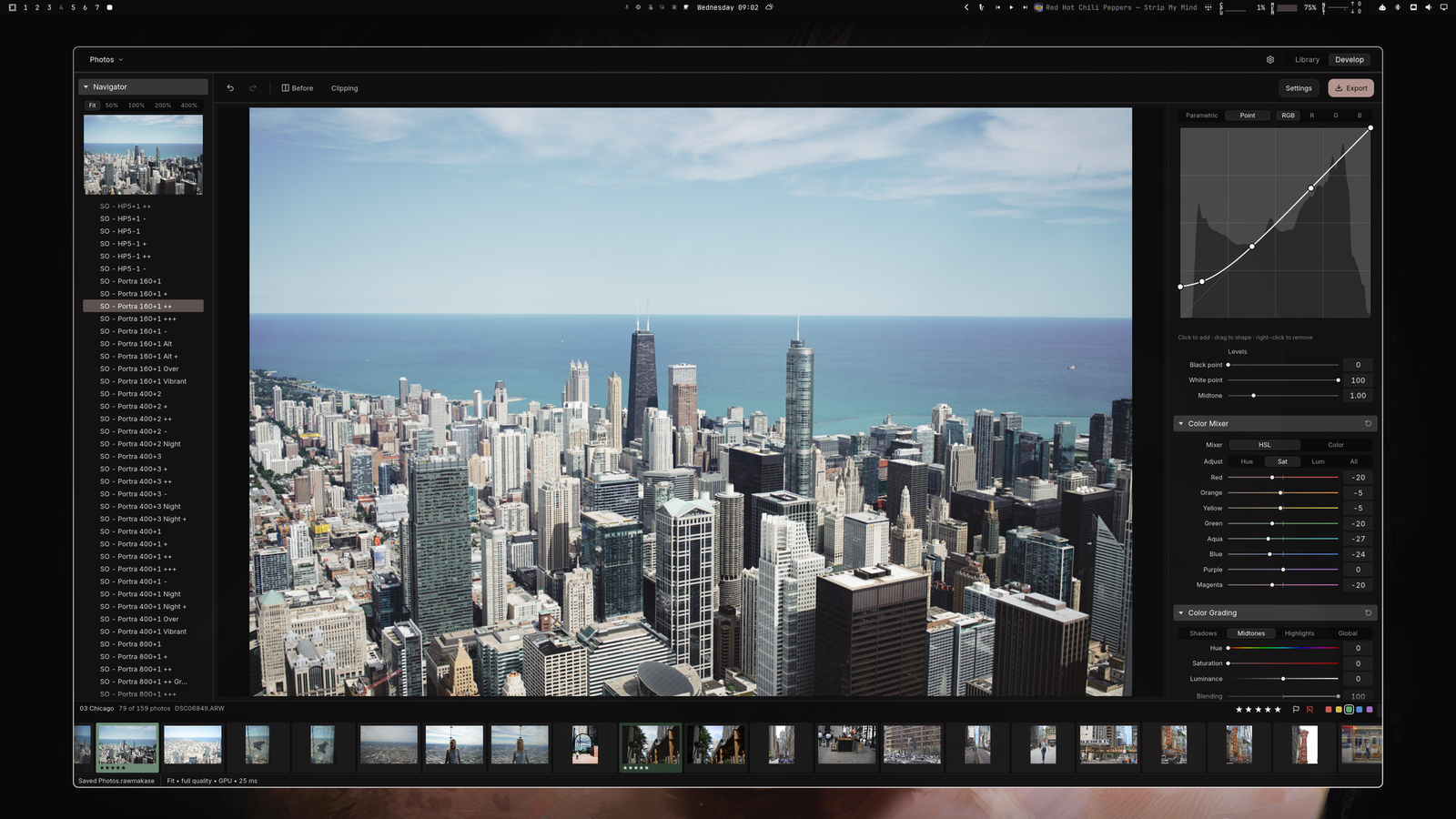
RAWmakase is a fast, non-destructive RAW photo developer for Linux, macOS and Windows, written in Rust. It opens RAW files from any camera LibRaw supports, develops them with a Lightroom-style set of controls, and exports JPEG or 16-bit TIFF. It can also import a Lightroom Classic catalog with its ratings, flags, labels, keywords and compatible develop settings, without ever writing to the original catalog or your photos.
⬇ Download the latest version
macOS (Apple Silicon, Intel) · Linux (.deb, .rpm, Arch) · Windows (x86_64) · install notes
It is a personal project in active development. Rendering aims for close, not exact, Lightroom parity; see parity gaps.
Features
- Develop: white balance and picker, one-click Auto tone and Auto white balance, exposure and tone, Shadows/Highlights, Clarity, Dehaze, point curves and levels, HSL color mixer, three-way color grading, detail (denoise and sharpening), crop, straighten and Transform, lens corrections, effects and calibration.
- Spot removal and masks (experimental, early): Heal and Clone spots and brushed areas with automatic sources, and brush, gradient and range masks with local adjustments, also imported from Lightroom. Not yet measured against Lightroom.
- Library: SQLite catalogs, folders and collections, ratings, flags, color labels, keywords, filtering, and non-destructive Lightroom
.lrcatimport with folder relinking. - Presets and profiles: Lightroom XMP presets, plus DCP and XMP camera profiles you import yourself.
- Non-destructive: originals are never modified. Edits live in the catalog, and all writes are atomic.
- Fast previews: a quick draft first, then full quality, with GPU finishing (Metal on macOS, Vulkan on Linux) and CPU fallback.
- Command line: inspect, render, export thumbnails, import catalogs and benchmark without the GUI.
Coming soon
- LUT support
- AI-powered masks and object removal
- Built-in open source preset library
- Agentic features: e.g. culling assistance
Install
Download the package for your system from GitHub Releases. Older releases may have only the original Arch-built Linux archive; use the requirements in that release's notes.
Let your agent install it
Point your coding agent to GitHub Releases and tell it to install the latest version for your operating system, or give it this prompt:
Install the latest release of RAWmakase for my operating system from https://github.com/pch/rawmakase/releases. Pick the right package for my OS and CPU architecture, verify it against the release's checksums, install it, and tell me how to launch it.
macOS (15 or newer)
Install with Homebrew:
brew install --cask pch/tap/rawmakase
Update with brew upgrade --cask rawmakase.
Or install the DMG directly:
Choose rawmakase-v<version>-macos-arm64.dmg for Apple Silicon or rawmakase-v<version>-macos-x86_64.dmg for Intel. Open the DMG, drag RAWmakase into Applications, and launch it there. Release DMGs are signed and notarized, and include their imaging libraries; Homebrew is not required.
Linux (x86_64 and aarch64)
Download the package for your architecture (amd64/x86_64 or arm64/aarch64), then run the matching command from its folder, replacing the filename with the one you downloaded:
| System | Package | Install |
|---|---|---|
| Ubuntu 24.04+ / Debian 13+ | .deb | sudo apt install ./rawmakase_<version>_amd64.deb |
| Fedora 43+ | .rpm | sudo dnf install ./rawmakase-<version>-1.x86_64.rpm |
| Arch Linux (x86_64) | .pkg.tar.zst | sudo pacman -U ./rawmakase-<version>-1-x86_64.pkg.tar.zst |
DEB/RPM packages include LibRaw and Little CMS. Arch packages use system dependencies. A working graphics driver is required; install your desktop's xdg-desktop-portal backend for native file dialogs.
AUR publication is paused. Install the Arch package directly, or (on Arch Linux ARM too) download and extract rawmakase-<version>-arch-recipe.tar.gz into an empty folder and build as a normal user:
makepkg -si
The development recipe is in packaging/arch/rawmakase-git.
The rawmakase-<version>-<arch>-linux.tar.gz download contains the same bundled imaging libraries as the DEB/RPM packages. Extract it and run ./usr/bin/rawmakase from the extracted folder. Keep the whole directory together. It requires the same OS/runtime baseline as the packages above; it is not a fully static build.
Windows (10 or newer, x86_64)
Run rawmakase-v<version>-x86_64-pc-windows-msvc-setup.exe. It installs for your user account only, without administrator rights, and adds RAWmakase to the Start menu. The installer is not code-signed yet, so Microsoft Defender SmartScreen may warn about an unrecognized app: choose More info → Run anyway. For a copy without installing, extract rawmakase-v<version>-x86_64-pc-windows-msvc.zip and run rawmakase.exe from the extracted folder.
Updates and verification
To update, download a newer release and repeat the installation steps (replace the app in Applications on macOS). Settings and catalogs are kept separately from the installed application. There is currently no in-app updater or automatic package repository.
Each new packaged release includes SHA256SUMS. After downloading it beside your package, verify downloaded files on Linux with sha256sum --ignore-missing -c SHA256SUMS. On macOS, use shasum -a 256 <downloaded-file> and compare the result with that file's entry in SHA256SUMS.
From source (Linux and macOS)
You need Rust 1.98 or newer, a C++17 compiler with OpenMP, pkg-config, LibRaw 0.22 or newer, and Little CMS 2.
- Arch Linux:
sudo pacman -S rust base-devel pkgconf libraw lcms2 - macOS:
brew install pkg-config libraw little-cms2 libomp. Use a native rustup toolchain (aarch64-apple-darwinon Apple Silicon);LIBOMP_PREFIXpoints the build at a non-Homebrew OpenMP.
make                                  # cargo build --release --locked
make install PREFIX="$HOME/.local"    # binary, desktop entry, icon and licenses
make install never builds, so make && sudo make install PREFIX=/usr does not compile as root. make uninstall removes the installed files.
On macOS, packaging/macos/app.sh builds target/release/RAWmakase.app, which you can open from Finder. It uses the Homebrew libraries installed on your Mac and is not a signed, self-contained distribution.
Usage
rawmakase                     # reopen the last catalog
rawmakase Photos.rawmakase    # open a catalog
rawmakase photo.dng           # add the photo's folder to the last catalog and edit it
Photos are edited through the Library. A photo dropped onto the window or passed on the command line has its folder added to the open catalog, then opens in Develop; edits it got in earlier releases (its photo.rawmakase.json) come along. You can also drop a catalog onto the window. The first launch offers to create a catalog or import a Lightroom catalog; both are available later from the Catalog menu. The camera's embedded JPEG shows immediately while the RAW develops.
Useful shortcuts:
| Key | Action |
|---|---|
| Left / Right | Previous / next photo |
| F / Z | Fit / toggle Fit and 100% |
| 0–5, 6–9 | Rating; red, yellow, green, blue label |
| P / X / U | Pick / reject / clear flag |
| Shift + rating, label or flag key | Apply and advance |
| R or C | Crop |
| J | Clipping indicators |
| Backslash | Before / after |
| Cmd/Ctrl+Z, Cmd/Ctrl+Shift+Z | Undo / redo |
| Cmd/Ctrl+Shift+U | Auto tone |
Double-click a slider to reset it, or type its value for precision.
Camera profiles
RAWmakase does not ship any camera profiles. Without one, it renders with the camera matrix LibRaw provides. For Lightroom-like color, import DCP and XMP profiles you are licensed to use (for example from your own Lightroom or Camera Raw installation, or published third-party DCPs such as RawTherapee's) with Edit → Import profiles… or rawmakase import-profiles. They are copied into RAWmakase's own data directory. See Lightroom profiles.
Command line
rawmakase inspect photo.dng
rawmakase thumbnail photo.dng embedded.jpg
rawmakase render photo.dng edited.jpg --exposure 0.7 --max-edge 2400
rawmakase render photo.dng edited.tiff --xmp preset.xmp
rawmakase render photo.dng edited.jpg --auto
rawmakase import-catalog Lightroom.lrcat Photos.rawmakase
rawmakase help
render applies the photo's saved edits unless --recipe or --xmp supplies settings, and it needs --overwrite to replace an existing file.
Where data lives
- Catalogs, with every edit: the
.rawmakasefile you choose. - Edits saved beside photos by releases before 0.1.8 (
photo.dng.rawmakase.json, with spots and masks inphoto.dng.rawmakase-local.json, or in the data directory'ssidecars/folder for read-only locations) are brought into the catalog when you add their folder, and left as they are. - Profiles, presets, previews and session state:
~/Library/Application Support/RAWmakaseon macOS,$XDG_DATA_HOME/rawmakase(default~/.local/share/rawmakase) on Linux,%APPDATA%\RAWmakaseon Windows.RAWMAKASE_DATA_DIRoverrides it.
Exports are always sRGB. The display defaults to sRGB; pick a monitor ICC profile under More only if your compositor does not already manage color.
Development
Start with the code map and the architecture guide.
make check # cargo fmt --check, clippy -D warnings, cargo test
The repository contains no RAW photos, Lightroom catalogs or camera profiles, so tests that need them are ignored by default. Run them with your own files:
| Environment variable | Test target | Needs |
|---|---|---|
RAWMAKASE_FIXTURES | --test raw_fixtures | A folder of RAW files (the test currently expects both a Bayer and an X-Trans file) |
RAWMAKASE_PROFILES | --test private_profiles | A folder of DCP files |
RAWMAKASE_TEST_DCP | --lib camera_profiles | A DCP file (the assertions currently match RawTherapee's SONY ILCE-7M2.dcp) |
RAWMAKASE_LRCAT | --lib catalog | A Lightroom catalog |
RAWMAKASE_FIXTURES=~/raw-fixtures cargo test --release --test raw_fixtures -- --ignored --nocapture
GPU tests are ignored as well; run them with cargo test --lib gpu -- --ignored on a machine with a compute adapter.
CI runs make check, a release build, an Arch package build and a cargo deny license and advisory audit on every push and pull request. A stable vX.Y.Z tag on main matching Cargo.toml builds both macOS DMGs, the Linux packages and the Windows installer. Publication waits for Apple notarization and package checks. See packaging/RELEASING.md for credentials, rehearsal runs, supported systems and the AUR pause.
License
RAWmakase is released under the MIT License. The DNG default tone curve and temperature table come from the Adobe DNG SDK, under the license in licenses/Adobe-DNG-SDK.txt. The interface font, Inter, is under the SIL Open Font License (licenses/Inter-OFL.txt), and the icons are Lucide's, under the ISC License (licenses/Lucide-ISC.txt). LibRaw, Little CMS and the Rust dependencies keep their own licenses; see dependencies.
Adobe, Lightroom and Camera Raw are trademarks of Adobe Inc. RAWmakase is not affiliated with or endorsed by Adobe.
Similar repos


Languages
Rust
92.1%
Python
3.3%
WGSL
2.8%
Free, fast, Lightroom-compatible RAW photo editor for Linux, macOS, and Windows.
See the codeSee what people are saying
README
RAWmakase
RAWmakase is a fast, non-destructive RAW photo developer for Linux, macOS and Windows, written in Rust. It opens RAW files from any camera LibRaw supports, develops them with a Lightroom-style set of controls, and exports JPEG or 16-bit TIFF. It can also import a Lightroom Classic catalog with its ratings, flags, labels, keywords and compatible develop settings, without ever writing to the original catalog or your photos.
⬇ Download the latest version
macOS (Apple Silicon, Intel) · Linux (.deb, .rpm, Arch) · Windows (x86_64) · install notes
It is a personal project in active development. Rendering aims for close, not exact, Lightroom parity; see parity gaps.
Features
- Develop: white balance and picker, one-click Auto tone and Auto white balance, exposure and tone, Shadows/Highlights, Clarity, Dehaze, point curves and levels, HSL color mixer, three-way color grading, detail (denoise and sharpening), crop, straighten and Transform, lens corrections, effects and calibration.
- Spot removal and masks (experimental, early): Heal and Clone spots and brushed areas with automatic sources, and brush, gradient and range masks with local adjustments, also imported from Lightroom. Not yet measured against Lightroom.
- Library: SQLite catalogs, folders and collections, ratings, flags, color labels, keywords, filtering, and non-destructive Lightroom
.lrcatimport with folder relinking. - Presets and profiles: Lightroom XMP presets, plus DCP and XMP camera profiles you import yourself.
- Non-destructive: originals are never modified. Edits live in the catalog, and all writes are atomic.
- Fast previews: a quick draft first, then full quality, with GPU finishing (Metal on macOS, Vulkan on Linux) and CPU fallback.
- Command line: inspect, render, export thumbnails, import catalogs and benchmark without the GUI.
Coming soon
- LUT support
- AI-powered masks and object removal
- Built-in open source preset library
- Agentic features: e.g. culling assistance
Install
Download the package for your system from GitHub Releases. Older releases may have only the original Arch-built Linux archive; use the requirements in that release's notes.
Let your agent install it
Point your coding agent to GitHub Releases and tell it to install the latest version for your operating system, or give it this prompt:
Install the latest release of RAWmakase for my operating system from https://github.com/pch/rawmakase/releases. Pick the right package for my OS and CPU architecture, verify it against the release's checksums, install it, and tell me how to launch it.
macOS (15 or newer)
Install with Homebrew:
brew install --cask pch/tap/rawmakase
Update with brew upgrade --cask rawmakase.
Or install the DMG directly:
Choose rawmakase-v<version>-macos-arm64.dmg for Apple Silicon or rawmakase-v<version>-macos-x86_64.dmg for Intel. Open the DMG, drag RAWmakase into Applications, and launch it there. Release DMGs are signed and notarized, and include their imaging libraries; Homebrew is not required.
Linux (x86_64 and aarch64)
Download the package for your architecture (amd64/x86_64 or arm64/aarch64), then run the matching command from its folder, replacing the filename with the one you downloaded:
| System | Package | Install |
|---|---|---|
| Ubuntu 24.04+ / Debian 13+ | .deb | sudo apt install ./rawmakase_<version>_amd64.deb |
| Fedora 43+ | .rpm | sudo dnf install ./rawmakase-<version>-1.x86_64.rpm |
| Arch Linux (x86_64) | .pkg.tar.zst | sudo pacman -U ./rawmakase-<version>-1-x86_64.pkg.tar.zst |
DEB/RPM packages include LibRaw and Little CMS. Arch packages use system dependencies. A working graphics driver is required; install your desktop's xdg-desktop-portal backend for native file dialogs.
AUR publication is paused. Install the Arch package directly, or (on Arch Linux ARM too) download and extract rawmakase-<version>-arch-recipe.tar.gz into an empty folder and build as a normal user:
makepkg -si
The development recipe is in packaging/arch/rawmakase-git.
The rawmakase-<version>-<arch>-linux.tar.gz download contains the same bundled imaging libraries as the DEB/RPM packages. Extract it and run ./usr/bin/rawmakase from the extracted folder. Keep the whole directory together. It requires the same OS/runtime baseline as the packages above; it is not a fully static build.
Windows (10 or newer, x86_64)
Run rawmakase-v<version>-x86_64-pc-windows-msvc-setup.exe. It installs for your user account only, without administrator rights, and adds RAWmakase to the Start menu. The installer is not code-signed yet, so Microsoft Defender SmartScreen may warn about an unrecognized app: choose More info → Run anyway. For a copy without installing, extract rawmakase-v<version>-x86_64-pc-windows-msvc.zip and run rawmakase.exe from the extracted folder.
Updates and verification
To update, download a newer release and repeat the installation steps (replace the app in Applications on macOS). Settings and catalogs are kept separately from the installed application. There is currently no in-app updater or automatic package repository.
Each new packaged release includes SHA256SUMS. After downloading it beside your package, verify downloaded files on Linux with sha256sum --ignore-missing -c SHA256SUMS. On macOS, use shasum -a 256 <downloaded-file> and compare the result with that file's entry in SHA256SUMS.
From source (Linux and macOS)
You need Rust 1.98 or newer, a C++17 compiler with OpenMP, pkg-config, LibRaw 0.22 or newer, and Little CMS 2.
- Arch Linux:
sudo pacman -S rust base-devel pkgconf libraw lcms2 - macOS:
brew install pkg-config libraw little-cms2 libomp. Use a native rustup toolchain (aarch64-apple-darwinon Apple Silicon);LIBOMP_PREFIXpoints the build at a non-Homebrew OpenMP.
make                                  # cargo build --release --locked
make install PREFIX="$HOME/.local"    # binary, desktop entry, icon and licenses
make install never builds, so make && sudo make install PREFIX=/usr does not compile as root. make uninstall removes the installed files.
On macOS, packaging/macos/app.sh builds target/release/RAWmakase.app, which you can open from Finder. It uses the Homebrew libraries installed on your Mac and is not a signed, self-contained distribution.
Usage
rawmakase                     # reopen the last catalog
rawmakase Photos.rawmakase    # open a catalog
rawmakase photo.dng           # add the photo's folder to the last catalog and edit it
Photos are edited through the Library. A photo dropped onto the window or passed on the command line has its folder added to the open catalog, then opens in Develop; edits it got in earlier releases (its photo.rawmakase.json) come along. You can also drop a catalog onto the window. The first launch offers to create a catalog or import a Lightroom catalog; both are available later from the Catalog menu. The camera's embedded JPEG shows immediately while the RAW develops.
Useful shortcuts:
| Key | Action |
|---|---|
| Left / Right | Previous / next photo |
| F / Z | Fit / toggle Fit and 100% |
| 0–5, 6–9 | Rating; red, yellow, green, blue label |
| P / X / U | Pick / reject / clear flag |
| Shift + rating, label or flag key | Apply and advance |
| R or C | Crop |
| J | Clipping indicators |
| Backslash | Before / after |
| Cmd/Ctrl+Z, Cmd/Ctrl+Shift+Z | Undo / redo |
| Cmd/Ctrl+Shift+U | Auto tone |
Double-click a slider to reset it, or type its value for precision.
Camera profiles
RAWmakase does not ship any camera profiles. Without one, it renders with the camera matrix LibRaw provides. For Lightroom-like color, import DCP and XMP profiles you are licensed to use (for example from your own Lightroom or Camera Raw installation, or published third-party DCPs such as RawTherapee's) with Edit → Import profiles… or rawmakase import-profiles. They are copied into RAWmakase's own data directory. See Lightroom profiles.
Command line
rawmakase inspect photo.dng
rawmakase thumbnail photo.dng embedded.jpg
rawmakase render photo.dng edited.jpg --exposure 0.7 --max-edge 2400
rawmakase render photo.dng edited.tiff --xmp preset.xmp
rawmakase render photo.dng edited.jpg --auto
rawmakase import-catalog Lightroom.lrcat Photos.rawmakase
rawmakase help
render applies the photo's saved edits unless --recipe or --xmp supplies settings, and it needs --overwrite to replace an existing file.
Where data lives
- Catalogs, with every edit: the
.rawmakasefile you choose. - Edits saved beside photos by releases before 0.1.8 (
photo.dng.rawmakase.json, with spots and masks inphoto.dng.rawmakase-local.json, or in the data directory'ssidecars/folder for read-only locations) are brought into the catalog when you add their folder, and left as they are. - Profiles, presets, previews and session state:
~/Library/Application Support/RAWmakaseon macOS,$XDG_DATA_HOME/rawmakase(default~/.local/share/rawmakase) on Linux,%APPDATA%\RAWmakaseon Windows.RAWMAKASE_DATA_DIRoverrides it.
Exports are always sRGB. The display defaults to sRGB; pick a monitor ICC profile under More only if your compositor does not already manage color.
Development
Start with the code map and the architecture guide.
make check # cargo fmt --check, clippy -D warnings, cargo test
The repository contains no RAW photos, Lightroom catalogs or camera profiles, so tests that need them are ignored by default. Run them with your own files:
| Environment variable | Test target | Needs |
|---|---|---|
RAWMAKASE_FIXTURES | --test raw_fixtures | A folder of RAW files (the test currently expects both a Bayer and an X-Trans file) |
RAWMAKASE_PROFILES | --test private_profiles | A folder of DCP files |
RAWMAKASE_TEST_DCP | --lib camera_profiles | A DCP file (the assertions currently match RawTherapee's SONY ILCE-7M2.dcp) |
RAWMAKASE_LRCAT | --lib catalog | A Lightroom catalog |
RAWMAKASE_FIXTURES=~/raw-fixtures cargo test --release --test raw_fixtures -- --ignored --nocapture
GPU tests are ignored as well; run them with cargo test --lib gpu -- --ignored on a machine with a compute adapter.
CI runs make check, a release build, an Arch package build and a cargo deny license and advisory audit on every push and pull request. A stable vX.Y.Z tag on main matching Cargo.toml builds both macOS DMGs, the Linux packages and the Windows installer. Publication waits for Apple notarization and package checks. See packaging/RELEASING.md for credentials, rehearsal runs, supported systems and the AUR pause.
License
RAWmakase is released under the MIT License. The DNG default tone curve and temperature table come from the Adobe DNG SDK, under the license in licenses/Adobe-DNG-SDK.txt. The interface font, Inter, is under the SIL Open Font License (licenses/Inter-OFL.txt), and the icons are Lucide's, under the ISC License (licenses/Lucide-ISC.txt). LibRaw, Little CMS and the Rust dependencies keep their own licenses; see dependencies.
Adobe, Lightroom and Camera Raw are trademarks of Adobe Inc. RAWmakase is not affiliated with or endorsed by Adobe.
Similar repos
Languages
Rust
92.1%
Python
3.3%
WGSL
2.8%