An automatic, real-time dual-grid tileset system for Godot
GDScript
1,276
293 commits
updated Sep 3, 2026

We want YOU! TileMapDual v5 is here with lots of updates, including hex grid support. Please report any issues you may encounter, and feel free to check the current issues, open new pull requests and contribute with your own code! More info on the v5 discussion.
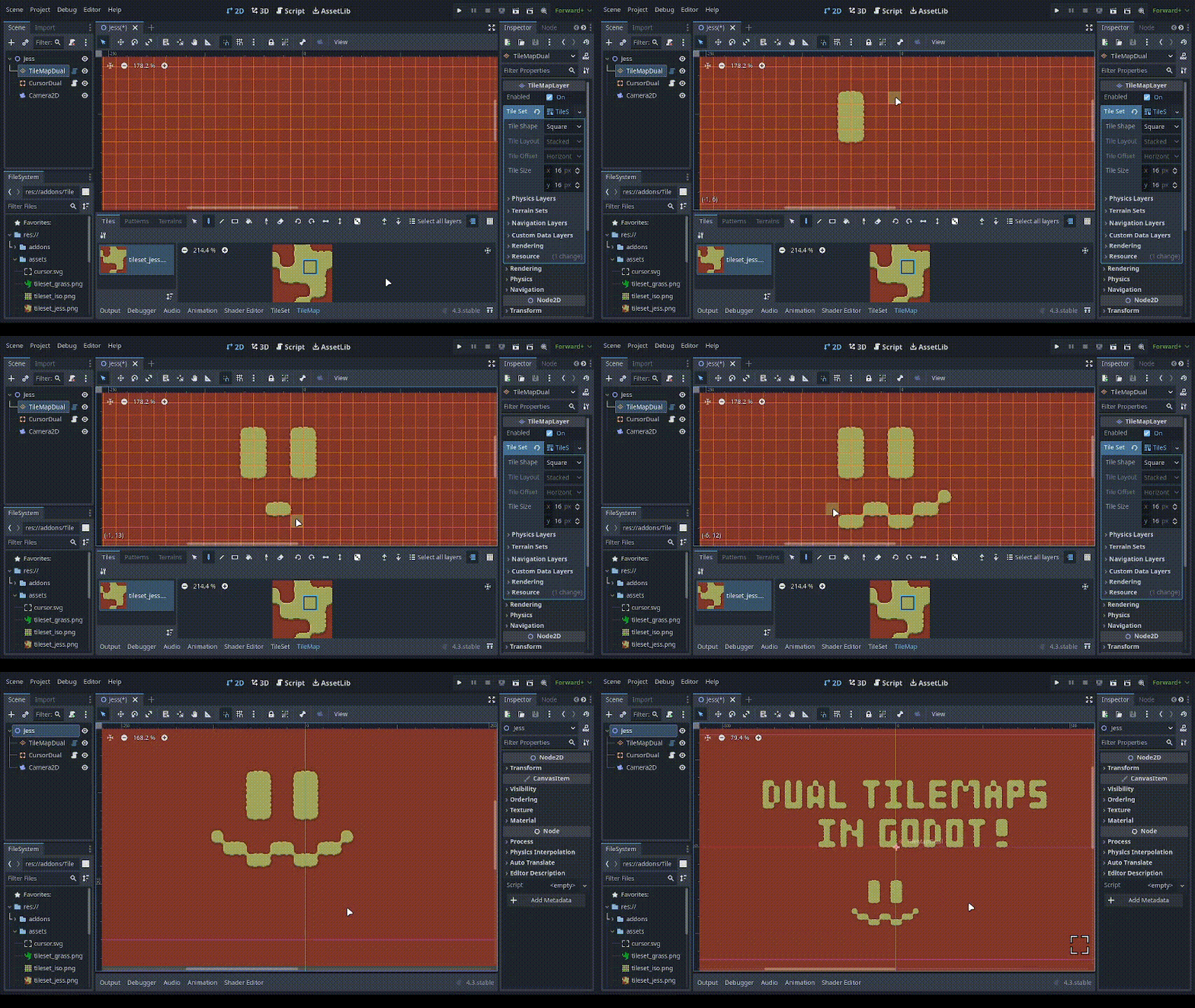
Welcome to TileMapDual: an automatic custom TileMapLayer node for Godot that provides a real-time, in-editor and in-game dual-grid tileset system, for all kinds of grids. Square, isometric, hex... The only limit is your imagination!
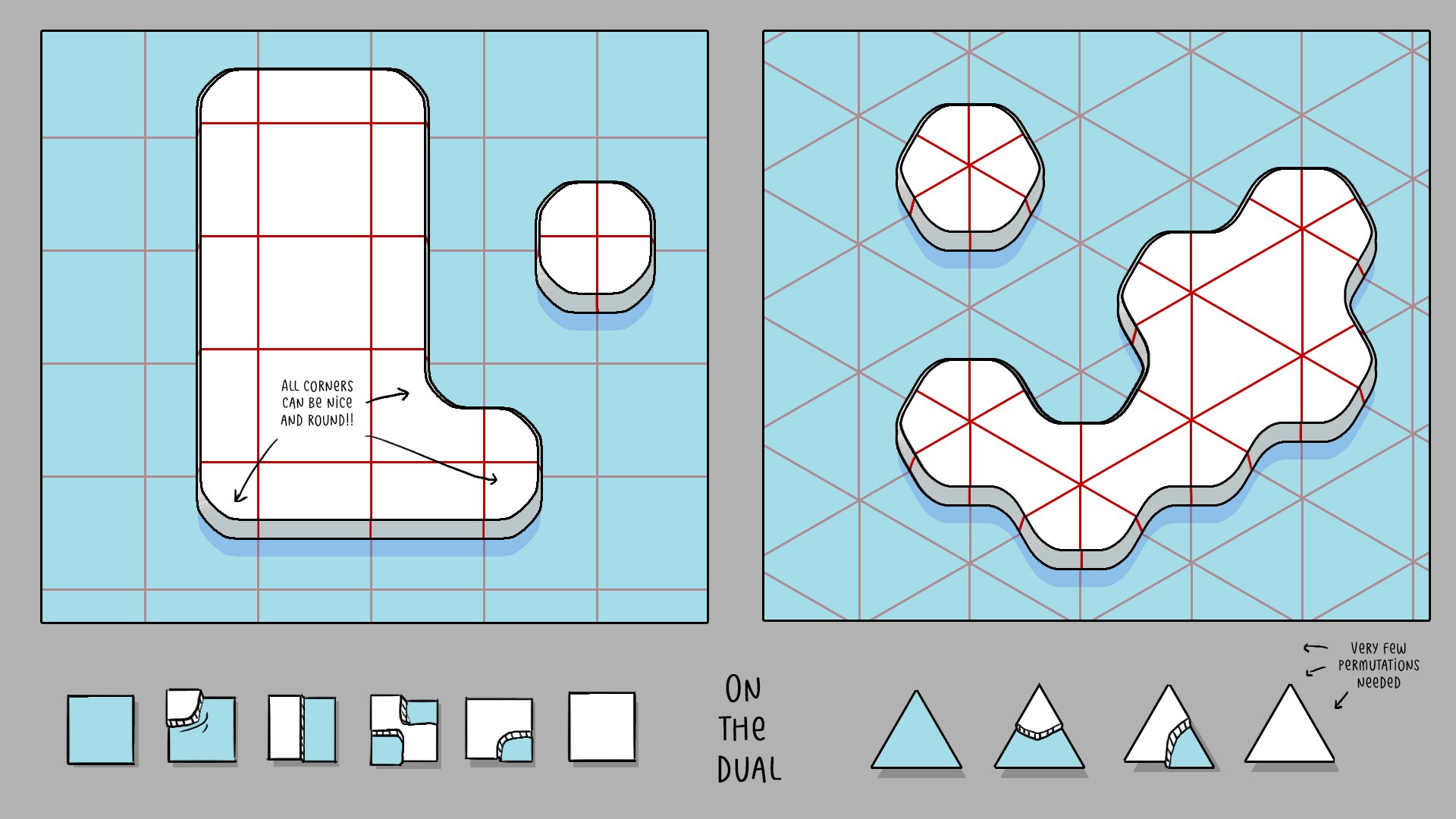
This dual-grid system, as explained by Oskar Stålberg, reduces the number of tiles required from 47 to just 15 (yes, fifteen!!), rocketing your dev journey!
Not only that, but if your tiles are symmetrical, you can get away with drawing only 6 (six!) tiles and then generating the 15-tile-tilesets used by TileMapDual, thanks to tools like Wang Tile Set Creator.
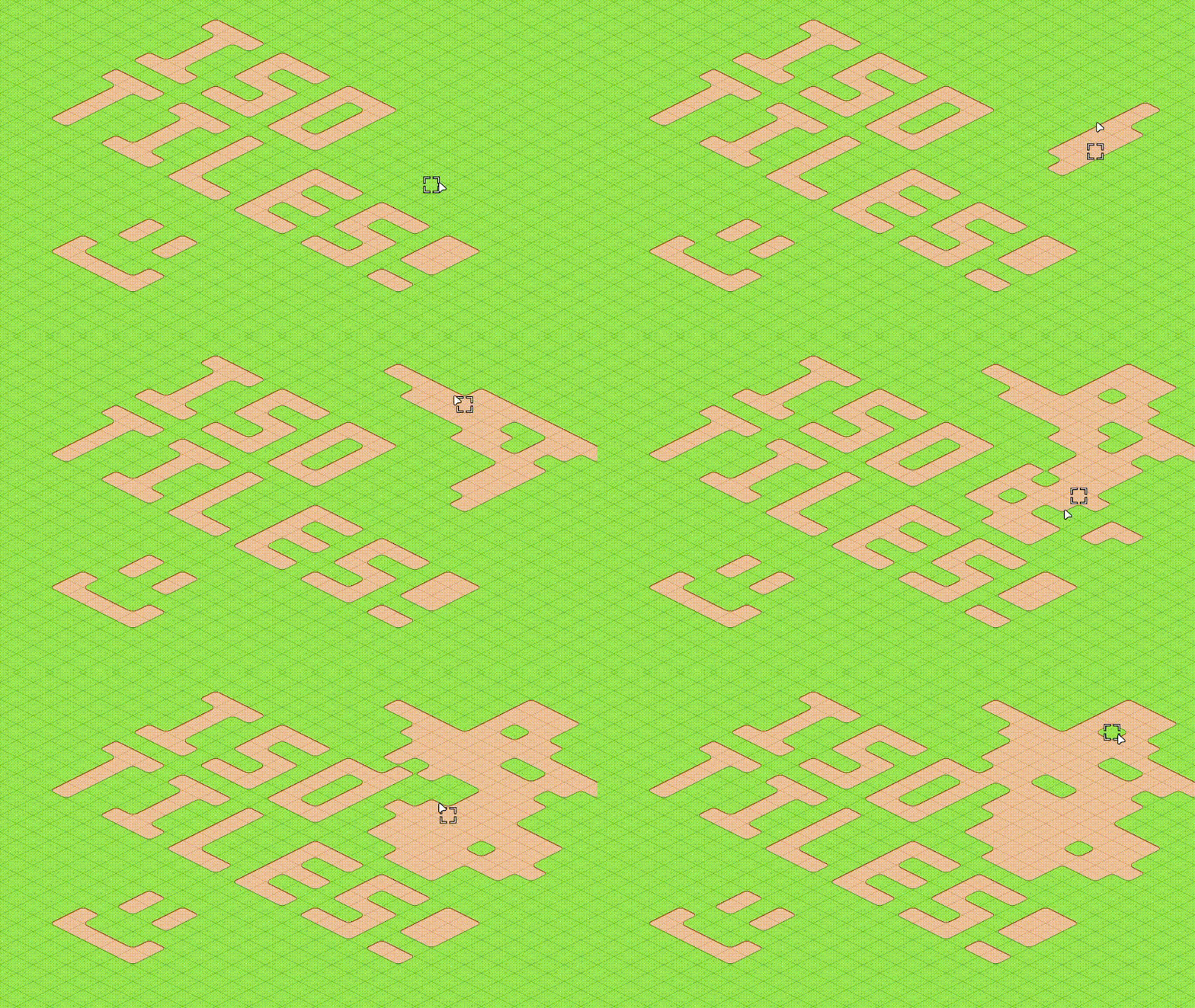
All grids are supported by TileMapDual. Square, isometric, hex... The only limit is your imagination!
Using a dual-grid system has the following advantages:
TileMapDual is installed as a regular Godot plugin.
Just copy the addons/TileMapDual folder to your Godot project, and enable it on Project, Project settings..., Plugins.
TileMapDual is loaded in the same way as a regular TileMapLayer node.
You have to create a TileMapDual node with your own tileset, and set it up with the appropriate tile shape and orientation, etc.
https://github.com/user-attachments/assets/2881ed29-fdb1-4954-a8f9-125d4168f455
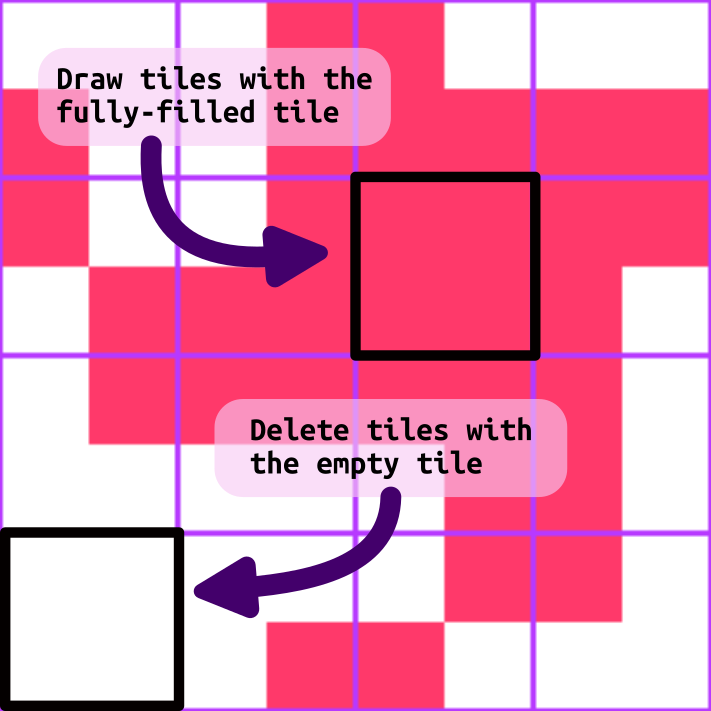
You can now start sketching your level with the fully-filled tile, indicated below for a square grid. You can also sketch with the empty tile in the bottom-left corner, or erase tiles as usual. The dual grid will update in real time as you draw!
You can find several example scenes for all kinds of grids in the examples/ folder.
To use isometric tilemaps, all you need to do is follow an isometric-ed version of the standard godot tileset template that we previously used for square tilemaps, as shown in the image below:

This isometric tileset can be drawn by hand. But it can also be drawn more easily using a tool like TileCropper, a Godot plugin that allows you to draw the tiles in one continuous image, to later separate the tiles as follows:
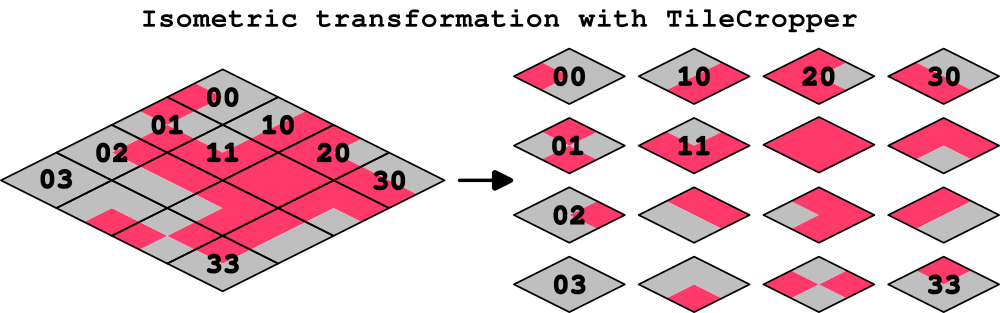
Check the first video on FAQ and Troubleshoot to see how to configure all kinds of grids.
To use more than two terrain types, it is highly encouraged to use multiple TileMapDual layers:
https://github.com/user-attachments/assets/f4c9bbb0-476b-448f-abae-ed5c36896cdb
To include extra data like collisions, pathing and such to your TileSet, it is recommended to use 2 separate spritesheets:
Here's how to set it up:
https://github.com/user-attachments/assets/d429e264-b59f-4d29-bc5b-ea487836d3ee
TileMapDual v5 was fully rewritten from the ground up. If you encounter issues, please report them on GitHub. For the time being, and to make the transition from v4 to v5 smoother, a custom TileMapDualLegacy node is available within the v5 version, containing the stable version from v4.0.3.
Note that this legacy version only supports square and isometric grids.
Please feel free to report issues and to open pull requests with your code contributions. You may want to check the contributing guidelines :D
More about how TileMapDual v5 works under the hood on the v5 discussion issue.
We thank all code contributors, as well as all issue contributions and of course all users out there, including you, beautiful person reading this. TileMapDual wouldn't be the same without you!
This repo is currently managed by:
pablogila (first dev)
raffimolero (since v5)
This plugin supports all the different tile shapes, layouts, and offset axes. Here's a rundown of all of them, with common mistakes and their corresponding fix:
https://github.com/user-attachments/assets/f6d5e5fc-4c05-4396-a771-5b971a775e72
You can then put hitboxes on the display tiles and logic such as pathing on the logical tiles. If your spritesheet doesn't follow the standard preset layout, you can manually set its terrains. Here is how to set up a Hexagonal Vertical tileset:
https://github.com/user-attachments/assets/caf224cf-cd7d-471f-b3f2-495704c5b65e
You can safely switch to a different tileset if you need to:
https://github.com/user-attachments/assets/cebe1b74-7e86-4961-8caa-1bab6195cb0e
You can use multiple atlases in the same TileSet, with a few quirks if you don't set up the terrains properly:
https://github.com/user-attachments/assets/777b4de7-29a0-479e-a992-2c9716cf0c64
In case you make mistakes, you can edit the terrain configuration and see the results in real-time:
https://github.com/user-attachments/assets/cba869dd-6d97-4fc7-beec-95022f9227b0
Some additional notes:
This project is Open Source Software, released under the MIT license. This basically means that you can do whatever you want with it. Enjoy!
35 followers · starred Dec 2024
51 followers · starred Sep 2024
154 followers · starred Nov 2025
25 followers · starred Oct 2024
An automatic, real-time dual-grid tileset system for Godot
GDScript
1,276
293 commits
updated Sep 3, 2026
We want YOU! TileMapDual v5 is here with lots of updates, including hex grid support. Please report any issues you may encounter, and feel free to check the current issues, open new pull requests and contribute with your own code! More info on the v5 discussion.
Welcome to TileMapDual: an automatic custom TileMapLayer node for Godot that provides a real-time, in-editor and in-game dual-grid tileset system, for all kinds of grids. Square, isometric, hex... The only limit is your imagination!
This dual-grid system, as explained by Oskar Stålberg, reduces the number of tiles required from 47 to just 15 (yes, fifteen!!), rocketing your dev journey!
Not only that, but if your tiles are symmetrical, you can get away with drawing only 6 (six!) tiles and then generating the 15-tile-tilesets used by TileMapDual, thanks to tools like Wang Tile Set Creator.
All grids are supported by TileMapDual. Square, isometric, hex... The only limit is your imagination!
Using a dual-grid system has the following advantages:
TileMapDual is installed as a regular Godot plugin.
Just copy the addons/TileMapDual folder to your Godot project, and enable it on Project, Project settings..., Plugins.
TileMapDual is loaded in the same way as a regular TileMapLayer node.
You have to create a TileMapDual node with your own tileset, and set it up with the appropriate tile shape and orientation, etc.
https://github.com/user-attachments/assets/2881ed29-fdb1-4954-a8f9-125d4168f455
You can now start sketching your level with the fully-filled tile, indicated below for a square grid. You can also sketch with the empty tile in the bottom-left corner, or erase tiles as usual. The dual grid will update in real time as you draw!
You can find several example scenes for all kinds of grids in the examples/ folder.
To use isometric tilemaps, all you need to do is follow an isometric-ed version of the standard godot tileset template that we previously used for square tilemaps, as shown in the image below:
This isometric tileset can be drawn by hand. But it can also be drawn more easily using a tool like TileCropper, a Godot plugin that allows you to draw the tiles in one continuous image, to later separate the tiles as follows:
Check the first video on FAQ and Troubleshoot to see how to configure all kinds of grids.
To use more than two terrain types, it is highly encouraged to use multiple TileMapDual layers:
https://github.com/user-attachments/assets/f4c9bbb0-476b-448f-abae-ed5c36896cdb
To include extra data like collisions, pathing and such to your TileSet, it is recommended to use 2 separate spritesheets:
Here's how to set it up:
https://github.com/user-attachments/assets/d429e264-b59f-4d29-bc5b-ea487836d3ee
TileMapDual v5 was fully rewritten from the ground up. If you encounter issues, please report them on GitHub. For the time being, and to make the transition from v4 to v5 smoother, a custom TileMapDualLegacy node is available within the v5 version, containing the stable version from v4.0.3.
Note that this legacy version only supports square and isometric grids.
Please feel free to report issues and to open pull requests with your code contributions. You may want to check the contributing guidelines :D
More about how TileMapDual v5 works under the hood on the v5 discussion issue.
We thank all code contributors, as well as all issue contributions and of course all users out there, including you, beautiful person reading this. TileMapDual wouldn't be the same without you!
This repo is currently managed by:
pablogila (first dev)
raffimolero (since v5)
This plugin supports all the different tile shapes, layouts, and offset axes. Here's a rundown of all of them, with common mistakes and their corresponding fix:
https://github.com/user-attachments/assets/f6d5e5fc-4c05-4396-a771-5b971a775e72
You can then put hitboxes on the display tiles and logic such as pathing on the logical tiles. If your spritesheet doesn't follow the standard preset layout, you can manually set its terrains. Here is how to set up a Hexagonal Vertical tileset:
https://github.com/user-attachments/assets/caf224cf-cd7d-471f-b3f2-495704c5b65e
You can safely switch to a different tileset if you need to:
https://github.com/user-attachments/assets/cebe1b74-7e86-4961-8caa-1bab6195cb0e
You can use multiple atlases in the same TileSet, with a few quirks if you don't set up the terrains properly:
https://github.com/user-attachments/assets/777b4de7-29a0-479e-a992-2c9716cf0c64
In case you make mistakes, you can edit the terrain configuration and see the results in real-time:
https://github.com/user-attachments/assets/cba869dd-6d97-4fc7-beec-95022f9227b0
Some additional notes:
This project is Open Source Software, released under the MIT license. This basically means that you can do whatever you want with it. Enjoy!
35 followers · starred Dec 2024
51 followers · starred Sep 2024
154 followers · starred Nov 2025
25 followers · starred Oct 2024



