
A powerful eBPF-based tool for monitoring and visualizing Goroutine events in realtime with a beautiful web UI!
xgotop allows you to observe what's happening inside your Go programs at the runtime level, without modifying your code or adding any instrumentation. It uses eBPF uprobes to hook into the Go runtime and capture goroutine lifecycle events, memory allocations, and scheduler activity as they happen.
Whether you're debugging a production issue, optimizing performance, or just curious about how your Go program behaves under the hood, xgotop gives you the visibility you need.
[!NOTE]
xgotoponly supportsarm64architecture for now, we will rollout support foramd64soon!
Running xgotop is relatively straightforward. Get a Go binary ready, and run each of the commands below in a separate terminal:
# Compile the xgotop program
make compile

# Run web UI in a terminal
make web-dev

# Run xgotop with the binary path or the PID of a running program
sudo ./xgotop -b <GO_BINARY_PATH> -web
sudo ./xgotop -pid <PROCESS_ID> -web
Then open localhost:5173, and you will see this screen:
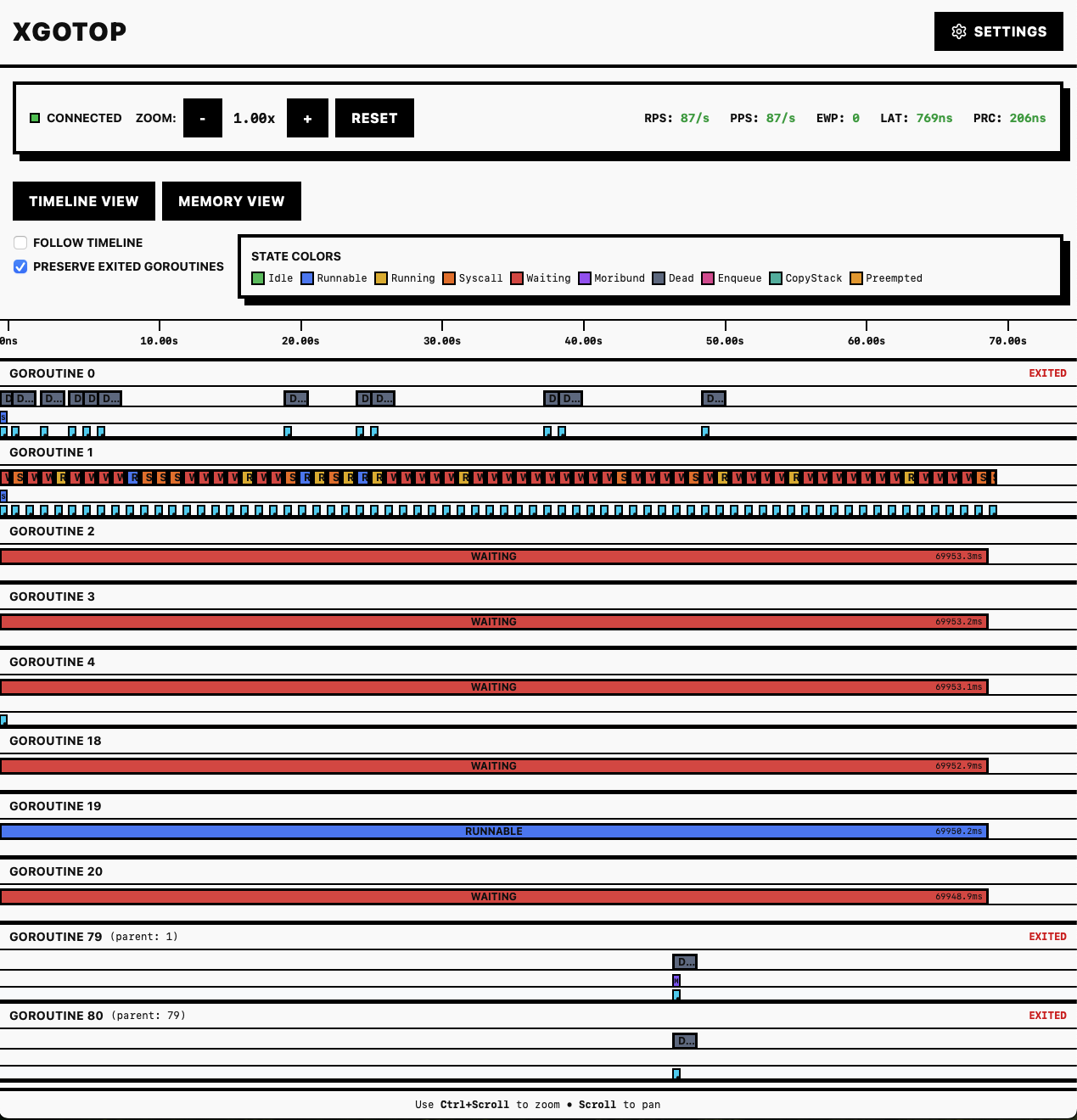
For more advanced xgotop runtime options such as sampling, see the Advanced Usage section below.
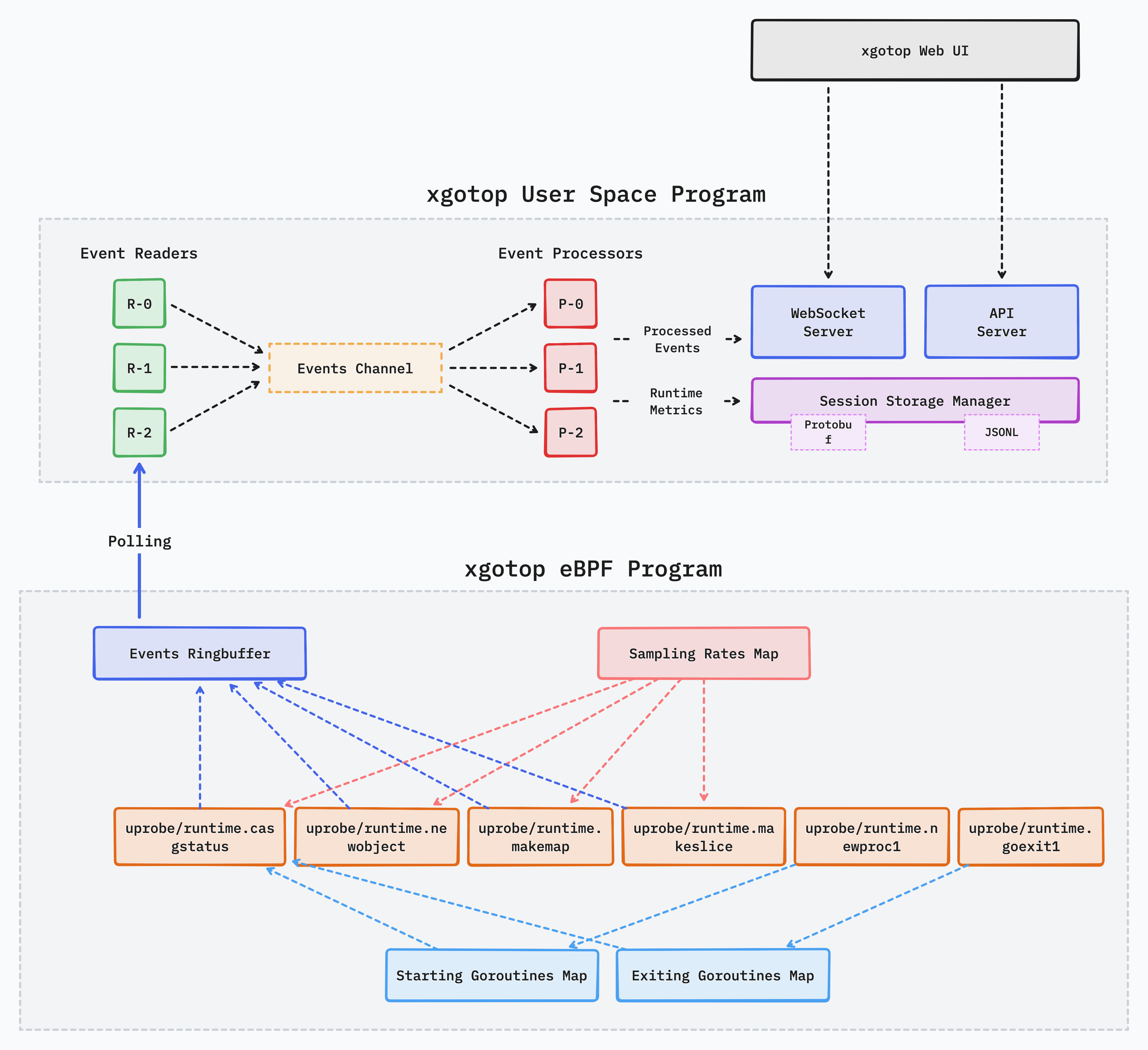
xgotop works by attaching eBPF uprobes to key functions inside the Go runtime. When you run xgotop with a specified Go binary or a running process, the following steps happen:
The kernel-level eBPF program attaches user space probes to several Go runtime functions to trace goroutine lifecycle events
Each time a goroutine is created, exits, or allocates memory, the eBPF program records the event with metadata like goroutine ID, timestamp, stack size, and more
These events are streamed to the user space via an eBPF ringbuffer. The xgotop process running in user space reads these events in realtime.
Read and processed events are stored in either Protobuf (for efficient storage) or JSONL (for better readability) format. Each monitoring session gets its own directory in sessions/ with a unique session ID.
Processed events are served over WebSockets to the web UI. The UI connects to xgotop's built-in HTTP server and receives events as they happen, and displays them in a detailed timeline view.
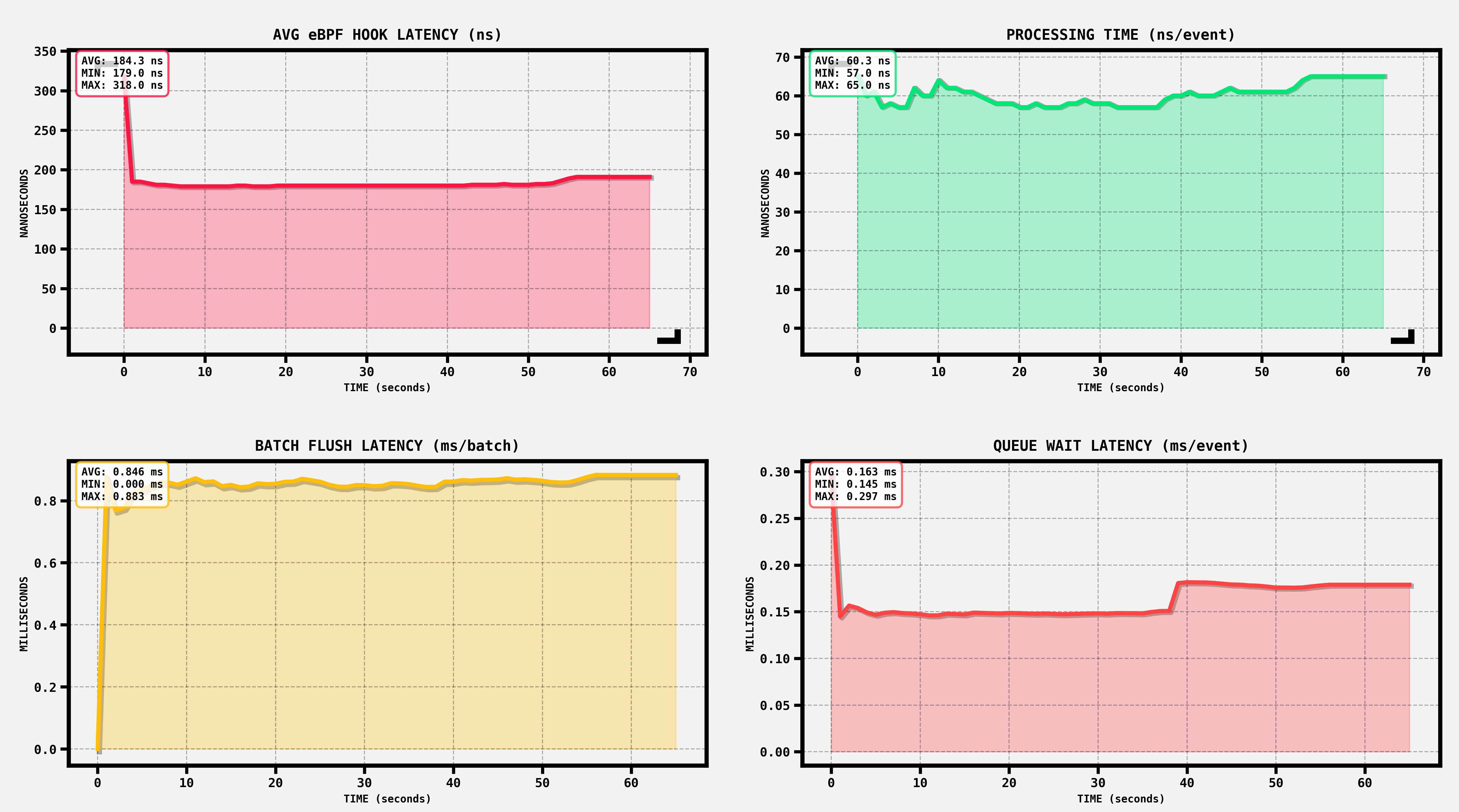
xgotop captures several key metrics about itself to help you understand the overhead and performance characteristics of the monitoring process. The chart above shows metrics from a test run with 16 event readers, 1 event processor and Protobuf storage.
LAT (Latency): The average time an eBPF hook takes to run. This is simply the overhead added to the observed Go program. Lower is better. Enabling debugging in the eBPF program enables bpf printk calls and increases LAT.
RPS (Reads Per Second): The number of eBPF events that xgotop reads from the ringbuffer per second. This depends on how active your Go program is. More goroutines and allocations mean higher RPS.
PPS (Processed Per Second): Similar to RPS, but specifically counts the number of events processed by the userspace program. A high difference between RPS and PPS means increased userspace event queue backpressure (see EWP below) and eventually failed eBPF ringbuffer sends.
EWP (Events Waiting to be Processed): Number of events waiting to be processed in the userspace event queue (channel). Increasing EWP means that the userspace event processors cannot keep up with the speed of event generation in kernel level. Ideally, PRC (see below) should be higher than EWP for this to happen.
PRC (Processing Time): The average time an event processor takes to process a single event. This includes basic event processing and transforming to other internal structures, and sending the event to storage manager and the API/Ws servers.
The exact metrics you'll see depend on your Go program's behavior, the sampling rate, and whether you're using the web UI or just storing events to disk.
xgotop provides several CLI flags to customize its behavior. Here's the complete list of options:
# Attach to a binary
-b <path>           Path to the Go binary to monitor

# Attach to a running process
-pid <pid>          PID of the running Go process to monitor

# Silent mode (no console output)
-s                  Enable silent mode, useful for performance testing

# Event reader workers (default: 3)
-rw <count>         Number of ringbuffer read workers
                    More workers can handle higher event rates

# Event processor workers (default: 5)
-pw <count>         Number of event processing workers
                    These workers transform raw events to storage format

# Enable web UI support
-web                Enable web mode with API server and WebSocket
-web-port <port>    Port for the web API server (default: 8080)

# Storage format
-storage-format <format>     Storage format: "protobuf" or "jsonl" (default: protobuf)
                             Protobuf is faster and more space-efficient

# Storage location
-storage-dir <path>          Directory for session data (default: ./sessions)

# Batch configuration
-batch-size <size>           Number of events to batch before writing (default: 1000)
                             Higher values reduce I/O but increase memory usage

-batch-flush-interval <dur>  Max time to wait before flushing (default: 100ms)
                             Ensures events are written even with low activity
The sampling feature is one of the most powerful ways to reduce overhead when monitoring high throughput applications. Instead of capturing every single Go runtime goroutine event, you can configure xgotop to sample events at specific rates inside the eBPF program using the '-sample' flag:
-sample <rates>
You can sample the following event types:
newgoroutine: Goroutine creationgoexit: Goroutine exitmakemap: Map allocationmakeslice: Slice allocationnewobject: Object allocationcasgstatus: Goroutine status changeThe sampling format is a comma separated list of event:rate pairs, where rate is a float between 0.0 and 1.0.
Examples:
# Sample 10% of goroutine creations
sudo ./xgotop -pid 48 -sample "newgoroutine:0.1"

# Sample multiple event types at different rates
sudo ./xgotop -pid 48 -sample "newgoroutine:0.5,makemap:0.2,makeslice:0.1"

# Sample only specific events (others are not captured)
sudo ./xgotop -pid 48 -sample "newgoroutine:0.8,goexit:0.8"
xgotop comes with several test suites to validate its functionality and measure performance characteristics. All tests use the included testserver binary, which is a simple HTTP API server with a single endpoint.
The sampling test validates that the sampling feature works correctly by running xgotop with different sampling rates and comparing the results.
make samplingtest
This will:
Run 6 different test scenarios with various sampling configurations
Generate 5000 HTTP requests to the testserver for each scenario
Save metrics to sampling_test_results/ directory
Automatically validate that the sampling rates match expectations using validate_sampling.py
The validation script compares the baseline (100% sampling) event counts with the sampled run event counts and verifies that they match the configured sampling rates within the acceptable tolerance (5% of the baseline metrics).
This test measures the overhead of different xgotop configurations with and without the web UI enabled.
make weboverheadtest
This will:
Test multiple configurations:
Generate 50K HTTP requests in flood mode
Measure performance metrics (RPS, PPS, LAT, etc.)
Save results to web_overhead_test_results/ directory
Generate comparison plots showing how different configurations affect overhead
The plots will show how metrics like latency, throughput, and processing time scale with the number of workers and which storage format performs better.
The buffer test helps finding the optimal batch size for event processing.
make buffertest
This will:
Test various batch sizes: 500, 1000, 2000, 4000, 8000, 16000, 32000, 64000
Run with both JSONL and Protobuf storage formats
Test only with web mode enabled
Generate 50K HTTP requests in flood mode
Save results and generate plots comparing batch sizes
117 followers · starred Dec 2025
197 followers · starred Dec 2025
199 followers · starred Apr 2026
122 followers · starred Apr 2026
A powerful eBPF-based tool for monitoring and visualizing Goroutine events in realtime with a beautiful web UI!
xgotop allows you to observe what's happening inside your Go programs at the runtime level, without modifying your code or adding any instrumentation. It uses eBPF uprobes to hook into the Go runtime and capture goroutine lifecycle events, memory allocations, and scheduler activity as they happen.
Whether you're debugging a production issue, optimizing performance, or just curious about how your Go program behaves under the hood, xgotop gives you the visibility you need.
[!NOTE]
xgotoponly supportsarm64architecture for now, we will rollout support foramd64soon!
Running xgotop is relatively straightforward. Get a Go binary ready, and run each of the commands below in a separate terminal:
# Compile the xgotop program
make compile

# Run web UI in a terminal
make web-dev

# Run xgotop with the binary path or the PID of a running program
sudo ./xgotop -b <GO_BINARY_PATH> -web
sudo ./xgotop -pid <PROCESS_ID> -web
Then open localhost:5173, and you will see this screen:
For more advanced xgotop runtime options such as sampling, see the Advanced Usage section below.
xgotop works by attaching eBPF uprobes to key functions inside the Go runtime. When you run xgotop with a specified Go binary or a running process, the following steps happen:
The kernel-level eBPF program attaches user space probes to several Go runtime functions to trace goroutine lifecycle events
Each time a goroutine is created, exits, or allocates memory, the eBPF program records the event with metadata like goroutine ID, timestamp, stack size, and more
These events are streamed to the user space via an eBPF ringbuffer. The xgotop process running in user space reads these events in realtime.
Read and processed events are stored in either Protobuf (for efficient storage) or JSONL (for better readability) format. Each monitoring session gets its own directory in sessions/ with a unique session ID.
Processed events are served over WebSockets to the web UI. The UI connects to xgotop's built-in HTTP server and receives events as they happen, and displays them in a detailed timeline view.
xgotop captures several key metrics about itself to help you understand the overhead and performance characteristics of the monitoring process. The chart above shows metrics from a test run with 16 event readers, 1 event processor and Protobuf storage.
LAT (Latency): The average time an eBPF hook takes to run. This is simply the overhead added to the observed Go program. Lower is better. Enabling debugging in the eBPF program enables bpf printk calls and increases LAT.
RPS (Reads Per Second): The number of eBPF events that xgotop reads from the ringbuffer per second. This depends on how active your Go program is. More goroutines and allocations mean higher RPS.
PPS (Processed Per Second): Similar to RPS, but specifically counts the number of events processed by the userspace program. A high difference between RPS and PPS means increased userspace event queue backpressure (see EWP below) and eventually failed eBPF ringbuffer sends.
EWP (Events Waiting to be Processed): Number of events waiting to be processed in the userspace event queue (channel). Increasing EWP means that the userspace event processors cannot keep up with the speed of event generation in kernel level. Ideally, PRC (see below) should be higher than EWP for this to happen.
PRC (Processing Time): The average time an event processor takes to process a single event. This includes basic event processing and transforming to other internal structures, and sending the event to storage manager and the API/Ws servers.
The exact metrics you'll see depend on your Go program's behavior, the sampling rate, and whether you're using the web UI or just storing events to disk.
xgotop provides several CLI flags to customize its behavior. Here's the complete list of options:
# Attach to a binary
-b <path>           Path to the Go binary to monitor

# Attach to a running process
-pid <pid>          PID of the running Go process to monitor

# Silent mode (no console output)
-s                  Enable silent mode, useful for performance testing

# Event reader workers (default: 3)
-rw <count>         Number of ringbuffer read workers
                    More workers can handle higher event rates

# Event processor workers (default: 5)
-pw <count>         Number of event processing workers
                    These workers transform raw events to storage format

# Enable web UI support
-web                Enable web mode with API server and WebSocket
-web-port <port>    Port for the web API server (default: 8080)

# Storage format
-storage-format <format>     Storage format: "protobuf" or "jsonl" (default: protobuf)
                             Protobuf is faster and more space-efficient

# Storage location
-storage-dir <path>          Directory for session data (default: ./sessions)

# Batch configuration
-batch-size <size>           Number of events to batch before writing (default: 1000)
                             Higher values reduce I/O but increase memory usage

-batch-flush-interval <dur>  Max time to wait before flushing (default: 100ms)
                             Ensures events are written even with low activity
The sampling feature is one of the most powerful ways to reduce overhead when monitoring high throughput applications. Instead of capturing every single Go runtime goroutine event, you can configure xgotop to sample events at specific rates inside the eBPF program using the '-sample' flag:
-sample <rates>
You can sample the following event types:
newgoroutine: Goroutine creationgoexit: Goroutine exitmakemap: Map allocationmakeslice: Slice allocationnewobject: Object allocationcasgstatus: Goroutine status changeThe sampling format is a comma separated list of event:rate pairs, where rate is a float between 0.0 and 1.0.
Examples:
# Sample 10% of goroutine creations
sudo ./xgotop -pid 48 -sample "newgoroutine:0.1"

# Sample multiple event types at different rates
sudo ./xgotop -pid 48 -sample "newgoroutine:0.5,makemap:0.2,makeslice:0.1"

# Sample only specific events (others are not captured)
sudo ./xgotop -pid 48 -sample "newgoroutine:0.8,goexit:0.8"
xgotop comes with several test suites to validate its functionality and measure performance characteristics. All tests use the included testserver binary, which is a simple HTTP API server with a single endpoint.
The sampling test validates that the sampling feature works correctly by running xgotop with different sampling rates and comparing the results.
make samplingtest
This will:
Run 6 different test scenarios with various sampling configurations
Generate 5000 HTTP requests to the testserver for each scenario
Save metrics to sampling_test_results/ directory
Automatically validate that the sampling rates match expectations using validate_sampling.py
The validation script compares the baseline (100% sampling) event counts with the sampled run event counts and verifies that they match the configured sampling rates within the acceptable tolerance (5% of the baseline metrics).
This test measures the overhead of different xgotop configurations with and without the web UI enabled.
make weboverheadtest
This will:
Test multiple configurations:
Generate 50K HTTP requests in flood mode
Measure performance metrics (RPS, PPS, LAT, etc.)
Save results to web_overhead_test_results/ directory
Generate comparison plots showing how different configurations affect overhead
The plots will show how metrics like latency, throughput, and processing time scale with the number of workers and which storage format performs better.
The buffer test helps finding the optimal batch size for event processing.
make buffertest
This will:
Test various batch sizes: 500, 1000, 2000, 4000, 8000, 16000, 32000, 64000
Run with both JSONL and Protobuf storage formats
Test only with web mode enabled
Generate 50K HTTP requests in flood mode
Save results and generate plots comparing batch sizes
117 followers · starred Dec 2025
197 followers · starred Dec 2025
199 followers · starred Apr 2026
122 followers · starred Apr 2026



