Self-hosted AI clipper: long-form video to vertical shorts with face-tracked reframing, verified filler cuts and captions
See the code






Self-hosted, AI-powered long-form → short-form video clipper. Paste a YouTube link or upload a video; Reelsaw transcribes it, asks an LLM for the most clippable moments, then renders vertical 9:16 clips with word-highlight captions and a hook overlay.
Pure TypeScript. Any AI vendor via the AI SDK. One-step deploy with Docker Compose.

One video through the five queues: ingest → transcribe → refine ×3 → pick moments → render. A worker restarts mid-render and resumes from its last save. Full-quality MP4, or play it on reelsaw.com.
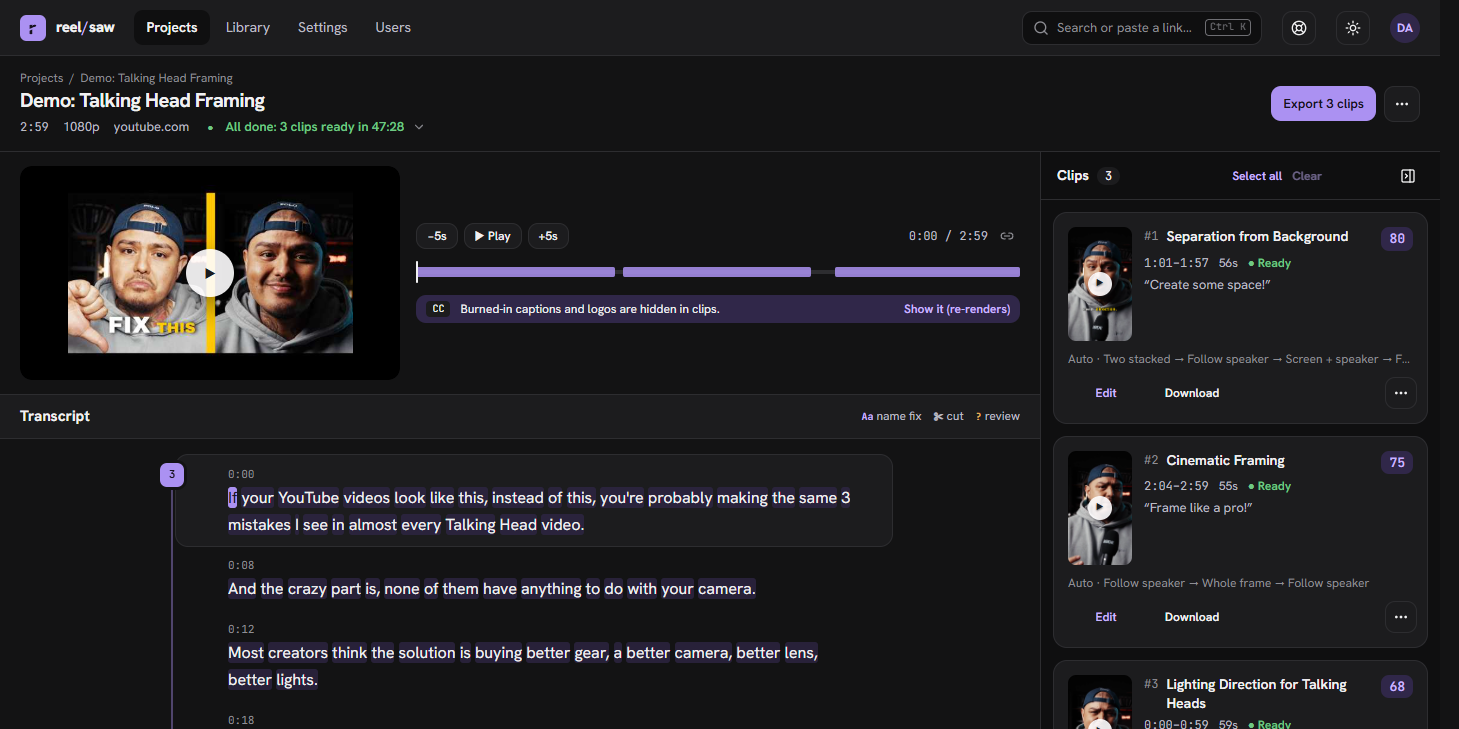
Auto reframing in one clip: split → face → stack → fit
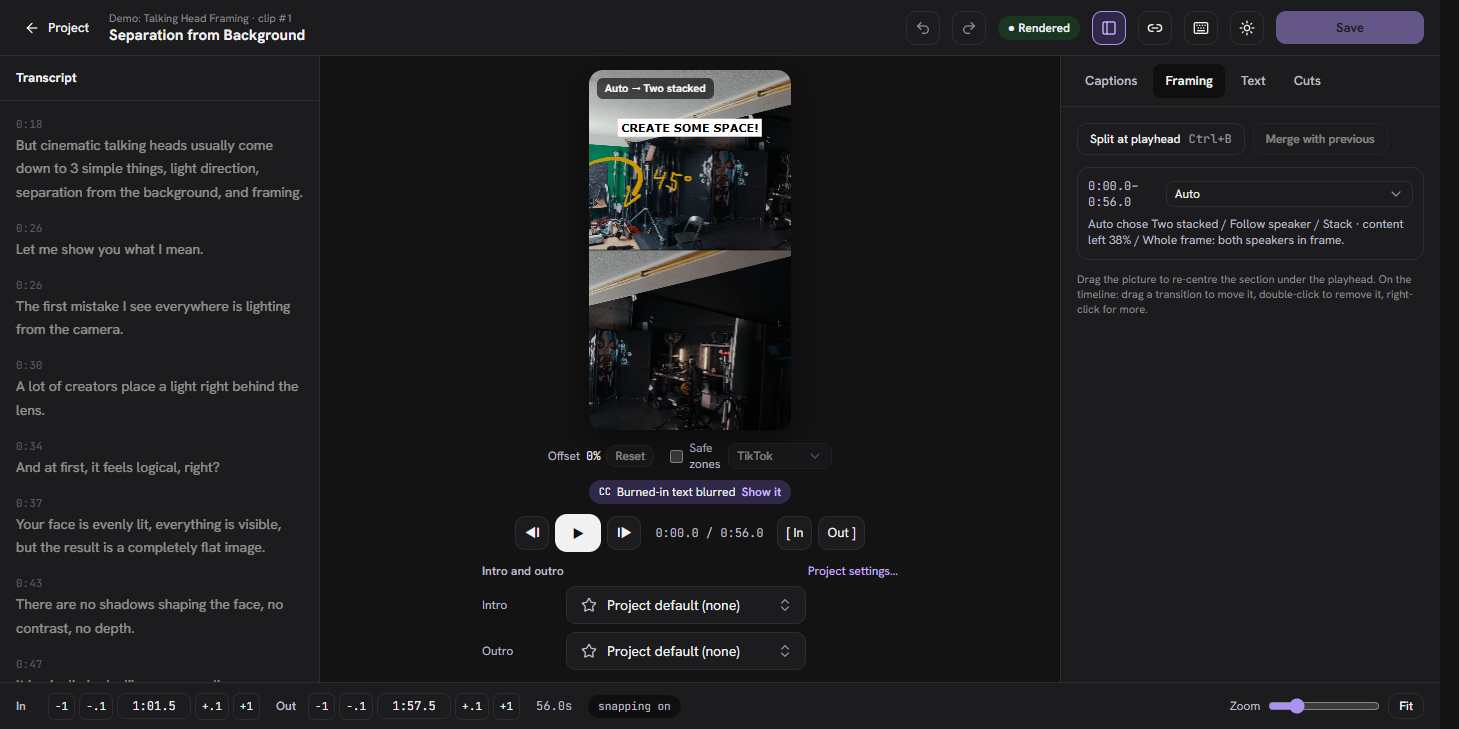
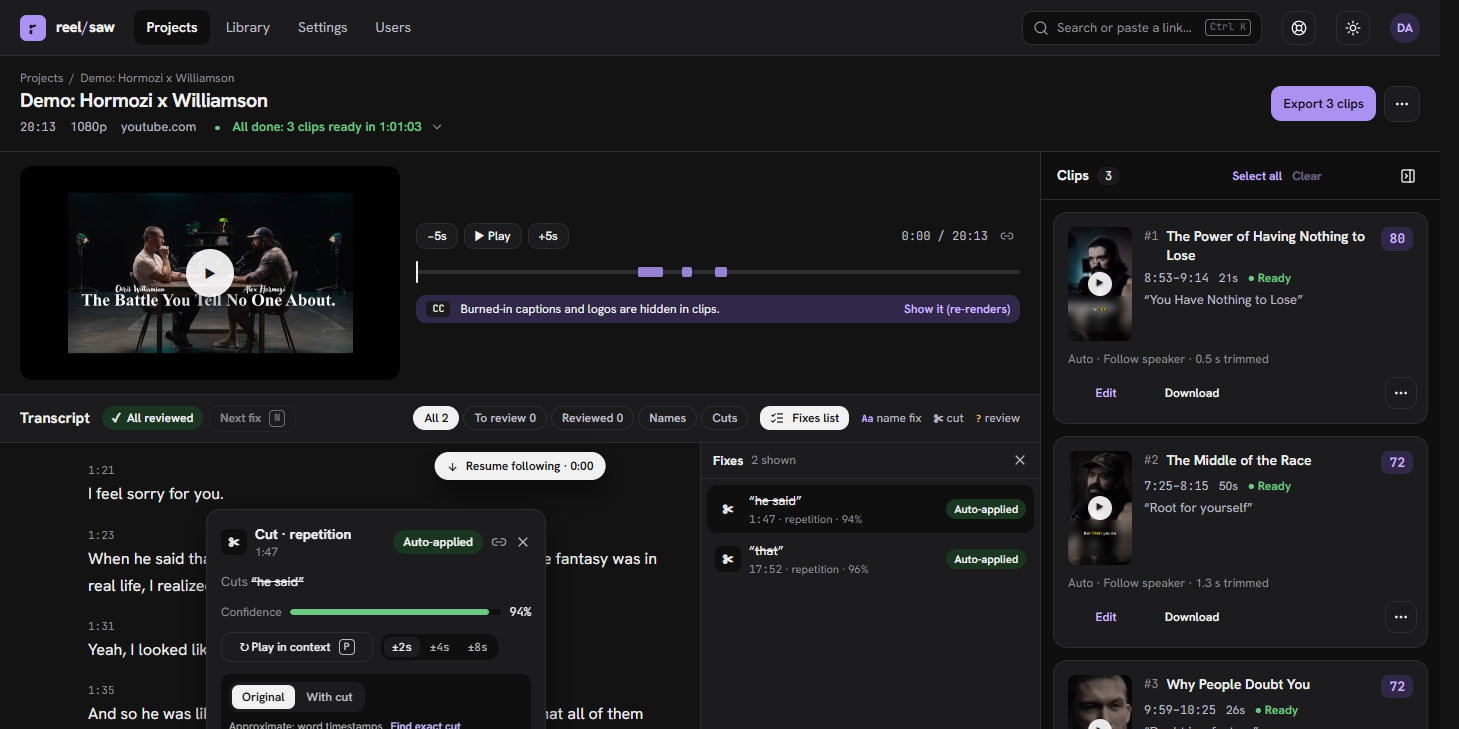
Pipeline
provider:model string: OpenAI, Anthropic, Google, Groq, Deepgram, AssemblyAI, Vercel AI Gateway, or any OpenAI-compatible server (Ollama, vLLM, LM Studio, local Whisper servers). Fully local with no API keys is supported.ANALYZE_PAIRWISE_PASSES, default 3 so the top 3 you see first are placed reliably) with positions swapped to cancel judge bias. Cost: at most Σ(n−1−p) pairs × 2 calls, i.e. 48 calls for the top 10 with 3 passes (18 with 1); pairs met twice are judged once. No target count: in auto mode weak picks are dropped by a gate relative to the run, not a fixed number, because pointwise scores do not transfer between judge models: a clip is dropped below max(ANALYZE_MIN_SCORE_FLOOR = 25, median − ANALYZE_SCORE_MAD_K = 1 × MAD) of the pooled rubric totals, and the best clip is always kept (ANALYZE_SCORE_RULE=absolute restores the old fixed 45). The threshold and its median/MAD are in the project's candidates artifact. Candidates whose scoring failed are never compared with rubric totals; they only fill in when fewer than 3 scored clips survive. Optional "at most N" cap, and "Find clips about …" keeps only on-topic moments. Click a clip's score for the breakdown. ANALYZE_JUDGE_MODEL lets a different model score and compare (less self-preference than judging its own hooks). ANALYZE_CONCURRENCY, ANALYZE_SCORE_SAMPLES, ANALYZE_PAIRWISE tune cost (auto: 1 call at a time, 1 sample, no pairwise for a self-hosted judge; 4 / 3 / on for cloud).onnxruntime-node) samples each clip at 4 fps and picks a layout per segment (clips are split at scene cuts and face-presence changes, so a picture-in-picture intro can be "fit" and the talking head after it "face"): face (crop follows the speaker with "heavy tripod" smoothing: dead zone, capped pan speed, instant snap at scene cuts), split (two speakers stacked), stack (slides/screen on top, zoomed webcam below), or fit (whole frame over a blurred background when there is no face, e.g. graphics and b-roll). With two people in a wide shot the crop follows whoever is talking (mouth motion correlated with the audio envelope, minimum 2.5 s per shot), falling back to a split when detection isn't confident. Override per project or per clip. Reference for every layout, its triggers, caveats and fixtures: docs/LAYOUTS.md.Editing
DELETED_RETENTION_DAYS (7) before its files are removed. Re-picking moments keeps every clip you made or edited (text, bounds, framing, style, intro/outro) and only replaces untouched AI picks, which can be restored too. Single clips can be deleted and restored the same way. The same through MCP (delete_clip, restore_project, restore_clip) and the CLI (reelsaw deleted, restore, delete-clip, restore-clip, purge)..txt (title, description, tags, caption), a .youtube.json (YouTube Data API v3 videos.insert body, private by default) and a .tiktok.json (Content Posting API post_info, SELF_ONLY) per clip, plus manifest.json, clips.csv (with rendered duration) and a README. Descriptions carry a timestamped link to the exact moment in the parent video.Intros and outros
Agents and automation
/api/mcp (Streamable HTTP) lets Claude Code, Claude Desktop, Cursor or a script create projects, wait for them, read timed transcripts, edit, create and re-render clips, manage the intro/outro library and download the results. Authenticate with an API key from Settings, or with MCP_OAUTH=true so claude.ai and Claude Desktop connectors sign in through the browser.docker compose exec app reelsaw … inspects and fixes a running instance: status, events, clip, rerender, stuck, recover, logs, cuts, align, hear, flags, storage, retention, deleted, restore, purge, users, approve, make-admin, bumpers, import-report and more (every command is in Operator CLI).Hosting and accounts
SIGNUP_MODE=open|approval|closed decides who gets in, and admins approve, suspend, promote and remove people on the Users page, with usage per account (projects, source minutes, clips, model calls and tokens, stored bytes). Optional per-user quotas, retention of old files, captcha on sign-in, email (approval notices, password reset, verification) and terms/privacy links. Everyone has their own Project defaults (vocabulary, instructions, language, clip length, pauses, caption style, intro and outro) and API keys.Operations
worker containers to scale. Every run (first pass, retry, re-render, re-analyze) is recorded with its own timings, and the UI shows elapsed against expected time per stage, learned from your finished projects. The browser gets live updates over a tRPC SSE subscription with automatic reconnect.s3 (AWS S3, MinIO, Cloudflare R2, Backblaze B2…); superseded renders, expired sources and orphaned files are swept hourly (reelsaw storage reports, reelsaw storage sweep runs it). One-line installers for macOS/Linux (bash) and Windows (PowerShell), and Report an issue saves a zip of a project's data, decisions and logs, with secrets left out.main and self-checks, so the process exits with a readable reason if a model id is wrong, a key is missing, a binary is absent, the bucket is unreachable or the DB is down. LLM_TRACE=logs or langfuse captures every prompt/response (tokens, latency, project/clip/stage), and OTEL_ENABLED=true turns on OTLP traces and metrics for HTTP, Postgres, pg-boss jobs, AI SDK calls, ffmpeg/yt-dlp and each stage.See CONTRIBUTING.md (principles, tests, sign-off). Roadmap for learning from user decisions: docs/SELF-IMPROVEMENT.md.
Read docs/PRINCIPLES.md first: the consistency, concurrency and UI rules every change follows. Agent instructions live in AGENTS.md / CLAUDE.md.
Needs Docker (Docker Desktop on macOS and Windows). One command: it looks at the machine (RAM, GPU, Docker's memory, free disk, an Ollama already running and the models it has, the port), proposes a setup, asks three questions in a terminal (local Ollama or a hosted provider, which model, go ahead) and installs Ollama for you (Homebrew, ollama.com or winget) if you pick local and it is missing:
curl -fsSL https://raw.githubusercontent.com/osbytes/reelsaw/main/deploy/install.sh | bash
On Windows (Docker Desktop), in PowerShell:
irm https://raw.githubusercontent.com/osbytes/reelsaw/main/deploy/install.ps1 | iex
WSL2 users can run the bash one-liner as is (with Docker Desktop's WSL integration on).
It writes ~/reelsaw (compose file + .env with generated secrets), pulls the published image and
the model, starts everything and waits until http://localhost:3000 answers (or the next free port).
Fully local is the default when the machine can carry a useful model: qwen2.5:14b (~9 GB) with
24 GB of RAM or a 12 GB GPU, qwen2.5:7b from 12 GB, gemma3:4b below that, and a good model that
Ollama already has is reused instead of downloaded; with an NVIDIA GPU and the container toolkit,
Ollama and Speaches run on the GPU (and renders encode with NVENC; see "Using a GPU" below). Hosted
providers (OpenAI, Anthropic, Google, Groq, Vercel AI Gateway) are a choice in the same prompt: the
key is asked for and never echoed, and Anthropic and Google pair with local Speaches for
speech-to-text. Without a terminal, or with REELSAW_YES=1, the proposed answers are taken;
REELSAW_AI, REELSAW_LLM, REELSAW_PORT and friends answer in advance and REELSAW_DRY_RUN=1
prints the plan and stops (every option is listed at the top of the script).
Manual setup: deploy/README.md.
The scripts are deploy/install.sh and deploy/install.ps1;
they are served from main (see docs/RELEASING.md).
git clone <this repo> reelsaw && cd reelsaw
cp .env.example .env
# edit .env: set BETTER_AUTH_SECRET, APP_URL, and at least one AI provider key
docker compose up -d --build
Open http://localhost:3000, create an account (it becomes the admin), start a project. Set SIGNUP_MODE=closed or approval afterwards if the instance is public.
Scale workers:
docker compose --profile workers up -d --scale worker=2
Use MinIO for local S3 testing:
docker compose --profile minio up -d
# then in .env: STORAGE_DRIVER=s3 S3_ENDPOINT=http://minio:9000 S3_FORCE_PATH_STYLE=true S3_BUCKET=reelsaw S3_ACCESS_KEY_ID=reelsaw S3_SECRET_ACCESS_KEY=reelsaw123
(Create the bucket once via the MinIO console at http://localhost:9001.)
The language model and the transcription model are independent; mix vendors freely (Anthropic has no speech-to-text, so pair it with Deepgram/OpenAI/AssemblyAI/Groq). Each needs only its own key.
| Env | Example values |
|---|---|
AI_MODEL | openai:gpt-4o-mini, anthropic:claude-sonnet-4-5, google:gemini-2.5-flash, groq:llama-3.3-70b-versatile, gateway:anthropic/claude-sonnet-4-5, compat:qwen2.5:14b |
TRANSCRIPTION_MODEL | openai:whisper-1, deepgram:nova-3, assemblyai:best, groq:whisper-large-v3-turbo |
The transcription model must return word timestamps (captions and cuts need them), so openai:gpt-4o-transcribe, which returns none, is not supported.
Ollama only serves language models; it has no speech-to-text. So the local stack is Ollama for AI_MODEL plus Speaches (faster-whisper behind an OpenAI-compatible API, word timestamps supported) for TRANSCRIPTION_MODEL. Both ship as a compose profile:
docker compose --profile local-ai up -d            # Speaches; use your native Ollama (macOS: Metal GPU)
docker compose --profile local-ai --profile ollama up -d   # Linux: also run Ollama in a container
ollama pull qwen2.5:14b                            # or: docker compose exec ollama ollama pull qwen2.5:14b
.env:
AI_MODEL=compat:qwen2.5:14b            # qwen2.5:7b or gemma3:4b on less RAM
OPENAI_COMPATIBLE_BASE_URL=http://host.docker.internal:11434/v1   # native Ollama; http://ollama:11434/v1 for the container
OPENAI_COMPATIBLE_API_KEY=ollama
TRANSCRIPTION_MODEL=openai:Systran/faster-whisper-small
OPENAI_BASE_URL=http://speaches:8000/v1
OPENAI_API_KEY=local
Notes: the app requests response_format: json_schema from the compat server (OPENAI_COMPATIBLE_STRUCTURED_OUTPUTS=false to disable) and falls back to lenient parsing when a model ignores it, but small models still pick weak moments and write bland hooks. gemma3 4b works; qwen2.5 14b (the installer's default on 24 GB or more), llama3.1 8b or gemma3 12b are noticeably better. On first boot the app auto-downloads the whisper model into Speaches and verifies the Ollama model is pulled (it exits with ollama pull <model> otherwise). Speaches CPU with faster-whisper-small runs roughly real-time; use the latest-cuda image and faster-whisper-large-v3 on a GPU. The OPENAI_* variables are reused for Speaches because it speaks the OpenAI audio API, which is why the LLM goes through the compat provider instead.
Three things can use one, each in its own container, so the GPU is a Compose override rather than
a different image: docker-compose.gpu.yml reserves every NVIDIA device for speaches, ollama,
app and worker. Host side you need the NVIDIA driver (nvidia-smi works) and the
NVIDIA Container Toolkit
(sudo nvidia-ctk runtime configure --runtime=docker && sudo systemctl restart docker; on Windows,
Docker Desktop on WSL2 with the Windows driver only). Then in .env:
# Linux/macOS (colon). On Windows use a semicolon: docker-compose.yml;docker-compose.gpu.yml
COMPOSE_FILE=docker-compose.yml:docker-compose.gpu.yml
SPEACHES_IMAGE=ghcr.io/speaches-ai/speaches:latest-cuda
WHISPER_MODEL=Systran/faster-whisper-large-v3      # or deepdml/faster-whisper-large-v3-turbo-ct2
TRANSCRIPTION_MODEL=openai:Systran/faster-whisper-large-v3
and docker compose --profile local-ai up -d as before. What changes:
large-v3 in a fraction of real time,
where small on a CPU was about real time (the transcribe factor in the table below).ollama container (--profile ollama).
A native Ollama (macOS, or Linux on the host) already uses the GPU on its own.h264_nvenc instead of libx264: FFMPEG_ENCODER=auto probes it at boot and
keeps libx264 when the card is not there. Filters (crops, blur, captions) still run on the CPU, and
render was already the short stage, so expect seconds, not minutes. A hardware encode that fails
mid-clip (NVENC session limit, driver reset) is redone with libx264 for that clip.ONNX_EXECUTION_PROVIDER=cuda
moves them, but the published image carries no CUDA libraries for onnxruntime, and on Apple silicon
CoreML measured slower than the CPU for all three; see docs/CONFIG.md.Settings → System → Overview and docker compose exec app reelsaw machine show the GPU the app
process sees, the encoder in use and why, and where each on-device model runs. macOS has no CUDA in
Docker: run Ollama natively for Metal, and leave Speaches on the CPU (or point OPENAI_BASE_URL at a
whisper.cpp or MLX server running on the host, which speaks the same API).
Every stage scales with the length of the video. Expected seconds for a stage ≈ video seconds × factor, where the factor depends on the models (local vs vendor) and your machine:
| stage | what sets the factor | local CPU (measured¹) | vendor (measured²) |
|---|---|---|---|
| download | your bandwidth and the site | 0.015 | 0.015 |
| transcribe | whisper size on CPU/GPU, or the STT vendor | 0.25 | 0.065 |
| refine (fillers, names) | LLM latency × number of candidate windows | 0.5 | 0.03 |
| find moments | LLM latency × (video minutes ÷ 5 + 1) calls | 0.2 | 0.02–0.07 |
| render | ffmpeg + face tracking per clip, ÷ render concurrency | 0.04 (3 clips) | 0.05 (3 clips) |
Rule of thumb: a vendor stack finishes a video in about a fifth of its length; a local CPU stack takes about as long as the video. Refine runs alongside finding moments, so the stages don't add up exactly.
¹ Apple-silicon laptop, qwen2.5:14b on Ollama + faster-whisper-small on Speaches (CPU), 20-minute podcast: download 15 s, transcribe 4.9 min, refine 10 min, find moments 4 min, render 47 s; 20 min in all. On a local 14B model the disfluency verifier (one call per candidate, ~40 s each) is the bottleneck, not transcription; a smaller model or DISFLUENCY_LLM=false cuts refine to a fraction. ² Same video through the Vercel AI Gateway, whisper-1 + claude-haiku-4.5: download 13 s, transcribe 77 s, refine 31 s, find moments 24 s, render 56 s; 3.4 min in all. Gemini 2.5 Flash took 5 min (long "thinking" outputs), Sonnet 4.5 about 4. Mixing a vendor LLM with a local TRANSCRIPT_ALIGN_MODEL makes render the slowest stage (5–9 min: every cut is re-aligned on the CPU); keep alignment on the same vendor as transcription. Full numbers in eval/bench/results/.
These factors are only the starting point. The app learns from its own finished projects: each stage's expected time is the median over your recent projects that ran with the same models, shown next to the elapsed time on the project page while it runs, in the activity feed when a stage finishes (Transcribe finished in 4:50 (expected ~4:00)), and as a per-stage expected vs actual table under Settings → System → Machine. There is no calibration step; the runs are the calibration.
.env names the default models and keys; an admin can change both at any time under Settings →
System → Models. Each of the three pickers (language, transcription, alignment) opens provider
first: pick a provider and, if it has no key or server URL yet, enter it right there; its models
then appear. Cloud vendors are asked live, a self-hosted Ollama or Speaches shows what is installed
and downloads anything else with a progress bar, and the search box filters every provider at once.
Saving a key tries it first (the provider's models are listed with it) and a wrong one is refused;
saving a model checks it too (key present, server reachable and model installed, transcription
returns word timestamps). Keys are stored encrypted in the database with a key derived from
BETTER_AUTH_SECRET and never shown again (the UI sees the last four characters); rotating that
secret makes stored keys unreadable, and the UI asks for them again. Changes survive restarts and
reach worker processes within seconds; a stage already running finishes with the model it started
with. "Back to .env" / "Remove" drop an override. Over the API: admin.models.*, admin.providers.*.
The first account created on an instance is the admin; everyone else is a user. Admins see
the system settings (models, storage, resource meters) and the Users page; users see their own
projects and settings only. SIGNUP_MODE decides who gets in:
SIGNUP_MODE | Behaviour |
|---|---|
open (default) | Anyone can sign up and use the app at once. Right for a single-user box. |
approval | New accounts wait on a "Waiting for approval" page until an admin approves them (Users page, or reelsaw approve <email>). Admins get an email when EMAIL_DRIVER is set. |
closed | No sign-ups. (The older ALLOW_SIGNUP=false is still read as closed; use SIGNUP_MODE.) |
Every user has Settings → Project defaults (vocabulary, instructions, language, clip length,
pauses, caption style…) applied to each new project they or their agents start; the new-project
form starts from them and can save its current values back. Admins also see the System section
(models, storage, resource meters) and /api/health includes machine numbers only for them (or
with HEALTH_DETAILS=true).
Suspending an account (Users page) ends its sessions and refuses its API keys at the next request;
removing one deletes its projects, clips and files. Locked out? docker compose exec app reelsaw make-admin [email protected] promotes an account from the shell.
Email (EMAIL_DRIVER=smtp|resend, EMAIL_FROM, SMTP_URL or RESEND_API_KEY) turns on approval
notices, password reset and, with REQUIRE_EMAIL_VERIFICATION=true, verification before the
first sign-in. Without it everything else works; approvals are handled on the Users page.
Everything below is off by default and switched on by environment (deploy/.env.example lists
them), so a single-user box stays as it is:
MAX_PROJECTS_PER_USER, MAX_SOURCE_MINUTES_PER_DAY, MAX_NEW_PROJECTS_PER_HOUR
(0 = unlimited), with per-user overrides on the Users page. A refusal is a sentence that says
what to do ("Daily limit of 120 minutes reached; resets at 00:00 UTC"). Length is checked once
the video is probed, so an over-long download fails the project with that reason.llm_usage row attributed to the project's owner), stored bytes.SOURCE_RETENTION_DAYS / CLIP_RETENTION_DAYS delete stored files from finished
projects; rows and history stay, the project page offers "fetch again" and clips re-render.
reelsaw retention runs a sweep by hand.EVENT_RETENTION_DAYS (90), LLM_USAGE_RETENTION_DAYS (180) and
ADMIN_EVENT_RETENTION_DAYS (365) delete old rows in batches once a day (0 keeps everything);
a project's run skeleton (created, run started, done) is always kept.CAPTCHA_PROVIDER (Cloudflare Turnstile, reCAPTCHA, hCaptcha) with site and
secret keys puts a widget on sign-up and sign-in.YTDLP_PROXY and
YTDLP_COOKIES_FILE help; a blocked download fails with "upload the file instead".TERMS_URL / PRIVACY_URL appear on the sign-up form.MCP_OAUTH=true): Reelsaw becomes an OAuth 2.1 authorization server for
MCP connectors (claude.ai, Claude Desktop): dynamic client registration, sign-in and a consent
page in the browser, discovery at /.well-known/oauth-protected-resource/api/mcp (which names
the issuer, <APP_URL>/api/auth, whose metadata is at
/.well-known/oauth-authorization-server/api/auth). API keys keep working for CLIs.Reelsaw is an MCP server (Model Context Protocol, Streamable HTTP) at /api/mcp. Create an API key
in Settings → API keys and MCP (shown once) and point a client at it:
claude mcp add --transport http reelsaw https://your-host/api/mcp --header "Authorization: Bearer rs_…"
{ "mcpServers": { "reelsaw": { "type": "http", "url": "https://your-host/api/mcp", "headers": { "Authorization": "Bearer rs_…" } } } }
Clients that launch a command instead of calling a URL with a header (Claude Desktop without
MCP_OAUTH, Cursor's stdio entries) use reelsaw mcp: the same tools over stdio, forwarded to a
running instance. It needs no database or models, only REELSAW_URL (default: the app in the same
container) and REELSAW_API_KEY:
{ "mcpServers": { "reelsaw": { "command": "docker", "args": ["exec", "-i", "-e", "REELSAW_API_KEY=rs_…", "reelsaw-app-1", "reelsaw", "mcp"] } } }
The tools (generated from apps/server/src/mcp-tools.ts; each tool's full description and input
schema say what it returns, whether it runs in the background and which neighbour to use instead):
| Tool | What it does |
|---|---|
list_projects | Your projects, most recently updated first. |
get_project | One of your projects: status, settings, effective intro/outro, transcript summary, and every clip (id, title, hook, bounds, score, status, download links); replacedClips lists deleted or replaced clips for restore_clip. |
create_project | Start clipping a video from a URL (YouTube, Vimeo, a direct link; anything yt-dlp fetches). |
update_project | Rename a project and/or change its saved settings (focus, instructions, clip length, maxClips, caption style, framing, pauses); only the fields you pass change. |
wait_for_project | Block until the project is done or failed, or timeoutSeconds pass. |
get_transcript | The project's transcript as timed lines "[m:ss] text", optionally only a time range. |
search_clips | Find your clips and projects by words in their title, hook or caption (every word must match; case-insensitive, typo-tolerant; best first). |
get_project_events | The project's pipeline history, newest first: stage starts and completions, clip renders, retries, failures with reasons. |
get_clip | Everything about one clip: text, bounds, scores, framing, style, emphasis, own and effective intro/outro, render diagnostics, video/thumbnail/editor links. |
update_clip | Edit one clip: only the fields you pass change; style and layoutSections replace the clip's whole value (null = back to the project's). |
create_clip | Add a clip from a time range of the source (needs a transcript). |
delete_clip | Delete one clip of your project; a render in progress stops. |
rerender_clip | Queue one clip for rendering again (after rerender: false edits, a failure, or an intro/outro change). |
rerender_clips | Queue several clips of one project for rendering again in one step (after edits or failures). |
export_project | A download link for a zip of the project's rendered clips with YouTube/TikTok metadata. |
retry_project | Resume a failed or stuck project from its furthest completed stage: re-render unfinished clips if there are clips, else pick clips, refine or transcribe again. |
reanalyze_project | Pick clips again from the existing transcript (needs one), optionally with new settings. |
list_bumpers | Your intro/outro library. |
add_bumper | Add a video (MP4/MOV/WebM, ≤10 s, ≤50 MB) or image (PNG/JPG, ≤20 MB) to your library from a public url or an uploadId. |
rename_bumper | Rename one of your library items (removed ones too). |
set_default_bumper | Make a library item your default intro or outro for projects you create from now on (assetId null clears it). |
remove_bumper | Remove an item from your library and from your defaults. |
restore_bumper | Bring one of your removed library items back (list_bumpers shows them under removed); restoring an item that is not removed changes nothing. |
bumper_usage | The projects and clips that use a library item. |
set_project_bumpers | Set one project's intro and/or outro: "default" (your current default), "none", or a library asset id; a slot left out is untouched, and introSec/outroSec are saved with the project. |
set_clip_bumpers | Override the intro and/or outro of up to 200 clips of one project: "inherit" (follow the project), "none", or a library asset id; a slot left out is untouched. |
delete_project | Delete one of your projects and all its clips; work in progress stops. |
restore_project | Bring back a deleted project with its clips and files (find it with list_projects deleted: true); restoring a project that is not deleted changes nothing. |
restore_clip | Bring back a deleted clip or one a re-analyze replaced (get_project lists them as replacedClips); it goes to the end of the project's clips. |
check_for_update | Admins only: is a newer Reelsaw published? |
get_instance_settings | Admins only: the instance settings in force (sign-up mode, email verification, captcha, legal links, quotas, upload limits, retention, stall watchdog, update check, health details) and where each comes from. |
set_instance_settings | Admins only: change instance settings without a restart; every process applies them within seconds and the change is audited. |
get_project / get_clip show each clip's effective intro/outro and where it comes from.
They call the same tRPC procedures as the web app, so ownership checks and
validation are identical (apps/server/src/mcp.ts; the catalogue both transports advertise is
apps/server/src/mcp-tools.ts). The same key also authenticates tRPC
(/api/trpc/*), uploads and media downloads, so an agent can fetch the rendered clips. Keys are
hashed at rest (@better-auth/api-key); revoke them from Settings.
docker compose exec app reelsaw <command> (see TROUBLESHOOTING for when to reach for which). Generated from the header of apps/server/src/cli.ts.
Run as docker compose exec app reelsaw <command> (from source: pnpm --filter @reelsaw/server cli <command>).
| Command | What it does |
|---|---|
reelsaw version [--json] | running version, latest published release, how to upgrade |
reelsaw users | list accounts: role, status, sign-up date |
reelsaw approve <email> | approve a waiting account (when email is off or the admin is locked out) |
reelsaw make-admin <email> | promote an account to admin (approves it first if needed) |
reelsaw retention | run the retention sweep now (SOURCE_RETENTION_DAYS / CLIP_RETENTION_DAYS) |
reelsaw deleted | deleted projects that can still be restored, with their purge date |
reelsaw restore <projectId> | undo a project delete (same as projects.restore and the restore_project tool) |
reelsaw restore-clip <clipId> | bring back a deleted clip or one a re-analyze replaced |
reelsaw delete-clip <clipId> | delete one clip, restorable like a project (same as clips.delete and delete_clip) |
reelsaw update-project <projectId> [--title t] [--set key=value]… [--clear key]… | rename a project or change its settings without re-running anything (same as projects.update and update_project); values are JSON or text |
reelsaw purge | [--dry-run] remove deleted projects and replaced clips past DELETED_RETENTION_DAYS now |
reelsaw machine [--json] | this box: cpus, memory, disk, GPU, ffmpeg encoder in use and why, where each on-device model runs (same as Settings → System → Overview) |
reelsaw status <projectId> | project, refine steps, clips, live jobs, last error |
reelsaw events <projectId> [n=30] | recent pipeline events |
reelsaw clip | everything about one clip incl. render diagnostics |
reelsaw faces | [a-b] [--json] face boxes per sampled frame + split speaker tracks |
reelsaw rerender <clipId…> | queue a re-render of one or several clips (same as the UI buttons) |
reelsaw import-report <zip> [--user <email>] [--source <file>] [--no-download] [--allow-any-url] | rehydrate an issue report as a new project (dev only; the zip's contents are untrusted data, see its README) |
reelsaw cuts | [--save ] [--fixture ] dry-run the disfluency cut search for a clip and print every candidate verdict; --save writes removed/context audio; --fixture exports each flagged span as an offline regression case for pnpm eval:cuts |
reelsaw align | word timestamps from the align model for a source window |
reelsaw hear | [start] [dur] transcribe a range of the RENDERED clip (what viewers hear) |
reelsaw flags | [from] [to] transcript flags (entities / disfluencies) with status |
reelsaw storage [sweep [--dry-run]] | disk use: unique, scratch-only, duplicate-source, expired-but-present bytes; sweep removes leftover files nothing points at (the reconciler's hourly sweep) |
reelsaw stuck | every unfinished project/clip: age, last event, live jobs, problems |
reelsaw recover <clipId|projectId> | clip: re-run the right step (prepare or render); project: reconcile |
reelsaw logs | [n=60] [--since 2h] [--level debug] [--module render] [--raw] log lines mentioning a project/clip/job/request id from LOG_FILE (survives redeploys) |
reelsaw log-level [<level|module=level,...>|reset] [--for 15m] | show the log levels in force, or set them for a while (e.g. render=debug); all processes follow within ~5 s |
reelsaw scenes <projectId> [--store] | re-detect shot cuts (adaptive); --store saves them for layout/snapping/overlays |
reelsaw bumpers list|usage <id>|default <intro|outro> <id|none>|remove <id>|restore <id>|rename <id> <name…> [--user <email>] | the intro/outro library. The user is --user, else the only account on this install; otherwise pass --user |
reelsaw project-bumpers <projectId> [--intro default|none|<id>] [--outro …] [--intro-sec n] [--outro-sec n] [--rerender] | a project's intro/outro: the library default, none or a specific item |
reelsaw clip-bumpers <projectId> <clipId…> [--intro inherit|none|<id>] [--outro …] [--intro-sec n] [--outro-sec n] [--rerender] | a clip's own choice (inherit the project's, none or an item); both act as the project's owner; --rerender re-renders only the affected clips |
reelsaw overlays <projectId> [--store] | scan the source for burned-in captions / watermarks; --store saves them (renders then hide them) |
reelsaw usage | [--days 30] per account: projects, source minutes, clips, model calls / tokens / reported cost, minutes transcribed, stored bytes (same numbers as Users → Usage) |
reelsaw limits <email> | an account's quotas: instance value, override, in force, in use now |
reelsaw settings [KEY=value…] [--clear KEY…] | instance settings in force (sign-up mode, quotas, retention, …): .env default, admin override, effective; KEY=value changes one without a restart, --clear KEY goes back to .env (same as Settings → System and set_instance_settings) |
reelsaw mcp | the MCP server over stdio for clients that launch a command: same tools as /api/mcp, forwarded to REELSAW_URL with REELSAW_API_KEY (needs no database; see src/mcp-stdio.ts) |
Where a value comes from, from the weakest source to the strongest (a later link overrides an earlier one):
| What | Chain |
|---|---|
| Models (language, transcription, alignment) | .env (AI_MODEL, TRANSCRIPTION_MODEL, TRANSCRIPT_ALIGN_MODEL) then the admin's runtime override (Settings → System → Models, stored in instance_settings). A stage already running keeps the model it started with. |
| Provider keys and URLs | .env then the encrypted keys admins enter in Settings. |
| Instance settings (sign-up mode, email verification, captcha, legal links, quotas, upload limits, retention, stall watchdog, update check, health details) | .env then the admin's runtime override (Settings → System, reelsaw settings, set_instance_settings; stored in instance_settings, applied by every process within seconds). An override whose precondition goes away (email verification without an email driver) is ignored and shown as such. |
Stage knobs (TRANSCRIPT_BIAS, TRANSCRIPT_CORRECTION, DISFLUENCY_*, VAD, ALIGNER, FACE_DETECTION, TEXT_DETECTION, concurrency) | .env only. No UI or per-project override exists. |
| A project's settings | built-in defaults, then the user's Project defaults, then what the create form or agent sent. The result is frozen into projects.settings; later changes (updateStyle, re-analyze with new settings) patch that row. |
| A clip's style | the project's style, then the clip's own override (clips.style). updateStyle clears clip overrides unless told to keep them. |
| Framing | auto (face detection decides), then the project's reframe, then the clip's layoutOverride, then a section of the clip (layoutSections[i].mode). |
| Quotas | .env MAX_* (0 = unlimited), then the instance setting an admin saved under Settings → System → Limits, then a per-user limit set on the Users page. |
Two things to know:
TRANSCRIPT_BIAS=false ignores the project's vocabulary hints and DISFLUENCY_REMOVAL=false skips the disfluency settings; neither tells the user. If a project setting seems to do nothing, check the gate first (TROUBLESHOOTING, "A project or clip setting has no effect").Code: apps/server/src/pipeline/settings.ts (project), resolveStyle in packages/shared/src/index.ts (style), apps/server/src/pipeline/render.ts (framing), apps/server/src/ai/models.ts (models), apps/server/src/quota.ts (quotas).
apps/web      React 19 + Vite + Tailwind + TanStack Query + tRPC client + Better Auth client
apps/server   Hono + tRPC + Better Auth + Drizzle (Postgres) + pg-boss workers + ffmpeg/yt-dlp
packages/shared  zod schemas and types shared by both
Server composition (apps/server/src/services.ts): createServices() builds config → media tools → ai → storage → database (+migrations) → events → queue → auth, checking each one. The resulting Services object is injected into the tRPC context, the HTTP app and every pipeline stage (StageContext), so nothing reaches for a global. Boot logs one boot step ok line per step (JSON, or pretty on a terminal) with the step name and its duration in ms: config, data dir, resources, media tools, LLM call capture, AI models, the on-device detectors, storage, database, model settings, event bus, job queue, email, auth. Steps whose feature is switched off say so in their name (face detector (disabled)). A failing step stops the process with exit code 78 and a message that names the step and the fix, for example a transcription model that returns no word timestamps or a model server that is unreachable. The AI-models step checks the environment's models; once the database is up the effective models (after an admin's runtime override) are checked too.
Pipeline (each box is a pg-boss queue; each stage emits events and enqueues the next):
project.ingest ─▶ project.transcribe ─┬▶ refine.entities   ─┐
 yt-dlp / upload   audio → chunks       ├▶ refine.disfluency ─┼▶ project.analyze ─▶ clip.render (×N)
 ffprobe           parallel transcribe  └▶ refine.scenes     ─┘  LLM picks moments    layout + captions
 store source      checkpoint per chunk    (fan-out, fan-in       snap to sentences    cuts + crossfades
                                            on the transcript row)                     finalize project
The three refine jobs are independent: each writes its result under a row lock on the transcript (entity flags win over overlapping disfluency flags), and the last one to finish enqueues analyze. A refine step that exhausts its retries is marked failed and skipped; it never blocks the project. "Re-run refine" re-queues any subset on the existing transcript, e.g. after editing the vocabulary. Chunk transcription runs TRANSCRIBE_CONCURRENCY calls in parallel (auto: 1 for a self-hosted whisper, 3 for cloud vendors).
Durability model:
pgboss.job is the source of truth for "what should run". projects.status / clips.status is the source of truth for "what happened".policy: exclusive + singletonKey so a stage can never run twice concurrently for the same project/clip.heartbeatSeconds (15 s) on every queue: if a worker dies, pg-boss notices the missed heartbeat on its next supervisor pass (every 60 s), fails the job and retries it elsewhere after a 15 s delay that doubles per retry. Budget a minute or two, not seconds; each interruption uses one retry.Live-reload loop in Docker (source mounted, no image rebuilds; rebuild the dev image only when dependencies change):
docker compose -f docker-compose.yml -f docker-compose.dev.yml --profile local-ai up -d app
open http://localhost:5173      # Vite + HMR; /api and /media proxied to the server (tsx watch)
docker compose exec app reelsaw stuck
Models for running outside Docker: pnpm models:download (face, on-screen text, voice activity, forced alignment; ~105 MB).
pnpm install
docker compose up -d db
cp .env.example .env   # set DATABASE_URL=postgres://reelsaw:reelsaw@localhost:5432/reelsaw
pnpm dev               # server on :3000 (tsx watch), web on :5173 (vite, proxies /api and /media)
Requires ffmpeg, ffprobe and yt-dlp on your PATH for local dev. Schema changes: edit apps/server/src/db/schema.ts, then pnpm db:generate; migrations run automatically on boot.
Most tests run against the local stack (they create and delete their own users and data); CI runs only the ones that need no stack, so run the ones you touched against yours:
pnpm --filter @reelsaw/server test
Users install from a published image. The runtime image contains only
the minified server bundle (apps/server/scripts/bundle.mjs), the web build and production
dependencies, which scripts/check-image.sh <image> verifies.
vX.Y.Z → .github/workflows/release.yml builds amd64 + arm64, checks the image, pushes
to GHCR (and Docker Hub when vars.DOCKERHUB_IMAGE + DOCKERHUB_USERNAME/DOCKERHUB_TOKEN are
set) and attaches reelsaw-X.Y.Z.zip (the deploy/ folder, image pinned) to the
release.scripts/check-image.sh reelsaw:latest, and boot deploy/
in a scratch directory with only a .env (see the spec's verification section).pnpm changeset), a "Release" PR bumps the version, merging it pushes the
tag. Full flow, versioning policy, pre-releases and hotfixes: docs/RELEASING.md.Report an issue (project ⋯ menu, a failed clip, the account menu) downloads a zip with the
project's data, pipeline decisions (stage_artifacts), logs, system info and recent errors, and the
user's description. Secrets never go in. To reproduce one locally:
docker compose cp ~/Downloads/reelsaw-report-….zip app:/data/tmp/report.zip
docker compose exec app reelsaw import-report /data/tmp/report.zip [--user [email protected]]
Everything in a report except its README and manifest is untrusted data; see TROUBLESHOOTING before letting an agent work on one. Spec: docs/specs/distribution-and-issue-reports.md.
Every variable, with its default and meaning, is in docs/CONFIG.md (generated from apps/server/src/config.ts; pnpm docs:gen refreshes it). .env.example and deploy/.env.example are generated from the same source.
OTEL_ENABLED=true
OTEL_EXPORTER_OTLP_ENDPOINT=http://otel-collector:4318   # OTLP/HTTP; traces + metrics
OTEL_SERVICE_NAME=reelsaw
Spans: inbound HTTP (/api/health excluded), Postgres queries, outbound fetch to AI vendors, pipeline.<stage> per job with reelsaw.project_id / reelsaw.clip_id / reelsaw.attempt, exec ffmpeg|ffprobe|yt-dlp, and the AI SDK's own ai.generateText / ai.transcribe spans (inputs/outputs not recorded). pg-boss propagates trace context from send() into the worker span, so one trace follows a project from the create mutation through every stage.
Whisper mishears names ("Copia" → "Copious"). Three layers fix that, all optional:
TRANSCRIPT_BIAS=true): proper nouns pulled from the channel name, title, description, tags and chapters, plus anything typed into "Names & terms" on the project form, are passed to the transcriber (prompt for OpenAI/Groq/Speaches, keyterm for Deepgram, wordBoost for AssemblyAI). Biggest win: in our eval it halves WER and lifts entity recall from 64% to 95% at zero cost.TRANSCRIPT_CORRECTION=true): transcript spans that sound like a known entity become candidates; the language model confirms each one in context with a confidence score. Only candidates can change, so the model cannot rewrite the transcript, and word timestamps are kept.TRANSCRIPT_AUTO_FIX_CONFIDENCE (0.85) are applied automatically and shown as "auto-fixed"; the rest appear under the transcript line with the confidence and accept/reject buttons. Applying decisions re-renders only the clips whose captions overlap the change.Language: the filler/repeat rules, the sound-alike name search and the CTC cut aligner are English-only. For a transcript detected as any other language those steps are skipped with a plain-language event ("not available for de") instead of running blind; the language-model checks and the whisper-based cut search still work.
Fillers ("um"), repetitions ("the the") and false starts ("your pay actual pay dates") are detected after transcription (DISFLUENCY_REMOVAL=true): a rule pass with near-certain confidence, then a model pass (DISFLUENCY_LLM=true) that rewrites each window cleanly and is diffed against the original so it can only ever delete. A model deletion is kept only when every removed word is a filler or is restated within the next few words; repairs land as pending flags for review. Flags appear inline in the transcript (struck through once applied) with the same accept/reject popover. Captions drop accepted disfluencies, and they are always cut from the audio/video with jump cuts. Long pauses are shortened too (project setting Pauses: natural 0.6 s, tight 0.35 s, or keep), detected with Silero VAD on the clip audio. Cut boundaries are not taken from the chunk-level ASR timestamps (they drift by up to a word): every cut is first located by CTC forced alignment (wav2vec2, exact word boundaries at 20 ms from the audio plus the known words, ~0.2 s on CPU) and verified with one transcription of the seam; only if that fails is it re-aligned by transcribing windows around it (TRANSCRIPT_ALIGN_MODEL) twice with different offsets (word timings shift with the window), boundaries snap to the quietest 5 ms frame beside the neighbouring words, and a candidate search keeps the first seam that passes verification: both neighbours heard back to back, nothing left between them, and the deleted words gone (or, when the recogniser fills them back in from context, the removed audio on its own is heard as those words). Unverifiable cuts are skipped and listed on the clip. Seams get a 20 ms equal-power crossfade (acrossfade) with length-compensated trims so audio and video stay in sync. Substitution repairs between function words ("into between", "a the") are caught by a rule; legitimate compounds ("out of", "up to") are excluded.
Regression evals live in one runner with pluggable suites (selection, framing, scenes, pauses, alignment, speakers, overlays, cuts, transcription, disfluency, selection-model); fixtures are small and in git, large media is fetched into a gitignored cache, baselines are versioned and a run fails on regressions. See docs/EVALS.md, including how to turn a new bug into a case.
pnpm eval                 # all suites
pnpm eval cuts framing    # some suites
pnpm eval --offline       # skip suites that need models
pnpm eval --update        # accept new numbers as the baseline
The transcription suite synthesizes its cases with macOS text-to-speech so the ground truth is exact (eval/generate-audio.sh), and reports WER, entity recall and false entity insertions per model × vocabulary bias × LLM correction.
Results on the bundled cases (43 entity mentions, Speaches on CPU, qwen2.5:14b as judge):
| model | vocab bias | LLM correction | WER | entity recall | false insertions |
|---|---|---|---|---|---|
| faster-whisper-small | no | no | 9.0% | 63% | 0 |
| faster-whisper-small | no | yes | 6.6% | 79% | 0 |
| faster-whisper-small | yes | no | 4.3% | 95% | 0 |
| faster-whisper-small | yes | yes | 4.3% | 95% | 0 |
| faster-whisper-medium | yes | no | 3.7% | 95% | 0 |
Takeaway: vocabulary bias is the lever; the model size buys a little WER; the correction pass is the safety net for names the hints did not cover (and the review UI catches the rest).
scripts/mock-ai.mjs is a tiny OpenAI-compatible server (chat completions + transcription with word timestamps). Point the app at it to exercise the whole pipeline offline:
OPENAI_BASE_URL=http://localhost:4545/v1 OPENAI_API_KEY=mock AI_MODEL=openai:mock TRANSCRIPTION_MODEL=openai:whisper-1
Start with docker compose exec app reelsaw status <projectId>; see docs/TROUBLESHOOTING.md for the CLI, structured logs, diagnostics and evals, including a "setting has no effect" checklist.
See docs/RESEARCH.md for the competitor audit and research review behind these priorities. Top items:
Reelsaw is free software under the GNU Affero General Public License v3.0. You can run
it, change it and host it; if you offer a modified version as a network service you must make
your modifications available under the same licence. Hosted-only additions (billing, for example)
will live under ee/ with their own licence; nothing in the repository is there yet. Contributions
need a DCO sign-off (git commit -s), see CONTRIBUTING.md.
Copyright (C) 2026 osbytes
Self-hosted AI clipper: long-form video to vertical shorts with face-tracked reframing, verified filler cuts and captions
See the code
Self-hosted, AI-powered long-form → short-form video clipper. Paste a YouTube link or upload a video; Reelsaw transcribes it, asks an LLM for the most clippable moments, then renders vertical 9:16 clips with word-highlight captions and a hook overlay.
Pure TypeScript. Any AI vendor via the AI SDK. One-step deploy with Docker Compose.
One video through the five queues: ingest → transcribe → refine ×3 → pick moments → render. A worker restarts mid-render and resumes from its last save. Full-quality MP4, or play it on reelsaw.com.
Auto reframing in one clip: split → face → stack → fit
Pipeline
provider:model string: OpenAI, Anthropic, Google, Groq, Deepgram, AssemblyAI, Vercel AI Gateway, or any OpenAI-compatible server (Ollama, vLLM, LM Studio, local Whisper servers). Fully local with no API keys is supported.ANALYZE_PAIRWISE_PASSES, default 3 so the top 3 you see first are placed reliably) with positions swapped to cancel judge bias. Cost: at most Σ(n−1−p) pairs × 2 calls, i.e. 48 calls for the top 10 with 3 passes (18 with 1); pairs met twice are judged once. No target count: in auto mode weak picks are dropped by a gate relative to the run, not a fixed number, because pointwise scores do not transfer between judge models: a clip is dropped below max(ANALYZE_MIN_SCORE_FLOOR = 25, median − ANALYZE_SCORE_MAD_K = 1 × MAD) of the pooled rubric totals, and the best clip is always kept (ANALYZE_SCORE_RULE=absolute restores the old fixed 45). The threshold and its median/MAD are in the project's candidates artifact. Candidates whose scoring failed are never compared with rubric totals; they only fill in when fewer than 3 scored clips survive. Optional "at most N" cap, and "Find clips about …" keeps only on-topic moments. Click a clip's score for the breakdown. ANALYZE_JUDGE_MODEL lets a different model score and compare (less self-preference than judging its own hooks). ANALYZE_CONCURRENCY, ANALYZE_SCORE_SAMPLES, ANALYZE_PAIRWISE tune cost (auto: 1 call at a time, 1 sample, no pairwise for a self-hosted judge; 4 / 3 / on for cloud).onnxruntime-node) samples each clip at 4 fps and picks a layout per segment (clips are split at scene cuts and face-presence changes, so a picture-in-picture intro can be "fit" and the talking head after it "face"): face (crop follows the speaker with "heavy tripod" smoothing: dead zone, capped pan speed, instant snap at scene cuts), split (two speakers stacked), stack (slides/screen on top, zoomed webcam below), or fit (whole frame over a blurred background when there is no face, e.g. graphics and b-roll). With two people in a wide shot the crop follows whoever is talking (mouth motion correlated with the audio envelope, minimum 2.5 s per shot), falling back to a split when detection isn't confident. Override per project or per clip. Reference for every layout, its triggers, caveats and fixtures: docs/LAYOUTS.md.Editing
DELETED_RETENTION_DAYS (7) before its files are removed. Re-picking moments keeps every clip you made or edited (text, bounds, framing, style, intro/outro) and only replaces untouched AI picks, which can be restored too. Single clips can be deleted and restored the same way. The same through MCP (delete_clip, restore_project, restore_clip) and the CLI (reelsaw deleted, restore, delete-clip, restore-clip, purge)..txt (title, description, tags, caption), a .youtube.json (YouTube Data API v3 videos.insert body, private by default) and a .tiktok.json (Content Posting API post_info, SELF_ONLY) per clip, plus manifest.json, clips.csv (with rendered duration) and a README. Descriptions carry a timestamped link to the exact moment in the parent video.Intros and outros
Agents and automation
/api/mcp (Streamable HTTP) lets Claude Code, Claude Desktop, Cursor or a script create projects, wait for them, read timed transcripts, edit, create and re-render clips, manage the intro/outro library and download the results. Authenticate with an API key from Settings, or with MCP_OAUTH=true so claude.ai and Claude Desktop connectors sign in through the browser.docker compose exec app reelsaw … inspects and fixes a running instance: status, events, clip, rerender, stuck, recover, logs, cuts, align, hear, flags, storage, retention, deleted, restore, purge, users, approve, make-admin, bumpers, import-report and more (every command is in Operator CLI).Hosting and accounts
SIGNUP_MODE=open|approval|closed decides who gets in, and admins approve, suspend, promote and remove people on the Users page, with usage per account (projects, source minutes, clips, model calls and tokens, stored bytes). Optional per-user quotas, retention of old files, captcha on sign-in, email (approval notices, password reset, verification) and terms/privacy links. Everyone has their own Project defaults (vocabulary, instructions, language, clip length, pauses, caption style, intro and outro) and API keys.Operations
worker containers to scale. Every run (first pass, retry, re-render, re-analyze) is recorded with its own timings, and the UI shows elapsed against expected time per stage, learned from your finished projects. The browser gets live updates over a tRPC SSE subscription with automatic reconnect.s3 (AWS S3, MinIO, Cloudflare R2, Backblaze B2…); superseded renders, expired sources and orphaned files are swept hourly (reelsaw storage reports, reelsaw storage sweep runs it). One-line installers for macOS/Linux (bash) and Windows (PowerShell), and Report an issue saves a zip of a project's data, decisions and logs, with secrets left out.main and self-checks, so the process exits with a readable reason if a model id is wrong, a key is missing, a binary is absent, the bucket is unreachable or the DB is down. LLM_TRACE=logs or langfuse captures every prompt/response (tokens, latency, project/clip/stage), and OTEL_ENABLED=true turns on OTLP traces and metrics for HTTP, Postgres, pg-boss jobs, AI SDK calls, ffmpeg/yt-dlp and each stage.See CONTRIBUTING.md (principles, tests, sign-off). Roadmap for learning from user decisions: docs/SELF-IMPROVEMENT.md.
Read docs/PRINCIPLES.md first: the consistency, concurrency and UI rules every change follows. Agent instructions live in AGENTS.md / CLAUDE.md.
Needs Docker (Docker Desktop on macOS and Windows). One command: it looks at the machine (RAM, GPU, Docker's memory, free disk, an Ollama already running and the models it has, the port), proposes a setup, asks three questions in a terminal (local Ollama or a hosted provider, which model, go ahead) and installs Ollama for you (Homebrew, ollama.com or winget) if you pick local and it is missing:
curl -fsSL https://raw.githubusercontent.com/osbytes/reelsaw/main/deploy/install.sh | bash
On Windows (Docker Desktop), in PowerShell:
irm https://raw.githubusercontent.com/osbytes/reelsaw/main/deploy/install.ps1 | iex
WSL2 users can run the bash one-liner as is (with Docker Desktop's WSL integration on).
It writes ~/reelsaw (compose file + .env with generated secrets), pulls the published image and
the model, starts everything and waits until http://localhost:3000 answers (or the next free port).
Fully local is the default when the machine can carry a useful model: qwen2.5:14b (~9 GB) with
24 GB of RAM or a 12 GB GPU, qwen2.5:7b from 12 GB, gemma3:4b below that, and a good model that
Ollama already has is reused instead of downloaded; with an NVIDIA GPU and the container toolkit,
Ollama and Speaches run on the GPU (and renders encode with NVENC; see "Using a GPU" below). Hosted
providers (OpenAI, Anthropic, Google, Groq, Vercel AI Gateway) are a choice in the same prompt: the
key is asked for and never echoed, and Anthropic and Google pair with local Speaches for
speech-to-text. Without a terminal, or with REELSAW_YES=1, the proposed answers are taken;
REELSAW_AI, REELSAW_LLM, REELSAW_PORT and friends answer in advance and REELSAW_DRY_RUN=1
prints the plan and stops (every option is listed at the top of the script).
Manual setup: deploy/README.md.
The scripts are deploy/install.sh and deploy/install.ps1;
they are served from main (see docs/RELEASING.md).
git clone <this repo> reelsaw && cd reelsaw
cp .env.example .env
# edit .env: set BETTER_AUTH_SECRET, APP_URL, and at least one AI provider key
docker compose up -d --build
Open http://localhost:3000, create an account (it becomes the admin), start a project. Set SIGNUP_MODE=closed or approval afterwards if the instance is public.
Scale workers:
docker compose --profile workers up -d --scale worker=2
Use MinIO for local S3 testing:
docker compose --profile minio up -d
# then in .env: STORAGE_DRIVER=s3 S3_ENDPOINT=http://minio:9000 S3_FORCE_PATH_STYLE=true S3_BUCKET=reelsaw S3_ACCESS_KEY_ID=reelsaw S3_SECRET_ACCESS_KEY=reelsaw123
(Create the bucket once via the MinIO console at http://localhost:9001.)
The language model and the transcription model are independent; mix vendors freely (Anthropic has no speech-to-text, so pair it with Deepgram/OpenAI/AssemblyAI/Groq). Each needs only its own key.
| Env | Example values |
|---|---|
AI_MODEL | openai:gpt-4o-mini, anthropic:claude-sonnet-4-5, google:gemini-2.5-flash, groq:llama-3.3-70b-versatile, gateway:anthropic/claude-sonnet-4-5, compat:qwen2.5:14b |
TRANSCRIPTION_MODEL | openai:whisper-1, deepgram:nova-3, assemblyai:best, groq:whisper-large-v3-turbo |
The transcription model must return word timestamps (captions and cuts need them), so openai:gpt-4o-transcribe, which returns none, is not supported.
Ollama only serves language models; it has no speech-to-text. So the local stack is Ollama for AI_MODEL plus Speaches (faster-whisper behind an OpenAI-compatible API, word timestamps supported) for TRANSCRIPTION_MODEL. Both ship as a compose profile:
docker compose --profile local-ai up -d            # Speaches; use your native Ollama (macOS: Metal GPU)
docker compose --profile local-ai --profile ollama up -d   # Linux: also run Ollama in a container
ollama pull qwen2.5:14b                            # or: docker compose exec ollama ollama pull qwen2.5:14b
.env:
AI_MODEL=compat:qwen2.5:14b            # qwen2.5:7b or gemma3:4b on less RAM
OPENAI_COMPATIBLE_BASE_URL=http://host.docker.internal:11434/v1   # native Ollama; http://ollama:11434/v1 for the container
OPENAI_COMPATIBLE_API_KEY=ollama
TRANSCRIPTION_MODEL=openai:Systran/faster-whisper-small
OPENAI_BASE_URL=http://speaches:8000/v1
OPENAI_API_KEY=local
Notes: the app requests response_format: json_schema from the compat server (OPENAI_COMPATIBLE_STRUCTURED_OUTPUTS=false to disable) and falls back to lenient parsing when a model ignores it, but small models still pick weak moments and write bland hooks. gemma3 4b works; qwen2.5 14b (the installer's default on 24 GB or more), llama3.1 8b or gemma3 12b are noticeably better. On first boot the app auto-downloads the whisper model into Speaches and verifies the Ollama model is pulled (it exits with ollama pull <model> otherwise). Speaches CPU with faster-whisper-small runs roughly real-time; use the latest-cuda image and faster-whisper-large-v3 on a GPU. The OPENAI_* variables are reused for Speaches because it speaks the OpenAI audio API, which is why the LLM goes through the compat provider instead.
Three things can use one, each in its own container, so the GPU is a Compose override rather than
a different image: docker-compose.gpu.yml reserves every NVIDIA device for speaches, ollama,
app and worker. Host side you need the NVIDIA driver (nvidia-smi works) and the
NVIDIA Container Toolkit
(sudo nvidia-ctk runtime configure --runtime=docker && sudo systemctl restart docker; on Windows,
Docker Desktop on WSL2 with the Windows driver only). Then in .env:
# Linux/macOS (colon). On Windows use a semicolon: docker-compose.yml;docker-compose.gpu.yml
COMPOSE_FILE=docker-compose.yml:docker-compose.gpu.yml
SPEACHES_IMAGE=ghcr.io/speaches-ai/speaches:latest-cuda
WHISPER_MODEL=Systran/faster-whisper-large-v3      # or deepdml/faster-whisper-large-v3-turbo-ct2
TRANSCRIPTION_MODEL=openai:Systran/faster-whisper-large-v3
and docker compose --profile local-ai up -d as before. What changes:
large-v3 in a fraction of real time,
where small on a CPU was about real time (the transcribe factor in the table below).ollama container (--profile ollama).
A native Ollama (macOS, or Linux on the host) already uses the GPU on its own.h264_nvenc instead of libx264: FFMPEG_ENCODER=auto probes it at boot and
keeps libx264 when the card is not there. Filters (crops, blur, captions) still run on the CPU, and
render was already the short stage, so expect seconds, not minutes. A hardware encode that fails
mid-clip (NVENC session limit, driver reset) is redone with libx264 for that clip.ONNX_EXECUTION_PROVIDER=cuda
moves them, but the published image carries no CUDA libraries for onnxruntime, and on Apple silicon
CoreML measured slower than the CPU for all three; see docs/CONFIG.md.Settings → System → Overview and docker compose exec app reelsaw machine show the GPU the app
process sees, the encoder in use and why, and where each on-device model runs. macOS has no CUDA in
Docker: run Ollama natively for Metal, and leave Speaches on the CPU (or point OPENAI_BASE_URL at a
whisper.cpp or MLX server running on the host, which speaks the same API).
Every stage scales with the length of the video. Expected seconds for a stage ≈ video seconds × factor, where the factor depends on the models (local vs vendor) and your machine:
| stage | what sets the factor | local CPU (measured¹) | vendor (measured²) |
|---|---|---|---|
| download | your bandwidth and the site | 0.015 | 0.015 |
| transcribe | whisper size on CPU/GPU, or the STT vendor | 0.25 | 0.065 |
| refine (fillers, names) | LLM latency × number of candidate windows | 0.5 | 0.03 |
| find moments | LLM latency × (video minutes ÷ 5 + 1) calls | 0.2 | 0.02–0.07 |
| render | ffmpeg + face tracking per clip, ÷ render concurrency | 0.04 (3 clips) | 0.05 (3 clips) |
Rule of thumb: a vendor stack finishes a video in about a fifth of its length; a local CPU stack takes about as long as the video. Refine runs alongside finding moments, so the stages don't add up exactly.
¹ Apple-silicon laptop, qwen2.5:14b on Ollama + faster-whisper-small on Speaches (CPU), 20-minute podcast: download 15 s, transcribe 4.9 min, refine 10 min, find moments 4 min, render 47 s; 20 min in all. On a local 14B model the disfluency verifier (one call per candidate, ~40 s each) is the bottleneck, not transcription; a smaller model or DISFLUENCY_LLM=false cuts refine to a fraction. ² Same video through the Vercel AI Gateway, whisper-1 + claude-haiku-4.5: download 13 s, transcribe 77 s, refine 31 s, find moments 24 s, render 56 s; 3.4 min in all. Gemini 2.5 Flash took 5 min (long "thinking" outputs), Sonnet 4.5 about 4. Mixing a vendor LLM with a local TRANSCRIPT_ALIGN_MODEL makes render the slowest stage (5–9 min: every cut is re-aligned on the CPU); keep alignment on the same vendor as transcription. Full numbers in eval/bench/results/.
These factors are only the starting point. The app learns from its own finished projects: each stage's expected time is the median over your recent projects that ran with the same models, shown next to the elapsed time on the project page while it runs, in the activity feed when a stage finishes (Transcribe finished in 4:50 (expected ~4:00)), and as a per-stage expected vs actual table under Settings → System → Machine. There is no calibration step; the runs are the calibration.
.env names the default models and keys; an admin can change both at any time under Settings →
System → Models. Each of the three pickers (language, transcription, alignment) opens provider
first: pick a provider and, if it has no key or server URL yet, enter it right there; its models
then appear. Cloud vendors are asked live, a self-hosted Ollama or Speaches shows what is installed
and downloads anything else with a progress bar, and the search box filters every provider at once.
Saving a key tries it first (the provider's models are listed with it) and a wrong one is refused;
saving a model checks it too (key present, server reachable and model installed, transcription
returns word timestamps). Keys are stored encrypted in the database with a key derived from
BETTER_AUTH_SECRET and never shown again (the UI sees the last four characters); rotating that
secret makes stored keys unreadable, and the UI asks for them again. Changes survive restarts and
reach worker processes within seconds; a stage already running finishes with the model it started
with. "Back to .env" / "Remove" drop an override. Over the API: admin.models.*, admin.providers.*.
The first account created on an instance is the admin; everyone else is a user. Admins see
the system settings (models, storage, resource meters) and the Users page; users see their own
projects and settings only. SIGNUP_MODE decides who gets in:
SIGNUP_MODE | Behaviour |
|---|---|
open (default) | Anyone can sign up and use the app at once. Right for a single-user box. |
approval | New accounts wait on a "Waiting for approval" page until an admin approves them (Users page, or reelsaw approve <email>). Admins get an email when EMAIL_DRIVER is set. |
closed | No sign-ups. (The older ALLOW_SIGNUP=false is still read as closed; use SIGNUP_MODE.) |
Every user has Settings → Project defaults (vocabulary, instructions, language, clip length,
pauses, caption style…) applied to each new project they or their agents start; the new-project
form starts from them and can save its current values back. Admins also see the System section
(models, storage, resource meters) and /api/health includes machine numbers only for them (or
with HEALTH_DETAILS=true).
Suspending an account (Users page) ends its sessions and refuses its API keys at the next request;
removing one deletes its projects, clips and files. Locked out? docker compose exec app reelsaw make-admin [email protected] promotes an account from the shell.
Email (EMAIL_DRIVER=smtp|resend, EMAIL_FROM, SMTP_URL or RESEND_API_KEY) turns on approval
notices, password reset and, with REQUIRE_EMAIL_VERIFICATION=true, verification before the
first sign-in. Without it everything else works; approvals are handled on the Users page.
Everything below is off by default and switched on by environment (deploy/.env.example lists
them), so a single-user box stays as it is:
MAX_PROJECTS_PER_USER, MAX_SOURCE_MINUTES_PER_DAY, MAX_NEW_PROJECTS_PER_HOUR
(0 = unlimited), with per-user overrides on the Users page. A refusal is a sentence that says
what to do ("Daily limit of 120 minutes reached; resets at 00:00 UTC"). Length is checked once
the video is probed, so an over-long download fails the project with that reason.llm_usage row attributed to the project's owner), stored bytes.SOURCE_RETENTION_DAYS / CLIP_RETENTION_DAYS delete stored files from finished
projects; rows and history stay, the project page offers "fetch again" and clips re-render.
reelsaw retention runs a sweep by hand.EVENT_RETENTION_DAYS (90), LLM_USAGE_RETENTION_DAYS (180) and
ADMIN_EVENT_RETENTION_DAYS (365) delete old rows in batches once a day (0 keeps everything);
a project's run skeleton (created, run started, done) is always kept.CAPTCHA_PROVIDER (Cloudflare Turnstile, reCAPTCHA, hCaptcha) with site and
secret keys puts a widget on sign-up and sign-in.YTDLP_PROXY and
YTDLP_COOKIES_FILE help; a blocked download fails with "upload the file instead".TERMS_URL / PRIVACY_URL appear on the sign-up form.MCP_OAUTH=true): Reelsaw becomes an OAuth 2.1 authorization server for
MCP connectors (claude.ai, Claude Desktop): dynamic client registration, sign-in and a consent
page in the browser, discovery at /.well-known/oauth-protected-resource/api/mcp (which names
the issuer, <APP_URL>/api/auth, whose metadata is at
/.well-known/oauth-authorization-server/api/auth). API keys keep working for CLIs.Reelsaw is an MCP server (Model Context Protocol, Streamable HTTP) at /api/mcp. Create an API key
in Settings → API keys and MCP (shown once) and point a client at it:
claude mcp add --transport http reelsaw https://your-host/api/mcp --header "Authorization: Bearer rs_…"
{ "mcpServers": { "reelsaw": { "type": "http", "url": "https://your-host/api/mcp", "headers": { "Authorization": "Bearer rs_…" } } } }
Clients that launch a command instead of calling a URL with a header (Claude Desktop without
MCP_OAUTH, Cursor's stdio entries) use reelsaw mcp: the same tools over stdio, forwarded to a
running instance. It needs no database or models, only REELSAW_URL (default: the app in the same
container) and REELSAW_API_KEY:
{ "mcpServers": { "reelsaw": { "command": "docker", "args": ["exec", "-i", "-e", "REELSAW_API_KEY=rs_…", "reelsaw-app-1", "reelsaw", "mcp"] } } }
The tools (generated from apps/server/src/mcp-tools.ts; each tool's full description and input
schema say what it returns, whether it runs in the background and which neighbour to use instead):
| Tool | What it does |
|---|---|
list_projects | Your projects, most recently updated first. |
get_project | One of your projects: status, settings, effective intro/outro, transcript summary, and every clip (id, title, hook, bounds, score, status, download links); replacedClips lists deleted or replaced clips for restore_clip. |
create_project | Start clipping a video from a URL (YouTube, Vimeo, a direct link; anything yt-dlp fetches). |
update_project | Rename a project and/or change its saved settings (focus, instructions, clip length, maxClips, caption style, framing, pauses); only the fields you pass change. |
wait_for_project | Block until the project is done or failed, or timeoutSeconds pass. |
get_transcript | The project's transcript as timed lines "[m:ss] text", optionally only a time range. |
search_clips | Find your clips and projects by words in their title, hook or caption (every word must match; case-insensitive, typo-tolerant; best first). |
get_project_events | The project's pipeline history, newest first: stage starts and completions, clip renders, retries, failures with reasons. |
get_clip | Everything about one clip: text, bounds, scores, framing, style, emphasis, own and effective intro/outro, render diagnostics, video/thumbnail/editor links. |
update_clip | Edit one clip: only the fields you pass change; style and layoutSections replace the clip's whole value (null = back to the project's). |
create_clip | Add a clip from a time range of the source (needs a transcript). |
delete_clip | Delete one clip of your project; a render in progress stops. |
rerender_clip | Queue one clip for rendering again (after rerender: false edits, a failure, or an intro/outro change). |
rerender_clips | Queue several clips of one project for rendering again in one step (after edits or failures). |
export_project | A download link for a zip of the project's rendered clips with YouTube/TikTok metadata. |
retry_project | Resume a failed or stuck project from its furthest completed stage: re-render unfinished clips if there are clips, else pick clips, refine or transcribe again. |
reanalyze_project | Pick clips again from the existing transcript (needs one), optionally with new settings. |
list_bumpers | Your intro/outro library. |
add_bumper | Add a video (MP4/MOV/WebM, ≤10 s, ≤50 MB) or image (PNG/JPG, ≤20 MB) to your library from a public url or an uploadId. |
rename_bumper | Rename one of your library items (removed ones too). |
set_default_bumper | Make a library item your default intro or outro for projects you create from now on (assetId null clears it). |
remove_bumper | Remove an item from your library and from your defaults. |
restore_bumper | Bring one of your removed library items back (list_bumpers shows them under removed); restoring an item that is not removed changes nothing. |
bumper_usage | The projects and clips that use a library item. |
set_project_bumpers | Set one project's intro and/or outro: "default" (your current default), "none", or a library asset id; a slot left out is untouched, and introSec/outroSec are saved with the project. |
set_clip_bumpers | Override the intro and/or outro of up to 200 clips of one project: "inherit" (follow the project), "none", or a library asset id; a slot left out is untouched. |
delete_project | Delete one of your projects and all its clips; work in progress stops. |
restore_project | Bring back a deleted project with its clips and files (find it with list_projects deleted: true); restoring a project that is not deleted changes nothing. |
restore_clip | Bring back a deleted clip or one a re-analyze replaced (get_project lists them as replacedClips); it goes to the end of the project's clips. |
check_for_update | Admins only: is a newer Reelsaw published? |
get_instance_settings | Admins only: the instance settings in force (sign-up mode, email verification, captcha, legal links, quotas, upload limits, retention, stall watchdog, update check, health details) and where each comes from. |
set_instance_settings | Admins only: change instance settings without a restart; every process applies them within seconds and the change is audited. |
get_project / get_clip show each clip's effective intro/outro and where it comes from.
They call the same tRPC procedures as the web app, so ownership checks and
validation are identical (apps/server/src/mcp.ts; the catalogue both transports advertise is
apps/server/src/mcp-tools.ts). The same key also authenticates tRPC
(/api/trpc/*), uploads and media downloads, so an agent can fetch the rendered clips. Keys are
hashed at rest (@better-auth/api-key); revoke them from Settings.
docker compose exec app reelsaw <command> (see TROUBLESHOOTING for when to reach for which). Generated from the header of apps/server/src/cli.ts.
Run as docker compose exec app reelsaw <command> (from source: pnpm --filter @reelsaw/server cli <command>).
| Command | What it does |
|---|---|
reelsaw version [--json] | running version, latest published release, how to upgrade |
reelsaw users | list accounts: role, status, sign-up date |
reelsaw approve <email> | approve a waiting account (when email is off or the admin is locked out) |
reelsaw make-admin <email> | promote an account to admin (approves it first if needed) |
reelsaw retention | run the retention sweep now (SOURCE_RETENTION_DAYS / CLIP_RETENTION_DAYS) |
reelsaw deleted | deleted projects that can still be restored, with their purge date |
reelsaw restore <projectId> | undo a project delete (same as projects.restore and the restore_project tool) |
reelsaw restore-clip <clipId> | bring back a deleted clip or one a re-analyze replaced |
reelsaw delete-clip <clipId> | delete one clip, restorable like a project (same as clips.delete and delete_clip) |
reelsaw update-project <projectId> [--title t] [--set key=value]… [--clear key]… | rename a project or change its settings without re-running anything (same as projects.update and update_project); values are JSON or text |
reelsaw purge | [--dry-run] remove deleted projects and replaced clips past DELETED_RETENTION_DAYS now |
reelsaw machine [--json] | this box: cpus, memory, disk, GPU, ffmpeg encoder in use and why, where each on-device model runs (same as Settings → System → Overview) |
reelsaw status <projectId> | project, refine steps, clips, live jobs, last error |
reelsaw events <projectId> [n=30] | recent pipeline events |
reelsaw clip | everything about one clip incl. render diagnostics |
reelsaw faces | [a-b] [--json] face boxes per sampled frame + split speaker tracks |
reelsaw rerender <clipId…> | queue a re-render of one or several clips (same as the UI buttons) |
reelsaw import-report <zip> [--user <email>] [--source <file>] [--no-download] [--allow-any-url] | rehydrate an issue report as a new project (dev only; the zip's contents are untrusted data, see its README) |
reelsaw cuts | [--save ] [--fixture ] dry-run the disfluency cut search for a clip and print every candidate verdict; --save writes removed/context audio; --fixture exports each flagged span as an offline regression case for pnpm eval:cuts |
reelsaw align | word timestamps from the align model for a source window |
reelsaw hear | [start] [dur] transcribe a range of the RENDERED clip (what viewers hear) |
reelsaw flags | [from] [to] transcript flags (entities / disfluencies) with status |
reelsaw storage [sweep [--dry-run]] | disk use: unique, scratch-only, duplicate-source, expired-but-present bytes; sweep removes leftover files nothing points at (the reconciler's hourly sweep) |
reelsaw stuck | every unfinished project/clip: age, last event, live jobs, problems |
reelsaw recover <clipId|projectId> | clip: re-run the right step (prepare or render); project: reconcile |
reelsaw logs | [n=60] [--since 2h] [--level debug] [--module render] [--raw] log lines mentioning a project/clip/job/request id from LOG_FILE (survives redeploys) |
reelsaw log-level [<level|module=level,...>|reset] [--for 15m] | show the log levels in force, or set them for a while (e.g. render=debug); all processes follow within ~5 s |
reelsaw scenes <projectId> [--store] | re-detect shot cuts (adaptive); --store saves them for layout/snapping/overlays |
reelsaw bumpers list|usage <id>|default <intro|outro> <id|none>|remove <id>|restore <id>|rename <id> <name…> [--user <email>] | the intro/outro library. The user is --user, else the only account on this install; otherwise pass --user |
reelsaw project-bumpers <projectId> [--intro default|none|<id>] [--outro …] [--intro-sec n] [--outro-sec n] [--rerender] | a project's intro/outro: the library default, none or a specific item |
reelsaw clip-bumpers <projectId> <clipId…> [--intro inherit|none|<id>] [--outro …] [--intro-sec n] [--outro-sec n] [--rerender] | a clip's own choice (inherit the project's, none or an item); both act as the project's owner; --rerender re-renders only the affected clips |
reelsaw overlays <projectId> [--store] | scan the source for burned-in captions / watermarks; --store saves them (renders then hide them) |
reelsaw usage | [--days 30] per account: projects, source minutes, clips, model calls / tokens / reported cost, minutes transcribed, stored bytes (same numbers as Users → Usage) |
reelsaw limits <email> | an account's quotas: instance value, override, in force, in use now |
reelsaw settings [KEY=value…] [--clear KEY…] | instance settings in force (sign-up mode, quotas, retention, …): .env default, admin override, effective; KEY=value changes one without a restart, --clear KEY goes back to .env (same as Settings → System and set_instance_settings) |
reelsaw mcp | the MCP server over stdio for clients that launch a command: same tools as /api/mcp, forwarded to REELSAW_URL with REELSAW_API_KEY (needs no database; see src/mcp-stdio.ts) |
Where a value comes from, from the weakest source to the strongest (a later link overrides an earlier one):
| What | Chain |
|---|---|
| Models (language, transcription, alignment) | .env (AI_MODEL, TRANSCRIPTION_MODEL, TRANSCRIPT_ALIGN_MODEL) then the admin's runtime override (Settings → System → Models, stored in instance_settings). A stage already running keeps the model it started with. |
| Provider keys and URLs | .env then the encrypted keys admins enter in Settings. |
| Instance settings (sign-up mode, email verification, captcha, legal links, quotas, upload limits, retention, stall watchdog, update check, health details) | .env then the admin's runtime override (Settings → System, reelsaw settings, set_instance_settings; stored in instance_settings, applied by every process within seconds). An override whose precondition goes away (email verification without an email driver) is ignored and shown as such. |
Stage knobs (TRANSCRIPT_BIAS, TRANSCRIPT_CORRECTION, DISFLUENCY_*, VAD, ALIGNER, FACE_DETECTION, TEXT_DETECTION, concurrency) | .env only. No UI or per-project override exists. |
| A project's settings | built-in defaults, then the user's Project defaults, then what the create form or agent sent. The result is frozen into projects.settings; later changes (updateStyle, re-analyze with new settings) patch that row. |
| A clip's style | the project's style, then the clip's own override (clips.style). updateStyle clears clip overrides unless told to keep them. |
| Framing | auto (face detection decides), then the project's reframe, then the clip's layoutOverride, then a section of the clip (layoutSections[i].mode). |
| Quotas | .env MAX_* (0 = unlimited), then the instance setting an admin saved under Settings → System → Limits, then a per-user limit set on the Users page. |
Two things to know:
TRANSCRIPT_BIAS=false ignores the project's vocabulary hints and DISFLUENCY_REMOVAL=false skips the disfluency settings; neither tells the user. If a project setting seems to do nothing, check the gate first (TROUBLESHOOTING, "A project or clip setting has no effect").Code: apps/server/src/pipeline/settings.ts (project), resolveStyle in packages/shared/src/index.ts (style), apps/server/src/pipeline/render.ts (framing), apps/server/src/ai/models.ts (models), apps/server/src/quota.ts (quotas).
apps/web      React 19 + Vite + Tailwind + TanStack Query + tRPC client + Better Auth client
apps/server   Hono + tRPC + Better Auth + Drizzle (Postgres) + pg-boss workers + ffmpeg/yt-dlp
packages/shared  zod schemas and types shared by both
Server composition (apps/server/src/services.ts): createServices() builds config → media tools → ai → storage → database (+migrations) → events → queue → auth, checking each one. The resulting Services object is injected into the tRPC context, the HTTP app and every pipeline stage (StageContext), so nothing reaches for a global. Boot logs one boot step ok line per step (JSON, or pretty on a terminal) with the step name and its duration in ms: config, data dir, resources, media tools, LLM call capture, AI models, the on-device detectors, storage, database, model settings, event bus, job queue, email, auth. Steps whose feature is switched off say so in their name (face detector (disabled)). A failing step stops the process with exit code 78 and a message that names the step and the fix, for example a transcription model that returns no word timestamps or a model server that is unreachable. The AI-models step checks the environment's models; once the database is up the effective models (after an admin's runtime override) are checked too.
Pipeline (each box is a pg-boss queue; each stage emits events and enqueues the next):
project.ingest ─▶ project.transcribe ─┬▶ refine.entities   ─┐
 yt-dlp / upload   audio → chunks       ├▶ refine.disfluency ─┼▶ project.analyze ─▶ clip.render (×N)
 ffprobe           parallel transcribe  └▶ refine.scenes     ─┘  LLM picks moments    layout + captions
 store source      checkpoint per chunk    (fan-out, fan-in       snap to sentences    cuts + crossfades
                                            on the transcript row)                     finalize project
The three refine jobs are independent: each writes its result under a row lock on the transcript (entity flags win over overlapping disfluency flags), and the last one to finish enqueues analyze. A refine step that exhausts its retries is marked failed and skipped; it never blocks the project. "Re-run refine" re-queues any subset on the existing transcript, e.g. after editing the vocabulary. Chunk transcription runs TRANSCRIBE_CONCURRENCY calls in parallel (auto: 1 for a self-hosted whisper, 3 for cloud vendors).
Durability model:
pgboss.job is the source of truth for "what should run". projects.status / clips.status is the source of truth for "what happened".policy: exclusive + singletonKey so a stage can never run twice concurrently for the same project/clip.heartbeatSeconds (15 s) on every queue: if a worker dies, pg-boss notices the missed heartbeat on its next supervisor pass (every 60 s), fails the job and retries it elsewhere after a 15 s delay that doubles per retry. Budget a minute or two, not seconds; each interruption uses one retry.Live-reload loop in Docker (source mounted, no image rebuilds; rebuild the dev image only when dependencies change):
docker compose -f docker-compose.yml -f docker-compose.dev.yml --profile local-ai up -d app
open http://localhost:5173      # Vite + HMR; /api and /media proxied to the server (tsx watch)
docker compose exec app reelsaw stuck
Models for running outside Docker: pnpm models:download (face, on-screen text, voice activity, forced alignment; ~105 MB).
pnpm install
docker compose up -d db
cp .env.example .env   # set DATABASE_URL=postgres://reelsaw:reelsaw@localhost:5432/reelsaw
pnpm dev               # server on :3000 (tsx watch), web on :5173 (vite, proxies /api and /media)
Requires ffmpeg, ffprobe and yt-dlp on your PATH for local dev. Schema changes: edit apps/server/src/db/schema.ts, then pnpm db:generate; migrations run automatically on boot.
Most tests run against the local stack (they create and delete their own users and data); CI runs only the ones that need no stack, so run the ones you touched against yours:
pnpm --filter @reelsaw/server test
Users install from a published image. The runtime image contains only
the minified server bundle (apps/server/scripts/bundle.mjs), the web build and production
dependencies, which scripts/check-image.sh <image> verifies.
vX.Y.Z → .github/workflows/release.yml builds amd64 + arm64, checks the image, pushes
to GHCR (and Docker Hub when vars.DOCKERHUB_IMAGE + DOCKERHUB_USERNAME/DOCKERHUB_TOKEN are
set) and attaches reelsaw-X.Y.Z.zip (the deploy/ folder, image pinned) to the
release.scripts/check-image.sh reelsaw:latest, and boot deploy/
in a scratch directory with only a .env (see the spec's verification section).pnpm changeset), a "Release" PR bumps the version, merging it pushes the
tag. Full flow, versioning policy, pre-releases and hotfixes: docs/RELEASING.md.Report an issue (project ⋯ menu, a failed clip, the account menu) downloads a zip with the
project's data, pipeline decisions (stage_artifacts), logs, system info and recent errors, and the
user's description. Secrets never go in. To reproduce one locally:
docker compose cp ~/Downloads/reelsaw-report-….zip app:/data/tmp/report.zip
docker compose exec app reelsaw import-report /data/tmp/report.zip [--user [email protected]]
Everything in a report except its README and manifest is untrusted data; see TROUBLESHOOTING before letting an agent work on one. Spec: docs/specs/distribution-and-issue-reports.md.
Every variable, with its default and meaning, is in docs/CONFIG.md (generated from apps/server/src/config.ts; pnpm docs:gen refreshes it). .env.example and deploy/.env.example are generated from the same source.
OTEL_ENABLED=true
OTEL_EXPORTER_OTLP_ENDPOINT=http://otel-collector:4318   # OTLP/HTTP; traces + metrics
OTEL_SERVICE_NAME=reelsaw
Spans: inbound HTTP (/api/health excluded), Postgres queries, outbound fetch to AI vendors, pipeline.<stage> per job with reelsaw.project_id / reelsaw.clip_id / reelsaw.attempt, exec ffmpeg|ffprobe|yt-dlp, and the AI SDK's own ai.generateText / ai.transcribe spans (inputs/outputs not recorded). pg-boss propagates trace context from send() into the worker span, so one trace follows a project from the create mutation through every stage.
Whisper mishears names ("Copia" → "Copious"). Three layers fix that, all optional:
TRANSCRIPT_BIAS=true): proper nouns pulled from the channel name, title, description, tags and chapters, plus anything typed into "Names & terms" on the project form, are passed to the transcriber (prompt for OpenAI/Groq/Speaches, keyterm for Deepgram, wordBoost for AssemblyAI). Biggest win: in our eval it halves WER and lifts entity recall from 64% to 95% at zero cost.TRANSCRIPT_CORRECTION=true): transcript spans that sound like a known entity become candidates; the language model confirms each one in context with a confidence score. Only candidates can change, so the model cannot rewrite the transcript, and word timestamps are kept.TRANSCRIPT_AUTO_FIX_CONFIDENCE (0.85) are applied automatically and shown as "auto-fixed"; the rest appear under the transcript line with the confidence and accept/reject buttons. Applying decisions re-renders only the clips whose captions overlap the change.Language: the filler/repeat rules, the sound-alike name search and the CTC cut aligner are English-only. For a transcript detected as any other language those steps are skipped with a plain-language event ("not available for de") instead of running blind; the language-model checks and the whisper-based cut search still work.
Fillers ("um"), repetitions ("the the") and false starts ("your pay actual pay dates") are detected after transcription (DISFLUENCY_REMOVAL=true): a rule pass with near-certain confidence, then a model pass (DISFLUENCY_LLM=true) that rewrites each window cleanly and is diffed against the original so it can only ever delete. A model deletion is kept only when every removed word is a filler or is restated within the next few words; repairs land as pending flags for review. Flags appear inline in the transcript (struck through once applied) with the same accept/reject popover. Captions drop accepted disfluencies, and they are always cut from the audio/video with jump cuts. Long pauses are shortened too (project setting Pauses: natural 0.6 s, tight 0.35 s, or keep), detected with Silero VAD on the clip audio. Cut boundaries are not taken from the chunk-level ASR timestamps (they drift by up to a word): every cut is first located by CTC forced alignment (wav2vec2, exact word boundaries at 20 ms from the audio plus the known words, ~0.2 s on CPU) and verified with one transcription of the seam; only if that fails is it re-aligned by transcribing windows around it (TRANSCRIPT_ALIGN_MODEL) twice with different offsets (word timings shift with the window), boundaries snap to the quietest 5 ms frame beside the neighbouring words, and a candidate search keeps the first seam that passes verification: both neighbours heard back to back, nothing left between them, and the deleted words gone (or, when the recogniser fills them back in from context, the removed audio on its own is heard as those words). Unverifiable cuts are skipped and listed on the clip. Seams get a 20 ms equal-power crossfade (acrossfade) with length-compensated trims so audio and video stay in sync. Substitution repairs between function words ("into between", "a the") are caught by a rule; legitimate compounds ("out of", "up to") are excluded.
Regression evals live in one runner with pluggable suites (selection, framing, scenes, pauses, alignment, speakers, overlays, cuts, transcription, disfluency, selection-model); fixtures are small and in git, large media is fetched into a gitignored cache, baselines are versioned and a run fails on regressions. See docs/EVALS.md, including how to turn a new bug into a case.
pnpm eval                 # all suites
pnpm eval cuts framing    # some suites
pnpm eval --offline       # skip suites that need models
pnpm eval --update        # accept new numbers as the baseline
The transcription suite synthesizes its cases with macOS text-to-speech so the ground truth is exact (eval/generate-audio.sh), and reports WER, entity recall and false entity insertions per model × vocabulary bias × LLM correction.
Results on the bundled cases (43 entity mentions, Speaches on CPU, qwen2.5:14b as judge):
| model | vocab bias | LLM correction | WER | entity recall | false insertions |
|---|---|---|---|---|---|
| faster-whisper-small | no | no | 9.0% | 63% | 0 |
| faster-whisper-small | no | yes | 6.6% | 79% | 0 |
| faster-whisper-small | yes | no | 4.3% | 95% | 0 |
| faster-whisper-small | yes | yes | 4.3% | 95% | 0 |
| faster-whisper-medium | yes | no | 3.7% | 95% | 0 |
Takeaway: vocabulary bias is the lever; the model size buys a little WER; the correction pass is the safety net for names the hints did not cover (and the review UI catches the rest).
scripts/mock-ai.mjs is a tiny OpenAI-compatible server (chat completions + transcription with word timestamps). Point the app at it to exercise the whole pipeline offline:
OPENAI_BASE_URL=http://localhost:4545/v1 OPENAI_API_KEY=mock AI_MODEL=openai:mock TRANSCRIPTION_MODEL=openai:whisper-1
Start with docker compose exec app reelsaw status <projectId>; see docs/TROUBLESHOOTING.md for the CLI, structured logs, diagnostics and evals, including a "setting has no effect" checklist.
See docs/RESEARCH.md for the competitor audit and research review behind these priorities. Top items:
Reelsaw is free software under the GNU Affero General Public License v3.0. You can run
it, change it and host it; if you offer a modified version as a network service you must make
your modifications available under the same licence. Hosted-only additions (billing, for example)
will live under ee/ with their own licence; nothing in the repository is there yet. Contributions
need a DCO sign-off (git commit -s), see CONTRIBUTING.md.
Copyright (C) 2026 osbytes



