Transcribe and summarize videos and podcasts using AI. Open-source, multi-platform, and supports multiple languages.
See the codeEnglish | 中文
An AI-powered tool to transcribe, summarize, and archive videos and podcasts — paste a URL from YouTube, TikTok, Bilibili, Apple Podcasts, SoundCloud, and 30+ platforms, or upload a local file (audio, video, or plain text).
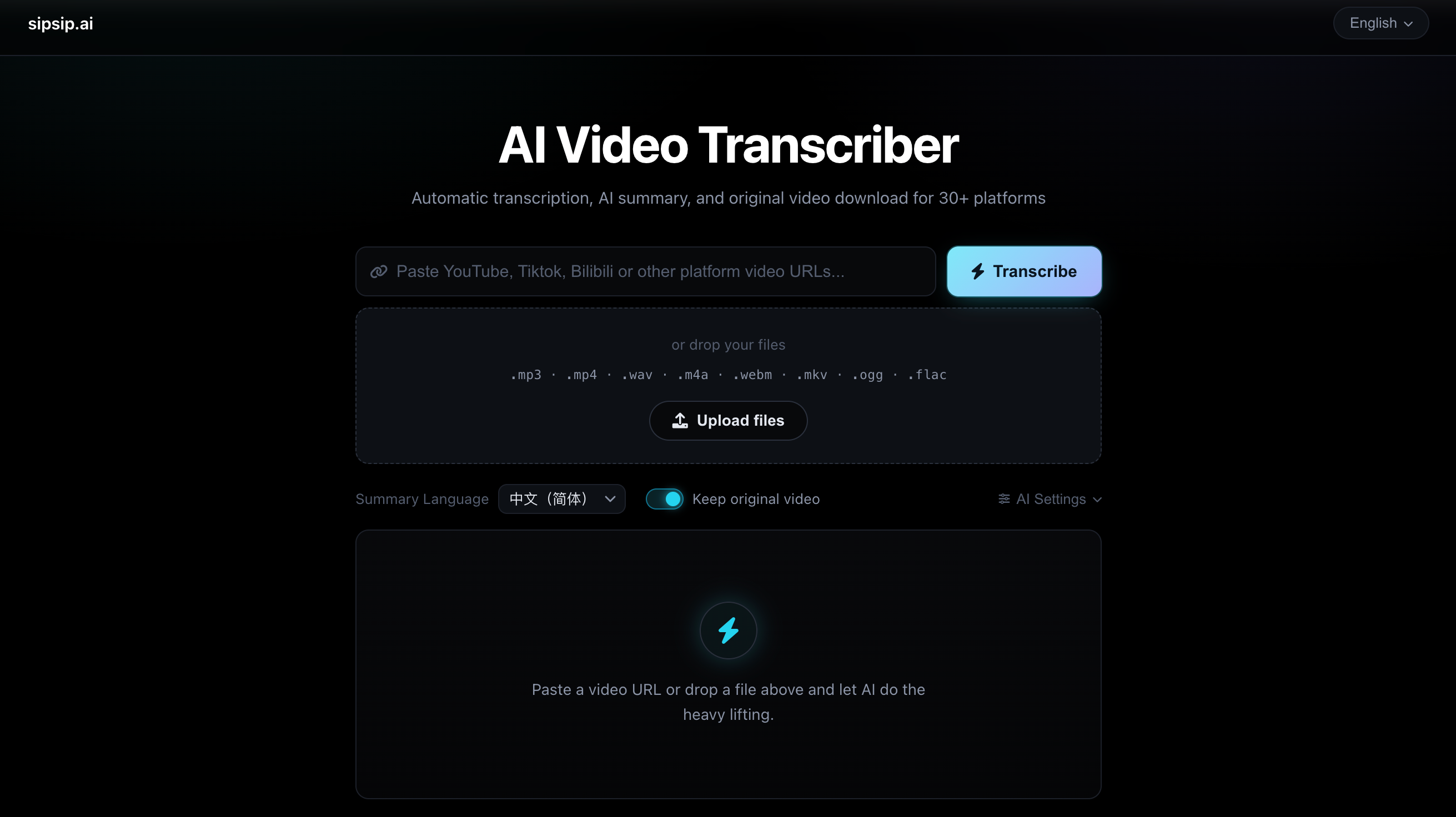
.txt (treated as transcript text), .mp3, .mp4, .m4a, .wav, .webm, .mkv, .ogg, .flac. Media is normalized with FFmpeg for Whisper, then runs the same optimize → translate → summarize pipeline as URLsgit clone https://github.com/wendy7756/AI-Video-Transcriber.git
cd AI-Video-Transcriber
chmod +x install.sh
./install.sh
git clone https://github.com/wendy7756/AI-Video-Transcriber.git
cd AI-Video-Transcriber

# Using Docker Compose (easiest)
cp .env.example .env
# Edit .env if you want server-side defaults (optional)
docker-compose up -d

# Or using Docker directly
docker build -t ai-video-transcriber .
docker run -p 8000:8000 --env-file .env ai-video-transcriber
The image uses Python 3.12 (Debian Bookworm), upgrades pip/setuptools/wheel, then installs from requirements.txt — same version constraints as a fresh local venv on a current Python.
Tip: transcripts and downloaded videos live in
/app/tempinside the container. Uncomment thevolumesblock indocker-compose.ymlto persist them on the host.
1. Install Python dependencies
# macOS (PEP 668) strongly recommends a virtualenv
python3 -m venv venv
source venv/bin/activate
python -m pip install --upgrade pip
pip install -r requirements.txt
2. Install FFmpeg
brew install ffmpeg                              # macOS
sudo apt update && sudo apt install ffmpeg       # Ubuntu/Debian
sudo yum install ffmpeg                          # CentOS/RHEL
3. Configure environment variables (optional)
# Only if you prefer server-side defaults — otherwise configure in the UI
export OPENAI_API_KEY="your_api_key_here"
export OPENAI_BASE_URL="https://openrouter.ai/api/v1"   # any OpenAI-compatible endpoint
python3 start.py
Then open http://localhost:8000.
Production mode (recommended for long videos) — disables hot-reload so the SSE connection stays stable across 30–60+ minute tasks:
python3 start.py --prod
source venv/bin/activate
export OPENAI_API_KEY=your_api_key_here                  # optional: server-side default
# export OPENAI_BASE_URL=https://openrouter.ai/api/v1    # optional: server-side default
python3 start.py --prod
1. Choose your input — URL or file
POST /api/process-video with a multipart file), which helps when a reverse proxy only allows that path2. Pick your options
3. (Optional) Configure your AI model — click AI Settings to expand
https://openrouter.ai/api/v1) and API KeylocalStorage, never sent anywhere but your chosen provider4. Start processing — click Transcribe. For URL jobs a badge shows the active mode:
| Badge | Meaning |
|---|---|
| ⚡ Subtitle (green) | Native subtitles found — transcript extracted in seconds |
| 🎙 Whisper (cyan) | No subtitles available — audio downloaded and transcribed |
For local uploads, media is normalized with FFmpeg then transcribed with Whisper. Plain .txt files skip download and Whisper entirely, going straight into the text pipeline.
5. Review the results
Besides the web UI there is a headless entry point, so agents and scripts can run the same pipeline with no server and no browser.
venv/bin/python transcribe.py "https://www.youtube.com/watch?v=VIDEO_ID" --json
venv/bin/python transcribe.py talk.mp4 -l zh --no-video
venv/bin/python transcribe.py notes.txt --no-llm          # no API key needed
--json puts a machine-readable result on stdout and keeps progress on stderr.
Exit codes: 0 success, 2 bad input, 1 download/transcode failure.
| Flag | Meaning |
|---|---|
-l, --summary-language | Summary language (en, zh, es, fr, de, it, pt, ru, ja, ko, ar) |
--no-llm | Transcript only — skips optimize/translate/summarize, needs no API key |
--no-video | Don't keep the original video |
--whisper-model | tiny … large, default base |
-o, --output-dir | Where to write the Markdown, default ./temp |
--json / -q | Machine-readable output / silence progress |
For CLI/agent use, configure the OpenAI-compatible provider with environment variables:
export OPENAI_API_KEY="your_api_key_here"
export OPENAI_BASE_URL="https://openrouter.ai/api/v1"
export OPENAI_TRANSLATION_MODEL="gpt-4o"  # optional
For one-off CLI runs you can also pass --api-key, --base-url, and --model,
but environment variables are safer because API keys do not end up in shell history.
The repo also ships a skills-only Codex plugin:
.codex-plugin/plugin.json
skills/video-transcribe/SKILL.md
This repository root is the plugin root. Import or install this folder as a local
plugin in Codex App, then start a new task and select AI Video Transcriber from
Plugins. Shipping the plugin files does not install the plugin automatically; after
changing the plugin, refresh or reinstall it and start a new task so Codex reloads
the skill. The skill wraps the same CLI pipeline above, so the machine running
Codex still needs this repo's venv and ffmpeg.
Codex App does not provide a plugin-specific settings panel for this skills-only
plugin. To switch from OpenRouter to another OpenAI-compatible endpoint, update the
environment variables available to the Codex task, or ask Codex to run the CLI with
--base-url / --model for that specific run.
This plugin intentionally does not bundle the local stdio MCP server. If you want
Codex to call the transcribe_video MCP tool directly, register the MCP server
separately as shown below.
The repo ships .claude/skills/video-transcribe/SKILL.md, so Claude Code picks it up
automatically when you work in this directory — just ask it to transcribe a link. To
use it from anywhere, copy the folder to ~/.claude/skills/.
The project includes an optional stdio MCP server. It is not registered automatically; add it once per client.
pip install "mcp>=2.0"

# From the repository root:
claude mcp add video-transcriber \
  -e OPENAI_API_KEY=your_api_key_here \
  -e OPENAI_BASE_URL=https://openrouter.ai/api/v1 \
  -- "$(pwd)/venv/bin/python" "$(pwd)/mcp_server.py"

codex mcp add \
  --env OPENAI_API_KEY=your_api_key_here \
  --env OPENAI_BASE_URL=https://openrouter.ai/api/v1 \
  video-transcriber -- "$(pwd)/venv/bin/python" "$(pwd)/mcp_server.py"
If you prefer editing Codex config directly, add this to ~/.codex/config.toml:
[mcp_servers.video-transcriber]
command = "/abs/path/venv/bin/python"
args = ["/abs/path/mcp_server.py"]

[mcp_servers.video-transcriber.env]
OPENAI_API_KEY = "your_api_key_here"
OPENAI_BASE_URL = "https://openrouter.ai/api/v1"
For Claude Desktop, add the same command and args to your Claude Desktop MCP configuration:
{
  "mcpServers": {
    "video-transcriber": {
      "command": "/abs/path/venv/bin/python",
      "args": ["/abs/path/mcp_server.py"],
      "env": {
        "OPENAI_API_KEY": "your_api_key_here",
        "OPENAI_BASE_URL": "https://openrouter.ai/api/v1"
      }
    }
  }
}
To change providers later, update the MCP client's saved environment variables
or remove and re-add the MCP server with the new OPENAI_BASE_URL / model settings,
then restart or reload the client if it keeps MCP servers running.
Exposes one tool, transcribe_video, returning the transcript, summary, optional
translation, file paths, and a no_speech flag. Verify the wiring with
venv/bin/python mcp_server.py --selftest, then check client registration with
claude mcp list or codex mcp list.
no_speechmatters: when the source has no speech, the pipeline skips the LLM entirely and returns empty text. Agents should report that rather than guessing at the content — feeding an empty transcript to an LLM produces confident fabrications.
All endpoints are served from the same origin as the UI.
| Method | Endpoint | Purpose |
|---|---|---|
POST | /api/process-video | Start a job — accepts either a URL or a multipart file |
POST | /api/process-upload | Upload-only alias, identical behavior |
GET | /api/task-status/{task_id} | Poll a job's current state |
GET | /api/task-stream/{task_id} | SSE stream of live progress updates |
GET | /api/download/{filename} | Download a result as an attachment (.md or media). Optional ?name= sets a friendly filename |
GET | /api/media/{filename} | Stream media inline for the player — supports HTTP Range, so seeking works |
DELETE | /api/task/{task_id} | Cancel a running job and drop its record |
POST | /api/models | Proxy: list models from any OpenAI-compatible provider |
GET | /api/tasks/active | Active job counters (debugging) |
POST /api/process-video| Field | Type | Default | Description |
|---|---|---|---|
url | string | "" | Video/podcast URL. Omit when uploading a file |
file | file | – | Multipart upload. Takes precedence over url |
summary_language | string | zh | Target summary language code |
download_video | string | 1 | 0/false/no/off disables the original video download |
api_key | string | "" | Per-request API key; falls back to OPENAI_API_KEY |
model_base_url | string | "" | Per-request OpenAI-compatible base URL |
model_id | string | "" | Model to use; blank means server default |
# Transcribe a URL, skipping the video download
curl -X POST http://localhost:8000/api/process-video \
  -F "url=https://www.youtube.com/watch?v=VIDEO_ID" \
  -F "summary_language=en" \
  -F "download_video=0"
Backend — FastAPI · yt-dlp (download & subtitle extraction) · FFmpeg (audio extraction, video merge, upload normalization to mono 16 kHz) · Faster-Whisper (transcription) · OpenAI-compatible API (optimization, translation, summary)
Frontend — vanilla HTML5/CSS3/ES6+ · Marked.js (Markdown rendering) · Font Awesome (icons) · SSE for live progress
URL ──┬─→ probe subtitles ──found──→ parse VTT/SRT ─────────────┐
      │                                                         │
      │   (in parallel, if "Keep original video" is on)          ├─→ optimize
      └─→ download video (≤720p) ──→ extract audio ──→ Whisper ──┘   → translate*
                                                                     → summarize
File ─→ normalize with FFmpeg ──→ Whisper ───────────────────────┘   → results
       (.txt skips straight to the text pipeline)                    (* when languages differ)
AI-Video-Transcriber/
├── backend/
│   ├── main.py             # FastAPI app, routes, task orchestration
│   ├── pipeline.py         # Pure helpers shared by web/CLI/MCP (incl. no-speech guard)
│   ├── video_processor.py  # yt-dlp: subtitles, audio, original video
│   ├── transcriber.py      # Faster-Whisper transcription
│   ├── summarizer.py       # Transcript optimization + summary
│   ├── translator.py       # Conditional translation
│   └── llm_sanitize.py     # Post-process LLM output (strip boilerplate)
├── static/
│   ├── index.html          # UI markup + styles
│   └── app.js              # Frontend logic, SSE, i18n
├── temp/                   # Generated transcripts, summaries, media
├── Dockerfile
├── docker-compose.yml
├── .env.example
├── requirements.txt
├── install.sh
├── start.py                # Startup script (--prod disables hot reload)
├── transcribe.py           # Headless CLI (agents, scripts, cron)
├── mcp_server.py           # MCP server exposing the transcribe_video tool
├── .codex-plugin/
│   └── plugin.json         # Codex App plugin manifest
├── skills/
│   └── video-transcribe/   # Codex plugin skill wrapping the CLI
└── .claude/skills/
    └── video-transcribe/   # Claude Code skill wrapping the CLI
All are optional — the app runs with defaults and accepts AI credentials from the UI.
| Variable | Description | Default |
|---|---|---|
OPENAI_API_KEY | API key (server-side default) | – |
OPENAI_BASE_URL | OpenAI-compatible endpoint | provider default |
OPENAI_TRANSLATION_MODEL | Model used for translation | gpt-4o |
WHISPER_MODEL_SIZE | Whisper model size | base |
UPLOAD_MAX_MB | Max upload size per file (MB) | 200 |
VIDEO_MAX_HEIGHT | Max height for the original video download | 720 |
HOST | Server address | 0.0.0.0 |
PORT | Server port | 8000 |
PRODUCTION_MODE | Set to true to disable hot reload (same as --prod) | – |
| Model | Parameters | Speed | Memory |
|---|---|---|---|
| tiny | 39 M | Fast | ~150 MB |
| base | 74 M | Medium | ~250 MB |
| small | 244 M | Medium | ~750 MB |
| medium | 769 M | Slow | ~1.5 GB |
| large | 1550 M | Very slow | ~3 GB |
All sizes are multilingual; tiny–medium also ship English-only variants.
Usually not much. The download runs concurrently with transcription and summarization and is only awaited at the very end, so it mostly hides behind work that was happening anyway. On the Whisper path it actually saves a download, because the audio is extracted from the video file instead of fetching the media twice.
Downloads are capped at 720p by default — lower VIDEO_MAX_HEIGHT to save bandwidth, or turn the toggle off entirely for text-only jobs. If the video download fails, transcription still completes normally and the results simply omit the player.
temp/ grow over time?Yes. Transcripts, summaries, and downloaded videos are deliberately kept after a job finishes so you can still download them, and there is no automatic cleanup. Now that original videos are saved too, prune the directory periodically:
# Delete generated files older than 7 days
find temp -type f -mtime +7 ! -name 'tasks.json' -delete
Speed depends on video length, Whisper model size, and hardware. Use a smaller model (tiny or base) to speed it up. Note that videos with native subtitles skip Whisper entirely and finish in seconds.
Everything yt-dlp supports — including YouTube, TikTok, Facebook, Instagram, X/Twitter, Bilibili, Youku, iQiyi, Tencent Video, Apple Podcasts, and SoundCloud.
Allowed extensions: .txt, .mp3, .mp4, .m4a, .wav, .webm, .mkv, .ogg, .flac. Default limit is 200 MB per file — override with UPLOAD_MAX_MB.
They need an API key from any OpenAI-compatible provider. Enter it in the AI Settings panel in the UI (no restart needed), or set OPENAI_API_KEY for a server-side default. Without a key, transcription still works — Whisper runs locally — but optimization, translation, and summaries fall back to basic formatting.
Usually environment configuration rather than a code bug. Check that you:
source venv/bin/activatepip install -r requirements.txtOPENAI_API_KEYbrew install ffmpeg / sudo apt install ffmpegPORTPrerequisites: install Docker Desktop from https://www.docker.com/products/docker-desktop/ and make sure the service is running.
git clone https://github.com/wendy7756/AI-Video-Transcriber.git
cd AI-Video-Transcriber
cp .env.example .env      # edit for server-side defaults (optional)

docker-compose up -d      # recommended

# Or manually
docker build -t ai-video-transcriber .
docker run -p 8000:8000 --env-file .env ai-video-transcriber
Common issues
-p 8001:8000docker logs <container_id>Useful commands
docker ps                                                    # running containers
docker logs ai-video-transcriber-ai-video-transcriber-1      # logs
docker-compose down                                          # stop
docker-compose build --no-cache                              # rebuild
Docker: ~128 MB idle, 500 MB–2 GB while processing, ~1.6 GB image. 4 GB+ RAM recommended.
Traditional: ~50–100 MB for the FastAPI server, plus the Whisper model (see the table above), plus roughly 500 MB peak for processing.
# Reduce memory usage
WHISPER_MODEL_SIZE=tiny

# Limit container memory
docker run -m 1g -p 8000:8000 --env-file .env ai-video-transcriber

# Monitor
docker stats ai-video-transcriber-ai-video-transcriber-1
Symptoms include "Unable to extract" or timeouts on download, API connection/DNS failures, and slow Docker pulls.
curl -I https://www.youtube.com/     # platform access
curl -I https://openrouter.ai        # AI provider
docker pull hello-world              # Docker Hub
Transcription — 100+ languages via Whisper, with automatic language detection.
Summaries & Translation — English, Chinese (Simplified), Japanese, Korean, Spanish, French, German, Italian, Portuguese, Russian, Arabic.
Interface — English and Chinese, switchable from the top-right.
Hardware
Processing time estimates
| Video Length | Subtitle Mode | Whisper Mode | Notes |
|---|---|---|---|
| 1 minute | ~5 s | 30 s–1 min | Subtitle mode needs no audio download |
| 5 minutes | ~10 s | 2–5 min | YouTube auto-captions trigger subtitle mode |
| 15 minutes | ~15 s | 5–15 min | Most YouTube videos support subtitle mode |
| 30+ minutes | ~20 s | 15–60 min | Podcasts/audio-only always use Whisper |
Times assume Keep original video is off. With it on, subtitle-mode jobs are bounded by the video download rather than the transcript — the download overlaps the AI steps, so the added wall-clock is usually well under the download time itself.
Issues and Pull Requests are welcome!
git checkout -b feature/AmazingFeature)git commit -m 'Add some AmazingFeature')git push origin feature/AmazingFeature)For questions or suggestions, please open an Issue or contact Wendy.
This tool is the open-source part of sipsip.ai.
The full product goes further:
Free to start — no credit card required.
➡️ sipsip.ai
⭐ If you find this project helpful, please consider giving it a star!
51 followers · starred Nov 2025
122 followers · starred Jul 2026
315 followers · starred Sep 2026
41 followers · starred Sep 2025
Transcribe and summarize videos and podcasts using AI. Open-source, multi-platform, and supports multiple languages.
See the codeEnglish | 中文
An AI-powered tool to transcribe, summarize, and archive videos and podcasts — paste a URL from YouTube, TikTok, Bilibili, Apple Podcasts, SoundCloud, and 30+ platforms, or upload a local file (audio, video, or plain text).
.txt (treated as transcript text), .mp3, .mp4, .m4a, .wav, .webm, .mkv, .ogg, .flac. Media is normalized with FFmpeg for Whisper, then runs the same optimize → translate → summarize pipeline as URLsgit clone https://github.com/wendy7756/AI-Video-Transcriber.git
cd AI-Video-Transcriber
chmod +x install.sh
./install.sh
git clone https://github.com/wendy7756/AI-Video-Transcriber.git
cd AI-Video-Transcriber

# Using Docker Compose (easiest)
cp .env.example .env
# Edit .env if you want server-side defaults (optional)
docker-compose up -d

# Or using Docker directly
docker build -t ai-video-transcriber .
docker run -p 8000:8000 --env-file .env ai-video-transcriber
The image uses Python 3.12 (Debian Bookworm), upgrades pip/setuptools/wheel, then installs from requirements.txt — same version constraints as a fresh local venv on a current Python.
Tip: transcripts and downloaded videos live in
/app/tempinside the container. Uncomment thevolumesblock indocker-compose.ymlto persist them on the host.
1. Install Python dependencies
# macOS (PEP 668) strongly recommends a virtualenv
python3 -m venv venv
source venv/bin/activate
python -m pip install --upgrade pip
pip install -r requirements.txt
2. Install FFmpeg
brew install ffmpeg                              # macOS
sudo apt update && sudo apt install ffmpeg       # Ubuntu/Debian
sudo yum install ffmpeg                          # CentOS/RHEL
3. Configure environment variables (optional)
# Only if you prefer server-side defaults — otherwise configure in the UI
export OPENAI_API_KEY="your_api_key_here"
export OPENAI_BASE_URL="https://openrouter.ai/api/v1"   # any OpenAI-compatible endpoint
python3 start.py
Then open http://localhost:8000.
Production mode (recommended for long videos) — disables hot-reload so the SSE connection stays stable across 30–60+ minute tasks:
python3 start.py --prod
source venv/bin/activate
export OPENAI_API_KEY=your_api_key_here                  # optional: server-side default
# export OPENAI_BASE_URL=https://openrouter.ai/api/v1    # optional: server-side default
python3 start.py --prod
1. Choose your input — URL or file
POST /api/process-video with a multipart file), which helps when a reverse proxy only allows that path2. Pick your options
3. (Optional) Configure your AI model — click AI Settings to expand
https://openrouter.ai/api/v1) and API KeylocalStorage, never sent anywhere but your chosen provider4. Start processing — click Transcribe. For URL jobs a badge shows the active mode:
| Badge | Meaning |
|---|---|
| ⚡ Subtitle (green) | Native subtitles found — transcript extracted in seconds |
| 🎙 Whisper (cyan) | No subtitles available — audio downloaded and transcribed |
For local uploads, media is normalized with FFmpeg then transcribed with Whisper. Plain .txt files skip download and Whisper entirely, going straight into the text pipeline.
5. Review the results
Besides the web UI there is a headless entry point, so agents and scripts can run the same pipeline with no server and no browser.
venv/bin/python transcribe.py "https://www.youtube.com/watch?v=VIDEO_ID" --json
venv/bin/python transcribe.py talk.mp4 -l zh --no-video
venv/bin/python transcribe.py notes.txt --no-llm          # no API key needed
--json puts a machine-readable result on stdout and keeps progress on stderr.
Exit codes: 0 success, 2 bad input, 1 download/transcode failure.
| Flag | Meaning |
|---|---|
-l, --summary-language | Summary language (en, zh, es, fr, de, it, pt, ru, ja, ko, ar) |
--no-llm | Transcript only — skips optimize/translate/summarize, needs no API key |
--no-video | Don't keep the original video |
--whisper-model | tiny … large, default base |
-o, --output-dir | Where to write the Markdown, default ./temp |
--json / -q | Machine-readable output / silence progress |
For CLI/agent use, configure the OpenAI-compatible provider with environment variables:
export OPENAI_API_KEY="your_api_key_here"
export OPENAI_BASE_URL="https://openrouter.ai/api/v1"
export OPENAI_TRANSLATION_MODEL="gpt-4o"  # optional
For one-off CLI runs you can also pass --api-key, --base-url, and --model,
but environment variables are safer because API keys do not end up in shell history.
The repo also ships a skills-only Codex plugin:
.codex-plugin/plugin.json
skills/video-transcribe/SKILL.md
This repository root is the plugin root. Import or install this folder as a local
plugin in Codex App, then start a new task and select AI Video Transcriber from
Plugins. Shipping the plugin files does not install the plugin automatically; after
changing the plugin, refresh or reinstall it and start a new task so Codex reloads
the skill. The skill wraps the same CLI pipeline above, so the machine running
Codex still needs this repo's venv and ffmpeg.
Codex App does not provide a plugin-specific settings panel for this skills-only
plugin. To switch from OpenRouter to another OpenAI-compatible endpoint, update the
environment variables available to the Codex task, or ask Codex to run the CLI with
--base-url / --model for that specific run.
This plugin intentionally does not bundle the local stdio MCP server. If you want
Codex to call the transcribe_video MCP tool directly, register the MCP server
separately as shown below.
The repo ships .claude/skills/video-transcribe/SKILL.md, so Claude Code picks it up
automatically when you work in this directory — just ask it to transcribe a link. To
use it from anywhere, copy the folder to ~/.claude/skills/.
The project includes an optional stdio MCP server. It is not registered automatically; add it once per client.
pip install "mcp>=2.0"

# From the repository root:
claude mcp add video-transcriber \
  -e OPENAI_API_KEY=your_api_key_here \
  -e OPENAI_BASE_URL=https://openrouter.ai/api/v1 \
  -- "$(pwd)/venv/bin/python" "$(pwd)/mcp_server.py"

codex mcp add \
  --env OPENAI_API_KEY=your_api_key_here \
  --env OPENAI_BASE_URL=https://openrouter.ai/api/v1 \
  video-transcriber -- "$(pwd)/venv/bin/python" "$(pwd)/mcp_server.py"
If you prefer editing Codex config directly, add this to ~/.codex/config.toml:
[mcp_servers.video-transcriber]
command = "/abs/path/venv/bin/python"
args = ["/abs/path/mcp_server.py"]

[mcp_servers.video-transcriber.env]
OPENAI_API_KEY = "your_api_key_here"
OPENAI_BASE_URL = "https://openrouter.ai/api/v1"
For Claude Desktop, add the same command and args to your Claude Desktop MCP configuration:
{
  "mcpServers": {
    "video-transcriber": {
      "command": "/abs/path/venv/bin/python",
      "args": ["/abs/path/mcp_server.py"],
      "env": {
        "OPENAI_API_KEY": "your_api_key_here",
        "OPENAI_BASE_URL": "https://openrouter.ai/api/v1"
      }
    }
  }
}
To change providers later, update the MCP client's saved environment variables
or remove and re-add the MCP server with the new OPENAI_BASE_URL / model settings,
then restart or reload the client if it keeps MCP servers running.
Exposes one tool, transcribe_video, returning the transcript, summary, optional
translation, file paths, and a no_speech flag. Verify the wiring with
venv/bin/python mcp_server.py --selftest, then check client registration with
claude mcp list or codex mcp list.
no_speechmatters: when the source has no speech, the pipeline skips the LLM entirely and returns empty text. Agents should report that rather than guessing at the content — feeding an empty transcript to an LLM produces confident fabrications.
All endpoints are served from the same origin as the UI.
| Method | Endpoint | Purpose |
|---|---|---|
POST | /api/process-video | Start a job — accepts either a URL or a multipart file |
POST | /api/process-upload | Upload-only alias, identical behavior |
GET | /api/task-status/{task_id} | Poll a job's current state |
GET | /api/task-stream/{task_id} | SSE stream of live progress updates |
GET | /api/download/{filename} | Download a result as an attachment (.md or media). Optional ?name= sets a friendly filename |
GET | /api/media/{filename} | Stream media inline for the player — supports HTTP Range, so seeking works |
DELETE | /api/task/{task_id} | Cancel a running job and drop its record |
POST | /api/models | Proxy: list models from any OpenAI-compatible provider |
GET | /api/tasks/active | Active job counters (debugging) |
POST /api/process-video| Field | Type | Default | Description |
|---|---|---|---|
url | string | "" | Video/podcast URL. Omit when uploading a file |
file | file | – | Multipart upload. Takes precedence over url |
summary_language | string | zh | Target summary language code |
download_video | string | 1 | 0/false/no/off disables the original video download |
api_key | string | "" | Per-request API key; falls back to OPENAI_API_KEY |
model_base_url | string | "" | Per-request OpenAI-compatible base URL |
model_id | string | "" | Model to use; blank means server default |
# Transcribe a URL, skipping the video download
curl -X POST http://localhost:8000/api/process-video \
  -F "url=https://www.youtube.com/watch?v=VIDEO_ID" \
  -F "summary_language=en" \
  -F "download_video=0"
Backend — FastAPI · yt-dlp (download & subtitle extraction) · FFmpeg (audio extraction, video merge, upload normalization to mono 16 kHz) · Faster-Whisper (transcription) · OpenAI-compatible API (optimization, translation, summary)
Frontend — vanilla HTML5/CSS3/ES6+ · Marked.js (Markdown rendering) · Font Awesome (icons) · SSE for live progress
URL ──┬─→ probe subtitles ──found──→ parse VTT/SRT ─────────────┐
      │                                                         │
      │   (in parallel, if "Keep original video" is on)          ├─→ optimize
      └─→ download video (≤720p) ──→ extract audio ──→ Whisper ──┘   → translate*
                                                                     → summarize
File ─→ normalize with FFmpeg ──→ Whisper ───────────────────────┘   → results
       (.txt skips straight to the text pipeline)                    (* when languages differ)
AI-Video-Transcriber/
├── backend/
│   ├── main.py             # FastAPI app, routes, task orchestration
│   ├── pipeline.py         # Pure helpers shared by web/CLI/MCP (incl. no-speech guard)
│   ├── video_processor.py  # yt-dlp: subtitles, audio, original video
│   ├── transcriber.py      # Faster-Whisper transcription
│   ├── summarizer.py       # Transcript optimization + summary
│   ├── translator.py       # Conditional translation
│   └── llm_sanitize.py     # Post-process LLM output (strip boilerplate)
├── static/
│   ├── index.html          # UI markup + styles
│   └── app.js              # Frontend logic, SSE, i18n
├── temp/                   # Generated transcripts, summaries, media
├── Dockerfile
├── docker-compose.yml
├── .env.example
├── requirements.txt
├── install.sh
├── start.py                # Startup script (--prod disables hot reload)
├── transcribe.py           # Headless CLI (agents, scripts, cron)
├── mcp_server.py           # MCP server exposing the transcribe_video tool
├── .codex-plugin/
│   └── plugin.json         # Codex App plugin manifest
├── skills/
│   └── video-transcribe/   # Codex plugin skill wrapping the CLI
└── .claude/skills/
    └── video-transcribe/   # Claude Code skill wrapping the CLI
All are optional — the app runs with defaults and accepts AI credentials from the UI.
| Variable | Description | Default |
|---|---|---|
OPENAI_API_KEY | API key (server-side default) | – |
OPENAI_BASE_URL | OpenAI-compatible endpoint | provider default |
OPENAI_TRANSLATION_MODEL | Model used for translation | gpt-4o |
WHISPER_MODEL_SIZE | Whisper model size | base |
UPLOAD_MAX_MB | Max upload size per file (MB) | 200 |
VIDEO_MAX_HEIGHT | Max height for the original video download | 720 |
HOST | Server address | 0.0.0.0 |
PORT | Server port | 8000 |
PRODUCTION_MODE | Set to true to disable hot reload (same as --prod) | – |
| Model | Parameters | Speed | Memory |
|---|---|---|---|
| tiny | 39 M | Fast | ~150 MB |
| base | 74 M | Medium | ~250 MB |
| small | 244 M | Medium | ~750 MB |
| medium | 769 M | Slow | ~1.5 GB |
| large | 1550 M | Very slow | ~3 GB |
All sizes are multilingual; tiny–medium also ship English-only variants.
Usually not much. The download runs concurrently with transcription and summarization and is only awaited at the very end, so it mostly hides behind work that was happening anyway. On the Whisper path it actually saves a download, because the audio is extracted from the video file instead of fetching the media twice.
Downloads are capped at 720p by default — lower VIDEO_MAX_HEIGHT to save bandwidth, or turn the toggle off entirely for text-only jobs. If the video download fails, transcription still completes normally and the results simply omit the player.
temp/ grow over time?Yes. Transcripts, summaries, and downloaded videos are deliberately kept after a job finishes so you can still download them, and there is no automatic cleanup. Now that original videos are saved too, prune the directory periodically:
# Delete generated files older than 7 days
find temp -type f -mtime +7 ! -name 'tasks.json' -delete
Speed depends on video length, Whisper model size, and hardware. Use a smaller model (tiny or base) to speed it up. Note that videos with native subtitles skip Whisper entirely and finish in seconds.
Everything yt-dlp supports — including YouTube, TikTok, Facebook, Instagram, X/Twitter, Bilibili, Youku, iQiyi, Tencent Video, Apple Podcasts, and SoundCloud.
Allowed extensions: .txt, .mp3, .mp4, .m4a, .wav, .webm, .mkv, .ogg, .flac. Default limit is 200 MB per file — override with UPLOAD_MAX_MB.
They need an API key from any OpenAI-compatible provider. Enter it in the AI Settings panel in the UI (no restart needed), or set OPENAI_API_KEY for a server-side default. Without a key, transcription still works — Whisper runs locally — but optimization, translation, and summaries fall back to basic formatting.
Usually environment configuration rather than a code bug. Check that you:
source venv/bin/activatepip install -r requirements.txtOPENAI_API_KEYbrew install ffmpeg / sudo apt install ffmpegPORTPrerequisites: install Docker Desktop from https://www.docker.com/products/docker-desktop/ and make sure the service is running.
git clone https://github.com/wendy7756/AI-Video-Transcriber.git
cd AI-Video-Transcriber
cp .env.example .env      # edit for server-side defaults (optional)

docker-compose up -d      # recommended

# Or manually
docker build -t ai-video-transcriber .
docker run -p 8000:8000 --env-file .env ai-video-transcriber
Common issues
-p 8001:8000docker logs <container_id>Useful commands
docker ps                                                    # running containers
docker logs ai-video-transcriber-ai-video-transcriber-1      # logs
docker-compose down                                          # stop
docker-compose build --no-cache                              # rebuild
Docker: ~128 MB idle, 500 MB–2 GB while processing, ~1.6 GB image. 4 GB+ RAM recommended.
Traditional: ~50–100 MB for the FastAPI server, plus the Whisper model (see the table above), plus roughly 500 MB peak for processing.
# Reduce memory usage
WHISPER_MODEL_SIZE=tiny

# Limit container memory
docker run -m 1g -p 8000:8000 --env-file .env ai-video-transcriber

# Monitor
docker stats ai-video-transcriber-ai-video-transcriber-1
Symptoms include "Unable to extract" or timeouts on download, API connection/DNS failures, and slow Docker pulls.
curl -I https://www.youtube.com/     # platform access
curl -I https://openrouter.ai        # AI provider
docker pull hello-world              # Docker Hub
Transcription — 100+ languages via Whisper, with automatic language detection.
Summaries & Translation — English, Chinese (Simplified), Japanese, Korean, Spanish, French, German, Italian, Portuguese, Russian, Arabic.
Interface — English and Chinese, switchable from the top-right.
Hardware
Processing time estimates
| Video Length | Subtitle Mode | Whisper Mode | Notes |
|---|---|---|---|
| 1 minute | ~5 s | 30 s–1 min | Subtitle mode needs no audio download |
| 5 minutes | ~10 s | 2–5 min | YouTube auto-captions trigger subtitle mode |
| 15 minutes | ~15 s | 5–15 min | Most YouTube videos support subtitle mode |
| 30+ minutes | ~20 s | 15–60 min | Podcasts/audio-only always use Whisper |
Times assume Keep original video is off. With it on, subtitle-mode jobs are bounded by the video download rather than the transcript — the download overlaps the AI steps, so the added wall-clock is usually well under the download time itself.
Issues and Pull Requests are welcome!
git checkout -b feature/AmazingFeature)git commit -m 'Add some AmazingFeature')git push origin feature/AmazingFeature)For questions or suggestions, please open an Issue or contact Wendy.
This tool is the open-source part of sipsip.ai.
The full product goes further:
Free to start — no credit card required.
➡️ sipsip.ai
⭐ If you find this project helpful, please consider giving it a star!
51 followers · starred Nov 2025
122 followers · starred Jul 2026
315 followers · starred Sep 2026
41 followers · starred Sep 2025



