✔️ Simple, pretty and powerful logger for android
Kotlin
13,831
106 commits
updated Oct 3, 2026

Readable, structured logs for Android. Turn messages, collections, JSON, and XML into output that's easy to scan in Logcat.
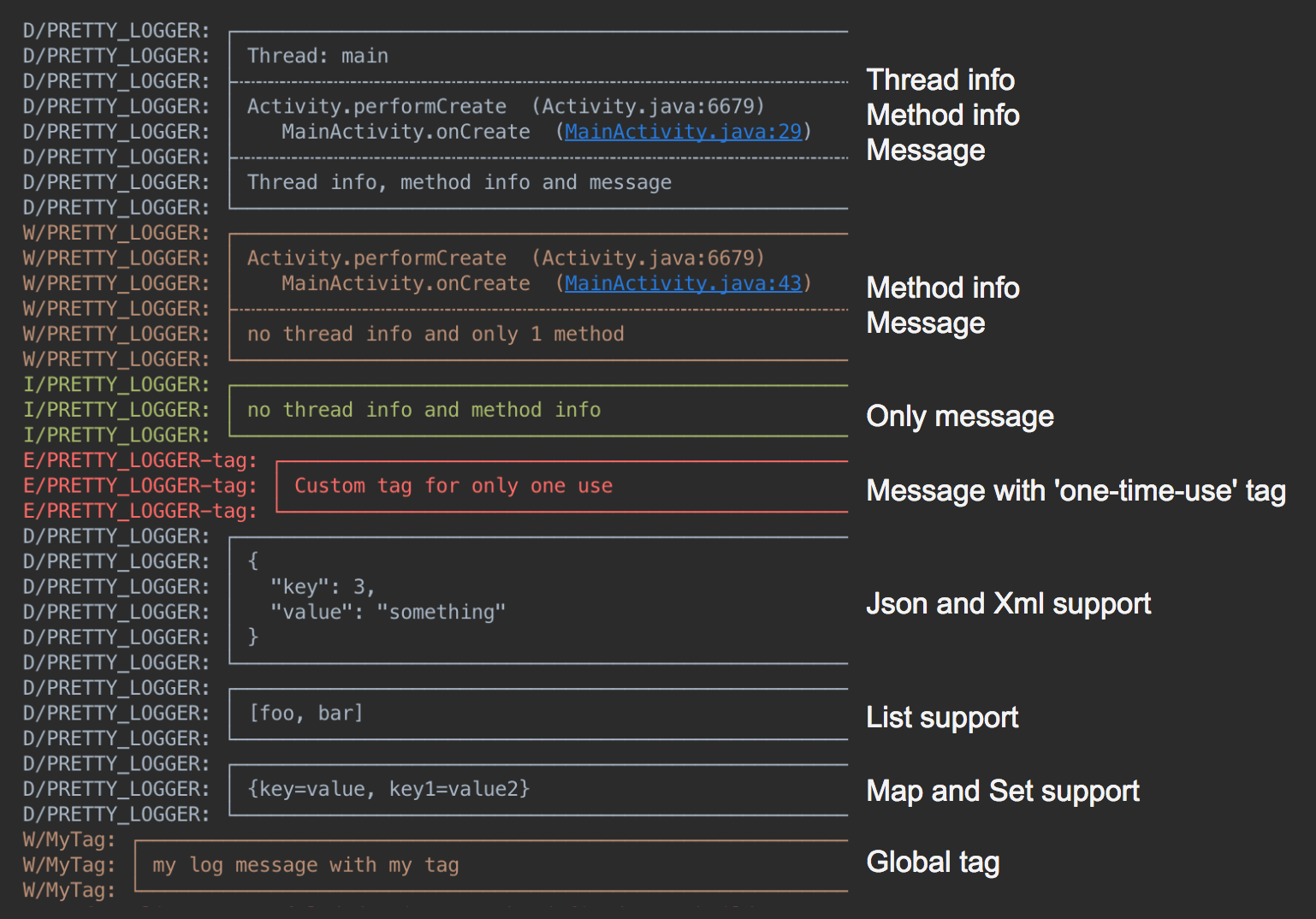
Add Google Maven and Maven Central to your dependency repositories:
dependencyResolutionManagement {
  repositories {
    google()
    mavenCentral()
  }
}
dependencies {
  implementation("com.orhanobut:logger:2.2.0")
}
Initialize once in your application, then log:
Logger.addLogAdapter(AndroidLogAdapter())
Logger.d("hello %s", "world")
Logger.d("debug")
Logger.e("error")
Logger.w("warning")
Logger.v("verbose")
Logger.i("information")
Logger.wtf("What a Terrible Failure")

Logger.d("hello %s", "world")
Logger.d(listOf("foo", "bar"))
Logger.d(mapOf("key" to "value"))
Logger.d(intArrayOf(1, 2, 3))
Logger.json("""{"items":[1,2,3]}""")
Logger.xml("<root><item>value</item></root>")
Collection and structured output use debug priority. Include an exception and its
cause with Logger.e(throwable, "message").
Set a tag for exactly one message on the calling thread:
Logger.t("Checkout").d("Order submitted")
val format = PrettyFormatStrategy.newBuilder()
  .showThreadInfo(false) // Default: true
  .methodCount(0)        // Default: 2 caller frames
  .methodOffset(0)       // Default: 0 additional frames skipped
  .tag("MyApp")          // Default: PRETTY_LOGGER
  .build()

Logger.addLogAdapter(object : AndroidLogAdapter(format) {
  override fun isLoggable(priority: Int, tag: String?): Boolean = BuildConfig.DEBUG
})

Logger.t("Screen").d("A message tagged MyApp-Screen")
Override LogAdapter.isLoggable to filter messages by priority or tag. The example
above enables logging only in debug builds. Use Logger.clearLogAdapters() before
replacing the configured adapters.
For Logcat filtering, use PRETTY_LOGGER or your configured tag.
Save formatted logs to app-private storage with CsvFormatStrategy and a custom
DiskLogStrategy. The sample
shows the complete setup, including background writes and cleanup. App-private
storage requires no storage permission.
The default DiskLogAdapter() still uses the legacy shared external-storage
location. Modern Android restricts that location through scoped storage; use the
sample's custom strategy for current applications.
Timber.plant(object : Timber.DebugTree() {
  override fun log(priority: Int, tag: String?, message: String, t: Throwable?) {
    Logger.log(priority, tag, message, t)
  }
})
Overall
Maintained
Code review
Maven
Latest release
Releases this year
13,002 followers · starred Mar 2019
9,446 followers · starred Mar 2017
275 followers · starred Sep 2015
102 followers · starred Mar 2020
✔️ Simple, pretty and powerful logger for android
Kotlin
13,831
106 commits
updated Oct 3, 2026
Readable, structured logs for Android. Turn messages, collections, JSON, and XML into output that's easy to scan in Logcat.
Add Google Maven and Maven Central to your dependency repositories:
dependencyResolutionManagement {
  repositories {
    google()
    mavenCentral()
  }
}
dependencies {
  implementation("com.orhanobut:logger:2.2.0")
}
Initialize once in your application, then log:
Logger.addLogAdapter(AndroidLogAdapter())
Logger.d("hello %s", "world")
Logger.d("debug")
Logger.e("error")
Logger.w("warning")
Logger.v("verbose")
Logger.i("information")
Logger.wtf("What a Terrible Failure")

Logger.d("hello %s", "world")
Logger.d(listOf("foo", "bar"))
Logger.d(mapOf("key" to "value"))
Logger.d(intArrayOf(1, 2, 3))
Logger.json("""{"items":[1,2,3]}""")
Logger.xml("<root><item>value</item></root>")
Collection and structured output use debug priority. Include an exception and its
cause with Logger.e(throwable, "message").
Set a tag for exactly one message on the calling thread:
Logger.t("Checkout").d("Order submitted")
val format = PrettyFormatStrategy.newBuilder()
  .showThreadInfo(false) // Default: true
  .methodCount(0)        // Default: 2 caller frames
  .methodOffset(0)       // Default: 0 additional frames skipped
  .tag("MyApp")          // Default: PRETTY_LOGGER
  .build()

Logger.addLogAdapter(object : AndroidLogAdapter(format) {
  override fun isLoggable(priority: Int, tag: String?): Boolean = BuildConfig.DEBUG
})

Logger.t("Screen").d("A message tagged MyApp-Screen")
Override LogAdapter.isLoggable to filter messages by priority or tag. The example
above enables logging only in debug builds. Use Logger.clearLogAdapters() before
replacing the configured adapters.
For Logcat filtering, use PRETTY_LOGGER or your configured tag.
Save formatted logs to app-private storage with CsvFormatStrategy and a custom
DiskLogStrategy. The sample
shows the complete setup, including background writes and cleanup. App-private
storage requires no storage permission.
The default DiskLogAdapter() still uses the legacy shared external-storage
location. Modern Android restricts that location through scoped storage; use the
sample's custom strategy for current applications.
Timber.plant(object : Timber.DebugTree() {
  override fun log(priority: Int, tag: String?, message: String, t: Throwable?) {
    Logger.log(priority, tag, message, t)
  }
})
Overall
Maintained
Code review
Maven
Latest release
Releases this year
13,002 followers · starred Mar 2019
9,446 followers · starred Mar 2017
275 followers · starred Sep 2015
102 followers · starred Mar 2020