
README
English Doc
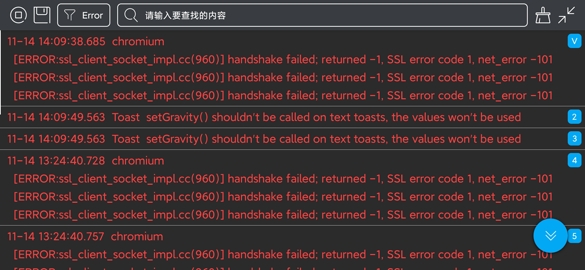
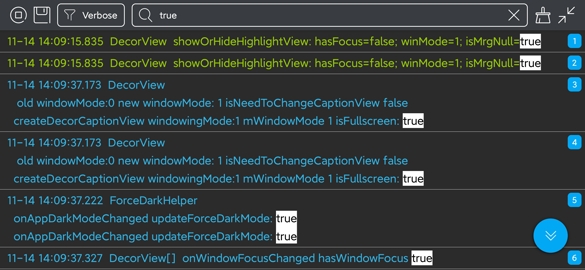
日志查看框架



集成步骤
- 如果你的项目 Gradle 配置是在
7.0 以下,需要在build.gradle文件中加入
allprojects {
    repositories {
        // JitPack 远程仓库:https://jitpack.io
        maven { url 'https://jitpack.io' }
    }
}
- 如果你的 Gradle 配置是
7.0 及以上,则需要在settings.gradle文件中加入
dependencyResolutionManagement {
    repositories {
        // JitPack 远程仓库:https://jitpack.io
        maven { url 'https://jitpack.io' }
    }
}
- 配置完远程仓库后,在项目 app 模块下的
build.gradle文件中加入远程依赖
android {
    // 支持 JDK 1.8 及以上
    compileOptions {
        targetCompatibility JavaVersion.VERSION_1_8
        sourceCompatibility JavaVersion.VERSION_1_8
    }
}

dependencies {
    // 日志调试框架:https://github.com/getActivity/Logcat
    debugImplementation 'com.github.getActivity:Logcat:13.2'
}
Support 库兼容
- 方案一:沿用旧版本框架的远程依赖
dependencies {
    // 日志调试框架:https://github.com/getActivity/Logcat
    debugImplementation 'com.github.getActivity:Logcat:12.5'
}
-
方案二:如果你的项目仍处于 Support 阶段,目前不方便转到 AndroidX 中来,但又想用最新版本的框架,可以使用 Google 提供的 JetifierStandalone 工具将已发布版本 Release 中的 aar 包通过反向模式转成 Support 版本的 aar 包来使用。
-
上述两种方案任选其一即可,但是仍旧不推荐你那样做,因为这些只是权宜之计,并非长久之计,框架后续的版本已不再支持 Support 项目,最好的方案是将项目迁移到 AndroidX。
-
将项目从 Support 迁移 AndroidX 相关的教程:AndroidX 踩坑指南
compileSdk 版本要求
- 如果项目的
compileSdkVersion小于 34,则需要先升级成 34
android {
    compileSdkVersion 34
}
- 如果项目的
compileSdkVersion大于等于 34,则不需要修改此配置
编译报错处理
- 如果你的项目在引用框架依赖之后,出现以下的编译报错
AAPT: error: unexpected element <property> found in <manifest><application><service>.
- 则证明是项目使用的
Gradle及Android Gradle Plugin版本太低导致的,请将Gradle升级到gradle-7.4-all及以上版本,并将Android Gradle Plugin升级到7.1.0及以上版本
使用方式
-
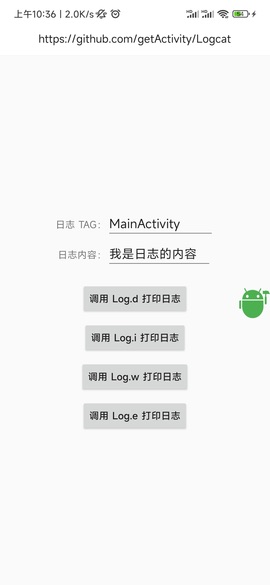
无需调用,直接运行,然后授予悬浮窗权限即可
-
在 debug 模式下运行即可,在 release 正式打包的时不会集成本库,尽管放心
框架的具体用法请点击这里查看
框架亮点
-
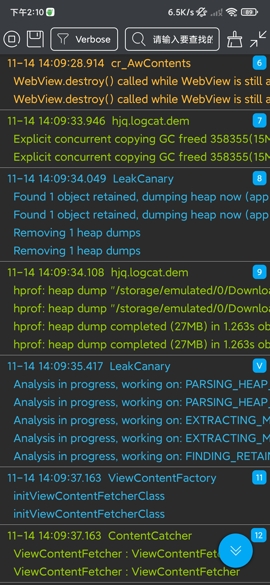
只需集成,无需调用
-
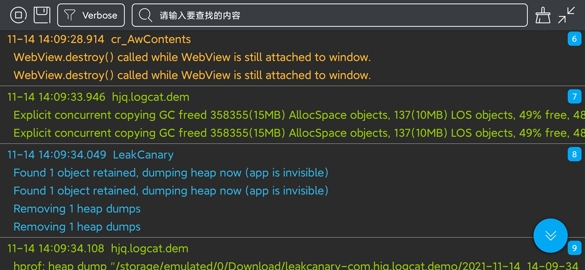
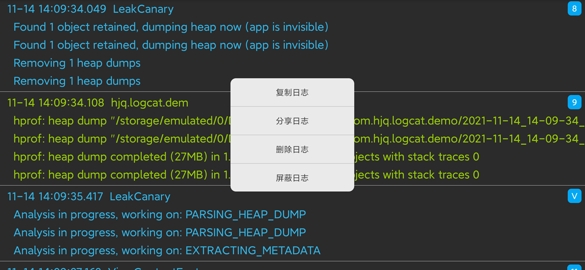
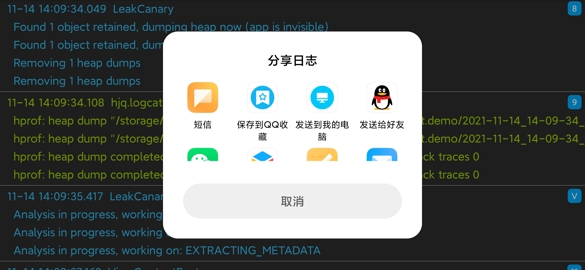
日志长按可复制分享
-
支持将日志保存到本地
-
长日志点击可收缩展开显示
-
日志搜索结果支持文本高亮
-
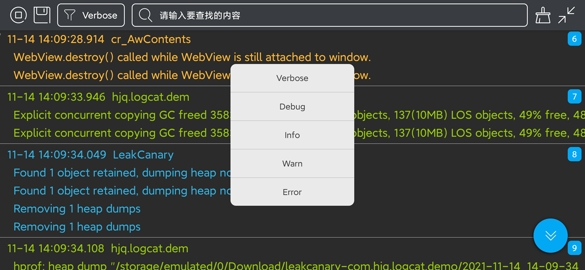
支持对指定 TAG 的日志屏蔽
-
多个相同 TAG 日志自动合并显示
-
仅在 Debug 下集成,无需手动初始化
作者的其他开源项目
-
安卓技术中台:AndroidProject


-
安卓技术中台 Kt 版:AndroidProject-Kotlin


-
权限框架:XXPermissions


-
吐司框架:Toaster


-
网络框架:EasyHttp


-
标题栏框架:TitleBar


-
悬浮窗框架:EasyWindow


-
设备兼容框架:DeviceCompat


-
ShapeView 框架:ShapeView


-
ShapeDrawable 框架:ShapeDrawable


-
语种切换框架:MultiLanguages


-
Gson 解析容错:GsonFactory


-
嵌套滚动布局框架:NestedScrollLayout


-
Android 版本适配:AndroidVersionAdapter


-
Android 代码规范:AndroidCodeStandard


-
Android 资源大汇总:AndroidIndex


-
Android 开源排行榜:AndroidGithubBoss


-
Studio 精品插件:StudioPlugins


-
表情包大集合:EmojiPackage


-
AI 资源大汇总:AiIndex


-
省市区 Json 数据:ProvinceJson


-
Markdown 语法文档:MarkdownDoc


微信公众号:Android轮子哥

Android 技术 Q 群:10047167
如果您觉得我的开源库帮你节省了大量的开发时间,请扫描下方的二维码随意打赏,要是能打赏个 10.24 :monkey_face:就太:thumbsup:了。您的支持将鼓励我继续创作:octocat:(点击查看捐赠列表)


License
Copyright 2020 Huang JinQun

Licensed under the Apache License, Version 2.0 (the "License");
you may not use this file except in compliance with the License.
You may obtain a copy of the License at

   http://www.apache.org/licenses/LICENSE-2.0

Unless required by applicable law or agreed to in writing, software
distributed under the License is distributed on an "AS IS" BASIS,
WITHOUT WARRANTIES OR CONDITIONS OF ANY KIND, either express or implied.
See the License for the specific language governing permissions and
limitations under the License.
Contributors

76 commits

3 commits
Similar repos

Languages
Java
100.0%
README
English Doc
日志查看框架
集成步骤
- 如果你的项目 Gradle 配置是在
7.0 以下,需要在build.gradle文件中加入
allprojects {
    repositories {
        // JitPack 远程仓库:https://jitpack.io
        maven { url 'https://jitpack.io' }
    }
}
- 如果你的 Gradle 配置是
7.0 及以上,则需要在settings.gradle文件中加入
dependencyResolutionManagement {
    repositories {
        // JitPack 远程仓库:https://jitpack.io
        maven { url 'https://jitpack.io' }
    }
}
- 配置完远程仓库后,在项目 app 模块下的
build.gradle文件中加入远程依赖
android {
    // 支持 JDK 1.8 及以上
    compileOptions {
        targetCompatibility JavaVersion.VERSION_1_8
        sourceCompatibility JavaVersion.VERSION_1_8
    }
}

dependencies {
    // 日志调试框架:https://github.com/getActivity/Logcat
    debugImplementation 'com.github.getActivity:Logcat:13.2'
}
Support 库兼容
- 方案一:沿用旧版本框架的远程依赖
dependencies {
    // 日志调试框架:https://github.com/getActivity/Logcat
    debugImplementation 'com.github.getActivity:Logcat:12.5'
}
-
方案二:如果你的项目仍处于 Support 阶段,目前不方便转到 AndroidX 中来,但又想用最新版本的框架,可以使用 Google 提供的 JetifierStandalone 工具将已发布版本 Release 中的 aar 包通过反向模式转成 Support 版本的 aar 包来使用。
-
上述两种方案任选其一即可,但是仍旧不推荐你那样做,因为这些只是权宜之计,并非长久之计,框架后续的版本已不再支持 Support 项目,最好的方案是将项目迁移到 AndroidX。
-
将项目从 Support 迁移 AndroidX 相关的教程:AndroidX 踩坑指南
compileSdk 版本要求
- 如果项目的
compileSdkVersion小于 34,则需要先升级成 34
android {
    compileSdkVersion 34
}
- 如果项目的
compileSdkVersion大于等于 34,则不需要修改此配置
编译报错处理
- 如果你的项目在引用框架依赖之后,出现以下的编译报错
AAPT: error: unexpected element <property> found in <manifest><application><service>.
- 则证明是项目使用的
Gradle及Android Gradle Plugin版本太低导致的,请将Gradle升级到gradle-7.4-all及以上版本,并将Android Gradle Plugin升级到7.1.0及以上版本
使用方式
-
无需调用,直接运行,然后授予悬浮窗权限即可
-
在 debug 模式下运行即可,在 release 正式打包的时不会集成本库,尽管放心
框架的具体用法请点击这里查看
框架亮点
-
只需集成,无需调用
-
日志长按可复制分享
-
支持将日志保存到本地
-
长日志点击可收缩展开显示
-
日志搜索结果支持文本高亮
-
支持对指定 TAG 的日志屏蔽
-
多个相同 TAG 日志自动合并显示
-
仅在 Debug 下集成,无需手动初始化
作者的其他开源项目
-
安卓技术中台:AndroidProject
-
安卓技术中台 Kt 版:AndroidProject-Kotlin
-
权限框架:XXPermissions
-
吐司框架:Toaster
-
网络框架:EasyHttp
-
标题栏框架:TitleBar
-
悬浮窗框架:EasyWindow
-
设备兼容框架:DeviceCompat
-
ShapeView 框架:ShapeView
-
ShapeDrawable 框架:ShapeDrawable
-
语种切换框架:MultiLanguages
-
Gson 解析容错:GsonFactory
-
嵌套滚动布局框架:NestedScrollLayout
-
Android 版本适配:AndroidVersionAdapter
-
Android 代码规范:AndroidCodeStandard
-
Android 资源大汇总:AndroidIndex
-
Android 开源排行榜:AndroidGithubBoss
-
Studio 精品插件:StudioPlugins
-
表情包大集合:EmojiPackage
-
AI 资源大汇总:AiIndex
-
省市区 Json 数据:ProvinceJson
-
Markdown 语法文档:MarkdownDoc
微信公众号:Android轮子哥
Android 技术 Q 群:10047167
如果您觉得我的开源库帮你节省了大量的开发时间,请扫描下方的二维码随意打赏,要是能打赏个 10.24 :monkey_face:就太:thumbsup:了。您的支持将鼓励我继续创作:octocat:(点击查看捐赠列表)
License
Copyright 2020 Huang JinQun

Licensed under the Apache License, Version 2.0 (the "License");
you may not use this file except in compliance with the License.
You may obtain a copy of the License at

   http://www.apache.org/licenses/LICENSE-2.0

Unless required by applicable law or agreed to in writing, software
distributed under the License is distributed on an "AS IS" BASIS,
WITHOUT WARRANTIES OR CONDITIONS OF ANY KIND, either express or implied.
See the License for the specific language governing permissions and
limitations under the License.
Similar repos
Contributors
76 commits
3 commits
Languages
Java
100.0%