DroidDesk turns your Android phone into a real Linux desktop using Termux, Termux X11, TUR, and Proot. Run VS Code, Firefox, LibreOffice, Blender, and more with X11 or VNC support for monitor setup.
Kotlin
3,902
55 commits
updated Oct 14, 2026
Run a full Linux desktop on any Android phone. Not a terminal. Not an emulator. A complete desktop environment with direct kernel access -- VS Code, Blender, Metasploit, local AI, all of it.
Connect your phone to a monitor and it becomes a Linux PC. Unplug it and your entire setup comes with you.
[!IMPORTANT] DroidDesk is an independent GPL-3.0 open-source project that incorporates modified Termux:X11 components. It is not affiliated with or endorsed by Termux, Termux:X11, TUR, Canonical, or Ubuntu.
- Source and licenses: https://github.com/orailnoor/DroidDesk
- Termux:X11 upstream: https://github.com/termux/termux-x11
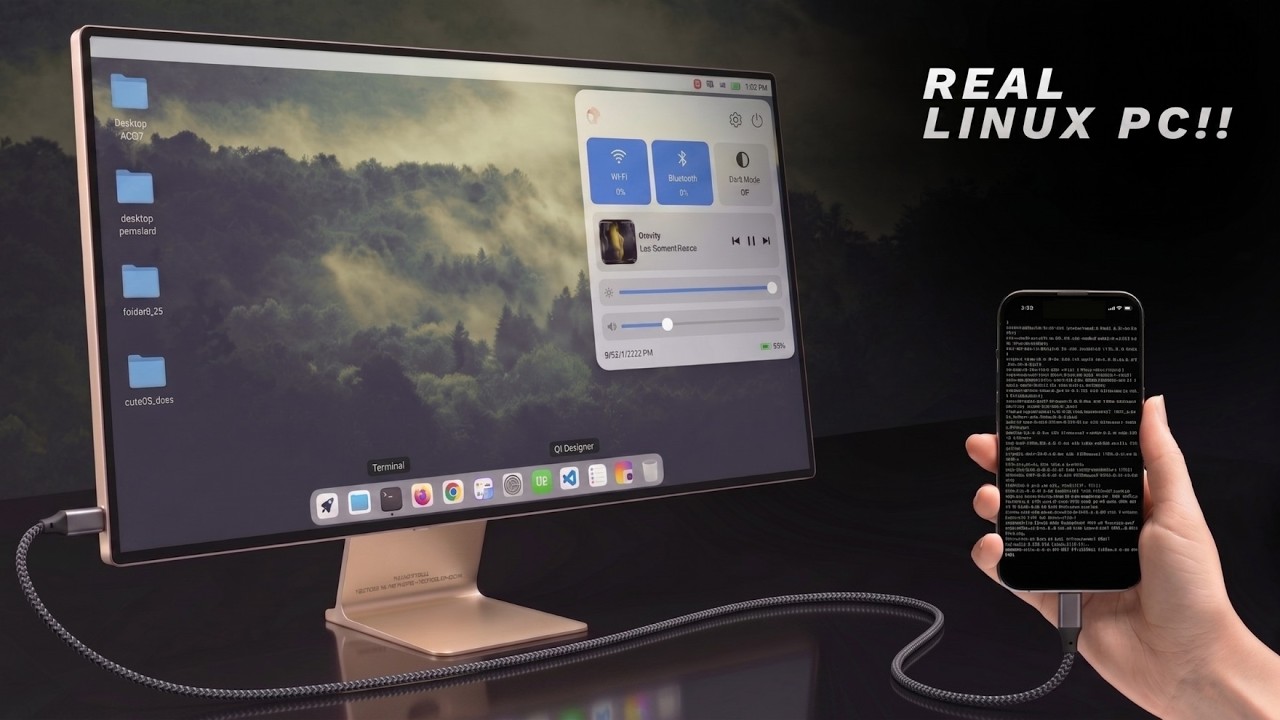
Everything below has been tested and confirmed working:
If it runs on Ubuntu, it runs here.
The Linux environment runs through Termux with direct access to the phone's kernel. No emulation, no translation -- native performance.
The setup script installs a full desktop (XFCE4/LXQt/MATE/KDE) inside Termux using the Termux User Repository (TUR) for GUI apps. For tools not available in TUR (Wireshark, Metasploit, etc.), a Proot container provides a standard Ubuntu/Debian/Kali environment where you install anything with apt.
The automatic menu sync scans what you install inside Proot and adds it directly to your desktop app menu. No need to enter the container every time.
DroidDesk is also available as a standalone Android application that completely automates this process without requiring a separate Termux installation. It renders through an embedded Termux:X11 server running in its own Android process; the app does not use VNC.
chroot.DISPLAY=:0. Adreno devices use Turnip/Zink hardware acceleration when available; other GPUs fall back to Mesa software rendering.Download the latest release APK from the Releases tab and sideload it to begin.
Option A: USB-C Display Output If your phone supports display output over USB-C, just use a USB-C to HDMI adapter. Done.
Option B: Raspberry Pi Bridge For phones without display output (most mid-range phones with USB 2.0), use a Raspberry Pi Zero 2W as a bridge:
The Pi connects to the phone via USB tethering, detects the phone's IP automatically, and opens a VNC viewer to display the phone's desktop on the monitor.
Download and install Termux from F-Droid: https://f-droid.org/en/packages/com.termux/
Do NOT use the Play Store version. It is outdated and will not work.
Download the latest APK from: https://github.com/termux/termux-x11/releases/tag/nightly
Install it on your phone. This is the display server that renders the desktop.
Open Termux and run:
curl -sL https://raw.githubusercontent.com/orailnoor/DroidDesk/main/termux-linux-setup.sh -o setup.sh
bash setup.sh
The script will:
After installation completes:
bash ~/start-x11.sh
Then open the Termux-X11 app on your phone. Your desktop is ready.
To install tools that are not in TUR:
bash ~/start-proot.sh
apt install wireshark    # or any other package
exit
bash ~/proot-menu-sync.sh
The app will appear in your desktop menu automatically.
If you are using a Raspberry Pi Zero 2W to output to a monitor:
Flash standard Raspberry Pi OS to an SD card and boot the Pi.
sudo apt update
sudo apt install realvnc-vnc-viewer
Copy pi-launch_phone.sh to your Pi:
curl -sL https://raw.githubusercontent.com/orailnoor/DroidDesk/main/pi-launch_phone.sh -o ~/pi-launch_phone.sh
chmod +x ~/pi-launch_phone.sh
bash ~/start-vnc.sh (in Termux)bash ~/pi-launch_phone.sh
The script auto-detects the phone's IP and opens a fullscreen VNC session on the monitor.
To make the Pi automatically connect when powered on, add to crontab:
crontab -e
Add this line:
@reboot sleep 15 && /home/pi/pi-launch_phone.sh
| Command | What It Does |
|---|---|
bash ~/start-x11.sh | Start desktop via Termux-X11 |
bash ~/start-vnc.sh | Start desktop via VNC (if installed) |
bash ~/start-proot.sh | Open Proot Linux shell |
bash ~/proot-menu-sync.sh | Sync Proot apps to desktop menu |
bash ~/stop-linux.sh | Stop all sessions |
[!WARNING] Disable Child Process in Developer Options On some Android versions (MIUI, One UI, stock Android 13+), the system may kill Termux background processes and drop your desktop session. To prevent this:
- Go to Settings → Developer Options
- Find "Child process" (may be labeled differently depending on your ROM)
- Disable child process restrictions for Termux
Without this, long-running sessions (VNC, Termux-X11) may be killed by the OS without warning.
Created by orailnoor
DroidDesk is independent software licensed under GNU GPL version 3 only. It is not affiliated with or endorsed by Termux, Termux:X11, TUR, Canonical, Ubuntu, or other upstream projects.
The Android application incorporates GPL-licensed Termux:X11 components and bundles other third-party software under their respective licenses. See:
The current compliance checklist includes unresolved source provenance, reproducible-build, custom-prefix bootstrap, and wallpaper-license work. Do not describe a binary release as fully compliant until the blocking checklist items are complete.
69 followers · starred Jun 2026
17 followers · starred Aug 2026
282 followers · starred Sep 2026
241 followers · starred Jul 2026
DroidDesk turns your Android phone into a real Linux desktop using Termux, Termux X11, TUR, and Proot. Run VS Code, Firefox, LibreOffice, Blender, and more with X11 or VNC support for monitor setup.
Kotlin
3,902
55 commits
updated Oct 14, 2026
Run a full Linux desktop on any Android phone. Not a terminal. Not an emulator. A complete desktop environment with direct kernel access -- VS Code, Blender, Metasploit, local AI, all of it.
Connect your phone to a monitor and it becomes a Linux PC. Unplug it and your entire setup comes with you.
[!IMPORTANT] DroidDesk is an independent GPL-3.0 open-source project that incorporates modified Termux:X11 components. It is not affiliated with or endorsed by Termux, Termux:X11, TUR, Canonical, or Ubuntu.
- Source and licenses: https://github.com/orailnoor/DroidDesk
- Termux:X11 upstream: https://github.com/termux/termux-x11
Everything below has been tested and confirmed working:
If it runs on Ubuntu, it runs here.
The Linux environment runs through Termux with direct access to the phone's kernel. No emulation, no translation -- native performance.
The setup script installs a full desktop (XFCE4/LXQt/MATE/KDE) inside Termux using the Termux User Repository (TUR) for GUI apps. For tools not available in TUR (Wireshark, Metasploit, etc.), a Proot container provides a standard Ubuntu/Debian/Kali environment where you install anything with apt.
The automatic menu sync scans what you install inside Proot and adds it directly to your desktop app menu. No need to enter the container every time.
DroidDesk is also available as a standalone Android application that completely automates this process without requiring a separate Termux installation. It renders through an embedded Termux:X11 server running in its own Android process; the app does not use VNC.
chroot.DISPLAY=:0. Adreno devices use Turnip/Zink hardware acceleration when available; other GPUs fall back to Mesa software rendering.Download the latest release APK from the Releases tab and sideload it to begin.
Option A: USB-C Display Output If your phone supports display output over USB-C, just use a USB-C to HDMI adapter. Done.
Option B: Raspberry Pi Bridge For phones without display output (most mid-range phones with USB 2.0), use a Raspberry Pi Zero 2W as a bridge:
The Pi connects to the phone via USB tethering, detects the phone's IP automatically, and opens a VNC viewer to display the phone's desktop on the monitor.
Download and install Termux from F-Droid: https://f-droid.org/en/packages/com.termux/
Do NOT use the Play Store version. It is outdated and will not work.
Download the latest APK from: https://github.com/termux/termux-x11/releases/tag/nightly
Install it on your phone. This is the display server that renders the desktop.
Open Termux and run:
curl -sL https://raw.githubusercontent.com/orailnoor/DroidDesk/main/termux-linux-setup.sh -o setup.sh
bash setup.sh
The script will:
After installation completes:
bash ~/start-x11.sh
Then open the Termux-X11 app on your phone. Your desktop is ready.
To install tools that are not in TUR:
bash ~/start-proot.sh
apt install wireshark    # or any other package
exit
bash ~/proot-menu-sync.sh
The app will appear in your desktop menu automatically.
If you are using a Raspberry Pi Zero 2W to output to a monitor:
Flash standard Raspberry Pi OS to an SD card and boot the Pi.
sudo apt update
sudo apt install realvnc-vnc-viewer
Copy pi-launch_phone.sh to your Pi:
curl -sL https://raw.githubusercontent.com/orailnoor/DroidDesk/main/pi-launch_phone.sh -o ~/pi-launch_phone.sh
chmod +x ~/pi-launch_phone.sh
bash ~/start-vnc.sh (in Termux)bash ~/pi-launch_phone.sh
The script auto-detects the phone's IP and opens a fullscreen VNC session on the monitor.
To make the Pi automatically connect when powered on, add to crontab:
crontab -e
Add this line:
@reboot sleep 15 && /home/pi/pi-launch_phone.sh
| Command | What It Does |
|---|---|
bash ~/start-x11.sh | Start desktop via Termux-X11 |
bash ~/start-vnc.sh | Start desktop via VNC (if installed) |
bash ~/start-proot.sh | Open Proot Linux shell |
bash ~/proot-menu-sync.sh | Sync Proot apps to desktop menu |
bash ~/stop-linux.sh | Stop all sessions |
[!WARNING] Disable Child Process in Developer Options On some Android versions (MIUI, One UI, stock Android 13+), the system may kill Termux background processes and drop your desktop session. To prevent this:
- Go to Settings → Developer Options
- Find "Child process" (may be labeled differently depending on your ROM)
- Disable child process restrictions for Termux
Without this, long-running sessions (VNC, Termux-X11) may be killed by the OS without warning.
Created by orailnoor
DroidDesk is independent software licensed under GNU GPL version 3 only. It is not affiliated with or endorsed by Termux, Termux:X11, TUR, Canonical, Ubuntu, or other upstream projects.
The Android application incorporates GPL-licensed Termux:X11 components and bundles other third-party software under their respective licenses. See:
The current compliance checklist includes unresolved source provenance, reproducible-build, custom-prefix bootstrap, and wallpaper-license work. Do not describe a binary release as fully compliant until the blocking checklist items are complete.
69 followers · starred Jun 2026
17 followers · starred Aug 2026
282 followers · starred Sep 2026
241 followers · starred Jul 2026



