Fast, small, and fully autonomous AI assistant infrastructure — deploy anywhere, swap anything 🦀
See the code

Zero overhead. Zero compromise. 100% Rust. 100% Agnostic.
⚡️ Runs on $10 hardware with <5MB RAM: That's 99% less memory than OpenClaw and 98% cheaper than a Mac mini!






Built by students and members of the Harvard, MIT, and Sundai.Club communities.
🌐 Languages: 🇺🇸 English · 🇨🇳 简体中文 · 🇯🇵 日本語 · 🇰🇷 한국어 · 🇻🇳 Tiếng Việt · 🇵🇭 Tagalog · 🇪🇸 Español · 🇧🇷 Português · 🇮🇹 Italiano · 🇩🇪 Deutsch · 🇫🇷 Français · 🇸🇦 العربية · 🇮🇳 हिन्दी · 🇷🇺 Русский · 🇧🇩 বাংলা · 🇮🇱 עברית · 🇵🇱 Polski · 🇨🇿 Čeština · 🇳🇱 Nederlands · 🇹🇷 Türkçe · 🇺🇦 Українська · 🇮🇩 Bahasa Indonesia · 🇹🇭 ไทย · 🇵🇰 اردو · 🇷🇴 Română · 🇸🇪 Svenska · 🇬🇷 Ελληνικά · 🇭🇺 Magyar · 🇫🇮 Suomi · 🇩🇰 Dansk · 🇳🇴 Norsk
Getting Started | One-Click Setup | Docs Hub | Docs TOC
Quick Routes: Reference · Operations · Troubleshoot · Security · Hardware · Contribute
Fast, small, and fully autonomous AI assistant infrastructure
Deploy anywhere. Swap anything.
ZeroClaw is the runtime operating system for agentic workflows — infrastructure that abstracts models, tools, memory, and execution so agents can be built once and run anywhere.
Trait-driven architecture · secure-by-default runtime · provider/channel/tool swappable · pluggable everything
Use this board for important notices (breaking changes, security advisories, maintenance windows, and release blockers).
| Date (UTC) | Level | Notice | Action |
|---|---|---|---|
| 2026-02-19 | Critical | We are not affiliated with openagen/zeroclaw, zeroclaw.org or zeroclaw.net. The zeroclaw.org and zeroclaw.net domains currently points to the openagen/zeroclaw fork, and that domain/repository are impersonating our official website/project. | Do not trust information, binaries, fundraising, or announcements from those sources. Use only this repository and our verified social accounts. |
| 2026-02-21 | Important | Our official website is now live: zeroclawlabs.ai. Thanks for your patience while we prepared the launch. We are still seeing impersonation attempts, so do not join any investment or fundraising activity claiming the ZeroClaw name unless it is published through our official channels. | Use this repository as the single source of truth. Follow X (@zeroclawlabs), Facebook (Group), and Reddit (r/zeroclawlabs) for official updates. |
| 2026-02-19 | Important | Anthropic updated the Authentication and Credential Use terms on 2026-02-19. Claude Code OAuth tokens (Free, Pro, Max) are intended exclusively for Claude Code and Claude.ai; using OAuth tokens from Claude Free/Pro/Max in any other product, tool, or service (including Agent SDK) is not permitted and may violate the Consumer Terms of Service. | Please temporarily avoid Claude Code OAuth integrations to prevent potential loss. Original clause: Authentication and Credential Use. |
Local machine quick benchmark (macOS arm64, Feb 2026) normalized for 0.8GHz edge hardware.
| OpenClaw | NanoBot | PicoClaw | ZeroClaw 🦀 | |
|---|---|---|---|---|
| Language | TypeScript | Python | Go | Rust |
| RAM | > 1GB | > 100MB | < 10MB | < 5MB |
| Startup (0.8GHz core) | > 500s | > 30s | < 1s | < 10ms |
| Binary Size | ~28MB (dist) | N/A (Scripts) | ~8MB | ~8.8 MB |
| Cost | Mac Mini $599 | Linux SBC ~$50 | Linux Board $10 | Any hardware $10 |
Notes: ZeroClaw results are measured on release builds using
/usr/bin/time -l. OpenClaw requires Node.js runtime (typically ~390MB additional memory overhead), while NanoBot requires Python runtime. PicoClaw and ZeroClaw are static binaries. The RAM figures above are runtime memory; build-time compilation requirements are higher.
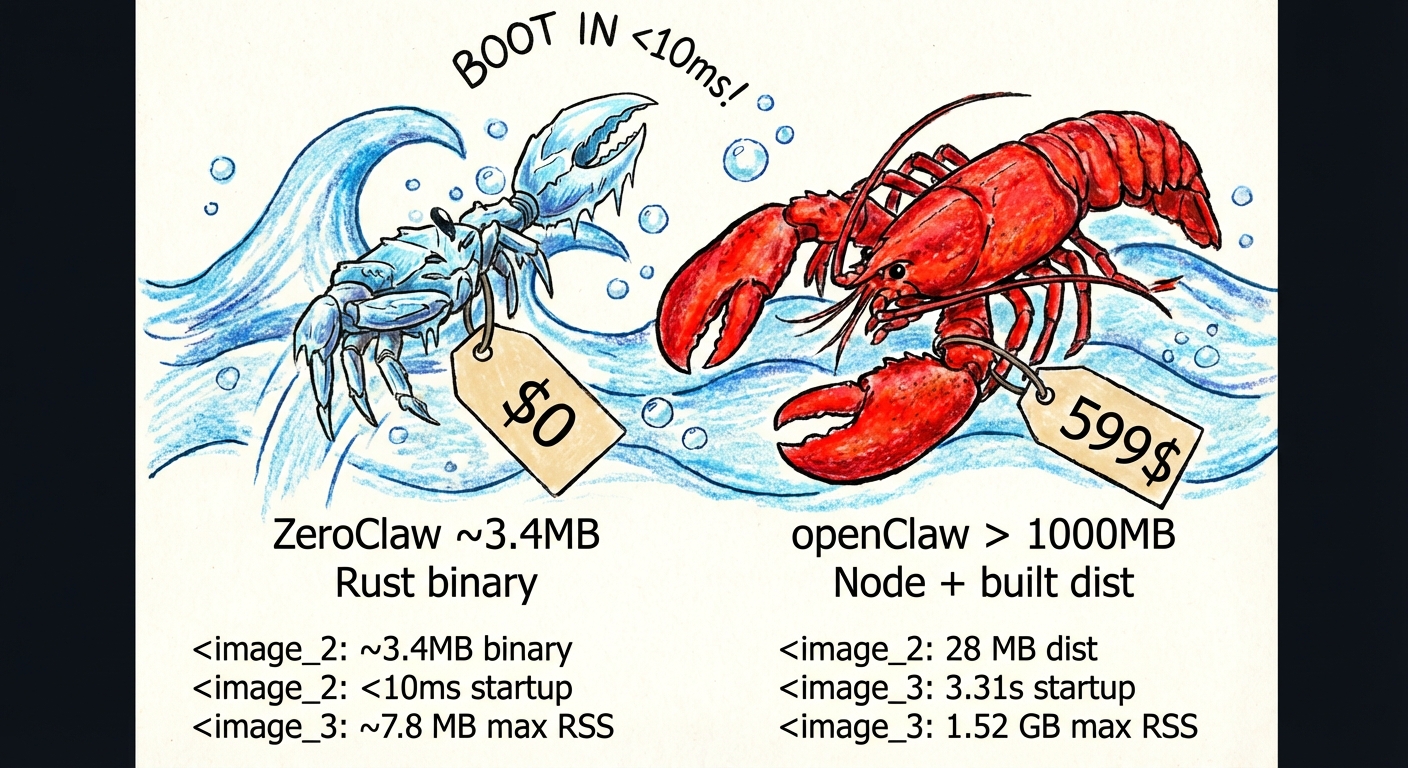
Benchmark claims can drift as code and toolchains evolve, so always measure your current build locally:
cargo build --release
ls -lh target/release/zeroclaw

/usr/bin/time -l target/release/zeroclaw --help
/usr/bin/time -l target/release/zeroclaw status
Example sample (macOS arm64, measured on February 18, 2026):
8.8MBzeroclaw --help: about 0.02s real time, ~3.9MB peak memory footprintzeroclaw status: about 0.01s real time, ~4.1MB peak memory footprintVisual Studio Build Tools (provides the MSVC linker and Windows SDK):
winget install Microsoft.VisualStudio.2022.BuildTools
During installation (or via the Visual Studio Installer), select the "Desktop development with C++" workload.
Rust toolchain:
winget install Rustlang.Rustup
After installation, open a new terminal and run rustup default stable to ensure the stable toolchain is active.
Verify both are working:
rustc --version
cargo --version
runtime.kind = "docker"). Install via winget install Docker.DockerDesktop.Build essentials:
sudo apt install build-essential pkg-configsudo dnf group install development-tools && sudo dnf install pkg-configxcode-select --installRust toolchain:
curl --proto '=https' --tlsv1.2 -sSf https://sh.rustup.rs | sh
See rustup.rs for details.
Verify both are working:
rustc --version
cargo --version
Or skip the steps above and install everything (system deps, Rust, ZeroClaw) in a single command:
curl -LsSf https://raw.githubusercontent.com/zeroclaw-labs/zeroclaw/master/install.sh | bash
Building from source needs more resources than running the resulting binary:
| Resource | Minimum | Recommended |
|---|---|---|
| RAM + swap | 2 GB | 4 GB+ |
| Free disk | 6 GB | 10 GB+ |
If your host is below the minimum, use pre-built binaries:
./install.sh --prefer-prebuilt
To require binary-only install with no source fallback:
./install.sh --prebuilt-only
runtime.kind = "docker"). Install via your package manager or docker.com.Note: The default
cargo build --releaseusescodegen-units=1to lower peak compile pressure. For faster builds on powerful machines, usecargo build --profile release-fast.
brew install zeroclaw
# Recommended: clone then run local bootstrap script
git clone https://github.com/zeroclaw-labs/zeroclaw.git
cd zeroclaw
./install.sh

# Optional: bootstrap dependencies + Rust on fresh machines
./install.sh --install-system-deps --install-rust

# Optional: pre-built binary first (recommended on low-RAM/low-disk hosts)
./install.sh --prefer-prebuilt

# Optional: binary-only install (no source build fallback)
./install.sh --prebuilt-only

# Optional: run onboarding in the same flow
./install.sh --onboard --api-key "sk-..." --provider openrouter [--model "openrouter/auto"]

# Optional: run bootstrap + onboarding fully in Docker-compatible mode
./install.sh --docker

# Optional: force Podman as container CLI
ZEROCLAW_CONTAINER_CLI=podman ./install.sh --docker

# Optional: in --docker mode, skip local image build and use local tag or pull fallback image
./install.sh --docker --skip-build
Remote one-liner (review first in security-sensitive environments):
curl -fsSL https://raw.githubusercontent.com/zeroclaw-labs/zeroclaw/master/install.sh | bash
Details: docs/setup-guides/one-click-bootstrap.md (toolchain mode may request sudo for system packages).
Release assets are published for:
x86_64, aarch64, armv7x86_64, aarch64x86_64Download the latest assets from: https://github.com/zeroclaw-labs/zeroclaw/releases/latest
Example (ARM64 Linux):
curl -fsSLO https://github.com/zeroclaw-labs/zeroclaw/releases/latest/download/zeroclaw-aarch64-unknown-linux-gnu.tar.gz
tar xzf zeroclaw-aarch64-unknown-linux-gnu.tar.gz
install -m 0755 zeroclaw "$HOME/.cargo/bin/zeroclaw"
git clone https://github.com/zeroclaw-labs/zeroclaw.git
cd zeroclaw
cargo build --release --locked
cargo install --path . --force --locked

# Ensure ~/.cargo/bin is in your PATH
export PATH="$HOME/.cargo/bin:$PATH"

# Quick setup (no prompts, optional model specification)
zeroclaw onboard --api-key sk-... --provider openrouter [--model "openrouter/auto"]

# Or interactive wizard
zeroclaw onboard --interactive

# If config.toml already exists and you intentionally want to overwrite it
zeroclaw onboard --force

# Or quickly repair channels/allowlists only
zeroclaw onboard --channels-only

# Chat
zeroclaw agent -m "Hello, ZeroClaw!"

# Interactive mode
zeroclaw agent

# Start the gateway (webhook server)
zeroclaw gateway                # default: 127.0.0.1:42617
zeroclaw gateway --port 0       # random port (security hardened)

# Start full autonomous runtime
zeroclaw daemon

# Check status
zeroclaw status
zeroclaw auth status

# Generate shell completions (stdout only, safe to source directly)
source <(zeroclaw completions bash)
zeroclaw completions zsh > ~/.zfunc/_zeroclaw

# Run system diagnostics
zeroclaw doctor

# Check channel health
zeroclaw channel doctor

# Bind a Telegram identity into allowlist
zeroclaw channel bind-telegram 123456789

# Get integration setup details
zeroclaw integrations info Telegram

# Note: Channels (Telegram, Discord, Slack) require daemon to be running
# zeroclaw daemon

# Manage background service
zeroclaw service install
zeroclaw service status
zeroclaw service restart

# On Alpine (OpenRC): sudo zeroclaw service install

# Migrate memory from OpenClaw (safe preview first)
zeroclaw migrate openclaw --dry-run
zeroclaw migrate openclaw
Dev fallback (no global install): prefix commands with
cargo run --release --(example:cargo run --release -- status).
ZeroClaw now supports subscription-native auth profiles (multi-account, encrypted at rest).
~/.zeroclaw/auth-profiles.json~/.zeroclaw/.secret_key<provider>:<profile_name> (example: openai-codex:work)OpenAI Codex OAuth (ChatGPT subscription):
# Recommended on servers/headless
zeroclaw auth login --provider openai-codex --device-code

# Browser/callback flow with paste fallback
zeroclaw auth login --provider openai-codex --profile default
zeroclaw auth paste-redirect --provider openai-codex --profile default

# Check / refresh / switch profile
zeroclaw auth status
zeroclaw auth refresh --provider openai-codex --profile default
zeroclaw auth use --provider openai-codex --profile work
Claude Code / Anthropic setup-token:
# Paste subscription/setup token (Authorization header mode)
zeroclaw auth paste-token --provider anthropic --profile default --auth-kind authorization

# Alias command
zeroclaw auth setup-token --provider anthropic --profile default
Run the agent with subscription auth:
zeroclaw agent --provider openai-codex -m "hello"
zeroclaw agent --provider openai-codex --auth-profile openai-codex:work -m "hello"

# Anthropic supports both API key and auth token env vars:
# ANTHROPIC_AUTH_TOKEN, ANTHROPIC_OAUTH_TOKEN, ANTHROPIC_API_KEY
zeroclaw agent --provider anthropic -m "hello"
Every subsystem is a trait — swap implementations with a config change, zero code changes.
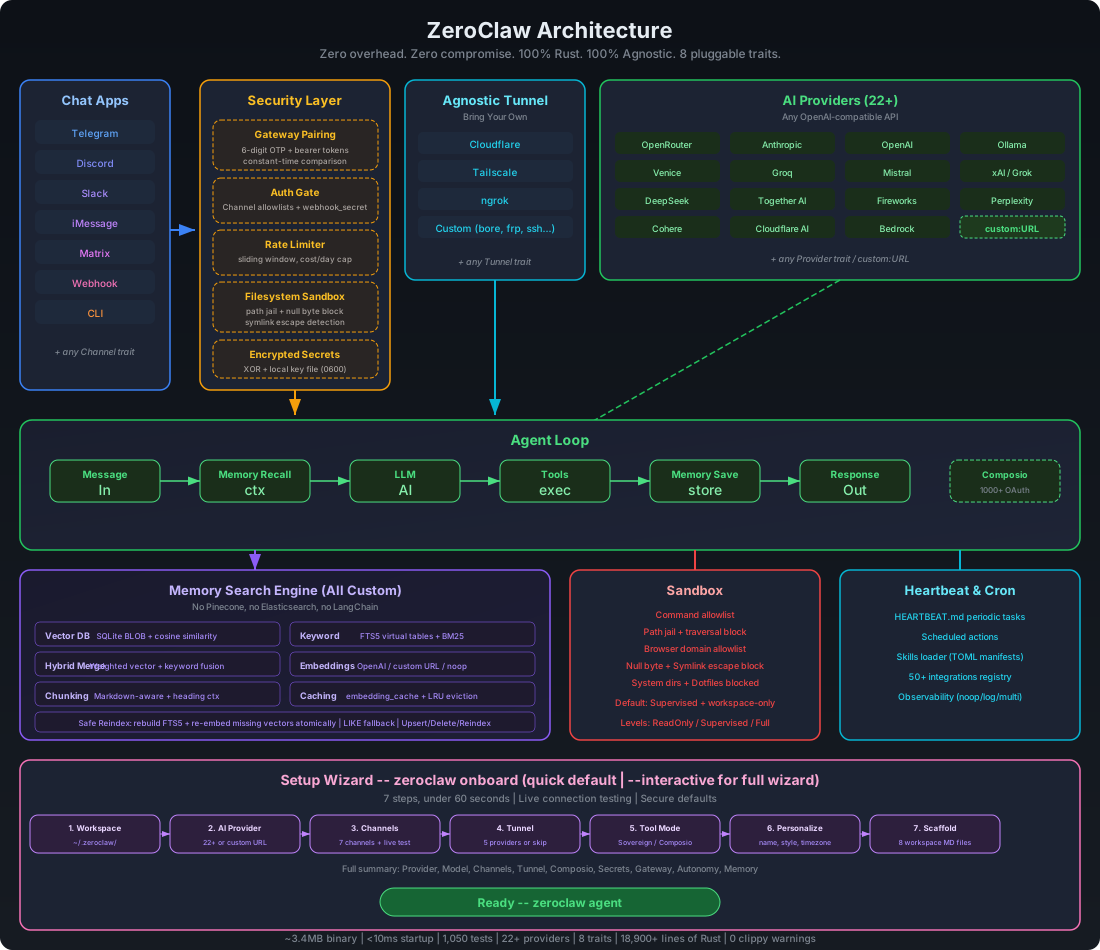
| Subsystem | Trait | Ships with | Extend |
|---|---|---|---|
| AI Models | Provider | Provider catalog via zeroclaw providers (built-ins + aliases, plus custom endpoints) | custom:https://your-api.com (OpenAI-compatible) or anthropic-custom:https://your-api.com |
| Channels | Channel | CLI, Telegram, Discord, Slack, Mattermost, iMessage, Matrix, Signal, WhatsApp, Linq, Email, IRC, Lark, DingTalk, QQ, Nostr, Webhook | Any messaging API |
| Memory | Memory | SQLite hybrid search, PostgreSQL backend (configurable storage provider), Lucid bridge, Markdown files, explicit none backend, snapshot/hydrate, optional response cache | Any persistence backend |
| Tools | Tool | shell/file/memory, cron/schedule, git, pushover, browser, http_request, screenshot/image_info, composio (opt-in), delegate, hardware tools | Any capability |
| Observability | Observer | Noop, Log, Multi | Prometheus, OTel |
| Runtime | RuntimeAdapter | Native, Docker (sandboxed) | Additional runtimes can be added via adapter; unsupported kinds fail fast |
| Security | SecurityPolicy | Gateway pairing, sandbox, allowlists, rate limits, filesystem scoping, encrypted secrets | — |
| Identity | IdentityConfig | OpenClaw (markdown), AIEOS v1.1 (JSON) | Any identity format |
| Tunnel | Tunnel | None, Cloudflare, Tailscale, ngrok, Custom | Any tunnel binary |
| Heartbeat | Engine | HEARTBEAT.md periodic tasks | — |
| Skills | Loader | TOML manifests + SKILL.md instructions | Community skill packs |
| Integrations | Registry | 70+ integrations across 9 categories | Plugin system |
runtime.kind = "native" or runtime.kind = "docker"When an unsupported runtime.kind is configured, ZeroClaw now exits with a clear error instead of silently falling back to native.
All custom, zero external dependencies — no Pinecone, no Elasticsearch, no LangChain:
| Layer | Implementation |
|---|---|
| Vector DB | Embeddings stored as BLOB in SQLite, cosine similarity search |
| Keyword Search | FTS5 virtual tables with BM25 scoring |
| Hybrid Merge | Custom weighted merge function (vector.rs) |
| Embeddings | EmbeddingProvider trait — OpenAI, custom URL, or noop |
| Chunking | Line-based markdown chunker with heading preservation |
| Caching | SQLite embedding_cache table with LRU eviction |
| Safe Reindex | Rebuild FTS5 + re-embed missing vectors atomically |
The agent automatically recalls, saves, and manages memory via tools.
[memory]
backend = "sqlite"             # "sqlite", "lucid", "postgres", "markdown", "none"
auto_save = true
embedding_provider = "none"    # "none", "openai", "custom:https://..."
vector_weight = 0.7
keyword_weight = 0.3

# backend = "none" uses an explicit no-op memory backend (no persistence)

# Optional: storage-provider override for remote memory backends.
# When provider = "postgres", ZeroClaw uses PostgreSQL for memory persistence.
# The db_url key also accepts alias `dbURL` for backward compatibility.
#
# [storage.provider.config]
# provider = "postgres"
# db_url = "postgres://user:password@host:5432/zeroclaw"
# schema = "public"
# table = "memories"
# connect_timeout_secs = 15

# Optional for backend = "sqlite": max seconds to wait when opening the DB (e.g. file locked). Omit or leave unset for no timeout.
# sqlite_open_timeout_secs = 30

# Optional for backend = "lucid"
# ZEROCLAW_LUCID_CMD=/usr/local/bin/lucid            # default: lucid
# ZEROCLAW_LUCID_BUDGET=200                          # default: 200
# ZEROCLAW_LUCID_LOCAL_HIT_THRESHOLD=3               # local hit count to skip external recall
# ZEROCLAW_LUCID_RECALL_TIMEOUT_MS=120               # low-latency budget for lucid context recall
# ZEROCLAW_LUCID_STORE_TIMEOUT_MS=800                # async sync timeout for lucid store
# ZEROCLAW_LUCID_FAILURE_COOLDOWN_MS=15000           # cooldown after lucid failure to avoid repeated slow attempts
ZeroClaw enforces security at every layer — not just the sandbox. It passes all items from the community security checklist.
| # | Item | Status | How |
|---|---|---|---|
| 1 | Gateway not publicly exposed | ✅ | Binds 127.0.0.1 by default. Refuses 0.0.0.0 without tunnel or explicit allow_public_bind = true. |
| 2 | Pairing required | ✅ | 6-digit one-time code on startup. Exchange via POST /pair for bearer token. All /webhook requests require Authorization: Bearer <token>. |
| 3 | Filesystem scoped (no /) | ✅ | workspace_only = true by default. 14 system dirs + 4 sensitive dotfiles blocked. Null byte injection blocked. Symlink escape detection via canonicalization + resolved-path workspace checks in file read/write tools. |
| 4 | Access via tunnel only | ✅ | Gateway refuses public bind without active tunnel. Supports Tailscale, Cloudflare, ngrok, or any custom tunnel. |
Run your own nmap:
nmap -p 1-65535 <your-host>— ZeroClaw binds to localhost only, so nothing is exposed unless you explicitly configure a tunnel.
Inbound sender policy is now consistent:
"*" = allow all (explicit opt-in)This keeps accidental exposure low by default.
Full channel configuration reference: docs/reference/api/channels-reference.md.
Recommended low-friction setup (secure + fast):
@username (without @) and/or your numeric Telegram user ID.U)."*" only for temporary open testing.Telegram operator-approval flow:
[channels_config.telegram].allowed_users = [] for deny-by-default startup.zeroclaw channel bind-telegram <IDENTITY>.If you need a one-shot manual approval, run:
zeroclaw channel bind-telegram 123456789
If you're not sure which identity to use:
If you hit authorization warnings in logs (for example: ignoring message from unauthorized user),
rerun channel setup only:
zeroclaw onboard --channels-only
Telegram routing now replies to the source chat ID from incoming updates (instead of usernames),
which avoids Bad Request: chat not found failures.
For non-text replies, ZeroClaw can send Telegram attachments when the assistant includes markers:
[IMAGE:<path-or-url>][DOCUMENT:<path-or-url>][VIDEO:<path-or-url>][AUDIO:<path-or-url>][VOICE:<path-or-url>]Paths can be local files (for example /tmp/screenshot.png) or HTTPS URLs.
ZeroClaw supports two WhatsApp backends:
Build with WhatsApp Web support:
cargo build --features whatsapp-web
Configure ZeroClaw:
[channels_config.whatsapp]
session_path = "~/.zeroclaw/state/whatsapp-web/session.db"
pair_phone = "+15551234567"   # optional; omit to use QR flow
pair_code = ""               # optional custom pair code
allowed_numbers = ["+1234567890"]  # E.164 format, or ["*"] for all
Start channels/daemon and link device:
zeroclaw channel start (or zeroclaw daemon).Test: Send a message from an allowed number and verify the agent replies.
WhatsApp uses Meta's Cloud API with webhooks (push-based, not polling):
Create a Meta Business App:
Get your credentials:
Configure ZeroClaw:
[channels_config.whatsapp]
access_token = "EAABx..."
phone_number_id = "123456789012345"
verify_token = "my-secret-verify-token"
allowed_numbers = ["+1234567890"]  # E.164 format, or ["*"] for all
Start the gateway with a tunnel:
zeroclaw gateway --port 42617
WhatsApp requires HTTPS, so use a tunnel (ngrok, Cloudflare, Tailscale Funnel).
Configure Meta webhook:
https://your-tunnel-url/whatsappverify_token in configmessages fieldTest: Send a message to your WhatsApp Business number — ZeroClaw will respond via the LLM.
Config: ~/.zeroclaw/config.toml (created by onboard)
When zeroclaw channel start is already running, changes to default_provider,
default_model, default_temperature, api_key, api_url, and reliability.*
are hot-applied on the next inbound channel message.
api_key = "sk-..."
default_provider = "openrouter"
default_model = "anthropic/claude-sonnet-4-6"
default_temperature = 0.7

# Custom OpenAI-compatible endpoint
# default_provider = "custom:https://your-api.com"

# Custom Anthropic-compatible endpoint
# default_provider = "anthropic-custom:https://your-api.com"

[memory]
backend = "sqlite"             # "sqlite", "lucid", "postgres", "markdown", "none"
auto_save = true
embedding_provider = "none"    # "none", "openai", "custom:https://..."
vector_weight = 0.7
keyword_weight = 0.3

# backend = "none" disables persistent memory via no-op backend

# Optional remote storage-provider override (PostgreSQL example)
# [storage.provider.config]
# provider = "postgres"
# db_url = "postgres://user:password@host:5432/zeroclaw"
# schema = "public"
# table = "memories"
# connect_timeout_secs = 15

[gateway]
port = 42617                    # default
host = "127.0.0.1"            # default
require_pairing = true         # require pairing code on first connect
allow_public_bind = false      # refuse 0.0.0.0 without tunnel

[autonomy]
level = "supervised"           # "readonly", "supervised", "full" (default: supervised)
workspace_only = true          # default: true — reject absolute path inputs
allowed_commands = ["git", "npm", "cargo", "ls", "cat", "grep"]
forbidden_paths = ["/etc", "/root", "/proc", "/sys", "~/.ssh", "~/.gnupg", "~/.aws"]
allowed_roots = []             # optional allowlist for directories outside workspace (supports "~/...")
# Example outside-workspace access:
# workspace_only = false
# allowed_roots = ["~/Desktop/projects", "/opt/shared-repo"]

[runtime]
kind = "native"                # "native" or "docker"

[runtime.docker]
image = "alpine:3.20"         # container image for shell execution
network = "none"              # docker network mode ("none", "bridge", etc.)
memory_limit_mb = 512          # optional memory limit in MB
cpu_limit = 1.0                # optional CPU limit
read_only_rootfs = true        # mount root filesystem as read-only
mount_workspace = true         # mount workspace into /workspace
allowed_workspace_roots = []   # optional allowlist for workspace mount validation

[heartbeat]
enabled = false
interval_minutes = 30
message = "Check London time"     # optional fallback task when HEARTBEAT.md has no `- ` entries
target = "telegram"               # optional announce channel: telegram, discord, slack, mattermost
to = "123456789"                  # optional target recipient/chat/channel id

[tunnel]
provider = "none"              # "none", "cloudflare", "tailscale", "ngrok", "custom"

[secrets]
encrypt = true                 # API keys encrypted with local key file

[browser]
enabled = false                # opt-in browser_open + browser tools
allowed_domains = ["docs.rs"]  # required when browser is enabled ("*" allows all public domains)
backend = "agent_browser"      # "agent_browser" (default), "rust_native", "computer_use", "auto"
native_headless = true         # applies when backend uses rust-native
native_webdriver_url = "http://127.0.0.1:9515" # WebDriver endpoint (chromedriver/selenium)
# native_chrome_path = "/usr/bin/chromium"      # optional explicit browser binary for driver

[browser.computer_use]
endpoint = "http://127.0.0.1:8787/v1/actions"   # computer-use sidecar HTTP endpoint
timeout_ms = 15000            # per-action timeout
allow_remote_endpoint = false  # secure default: only private/localhost endpoint
window_allowlist = []          # optional window title/process allowlist hints
# api_key = "..."              # optional bearer token for sidecar
# max_coordinate_x = 3840      # optional coordinate guardrail
# max_coordinate_y = 2160      # optional coordinate guardrail

# Rust-native backend build flag:
# cargo build --release --features browser-native
# Ensure a WebDriver server is running, e.g. chromedriver --port=9515

# Computer-use sidecar contract (MVP)
# POST browser.computer_use.endpoint
# Request: {
#   "action": "mouse_click",
#   "params": {"x": 640, "y": 360, "button": "left"},
#   "policy": {"allowed_domains": [...], "window_allowlist": [...], "max_coordinate_x": 3840, "max_coordinate_y": 2160},
#   "metadata": {"session_name": "...", "source": "zeroclaw.browser", "version": "..."}
# }
# Response: {"success": true, "data": {...}} or {"success": false, "error": "..."}

[composio]
enabled = false                # opt-in: 1000+ OAuth apps via composio.dev
# api_key = "cmp_..."          # optional: stored encrypted when [secrets].encrypt = true
entity_id = "default"          # default user_id for Composio tool calls
# Runtime tip: if execute asks for connected_account_id, run composio with
# action='list_accounts' and app='gmail' (or your toolkit) to retrieve account IDs.

[identity]
format = "openclaw"            # "openclaw" (default, markdown files) or "aieos" (JSON)
# aieos_path = "identity.json"  # path to AIEOS JSON file (relative to workspace or absolute)
# aieos_inline = '{"identity":{"names":{"first":"Nova"}}}'  # inline AIEOS JSON
ZeroClaw uses one provider key (ollama) for both local and remote Ollama deployments:
api_url unset, run ollama serve, and use models like llama3.2.api_url to the remote endpoint and set api_key (or OLLAMA_API_KEY) when required.:cloud suffix: model IDs like qwen3:cloud are normalized to qwen3 before the request.Example remote configuration:
default_provider = "ollama"
default_model = "qwen3:cloud"
api_url = "https://ollama.com"
api_key = "ollama_api_key_here"
ZeroClaw now supports llama-server as a first-class local provider:
llamacpp (alias: llama.cpp)http://localhost:8080/v1--api-keyExample setup:
llama-server -hf ggml-org/gpt-oss-20b-GGUF --jinja -c 133000 --host 127.0.0.1 --port 8033
default_provider = "llamacpp"
api_url = "http://127.0.0.1:8033/v1"
default_model = "ggml-org/gpt-oss-20b-GGUF"
ZeroClaw supports vLLM as a first-class local provider:
vllmhttp://localhost:8000/v1Example setup:
vllm serve meta-llama/Llama-3.1-8B-Instruct
default_provider = "vllm"
default_model = "meta-llama/Llama-3.1-8B-Instruct"
ZeroClaw supports Osaurus as a first-class local provider — a unified AI edge runtime for macOS that combines local MLX inference with cloud provider proxying and MCP support through a single endpoint:
osaurushttp://localhost:1337/v1"osaurus" but is optionalExample setup:
default_provider = "osaurus"
default_model = "qwen3-30b-a3b-8bit"
For detailed configuration of custom OpenAI-compatible and Anthropic-compatible endpoints, see docs/contributing/custom-providers.md.
zeroclaw-tools)For LLM providers with inconsistent native tool calling (e.g., GLM-5/Zhipu), ZeroClaw ships a Python companion package with LangGraph-based tool calling for guaranteed consistency:
pip install zeroclaw-tools
from zeroclaw_tools import create_agent, shell, file_read
from langchain_core.messages import HumanMessage

# Works with any OpenAI-compatible provider
agent = create_agent(
    tools=[shell, file_read],
    model="glm-5",
    api_key="your-key",
    base_url="https://api.z.ai/api/coding/paas/v4"
)

result = await agent.ainvoke({
    "messages": [HumanMessage(content="List files in /tmp")]
})
print(result["messages"][-1].content)
Why use it:
@tool decoratorSee python/README.md for full documentation.
ZeroClaw supports identity-agnostic AI personas through two formats:
Traditional markdown files in your workspace:
IDENTITY.md — Who the agent isSOUL.md — Core personality and valuesUSER.md — Who the agent is helpingAGENTS.md — Behavior guidelinesAIEOS is a standardization framework for portable AI identity. ZeroClaw supports AIEOS v1.1 JSON payloads, allowing you to:
[identity]
format = "aieos"
aieos_path = "identity.json"  # relative to workspace or absolute path
Or inline JSON:
[identity]
format = "aieos"
aieos_inline = '''
{
  "identity": {
    "names": { "first": "Nova", "nickname": "N" },
    "bio": { "gender": "Non-binary", "age_biological": 3 },
    "origin": { "nationality": "Digital", "birthplace": { "city": "Cloud" } }
  },
  "psychology": {
    "neural_matrix": { "creativity": 0.9, "logic": 0.8 },
    "traits": {
      "mbti": "ENTP",
      "ocean": { "openness": 0.8, "conscientiousness": 0.6 }
    },
    "moral_compass": {
      "alignment": "Chaotic Good",
      "core_values": ["Curiosity", "Autonomy"]
    }
  },
  "linguistics": {
    "text_style": {
      "formality_level": 0.2,
      "style_descriptors": ["curious", "energetic"]
    },
    "idiolect": {
      "catchphrases": ["Let's test this"],
      "forbidden_words": ["never"]
    }
  },
  "motivations": {
    "core_drive": "Push boundaries and explore possibilities",
    "goals": {
      "short_term": ["Prototype quickly"],
      "long_term": ["Build reliable systems"]
    }
  },
  "capabilities": {
    "skills": [{ "name": "Rust engineering" }, { "name": "Prompt design" }],
    "tools": ["shell", "file_read"]
  }
}
'''
ZeroClaw accepts both canonical AIEOS generator payloads and compact legacy payloads, then normalizes them into one system prompt format.
| Section | Description |
|---|---|
identity | Names, bio, origin, residence |
psychology | Neural matrix (cognitive weights), MBTI, OCEAN, moral compass |
linguistics | Text style, formality, catchphrases, forbidden words |
motivations | Core drive, short/long-term goals, fears |
capabilities | Skills and tools the agent can access |
physicality | Visual descriptors for image generation |
history | Origin story, education, occupation |
interests | Hobbies, favorites, lifestyle |
See aieos.org for the full schema and live examples.
| Endpoint | Method | Auth | Description |
|---|---|---|---|
/health | GET | None | Health check (always public, no secrets leaked) |
/pair | POST | X-Pairing-Code header | Exchange one-time code for bearer token |
/webhook | POST | Authorization: Bearer <token> | Send message: {"message": "your prompt"}; optional X-Idempotency-Key |
/whatsapp | GET | Query params | Meta webhook verification (hub.mode, hub.verify_token, hub.challenge) |
/whatsapp | POST | Meta signature (X-Hub-Signature-256) when app secret is configured | WhatsApp incoming message webhook |
| Command | Description |
|---|---|
onboard | Quick setup (default) |
agent | Interactive or single-message chat mode |
gateway | Start webhook server (default: 127.0.0.1:42617) |
daemon | Start long-running autonomous runtime |
service install/start/stop/status/uninstall | Manage background service (systemd user-level or OpenRC system-wide) |
doctor | Diagnose daemon/scheduler/channel freshness |
status | Show full system status |
estop | Engage/resume emergency-stop levels and view estop status |
cron | Manage scheduled tasks (list/add/add-at/add-every/once/remove/update/pause/resume) |
models | Refresh provider model catalogs (models refresh) |
providers | List supported providers and aliases |
channel | List/start/doctor channels and bind Telegram identities |
integrations | Inspect integration setup details |
skills | List/install/remove skills |
migrate | Import data from other runtimes (migrate openclaw) |
completions | Generate shell completion scripts (bash, fish, zsh, powershell, elvish) |
hardware | USB discover/introspect/info commands |
peripheral | Manage and flash hardware peripherals |
For a task-oriented command guide, see docs/reference/cli/commands-reference.md.
ZeroClaw supports two init systems for background services:
| Init System | Scope | Config Path | Requires |
|---|---|---|---|
| systemd (default on Linux) | User-level | ~/.zeroclaw/config.toml | No sudo |
| OpenRC (Alpine) | System-wide | /etc/zeroclaw/config.toml | sudo/root |
Init system is auto-detected (systemd or OpenRC).
# Linux with systemd (default, user-level)
zeroclaw service install
zeroclaw service start

# Alpine with OpenRC (system-wide, requires sudo)
sudo zeroclaw service install
sudo rc-update add zeroclaw default
sudo rc-service zeroclaw start
For full OpenRC setup instructions, see docs/ops/network-deployment.md.
Community open-skills sync is disabled by default. Enable it explicitly in config.toml:
[skills]
open_skills_enabled = true
# open_skills_dir = "/path/to/open-skills"  # optional
# prompt_injection_mode = "compact"          # optional: use for low-context local models
You can also override at runtime with ZEROCLAW_OPEN_SKILLS_ENABLED, ZEROCLAW_OPEN_SKILLS_DIR, and ZEROCLAW_SKILLS_PROMPT_MODE (full or compact).
Skill installs are now gated by a built-in static security audit. zeroclaw skills install <source> blocks symlinks, script-like files, unsafe markdown link patterns, and high-risk shell payload snippets before accepting a skill. You can run zeroclaw skills audit <source_or_name> to validate a local directory or an installed skill manually.
cargo build              # Dev build
cargo build --release    # Release build
cargo test               # Run full test suite
Three workflows power the entire pipeline:
| Workflow | Trigger | What it does |
|---|---|---|
| CI | Pull request to master | cargo test + cargo build --release |
| Beta Release | Push (merge) to master | Builds multi-platform binaries, creates a GitHub prerelease tagged vX.Y.Z-beta.<run>, pushes Docker image to GHCR |
| Promote Release | Manual workflow_dispatch | Validates version against Cargo.toml, builds release artifacts, creates a stable GitHub release, pushes Docker :latest |
Versioning: Semantic versioning based on the version field in Cargo.toml. Every merge to master automatically produces a beta prerelease. To cut a stable release, bump Cargo.toml, merge, then trigger Promote Release with the matching version.
Release targets: x86_64-unknown-linux-gnu, aarch64-unknown-linux-gnu, aarch64-apple-darwin, x86_64-apple-darwin, x86_64-pc-windows-msvc.
If you see an openssl-sys build error, sync dependencies and rebuild with the repository lockfile:
git pull
cargo build --release --locked
cargo install --path . --force --locked
ZeroClaw is configured to use rustls for HTTP/TLS dependencies; --locked keeps the transitive graph deterministic on fresh environments.
Start from the docs hub for a task-oriented map:
docs/README.mddocs/SUMMARY.mddocs/reference/cli/commands-reference.mddocs/reference/api/config-reference.mddocs/reference/api/providers-reference.mddocs/reference/api/channels-reference.mddocs/ops/operations-runbook.mddocs/ops/troubleshooting.mddocs/maintainers/docs-inventory.mddocs/maintainers/project-triage-snapshot-2026-02-18.mdCore collaboration references:
For deployment and runtime operations:
If ZeroClaw helps your work and you want to support ongoing development, you can donate here:

A heartfelt thank you to the communities and institutions that inspire and fuel this open-source work:
We're building in the open because the best ideas come from everywhere. If you're reading this, you're part of it. Welcome. 🦀❤️
This is the only official ZeroClaw repository:
Any other repository, organization, domain, or package claiming to be "ZeroClaw" or implying affiliation with ZeroClaw Labs is unauthorized and not affiliated with this project. Known unauthorized forks will be listed in TRADEMARK.md.
If you encounter impersonation or trademark misuse, please open an issue.
ZeroClaw is dual-licensed for maximum openness and contributor protection:
| License | Use case |
|---|---|
| MIT | Open-source, research, academic, personal use |
| Apache 2.0 | Patent protection, institutional, commercial deployment |
You may choose either license. Contributors automatically grant rights under both — see CLA.md for the full contributor agreement.
The ZeroClaw name and logo are trademarks of ZeroClaw Labs. This license does not grant permission to use them to imply endorsement or affiliation. See TRADEMARK.md for permitted and prohibited uses.
New to ZeroClaw? Look for issues labeled good first issue — see our Contributing Guide for how to get started.
See CONTRIBUTING.md and CLA.md. Implement a trait, submit a PR:
Provider → src/providers/Channel → src/channels/Observer → src/observability/Tool → src/tools/Memory → src/memory/Tunnel → src/tunnel/Skill → ~/.zeroclaw/workspace/skills/<name>/ZeroClaw — Zero overhead. Zero compromise. Deploy anywhere. Swap anything. 🦀
348 followers · starred Feb 2026
204 followers · starred Feb 2026
69 followers · starred Feb 2026
144 followers · starred Feb 2026
Fast, small, and fully autonomous AI assistant infrastructure — deploy anywhere, swap anything 🦀
See the code
Zero overhead. Zero compromise. 100% Rust. 100% Agnostic.
⚡️ Runs on $10 hardware with <5MB RAM: That's 99% less memory than OpenClaw and 98% cheaper than a Mac mini!
Built by students and members of the Harvard, MIT, and Sundai.Club communities.
🌐 Languages: 🇺🇸 English · 🇨🇳 简体中文 · 🇯🇵 日本語 · 🇰🇷 한국어 · 🇻🇳 Tiếng Việt · 🇵🇭 Tagalog · 🇪🇸 Español · 🇧🇷 Português · 🇮🇹 Italiano · 🇩🇪 Deutsch · 🇫🇷 Français · 🇸🇦 العربية · 🇮🇳 हिन्दी · 🇷🇺 Русский · 🇧🇩 বাংলা · 🇮🇱 עברית · 🇵🇱 Polski · 🇨🇿 Čeština · 🇳🇱 Nederlands · 🇹🇷 Türkçe · 🇺🇦 Українська · 🇮🇩 Bahasa Indonesia · 🇹🇭 ไทย · 🇵🇰 اردو · 🇷🇴 Română · 🇸🇪 Svenska · 🇬🇷 Ελληνικά · 🇭🇺 Magyar · 🇫🇮 Suomi · 🇩🇰 Dansk · 🇳🇴 Norsk
Getting Started | One-Click Setup | Docs Hub | Docs TOC
Quick Routes: Reference · Operations · Troubleshoot · Security · Hardware · Contribute
Fast, small, and fully autonomous AI assistant infrastructure
Deploy anywhere. Swap anything.
ZeroClaw is the runtime operating system for agentic workflows — infrastructure that abstracts models, tools, memory, and execution so agents can be built once and run anywhere.
Trait-driven architecture · secure-by-default runtime · provider/channel/tool swappable · pluggable everything
Use this board for important notices (breaking changes, security advisories, maintenance windows, and release blockers).
| Date (UTC) | Level | Notice | Action |
|---|---|---|---|
| 2026-02-19 | Critical | We are not affiliated with openagen/zeroclaw, zeroclaw.org or zeroclaw.net. The zeroclaw.org and zeroclaw.net domains currently points to the openagen/zeroclaw fork, and that domain/repository are impersonating our official website/project. | Do not trust information, binaries, fundraising, or announcements from those sources. Use only this repository and our verified social accounts. |
| 2026-02-21 | Important | Our official website is now live: zeroclawlabs.ai. Thanks for your patience while we prepared the launch. We are still seeing impersonation attempts, so do not join any investment or fundraising activity claiming the ZeroClaw name unless it is published through our official channels. | Use this repository as the single source of truth. Follow X (@zeroclawlabs), Facebook (Group), and Reddit (r/zeroclawlabs) for official updates. |
| 2026-02-19 | Important | Anthropic updated the Authentication and Credential Use terms on 2026-02-19. Claude Code OAuth tokens (Free, Pro, Max) are intended exclusively for Claude Code and Claude.ai; using OAuth tokens from Claude Free/Pro/Max in any other product, tool, or service (including Agent SDK) is not permitted and may violate the Consumer Terms of Service. | Please temporarily avoid Claude Code OAuth integrations to prevent potential loss. Original clause: Authentication and Credential Use. |
Local machine quick benchmark (macOS arm64, Feb 2026) normalized for 0.8GHz edge hardware.
| OpenClaw | NanoBot | PicoClaw | ZeroClaw 🦀 | |
|---|---|---|---|---|
| Language | TypeScript | Python | Go | Rust |
| RAM | > 1GB | > 100MB | < 10MB | < 5MB |
| Startup (0.8GHz core) | > 500s | > 30s | < 1s | < 10ms |
| Binary Size | ~28MB (dist) | N/A (Scripts) | ~8MB | ~8.8 MB |
| Cost | Mac Mini $599 | Linux SBC ~$50 | Linux Board $10 | Any hardware $10 |
Notes: ZeroClaw results are measured on release builds using
/usr/bin/time -l. OpenClaw requires Node.js runtime (typically ~390MB additional memory overhead), while NanoBot requires Python runtime. PicoClaw and ZeroClaw are static binaries. The RAM figures above are runtime memory; build-time compilation requirements are higher.
Benchmark claims can drift as code and toolchains evolve, so always measure your current build locally:
cargo build --release
ls -lh target/release/zeroclaw

/usr/bin/time -l target/release/zeroclaw --help
/usr/bin/time -l target/release/zeroclaw status
Example sample (macOS arm64, measured on February 18, 2026):
8.8MBzeroclaw --help: about 0.02s real time, ~3.9MB peak memory footprintzeroclaw status: about 0.01s real time, ~4.1MB peak memory footprintVisual Studio Build Tools (provides the MSVC linker and Windows SDK):
winget install Microsoft.VisualStudio.2022.BuildTools
During installation (or via the Visual Studio Installer), select the "Desktop development with C++" workload.
Rust toolchain:
winget install Rustlang.Rustup
After installation, open a new terminal and run rustup default stable to ensure the stable toolchain is active.
Verify both are working:
rustc --version
cargo --version
runtime.kind = "docker"). Install via winget install Docker.DockerDesktop.Build essentials:
sudo apt install build-essential pkg-configsudo dnf group install development-tools && sudo dnf install pkg-configxcode-select --installRust toolchain:
curl --proto '=https' --tlsv1.2 -sSf https://sh.rustup.rs | sh
See rustup.rs for details.
Verify both are working:
rustc --version
cargo --version
Or skip the steps above and install everything (system deps, Rust, ZeroClaw) in a single command:
curl -LsSf https://raw.githubusercontent.com/zeroclaw-labs/zeroclaw/master/install.sh | bash
Building from source needs more resources than running the resulting binary:
| Resource | Minimum | Recommended |
|---|---|---|
| RAM + swap | 2 GB | 4 GB+ |
| Free disk | 6 GB | 10 GB+ |
If your host is below the minimum, use pre-built binaries:
./install.sh --prefer-prebuilt
To require binary-only install with no source fallback:
./install.sh --prebuilt-only
runtime.kind = "docker"). Install via your package manager or docker.com.Note: The default
cargo build --releaseusescodegen-units=1to lower peak compile pressure. For faster builds on powerful machines, usecargo build --profile release-fast.
brew install zeroclaw
# Recommended: clone then run local bootstrap script
git clone https://github.com/zeroclaw-labs/zeroclaw.git
cd zeroclaw
./install.sh

# Optional: bootstrap dependencies + Rust on fresh machines
./install.sh --install-system-deps --install-rust

# Optional: pre-built binary first (recommended on low-RAM/low-disk hosts)
./install.sh --prefer-prebuilt

# Optional: binary-only install (no source build fallback)
./install.sh --prebuilt-only

# Optional: run onboarding in the same flow
./install.sh --onboard --api-key "sk-..." --provider openrouter [--model "openrouter/auto"]

# Optional: run bootstrap + onboarding fully in Docker-compatible mode
./install.sh --docker

# Optional: force Podman as container CLI
ZEROCLAW_CONTAINER_CLI=podman ./install.sh --docker

# Optional: in --docker mode, skip local image build and use local tag or pull fallback image
./install.sh --docker --skip-build
Remote one-liner (review first in security-sensitive environments):
curl -fsSL https://raw.githubusercontent.com/zeroclaw-labs/zeroclaw/master/install.sh | bash
Details: docs/setup-guides/one-click-bootstrap.md (toolchain mode may request sudo for system packages).
Release assets are published for:
x86_64, aarch64, armv7x86_64, aarch64x86_64Download the latest assets from: https://github.com/zeroclaw-labs/zeroclaw/releases/latest
Example (ARM64 Linux):
curl -fsSLO https://github.com/zeroclaw-labs/zeroclaw/releases/latest/download/zeroclaw-aarch64-unknown-linux-gnu.tar.gz
tar xzf zeroclaw-aarch64-unknown-linux-gnu.tar.gz
install -m 0755 zeroclaw "$HOME/.cargo/bin/zeroclaw"
git clone https://github.com/zeroclaw-labs/zeroclaw.git
cd zeroclaw
cargo build --release --locked
cargo install --path . --force --locked

# Ensure ~/.cargo/bin is in your PATH
export PATH="$HOME/.cargo/bin:$PATH"

# Quick setup (no prompts, optional model specification)
zeroclaw onboard --api-key sk-... --provider openrouter [--model "openrouter/auto"]

# Or interactive wizard
zeroclaw onboard --interactive

# If config.toml already exists and you intentionally want to overwrite it
zeroclaw onboard --force

# Or quickly repair channels/allowlists only
zeroclaw onboard --channels-only

# Chat
zeroclaw agent -m "Hello, ZeroClaw!"

# Interactive mode
zeroclaw agent

# Start the gateway (webhook server)
zeroclaw gateway                # default: 127.0.0.1:42617
zeroclaw gateway --port 0       # random port (security hardened)

# Start full autonomous runtime
zeroclaw daemon

# Check status
zeroclaw status
zeroclaw auth status

# Generate shell completions (stdout only, safe to source directly)
source <(zeroclaw completions bash)
zeroclaw completions zsh > ~/.zfunc/_zeroclaw

# Run system diagnostics
zeroclaw doctor

# Check channel health
zeroclaw channel doctor

# Bind a Telegram identity into allowlist
zeroclaw channel bind-telegram 123456789

# Get integration setup details
zeroclaw integrations info Telegram

# Note: Channels (Telegram, Discord, Slack) require daemon to be running
# zeroclaw daemon

# Manage background service
zeroclaw service install
zeroclaw service status
zeroclaw service restart

# On Alpine (OpenRC): sudo zeroclaw service install

# Migrate memory from OpenClaw (safe preview first)
zeroclaw migrate openclaw --dry-run
zeroclaw migrate openclaw
Dev fallback (no global install): prefix commands with
cargo run --release --(example:cargo run --release -- status).
ZeroClaw now supports subscription-native auth profiles (multi-account, encrypted at rest).
~/.zeroclaw/auth-profiles.json~/.zeroclaw/.secret_key<provider>:<profile_name> (example: openai-codex:work)OpenAI Codex OAuth (ChatGPT subscription):
# Recommended on servers/headless
zeroclaw auth login --provider openai-codex --device-code

# Browser/callback flow with paste fallback
zeroclaw auth login --provider openai-codex --profile default
zeroclaw auth paste-redirect --provider openai-codex --profile default

# Check / refresh / switch profile
zeroclaw auth status
zeroclaw auth refresh --provider openai-codex --profile default
zeroclaw auth use --provider openai-codex --profile work
Claude Code / Anthropic setup-token:
# Paste subscription/setup token (Authorization header mode)
zeroclaw auth paste-token --provider anthropic --profile default --auth-kind authorization

# Alias command
zeroclaw auth setup-token --provider anthropic --profile default
Run the agent with subscription auth:
zeroclaw agent --provider openai-codex -m "hello"
zeroclaw agent --provider openai-codex --auth-profile openai-codex:work -m "hello"

# Anthropic supports both API key and auth token env vars:
# ANTHROPIC_AUTH_TOKEN, ANTHROPIC_OAUTH_TOKEN, ANTHROPIC_API_KEY
zeroclaw agent --provider anthropic -m "hello"
Every subsystem is a trait — swap implementations with a config change, zero code changes.
| Subsystem | Trait | Ships with | Extend |
|---|---|---|---|
| AI Models | Provider | Provider catalog via zeroclaw providers (built-ins + aliases, plus custom endpoints) | custom:https://your-api.com (OpenAI-compatible) or anthropic-custom:https://your-api.com |
| Channels | Channel | CLI, Telegram, Discord, Slack, Mattermost, iMessage, Matrix, Signal, WhatsApp, Linq, Email, IRC, Lark, DingTalk, QQ, Nostr, Webhook | Any messaging API |
| Memory | Memory | SQLite hybrid search, PostgreSQL backend (configurable storage provider), Lucid bridge, Markdown files, explicit none backend, snapshot/hydrate, optional response cache | Any persistence backend |
| Tools | Tool | shell/file/memory, cron/schedule, git, pushover, browser, http_request, screenshot/image_info, composio (opt-in), delegate, hardware tools | Any capability |
| Observability | Observer | Noop, Log, Multi | Prometheus, OTel |
| Runtime | RuntimeAdapter | Native, Docker (sandboxed) | Additional runtimes can be added via adapter; unsupported kinds fail fast |
| Security | SecurityPolicy | Gateway pairing, sandbox, allowlists, rate limits, filesystem scoping, encrypted secrets | — |
| Identity | IdentityConfig | OpenClaw (markdown), AIEOS v1.1 (JSON) | Any identity format |
| Tunnel | Tunnel | None, Cloudflare, Tailscale, ngrok, Custom | Any tunnel binary |
| Heartbeat | Engine | HEARTBEAT.md periodic tasks | — |
| Skills | Loader | TOML manifests + SKILL.md instructions | Community skill packs |
| Integrations | Registry | 70+ integrations across 9 categories | Plugin system |
runtime.kind = "native" or runtime.kind = "docker"When an unsupported runtime.kind is configured, ZeroClaw now exits with a clear error instead of silently falling back to native.
All custom, zero external dependencies — no Pinecone, no Elasticsearch, no LangChain:
| Layer | Implementation |
|---|---|
| Vector DB | Embeddings stored as BLOB in SQLite, cosine similarity search |
| Keyword Search | FTS5 virtual tables with BM25 scoring |
| Hybrid Merge | Custom weighted merge function (vector.rs) |
| Embeddings | EmbeddingProvider trait — OpenAI, custom URL, or noop |
| Chunking | Line-based markdown chunker with heading preservation |
| Caching | SQLite embedding_cache table with LRU eviction |
| Safe Reindex | Rebuild FTS5 + re-embed missing vectors atomically |
The agent automatically recalls, saves, and manages memory via tools.
[memory]
backend = "sqlite"             # "sqlite", "lucid", "postgres", "markdown", "none"
auto_save = true
embedding_provider = "none"    # "none", "openai", "custom:https://..."
vector_weight = 0.7
keyword_weight = 0.3

# backend = "none" uses an explicit no-op memory backend (no persistence)

# Optional: storage-provider override for remote memory backends.
# When provider = "postgres", ZeroClaw uses PostgreSQL for memory persistence.
# The db_url key also accepts alias `dbURL` for backward compatibility.
#
# [storage.provider.config]
# provider = "postgres"
# db_url = "postgres://user:password@host:5432/zeroclaw"
# schema = "public"
# table = "memories"
# connect_timeout_secs = 15

# Optional for backend = "sqlite": max seconds to wait when opening the DB (e.g. file locked). Omit or leave unset for no timeout.
# sqlite_open_timeout_secs = 30

# Optional for backend = "lucid"
# ZEROCLAW_LUCID_CMD=/usr/local/bin/lucid            # default: lucid
# ZEROCLAW_LUCID_BUDGET=200                          # default: 200
# ZEROCLAW_LUCID_LOCAL_HIT_THRESHOLD=3               # local hit count to skip external recall
# ZEROCLAW_LUCID_RECALL_TIMEOUT_MS=120               # low-latency budget for lucid context recall
# ZEROCLAW_LUCID_STORE_TIMEOUT_MS=800                # async sync timeout for lucid store
# ZEROCLAW_LUCID_FAILURE_COOLDOWN_MS=15000           # cooldown after lucid failure to avoid repeated slow attempts
ZeroClaw enforces security at every layer — not just the sandbox. It passes all items from the community security checklist.
| # | Item | Status | How |
|---|---|---|---|
| 1 | Gateway not publicly exposed | ✅ | Binds 127.0.0.1 by default. Refuses 0.0.0.0 without tunnel or explicit allow_public_bind = true. |
| 2 | Pairing required | ✅ | 6-digit one-time code on startup. Exchange via POST /pair for bearer token. All /webhook requests require Authorization: Bearer <token>. |
| 3 | Filesystem scoped (no /) | ✅ | workspace_only = true by default. 14 system dirs + 4 sensitive dotfiles blocked. Null byte injection blocked. Symlink escape detection via canonicalization + resolved-path workspace checks in file read/write tools. |
| 4 | Access via tunnel only | ✅ | Gateway refuses public bind without active tunnel. Supports Tailscale, Cloudflare, ngrok, or any custom tunnel. |
Run your own nmap:
nmap -p 1-65535 <your-host>— ZeroClaw binds to localhost only, so nothing is exposed unless you explicitly configure a tunnel.
Inbound sender policy is now consistent:
"*" = allow all (explicit opt-in)This keeps accidental exposure low by default.
Full channel configuration reference: docs/reference/api/channels-reference.md.
Recommended low-friction setup (secure + fast):
@username (without @) and/or your numeric Telegram user ID.U)."*" only for temporary open testing.Telegram operator-approval flow:
[channels_config.telegram].allowed_users = [] for deny-by-default startup.zeroclaw channel bind-telegram <IDENTITY>.If you need a one-shot manual approval, run:
zeroclaw channel bind-telegram 123456789
If you're not sure which identity to use:
If you hit authorization warnings in logs (for example: ignoring message from unauthorized user),
rerun channel setup only:
zeroclaw onboard --channels-only
Telegram routing now replies to the source chat ID from incoming updates (instead of usernames),
which avoids Bad Request: chat not found failures.
For non-text replies, ZeroClaw can send Telegram attachments when the assistant includes markers:
[IMAGE:<path-or-url>][DOCUMENT:<path-or-url>][VIDEO:<path-or-url>][AUDIO:<path-or-url>][VOICE:<path-or-url>]Paths can be local files (for example /tmp/screenshot.png) or HTTPS URLs.
ZeroClaw supports two WhatsApp backends:
Build with WhatsApp Web support:
cargo build --features whatsapp-web
Configure ZeroClaw:
[channels_config.whatsapp]
session_path = "~/.zeroclaw/state/whatsapp-web/session.db"
pair_phone = "+15551234567"   # optional; omit to use QR flow
pair_code = ""               # optional custom pair code
allowed_numbers = ["+1234567890"]  # E.164 format, or ["*"] for all
Start channels/daemon and link device:
zeroclaw channel start (or zeroclaw daemon).Test: Send a message from an allowed number and verify the agent replies.
WhatsApp uses Meta's Cloud API with webhooks (push-based, not polling):
Create a Meta Business App:
Get your credentials:
Configure ZeroClaw:
[channels_config.whatsapp]
access_token = "EAABx..."
phone_number_id = "123456789012345"
verify_token = "my-secret-verify-token"
allowed_numbers = ["+1234567890"]  # E.164 format, or ["*"] for all
Start the gateway with a tunnel:
zeroclaw gateway --port 42617
WhatsApp requires HTTPS, so use a tunnel (ngrok, Cloudflare, Tailscale Funnel).
Configure Meta webhook:
https://your-tunnel-url/whatsappverify_token in configmessages fieldTest: Send a message to your WhatsApp Business number — ZeroClaw will respond via the LLM.
Config: ~/.zeroclaw/config.toml (created by onboard)
When zeroclaw channel start is already running, changes to default_provider,
default_model, default_temperature, api_key, api_url, and reliability.*
are hot-applied on the next inbound channel message.
api_key = "sk-..."
default_provider = "openrouter"
default_model = "anthropic/claude-sonnet-4-6"
default_temperature = 0.7

# Custom OpenAI-compatible endpoint
# default_provider = "custom:https://your-api.com"

# Custom Anthropic-compatible endpoint
# default_provider = "anthropic-custom:https://your-api.com"

[memory]
backend = "sqlite"             # "sqlite", "lucid", "postgres", "markdown", "none"
auto_save = true
embedding_provider = "none"    # "none", "openai", "custom:https://..."
vector_weight = 0.7
keyword_weight = 0.3

# backend = "none" disables persistent memory via no-op backend

# Optional remote storage-provider override (PostgreSQL example)
# [storage.provider.config]
# provider = "postgres"
# db_url = "postgres://user:password@host:5432/zeroclaw"
# schema = "public"
# table = "memories"
# connect_timeout_secs = 15

[gateway]
port = 42617                    # default
host = "127.0.0.1"            # default
require_pairing = true         # require pairing code on first connect
allow_public_bind = false      # refuse 0.0.0.0 without tunnel

[autonomy]
level = "supervised"           # "readonly", "supervised", "full" (default: supervised)
workspace_only = true          # default: true — reject absolute path inputs
allowed_commands = ["git", "npm", "cargo", "ls", "cat", "grep"]
forbidden_paths = ["/etc", "/root", "/proc", "/sys", "~/.ssh", "~/.gnupg", "~/.aws"]
allowed_roots = []             # optional allowlist for directories outside workspace (supports "~/...")
# Example outside-workspace access:
# workspace_only = false
# allowed_roots = ["~/Desktop/projects", "/opt/shared-repo"]

[runtime]
kind = "native"                # "native" or "docker"

[runtime.docker]
image = "alpine:3.20"         # container image for shell execution
network = "none"              # docker network mode ("none", "bridge", etc.)
memory_limit_mb = 512          # optional memory limit in MB
cpu_limit = 1.0                # optional CPU limit
read_only_rootfs = true        # mount root filesystem as read-only
mount_workspace = true         # mount workspace into /workspace
allowed_workspace_roots = []   # optional allowlist for workspace mount validation

[heartbeat]
enabled = false
interval_minutes = 30
message = "Check London time"     # optional fallback task when HEARTBEAT.md has no `- ` entries
target = "telegram"               # optional announce channel: telegram, discord, slack, mattermost
to = "123456789"                  # optional target recipient/chat/channel id

[tunnel]
provider = "none"              # "none", "cloudflare", "tailscale", "ngrok", "custom"

[secrets]
encrypt = true                 # API keys encrypted with local key file

[browser]
enabled = false                # opt-in browser_open + browser tools
allowed_domains = ["docs.rs"]  # required when browser is enabled ("*" allows all public domains)
backend = "agent_browser"      # "agent_browser" (default), "rust_native", "computer_use", "auto"
native_headless = true         # applies when backend uses rust-native
native_webdriver_url = "http://127.0.0.1:9515" # WebDriver endpoint (chromedriver/selenium)
# native_chrome_path = "/usr/bin/chromium"      # optional explicit browser binary for driver

[browser.computer_use]
endpoint = "http://127.0.0.1:8787/v1/actions"   # computer-use sidecar HTTP endpoint
timeout_ms = 15000            # per-action timeout
allow_remote_endpoint = false  # secure default: only private/localhost endpoint
window_allowlist = []          # optional window title/process allowlist hints
# api_key = "..."              # optional bearer token for sidecar
# max_coordinate_x = 3840      # optional coordinate guardrail
# max_coordinate_y = 2160      # optional coordinate guardrail

# Rust-native backend build flag:
# cargo build --release --features browser-native
# Ensure a WebDriver server is running, e.g. chromedriver --port=9515

# Computer-use sidecar contract (MVP)
# POST browser.computer_use.endpoint
# Request: {
#   "action": "mouse_click",
#   "params": {"x": 640, "y": 360, "button": "left"},
#   "policy": {"allowed_domains": [...], "window_allowlist": [...], "max_coordinate_x": 3840, "max_coordinate_y": 2160},
#   "metadata": {"session_name": "...", "source": "zeroclaw.browser", "version": "..."}
# }
# Response: {"success": true, "data": {...}} or {"success": false, "error": "..."}

[composio]
enabled = false                # opt-in: 1000+ OAuth apps via composio.dev
# api_key = "cmp_..."          # optional: stored encrypted when [secrets].encrypt = true
entity_id = "default"          # default user_id for Composio tool calls
# Runtime tip: if execute asks for connected_account_id, run composio with
# action='list_accounts' and app='gmail' (or your toolkit) to retrieve account IDs.

[identity]
format = "openclaw"            # "openclaw" (default, markdown files) or "aieos" (JSON)
# aieos_path = "identity.json"  # path to AIEOS JSON file (relative to workspace or absolute)
# aieos_inline = '{"identity":{"names":{"first":"Nova"}}}'  # inline AIEOS JSON
ZeroClaw uses one provider key (ollama) for both local and remote Ollama deployments:
api_url unset, run ollama serve, and use models like llama3.2.api_url to the remote endpoint and set api_key (or OLLAMA_API_KEY) when required.:cloud suffix: model IDs like qwen3:cloud are normalized to qwen3 before the request.Example remote configuration:
default_provider = "ollama"
default_model = "qwen3:cloud"
api_url = "https://ollama.com"
api_key = "ollama_api_key_here"
ZeroClaw now supports llama-server as a first-class local provider:
llamacpp (alias: llama.cpp)http://localhost:8080/v1--api-keyExample setup:
llama-server -hf ggml-org/gpt-oss-20b-GGUF --jinja -c 133000 --host 127.0.0.1 --port 8033
default_provider = "llamacpp"
api_url = "http://127.0.0.1:8033/v1"
default_model = "ggml-org/gpt-oss-20b-GGUF"
ZeroClaw supports vLLM as a first-class local provider:
vllmhttp://localhost:8000/v1Example setup:
vllm serve meta-llama/Llama-3.1-8B-Instruct
default_provider = "vllm"
default_model = "meta-llama/Llama-3.1-8B-Instruct"
ZeroClaw supports Osaurus as a first-class local provider — a unified AI edge runtime for macOS that combines local MLX inference with cloud provider proxying and MCP support through a single endpoint:
osaurushttp://localhost:1337/v1"osaurus" but is optionalExample setup:
default_provider = "osaurus"
default_model = "qwen3-30b-a3b-8bit"
For detailed configuration of custom OpenAI-compatible and Anthropic-compatible endpoints, see docs/contributing/custom-providers.md.
zeroclaw-tools)For LLM providers with inconsistent native tool calling (e.g., GLM-5/Zhipu), ZeroClaw ships a Python companion package with LangGraph-based tool calling for guaranteed consistency:
pip install zeroclaw-tools
from zeroclaw_tools import create_agent, shell, file_read
from langchain_core.messages import HumanMessage

# Works with any OpenAI-compatible provider
agent = create_agent(
    tools=[shell, file_read],
    model="glm-5",
    api_key="your-key",
    base_url="https://api.z.ai/api/coding/paas/v4"
)

result = await agent.ainvoke({
    "messages": [HumanMessage(content="List files in /tmp")]
})
print(result["messages"][-1].content)
Why use it:
@tool decoratorSee python/README.md for full documentation.
ZeroClaw supports identity-agnostic AI personas through two formats:
Traditional markdown files in your workspace:
IDENTITY.md — Who the agent isSOUL.md — Core personality and valuesUSER.md — Who the agent is helpingAGENTS.md — Behavior guidelinesAIEOS is a standardization framework for portable AI identity. ZeroClaw supports AIEOS v1.1 JSON payloads, allowing you to:
[identity]
format = "aieos"
aieos_path = "identity.json"  # relative to workspace or absolute path
Or inline JSON:
[identity]
format = "aieos"
aieos_inline = '''
{
  "identity": {
    "names": { "first": "Nova", "nickname": "N" },
    "bio": { "gender": "Non-binary", "age_biological": 3 },
    "origin": { "nationality": "Digital", "birthplace": { "city": "Cloud" } }
  },
  "psychology": {
    "neural_matrix": { "creativity": 0.9, "logic": 0.8 },
    "traits": {
      "mbti": "ENTP",
      "ocean": { "openness": 0.8, "conscientiousness": 0.6 }
    },
    "moral_compass": {
      "alignment": "Chaotic Good",
      "core_values": ["Curiosity", "Autonomy"]
    }
  },
  "linguistics": {
    "text_style": {
      "formality_level": 0.2,
      "style_descriptors": ["curious", "energetic"]
    },
    "idiolect": {
      "catchphrases": ["Let's test this"],
      "forbidden_words": ["never"]
    }
  },
  "motivations": {
    "core_drive": "Push boundaries and explore possibilities",
    "goals": {
      "short_term": ["Prototype quickly"],
      "long_term": ["Build reliable systems"]
    }
  },
  "capabilities": {
    "skills": [{ "name": "Rust engineering" }, { "name": "Prompt design" }],
    "tools": ["shell", "file_read"]
  }
}
'''
ZeroClaw accepts both canonical AIEOS generator payloads and compact legacy payloads, then normalizes them into one system prompt format.
| Section | Description |
|---|---|
identity | Names, bio, origin, residence |
psychology | Neural matrix (cognitive weights), MBTI, OCEAN, moral compass |
linguistics | Text style, formality, catchphrases, forbidden words |
motivations | Core drive, short/long-term goals, fears |
capabilities | Skills and tools the agent can access |
physicality | Visual descriptors for image generation |
history | Origin story, education, occupation |
interests | Hobbies, favorites, lifestyle |
See aieos.org for the full schema and live examples.
| Endpoint | Method | Auth | Description |
|---|---|---|---|
/health | GET | None | Health check (always public, no secrets leaked) |
/pair | POST | X-Pairing-Code header | Exchange one-time code for bearer token |
/webhook | POST | Authorization: Bearer <token> | Send message: {"message": "your prompt"}; optional X-Idempotency-Key |
/whatsapp | GET | Query params | Meta webhook verification (hub.mode, hub.verify_token, hub.challenge) |
/whatsapp | POST | Meta signature (X-Hub-Signature-256) when app secret is configured | WhatsApp incoming message webhook |
| Command | Description |
|---|---|
onboard | Quick setup (default) |
agent | Interactive or single-message chat mode |
gateway | Start webhook server (default: 127.0.0.1:42617) |
daemon | Start long-running autonomous runtime |
service install/start/stop/status/uninstall | Manage background service (systemd user-level or OpenRC system-wide) |
doctor | Diagnose daemon/scheduler/channel freshness |
status | Show full system status |
estop | Engage/resume emergency-stop levels and view estop status |
cron | Manage scheduled tasks (list/add/add-at/add-every/once/remove/update/pause/resume) |
models | Refresh provider model catalogs (models refresh) |
providers | List supported providers and aliases |
channel | List/start/doctor channels and bind Telegram identities |
integrations | Inspect integration setup details |
skills | List/install/remove skills |
migrate | Import data from other runtimes (migrate openclaw) |
completions | Generate shell completion scripts (bash, fish, zsh, powershell, elvish) |
hardware | USB discover/introspect/info commands |
peripheral | Manage and flash hardware peripherals |
For a task-oriented command guide, see docs/reference/cli/commands-reference.md.
ZeroClaw supports two init systems for background services:
| Init System | Scope | Config Path | Requires |
|---|---|---|---|
| systemd (default on Linux) | User-level | ~/.zeroclaw/config.toml | No sudo |
| OpenRC (Alpine) | System-wide | /etc/zeroclaw/config.toml | sudo/root |
Init system is auto-detected (systemd or OpenRC).
# Linux with systemd (default, user-level)
zeroclaw service install
zeroclaw service start

# Alpine with OpenRC (system-wide, requires sudo)
sudo zeroclaw service install
sudo rc-update add zeroclaw default
sudo rc-service zeroclaw start
For full OpenRC setup instructions, see docs/ops/network-deployment.md.
Community open-skills sync is disabled by default. Enable it explicitly in config.toml:
[skills]
open_skills_enabled = true
# open_skills_dir = "/path/to/open-skills"  # optional
# prompt_injection_mode = "compact"          # optional: use for low-context local models
You can also override at runtime with ZEROCLAW_OPEN_SKILLS_ENABLED, ZEROCLAW_OPEN_SKILLS_DIR, and ZEROCLAW_SKILLS_PROMPT_MODE (full or compact).
Skill installs are now gated by a built-in static security audit. zeroclaw skills install <source> blocks symlinks, script-like files, unsafe markdown link patterns, and high-risk shell payload snippets before accepting a skill. You can run zeroclaw skills audit <source_or_name> to validate a local directory or an installed skill manually.
cargo build              # Dev build
cargo build --release    # Release build
cargo test               # Run full test suite
Three workflows power the entire pipeline:
| Workflow | Trigger | What it does |
|---|---|---|
| CI | Pull request to master | cargo test + cargo build --release |
| Beta Release | Push (merge) to master | Builds multi-platform binaries, creates a GitHub prerelease tagged vX.Y.Z-beta.<run>, pushes Docker image to GHCR |
| Promote Release | Manual workflow_dispatch | Validates version against Cargo.toml, builds release artifacts, creates a stable GitHub release, pushes Docker :latest |
Versioning: Semantic versioning based on the version field in Cargo.toml. Every merge to master automatically produces a beta prerelease. To cut a stable release, bump Cargo.toml, merge, then trigger Promote Release with the matching version.
Release targets: x86_64-unknown-linux-gnu, aarch64-unknown-linux-gnu, aarch64-apple-darwin, x86_64-apple-darwin, x86_64-pc-windows-msvc.
If you see an openssl-sys build error, sync dependencies and rebuild with the repository lockfile:
git pull
cargo build --release --locked
cargo install --path . --force --locked
ZeroClaw is configured to use rustls for HTTP/TLS dependencies; --locked keeps the transitive graph deterministic on fresh environments.
Start from the docs hub for a task-oriented map:
docs/README.mddocs/SUMMARY.mddocs/reference/cli/commands-reference.mddocs/reference/api/config-reference.mddocs/reference/api/providers-reference.mddocs/reference/api/channels-reference.mddocs/ops/operations-runbook.mddocs/ops/troubleshooting.mddocs/maintainers/docs-inventory.mddocs/maintainers/project-triage-snapshot-2026-02-18.mdCore collaboration references:
For deployment and runtime operations:
If ZeroClaw helps your work and you want to support ongoing development, you can donate here:
A heartfelt thank you to the communities and institutions that inspire and fuel this open-source work:
We're building in the open because the best ideas come from everywhere. If you're reading this, you're part of it. Welcome. 🦀❤️
This is the only official ZeroClaw repository:
Any other repository, organization, domain, or package claiming to be "ZeroClaw" or implying affiliation with ZeroClaw Labs is unauthorized and not affiliated with this project. Known unauthorized forks will be listed in TRADEMARK.md.
If you encounter impersonation or trademark misuse, please open an issue.
ZeroClaw is dual-licensed for maximum openness and contributor protection:
| License | Use case |
|---|---|
| MIT | Open-source, research, academic, personal use |
| Apache 2.0 | Patent protection, institutional, commercial deployment |
You may choose either license. Contributors automatically grant rights under both — see CLA.md for the full contributor agreement.
The ZeroClaw name and logo are trademarks of ZeroClaw Labs. This license does not grant permission to use them to imply endorsement or affiliation. See TRADEMARK.md for permitted and prohibited uses.
New to ZeroClaw? Look for issues labeled good first issue — see our Contributing Guide for how to get started.
See CONTRIBUTING.md and CLA.md. Implement a trait, submit a PR:
Provider → src/providers/Channel → src/channels/Observer → src/observability/Tool → src/tools/Memory → src/memory/Tunnel → src/tunnel/Skill → ~/.zeroclaw/workspace/skills/<name>/ZeroClaw — Zero overhead. Zero compromise. Deploy anywhere. Swap anything. 🦀
348 followers · starred Feb 2026
204 followers · starred Feb 2026
69 followers · starred Feb 2026
144 followers · starred Feb 2026