
Discord bot for requesting movies/TV and receiving notifications when items are added to your media server.
See the codeREADME

A helpful Discord bot for requesting media via Seerr and receiving Jellyfin notifications for new content in your library.
Features • Quick Start • Configuration • Commands • Docker • Changelog • Contributing • Discord
💬 Discord Server
Before anything else, I invite you to join my Discord server for faster assistance, discussions, and important information such as an organized list of known bugs that are currently being tracked or planned features scheduled for future releases!
This helps avoid duplicate requests and keeps everyone informed about what's coming next!
Join Here:
I also have a dedicated channel on the r/JellyfinCommunity server (if you are already a member): Join me here
🌟 Features
- 🔍 Media Search: Search for movies and TV shows with
/searchcommand - you can then request it later within the message embed - 🔥 Trending Content: Browse weekly trending movies and TV shows with
/trendingcommand - 📤 One-Click Requests: Directly request media to Seerr with
/requestcommand - 📺 Smart TV Handling: Choose specific seasons when searching for TV series using
/search, or request all seasons at once with/request - 🎚️ Server and Quality: Choose which Radarr or Sonarr instance to request to, and which quality profile
- 🚫 Duplicate Detection: Automatically check if content already exists in Seerr before allowing requests
- 🏷️ Tag Selection: Select Radarr/Sonarr tags when requesting media for better organization and categorization
- 📬 Jellyfin Notifications: Automatic Discord notifications when new media is added to your library
- 📚 Library Filtering and Mapping: Choose which Jellyfin libraries send notifications and to which Discord channel
- 👤 User Mapping: Map Discord users to Seerr accounts so requests appear from the correct user
- 🔐 Role-Based Permissions: Control which users can use bot commands via Discord roles (allowlist/blocklist)
- 🔔 Private Notifications: Optional PM when your requested content becomes available on Jellyfin
- 👻 Ephemeral Mode: Make bot responses visible only to the command user
- 🌍 Multi-Language Support: Fully translated interface with automatic language detection
- 🎨 Rich Embeds: Beautiful, detailed embeds with:
- Movie/TV show posters and backdrops
- Director/Creator information
- IMDb ratings and links
- Runtime, genres, and synopsis
- Quick action buttons (IMDb, Letterboxd, Watch Now)
- 🔗 Autocomplete Support: Intelligent autocomplete for search queries with rich metadata
- ⚙️ Web Dashboard: User-friendly web interface for configuration with auto-detection
⚠️ Security Notice
Anchorr is designed to run locally on your home network alongside your Jellyfin server. It is not hardened for public internet exposure.
If you choose to expose Anchorr to the internet (e.g. via port forwarding or a reverse proxy), be aware of the following risks:
- The web dashboard (including configuration and secrets) would be publicly reachable
- Authentication is a simple username/password with no 2FA (brute-force lockout is in place, but it is not a substitute for proper access control)
- Secrets (Discord token, API keys, webhook secret) are base64-encoded in
config.json— note that base64 is not encryption and can be trivially decoded - There is no HTTPS built in — use a reverse proxy (e.g. Nginx + Let's Encrypt) if you expose it
Recommendation: Keep Anchorr on your local network. If remote access is needed, use a VPN instead of direct port forwarding.
📋 Prerequisites
Before getting started, ensure you have:
- ✅ A running Jellyfin server
- ✅ A running Seerr instance
- ✅ A Discord account with a server where you have admin privileges
- ✅ API keys from:
- The Movie Database (TMDB) - Required
- OMDb API - Optional, but recommended for richer data
- ✅ Node.js v18+ or Docker & Docker Compose
🚀 Quick Start
1️⃣ Clone and Install
git clone https://github.com/nairdahh/anchorr.git
cd anchorr
npm install
2️⃣ Start the Application
node app.js
The web dashboard will be available at http://localhost:8282
Note: The server binds to
127.0.0.1(localhost only) by default. This means the dashboard is only accessible from the machine running Anchorr. If you need to access it from another device on your network, either use a reverse proxy or setBIND_HOST=0.0.0.0before starting (e.g.BIND_HOST=0.0.0.0 node app.js). Docker deployments handle this automatically.
3️⃣ Configure via Web Dashboard
- Open
http://localhost:8282in your browser - Fill in your Discord Bot credentials, API keys, and service URLs
- Click the test buttons to verify connections
- Start the bot using the dashboard button
4️⃣ Invite Bot to Discord
Generate an OAuth2 URL in Discord Developer Portal:
- OAuth2 → URL Generator
- Scopes:
bot,applications.commands - Permissions: Send Messages, Embed Links
- Copy generated URL and open in browser
5️⃣ Configure Jellyfin Webhook
In Jellyfin Dashboard → Webhooks:
- Click + to add new Discord webhook
- Enter URL:
http://<bot-host>:<port>/jellyfin-webhook - Example:
http://192.168.1.100:8282/jellyfin-webhook - Add a custom HTTP header for authentication (see below)
- Save and you're done! 🎉
Security: Anchorr auto-generates a webhook secret on first start. Open the Anchorr dashboard, find the Webhook Secret field in the Jellyfin section, and click Copy Secret. Then add it as a custom HTTP header in the Jellyfin webhook plugin:
Header name Value X-Webhook-Secret(paste from dashboard) Requests without a valid secret are rejected with
401 Unauthorized.
⚙️ Configuration
Configuration is managed through a web dashboard at http://localhost:8282/. However, you can also configure it programmatically.
🐳 Docker Deployment
Deploying with Docker is the recommended method for running Anchorr. You can use Docker Compose (the easiest way) or run the container manually.
Method 1: Docker Compose
Option A: Clone the full repository
git clone https://github.com/nairdahh/anchorr.git
cd anchorr
docker compose up -d
Option B: Download only docker-compose.yml
mkdir anchorr && cd anchorr
wget https://raw.githubusercontent.com/nairdahh/anchorr/main/docker-compose.yml
# OR with curl: curl -O https://raw.githubusercontent.com/nairdahh/anchorr/main/docker-compose.yml
docker compose up -d
Access: Open browser at http://<your-server-ip>:8282 (e.g., http://192.168.1.100:8282 or http://localhost:8282)
Method 2: Manual Docker Run
# Run container (using port 8282)
docker run -d \
  --name anchorr \
  --restart unless-stopped \
  -p 8282:8282 \
  -v ./anchorr-data:/usr/src/app/config \
  -e WEBHOOK_PORT=8282 \
  -e NODE_ENV=production \
  -e BIND_HOST=0.0.0.0 \
  nairdah/anchorr:latest
Access: Open browser at http://<your-server-ip>:8282
Important parameters:
-p 8282:8282- Port mapping (host:container). First number is the port on your host.-v ./anchorr-data:/usr/src/app/config- Persistent config storage (saves to./anchorr-data/config.json)--restart unless-stopped- Auto-restart on failure-e WEBHOOK_PORT=8282- Web dashboard port-e NODE_ENV=production- Production mode
Example for Unraid: When adding the container in Unraid Community Apps, add this volume mapping in the "Path" section:
- Container Path:
/usr/src/app/config - Host Path:
/mnt/user/appdata/anchorr - Access Mode:
RW(Read-Write)
Method 3: Install Directly from Docker Hub
If you use Docker Desktop or other GUI tools (Portainer, Unraid, etc.), you can install directly from Docker Hub without cloning the repository:
- Open Docker Desktop → Images (or search in your GUI)
- Search for
nairdah/anchorror justanchorr - Pull the latest image
- Create a new container with these settings:
- Port:
8282:8282(or change as needed) - Volume:
./anchorr-data→/usr/src/app/config - Environment variables:
WEBHOOK_PORT=8282NODE_ENV=productionBIND_HOST=0.0.0.0
- Restart policy: Unless stopped
- Port:
Using a Different Port
If port 8282 is already in use:
Docker Compose: Edit docker-compose.yml
ports:
  - "9000:8282" # Change 9000 to your desired port
Docker Run: Change the first port number
docker run -d \
  --name anchorr \
  --restart unless-stopped \
  -p 9000:8282 \              # Use port 9000 on host
  -v ./anchorr-data:/usr/src/app/config \
  -e WEBHOOK_PORT=8282 \
  -e NODE_ENV=production \
  nairdah/anchorr:latest
Then access at: http://localhost:9000
🔄 Updates
Node.js Installation
cd anchorr
git pull origin main
npm install
# Restart the application (Ctrl+C, then run: node app.js)
Docker Compose
cd anchorr
git pull origin main
docker compose up -d --pull always
Docker Manual Run
docker pull nairdah/anchorr:latest
docker stop anchorr
docker rm anchorr
docker run -d \
  --name anchorr \
  --restart unless-stopped \
  -p 8282:8282 \
  -v ./anchorr-data:/usr/src/app/config \
  -e WEBHOOK_PORT=8282 \
  -e NODE_ENV=production \
  -e BIND_HOST=0.0.0.0 \
  nairdah/anchorr:latest
📸 Screenshots (a bit outdated for now)
| Feature | Screenshot |
|---|---|
| Autocomplete | 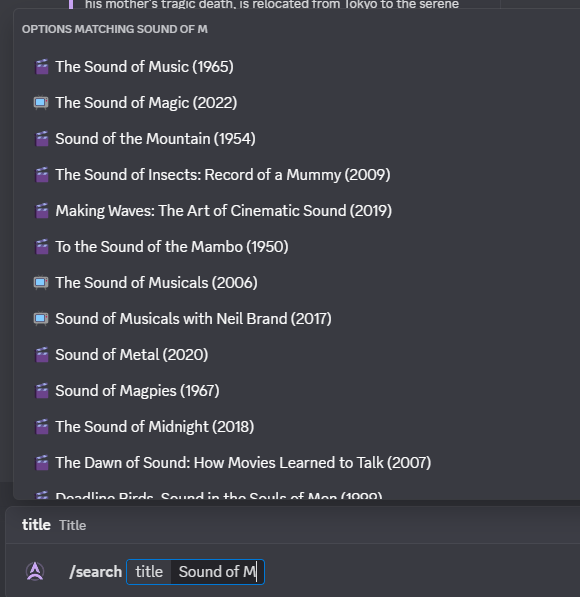 |
| Search Results | 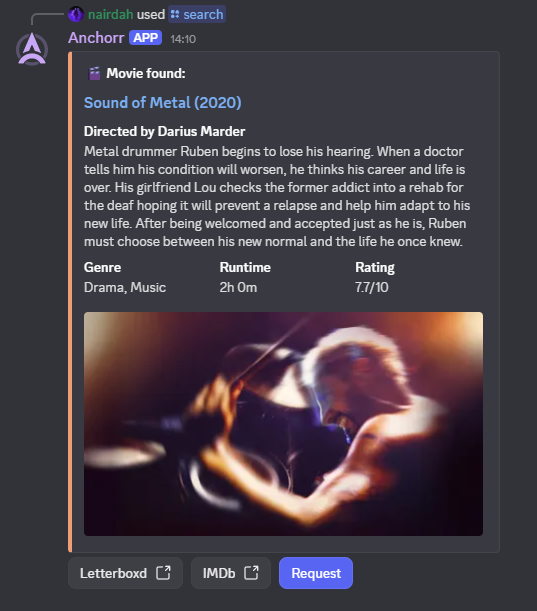 |
| Request Confirmation | 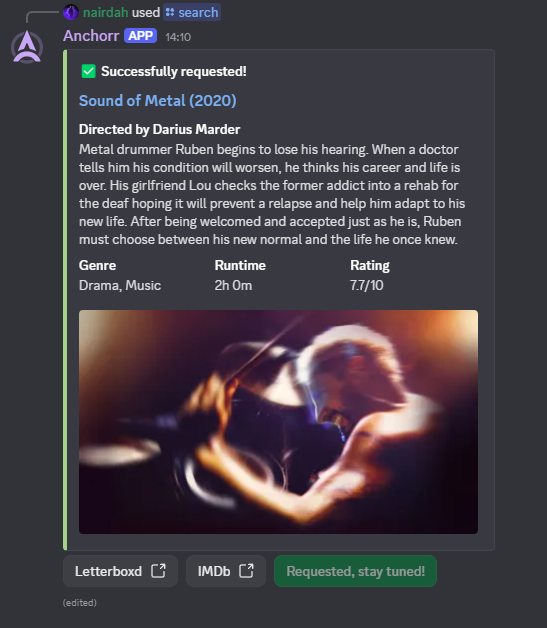 |
| Jellyfin Notification | 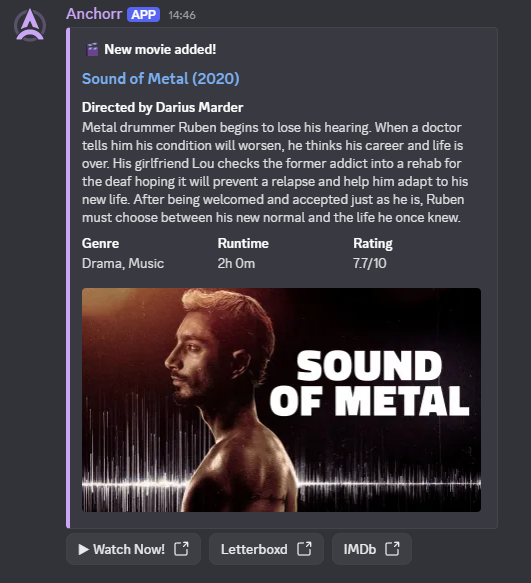 |
🤝 Contributing
Contributions are welcome! See CONTRIBUTING.md for guidelines.
🌍 Adding Translations
Help make Anchorr accessible to more users by contributing translations! The system automatically detects and loads new languages — no code changes needed.
Quick start: Copy locales/template.json to locales/<language_code>.json, fill in the _meta section, translate the values, and open a PR.
See CONTRIBUTING.md for detailed instructions.
👥 Contributors
A huge thank you to all the amazing people who have contributed to making Anchorr better! 🎉


📄 License
This project is released under the Unlicense — it's public domain. Do anything you want with the code!
Similar repos


Languages
JavaScript
77.8%
HTML
13.7%
CSS
8.1%
Discord bot for requesting movies/TV and receiving notifications when items are added to your media server.
See the codeREADME
A helpful Discord bot for requesting media via Seerr and receiving Jellyfin notifications for new content in your library.
Features • Quick Start • Configuration • Commands • Docker • Changelog • Contributing • Discord
💬 Discord Server
Before anything else, I invite you to join my Discord server for faster assistance, discussions, and important information such as an organized list of known bugs that are currently being tracked or planned features scheduled for future releases!
This helps avoid duplicate requests and keeps everyone informed about what's coming next!
Join Here:
I also have a dedicated channel on the r/JellyfinCommunity server (if you are already a member): Join me here
🌟 Features
- 🔍 Media Search: Search for movies and TV shows with
/searchcommand - you can then request it later within the message embed - 🔥 Trending Content: Browse weekly trending movies and TV shows with
/trendingcommand - 📤 One-Click Requests: Directly request media to Seerr with
/requestcommand - 📺 Smart TV Handling: Choose specific seasons when searching for TV series using
/search, or request all seasons at once with/request - 🎚️ Server and Quality: Choose which Radarr or Sonarr instance to request to, and which quality profile
- 🚫 Duplicate Detection: Automatically check if content already exists in Seerr before allowing requests
- 🏷️ Tag Selection: Select Radarr/Sonarr tags when requesting media for better organization and categorization
- 📬 Jellyfin Notifications: Automatic Discord notifications when new media is added to your library
- 📚 Library Filtering and Mapping: Choose which Jellyfin libraries send notifications and to which Discord channel
- 👤 User Mapping: Map Discord users to Seerr accounts so requests appear from the correct user
- 🔐 Role-Based Permissions: Control which users can use bot commands via Discord roles (allowlist/blocklist)
- 🔔 Private Notifications: Optional PM when your requested content becomes available on Jellyfin
- 👻 Ephemeral Mode: Make bot responses visible only to the command user
- 🌍 Multi-Language Support: Fully translated interface with automatic language detection
- 🎨 Rich Embeds: Beautiful, detailed embeds with:
- Movie/TV show posters and backdrops
- Director/Creator information
- IMDb ratings and links
- Runtime, genres, and synopsis
- Quick action buttons (IMDb, Letterboxd, Watch Now)
- 🔗 Autocomplete Support: Intelligent autocomplete for search queries with rich metadata
- ⚙️ Web Dashboard: User-friendly web interface for configuration with auto-detection
⚠️ Security Notice
Anchorr is designed to run locally on your home network alongside your Jellyfin server. It is not hardened for public internet exposure.
If you choose to expose Anchorr to the internet (e.g. via port forwarding or a reverse proxy), be aware of the following risks:
- The web dashboard (including configuration and secrets) would be publicly reachable
- Authentication is a simple username/password with no 2FA (brute-force lockout is in place, but it is not a substitute for proper access control)
- Secrets (Discord token, API keys, webhook secret) are base64-encoded in
config.json— note that base64 is not encryption and can be trivially decoded - There is no HTTPS built in — use a reverse proxy (e.g. Nginx + Let's Encrypt) if you expose it
Recommendation: Keep Anchorr on your local network. If remote access is needed, use a VPN instead of direct port forwarding.
📋 Prerequisites
Before getting started, ensure you have:
- ✅ A running Jellyfin server
- ✅ A running Seerr instance
- ✅ A Discord account with a server where you have admin privileges
- ✅ API keys from:
- The Movie Database (TMDB) - Required
- OMDb API - Optional, but recommended for richer data
- ✅ Node.js v18+ or Docker & Docker Compose
🚀 Quick Start
1️⃣ Clone and Install
git clone https://github.com/nairdahh/anchorr.git
cd anchorr
npm install
2️⃣ Start the Application
node app.js
The web dashboard will be available at http://localhost:8282
Note: The server binds to
127.0.0.1(localhost only) by default. This means the dashboard is only accessible from the machine running Anchorr. If you need to access it from another device on your network, either use a reverse proxy or setBIND_HOST=0.0.0.0before starting (e.g.BIND_HOST=0.0.0.0 node app.js). Docker deployments handle this automatically.
3️⃣ Configure via Web Dashboard
- Open
http://localhost:8282in your browser - Fill in your Discord Bot credentials, API keys, and service URLs
- Click the test buttons to verify connections
- Start the bot using the dashboard button
4️⃣ Invite Bot to Discord
Generate an OAuth2 URL in Discord Developer Portal:
- OAuth2 → URL Generator
- Scopes:
bot,applications.commands - Permissions: Send Messages, Embed Links
- Copy generated URL and open in browser
5️⃣ Configure Jellyfin Webhook
In Jellyfin Dashboard → Webhooks:
- Click + to add new Discord webhook
- Enter URL:
http://<bot-host>:<port>/jellyfin-webhook - Example:
http://192.168.1.100:8282/jellyfin-webhook - Add a custom HTTP header for authentication (see below)
- Save and you're done! 🎉
Security: Anchorr auto-generates a webhook secret on first start. Open the Anchorr dashboard, find the Webhook Secret field in the Jellyfin section, and click Copy Secret. Then add it as a custom HTTP header in the Jellyfin webhook plugin:
Header name Value X-Webhook-Secret(paste from dashboard) Requests without a valid secret are rejected with
401 Unauthorized.
⚙️ Configuration
Configuration is managed through a web dashboard at http://localhost:8282/. However, you can also configure it programmatically.
🐳 Docker Deployment
Deploying with Docker is the recommended method for running Anchorr. You can use Docker Compose (the easiest way) or run the container manually.
Method 1: Docker Compose
Option A: Clone the full repository
git clone https://github.com/nairdahh/anchorr.git
cd anchorr
docker compose up -d
Option B: Download only docker-compose.yml
mkdir anchorr && cd anchorr
wget https://raw.githubusercontent.com/nairdahh/anchorr/main/docker-compose.yml
# OR with curl: curl -O https://raw.githubusercontent.com/nairdahh/anchorr/main/docker-compose.yml
docker compose up -d
Access: Open browser at http://<your-server-ip>:8282 (e.g., http://192.168.1.100:8282 or http://localhost:8282)
Method 2: Manual Docker Run
# Run container (using port 8282)
docker run -d \
  --name anchorr \
  --restart unless-stopped \
  -p 8282:8282 \
  -v ./anchorr-data:/usr/src/app/config \
  -e WEBHOOK_PORT=8282 \
  -e NODE_ENV=production \
  -e BIND_HOST=0.0.0.0 \
  nairdah/anchorr:latest
Access: Open browser at http://<your-server-ip>:8282
Important parameters:
-p 8282:8282- Port mapping (host:container). First number is the port on your host.-v ./anchorr-data:/usr/src/app/config- Persistent config storage (saves to./anchorr-data/config.json)--restart unless-stopped- Auto-restart on failure-e WEBHOOK_PORT=8282- Web dashboard port-e NODE_ENV=production- Production mode
Example for Unraid: When adding the container in Unraid Community Apps, add this volume mapping in the "Path" section:
- Container Path:
/usr/src/app/config - Host Path:
/mnt/user/appdata/anchorr - Access Mode:
RW(Read-Write)
Method 3: Install Directly from Docker Hub
If you use Docker Desktop or other GUI tools (Portainer, Unraid, etc.), you can install directly from Docker Hub without cloning the repository:
- Open Docker Desktop → Images (or search in your GUI)
- Search for
nairdah/anchorror justanchorr - Pull the latest image
- Create a new container with these settings:
- Port:
8282:8282(or change as needed) - Volume:
./anchorr-data→/usr/src/app/config - Environment variables:
WEBHOOK_PORT=8282NODE_ENV=productionBIND_HOST=0.0.0.0
- Restart policy: Unless stopped
- Port:
Using a Different Port
If port 8282 is already in use:
Docker Compose: Edit docker-compose.yml
ports:
  - "9000:8282" # Change 9000 to your desired port
Docker Run: Change the first port number
docker run -d \
  --name anchorr \
  --restart unless-stopped \
  -p 9000:8282 \              # Use port 9000 on host
  -v ./anchorr-data:/usr/src/app/config \
  -e WEBHOOK_PORT=8282 \
  -e NODE_ENV=production \
  nairdah/anchorr:latest
Then access at: http://localhost:9000
🔄 Updates
Node.js Installation
cd anchorr
git pull origin main
npm install
# Restart the application (Ctrl+C, then run: node app.js)
Docker Compose
cd anchorr
git pull origin main
docker compose up -d --pull always
Docker Manual Run
docker pull nairdah/anchorr:latest
docker stop anchorr
docker rm anchorr
docker run -d \
  --name anchorr \
  --restart unless-stopped \
  -p 8282:8282 \
  -v ./anchorr-data:/usr/src/app/config \
  -e WEBHOOK_PORT=8282 \
  -e NODE_ENV=production \
  -e BIND_HOST=0.0.0.0 \
  nairdah/anchorr:latest
📸 Screenshots (a bit outdated for now)
| Feature | Screenshot |
|---|---|
| Autocomplete | |
| Search Results | |
| Request Confirmation | |
| Jellyfin Notification | |
🤝 Contributing
Contributions are welcome! See CONTRIBUTING.md for guidelines.
🌍 Adding Translations
Help make Anchorr accessible to more users by contributing translations! The system automatically detects and loads new languages — no code changes needed.
Quick start: Copy locales/template.json to locales/<language_code>.json, fill in the _meta section, translate the values, and open a PR.
See CONTRIBUTING.md for detailed instructions.
👥 Contributors
A huge thank you to all the amazing people who have contributed to making Anchorr better! 🎉
📄 License
This project is released under the Unlicense — it's public domain. Do anything you want with the code!
Similar repos
Languages
JavaScript
77.8%
HTML
13.7%
CSS
8.1%