
Real Vim 9.2 running directly on the ESP32-P4 and ESP32-S3: an ESP-IDF port with a UART console, device help, and in-place session restart
C
7
74 commits
updated Oct 1, 2026
See what people are saying
README
esp-vim
Real Vim, running as the firmware of an ESP32 microcontroller. There is no Linux and no computer behind it: the chip boots straight into Vim 9.2, and Vim is the whole system. On a board with a screen and a keyboard it makes a pocket computer for writing, scripting and tinkering with hardware; on a bare board it runs over a serial terminal. See Hardware for the boards it targets.
Features
- Real Vim 9.2: windows, buffers, registers, macros, Vim script,
:vimgrep, diff, syntax highlighting and indenting for 30 file types, spell checking - Its own screen and keyboard: runs on the board's display with a built-in, USB or Bluetooth (BLE) keyboard and touch, or on any serial terminal
- Files everywhere: flash, SD card, and remote machines over SCP and SFTP, in
:EspFiles, a two-pane file manager in the style of Midnight Commander - File transfer: SCP, SFTP, HTTP(S) downloads, and USB mass storage
- Web interface: a password-protected browser page for files and settings, with a live view of what's being edited
- MicroPython: run scripts from the editor and script Vim itself in Python
- Git: init, commit, diff, log, clone, fetch and push, from inside Vim
- Hardware from the editor: WiFi, Bluetooth, GPIO, ADC, I²C, sensors, serial ports,
persistent settings, memory and tasks, as
:Espcommands and functions - Built to be the whole system:
:qrestarts Vim in place, a spinner shows when it's busy, and:helpcovers the device - ESP32-P4 and ESP32-S3 builds
Development status: see the phase table in docs/PLAN.md.
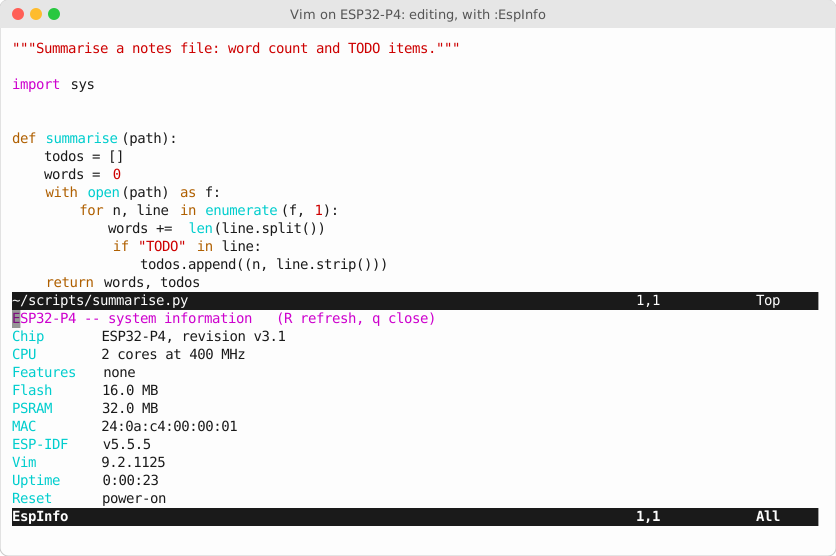
Editing a Python script on the device, with :EspInfo open below.
How you use it
Seeing it. On a board with a display, Vim draws directly on it, through a terminal emulator that runs on the chip. On any board it can also draw on a serial terminal: the chip's console UART carries Vim's screen, and a terminal program on your computer displays it, like logging in to a remote machine.
Typing. Use the board's own keyboard if it has one, a USB keyboard, a Bluetooth
keyboard paired with :EspBtKeyboard (BLE keyboards only: neither chip has Bluetooth
Classic), or touch (tap to move the cursor, drag to scroll). On a touch screen with no
keyboard attached, a pairing screen appears by itself, so a Bluetooth keyboard can be
paired with taps alone. Every function-key command also has a letter, for keyboards
without F-keys. Over serial, keys typed in your terminal go down the line to Vim, mouse
included. Everything works as in
desktop Vim, including arrows, Backspace and CTRL-C.
Files. Your files live in flash at /fat and on the SD card at /sd, and survive
reboots. :e, :w and <Tab> completion work as usual, and scp:// and sftp://
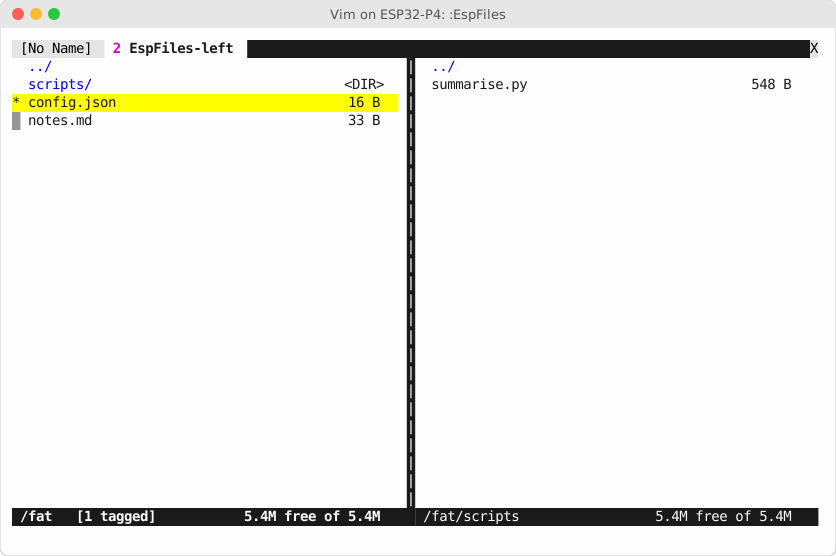
paths reach other machines. :EspFiles puts two directories side by side, local or
remote, for copying, moving and deleting:
To move files without the editor, plug the board into a computer over USB (it appears
as a drive), or start the web interface with :EspWebStart and use a browser.
Programming it. There are two languages. Vim script, with the hardware reachable
through esp_*() functions:
:EspWifiScan                   " nearby networks, in a window
:EspGpio 21 on                 " drive GPIO 21 high
:EspNvs app greeting hello     " store a setting that survives reboots
:echo esp_info().chip          " ESP32-P4
" blink GPIO 21 five times
for i in range(10)
  call esp_gpio_write(21, i % 2)
  sleep 500m
endfor
and MicroPython, which runs scripts (:EspPyRun runs the current buffer) and can
drive the editor through a vim module and the hardware through an esp module:
# Light an LED while the current buffer has TODOs in it
import esp, vim

todos = [n for n, line in enumerate(vim.current.buffer, 1) if "TODO" in line]
esp.gpio_write(21, 1 if todos else 0)
vim.command(f"echo '{len(todos)} TODOs'")
There is no operating-system shell, so :!cmd and :terminal don't exist. The :Esp
commands and MicroPython take their place.
Version control. :EspGitInit, :EspGitCommit, :EspGitDiff, :EspGitPush,
:EspGitClone and friends keep a real git repository in /fat or /sd. It's
compatible with git on your computer, and pushes and fetches over HTTPS or SSH.
Help. :help opens a guide to the device: what's different from desktop Vim, the
:Esp commands, keys, storage and settings. :q doesn't leave you at a dead device:
Vim restarts in place.
What it needs
| Needed | |
|---|---|
| Chip | ESP32-P4 or ESP32-S3 |
| Flash | 16 MB |
| PSRAM | 8 MB minimum; more leaves room for MicroPython and bigger files |
Flash is laid out for 16 MB: 7 MB for the firmware (2.2 MB today, with room for the
networking, MicroPython and git parts), 3 MB for Vim's runtime files (2.2 MB used: syntax,
help, plugins), about 5.5 MB for your files at /fat, and 64 KB for settings. An SD
card adds storage at /sd.
PSRAM is required. Vim's memory lives there, because the chip's internal RAM (a few hundred KB at most) isn't enough. Vim uses about 0.5 MB editing a typical file and peaked near 2.7 MB in the test suite with help and syntax highlighting loaded. It's allowed up to half of the free PSRAM (at most 16 MB), leaving the rest for everything else.
Hardware
Targeted boards:
| Board | Chip | Flash / PSRAM | Screen and input |
|---|---|---|---|
| M5Stack Tab5 | ESP32-P4 | 16 MB / 32 MB | 1280×720 touch screen; clip-on keyboard (no F-keys: its Sym layer gives F1–F12), USB keyboards, BLE keyboards through its ESP32-C6 radio |
| ESP32-S3 "Cheap Yellow Display" (CYD) boards, starting with the Hosyond ES3C28P (2.8", 320×240, capacitive touch) | ESP32-S3 | 16 MB / 8 MB required | built-in touch LCD; BLE keyboards, paired by touch; console over the S3's own USB |
| Freenove ESP32-S3 Display FNK0115Q (5.0", 800×480, capacitive touch) | ESP32-S3 | 16 MB / 8 MB | touch LCD, 80×24 cells (72×21 or 100×30 with :EspFont); BLE keyboards, paired by touch; console over its USB-serial bridge |
| Waveshare ESP32-S3-RLCD-4.2 (4.2", 400×300 reflective monochrome LCD) | ESP32-S3 | 16 MB / 8 MB | black-and-white screen, no backlight, 66×25 cells (80×37, 50×21 or 50×18 with :EspFont); BLE keyboards; console over the S3's own USB |
| ESP32-S3 development boards | ESP32-S3 | 16 MB / 8 MB required | none: a serial terminal |
- CYD boards: only the ESP32-S3 variants with 16 MB flash and 8 MB PSRAM (the module is marked N16R8) can run this. The original CYD, the ESP32-2432S028, uses a classic ESP32 with 4 MB flash and no PSRAM, which isn't enough. S3 CYDs differ in panel (SPI or parallel RGB, various sizes) and touch controller, so each one needs a small board definition.
- ESP32-S3 PSRAM: N16R8 modules have octal PSRAM, which is the default here. For
quad PSRAM, set
CONFIG_SPIRAM_MODE_QUADinesp-vim/sdkconfig.defaults.esp32s3.
Tested so far: the ESP32-P4 and ESP32-S3 chips in Espressif's emulator, over a serial terminal. No physical board yet. Progress is in the plan.
Try it in the emulator
You need Linux x86-64, pixi and Git LFS.
git clone https://github.com/omwah/esp-vim.git && cd esp-vim
git lfs pull              # the vendored Vim source and emulator archives
pixi install              # host tools
pixi run deps             # extract and patch upstream into build-deps/
Then install ESP-IDF v5.5.5 outside the repo, from inside the pixi environment so ESP-IDF builds its own Python environment against pixi's Python:
git clone -b v5.5.5 --depth 1 --recurse-submodules --shallow-submodules \
    https://github.com/espressif/esp-idf.git ~/esp/esp-idf
pixi run -- bash -c 'cd ~/esp/esp-idf && ./install.sh esp32p4'
pixi run -- bash -c 'cd ~/esp/esp-idf && \
    python tools/idf_tools.py install cmake ninja'   # not installed by default on Linux
pixi run env-check        # should report ESP-IDF v5.5.5 and riscv32-esp-elf 14.2.0
Build the firmware, start it in the emulator, and attach a terminal:
pixi run vim-build
pixi run emu esp-vim -- --uart-tcp 127.0.0.1:5555   # terminal 1: the "device"
pixi run emu-tty                                    # terminal 2: your screen and keyboard
Detach with Ctrl-]. pixi run vim-test runs the full regression suite in the
emulator: edits across reboots, the interactive console, :help, the :Esp commands
and the file manager.
Put it on a board
Build as above, connect the board over USB, and flash it with ESP-IDF (the port may differ):
pixi run vim-build-tab5       # M5Stack Tab5;  pixi run vim-build-s3 for ESP32-S3
pixi run -- bash -c '. scripts/env.sh && idf.py -C esp-vim -B esp-vim/build-tab5 -p /dev/ttyACM0 flash'
For an ESP32-S3 board, use build-esp32s3; for the Hosyond ES3C28P, whose only USB
port is the S3's own, pixi run vim-build-es3c28p and build-es3c28p, which put the
console on that port; for the Freenove FNK0115Q, pixi run vim-build-fnk0115 and
build-fnk0115 (its console is UART0, through the board's USB-serial bridge). Attach a terminal to the board's serial port with, for example,
pixi run -- socat -,raw,echo=0,escape=0x1d /dev/ttyACM0,raw,echo=0 (detach with
Ctrl-]). The Tab5's WiFi comes from its ESP32-C6
running Espressif's esp-hosted firmware; pixi run c6-build builds that firmware at the
version this build speaks, for when the C6 needs updating. (Plain vim-build is the P4
with Ethernet, which is what the emulator models.)
For developers
Tasks
Everything runs through pixi, so the incantations live in the repo rather than in
someone's shell history. pixi task list shows them all.
| Task | What |
|---|---|
pixi run deps | Verify, extract and patch vendored upstream into build-deps/ |
pixi run add-dep | Onboard a new third-party archive into LFS — the only networked script |
pixi run env-check | Print the active python / ESP-IDF / cross-compiler versions |
pixi run spike | Build and run the Phase 1 capability spike under the emulator |
pixi run spike-build | Build the spike only |
pixi run spike-report | Re-record spike output into docs/phase1-spike-results.txt |
pixi run configure-vim | Run Vim's configure on the host to emit a baseline auto/config.h |
pixi run runtime | Curate $VIMRUNTIME into build-deps/vimrt-<target>/ (one per chip) and generate filetype.vim (checks it fits the partition) |
pixi run vim-build | Build the Vim firmware for ESP32-P4 (esp-vim/build-esp32p4/); runs runtime first |
pixi run vim-build-s3 | Build the ESP32-S3 variant (esp-vim/build-esp32s3/) |
pixi run vim-build-tab5 | Build the M5Stack Tab5 variant: P4, WiFi through the C6 (esp-vim/build-tab5/) |
pixi run c6-build | Build the Tab5's ESP32-C6 co-processor firmware (esp-hosted) |
pixi run vim-test | The regression gate on ESP32-P4: builds, then round trips across reboots, interactive console checks, and the web interface |
pixi run vim-test-s3 | The same gate on the ESP32-S3 variant |
pixi run vim-size | Report the Vim component's text/data/bss |
pixi run screenshots | Regenerate the README images from the firmware running in the emulator |
pixi run mkpatch <dep> <name> | Turn edits in build-deps/<dep> into a new patch (see Patch authoring) |
pixi run emu <dir> | Run any built project under esp-emu (merges the flash image first) |
pixi run emu-tty | Attach a raw terminal to an emulator started with --uart-tcp 127.0.0.1:5555 |
Extra arguments pass through after --:
pixi run emu esp-vim/test/spike -- --gdb 1234 --gdb-halt
emu-tty uses socat, not nc — nc cannot put the terminal in raw mode, so arrow
keys arrive as literal escape sequences and echo doubles. Detach with Ctrl-].
Help on the device
:help on the device opens a device-specific guide: an amended version of Vim's
help.txt covering storage, filetypes, keys, settings and what isn't available. Edit it
in esp-vim/runtime-image/doc/help.txt.in. The build generates the tags and rejects
broken links.
Choosing which filetypes the device supports
Edit esp-vim/filetypes.conf: one line per filetype, followed by its file patterns.
It generates the device's filetype.vim and decides which syntax, ftplugin and indent
files are shipped. Then run pixi run vim-build. Types not listed there aren't detected
at all. To add one on a running device without reflashing, use a standard Vim
ftdetect/ script in /fat/.vim/ftdetect/.
Why the host tools are pinned
pixi.toml pins four host tools, each for a specific reason:
- ncurses — Vim's
./configurerefuses to finish without a terminal library, even though the ESP build deliberately runs withHAVE_TGETENTundefined and uses Vim's builtin termcaps. We only need configure to complete so it emits aconfig.hto curate. - socat — raw-mode terminal for interactive sessions over the emulated UART.
- openssh — a local
sshdand bare repo to test SCP/SFTP andgit push(Phase 8). - python 3.13 — ESP-IDF builds its own venv with
python -m venv, which needsensurepip. The system Python has none, so IDF's bootstrap fails against it.
Pinning them here keeps a fresh clone reproducible and needs no root, which apt would.
How third-party source is handled
Upstream source is never committed as files. Each dependency is a Git LFS archive in
third_party/ plus a patch series in patches/<dep>/, extracted and applied into the
git-ignored build-deps/ at build time. This keeps the repository reviewable, makes our
changes to upstream explicit, and makes re-syncing to a newer Vim a bounded job.
third_party/manifest.txt records each archive's provenance and sha256. Note the sha256
attests the blob we vendored, not an upstream-published digest — see the manifest header
for why that distinction is necessary.
To change upstream source: see Patch authoring in docs/DECISIONS.md.
Layout
| Path | What |
|---|---|
docs/ | plan, phase results, decisions; docs/images/ is generated by pixi run screenshots |
third_party/ | LFS archives + manifest. No source files. |
patches/<dep>/ | our changes to upstream, applied in lexical order |
scripts/ | dependency prep, environment, emulator harness |
esp-vim/ | the ESP-IDF project (test/spike/ is Phase 1) |
build-deps/ | extracted + patched upstream (git-ignored) |
Documentation
- docs/PLAN.md: the living plan, phase by phase, with status
- docs/DECISIONS.md: why things are the way they are
- Phase write-ups: 1 capability spike ·
2 Vim compiles · 3 Vim runs ·
4 curated runtime and memory · 5 interactive
over UART, restart, S3 · 6
:Espcommands and file manager
License
This project's own code, scripts and documentation are licensed under the Apache License 2.0.
Third-party components keep their own licenses:
| Component | License |
|---|---|
Vim (third_party/vim-*.tar.gz) and our patches to it (patches/vim/) | the Vim license |
esp-emu (third_party/esp-emu-*.tar.gz) | Apache-2.0, see third_party/licenses/esp-emu-LICENSE |
| ESP-IDF (fetched separately, not vendored) | Apache-2.0 |
Similar repos


Languages
C
66.2%
Python
16.6%
Vim Script
9.3%
CMake
3.2%
Shell
3.1%
JavaScript
1.0%
Real Vim 9.2 running directly on the ESP32-P4 and ESP32-S3: an ESP-IDF port with a UART console, device help, and in-place session restart
C
7
74 commits
updated Oct 1, 2026
See what people are saying
README
esp-vim
Real Vim, running as the firmware of an ESP32 microcontroller. There is no Linux and no computer behind it: the chip boots straight into Vim 9.2, and Vim is the whole system. On a board with a screen and a keyboard it makes a pocket computer for writing, scripting and tinkering with hardware; on a bare board it runs over a serial terminal. See Hardware for the boards it targets.
Features
- Real Vim 9.2: windows, buffers, registers, macros, Vim script,
:vimgrep, diff, syntax highlighting and indenting for 30 file types, spell checking - Its own screen and keyboard: runs on the board's display with a built-in, USB or Bluetooth (BLE) keyboard and touch, or on any serial terminal
- Files everywhere: flash, SD card, and remote machines over SCP and SFTP, in
:EspFiles, a two-pane file manager in the style of Midnight Commander - File transfer: SCP, SFTP, HTTP(S) downloads, and USB mass storage
- Web interface: a password-protected browser page for files and settings, with a live view of what's being edited
- MicroPython: run scripts from the editor and script Vim itself in Python
- Git: init, commit, diff, log, clone, fetch and push, from inside Vim
- Hardware from the editor: WiFi, Bluetooth, GPIO, ADC, I²C, sensors, serial ports,
persistent settings, memory and tasks, as
:Espcommands and functions - Built to be the whole system:
:qrestarts Vim in place, a spinner shows when it's busy, and:helpcovers the device - ESP32-P4 and ESP32-S3 builds
Development status: see the phase table in docs/PLAN.md.
Editing a Python script on the device, with :EspInfo open below.
How you use it
Seeing it. On a board with a display, Vim draws directly on it, through a terminal emulator that runs on the chip. On any board it can also draw on a serial terminal: the chip's console UART carries Vim's screen, and a terminal program on your computer displays it, like logging in to a remote machine.
Typing. Use the board's own keyboard if it has one, a USB keyboard, a Bluetooth
keyboard paired with :EspBtKeyboard (BLE keyboards only: neither chip has Bluetooth
Classic), or touch (tap to move the cursor, drag to scroll). On a touch screen with no
keyboard attached, a pairing screen appears by itself, so a Bluetooth keyboard can be
paired with taps alone. Every function-key command also has a letter, for keyboards
without F-keys. Over serial, keys typed in your terminal go down the line to Vim, mouse
included. Everything works as in
desktop Vim, including arrows, Backspace and CTRL-C.
Files. Your files live in flash at /fat and on the SD card at /sd, and survive
reboots. :e, :w and <Tab> completion work as usual, and scp:// and sftp://
paths reach other machines. :EspFiles puts two directories side by side, local or
remote, for copying, moving and deleting:
To move files without the editor, plug the board into a computer over USB (it appears
as a drive), or start the web interface with :EspWebStart and use a browser.
Programming it. There are two languages. Vim script, with the hardware reachable
through esp_*() functions:
:EspWifiScan                   " nearby networks, in a window
:EspGpio 21 on                 " drive GPIO 21 high
:EspNvs app greeting hello     " store a setting that survives reboots
:echo esp_info().chip          " ESP32-P4
" blink GPIO 21 five times
for i in range(10)
  call esp_gpio_write(21, i % 2)
  sleep 500m
endfor
and MicroPython, which runs scripts (:EspPyRun runs the current buffer) and can
drive the editor through a vim module and the hardware through an esp module:
# Light an LED while the current buffer has TODOs in it
import esp, vim

todos = [n for n, line in enumerate(vim.current.buffer, 1) if "TODO" in line]
esp.gpio_write(21, 1 if todos else 0)
vim.command(f"echo '{len(todos)} TODOs'")
There is no operating-system shell, so :!cmd and :terminal don't exist. The :Esp
commands and MicroPython take their place.
Version control. :EspGitInit, :EspGitCommit, :EspGitDiff, :EspGitPush,
:EspGitClone and friends keep a real git repository in /fat or /sd. It's
compatible with git on your computer, and pushes and fetches over HTTPS or SSH.
Help. :help opens a guide to the device: what's different from desktop Vim, the
:Esp commands, keys, storage and settings. :q doesn't leave you at a dead device:
Vim restarts in place.
What it needs
| Needed | |
|---|---|
| Chip | ESP32-P4 or ESP32-S3 |
| Flash | 16 MB |
| PSRAM | 8 MB minimum; more leaves room for MicroPython and bigger files |
Flash is laid out for 16 MB: 7 MB for the firmware (2.2 MB today, with room for the
networking, MicroPython and git parts), 3 MB for Vim's runtime files (2.2 MB used: syntax,
help, plugins), about 5.5 MB for your files at /fat, and 64 KB for settings. An SD
card adds storage at /sd.
PSRAM is required. Vim's memory lives there, because the chip's internal RAM (a few hundred KB at most) isn't enough. Vim uses about 0.5 MB editing a typical file and peaked near 2.7 MB in the test suite with help and syntax highlighting loaded. It's allowed up to half of the free PSRAM (at most 16 MB), leaving the rest for everything else.
Hardware
Targeted boards:
| Board | Chip | Flash / PSRAM | Screen and input |
|---|---|---|---|
| M5Stack Tab5 | ESP32-P4 | 16 MB / 32 MB | 1280×720 touch screen; clip-on keyboard (no F-keys: its Sym layer gives F1–F12), USB keyboards, BLE keyboards through its ESP32-C6 radio |
| ESP32-S3 "Cheap Yellow Display" (CYD) boards, starting with the Hosyond ES3C28P (2.8", 320×240, capacitive touch) | ESP32-S3 | 16 MB / 8 MB required | built-in touch LCD; BLE keyboards, paired by touch; console over the S3's own USB |
| Freenove ESP32-S3 Display FNK0115Q (5.0", 800×480, capacitive touch) | ESP32-S3 | 16 MB / 8 MB | touch LCD, 80×24 cells (72×21 or 100×30 with :EspFont); BLE keyboards, paired by touch; console over its USB-serial bridge |
| Waveshare ESP32-S3-RLCD-4.2 (4.2", 400×300 reflective monochrome LCD) | ESP32-S3 | 16 MB / 8 MB | black-and-white screen, no backlight, 66×25 cells (80×37, 50×21 or 50×18 with :EspFont); BLE keyboards; console over the S3's own USB |
| ESP32-S3 development boards | ESP32-S3 | 16 MB / 8 MB required | none: a serial terminal |
- CYD boards: only the ESP32-S3 variants with 16 MB flash and 8 MB PSRAM (the module is marked N16R8) can run this. The original CYD, the ESP32-2432S028, uses a classic ESP32 with 4 MB flash and no PSRAM, which isn't enough. S3 CYDs differ in panel (SPI or parallel RGB, various sizes) and touch controller, so each one needs a small board definition.
- ESP32-S3 PSRAM: N16R8 modules have octal PSRAM, which is the default here. For
quad PSRAM, set
CONFIG_SPIRAM_MODE_QUADinesp-vim/sdkconfig.defaults.esp32s3.
Tested so far: the ESP32-P4 and ESP32-S3 chips in Espressif's emulator, over a serial terminal. No physical board yet. Progress is in the plan.
Try it in the emulator
You need Linux x86-64, pixi and Git LFS.
git clone https://github.com/omwah/esp-vim.git && cd esp-vim
git lfs pull              # the vendored Vim source and emulator archives
pixi install              # host tools
pixi run deps             # extract and patch upstream into build-deps/
Then install ESP-IDF v5.5.5 outside the repo, from inside the pixi environment so ESP-IDF builds its own Python environment against pixi's Python:
git clone -b v5.5.5 --depth 1 --recurse-submodules --shallow-submodules \
    https://github.com/espressif/esp-idf.git ~/esp/esp-idf
pixi run -- bash -c 'cd ~/esp/esp-idf && ./install.sh esp32p4'
pixi run -- bash -c 'cd ~/esp/esp-idf && \
    python tools/idf_tools.py install cmake ninja'   # not installed by default on Linux
pixi run env-check        # should report ESP-IDF v5.5.5 and riscv32-esp-elf 14.2.0
Build the firmware, start it in the emulator, and attach a terminal:
pixi run vim-build
pixi run emu esp-vim -- --uart-tcp 127.0.0.1:5555   # terminal 1: the "device"
pixi run emu-tty                                    # terminal 2: your screen and keyboard
Detach with Ctrl-]. pixi run vim-test runs the full regression suite in the
emulator: edits across reboots, the interactive console, :help, the :Esp commands
and the file manager.
Put it on a board
Build as above, connect the board over USB, and flash it with ESP-IDF (the port may differ):
pixi run vim-build-tab5       # M5Stack Tab5;  pixi run vim-build-s3 for ESP32-S3
pixi run -- bash -c '. scripts/env.sh && idf.py -C esp-vim -B esp-vim/build-tab5 -p /dev/ttyACM0 flash'
For an ESP32-S3 board, use build-esp32s3; for the Hosyond ES3C28P, whose only USB
port is the S3's own, pixi run vim-build-es3c28p and build-es3c28p, which put the
console on that port; for the Freenove FNK0115Q, pixi run vim-build-fnk0115 and
build-fnk0115 (its console is UART0, through the board's USB-serial bridge). Attach a terminal to the board's serial port with, for example,
pixi run -- socat -,raw,echo=0,escape=0x1d /dev/ttyACM0,raw,echo=0 (detach with
Ctrl-]). The Tab5's WiFi comes from its ESP32-C6
running Espressif's esp-hosted firmware; pixi run c6-build builds that firmware at the
version this build speaks, for when the C6 needs updating. (Plain vim-build is the P4
with Ethernet, which is what the emulator models.)
For developers
Tasks
Everything runs through pixi, so the incantations live in the repo rather than in
someone's shell history. pixi task list shows them all.
| Task | What |
|---|---|
pixi run deps | Verify, extract and patch vendored upstream into build-deps/ |
pixi run add-dep | Onboard a new third-party archive into LFS — the only networked script |
pixi run env-check | Print the active python / ESP-IDF / cross-compiler versions |
pixi run spike | Build and run the Phase 1 capability spike under the emulator |
pixi run spike-build | Build the spike only |
pixi run spike-report | Re-record spike output into docs/phase1-spike-results.txt |
pixi run configure-vim | Run Vim's configure on the host to emit a baseline auto/config.h |
pixi run runtime | Curate $VIMRUNTIME into build-deps/vimrt-<target>/ (one per chip) and generate filetype.vim (checks it fits the partition) |
pixi run vim-build | Build the Vim firmware for ESP32-P4 (esp-vim/build-esp32p4/); runs runtime first |
pixi run vim-build-s3 | Build the ESP32-S3 variant (esp-vim/build-esp32s3/) |
pixi run vim-build-tab5 | Build the M5Stack Tab5 variant: P4, WiFi through the C6 (esp-vim/build-tab5/) |
pixi run c6-build | Build the Tab5's ESP32-C6 co-processor firmware (esp-hosted) |
pixi run vim-test | The regression gate on ESP32-P4: builds, then round trips across reboots, interactive console checks, and the web interface |
pixi run vim-test-s3 | The same gate on the ESP32-S3 variant |
pixi run vim-size | Report the Vim component's text/data/bss |
pixi run screenshots | Regenerate the README images from the firmware running in the emulator |
pixi run mkpatch <dep> <name> | Turn edits in build-deps/<dep> into a new patch (see Patch authoring) |
pixi run emu <dir> | Run any built project under esp-emu (merges the flash image first) |
pixi run emu-tty | Attach a raw terminal to an emulator started with --uart-tcp 127.0.0.1:5555 |
Extra arguments pass through after --:
pixi run emu esp-vim/test/spike -- --gdb 1234 --gdb-halt
emu-tty uses socat, not nc — nc cannot put the terminal in raw mode, so arrow
keys arrive as literal escape sequences and echo doubles. Detach with Ctrl-].
Help on the device
:help on the device opens a device-specific guide: an amended version of Vim's
help.txt covering storage, filetypes, keys, settings and what isn't available. Edit it
in esp-vim/runtime-image/doc/help.txt.in. The build generates the tags and rejects
broken links.
Choosing which filetypes the device supports
Edit esp-vim/filetypes.conf: one line per filetype, followed by its file patterns.
It generates the device's filetype.vim and decides which syntax, ftplugin and indent
files are shipped. Then run pixi run vim-build. Types not listed there aren't detected
at all. To add one on a running device without reflashing, use a standard Vim
ftdetect/ script in /fat/.vim/ftdetect/.
Why the host tools are pinned
pixi.toml pins four host tools, each for a specific reason:
- ncurses — Vim's
./configurerefuses to finish without a terminal library, even though the ESP build deliberately runs withHAVE_TGETENTundefined and uses Vim's builtin termcaps. We only need configure to complete so it emits aconfig.hto curate. - socat — raw-mode terminal for interactive sessions over the emulated UART.
- openssh — a local
sshdand bare repo to test SCP/SFTP andgit push(Phase 8). - python 3.13 — ESP-IDF builds its own venv with
python -m venv, which needsensurepip. The system Python has none, so IDF's bootstrap fails against it.
Pinning them here keeps a fresh clone reproducible and needs no root, which apt would.
How third-party source is handled
Upstream source is never committed as files. Each dependency is a Git LFS archive in
third_party/ plus a patch series in patches/<dep>/, extracted and applied into the
git-ignored build-deps/ at build time. This keeps the repository reviewable, makes our
changes to upstream explicit, and makes re-syncing to a newer Vim a bounded job.
third_party/manifest.txt records each archive's provenance and sha256. Note the sha256
attests the blob we vendored, not an upstream-published digest — see the manifest header
for why that distinction is necessary.
To change upstream source: see Patch authoring in docs/DECISIONS.md.
Layout
| Path | What |
|---|---|
docs/ | plan, phase results, decisions; docs/images/ is generated by pixi run screenshots |
third_party/ | LFS archives + manifest. No source files. |
patches/<dep>/ | our changes to upstream, applied in lexical order |
scripts/ | dependency prep, environment, emulator harness |
esp-vim/ | the ESP-IDF project (test/spike/ is Phase 1) |
build-deps/ | extracted + patched upstream (git-ignored) |
Documentation
- docs/PLAN.md: the living plan, phase by phase, with status
- docs/DECISIONS.md: why things are the way they are
- Phase write-ups: 1 capability spike ·
2 Vim compiles · 3 Vim runs ·
4 curated runtime and memory · 5 interactive
over UART, restart, S3 · 6
:Espcommands and file manager
License
This project's own code, scripts and documentation are licensed under the Apache License 2.0.
Third-party components keep their own licenses:
| Component | License |
|---|---|
Vim (third_party/vim-*.tar.gz) and our patches to it (patches/vim/) | the Vim license |
esp-emu (third_party/esp-emu-*.tar.gz) | Apache-2.0, see third_party/licenses/esp-emu-LICENSE |
| ESP-IDF (fetched separately, not vendored) | Apache-2.0 |
Similar repos
Languages
C
66.2%
Python
16.6%
Vim Script
9.3%
CMake
3.2%
Shell
3.1%
JavaScript
1.0%