
README
scav ~ substrate for a portable web
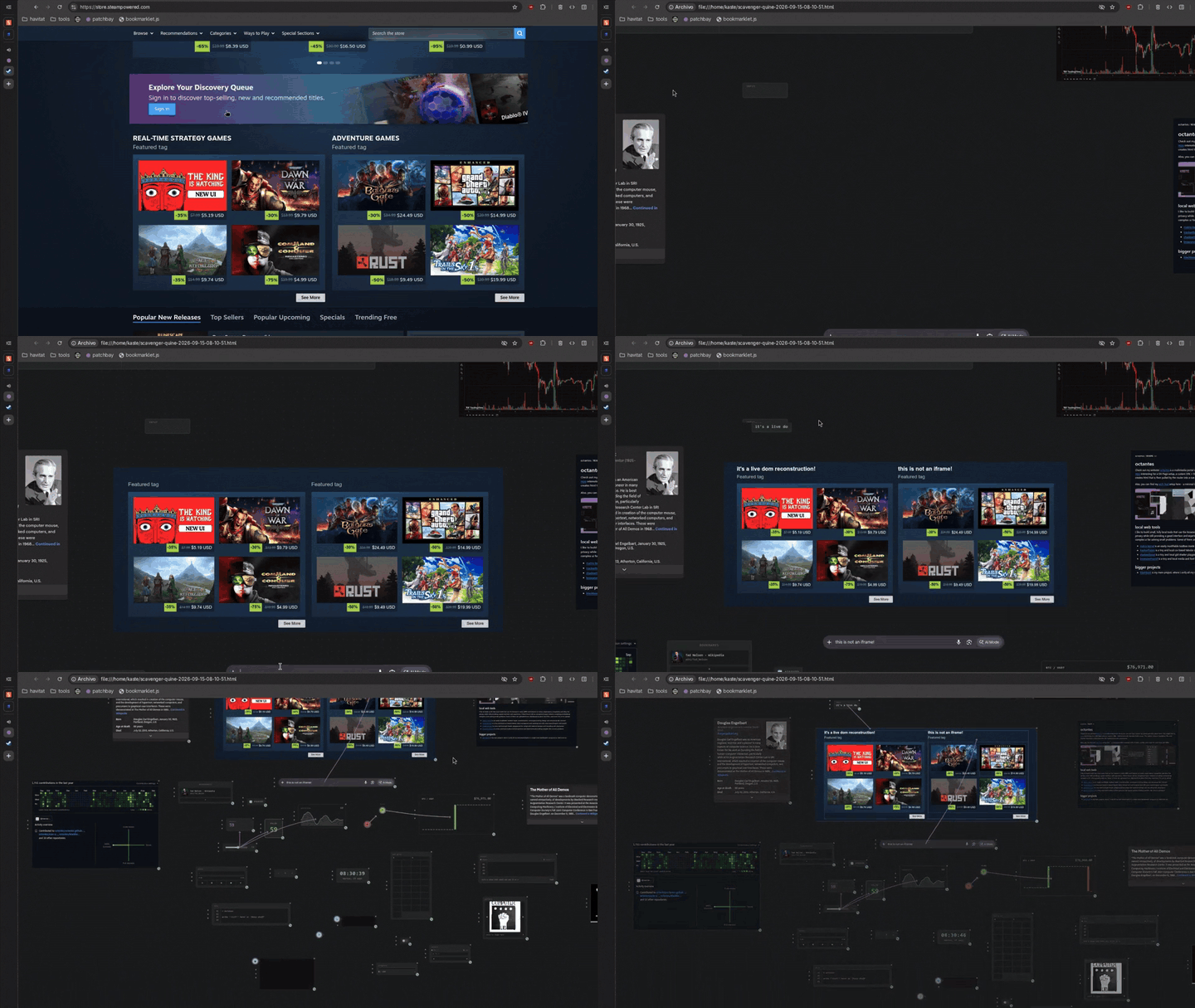
Harvest anything from the web and wire it into something new
Export it as a single html file, use it anywhere and publish it

UI is a function of state, and in s<av> state is a function of DOM
The whole web is a component repository for your projects - steal a piece, rewire it, keep it forever.
scavenger is a substrate for portable web tools. Anything you build with scav becomes portable by definition, exporting into a single, standalone HTML file that works anywhere. No packages, no build step, no framework, no account, and nothing phoning home unless you explicitly want it to.
The toolkit has four core primitives, deliberately different in shape because each is the natural form for what it does. You don't need all of them to build something, but together they form the complete project:
- patchbay is the runtime, where you place components and wire them, exporting the project as-is into HTML
- kernel is the script that you run on any website to harvest components, lift data and run visual debugging tools
- quests is the bridge to live external state and data, turning CSS selectors into channels for patchbay to consume
- compiler is the authoring environment, where you create new logic nodes and components that extend patchbay
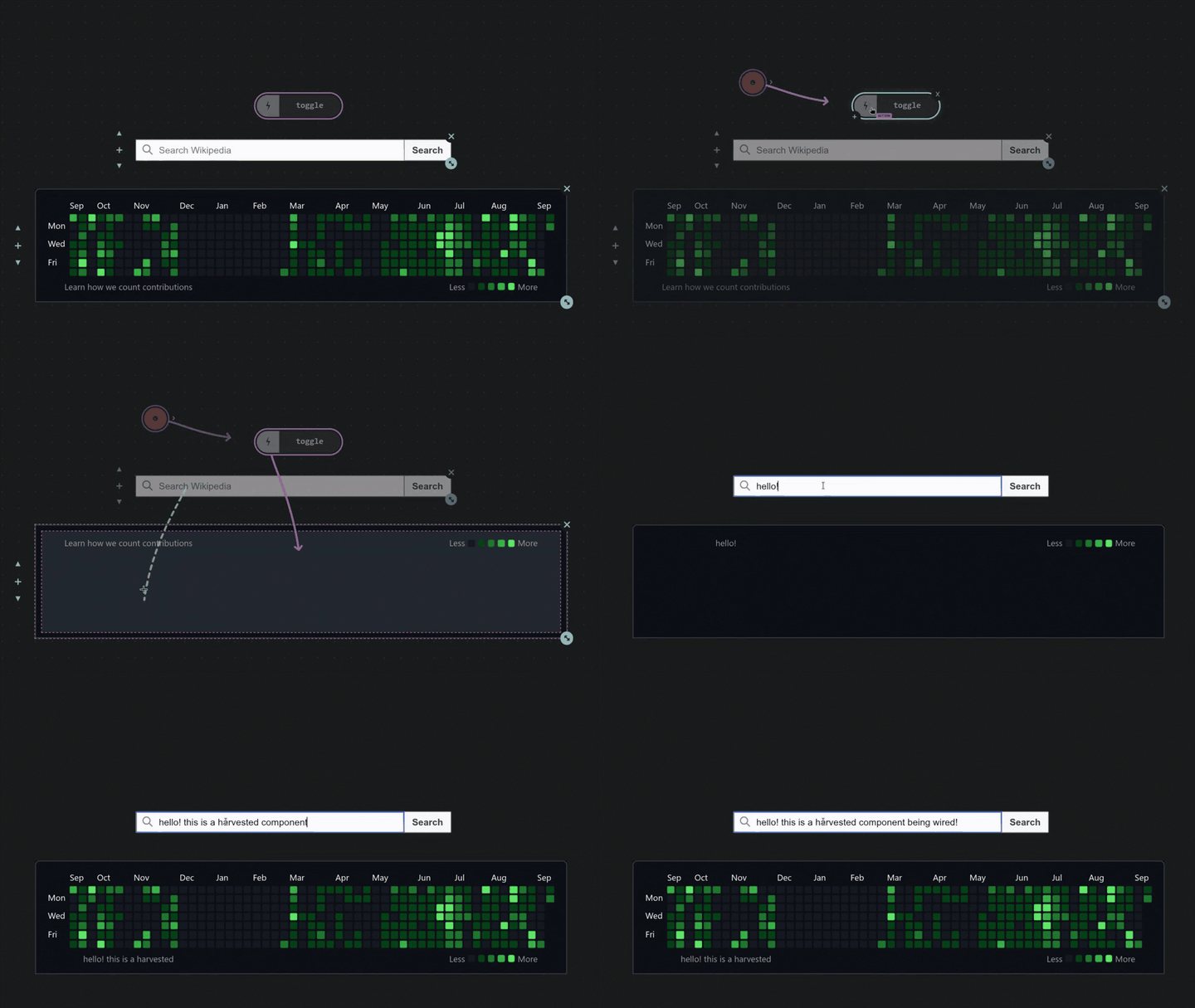
Harvesting is not scraping HTML or taking a screenshot. It takes a rendered component from a live page and reconstructs it as an independent Web Component: resolving the styles the browser actually applied, preserving the cascade, responsive units, variables, pseudo-elements, fonts, assets, form state, and relevant layout behavior.
I tried to write this so five minutes gets you started, but there's a lot to cover. So bear with me - I promise it's worth it:
- Learn the loop with the quick start tutorial and bring in live data by harvesting through the quests terminal tool
- Extend patchbay by building nodes and components with the compiler and set up the kernel to run anywhere
- Read about security, the architecture and principles or the philosophy behind the browser as malleable substrate
- For deeper reading, you can find the reference manuals, contract, security and contributing guides here
Quick start - Setting up a patchbay and harvesting
I strongly recommend downloading the HTML files and actually going through these steps. You'll get a much better understanding of what scav can do from five minutes of playing with it than from anything I can write here.
- Launch
patchbay.htmlin your browser by double-clicking it or throughfile:// - Use the right-click menu or keybinds to spawn nodes, wire them and toggle between use and edit modes
- Create a bookmark from
bookmarklet.jsby pasting the code into the URL field. Ask an AI if it's safe if you want. - Run it on a site that doesn't block it (or check how to run it anywhere) and harvest something cool looking
- If you used the normal harvest, the component is now in your clipboard! Paste it onto the patchbay (
Ctrl + V)
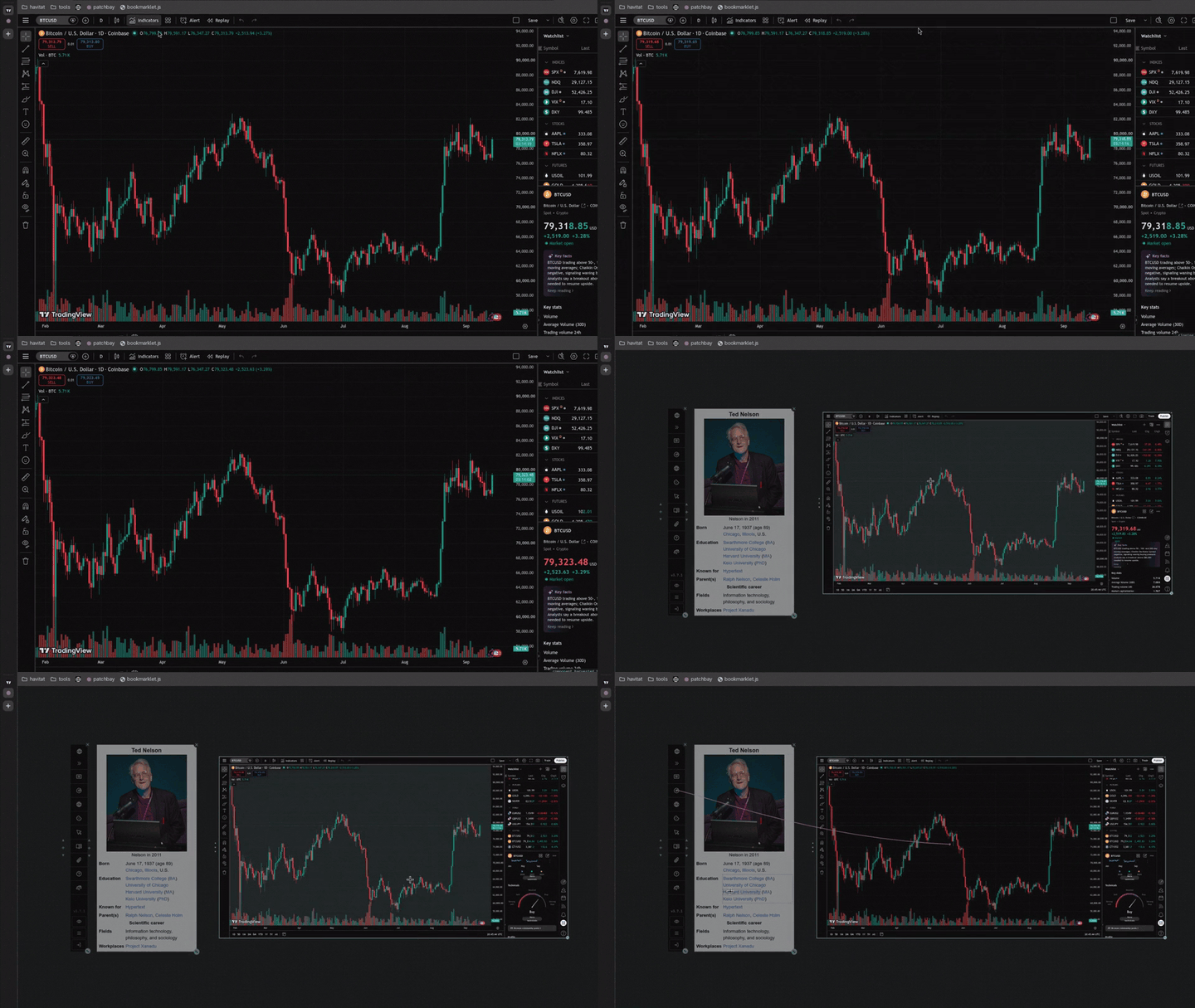
- Wire nodes, chain multiple components, and play with them - anything harvested is yours forever, even offline!
- Your project won't auto-save, use
Ctrl + Sto keep editor,Ctrl + P(publish) removes it but keeps behavior - You are all set! Go build something interesting, or keep reading to find out how to bring in live website data
A few things worth knowing:
- If you ever want to give a published export its editing capabilities back, just drop it into a clean patchbay!
- The
clocknode is your best friend: it emits a1pulse, which is read by other nodes as an act-now instruction - You can open nodes by double-clicking the
+handle, which shows their input value (clockinput isinterval) - All nodes do something when you click their icons, experiment! Some are mode toggles, others just a trigger
Harvesting the web through quests
You just learned how to harvest component snapshots, but what if you want to make those components feel alive?
Nodes are a way to make them interactive, but you can also bring in live data from the web and chain it through wires by using quests.mjs. You only need to have node installed (which you probably already do), no other dependencies.
- Open your terminal and go to the scavenger directory, then run
node quests.mjsto open the TUI (?for help) - Run the bookmarklet on any site, press
quest selector, and click any single piece of data (like a text or number) - Your clipboard has a pointer to the data you sniped built from its selector - add a quests node to the patchbay
- Paste that pointer into the node's input (you can open this and any node by double-clicking the
+drag handle) - Wait for a moment while the engine scrapes the live data, you'll see the quest appear in the terminal interface
- When data is scraped, the node will emit the quest's last known value once - wire a clock so it pulls on interval
- Now create a node chain to transform the value, or wire it to a harvested component to display it - it will update
- You can emit values from the patchbay to quests by using a
quests outputnode (press the icon to toggle mode)
You can skip the snipe and write the line yourself, its shape is: channel-name, url, target
The target can be sel: for a DOM value, key: for a JSON key, or ls: for a localStorage key

An API example: btc, https://api.binance.com/api/v3/ticker/price?symbol=BTCUSDT, key:price
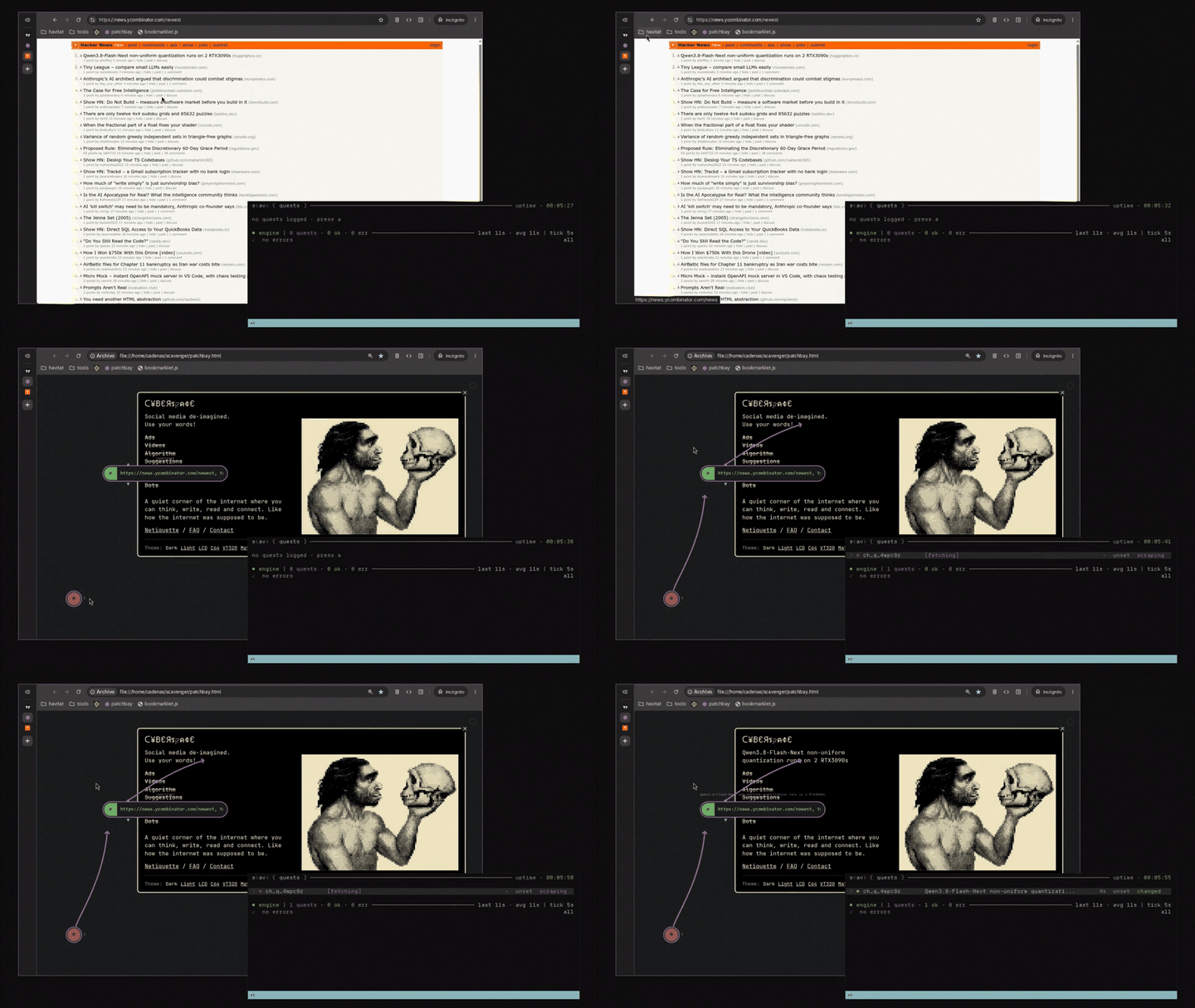
That's the whole loop, though there is another, more interesting quest type. You can set it up by pressing the icon of a quest node until its label reads quest component. Then, you follow the same steps as in the input node, but instead of choosing the selector for a single piece of data, you can select a full component or layout, and paste that line into the node.
After the node is set up, the quests engine will use the bookmarklet to harvest the live version of whatever you selected, and create a new component that also live-updates. You can wire anything into it or through it, like you do with your own harvests, because the updates are applied via diff-morphing, which only updates what really changed. The wires survive because the component is not being re-rendered on each poll.
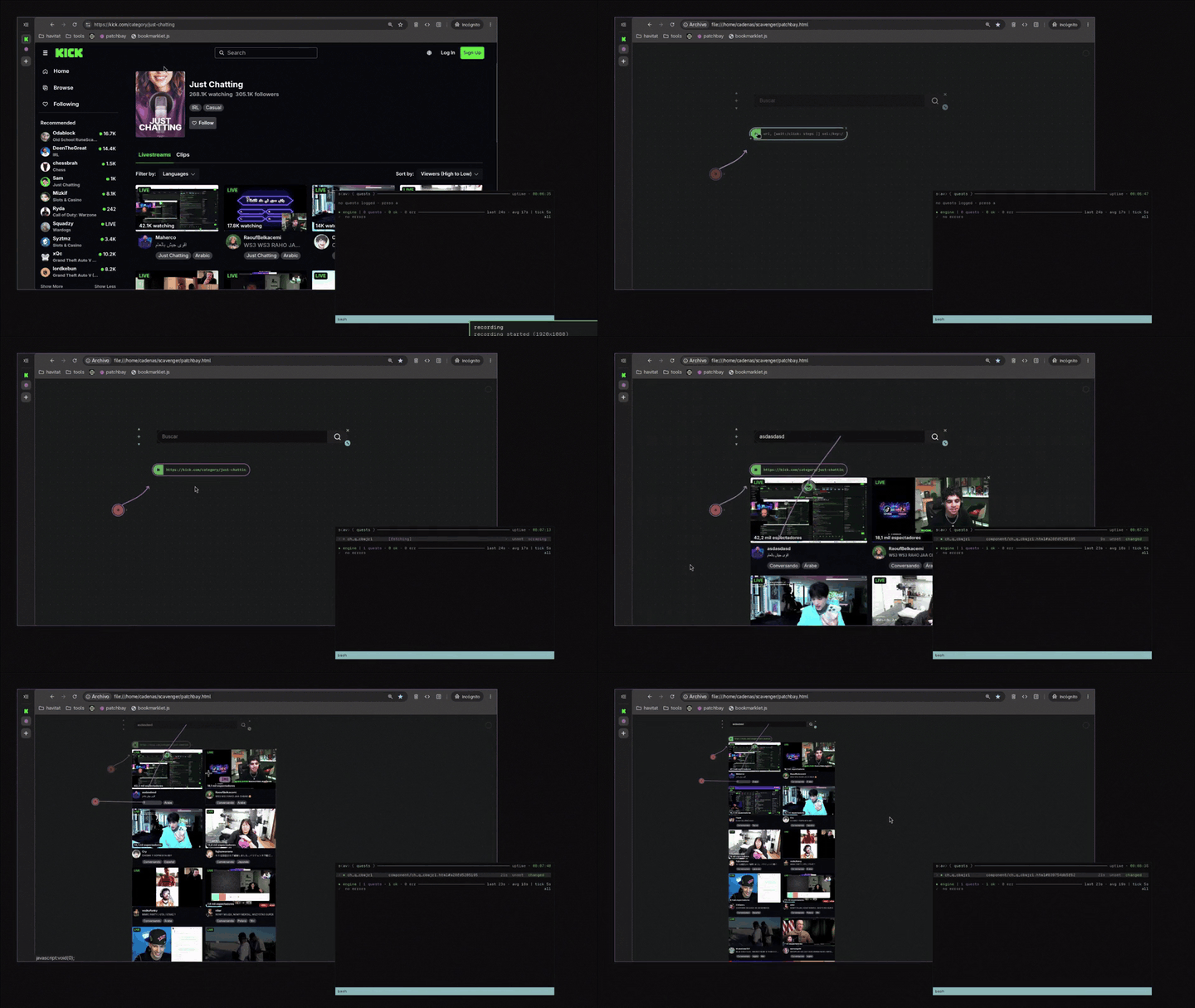
Live data will keep flowing until you close the terminal. When you do that, the quest nodes and components will keep working with their last known value. Also, quests will break if the page owner changes the layout of the page or makes a big update that touches the selectors. Keep that in mind.
Some other things quests can do:
- Optionally drive the page with steps before reading a value (click, scroll, type, drag) so you can reach behind walls
- By default, quests uses a temp profile, but you can set it up to harvest login walled sources with cookie profile
- Normal quests replace their value on update, but log mode keeps historic data to allow visualization and charts
- Drive CI testing with assertions through the terminal by using --run like the suite that tests scavenger itself does
Extending the patchbay through the compiler
You've harvested UI and brought in live data, but what if you need a specific logic node for your chains or want a custom component that can actually run arbitrary code?
The compiler is a standalone editor where you can author your own nodes and components, test them, and compile them into .scv files, which are, like everything else, plain HTML. This is more advanced and mostly for builders, but you can probably get surprisingly far with an AI if you know what you're asking for.
- Launch
compiler.htmlin your browser, just like we did with the patchbay (double-clicking or throughfile://) - Choose what to build: a logic node (JS processing for your chains) or a component (which is HTML + CSS + JS)
- Write your code against the contract, which you can read in the help menu (by pressing
?,Escor the button) - If building a component, use
data-scv-slot="name"to mark which elements should keep their state on export - Test your creation live in the compiler's built-in test rig to ensure data routes correctly and UX is as you want it
- Press save to store the code in
localStorage, and press export to generate a.scvfile - your portable tool - Drag and drop the
.scvdirectly onto your patchbay to register it, and use the menu to spawn instances - If you need to update the tool, drop an updated
.scvfile and all instances will upgrade without losing state
Unlike harvested components (which have their scripts stripped for safety), authored components keep their script tags and you should treat files you didn't write like downloaded executables, especially if your patchbays hold personal data. You can explore examples/ for a curated and growing library of ready-to-use custom tools.
The compiler makes the patchbay extensible, so you can build your own inner systems and even use Web APIs while keeping the advantages of the model: portability, state serialization, and so on.
Running the kernel without the bookmarklet
The bookmarklet is the browser's .sh, an inlined JS script you store to fire easily at any page.
It can be blocked by some sites (Google, GitHub, most large web apps) that send a Content-Security-Policy that prevents javascript: bookmarklets from running - that's the browser working as designed, not a bug, and no bookmarklet can get around it. But we can still run the tool in two ways, no extension needed:
- One-shot: Open DevTools with
F12and paste the contents ofkernel.jsin the console, then hitEnter - Reusable: Open DevTools with
F12and go toSources>Snippets>New Snippet> pastekernel.js>Save
Once set up, the snippet will run on any page by right clicking it and pressing Run. Console and Snippet execution are user-initiated, so they're exempt from the page's security policy.
Security
A patchbay is a program. An exported HTML or node can run arbitrary JavaScript, so treat one you didn't write like you would a downloaded executable. Never add a node you don't trust, and especially never swap out the quests.mjs engine that runs your quests.
The only exception for the nothing phoning home rule is a visible <iframe>, which is not purged since it holds content you chose to carry. Embeds without visual content are fully purged, so if you want a fully sealed patchbay, don't harvest embeds you can see.
The quest server is read-public, write-owner only, by construction. Writes are accepted only from a direct loopback connection with no reverse-proxy hop - the boundary is physical, not a capability - and outbound fetches refuse any host resolving to a private address, making it DNS-rebinding-safe.
The complete model is detailed in security
Architecture and Principles
scavenger is feature-frozen except for bug-fixes. New capabilities land as new external files and tools, never as changes to the core toolkit. The main laws that keep the architecture intact are:
- Zero dependencies, build-step or framework. Each file is native JS and only needs a browser (or node for quests)
- Patchbay's runtime has a one-way relationship with studio and never references editing so publish can remove it
- Persistent state is a function of the DOM and serializes into the final file; read more on the philosophy section
The pieces talk through two planes. The clipboard carries a harvest at build time, so the kernel and the patchbay never hold a live connection to each other. Channels carry signal at runtime, a value emitted on a channel reaches every receiver wired to it. This routes as a patch locally in the DOM, or as a topic with a network backplane through quests.mjs, allowing the signal to cross between entirely separate dashboards.
The full working guide is in contributing
Philosophy
This project starts from a simple premise: the browser already is a malleable computational substrate.
The Document Object Model is not just the representation of an interface; it is a live, addressable state space that the browser knows how to render, mutate, serialize, persist and rehydrate. This leads to a simple model: UI is a function of state, and all persistent state is a function of the DOM.
htmx says "don't maintain a second client-side representation of UI, HTML is the representation"
scav says "don't maintain a second representation of the application, the DOM holds the state"
The consequence of this conceptualization is that the document isn't a rendering of the app, the app is a rehydration of the document. If state lives in element attributes, values can be serialized into markup, and if the runtime reads the document itself, there is no hidden model to drift out of sync. Saving is a memory dump, the file just boots.
The same property that makes state serialization possible also makes the runtime web a material you can build from. The early web itself was built around documents that could be linked, copied, saved, edited and served without asking permission from a platform.
This is still true. The underlying model hasn't changed, but layers of tooling and growing complexity have obscured it. We stopped noticing - scav makes those properties apparent and directly usable. What gets distributed to your machine is yours to harvest, rewire and repurpose, and what you build with it can persist as a document.
The modern browser is the closest working approximation of the conceptual model The Memex imagined, Engelbart demoed, and Nelson spent a lifetime writing about: hypertext you author, not just consume. scavenger is less of an invention than a realization that the model is already here, installed on almost every personal computer.
The long argument lives in a companion essay - Artesanías del Runtime - on the browser as a scavengeable runtime and the third domain of tools that only exist there: not CLI, not web app, but local-first visual runtime. (Forthcoming.)
Full Documentation
| Manual | What it covers |
|---|---|
| Kernel | The full tool suite the bookmarklet drops onto any live page |
| Patchbay | Editing gestures, wiring rules, action verbs and logic nodes |
| Quests | Scraping, the TUI, quests-as-tests, steps and live components |
| Compiler | Authoring custom logic nodes and components with the rig |
| Security | The write-gate, SSRF pinning, profile modes and live-emit |
| Contract | The stable embed/extend boundary - what's frozen after 1.0 |
| Contributing | Working on scavenger - the 20-tier testing suite, the laws |
| Examples | A curated library of ready-made nodes, components and tools |
License & Credits
Use it however you like, including commercially and in closed-source projects. Linking this repo is much appreciated, the Apache License 2.0 is here for protection, not restriction.
s<av> - built by @octantes
Contributors

1 commits
See what people are saying
Similar repos


Languages
JavaScript
68.7%
HTML
31.3%
README
scav ~ substrate for a portable web
Harvest anything from the web and wire it into something new
Export it as a single html file, use it anywhere and publish it

UI is a function of state, and in s<av> state is a function of DOM
The whole web is a component repository for your projects - steal a piece, rewire it, keep it forever.
scavenger is a substrate for portable web tools. Anything you build with scav becomes portable by definition, exporting into a single, standalone HTML file that works anywhere. No packages, no build step, no framework, no account, and nothing phoning home unless you explicitly want it to.
The toolkit has four core primitives, deliberately different in shape because each is the natural form for what it does. You don't need all of them to build something, but together they form the complete project:
- patchbay is the runtime, where you place components and wire them, exporting the project as-is into HTML
- kernel is the script that you run on any website to harvest components, lift data and run visual debugging tools
- quests is the bridge to live external state and data, turning CSS selectors into channels for patchbay to consume
- compiler is the authoring environment, where you create new logic nodes and components that extend patchbay
Harvesting is not scraping HTML or taking a screenshot. It takes a rendered component from a live page and reconstructs it as an independent Web Component: resolving the styles the browser actually applied, preserving the cascade, responsive units, variables, pseudo-elements, fonts, assets, form state, and relevant layout behavior.
I tried to write this so five minutes gets you started, but there's a lot to cover. So bear with me - I promise it's worth it:
- Learn the loop with the quick start tutorial and bring in live data by harvesting through the quests terminal tool
- Extend patchbay by building nodes and components with the compiler and set up the kernel to run anywhere
- Read about security, the architecture and principles or the philosophy behind the browser as malleable substrate
- For deeper reading, you can find the reference manuals, contract, security and contributing guides here
Quick start - Setting up a patchbay and harvesting
I strongly recommend downloading the HTML files and actually going through these steps. You'll get a much better understanding of what scav can do from five minutes of playing with it than from anything I can write here.
- Launch
patchbay.htmlin your browser by double-clicking it or throughfile:// - Use the right-click menu or keybinds to spawn nodes, wire them and toggle between use and edit modes
- Create a bookmark from
bookmarklet.jsby pasting the code into the URL field. Ask an AI if it's safe if you want. - Run it on a site that doesn't block it (or check how to run it anywhere) and harvest something cool looking
- If you used the normal harvest, the component is now in your clipboard! Paste it onto the patchbay (
Ctrl + V)
- Wire nodes, chain multiple components, and play with them - anything harvested is yours forever, even offline!
- Your project won't auto-save, use
Ctrl + Sto keep editor,Ctrl + P(publish) removes it but keeps behavior - You are all set! Go build something interesting, or keep reading to find out how to bring in live website data
A few things worth knowing:
- If you ever want to give a published export its editing capabilities back, just drop it into a clean patchbay!
- The
clocknode is your best friend: it emits a1pulse, which is read by other nodes as an act-now instruction - You can open nodes by double-clicking the
+handle, which shows their input value (clockinput isinterval) - All nodes do something when you click their icons, experiment! Some are mode toggles, others just a trigger
Harvesting the web through quests
You just learned how to harvest component snapshots, but what if you want to make those components feel alive?
Nodes are a way to make them interactive, but you can also bring in live data from the web and chain it through wires by using quests.mjs. You only need to have node installed (which you probably already do), no other dependencies.
- Open your terminal and go to the scavenger directory, then run
node quests.mjsto open the TUI (?for help) - Run the bookmarklet on any site, press
quest selector, and click any single piece of data (like a text or number) - Your clipboard has a pointer to the data you sniped built from its selector - add a quests node to the patchbay
- Paste that pointer into the node's input (you can open this and any node by double-clicking the
+drag handle) - Wait for a moment while the engine scrapes the live data, you'll see the quest appear in the terminal interface
- When data is scraped, the node will emit the quest's last known value once - wire a clock so it pulls on interval
- Now create a node chain to transform the value, or wire it to a harvested component to display it - it will update
- You can emit values from the patchbay to quests by using a
quests outputnode (press the icon to toggle mode)
You can skip the snipe and write the line yourself, its shape is: channel-name, url, target
The target can be sel: for a DOM value, key: for a JSON key, or ls: for a localStorage key

An API example: btc, https://api.binance.com/api/v3/ticker/price?symbol=BTCUSDT, key:price
That's the whole loop, though there is another, more interesting quest type. You can set it up by pressing the icon of a quest node until its label reads quest component. Then, you follow the same steps as in the input node, but instead of choosing the selector for a single piece of data, you can select a full component or layout, and paste that line into the node.
After the node is set up, the quests engine will use the bookmarklet to harvest the live version of whatever you selected, and create a new component that also live-updates. You can wire anything into it or through it, like you do with your own harvests, because the updates are applied via diff-morphing, which only updates what really changed. The wires survive because the component is not being re-rendered on each poll.
Live data will keep flowing until you close the terminal. When you do that, the quest nodes and components will keep working with their last known value. Also, quests will break if the page owner changes the layout of the page or makes a big update that touches the selectors. Keep that in mind.
Some other things quests can do:
- Optionally drive the page with steps before reading a value (click, scroll, type, drag) so you can reach behind walls
- By default, quests uses a temp profile, but you can set it up to harvest login walled sources with cookie profile
- Normal quests replace their value on update, but log mode keeps historic data to allow visualization and charts
- Drive CI testing with assertions through the terminal by using --run like the suite that tests scavenger itself does
Extending the patchbay through the compiler
You've harvested UI and brought in live data, but what if you need a specific logic node for your chains or want a custom component that can actually run arbitrary code?
The compiler is a standalone editor where you can author your own nodes and components, test them, and compile them into .scv files, which are, like everything else, plain HTML. This is more advanced and mostly for builders, but you can probably get surprisingly far with an AI if you know what you're asking for.
- Launch
compiler.htmlin your browser, just like we did with the patchbay (double-clicking or throughfile://) - Choose what to build: a logic node (JS processing for your chains) or a component (which is HTML + CSS + JS)
- Write your code against the contract, which you can read in the help menu (by pressing
?,Escor the button) - If building a component, use
data-scv-slot="name"to mark which elements should keep their state on export - Test your creation live in the compiler's built-in test rig to ensure data routes correctly and UX is as you want it
- Press save to store the code in
localStorage, and press export to generate a.scvfile - your portable tool - Drag and drop the
.scvdirectly onto your patchbay to register it, and use the menu to spawn instances - If you need to update the tool, drop an updated
.scvfile and all instances will upgrade without losing state
Unlike harvested components (which have their scripts stripped for safety), authored components keep their script tags and you should treat files you didn't write like downloaded executables, especially if your patchbays hold personal data. You can explore examples/ for a curated and growing library of ready-to-use custom tools.
The compiler makes the patchbay extensible, so you can build your own inner systems and even use Web APIs while keeping the advantages of the model: portability, state serialization, and so on.
Running the kernel without the bookmarklet
The bookmarklet is the browser's .sh, an inlined JS script you store to fire easily at any page.
It can be blocked by some sites (Google, GitHub, most large web apps) that send a Content-Security-Policy that prevents javascript: bookmarklets from running - that's the browser working as designed, not a bug, and no bookmarklet can get around it. But we can still run the tool in two ways, no extension needed:
- One-shot: Open DevTools with
F12and paste the contents ofkernel.jsin the console, then hitEnter - Reusable: Open DevTools with
F12and go toSources>Snippets>New Snippet> pastekernel.js>Save
Once set up, the snippet will run on any page by right clicking it and pressing Run. Console and Snippet execution are user-initiated, so they're exempt from the page's security policy.
Security
A patchbay is a program. An exported HTML or node can run arbitrary JavaScript, so treat one you didn't write like you would a downloaded executable. Never add a node you don't trust, and especially never swap out the quests.mjs engine that runs your quests.
The only exception for the nothing phoning home rule is a visible <iframe>, which is not purged since it holds content you chose to carry. Embeds without visual content are fully purged, so if you want a fully sealed patchbay, don't harvest embeds you can see.
The quest server is read-public, write-owner only, by construction. Writes are accepted only from a direct loopback connection with no reverse-proxy hop - the boundary is physical, not a capability - and outbound fetches refuse any host resolving to a private address, making it DNS-rebinding-safe.
The complete model is detailed in security
Architecture and Principles
scavenger is feature-frozen except for bug-fixes. New capabilities land as new external files and tools, never as changes to the core toolkit. The main laws that keep the architecture intact are:
- Zero dependencies, build-step or framework. Each file is native JS and only needs a browser (or node for quests)
- Patchbay's runtime has a one-way relationship with studio and never references editing so publish can remove it
- Persistent state is a function of the DOM and serializes into the final file; read more on the philosophy section
The pieces talk through two planes. The clipboard carries a harvest at build time, so the kernel and the patchbay never hold a live connection to each other. Channels carry signal at runtime, a value emitted on a channel reaches every receiver wired to it. This routes as a patch locally in the DOM, or as a topic with a network backplane through quests.mjs, allowing the signal to cross between entirely separate dashboards.
The full working guide is in contributing
Philosophy
This project starts from a simple premise: the browser already is a malleable computational substrate.
The Document Object Model is not just the representation of an interface; it is a live, addressable state space that the browser knows how to render, mutate, serialize, persist and rehydrate. This leads to a simple model: UI is a function of state, and all persistent state is a function of the DOM.
htmx says "don't maintain a second client-side representation of UI, HTML is the representation"
scav says "don't maintain a second representation of the application, the DOM holds the state"
The consequence of this conceptualization is that the document isn't a rendering of the app, the app is a rehydration of the document. If state lives in element attributes, values can be serialized into markup, and if the runtime reads the document itself, there is no hidden model to drift out of sync. Saving is a memory dump, the file just boots.
The same property that makes state serialization possible also makes the runtime web a material you can build from. The early web itself was built around documents that could be linked, copied, saved, edited and served without asking permission from a platform.
This is still true. The underlying model hasn't changed, but layers of tooling and growing complexity have obscured it. We stopped noticing - scav makes those properties apparent and directly usable. What gets distributed to your machine is yours to harvest, rewire and repurpose, and what you build with it can persist as a document.
The modern browser is the closest working approximation of the conceptual model The Memex imagined, Engelbart demoed, and Nelson spent a lifetime writing about: hypertext you author, not just consume. scavenger is less of an invention than a realization that the model is already here, installed on almost every personal computer.
The long argument lives in a companion essay - Artesanías del Runtime - on the browser as a scavengeable runtime and the third domain of tools that only exist there: not CLI, not web app, but local-first visual runtime. (Forthcoming.)
Full Documentation
| Manual | What it covers |
|---|---|
| Kernel | The full tool suite the bookmarklet drops onto any live page |
| Patchbay | Editing gestures, wiring rules, action verbs and logic nodes |
| Quests | Scraping, the TUI, quests-as-tests, steps and live components |
| Compiler | Authoring custom logic nodes and components with the rig |
| Security | The write-gate, SSRF pinning, profile modes and live-emit |
| Contract | The stable embed/extend boundary - what's frozen after 1.0 |
| Contributing | Working on scavenger - the 20-tier testing suite, the laws |
| Examples | A curated library of ready-made nodes, components and tools |
License & Credits
Use it however you like, including commercially and in closed-source projects. Linking this repo is much appreciated, the Apache License 2.0 is here for protection, not restriction.
s<av> - built by @octantes
See what people are saying
Similar repos
Contributors
1 commits
Languages
JavaScript
68.7%
HTML
31.3%