
AI copilot skills and tools for the PiDP-1: assembly, debugging, machine operation, display analysis — for Hermes Agent and other agents
Shell
0
68 commits
updated Oct 4, 2026
See what people are saying
README
Agent-PDP1: A PDP-1 Hacker Replicant
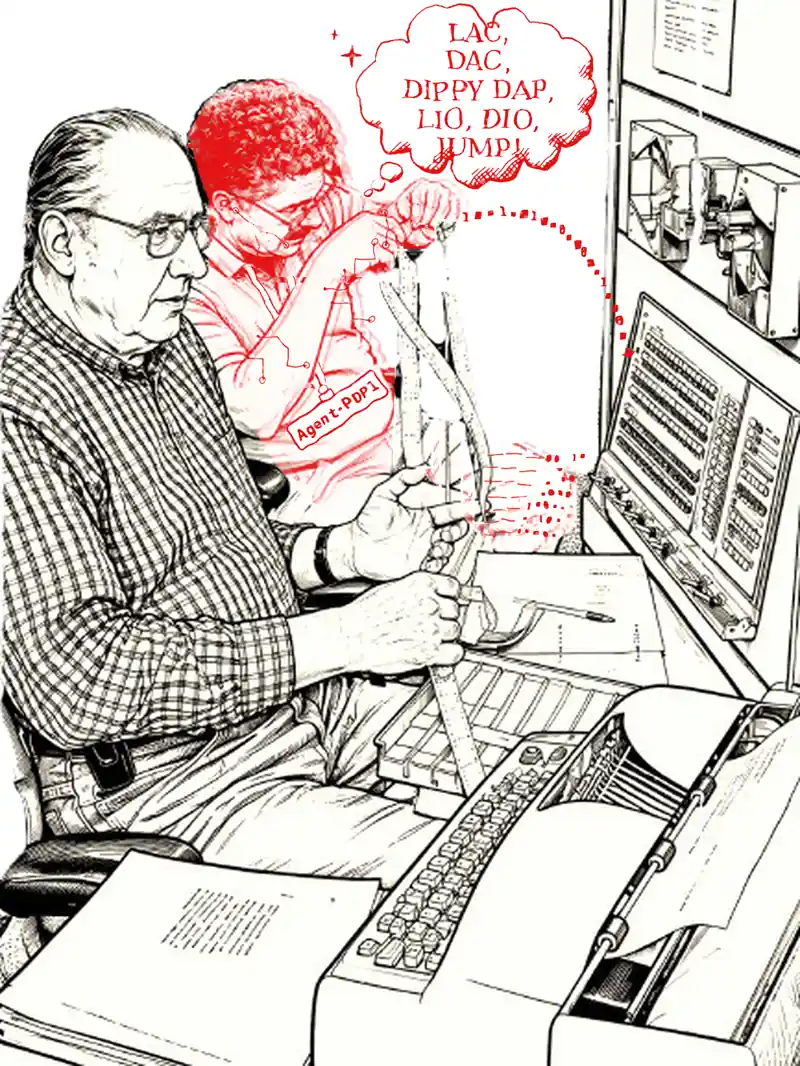
An AI companion for the PiDP-1 — installs a tutor, guide, and capable copilot on your replica PDP-1. It sits next to you, and can see the display/operate the front panel just like you. Learn how to use the PDP-1 faster, and more enjoyably.
The PiDP-1 is a replica of the original Digital Equipment Corporation
PDP-1 computer.
See the PiDP-1 web site
It is great to have a proper PDP-1 Hacker sit next to you at the front panel. Perhaps having replica Hackers around is just as important as having replicas of their old computers?
The idea
I wanted to make an AI companion to the PiDP-1. It is able to vibe-code, but the real purpose is to help people learn how to use the PDP-1 — more quickly, and more enjoyably. Any user, from beginner to advanced.
It is not too hard in 2026. This is a first attempt; I hope it will be picked up and improved. So, feel free to fork, recycle, replace, whatever.
What you get
It can install a complete open-source Hermes Agent setup on your PiDP-1 (or any Linux machine). All it needs is an external LLM to connect to. As of November 2026, I'd suggest the cheap, good-enough DeepSeek, but it is up to you. The PDP-1 "problem set" is small enough, and $10 at Deepseek gives you months of playtime. And there is no subscription: when the money runs out, you are off the hook, unless you want more playtime. I like that. The install script will set it up in a few minutes.
This project comes in three independent parts:
- The skills — markdown files that make any AI you like into a PDP-1 expert.
- Code to share the PiDP-1 — a companion update in the pidp1 repo itself, so your AI has the same access to the PDP-1 as you: it can see and type on the typewriter, see and control the front panel, and watch the Type 30 graphics display. The install script will do that update for you.
- And if you want it: this also installs a turn-key Hermes Agent on the PiDP-1 to use the above. Hermes is an open-source AI agent that runs locally, and it is charming because it learns as you use it: your preferences, and its own past mistakes. It really gets good after an hour or two! You chat with your expert through its own window, whilst it can handle the PDP-1 just as you can.
Vibe-coded eye candy (click to zoom the Type 30 display)

Rotating cube |

Tic-tac-toe |
 Hopalong radiant attractor
(click to zoom!) | Hopalong was ported without human intervention from Javascript in 20 minutes. The agent wrote this page. It depressed me: a sign that the end of democoding is near? |
But it is meant as a tutor, not a vibe-coder
Admittedly, as a side-effect, the AI becomes a competent PDP-1 coding agent. It was trained doing code reviews of major PDP-1 programs, and it wrote some nice demo code, like the tic-tac-toe game above.
But, personal view: retrocomputing is best left AI-free in that sense. There is no sense of achievement or historical value in letting an AI write an amazing new program on a PDP-1.
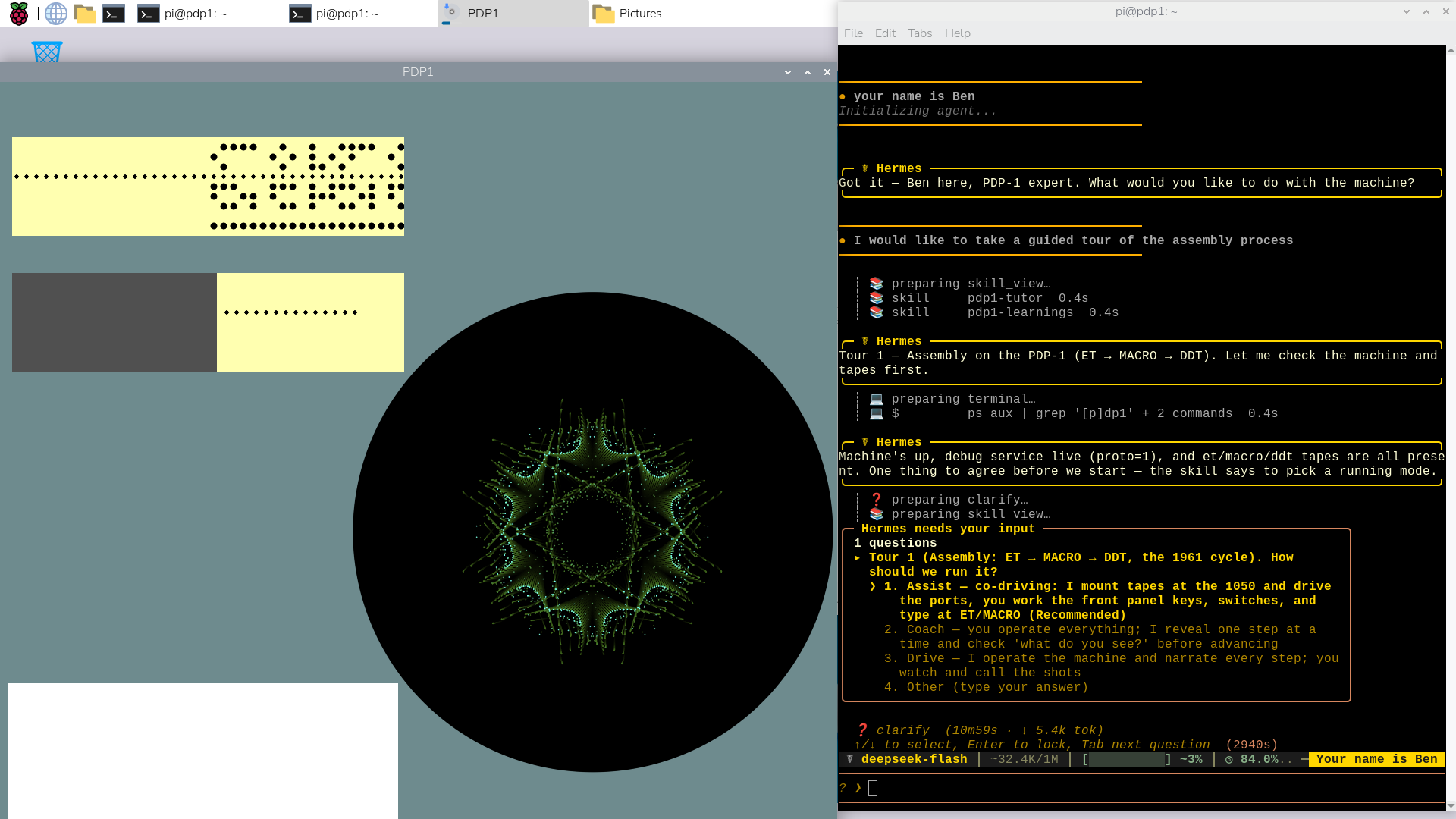
Instead, its goal is to be a tutor, click to zoom the screen shot. It can teach you to operate the machine, teach assembly programming, help find bugs. And also, give you an interactive tour through the process of writing code in ET, assembling it, using DDT. Or show you how to work in Lisp. Or take you through a tour of the best graphics demos.
Almost nobody still has an experienced PDP-1 hacker nearby. So it makes sense to have an AI take that role; it will make learning about the PDP-1 much faster and much more fun.
To see some nice demonstrations:
- ask for a code review of something like the DDT source code — the code-review skill is an amazing teacher, and you will see exactly how powerful this tutor can be. Here is an example of what studying the DDT source code added during the training process.
- new to the PDP-1? Ask for the assembly tour;
- or just ask about the history of demo coding on the PDP-1.
Install
cd /opt
sudo git clone https://github.com/obsolescence/agent-pdp1.git
cd agent-pdp1
./install.sh
[!NOTE] The install script will download and install Hermes for you through their headless install option. The user-friendly way. But Hermes is a bit of a moving target, it depends on - well, lots of Linux dependency hell it seems. So at some point in the future: if the Hermes install through my install script breaks: not a problem. Then, just install Hermes yourself, manually. Easily googled. And rerun the install script afterwards to let it complete the Hermes setup. But this install script is tested to work during 2026 and saved some hassle from a manual install.
From now on, to start working with this: do the usual pdp1control start command, switch the power on (top right of the front panel). Then type hermes --tui any time you want your companion alongside you. For now, use the PiDP-1's GUI setup, the web server alternative is not tested thoroughly yet.
Works on a PiDP-1 (Pi 4/5, 4 GB RAM; untested: 2 GB RAM). If you don't have one, install this after the pidp1 package, on just any Linux laptop — you get a virtual front panel, and everything else stays the same.
The installer presents a menu. Every step explains itself, and every step can be declined:
- Basic setup — update the pidp1 package, install the agent tools.
- Hermes Agent — setup Hermes, connect DeepSeek (or defer that), add the skills into the agent.
- Update/restore the core skills — an update function. Pull the latest from GitHub. Edits you made to the core skills are replaced, but your PDP-1-Learnings are left alone.
DRY_RUN=1 ./install.sh simulates the install without changing anything
— handy as a preview, or for testing.
The Hermes step asks for a DeepSeek API key — type/paste it in, or point the installer at a file that holds one (like ~/my-api-key.txt). There is no particular reason to use DeepSeek: it is just, at the time of writing, the cheapest model that is good enough. Hermes runs any model — add others later, things will evolve.
What's inside
skills/ — core of the project. Readable markdown files with PDP-1 knowledge.
- pdp1-assembly — instruction set, MACRO-1, programming patterns
- pdp1-debugging — the new debugger protocol, recipes, a pdp1dbg helper client
- pdp1-plumbing — knowledge of the simulator itself
- pdp1-type30-vision — reading the screen (through a the pdp1_dpy tool)
- pdp1-tutor — guided tours of PDP-1 applications (still WIP, but OK for now)
- pdp1-code-review — structured code review workflow
hermes-specific/
- SOUL.md - the rules that Hermes should keep in mind
- pdp1-learnings template: the agent's own learning file. Read it and change it to your liking. Perhaps share it with us so we can improve the knowledge base.
install.sh — the installer script. Tested on Raspberry Pi OS and Ubuntu.
None of this needs to be Hermes-specific — and nothing depends on DeepSeek, either. The skills are plain markdown, and most any AI will absorb them; Claude Code, for instance, will happily adopt them. The API that lets an agent work the machine the same way you do is described in the skills files themselves.
The pidp1 side
As part of this project, the base pidp1 simulator was updated so an AI can share the PiDP-1 with you. Useful for future projects as well. And the PDP-1 simulator gained a massively improved debugger: useful for the AI, so it is not forced to debug over the front panel all the time; useful for human PDP-1 hackers, too. Again, described in the skills files.
The read-only core, and the pdp1-learnings skill
We noticed that a self-learning agent like Hermes will, over time, not just learn new things — it will also get caught in its own previous mistakes. Anecdote: when programming Tic-Tac-Toe, it looked online for more example code, found some helpful PDP-8 code, and then got itself confused for a week about the "bug in the subroutine instructions" of the PDP-1…
So, we decided that the self-learning is best kept curated. Instead of
editing the canonical skills, agents are instructed to write what they learn
to their own pdp1-learnings skill file
(~/.hermes/skills/pdp1-learnings/). Read this file in an editor some time —
it is interesting.
We hope people will submit their pdp1-learnings files, so we can use them
to improve the core skills. You can also do that locally:
/opt/agent-pdp1/skills/curate.sh— disable the write protection.- Tell your Hermes agent to curate your
pdp1-learningsinto the core skills, and ask it to go through each learning with you, so you can judge what is useful and what is not. Or, of course, tell Hermes to do it for itself. /opt/agent-pdp1/skills/protect.sh— restore the write protection when you're done.
There is also /opt/agent-pdp1/skills/update.sh (or menu option 3 of the
installer): it restores your local core skills to the originals from the
GitHub repo — so there is no risk of breaking anything.
Feedback, and contributing
Please use the PiDP-1 Google Group: https://groups.google.com/g/pidp-1
And send your pdp1-learnings files if you want to contribute — through
GitHub, as attachments in the Google Group, or by email. You will have my
email if you are a PiDP-1 user ;-)
Tips
- Tell Hermes to be interactive with you, and not to go off figuring things out alone. You want to say things like that regularly, so it remembers.
- Set its
/reasoningto medium or low for regular chats, maybe tomaxorhighwhen you want it to write a program. Tell it to be concise. - Now and then, tell it to curate its new learnings; I recommend you ask it to that together with you.
- Give it an hour or two of use to get settled in (proving I have some work to do still!).
In closing
There is no claim to greatness here. This is experimental, zero copyright or ownership claims — I am just a hobbyist. AI agents will evolve rapidly, so by the time you read this, there may be much better ways to use these skills files. But it is a start: fun, cheap, open source, subscription-free.
We do believe these skills files have some eternal value — they are a thorough knowledge base for anyone, and any AI, to build on. A lot of time was spent getting them effective; improving this curated PDP-1 knowledge is what we think the real value here is.
To close, again, our intention. Preserving PDP-1 legacy is not about vibe coding — this agent can do that, but computer history should be free from AI, IMO.
But...
As people with knowledge of the historical machine start to become scarce, an AI tutor and guide is a very legitimate way of keeping PDP-1 history alive.
License
Ugh. Lawyers. MIT — see LICENSE. Fork it, recycle it, replace it.
Similar repos


AI copilot skills and tools for the PiDP-1: assembly, debugging, machine operation, display analysis — for Hermes Agent and other agents
Shell
0
68 commits
updated Oct 4, 2026
See what people are saying
README
Agent-PDP1: A PDP-1 Hacker Replicant
An AI companion for the PiDP-1 — installs a tutor, guide, and capable copilot on your replica PDP-1. It sits next to you, and can see the display/operate the front panel just like you. Learn how to use the PDP-1 faster, and more enjoyably.
The PiDP-1 is a replica of the original Digital Equipment Corporation
PDP-1 computer.
See the PiDP-1 web site
It is great to have a proper PDP-1 Hacker sit next to you at the front panel. Perhaps having replica Hackers around is just as important as having replicas of their old computers?
The idea
I wanted to make an AI companion to the PiDP-1. It is able to vibe-code, but the real purpose is to help people learn how to use the PDP-1 — more quickly, and more enjoyably. Any user, from beginner to advanced.
It is not too hard in 2026. This is a first attempt; I hope it will be picked up and improved. So, feel free to fork, recycle, replace, whatever.
What you get
It can install a complete open-source Hermes Agent setup on your PiDP-1 (or any Linux machine). All it needs is an external LLM to connect to. As of November 2026, I'd suggest the cheap, good-enough DeepSeek, but it is up to you. The PDP-1 "problem set" is small enough, and $10 at Deepseek gives you months of playtime. And there is no subscription: when the money runs out, you are off the hook, unless you want more playtime. I like that. The install script will set it up in a few minutes.
This project comes in three independent parts:
- The skills — markdown files that make any AI you like into a PDP-1 expert.
- Code to share the PiDP-1 — a companion update in the pidp1 repo itself, so your AI has the same access to the PDP-1 as you: it can see and type on the typewriter, see and control the front panel, and watch the Type 30 graphics display. The install script will do that update for you.
- And if you want it: this also installs a turn-key Hermes Agent on the PiDP-1 to use the above. Hermes is an open-source AI agent that runs locally, and it is charming because it learns as you use it: your preferences, and its own past mistakes. It really gets good after an hour or two! You chat with your expert through its own window, whilst it can handle the PDP-1 just as you can.
Vibe-coded eye candy (click to zoom the Type 30 display)
|
Rotating cube |
Tic-tac-toe |
Hopalong radiant attractor (click to zoom!) | Hopalong was ported without human intervention from Javascript in 20 minutes. The agent wrote this page. It depressed me: a sign that the end of democoding is near? |
But it is meant as a tutor, not a vibe-coder
Admittedly, as a side-effect, the AI becomes a competent PDP-1 coding agent. It was trained doing code reviews of major PDP-1 programs, and it wrote some nice demo code, like the tic-tac-toe game above.
But, personal view: retrocomputing is best left AI-free in that sense. There is no sense of achievement or historical value in letting an AI write an amazing new program on a PDP-1.
Instead, its goal is to be a tutor, click to zoom the screen shot. It can teach you to operate the machine, teach assembly programming, help find bugs. And also, give you an interactive tour through the process of writing code in ET, assembling it, using DDT. Or show you how to work in Lisp. Or take you through a tour of the best graphics demos.
Almost nobody still has an experienced PDP-1 hacker nearby. So it makes sense to have an AI take that role; it will make learning about the PDP-1 much faster and much more fun.
To see some nice demonstrations:
- ask for a code review of something like the DDT source code — the code-review skill is an amazing teacher, and you will see exactly how powerful this tutor can be. Here is an example of what studying the DDT source code added during the training process.
- new to the PDP-1? Ask for the assembly tour;
- or just ask about the history of demo coding on the PDP-1.
Install
cd /opt
sudo git clone https://github.com/obsolescence/agent-pdp1.git
cd agent-pdp1
./install.sh
[!NOTE] The install script will download and install Hermes for you through their headless install option. The user-friendly way. But Hermes is a bit of a moving target, it depends on - well, lots of Linux dependency hell it seems. So at some point in the future: if the Hermes install through my install script breaks: not a problem. Then, just install Hermes yourself, manually. Easily googled. And rerun the install script afterwards to let it complete the Hermes setup. But this install script is tested to work during 2026 and saved some hassle from a manual install.
From now on, to start working with this: do the usual pdp1control start command, switch the power on (top right of the front panel). Then type hermes --tui any time you want your companion alongside you. For now, use the PiDP-1's GUI setup, the web server alternative is not tested thoroughly yet.
Works on a PiDP-1 (Pi 4/5, 4 GB RAM; untested: 2 GB RAM). If you don't have one, install this after the pidp1 package, on just any Linux laptop — you get a virtual front panel, and everything else stays the same.
The installer presents a menu. Every step explains itself, and every step can be declined:
- Basic setup — update the pidp1 package, install the agent tools.
- Hermes Agent — setup Hermes, connect DeepSeek (or defer that), add the skills into the agent.
- Update/restore the core skills — an update function. Pull the latest from GitHub. Edits you made to the core skills are replaced, but your PDP-1-Learnings are left alone.
DRY_RUN=1 ./install.sh simulates the install without changing anything
— handy as a preview, or for testing.
The Hermes step asks for a DeepSeek API key — type/paste it in, or point the installer at a file that holds one (like ~/my-api-key.txt). There is no particular reason to use DeepSeek: it is just, at the time of writing, the cheapest model that is good enough. Hermes runs any model — add others later, things will evolve.
What's inside
skills/ — core of the project. Readable markdown files with PDP-1 knowledge.
- pdp1-assembly — instruction set, MACRO-1, programming patterns
- pdp1-debugging — the new debugger protocol, recipes, a pdp1dbg helper client
- pdp1-plumbing — knowledge of the simulator itself
- pdp1-type30-vision — reading the screen (through a the pdp1_dpy tool)
- pdp1-tutor — guided tours of PDP-1 applications (still WIP, but OK for now)
- pdp1-code-review — structured code review workflow
hermes-specific/
- SOUL.md - the rules that Hermes should keep in mind
- pdp1-learnings template: the agent's own learning file. Read it and change it to your liking. Perhaps share it with us so we can improve the knowledge base.
install.sh — the installer script. Tested on Raspberry Pi OS and Ubuntu.
None of this needs to be Hermes-specific — and nothing depends on DeepSeek, either. The skills are plain markdown, and most any AI will absorb them; Claude Code, for instance, will happily adopt them. The API that lets an agent work the machine the same way you do is described in the skills files themselves.
The pidp1 side
As part of this project, the base pidp1 simulator was updated so an AI can share the PiDP-1 with you. Useful for future projects as well. And the PDP-1 simulator gained a massively improved debugger: useful for the AI, so it is not forced to debug over the front panel all the time; useful for human PDP-1 hackers, too. Again, described in the skills files.
The read-only core, and the pdp1-learnings skill
We noticed that a self-learning agent like Hermes will, over time, not just learn new things — it will also get caught in its own previous mistakes. Anecdote: when programming Tic-Tac-Toe, it looked online for more example code, found some helpful PDP-8 code, and then got itself confused for a week about the "bug in the subroutine instructions" of the PDP-1…
So, we decided that the self-learning is best kept curated. Instead of
editing the canonical skills, agents are instructed to write what they learn
to their own pdp1-learnings skill file
(~/.hermes/skills/pdp1-learnings/). Read this file in an editor some time —
it is interesting.
We hope people will submit their pdp1-learnings files, so we can use them
to improve the core skills. You can also do that locally:
/opt/agent-pdp1/skills/curate.sh— disable the write protection.- Tell your Hermes agent to curate your
pdp1-learningsinto the core skills, and ask it to go through each learning with you, so you can judge what is useful and what is not. Or, of course, tell Hermes to do it for itself. /opt/agent-pdp1/skills/protect.sh— restore the write protection when you're done.
There is also /opt/agent-pdp1/skills/update.sh (or menu option 3 of the
installer): it restores your local core skills to the originals from the
GitHub repo — so there is no risk of breaking anything.
Feedback, and contributing
Please use the PiDP-1 Google Group: https://groups.google.com/g/pidp-1
And send your pdp1-learnings files if you want to contribute — through
GitHub, as attachments in the Google Group, or by email. You will have my
email if you are a PiDP-1 user ;-)
Tips
- Tell Hermes to be interactive with you, and not to go off figuring things out alone. You want to say things like that regularly, so it remembers.
- Set its
/reasoningto medium or low for regular chats, maybe tomaxorhighwhen you want it to write a program. Tell it to be concise. - Now and then, tell it to curate its new learnings; I recommend you ask it to that together with you.
- Give it an hour or two of use to get settled in (proving I have some work to do still!).
In closing
There is no claim to greatness here. This is experimental, zero copyright or ownership claims — I am just a hobbyist. AI agents will evolve rapidly, so by the time you read this, there may be much better ways to use these skills files. But it is a start: fun, cheap, open source, subscription-free.
We do believe these skills files have some eternal value — they are a thorough knowledge base for anyone, and any AI, to build on. A lot of time was spent getting them effective; improving this curated PDP-1 knowledge is what we think the real value here is.
To close, again, our intention. Preserving PDP-1 legacy is not about vibe coding — this agent can do that, but computer history should be free from AI, IMO.
But...
As people with knowledge of the historical machine start to become scarce, an AI tutor and guide is a very legitimate way of keeping PDP-1 history alive.
License
Ugh. Lawyers. MIT — see LICENSE. Fork it, recycle it, replace it.