Claude Code mod: live GitHub pull request status (checks, reviews, threads, merge queue) in a band and pane, with confirmed merge actions.
TypeScript
6
18 commits
updated Oct 13, 2026
The pull request status of your current branch, its repository's issues and its GitHub Actions runs, live inside Claude Code, so you never open GitHub just to check them.
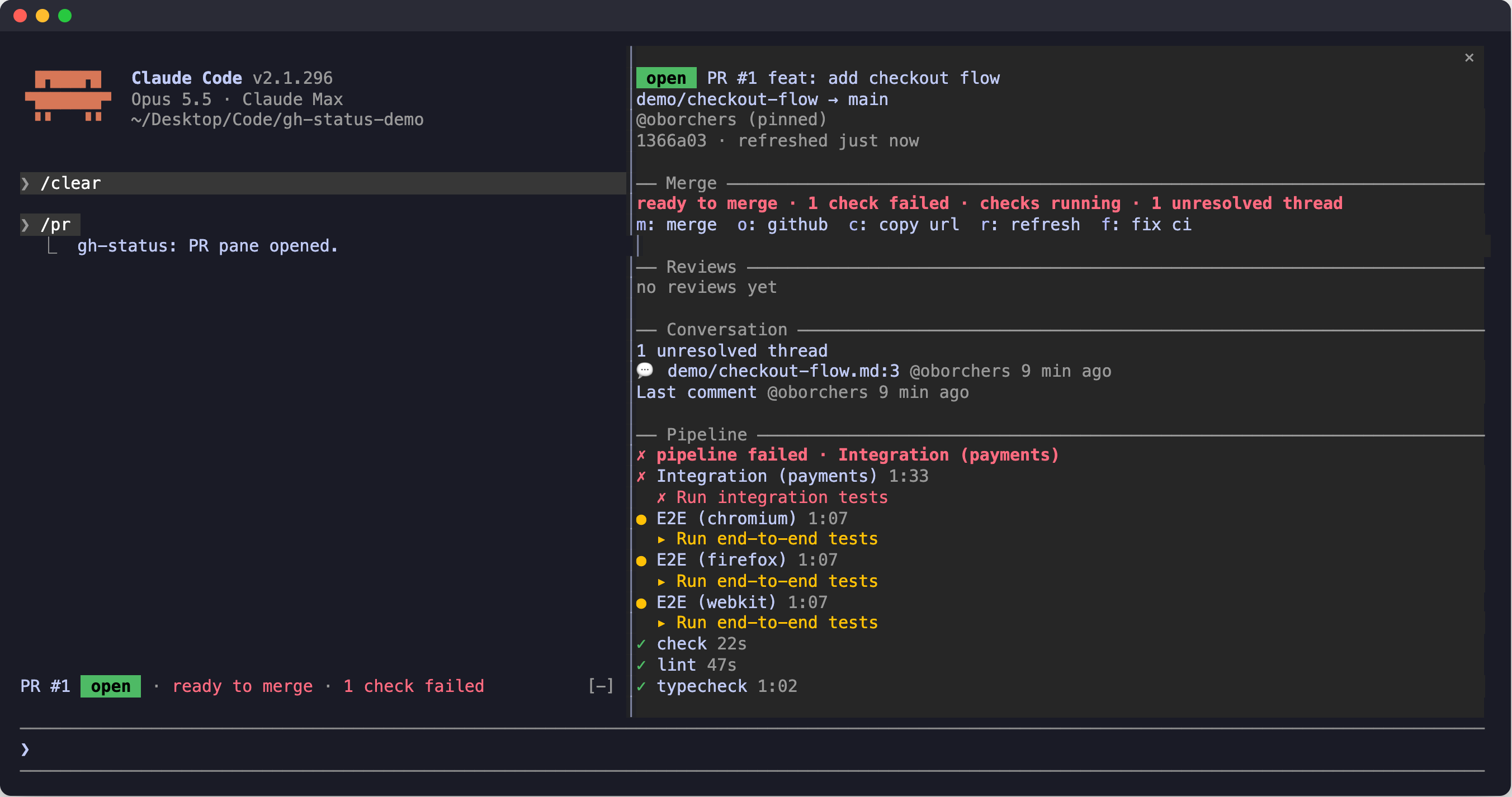
/gh (or /pr). Merge section, reviews, conversation, and the full pipeline. Comment times read @bot 4 min ago, or @bot edited 2 min ago once a comment was edited in place (review bots do that).ready to merge · 1 check failed is red, it is yellow while checks run, and it is green only when everything is clean.1: PRs 2: Issues 3: Actions. Issues lists the repository's open issues, Actions its workflow runs, each with a detail view. Both are read only, except that a failed run can be re-run./gh. One command for the three tabs: /gh, /gh issues, /gh actions, /gh <number>, /gh run <id>.main ✗ <workflow>.gh login, with no gh auth switch.The pane always starts with a tab row:
1: PRs 2: Issues 3: Actions
The digits 1, 2 and 3 switch tabs while the pane has the keyboard, and so does a click. The row shows the number of open pull requests and issues, and a symbol for the default branch's workflows on the Actions tab (✗ failing, ● running, ✓ passing).
b or l go up one level in the same tab, from a detail to its list, with the cursor back on the row you came from.b there goes to that tab's list.n and p page.| Entry point | Opens |
|---|---|
/gh with a pull request on the branch | The PRs tab, showing that pull request |
/gh without one | The PRs tab, showing the list |
/gh issues (i) | The Issues tab, at the level it was left (the list the first time) |
/gh actions (ac) | The Actions tab, at the level it was left (the list the first time) |
/gh prs, /gh list, /gh ls | The PRs tab, showing the list |
/gh <n> | Pull request n in the PRs tab; if there is no such pull request, issue n in the Issues tab |
/gh issue <n> | Issue n in the Issues tab |
/gh run <id> | Run id in the Actions tab |
l: list in the band | The PRs tab, showing the list |
main ✗ notice in the band | The Actions tab (hotkey 3 while the band has the keyboard) |
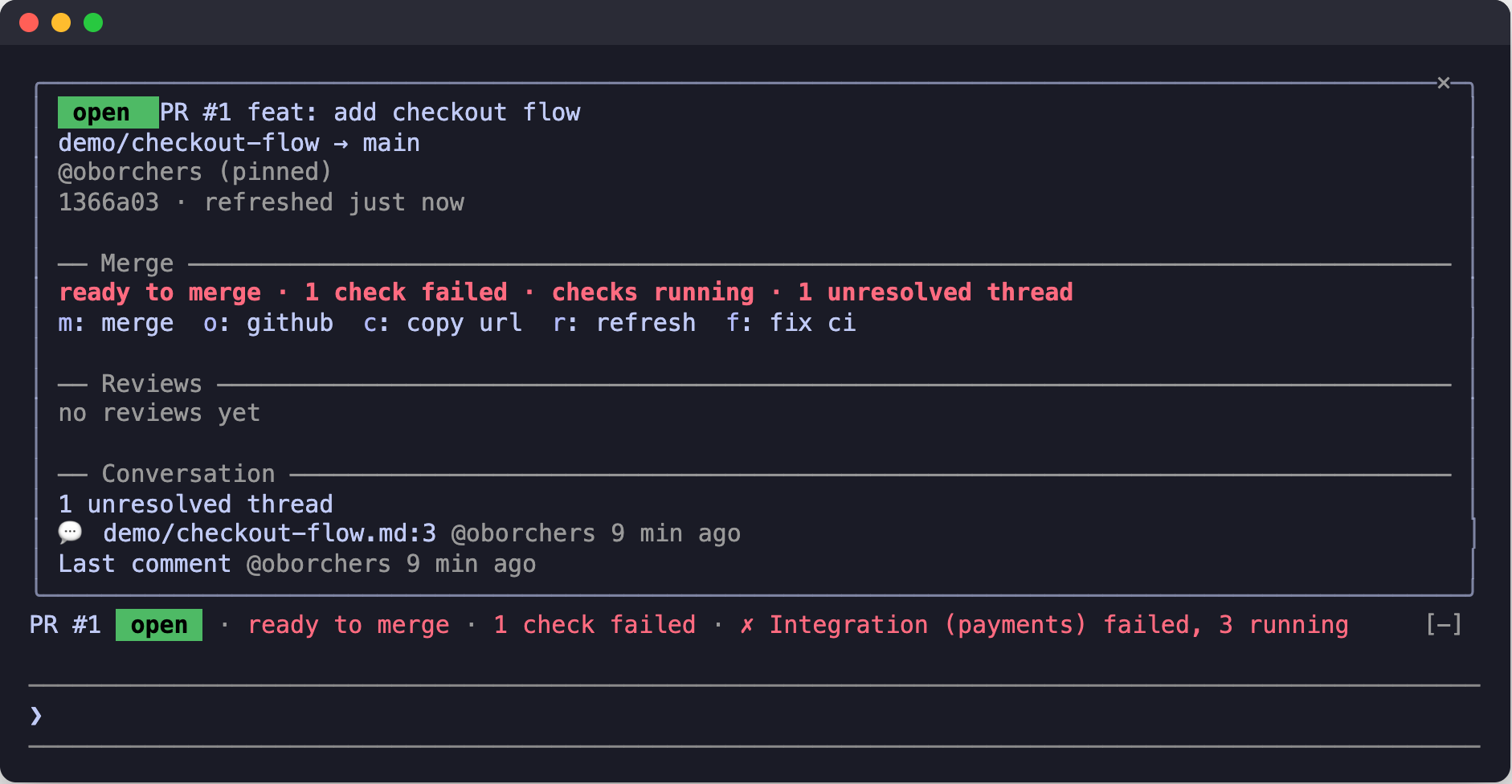
Below 110 columns, or outside the fullscreen layout, the pane opens inline above the prompt instead of docking beside the transcript.
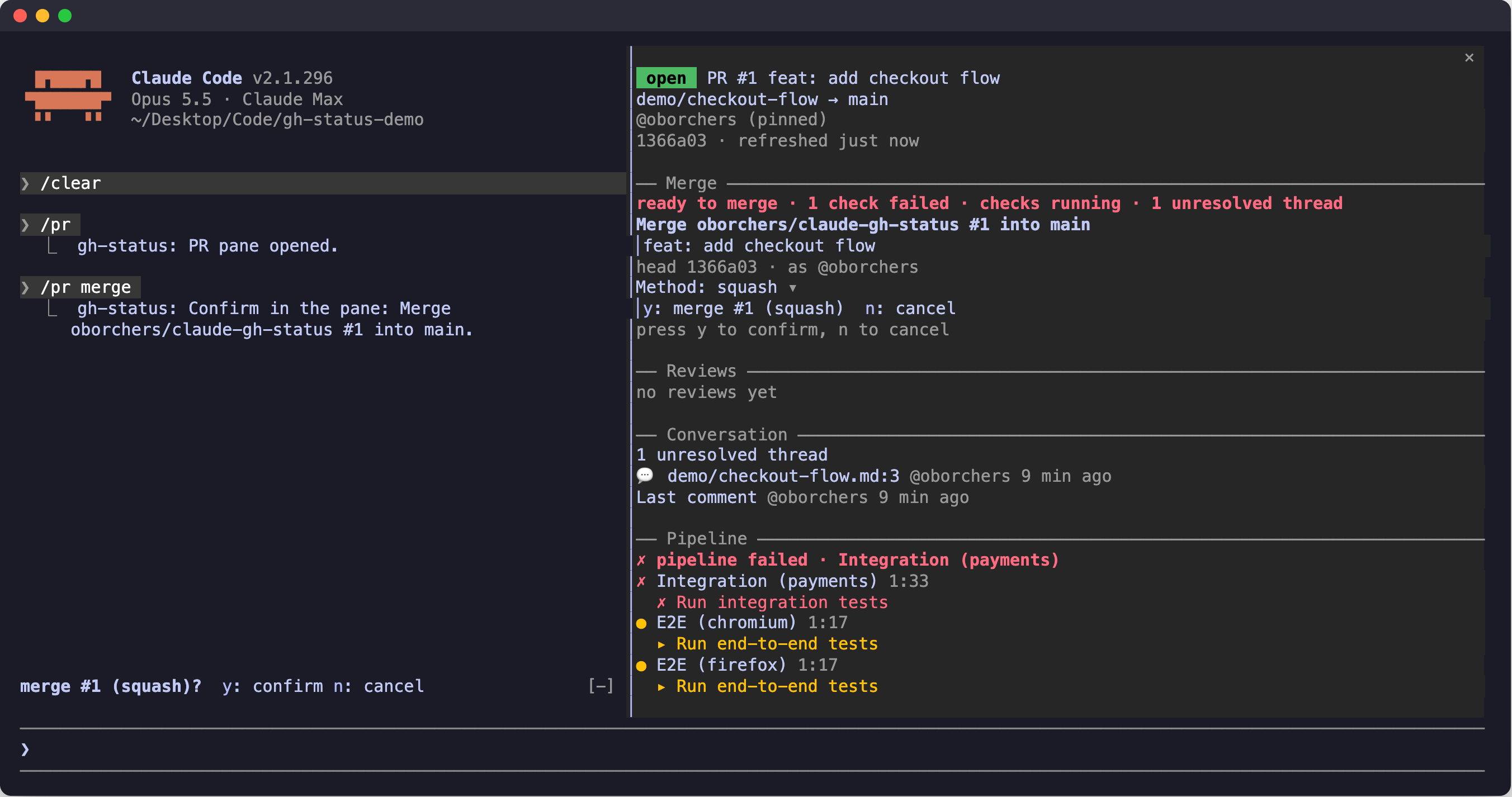
Merge, add to and remove from the merge queue, auto-merge on and off, admin merge, and the review actions all ask first. Nothing is written until you press the confirm key.
--match-head-commit, queue and auto-merge use expectedHeadOid, so GitHub refuses if the branch moved.commitOID. A review whose result is unknown (a timeout or a server error) is never retried.--delete-branch and --auto are never used.
The band is one line above the prompt: PR number and state badge, the verdict (the first caveat such as a failed check, running checks or an unresolved thread, or blocked, in queue, auto-merge), the pipeline, reviews, unresolved threads and the account. A second row lists further blockers.
When the branch has no pull request, the band reads no PR for <branch> · N open · N yours · N review requested with a list button. With a pull request it shows a dim N open at the end of the row, dropped first when the row is tight. The counts, which include open issues, are read every 5 minutes.
When the newest run of a workflow on the default branch failed, the band also shows main ✗ <workflow> (with +N for further failing workflows). It is a button that opens the Actions tab. It is read every 5 minutes with a conditional request, and the setting mainStatus (red by default, off) turns it off.
Keys, when the band has the keyboard (a key only appears when its action is available):
| Key | Does |
|---|---|
d | Open the detail pane |
o | Open the pull request on GitHub |
f | Fix CI with Claude (when a check failed) |
m | Merge |
q | Add to the merge queue |
l | Open the list of open pull requests (when the branch has no pull request) |
3 | Open the Actions tab (when the main ✗ notice is shown) |
y / n | Confirm / cancel a pending confirmation |
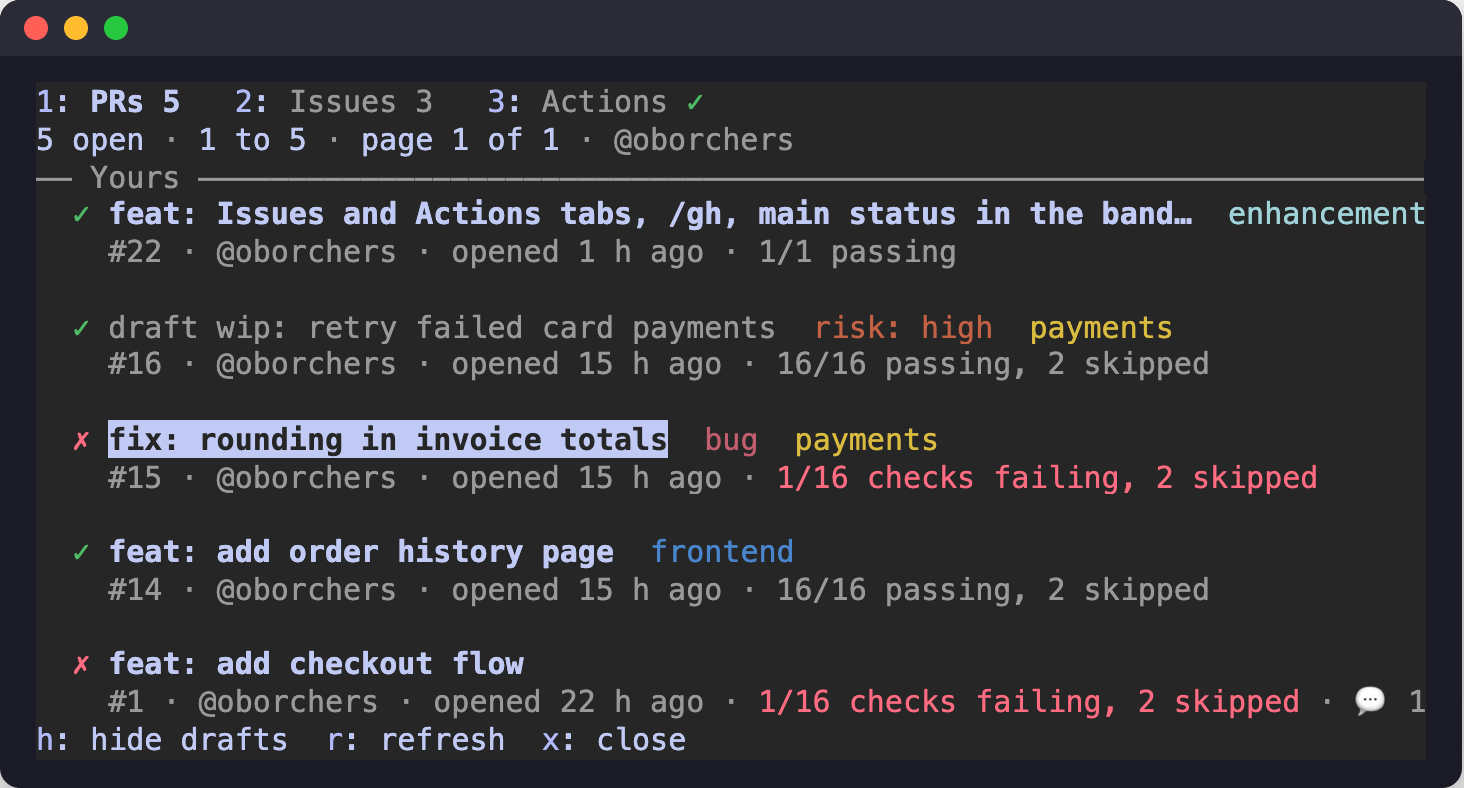
Open the list with l in the band (when the branch has no pull request) or in the pane, with /gh list (ls), or with /gh alone when the branch has no pull request. The list and the detail of a pull request are two levels of the PRs tab.
✓ passing, ✗ failing, ● running, ◷ queued), the title and the labels in a muted version of their GitHub color. The second has the number, author, age, checks, review state and comment count.n next, p previous.h hides or shows them.r refreshes now.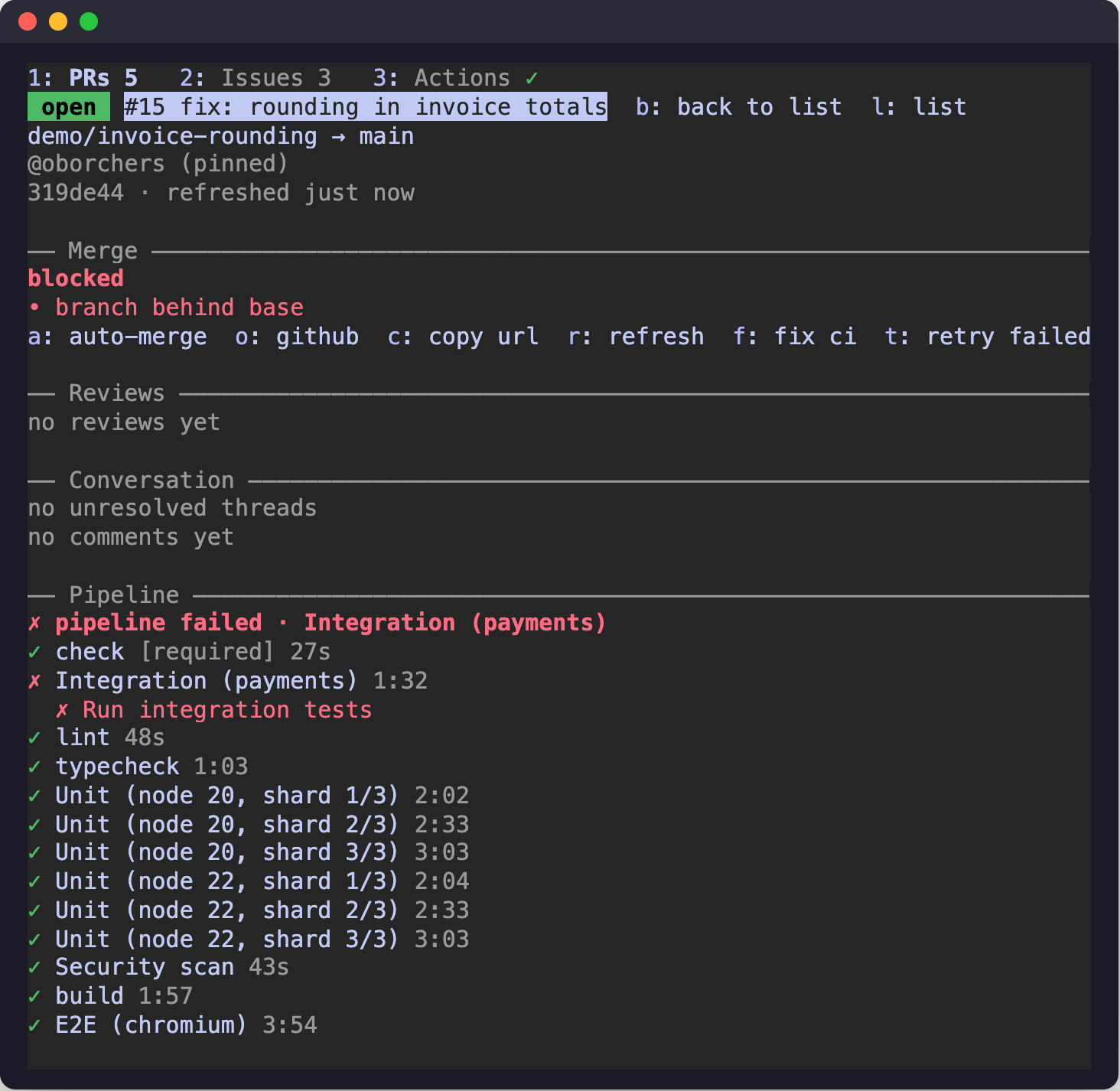
Press Enter on a row in the list, or type /gh <number>. The same pane switches to that pull request, with b: back to list in its header. b (or l) returns to the list with the focus on the row you came from; the page and the draft filter stay. /gh back does the same. The band keeps showing the branch's own pull request.
Merging, the queue and the other actions act on the pull request the pane shows, with the same confirmation and bindings as for the branch's pull request. Closing the pane ends the selection.
In the pane, for the pull request it shows (the branch's or a selected one):
v approve, with an optional comment.w request changes. The text is required.e ready for review, for your own drafts.The commands are /gh approve, /gh changes and /gh ready. Each opens the pane with a confirmation that shows the repository, the number, the head commit, the account and the exact text that will be posted.
y to post or n to cancel.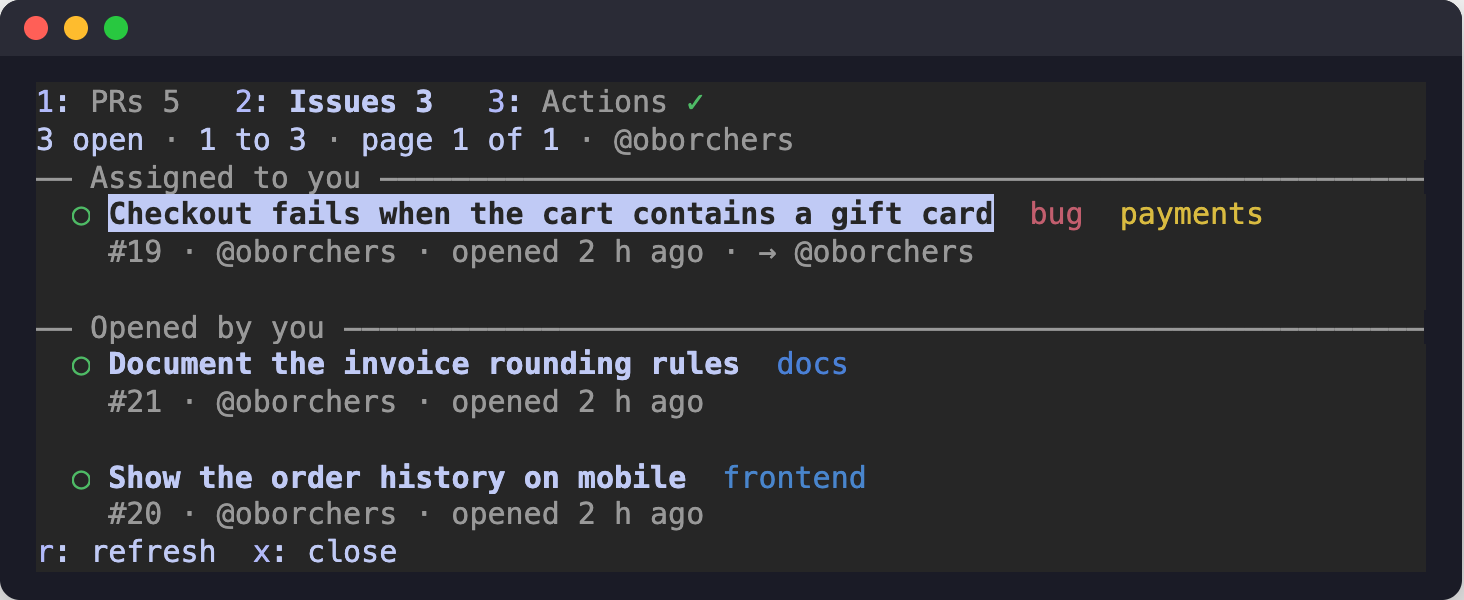
The Issues tab lists the repository's open issues.
n next, p previous. The list is read again while the tab shows it, and r refreshes now.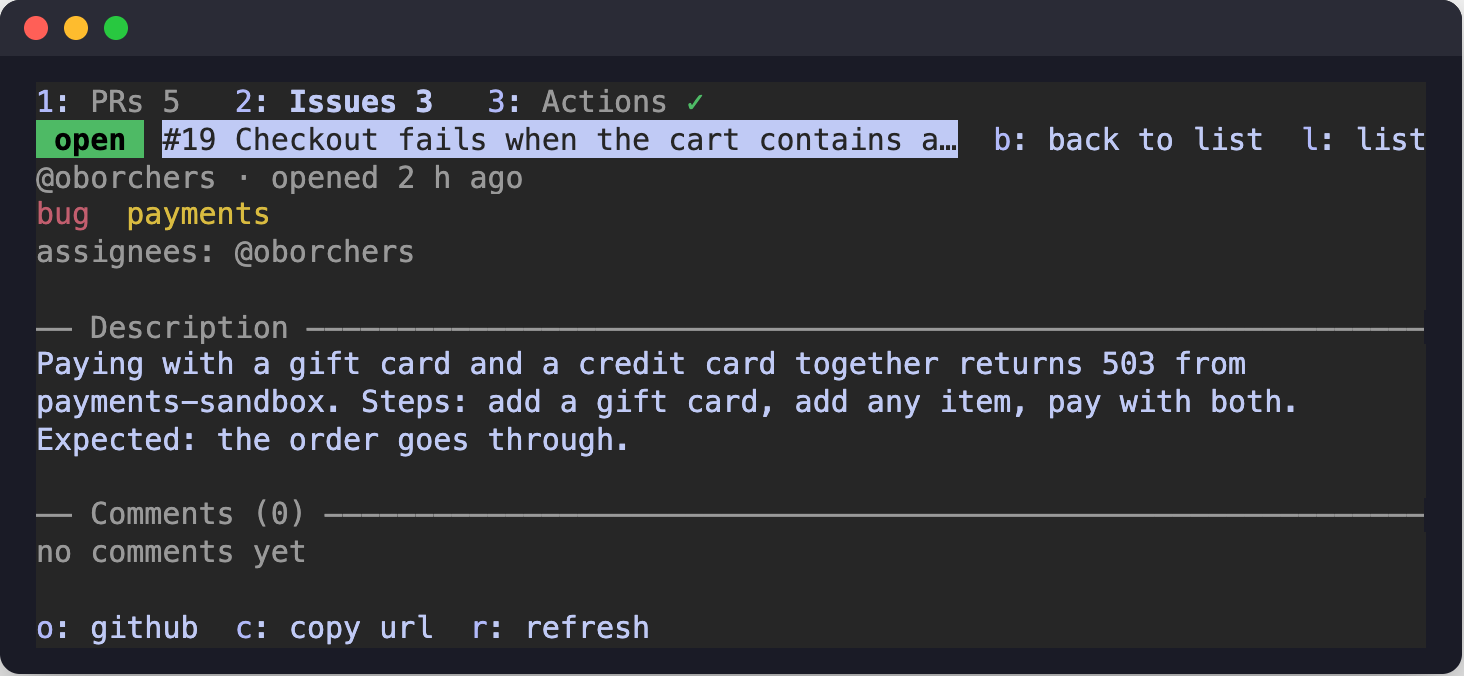
Enter opens an issue. The detail shows:
o opens the issue on GitHub for the rest.o opens the issue on GitHub, c copies its URL and r refreshes. Issues are read only: gh-status does not write to them.
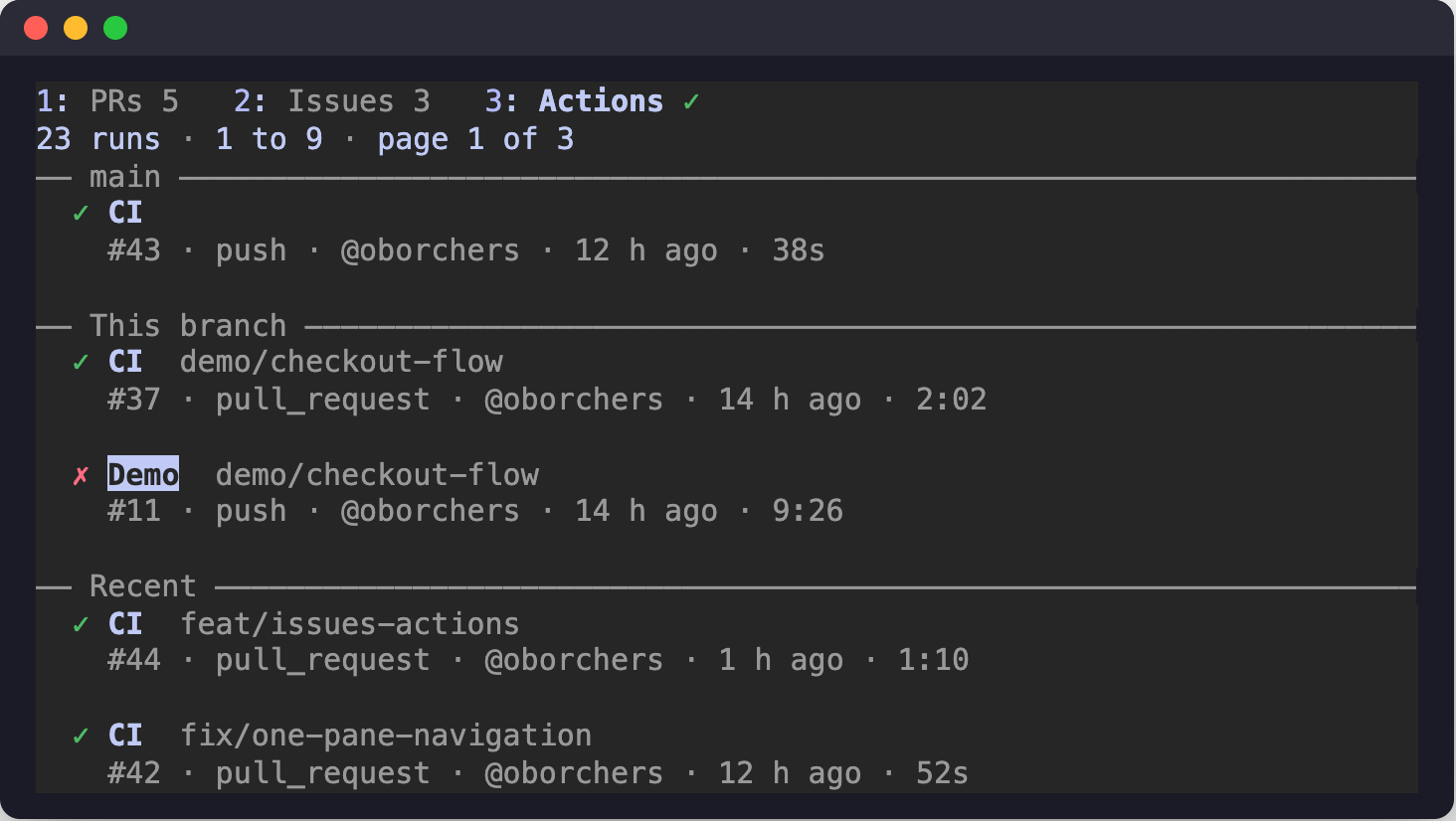
The Actions tab lists workflow runs.
n next, p previous, r refreshes now.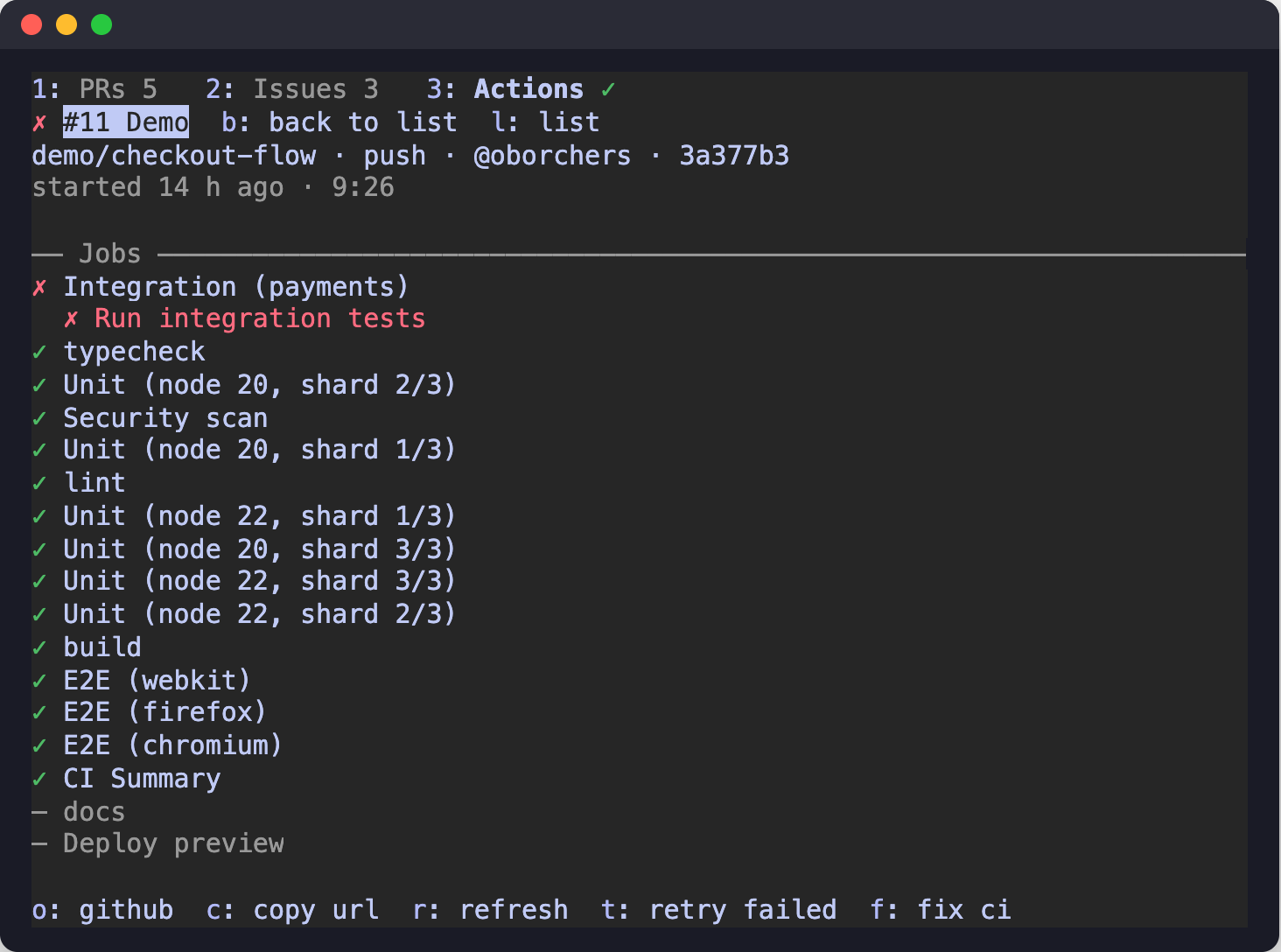
Enter opens a run. The detail shows the branch, event, actor, commit, attempt and timing, and the run's jobs, with the running or failed step of each, ordered like the pull request's pipeline. A run can also be opened from a pull request's pipeline.
For a failed or timed-out run:
t re-runs the failed jobs of that run (gh run rerun <id> --failed). There is no confirmation, as for the pull request's t: it only starts CI again.f puts a reference to the failure into the prompt, never the log.o opens the run on GitHub, c copies its URL and r refreshes.
In a terminal Claude Code session:
/plugin install gh-status --marketplace oborchers/claude-gh-status
Answer y to add the marketplace, then pick a scope (user scope is listed first). The command works in a terminal session only.
Update:
claude plugin update gh-status@claude-gh-status
Then run /reload-plugins in sessions that are already running.
Requirements:
gh, logged in (gh auth login)The command is /pr, and /gh does the same (it is skipped without a message if another command already has that name). If a skill or another command already uses /pr in a session, the mod does not register it there and a toast says so; /gh-pr always works. The name can be changed with the setting command (Command name). Below, /gh stands for any of these names.
| Command | Does |
|---|---|
/gh | Show the branch's pull request in the pane (the list, when the branch has no pull request) |
/gh issues (/gh i) | Open the Issues tab |
/gh actions (/gh ac) | Open the Actions tab |
/gh issue <n> | Show issue n in the Issues tab |
/gh run <id> | Show a workflow run in the Actions tab |
/gh refresh | Refresh now |
/gh open | Open the pull request on GitHub |
/gh copy | Copy the pull request URL |
/gh close | Close the pane (and drop a pending confirmation) |
/gh prs (/gh list, /gh ls) | Open the list of open pull requests |
/gh <number> | Show that pull request in the pane; if there is none, that issue |
/gh back | Up one level in the active tab |
/gh approve | Ask to approve (optional comment) |
/gh changes | Ask to request changes (text required) |
/gh ready | Ask to mark your own draft ready for review |
/gh merge (/gh m) | Ask to merge |
/gh queue (/gh q) | Ask to add the PR to the merge queue |
/gh dequeue (/gh dq) | Ask to remove the PR from the merge queue |
/gh auto (/gh a) | Ask to turn auto-merge on, or off if it is on |
/gh admin (/gh x) | Ask for an admin merge (two steps) |
/gh fix | Put the failed CI jobs into the prompt |
/gh rerun (/gh rr) | Re-run only the failed jobs of the failed workflow runs (no confirmation: it only starts CI again) |
/gh refresh refreshes the tab the pane shows. Write commands (merge, queue, auto-merge, admin merge, approve, changes, ready) only ask: they open the detail pane with the keyboard and show the confirmation in its Merge section and in the band. The keyboard is granted when the prompt is empty. They tell you when an action is not available for the current PR.
Re-running covers the head commit's failed, timed-out and cancelled Actions runs, once each, with gh run rerun <id> --failed. A run that still has a queued or running job is skipped (GitHub refuses it), runs waiting for approval are skipped, and the merge queue's own checks are never touched. It writes nothing but a new CI attempt: no merge, no code.
Keys (a key only appears when its action is available):
| Where | Keys |
|---|---|
| Band | l list (without a pull request), 3 Actions (with the main ✗ notice), d details, o open on GitHub, f fix CI (when a check failed), m merge, q add to queue, t retry failed jobs (when a failed run can be re-run) |
| Pane, all tabs | 1 PRs, 2 Issues, 3 Actions, b or l up one level in the Issues and Actions tabs, n next page, p previous page, r refresh |
| Issues and Actions lists | up and down move between items, Enter or a click opens one, n and p page, r refresh |
| Issue detail | o open on GitHub, c copy URL, r refresh |
| Run detail | o open on GitHub, c copy URL, r refresh, t retry failed jobs and f fix CI (for a failed run) |
| PR list | up and down move between pull requests, Enter or a click opens one in the same pane, n next page, p previous page, h hide or show drafts, r refresh, x close the pane |
| PR pane | m merge, q add to or remove from queue, a auto-merge on or off, x admin merge, v approve, w request changes, e ready for review, l list (l or b back to the list while a picked pull request is shown), o open on GitHub, c copy URL, r refresh, f fix CI (when a check failed), t retry failed jobs (when a failed run can be re-run) |
| Confirmation (band or pane) | y confirm (b for the final admin step), n cancel; in a review's text field, Esc leaves the field first |
Keys work while the band or pane has the keyboard: focus the band or pane with ctrl+x tab or a click. If your terminal multiplexer takes ctrl+x tab, click the band to focus it. Esc returns to the prompt. There is no separate dialog: a button press or a slash command sets the confirmation, and both the band (a one-line prompt with y and n) and the pane's Merge section (full details) show it, so whichever one holds the keyboard can answer. Cancel with n (or /pr close, or the pane's close mark); Esc alone only returns the keyboard. With several allowed merge methods the pane's confirmation shows a method selector (squash is the default if allowed).
When the repository is private and the account is not your active gh login, opening the pull request on GitHub also shows a hint to sign in to github.com as that account, because the browser would otherwise show a 404.
The account for a repository is chosen in this order:
accounts setting for the repository owner.credential.helper that calls gh auth token -u <login>.gh login, if it can read the repository.gh accounts on github.com, each probed for read access; the first that works is remembered.The account's token goes only to the single gh child process that needs it (as GH_TOKEN). gh-status never runs gh auth switch, so your global gh login stays as it is. Tokens are kept in memory only.
Shown as rows in /config.
| Setting | Default | Meaning |
|---|---|---|
Account per owner (accounts) | empty | Comma separated owner=login pairs, e.g. my-org=work-login,my-user=my-user. Wins over automatic detection. |
Fast interval (fastIntervalSeconds) | 5 | Check interval while checks run or the PR is in the merge queue. |
Idle interval (idleIntervalSeconds) | 30 | Check interval when nothing runs. |
Toasts on state changes (toasts) | on | Show a toast when the pipeline, reviews, comments or mergeability change. |
Command name (command) | pr | Slash command name (1 to 32 characters of a-z, 0-9 and -; anything else means pr). When it is taken in a session, for example by a skill, /gh-pr is used instead. |
Main branch status in the band (mainStatus) | red | red shows main ✗ <workflow> in the band while a workflow of the default branch fails; off hides it and stops reading it. |
Pane width (paneWidthPercent) | 35 | Share of the terminal width the docked pane opens with, at least 60 columns. 0 leaves it to Claude Code. A width you drag the pane to wins. |
Color scheme (colors) | claude | claude follows your Claude Code theme; github uses GitHub's Primer colors. |
All Claude Code sessions of one GitHub account share GitHub's hourly budget: 5,000 GraphQL points and 5,000 REST requests. Requests answered "not modified" (304) are not counted. Only the visible tab is read. Below 500 remaining points the mod reads at most once a minute.
304 Not Modified answer does not count against the REST rate limit.git push, pull, checkout, switch, rebase, merge, commit, reset and gh pr or gh run commands run by Claude, when a turn ends, when the working directory changes, and on /pr.main ✗ status is read every 5 minutes with a conditional request.toasts).-p runs or in cloud sessions.claude --plugin-dir <path> # load from disk, hot reload on save
claude plugin validate .
tsc -p .
claude plugin test .
To refresh the screenshots in docs/images, use the demo skill in .claude/skills/gh-status-demo. It sets up a demo pipeline, branch and pull request, and the terminal layouts for the tab and compact views.
Architecture:
hooks/register.tsx is the only file that touches $ (the engine interface); it wires commands, hooks and state.src/*.ts modules are pure and receive their effects (gh, git, state, time, toasts) as injected functions.src/ui/*.tsx draws the band and the pane (tab row, the three tabs and the inline confirmation) from a view built by register.tsx.types/index.d.ts.tests/.MIT, see LICENSE.
Claude Code mod: live GitHub pull request status (checks, reviews, threads, merge queue) in a band and pane, with confirmed merge actions.
TypeScript
6
18 commits
updated Oct 13, 2026
The pull request status of your current branch, its repository's issues and its GitHub Actions runs, live inside Claude Code, so you never open GitHub just to check them.
/gh (or /pr). Merge section, reviews, conversation, and the full pipeline. Comment times read @bot 4 min ago, or @bot edited 2 min ago once a comment was edited in place (review bots do that).ready to merge · 1 check failed is red, it is yellow while checks run, and it is green only when everything is clean.1: PRs 2: Issues 3: Actions. Issues lists the repository's open issues, Actions its workflow runs, each with a detail view. Both are read only, except that a failed run can be re-run./gh. One command for the three tabs: /gh, /gh issues, /gh actions, /gh <number>, /gh run <id>.main ✗ <workflow>.gh login, with no gh auth switch.The pane always starts with a tab row:
1: PRs 2: Issues 3: Actions
The digits 1, 2 and 3 switch tabs while the pane has the keyboard, and so does a click. The row shows the number of open pull requests and issues, and a symbol for the default branch's workflows on the Actions tab (✗ failing, ● running, ✓ passing).
b or l go up one level in the same tab, from a detail to its list, with the cursor back on the row you came from.b there goes to that tab's list.n and p page.| Entry point | Opens |
|---|---|
/gh with a pull request on the branch | The PRs tab, showing that pull request |
/gh without one | The PRs tab, showing the list |
/gh issues (i) | The Issues tab, at the level it was left (the list the first time) |
/gh actions (ac) | The Actions tab, at the level it was left (the list the first time) |
/gh prs, /gh list, /gh ls | The PRs tab, showing the list |
/gh <n> | Pull request n in the PRs tab; if there is no such pull request, issue n in the Issues tab |
/gh issue <n> | Issue n in the Issues tab |
/gh run <id> | Run id in the Actions tab |
l: list in the band | The PRs tab, showing the list |
main ✗ notice in the band | The Actions tab (hotkey 3 while the band has the keyboard) |
Below 110 columns, or outside the fullscreen layout, the pane opens inline above the prompt instead of docking beside the transcript.
Merge, add to and remove from the merge queue, auto-merge on and off, admin merge, and the review actions all ask first. Nothing is written until you press the confirm key.
--match-head-commit, queue and auto-merge use expectedHeadOid, so GitHub refuses if the branch moved.commitOID. A review whose result is unknown (a timeout or a server error) is never retried.--delete-branch and --auto are never used.
The band is one line above the prompt: PR number and state badge, the verdict (the first caveat such as a failed check, running checks or an unresolved thread, or blocked, in queue, auto-merge), the pipeline, reviews, unresolved threads and the account. A second row lists further blockers.
When the branch has no pull request, the band reads no PR for <branch> · N open · N yours · N review requested with a list button. With a pull request it shows a dim N open at the end of the row, dropped first when the row is tight. The counts, which include open issues, are read every 5 minutes.
When the newest run of a workflow on the default branch failed, the band also shows main ✗ <workflow> (with +N for further failing workflows). It is a button that opens the Actions tab. It is read every 5 minutes with a conditional request, and the setting mainStatus (red by default, off) turns it off.
Keys, when the band has the keyboard (a key only appears when its action is available):
| Key | Does |
|---|---|
d | Open the detail pane |
o | Open the pull request on GitHub |
f | Fix CI with Claude (when a check failed) |
m | Merge |
q | Add to the merge queue |
l | Open the list of open pull requests (when the branch has no pull request) |
3 | Open the Actions tab (when the main ✗ notice is shown) |
y / n | Confirm / cancel a pending confirmation |
Open the list with l in the band (when the branch has no pull request) or in the pane, with /gh list (ls), or with /gh alone when the branch has no pull request. The list and the detail of a pull request are two levels of the PRs tab.
✓ passing, ✗ failing, ● running, ◷ queued), the title and the labels in a muted version of their GitHub color. The second has the number, author, age, checks, review state and comment count.n next, p previous.h hides or shows them.r refreshes now.
Press Enter on a row in the list, or type /gh <number>. The same pane switches to that pull request, with b: back to list in its header. b (or l) returns to the list with the focus on the row you came from; the page and the draft filter stay. /gh back does the same. The band keeps showing the branch's own pull request.
Merging, the queue and the other actions act on the pull request the pane shows, with the same confirmation and bindings as for the branch's pull request. Closing the pane ends the selection.
In the pane, for the pull request it shows (the branch's or a selected one):
v approve, with an optional comment.w request changes. The text is required.e ready for review, for your own drafts.The commands are /gh approve, /gh changes and /gh ready. Each opens the pane with a confirmation that shows the repository, the number, the head commit, the account and the exact text that will be posted.
y to post or n to cancel.
The Issues tab lists the repository's open issues.
n next, p previous. The list is read again while the tab shows it, and r refreshes now.
Enter opens an issue. The detail shows:
o opens the issue on GitHub for the rest.o opens the issue on GitHub, c copies its URL and r refreshes. Issues are read only: gh-status does not write to them.
The Actions tab lists workflow runs.
n next, p previous, r refreshes now.
Enter opens a run. The detail shows the branch, event, actor, commit, attempt and timing, and the run's jobs, with the running or failed step of each, ordered like the pull request's pipeline. A run can also be opened from a pull request's pipeline.
For a failed or timed-out run:
t re-runs the failed jobs of that run (gh run rerun <id> --failed). There is no confirmation, as for the pull request's t: it only starts CI again.f puts a reference to the failure into the prompt, never the log.o opens the run on GitHub, c copies its URL and r refreshes.
In a terminal Claude Code session:
/plugin install gh-status --marketplace oborchers/claude-gh-status
Answer y to add the marketplace, then pick a scope (user scope is listed first). The command works in a terminal session only.
Update:
claude plugin update gh-status@claude-gh-status
Then run /reload-plugins in sessions that are already running.
Requirements:
gh, logged in (gh auth login)The command is /pr, and /gh does the same (it is skipped without a message if another command already has that name). If a skill or another command already uses /pr in a session, the mod does not register it there and a toast says so; /gh-pr always works. The name can be changed with the setting command (Command name). Below, /gh stands for any of these names.
| Command | Does |
|---|---|
/gh | Show the branch's pull request in the pane (the list, when the branch has no pull request) |
/gh issues (/gh i) | Open the Issues tab |
/gh actions (/gh ac) | Open the Actions tab |
/gh issue <n> | Show issue n in the Issues tab |
/gh run <id> | Show a workflow run in the Actions tab |
/gh refresh | Refresh now |
/gh open | Open the pull request on GitHub |
/gh copy | Copy the pull request URL |
/gh close | Close the pane (and drop a pending confirmation) |
/gh prs (/gh list, /gh ls) | Open the list of open pull requests |
/gh <number> | Show that pull request in the pane; if there is none, that issue |
/gh back | Up one level in the active tab |
/gh approve | Ask to approve (optional comment) |
/gh changes | Ask to request changes (text required) |
/gh ready | Ask to mark your own draft ready for review |
/gh merge (/gh m) | Ask to merge |
/gh queue (/gh q) | Ask to add the PR to the merge queue |
/gh dequeue (/gh dq) | Ask to remove the PR from the merge queue |
/gh auto (/gh a) | Ask to turn auto-merge on, or off if it is on |
/gh admin (/gh x) | Ask for an admin merge (two steps) |
/gh fix | Put the failed CI jobs into the prompt |
/gh rerun (/gh rr) | Re-run only the failed jobs of the failed workflow runs (no confirmation: it only starts CI again) |
/gh refresh refreshes the tab the pane shows. Write commands (merge, queue, auto-merge, admin merge, approve, changes, ready) only ask: they open the detail pane with the keyboard and show the confirmation in its Merge section and in the band. The keyboard is granted when the prompt is empty. They tell you when an action is not available for the current PR.
Re-running covers the head commit's failed, timed-out and cancelled Actions runs, once each, with gh run rerun <id> --failed. A run that still has a queued or running job is skipped (GitHub refuses it), runs waiting for approval are skipped, and the merge queue's own checks are never touched. It writes nothing but a new CI attempt: no merge, no code.
Keys (a key only appears when its action is available):
| Where | Keys |
|---|---|
| Band | l list (without a pull request), 3 Actions (with the main ✗ notice), d details, o open on GitHub, f fix CI (when a check failed), m merge, q add to queue, t retry failed jobs (when a failed run can be re-run) |
| Pane, all tabs | 1 PRs, 2 Issues, 3 Actions, b or l up one level in the Issues and Actions tabs, n next page, p previous page, r refresh |
| Issues and Actions lists | up and down move between items, Enter or a click opens one, n and p page, r refresh |
| Issue detail | o open on GitHub, c copy URL, r refresh |
| Run detail | o open on GitHub, c copy URL, r refresh, t retry failed jobs and f fix CI (for a failed run) |
| PR list | up and down move between pull requests, Enter or a click opens one in the same pane, n next page, p previous page, h hide or show drafts, r refresh, x close the pane |
| PR pane | m merge, q add to or remove from queue, a auto-merge on or off, x admin merge, v approve, w request changes, e ready for review, l list (l or b back to the list while a picked pull request is shown), o open on GitHub, c copy URL, r refresh, f fix CI (when a check failed), t retry failed jobs (when a failed run can be re-run) |
| Confirmation (band or pane) | y confirm (b for the final admin step), n cancel; in a review's text field, Esc leaves the field first |
Keys work while the band or pane has the keyboard: focus the band or pane with ctrl+x tab or a click. If your terminal multiplexer takes ctrl+x tab, click the band to focus it. Esc returns to the prompt. There is no separate dialog: a button press or a slash command sets the confirmation, and both the band (a one-line prompt with y and n) and the pane's Merge section (full details) show it, so whichever one holds the keyboard can answer. Cancel with n (or /pr close, or the pane's close mark); Esc alone only returns the keyboard. With several allowed merge methods the pane's confirmation shows a method selector (squash is the default if allowed).
When the repository is private and the account is not your active gh login, opening the pull request on GitHub also shows a hint to sign in to github.com as that account, because the browser would otherwise show a 404.
The account for a repository is chosen in this order:
accounts setting for the repository owner.credential.helper that calls gh auth token -u <login>.gh login, if it can read the repository.gh accounts on github.com, each probed for read access; the first that works is remembered.The account's token goes only to the single gh child process that needs it (as GH_TOKEN). gh-status never runs gh auth switch, so your global gh login stays as it is. Tokens are kept in memory only.
Shown as rows in /config.
| Setting | Default | Meaning |
|---|---|---|
Account per owner (accounts) | empty | Comma separated owner=login pairs, e.g. my-org=work-login,my-user=my-user. Wins over automatic detection. |
Fast interval (fastIntervalSeconds) | 5 | Check interval while checks run or the PR is in the merge queue. |
Idle interval (idleIntervalSeconds) | 30 | Check interval when nothing runs. |
Toasts on state changes (toasts) | on | Show a toast when the pipeline, reviews, comments or mergeability change. |
Command name (command) | pr | Slash command name (1 to 32 characters of a-z, 0-9 and -; anything else means pr). When it is taken in a session, for example by a skill, /gh-pr is used instead. |
Main branch status in the band (mainStatus) | red | red shows main ✗ <workflow> in the band while a workflow of the default branch fails; off hides it and stops reading it. |
Pane width (paneWidthPercent) | 35 | Share of the terminal width the docked pane opens with, at least 60 columns. 0 leaves it to Claude Code. A width you drag the pane to wins. |
Color scheme (colors) | claude | claude follows your Claude Code theme; github uses GitHub's Primer colors. |
All Claude Code sessions of one GitHub account share GitHub's hourly budget: 5,000 GraphQL points and 5,000 REST requests. Requests answered "not modified" (304) are not counted. Only the visible tab is read. Below 500 remaining points the mod reads at most once a minute.
304 Not Modified answer does not count against the REST rate limit.git push, pull, checkout, switch, rebase, merge, commit, reset and gh pr or gh run commands run by Claude, when a turn ends, when the working directory changes, and on /pr.main ✗ status is read every 5 minutes with a conditional request.toasts).-p runs or in cloud sessions.claude --plugin-dir <path> # load from disk, hot reload on save
claude plugin validate .
tsc -p .
claude plugin test .
To refresh the screenshots in docs/images, use the demo skill in .claude/skills/gh-status-demo. It sets up a demo pipeline, branch and pull request, and the terminal layouts for the tab and compact views.
Architecture:
hooks/register.tsx is the only file that touches $ (the engine interface); it wires commands, hooks and state.src/*.ts modules are pure and receive their effects (gh, git, state, time, toasts) as injected functions.src/ui/*.tsx draws the band and the pane (tab row, the three tabs and the inline confirmation) from a view built by register.tsx.types/index.d.ts.tests/.MIT, see LICENSE.



