https://catcoding.me/ghr/ ghr is a fast terminal workspace for staying on top of GitHub. It brings pull requests, issues, notifications, repo tabs, conversations, checks, and diffs into one stateful TUI
Rust
95
339 commits
updated Oct 18, 2026
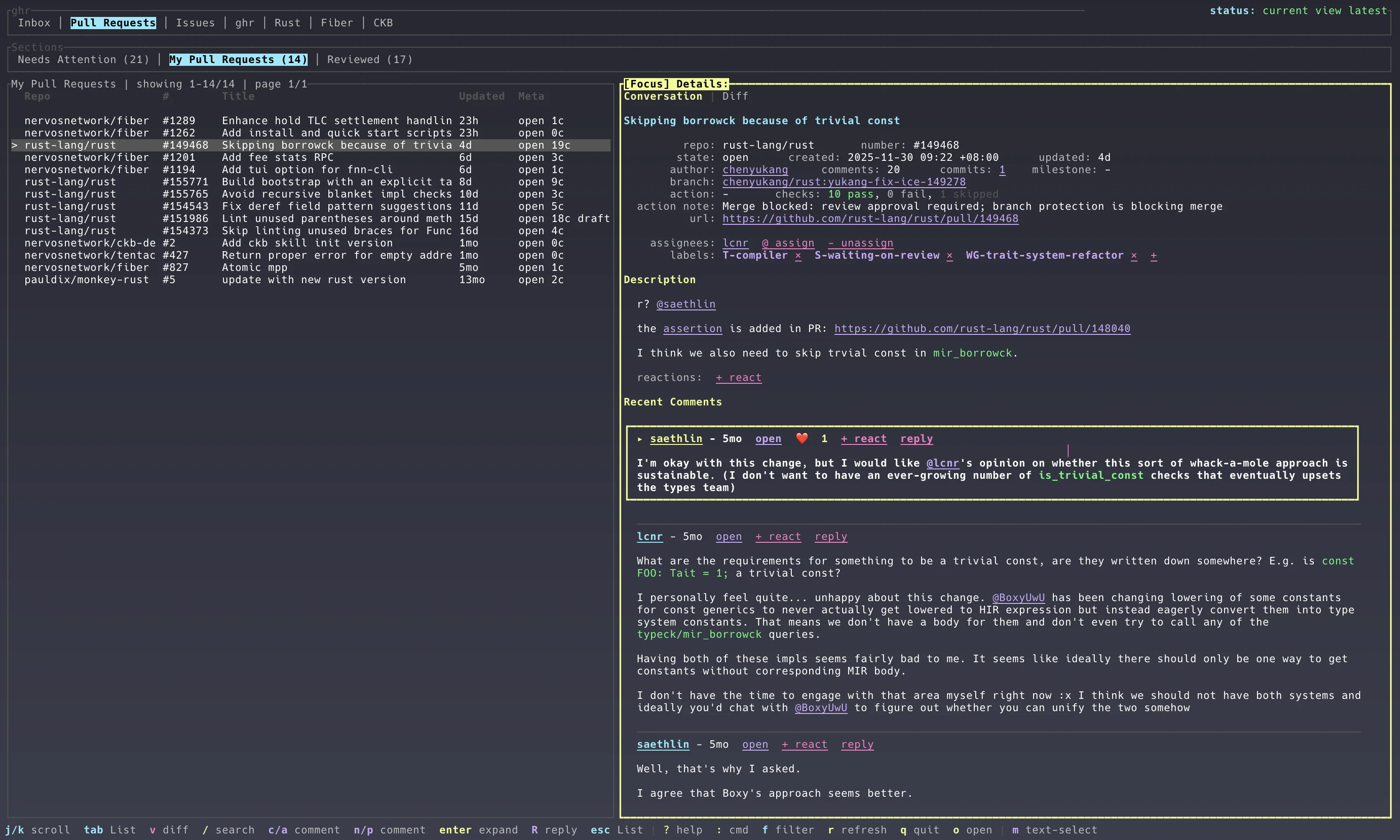
ghr is a fast terminal workspace for staying on top of GitHub. It brings your GitHub inbox, pull requests, issues, repo tabs, conversations, checks, and diffs into one stateful TUI, so you can triage, review, comment, approve, merge, and jump back in without waiting on a fresh GitHub fetch.


Conversation and triage view
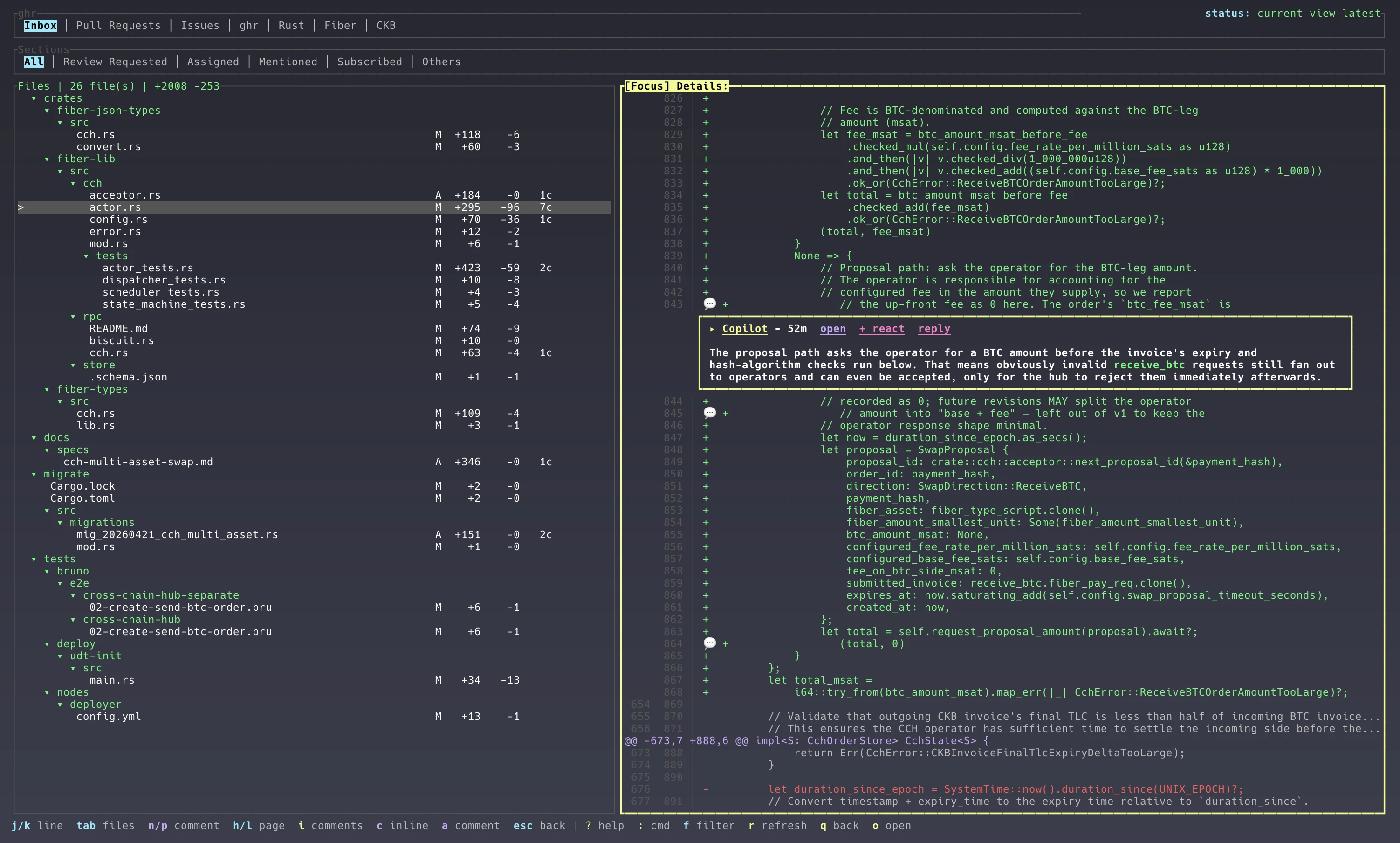
Pull request diff review view
Needs Attention./, quick PR/issue/inbox section filters with f, plus structured GitHub search with S.auto plus named light and dark color themes configured through defaults.theme / defaults.theme_name; auto follows the macOS appearance when available.~/.ghr, including focus, selected item, scroll position, split ratio, and diff mode.~/.ghr: config, SQLite snapshot database, logs, and UI state.Choose either authentication method:
export GHR_GITHUB_TOKEN=ghp_...
ghr
For full access to private repositories, select the classic repo scope. For public repositories only, use public_repo together with notifications. The workflow scope is not required because ghr does not modify workflow files. GitHub's notification endpoints accept the notifications or repo scope, and linked private issues, pull requests, and commits require repo.
GH_TOKEN and GITHUB_TOKEN are also recognized. GHR_GITHUB_TOKEN takes precedence. Tokens are read from the environment and are never written to ~/.ghr/config.toml. Treat the token like a password and give it an expiration date.
Fine-grained PATs (github_pat_...) provide partial repository access, but are not recommended for the complete ghr experience. GitHub's Notifications API does not support fine-grained PATs, so Inbox loading and read/done/mute actions will fail. Fine-grained PATs are also limited to one resource owner, cannot access multiple organizations at once, may not support every Checks API operation, and can require organization approval or a shorter lifetime. See GitHub's documentation for notification authentication and fine-grained PAT limitations.
gh auth login
GitHub CLI is not required in PAT mode. Local checkout uses the matching repository remote with ordinary git commands.
You can install ghr with Homebrew on macOS or Linux through the project tap:
brew install chenyukang/tap/ghr-cli
You can also install ghr with Cargo:
cargo install ghr-cli
Or install the latest release binary on macOS or Linux:
curl -fsSL https://raw.githubusercontent.com/chenyukang/ghr/main/install.sh | sh
Install the latest release binary on Windows PowerShell:
irm https://raw.githubusercontent.com/chenyukang/ghr/main/install.ps1 | iex
Then set a token or authenticate GitHub CLI and run ghr:
# PAT mode, without GitHub CLI
export GHR_GITHUB_TOKEN=ghp_...
ghr

# Or GitHub CLI mode
gh auth login
ghr

## by default, ghr starts in the Inbox/Issues/Pull Requests view
## go to some dir with a GitHub remote and run ghr to see the repo tab show up
## command palette (press `:`) and then type "Project Add" to add new repos
The installers detect your OS and CPU architecture, download the matching GitHub release asset with visible progress, verify its .sha256, and install ghr into ~/.local/bin by default. Use GHR_INSTALL_DIR to choose another install directory, or GHR_VERSION to pin a release tag:
curl -fsSL https://raw.githubusercontent.com/chenyukang/ghr/main/install.sh | GHR_VERSION=v0.9.1 GHR_INSTALL_DIR=/usr/local/bin sh
Run ghr after setting a token or completing gh auth login. When started inside a Git checkout with a GitHub remote, ghr adds that repository as a local project tab automatically.
Press ? in the TUI for the live shortcut reference. The top-right status shows the current app state; the footer stays focused on the most useful shortcuts for the active area.
| Key | Action |
|---|---|
: | Open the command palette; recent commands lead before typing, then fuzzy relevance wins |
1 / 2 / 3 / 4 | Focus ghr / Sections / list / Details |
Tab | Switch list/details focus; when ghr or Sections is focused, move to the next tab |
Shift+Tab in List | Switch to the previous Section, then return focus to List after 200 ms |
Shift+[ / Shift+] in List | Switch to the left/right Section, then return focus to List after 200 ms |
Shift+Tab elsewhere | Return from Details to List, or move backward within focused ghr/Sections tabs |
h / l or [ / ] | Move within the focused ghr or Sections tab group, wrapping at the ends |
Enter | Focus the details pane from the list |
Esc | Return from details to list, clear search, or leave diff mode |
j / k | Move list selection, choose diff files, select diff lines, or scroll details |
n / p in ghr, Sections, or List | Mirror next/previous movement for focus or list selection; p at the first list item returns to Sections |
[ / ] in List | Load previous/next GitHub result page |
PgDown / PgUp or d / u | Page current list/details movement |
n / p in Details | Focus next/previous check or comment in conversation details, or comments in diff details; p moves back toward PR/issue details |
h / l in diff Details | Page down/up through the file diff; at file edges, jump to the next/previous file |
g / G | Jump to top/bottom in list, details, or diff; in conversation details, top clears comment focus and bottom focuses the last comment |
[ / ] in diff mode | Switch diff files |
/ | In PR/issue lists, open the repo search dialog; in other lists, fuzzy filter the loaded list |
f | Filter the current PR/issue/inbox section with qualifiers such as state:closed label:bug author:alice, unread reason:mention, or done; empty input or clear resets |
S | Search matching PRs and issues; global PR/issue lists include a Repo field, repo tabs use remembered per-repo fields, and Inbox searches by state, reason, and repo; use Tab to switch fields, ↑/↓ to move candidates, Enter to choose or search, Ctrl+S to save reusable PR/issue conditions, and Ctrl+U to clear conditions |
i | Ignore the selected PR or issue and hide it from future lists |
x / Delete in Inbox | Mark the selected GitHub inbox notification done |
v | Open PR diff mode |
V | Select a contiguous commit range or all PR changes |
q in diff mode | Return to the state before opening diff |
o | Open the selected item in the browser; in diff mode, open the PR changes page; in Details, open the focused check URL when one is selected |
a | Add a normal issue or PR comment |
L | Add a label to the selected issue or PR; type a prefix and choose from repo labels |
N | In a PR list, create a PR from the repo local_dir current branch; in an issue list, create an issue |
+ | Add a reaction to the selected issue, PR, or focused comment |
@ / - | Assign or unassign assignees on the selected issue or PR |
c in Details | Add a normal comment in conversation mode, or an inline review comment in diff mode |
R | Reply to the focused comment |
e | Edit the focused comment in Details, edit the selected issue or PR when no comment is focused, or end a review range in diff mode |
z | Resolve or unresolve the focused inline review thread |
T | Edit the selected issue or PR title, assignees, labels, and body |
m | Toggle terminal text selection mode; in diff details, begin a review range |
M | Open a merge confirmation for the selected PR, defaulting to merge commits |
C | Open a close or reopen confirmation for the selected issue or PR |
X | Open a local PR checkout confirmation using ordinary git commands |
F | Rerun failed checks for the selected PR |
U | Open an update-branch confirmation for the selected PR |
m / s / r in merge confirmation | Choose merge, squash, or rebase before confirming |
Tab in merge confirmation | Cycle merge method |
s | Submit a PR review summary as comment, request changes, or approve |
A | Approve through the PR review summary flow |
Ctrl+D | Discard a pending PR review created in this session |
E | Open an enable auto-merge confirmation for the selected PR |
O | Open a disable auto-merge confirmation for the selected PR |
D | Toggle the selected open PR between draft and ready for review |
P | Request or re-request PR reviewers with comma-separated logins |
Y | Remove pending PR review requests with comma-separated logins |
t | Change or clear the selected issue/PR milestone |
y / Enter | Confirm the current action in the confirmation dialog |
Enter in Reviewer Action | Submit the reviewer login list |
Ctrl+Enter / Ctrl+O | Send a comment or save the active issue/PR editor dialog |
Ctrl+S / Cmd+S in editor dialogs | Save the current comment, issue, or pull request draft |
@ in editor dialogs | Search GitHub accounts for mention completion; Up/Down choose and Tab/Enter insert |
Ctrl+Enter / Ctrl+O in issue dialog | Create the issue |
← / → / ↑ / ↓ in editor dialogs | Move the cursor by character or rendered line |
Home / End in editor dialogs | Jump to the start or end of the current line |
Ctrl+W / Alt+Backspace in editor dialogs | Delete the previous word |
Alt+B / Alt+F / Alt+D in editor dialogs | Jump previous/next word, or delete the next word |
Ctrl+U / Ctrl+K in editor dialogs | Delete to the start or end of the current line |
Ctrl+X in editor dialogs | Delete the current line |
Ctrl+Z / Cmd+Z in editor dialogs | Undo text edits |
Ctrl+R / Cmd+Shift+Z in editor dialogs | Redo text edits |
r | Refresh the active tab first, then run a full background refresh |
q / Ctrl+C | Save UI state and quit |
Open the command palette with : to fuzzy search and run commands. Recently run commands appear
first before you type; once you enter a query, the closest matches appear first. Every current
top-menu item is also generated as a direct command, including projects added at runtime, so typing
Inb or a project name switches to that tab without opening another picker.
| Command | Action |
|---|---|
Project Switch | Filter configured repos by prefix and activate a project tab |
Project Add | Add a repo project to the menu and save it to config.toml |
Project Remove | Select a configured repo project, confirm, and remove it from config.toml |
Recent Items | Fuzzy search recently viewed PRs/issues, including linked inbox notifications, and jump back to the selected item |
Saved Search Filter | Pick a named saved PR/issue search filter from config.toml and run it |
Set Color Theme | Choose auto or a fixed color theme and save it to config.toml |
Top Menu Switch | Switch Inbox, PR, issue, search, or repo tabs, then focus the list after a short delay |
Copy GitHub Link | Copy the selected comment link, or the current PR/issue link, to the clipboard |
Copy PR/Issue Link | Copy the current PR/issue link to the clipboard, ignoring selected comments |
Copy Content | Copy the selected comment content, or the current PR/issue description, to the clipboard |
Open Linked PR/Issue | Open the first linked pull request or issue from the current item |
Clear Cache | Choose a local cache layer to clear: current section, current view, all list snapshots, suggestions, loaded details/diffs, or all cache |
Mark Done | Move the selected GitHub inbox notification out of inbox lists; future activity can still notify unless the thread is muted |
Mark All Read | Mark every GitHub inbox notification as read |
Mute Thread | Ignore future notifications for the selected inbox thread |
Subscribe Thread / Unsubscribe Thread | Change the selected inbox thread subscription |
Subscribe Item / Unsubscribe Item | Change the selected issue or pull request conversation subscription |
Info | Show terminal, version, config/db/log paths, cache counts, runtime state, and ghr system diagnostics in a scrollable popup |
Log | Show recent direct API and gh api requests with timestamps, status, response sizes, errors, and rate-limit events; use j/k to select and Enter to open details |
Rate Limit | Query and show current GitHub core, search, and GraphQL quotas together with local queue and cooldown state |
Commit diffs:
V, click the commits count, or click a commit in the conversation to open its diff.Space or click to toggle checkboxes, then Enter (or click Enter apply) to apply; Esc cancels and r reloads.Enter, or click it; no Space is needed.All commits, a single SHA with title and (N/M), or a SHA range with (N–K/M). Each selection remembers its file and scroll position.~/.ghr/git-diffs/ and reused; credentials follow the selected GitHub backend. Comparison failures remain visible and can be retried with r.c, including selected line ranges) target the last selected commit; drafts are kept separate for each commit selection. a posts a general PR comment. Comments on older commits may become outdated as the PR changes.Diff review ranges:
m on a diff line to begin a range, move the highlight, then press e to end it.c after ending a range to post an inline review comment for the selected range.s to open the review summary editor, use Tab or 1 / 2 / 3 to choose comment, request changes, or approve, then press Ctrl+Enter or Ctrl+O to submit.Ctrl+P in the review summary editor to create a pending review draft, then press s later to submit it or D to discard it.Local PR checkout:
X on a pull request in the list or Details pane, then confirm with y or Enter.refs/pull/<number>/head from the matching Git remote and checks out pr/<number>; GitHub CLI is not required for checkout.pr/<number> branch is only fast-forwarded. If it has diverged, ghr leaves it untouched and reports the conflict.local_dir on a repo entry to make the target explicit:[[repos]]
name = "Rust"
repo = "rust-lang/rust"
local_dir = "~/code/rust"
# Optional. Defaults to origin when omitted.
remote = "upstream"
show_prs = true
show_issues = true
local_dir is not set, ghr tries the directory where it was launched when that directory has a GitHub remote for the pull request repository. If neither path matches, ghr shows a hint instead of running checkout.local_dir runs a local preflight before pushing and calling the GitHub API. It blocks with a dialog when the title is empty, the checkout has moved branches, the worktree is dirty, the head has no commit, no matching GitHub push remote exists, or the branch has no commits ahead of the local base branch.Mouse behavior:
m outside diff mode to temporarily disable TUI mouse capture for terminal text selection; press m again to restore mouse controls.Inbox:
AllReview RequestedAssignedMentionedSubscribedOthersPull Requests:
Needs Attention: open PRs where you were requested for review, assigned, or mentioned.My Pull Requests: open PRs authored by you.Reviewed: open PRs reviewed by you and authored by someone else.Issues:
Assigned to MeMentionedInvolvedThe config file is created at:
~/.ghr/config.toml
Example:
[[repos]]
name = "Rust"
repo = "rust-lang/rust"
show_prs = true
show_issues = true
labels = ["T-compiler"]
pr_labels = ["S-waiting-on-review"]
issue_labels = ["E-easy"]

[defaults]
view = "pull_requests"
command_palette_key = ":"
editor_submit_key = "Ctrl+O"
theme = "auto"
log_level = "info"
pr_per_page = 50
issue_per_page = 50
notification_limit = 50
refetch_interval_seconds = 60
include_read_notifications = true

[[pr_sections]]
title = "Needs Attention"
queries = [
  "is:open review-requested:@me archived:false sort:created-desc",
  "is:open assignee:@me archived:false sort:created-desc",
  "is:open mentions:@me archived:false sort:created-desc",
]

[[pr_sections]]
title = "My Pull Requests"
filters = "is:open author:@me archived:false sort:created-desc"

[[pr_sections]]
title = "Reviewed"
filters = "is:open reviewed-by:@me -author:@me archived:false sort:created-desc"

[[saved_search_filters]]
name = "my rust prs"
repo = "rust-lang/rust"
kind = "pull_requests"
status = "open"
author = "chenyukang"
sort = "created_at"

exclude_repos = ["some-org/archive-*"]
Use filters for a single GitHub search query. Use queries when a section should merge several GitHub searches into one deduplicated list. Label filters can be written directly in either form, for example filters = "is:open label:bug archived:false sort:created-desc" or label:"good first issue" for labels with spaces.
Use [[repos]] to add repository tabs to the top bar. Each configured repo shows its name as a top-level tab; inside that tab, show_issues and show_prs control whether the sections are shown as Issues and Pull Requests. Repo tabs default to open issues and open PRs, with Issues shown first. Set labels to filter both repo issue and PR lists, or use issue_labels / pr_labels for kind-specific filters.
Use [[saved_search_filters]] for named PR/issue searches that should be editable in config.toml. From the search dialog, Ctrl+S prompts for a name and saves the current repo, PR/issue kind, and filter fields back to the active config file.
When ghr starts inside a Git checkout with a GitHub remote, it adds that repository as a repo tab if it is not already configured and saves it back to config.toml with local_dir set to the launch directory. If the checkout has more than one GitHub remote, ghr opens a startup modal so you can choose the remote, then stores non-origin choices as remote = "upstream" or whichever remote you selected. If the repo already exists in the config but has no local_dir, ghr fills that field without overwriting an existing value.
Set command_palette_key to change the command palette shortcut. Printable keys such as ":" are treated as text while typing in search, filter, and editor dialogs; use a modified key such as "Ctrl+L" if you want the palette to open from those text inputs. Set editor_submit_key to add a custom submit shortcut for editor dialogs; Ctrl+Enter and Ctrl+O are always accepted.
Set theme to "auto", "dark", or "light" to switch the base TUI palette. Set theme_name for a fixed named theme such as "catppuccin_mocha", "gruvbox_light", or "github_dark". auto follows the macOS system appearance and falls back to dark when the system theme cannot be detected; fixed themes do not auto-switch.
Set log_level to trace, debug, info, warn, or error. In debug mode, direct GitHub API and gh / gh api requests plus UI focus/view changes and mouse clicks are written to ~/.ghr/ghr.log. Failed API requests, failed gh executions, and non-zero gh results are logged at error level, so they are visible with the default info log level. The Log command also keeps an in-memory list of recent direct API and gh calls for the current session, including response errors and GitHub rate-limit failures. RUST_LOG still overrides this config value when it is set.
pr_per_page and issue_per_page control the page size used for PR and issue search sections. Use [ and ] in the list to load adjacent GitHub result pages.
ghr keeps all local files in ~/.ghr:
config.toml: user configurationghr.db: SQLite snapshot cacheghr.log: log filestate.toml: persisted UI state, including ignored PRs/issuesThe snapshot cache is intentionally local and disposable. Use the Clear Cache command to clear one cache layer, or delete ~/.ghr/ghr.db if you want to rebuild every persisted cache row from GitHub.
Contributions are very welcome! Please open an issue or a pull request with any bug fixes, improvements, or new features.
912 followers · starred May 2026
2,452 followers · starred May 2026
628 followers · starred Sep 2026
280 followers · starred Jul 2026
https://catcoding.me/ghr/ ghr is a fast terminal workspace for staying on top of GitHub. It brings pull requests, issues, notifications, repo tabs, conversations, checks, and diffs into one stateful TUI
Rust
95
339 commits
updated Oct 18, 2026
ghr is a fast terminal workspace for staying on top of GitHub. It brings your GitHub inbox, pull requests, issues, repo tabs, conversations, checks, and diffs into one stateful TUI, so you can triage, review, comment, approve, merge, and jump back in without waiting on a fresh GitHub fetch.
Conversation and triage view
Pull request diff review view
Needs Attention./, quick PR/issue/inbox section filters with f, plus structured GitHub search with S.auto plus named light and dark color themes configured through defaults.theme / defaults.theme_name; auto follows the macOS appearance when available.~/.ghr, including focus, selected item, scroll position, split ratio, and diff mode.~/.ghr: config, SQLite snapshot database, logs, and UI state.Choose either authentication method:
export GHR_GITHUB_TOKEN=ghp_...
ghr
For full access to private repositories, select the classic repo scope. For public repositories only, use public_repo together with notifications. The workflow scope is not required because ghr does not modify workflow files. GitHub's notification endpoints accept the notifications or repo scope, and linked private issues, pull requests, and commits require repo.
GH_TOKEN and GITHUB_TOKEN are also recognized. GHR_GITHUB_TOKEN takes precedence. Tokens are read from the environment and are never written to ~/.ghr/config.toml. Treat the token like a password and give it an expiration date.
Fine-grained PATs (github_pat_...) provide partial repository access, but are not recommended for the complete ghr experience. GitHub's Notifications API does not support fine-grained PATs, so Inbox loading and read/done/mute actions will fail. Fine-grained PATs are also limited to one resource owner, cannot access multiple organizations at once, may not support every Checks API operation, and can require organization approval or a shorter lifetime. See GitHub's documentation for notification authentication and fine-grained PAT limitations.
gh auth login
GitHub CLI is not required in PAT mode. Local checkout uses the matching repository remote with ordinary git commands.
You can install ghr with Homebrew on macOS or Linux through the project tap:
brew install chenyukang/tap/ghr-cli
You can also install ghr with Cargo:
cargo install ghr-cli
Or install the latest release binary on macOS or Linux:
curl -fsSL https://raw.githubusercontent.com/chenyukang/ghr/main/install.sh | sh
Install the latest release binary on Windows PowerShell:
irm https://raw.githubusercontent.com/chenyukang/ghr/main/install.ps1 | iex
Then set a token or authenticate GitHub CLI and run ghr:
# PAT mode, without GitHub CLI
export GHR_GITHUB_TOKEN=ghp_...
ghr

# Or GitHub CLI mode
gh auth login
ghr

## by default, ghr starts in the Inbox/Issues/Pull Requests view
## go to some dir with a GitHub remote and run ghr to see the repo tab show up
## command palette (press `:`) and then type "Project Add" to add new repos
The installers detect your OS and CPU architecture, download the matching GitHub release asset with visible progress, verify its .sha256, and install ghr into ~/.local/bin by default. Use GHR_INSTALL_DIR to choose another install directory, or GHR_VERSION to pin a release tag:
curl -fsSL https://raw.githubusercontent.com/chenyukang/ghr/main/install.sh | GHR_VERSION=v0.9.1 GHR_INSTALL_DIR=/usr/local/bin sh
Run ghr after setting a token or completing gh auth login. When started inside a Git checkout with a GitHub remote, ghr adds that repository as a local project tab automatically.
Press ? in the TUI for the live shortcut reference. The top-right status shows the current app state; the footer stays focused on the most useful shortcuts for the active area.
| Key | Action |
|---|---|
: | Open the command palette; recent commands lead before typing, then fuzzy relevance wins |
1 / 2 / 3 / 4 | Focus ghr / Sections / list / Details |
Tab | Switch list/details focus; when ghr or Sections is focused, move to the next tab |
Shift+Tab in List | Switch to the previous Section, then return focus to List after 200 ms |
Shift+[ / Shift+] in List | Switch to the left/right Section, then return focus to List after 200 ms |
Shift+Tab elsewhere | Return from Details to List, or move backward within focused ghr/Sections tabs |
h / l or [ / ] | Move within the focused ghr or Sections tab group, wrapping at the ends |
Enter | Focus the details pane from the list |
Esc | Return from details to list, clear search, or leave diff mode |
j / k | Move list selection, choose diff files, select diff lines, or scroll details |
n / p in ghr, Sections, or List | Mirror next/previous movement for focus or list selection; p at the first list item returns to Sections |
[ / ] in List | Load previous/next GitHub result page |
PgDown / PgUp or d / u | Page current list/details movement |
n / p in Details | Focus next/previous check or comment in conversation details, or comments in diff details; p moves back toward PR/issue details |
h / l in diff Details | Page down/up through the file diff; at file edges, jump to the next/previous file |
g / G | Jump to top/bottom in list, details, or diff; in conversation details, top clears comment focus and bottom focuses the last comment |
[ / ] in diff mode | Switch diff files |
/ | In PR/issue lists, open the repo search dialog; in other lists, fuzzy filter the loaded list |
f | Filter the current PR/issue/inbox section with qualifiers such as state:closed label:bug author:alice, unread reason:mention, or done; empty input or clear resets |
S | Search matching PRs and issues; global PR/issue lists include a Repo field, repo tabs use remembered per-repo fields, and Inbox searches by state, reason, and repo; use Tab to switch fields, ↑/↓ to move candidates, Enter to choose or search, Ctrl+S to save reusable PR/issue conditions, and Ctrl+U to clear conditions |
i | Ignore the selected PR or issue and hide it from future lists |
x / Delete in Inbox | Mark the selected GitHub inbox notification done |
v | Open PR diff mode |
V | Select a contiguous commit range or all PR changes |
q in diff mode | Return to the state before opening diff |
o | Open the selected item in the browser; in diff mode, open the PR changes page; in Details, open the focused check URL when one is selected |
a | Add a normal issue or PR comment |
L | Add a label to the selected issue or PR; type a prefix and choose from repo labels |
N | In a PR list, create a PR from the repo local_dir current branch; in an issue list, create an issue |
+ | Add a reaction to the selected issue, PR, or focused comment |
@ / - | Assign or unassign assignees on the selected issue or PR |
c in Details | Add a normal comment in conversation mode, or an inline review comment in diff mode |
R | Reply to the focused comment |
e | Edit the focused comment in Details, edit the selected issue or PR when no comment is focused, or end a review range in diff mode |
z | Resolve or unresolve the focused inline review thread |
T | Edit the selected issue or PR title, assignees, labels, and body |
m | Toggle terminal text selection mode; in diff details, begin a review range |
M | Open a merge confirmation for the selected PR, defaulting to merge commits |
C | Open a close or reopen confirmation for the selected issue or PR |
X | Open a local PR checkout confirmation using ordinary git commands |
F | Rerun failed checks for the selected PR |
U | Open an update-branch confirmation for the selected PR |
m / s / r in merge confirmation | Choose merge, squash, or rebase before confirming |
Tab in merge confirmation | Cycle merge method |
s | Submit a PR review summary as comment, request changes, or approve |
A | Approve through the PR review summary flow |
Ctrl+D | Discard a pending PR review created in this session |
E | Open an enable auto-merge confirmation for the selected PR |
O | Open a disable auto-merge confirmation for the selected PR |
D | Toggle the selected open PR between draft and ready for review |
P | Request or re-request PR reviewers with comma-separated logins |
Y | Remove pending PR review requests with comma-separated logins |
t | Change or clear the selected issue/PR milestone |
y / Enter | Confirm the current action in the confirmation dialog |
Enter in Reviewer Action | Submit the reviewer login list |
Ctrl+Enter / Ctrl+O | Send a comment or save the active issue/PR editor dialog |
Ctrl+S / Cmd+S in editor dialogs | Save the current comment, issue, or pull request draft |
@ in editor dialogs | Search GitHub accounts for mention completion; Up/Down choose and Tab/Enter insert |
Ctrl+Enter / Ctrl+O in issue dialog | Create the issue |
← / → / ↑ / ↓ in editor dialogs | Move the cursor by character or rendered line |
Home / End in editor dialogs | Jump to the start or end of the current line |
Ctrl+W / Alt+Backspace in editor dialogs | Delete the previous word |
Alt+B / Alt+F / Alt+D in editor dialogs | Jump previous/next word, or delete the next word |
Ctrl+U / Ctrl+K in editor dialogs | Delete to the start or end of the current line |
Ctrl+X in editor dialogs | Delete the current line |
Ctrl+Z / Cmd+Z in editor dialogs | Undo text edits |
Ctrl+R / Cmd+Shift+Z in editor dialogs | Redo text edits |
r | Refresh the active tab first, then run a full background refresh |
q / Ctrl+C | Save UI state and quit |
Open the command palette with : to fuzzy search and run commands. Recently run commands appear
first before you type; once you enter a query, the closest matches appear first. Every current
top-menu item is also generated as a direct command, including projects added at runtime, so typing
Inb or a project name switches to that tab without opening another picker.
| Command | Action |
|---|---|
Project Switch | Filter configured repos by prefix and activate a project tab |
Project Add | Add a repo project to the menu and save it to config.toml |
Project Remove | Select a configured repo project, confirm, and remove it from config.toml |
Recent Items | Fuzzy search recently viewed PRs/issues, including linked inbox notifications, and jump back to the selected item |
Saved Search Filter | Pick a named saved PR/issue search filter from config.toml and run it |
Set Color Theme | Choose auto or a fixed color theme and save it to config.toml |
Top Menu Switch | Switch Inbox, PR, issue, search, or repo tabs, then focus the list after a short delay |
Copy GitHub Link | Copy the selected comment link, or the current PR/issue link, to the clipboard |
Copy PR/Issue Link | Copy the current PR/issue link to the clipboard, ignoring selected comments |
Copy Content | Copy the selected comment content, or the current PR/issue description, to the clipboard |
Open Linked PR/Issue | Open the first linked pull request or issue from the current item |
Clear Cache | Choose a local cache layer to clear: current section, current view, all list snapshots, suggestions, loaded details/diffs, or all cache |
Mark Done | Move the selected GitHub inbox notification out of inbox lists; future activity can still notify unless the thread is muted |
Mark All Read | Mark every GitHub inbox notification as read |
Mute Thread | Ignore future notifications for the selected inbox thread |
Subscribe Thread / Unsubscribe Thread | Change the selected inbox thread subscription |
Subscribe Item / Unsubscribe Item | Change the selected issue or pull request conversation subscription |
Info | Show terminal, version, config/db/log paths, cache counts, runtime state, and ghr system diagnostics in a scrollable popup |
Log | Show recent direct API and gh api requests with timestamps, status, response sizes, errors, and rate-limit events; use j/k to select and Enter to open details |
Rate Limit | Query and show current GitHub core, search, and GraphQL quotas together with local queue and cooldown state |
Commit diffs:
V, click the commits count, or click a commit in the conversation to open its diff.Space or click to toggle checkboxes, then Enter (or click Enter apply) to apply; Esc cancels and r reloads.Enter, or click it; no Space is needed.All commits, a single SHA with title and (N/M), or a SHA range with (N–K/M). Each selection remembers its file and scroll position.~/.ghr/git-diffs/ and reused; credentials follow the selected GitHub backend. Comparison failures remain visible and can be retried with r.c, including selected line ranges) target the last selected commit; drafts are kept separate for each commit selection. a posts a general PR comment. Comments on older commits may become outdated as the PR changes.Diff review ranges:
m on a diff line to begin a range, move the highlight, then press e to end it.c after ending a range to post an inline review comment for the selected range.s to open the review summary editor, use Tab or 1 / 2 / 3 to choose comment, request changes, or approve, then press Ctrl+Enter or Ctrl+O to submit.Ctrl+P in the review summary editor to create a pending review draft, then press s later to submit it or D to discard it.Local PR checkout:
X on a pull request in the list or Details pane, then confirm with y or Enter.refs/pull/<number>/head from the matching Git remote and checks out pr/<number>; GitHub CLI is not required for checkout.pr/<number> branch is only fast-forwarded. If it has diverged, ghr leaves it untouched and reports the conflict.local_dir on a repo entry to make the target explicit:[[repos]]
name = "Rust"
repo = "rust-lang/rust"
local_dir = "~/code/rust"
# Optional. Defaults to origin when omitted.
remote = "upstream"
show_prs = true
show_issues = true
local_dir is not set, ghr tries the directory where it was launched when that directory has a GitHub remote for the pull request repository. If neither path matches, ghr shows a hint instead of running checkout.local_dir runs a local preflight before pushing and calling the GitHub API. It blocks with a dialog when the title is empty, the checkout has moved branches, the worktree is dirty, the head has no commit, no matching GitHub push remote exists, or the branch has no commits ahead of the local base branch.Mouse behavior:
m outside diff mode to temporarily disable TUI mouse capture for terminal text selection; press m again to restore mouse controls.Inbox:
AllReview RequestedAssignedMentionedSubscribedOthersPull Requests:
Needs Attention: open PRs where you were requested for review, assigned, or mentioned.My Pull Requests: open PRs authored by you.Reviewed: open PRs reviewed by you and authored by someone else.Issues:
Assigned to MeMentionedInvolvedThe config file is created at:
~/.ghr/config.toml
Example:
[[repos]]
name = "Rust"
repo = "rust-lang/rust"
show_prs = true
show_issues = true
labels = ["T-compiler"]
pr_labels = ["S-waiting-on-review"]
issue_labels = ["E-easy"]

[defaults]
view = "pull_requests"
command_palette_key = ":"
editor_submit_key = "Ctrl+O"
theme = "auto"
log_level = "info"
pr_per_page = 50
issue_per_page = 50
notification_limit = 50
refetch_interval_seconds = 60
include_read_notifications = true

[[pr_sections]]
title = "Needs Attention"
queries = [
  "is:open review-requested:@me archived:false sort:created-desc",
  "is:open assignee:@me archived:false sort:created-desc",
  "is:open mentions:@me archived:false sort:created-desc",
]

[[pr_sections]]
title = "My Pull Requests"
filters = "is:open author:@me archived:false sort:created-desc"

[[pr_sections]]
title = "Reviewed"
filters = "is:open reviewed-by:@me -author:@me archived:false sort:created-desc"

[[saved_search_filters]]
name = "my rust prs"
repo = "rust-lang/rust"
kind = "pull_requests"
status = "open"
author = "chenyukang"
sort = "created_at"

exclude_repos = ["some-org/archive-*"]
Use filters for a single GitHub search query. Use queries when a section should merge several GitHub searches into one deduplicated list. Label filters can be written directly in either form, for example filters = "is:open label:bug archived:false sort:created-desc" or label:"good first issue" for labels with spaces.
Use [[repos]] to add repository tabs to the top bar. Each configured repo shows its name as a top-level tab; inside that tab, show_issues and show_prs control whether the sections are shown as Issues and Pull Requests. Repo tabs default to open issues and open PRs, with Issues shown first. Set labels to filter both repo issue and PR lists, or use issue_labels / pr_labels for kind-specific filters.
Use [[saved_search_filters]] for named PR/issue searches that should be editable in config.toml. From the search dialog, Ctrl+S prompts for a name and saves the current repo, PR/issue kind, and filter fields back to the active config file.
When ghr starts inside a Git checkout with a GitHub remote, it adds that repository as a repo tab if it is not already configured and saves it back to config.toml with local_dir set to the launch directory. If the checkout has more than one GitHub remote, ghr opens a startup modal so you can choose the remote, then stores non-origin choices as remote = "upstream" or whichever remote you selected. If the repo already exists in the config but has no local_dir, ghr fills that field without overwriting an existing value.
Set command_palette_key to change the command palette shortcut. Printable keys such as ":" are treated as text while typing in search, filter, and editor dialogs; use a modified key such as "Ctrl+L" if you want the palette to open from those text inputs. Set editor_submit_key to add a custom submit shortcut for editor dialogs; Ctrl+Enter and Ctrl+O are always accepted.
Set theme to "auto", "dark", or "light" to switch the base TUI palette. Set theme_name for a fixed named theme such as "catppuccin_mocha", "gruvbox_light", or "github_dark". auto follows the macOS system appearance and falls back to dark when the system theme cannot be detected; fixed themes do not auto-switch.
Set log_level to trace, debug, info, warn, or error. In debug mode, direct GitHub API and gh / gh api requests plus UI focus/view changes and mouse clicks are written to ~/.ghr/ghr.log. Failed API requests, failed gh executions, and non-zero gh results are logged at error level, so they are visible with the default info log level. The Log command also keeps an in-memory list of recent direct API and gh calls for the current session, including response errors and GitHub rate-limit failures. RUST_LOG still overrides this config value when it is set.
pr_per_page and issue_per_page control the page size used for PR and issue search sections. Use [ and ] in the list to load adjacent GitHub result pages.
ghr keeps all local files in ~/.ghr:
config.toml: user configurationghr.db: SQLite snapshot cacheghr.log: log filestate.toml: persisted UI state, including ignored PRs/issuesThe snapshot cache is intentionally local and disposable. Use the Clear Cache command to clear one cache layer, or delete ~/.ghr/ghr.db if you want to rebuild every persisted cache row from GitHub.
Contributions are very welcome! Please open an issue or a pull request with any bug fixes, improvements, or new features.
912 followers · starred May 2026
2,452 followers · starred May 2026
628 followers · starred Sep 2026
280 followers · starred Jul 2026



