AWS, Google Cloud and Azure emulators in one binary, on one port
See the code

The whole cloud on your machine.
AWS, Google Cloud and Azure in one small program, on one port. Free, offline, no account.
Docs · Install · Changelog · Website


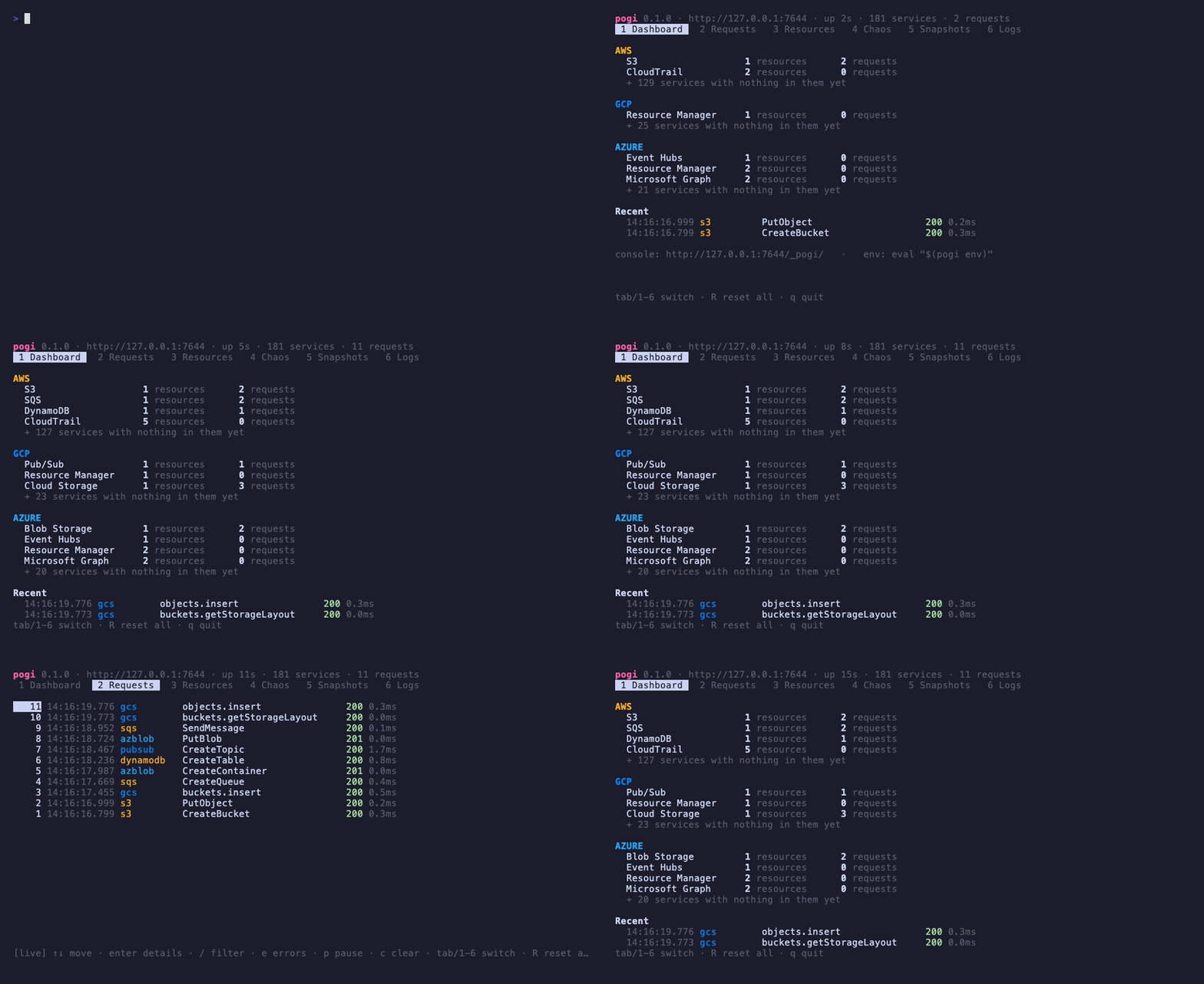
pogi runs AWS, Google Cloud and Azure on your laptop. Point your SDKs, the cloud CLIs, Terraform or the CDK at it, and they work the way they do against the real cloud: no account, no bill, and nothing leaves your machine. It is one program on one port, it starts in about 25 ms, and it covers 181 services.
[!NOTE] pogi is new, at version 0.x. Flags, config keys and APIs may still change between releases, and the changelog lists every change.
1. Install pogi. On macOS, with Homebrew. For Linux, Windows, Docker and Go, see Install.
brew install nrndev/tap/pogi
2. Start it. This opens a live terminal screen. Add --headless if you only want plain logs.
pogi
3. Point your tools at it. In a second terminal, this sets the endpoint and test credentials for the AWS, Google Cloud and Azure tools.
eval "$(pogi env)"
4. Make something. Use the CLIs you already have.
aws s3 mb s3://demo
gcloud storage buckets create gs://demo
az storage container create -n demo
5. Look inside. Open the web console at http://localhost:7644/_pogi/ to see your buckets and every call you made.
That's all your code needs too: only the endpoint and the credentials change, and pogi env sets both.
One place for three clouds. AWS, Google Cloud and Azure all answer on localhost:7644: 131 AWS services, 26 Google Cloud and 24 Azure. You don't need a separate emulator for each service.
It behaves like the real thing. pogi is tested with the official SDKs. Lambda runs Python and Node.js directly, Terraform and cdk deploy work, and services trigger each other as they do in the cloud: S3 to SQS, SNS to Lambda, Pub/Sub push, Event Grid and more.
It's made for tests. Reset everything in one command, save and load snapshots, make chosen calls fail or slow down, and keep state on disk or in memory. Run it in CI, or start it right inside your Go tests.
It's a drop-in for LocalStack. It has the same health endpoint, init hooks and Ready. log line, and --port 4566 keeps your old endpoint. See Migrate from LocalStack.
It stays on your machine. pogi listens on 127.0.0.1 only, refuses requests from other websites, and never phones home.

While pogi runs, the console at http://localhost:7644/_pogi/ shows what your code did:
--iam soft or --iam strict;pogi has a built-in MCP server, so AI coding agents such as Claude Code, Cursor and Codex can look inside your local cloud and drive it while they work. Your agent can deploy a stack, invoke the function it just wrote, read the function's logs, peek at a queue, and check which IAM calls were denied, all without touching a real account.
Add it to Claude Code with one line (pogi must be running):
claude mcp add pogi -- pogi mcp
pogi mcp --print-config prints the setup for Cursor and Codex too, and pogi agents init adds a short brief on using pogi to your project's AGENTS.md.
The server has 22 tools. Agents use them to:
Cloud calls themselves still go through the normal SDKs and CLIs, so the agent tests your code the same way you would. The CLI reference lists every tool.
macOS with Homebrew:
brew install nrndev/tap/pogi
Linux (Debian, Ubuntu) with the .deb package. On Arm, use arm64 in place of amd64:
curl -LO https://github.com/nrndev/pogi/releases/download/v0.1.0/pogi_0.1.0_linux_amd64.deb
sudo apt install ./pogi_0.1.0_linux_amd64.deb
Fedora, RHEL and Amazon Linux use the .rpm from the same place: sudo dnf install ./pogi_0.1.0_linux_amd64.rpm.
Windows with Scoop:
scoop bucket add nrndev https://github.com/nrndev/scoop-bucket
scoop install nrndev/pogi
Docker, with nothing to install. The image includes Python and Node.js, so functions run inside it. Ports 10000 to 10002 are for Azure Storage.
docker run --rm -p 127.0.0.1:7644:7644 -p 127.0.0.1:10000-10002:10000-10002 ghcr.io/nrndev/pogi
Go, version 1.27.2 or newer:
go install github.com/nrndev/pogi/cmd/pogi@latest
You can also download a binary for Linux, macOS or Windows, on Intel or Arm, from the releases page. After installing, pogi doctor checks your setup. Install pogi has more detail.
| Tool | How |
|---|---|
| AWS CLI and SDKs | eval "$(pogi env)", or pogi aws …. Connect your tools |
| Terraform | pogi tf > pogi_override.tf. Terraform |
| AWS CDK | cdk bootstrap and cdk deploy, no wrapper. CDK |
| Google Cloud | Client libraries and gcloud read the variables pogi env sets. Google Cloud |
| Azure | Azurite ports for storage, HTTPS for Cosmos DB and Key Vault. Azure |
| Go tests | Start pogi in-process from your tests. Go tests |
| Coding agents | pogi mcp, and pogi agents init for AGENTS.md. Use it from your coding agent |
| Cloud | Services |
|---|---|
| AWS | S3, SQS, SNS, DynamoDB + Streams, Lambda, API Gateway v1 + v2, Step Functions, EventBridge + Scheduler, Kinesis / Firehose, CloudFormation, IAM, STS, KMS, Secrets Manager, CloudWatch Logs, CloudWatch Metrics, SES v1 + v2, Cognito user pools, AppSync, EventBridge Pipes, API Gateway WebSockets, Cognito identity pools, IoT Core, Cloud Map, CloudTrail, Fault Injection Service, CodeDeploy + CodePipeline, Organizations + SCPs, Verified Permissions, Resource Explorer, AppConfig, CloudFront, S3 Vectors, SES SMTP, IAM Identity Center, Security services, Transfer Family, DataSync, S3 Tables, AWS Backup, Config, Managed Prometheus, RUM, OAM, Cloud Control API, Beanstalk, EMR, MWAA, Flink, Lightsail, DMS, Lake Formation, Connect, Bedrock and the AI services, Cost services, ACM, Route 53, EC2 network, Tagging, and 16 more long-tail services generated from the AWS API models (see docs/reference/aws-long-tail.md); with Docker running: Systems Manager (SSM), RDS / ElastiCache, ECR, ECS, ELB v2, EC2 transit gateways, flow logs, hosts and images, EKS, EC2 instances, Auto Scaling + Application Auto Scaling, Batch, CodeBuild, RDS extras, ElastiCache users / MemoryDB, MSK, Amazon MQ, OpenSearch Service, Glue + Athena, Redshift + Data API + Serverless, Timestream for InfluxDB |
| Google Cloud | Cloud Storage, Pub/Sub, Firestore (Native), Firestore (Datastore mode), Secret Manager, Cloud Logging, Cloud Monitoring, Cloud Tasks, Cloud Scheduler, Eventarc, IAM, IAM Credentials, OAuth2, STS, Resource Manager, Service Usage, Cloud KMS, Firebase Auth, Long-running operations; with Docker running: Cloud SQL, Cloud Run, BigQuery, Cloud Functions, Managed Kafka, Kubernetes Engine, Compute Engine, Artifact Registry |
| Azure | Blob Storage, Queue Storage, Table Storage, Cosmos DB (NoSQL), Key Vault, Service Bus, Event Hubs, Event Grid, App Configuration, SignalR, Communication Services email, Resource Manager, Entra ID, Managed Identity, Graph, Management planes (ARM), Azure Monitor, Virtual Network, API Management; with Docker running: Azure Functions, Azure SQL, PostgreSQL, MySQL, MariaDB, Cache for Redis, Kubernetes Service, Container Registry, Container Instances, Container Apps, Virtual Machines |
Most services run inside pogi itself. The ones marked "with Docker running" start real software, such as Postgres, Redis or Kafka, in Docker, Podman, Colima or OrbStack.
pogi is not the real cloud. Some services go deep, with real behavior wired to other services; others cover the common create, read and delete calls. The coverage page says what each one does and what it doesn't do yet.
It's built for tests and local development. It keeps data in memory by default and limits uploads to 10 MB (raise that with --max-upload-mb), so don't run it as a server for other people.
It never calls the real clouds, so never give it real credentials. pogi env sets test ones for you.
AWS, Google Cloud and Azure emulators in one binary, on one port
See the code
The whole cloud on your machine.
AWS, Google Cloud and Azure in one small program, on one port. Free, offline, no account.
Docs · Install · Changelog · Website
pogi runs AWS, Google Cloud and Azure on your laptop. Point your SDKs, the cloud CLIs, Terraform or the CDK at it, and they work the way they do against the real cloud: no account, no bill, and nothing leaves your machine. It is one program on one port, it starts in about 25 ms, and it covers 181 services.
[!NOTE] pogi is new, at version 0.x. Flags, config keys and APIs may still change between releases, and the changelog lists every change.
1. Install pogi. On macOS, with Homebrew. For Linux, Windows, Docker and Go, see Install.
brew install nrndev/tap/pogi
2. Start it. This opens a live terminal screen. Add --headless if you only want plain logs.
pogi
3. Point your tools at it. In a second terminal, this sets the endpoint and test credentials for the AWS, Google Cloud and Azure tools.
eval "$(pogi env)"
4. Make something. Use the CLIs you already have.
aws s3 mb s3://demo
gcloud storage buckets create gs://demo
az storage container create -n demo
5. Look inside. Open the web console at http://localhost:7644/_pogi/ to see your buckets and every call you made.
That's all your code needs too: only the endpoint and the credentials change, and pogi env sets both.
One place for three clouds. AWS, Google Cloud and Azure all answer on localhost:7644: 131 AWS services, 26 Google Cloud and 24 Azure. You don't need a separate emulator for each service.
It behaves like the real thing. pogi is tested with the official SDKs. Lambda runs Python and Node.js directly, Terraform and cdk deploy work, and services trigger each other as they do in the cloud: S3 to SQS, SNS to Lambda, Pub/Sub push, Event Grid and more.
It's made for tests. Reset everything in one command, save and load snapshots, make chosen calls fail or slow down, and keep state on disk or in memory. Run it in CI, or start it right inside your Go tests.
It's a drop-in for LocalStack. It has the same health endpoint, init hooks and Ready. log line, and --port 4566 keeps your old endpoint. See Migrate from LocalStack.
It stays on your machine. pogi listens on 127.0.0.1 only, refuses requests from other websites, and never phones home.
While pogi runs, the console at http://localhost:7644/_pogi/ shows what your code did:
--iam soft or --iam strict;pogi has a built-in MCP server, so AI coding agents such as Claude Code, Cursor and Codex can look inside your local cloud and drive it while they work. Your agent can deploy a stack, invoke the function it just wrote, read the function's logs, peek at a queue, and check which IAM calls were denied, all without touching a real account.
Add it to Claude Code with one line (pogi must be running):
claude mcp add pogi -- pogi mcp
pogi mcp --print-config prints the setup for Cursor and Codex too, and pogi agents init adds a short brief on using pogi to your project's AGENTS.md.
The server has 22 tools. Agents use them to:
Cloud calls themselves still go through the normal SDKs and CLIs, so the agent tests your code the same way you would. The CLI reference lists every tool.
macOS with Homebrew:
brew install nrndev/tap/pogi
Linux (Debian, Ubuntu) with the .deb package. On Arm, use arm64 in place of amd64:
curl -LO https://github.com/nrndev/pogi/releases/download/v0.1.0/pogi_0.1.0_linux_amd64.deb
sudo apt install ./pogi_0.1.0_linux_amd64.deb
Fedora, RHEL and Amazon Linux use the .rpm from the same place: sudo dnf install ./pogi_0.1.0_linux_amd64.rpm.
Windows with Scoop:
scoop bucket add nrndev https://github.com/nrndev/scoop-bucket
scoop install nrndev/pogi
Docker, with nothing to install. The image includes Python and Node.js, so functions run inside it. Ports 10000 to 10002 are for Azure Storage.
docker run --rm -p 127.0.0.1:7644:7644 -p 127.0.0.1:10000-10002:10000-10002 ghcr.io/nrndev/pogi
Go, version 1.27.2 or newer:
go install github.com/nrndev/pogi/cmd/pogi@latest
You can also download a binary for Linux, macOS or Windows, on Intel or Arm, from the releases page. After installing, pogi doctor checks your setup. Install pogi has more detail.
| Tool | How |
|---|---|
| AWS CLI and SDKs | eval "$(pogi env)", or pogi aws …. Connect your tools |
| Terraform | pogi tf > pogi_override.tf. Terraform |
| AWS CDK | cdk bootstrap and cdk deploy, no wrapper. CDK |
| Google Cloud | Client libraries and gcloud read the variables pogi env sets. Google Cloud |
| Azure | Azurite ports for storage, HTTPS for Cosmos DB and Key Vault. Azure |
| Go tests | Start pogi in-process from your tests. Go tests |
| Coding agents | pogi mcp, and pogi agents init for AGENTS.md. Use it from your coding agent |
| Cloud | Services |
|---|---|
| AWS | S3, SQS, SNS, DynamoDB + Streams, Lambda, API Gateway v1 + v2, Step Functions, EventBridge + Scheduler, Kinesis / Firehose, CloudFormation, IAM, STS, KMS, Secrets Manager, CloudWatch Logs, CloudWatch Metrics, SES v1 + v2, Cognito user pools, AppSync, EventBridge Pipes, API Gateway WebSockets, Cognito identity pools, IoT Core, Cloud Map, CloudTrail, Fault Injection Service, CodeDeploy + CodePipeline, Organizations + SCPs, Verified Permissions, Resource Explorer, AppConfig, CloudFront, S3 Vectors, SES SMTP, IAM Identity Center, Security services, Transfer Family, DataSync, S3 Tables, AWS Backup, Config, Managed Prometheus, RUM, OAM, Cloud Control API, Beanstalk, EMR, MWAA, Flink, Lightsail, DMS, Lake Formation, Connect, Bedrock and the AI services, Cost services, ACM, Route 53, EC2 network, Tagging, and 16 more long-tail services generated from the AWS API models (see docs/reference/aws-long-tail.md); with Docker running: Systems Manager (SSM), RDS / ElastiCache, ECR, ECS, ELB v2, EC2 transit gateways, flow logs, hosts and images, EKS, EC2 instances, Auto Scaling + Application Auto Scaling, Batch, CodeBuild, RDS extras, ElastiCache users / MemoryDB, MSK, Amazon MQ, OpenSearch Service, Glue + Athena, Redshift + Data API + Serverless, Timestream for InfluxDB |
| Google Cloud | Cloud Storage, Pub/Sub, Firestore (Native), Firestore (Datastore mode), Secret Manager, Cloud Logging, Cloud Monitoring, Cloud Tasks, Cloud Scheduler, Eventarc, IAM, IAM Credentials, OAuth2, STS, Resource Manager, Service Usage, Cloud KMS, Firebase Auth, Long-running operations; with Docker running: Cloud SQL, Cloud Run, BigQuery, Cloud Functions, Managed Kafka, Kubernetes Engine, Compute Engine, Artifact Registry |
| Azure | Blob Storage, Queue Storage, Table Storage, Cosmos DB (NoSQL), Key Vault, Service Bus, Event Hubs, Event Grid, App Configuration, SignalR, Communication Services email, Resource Manager, Entra ID, Managed Identity, Graph, Management planes (ARM), Azure Monitor, Virtual Network, API Management; with Docker running: Azure Functions, Azure SQL, PostgreSQL, MySQL, MariaDB, Cache for Redis, Kubernetes Service, Container Registry, Container Instances, Container Apps, Virtual Machines |
Most services run inside pogi itself. The ones marked "with Docker running" start real software, such as Postgres, Redis or Kafka, in Docker, Podman, Colima or OrbStack.
pogi is not the real cloud. Some services go deep, with real behavior wired to other services; others cover the common create, read and delete calls. The coverage page says what each one does and what it doesn't do yet.
It's built for tests and local development. It keeps data in memory by default and limits uploads to 10 MB (raise that with --max-upload-mb), so don't run it as a server for other people.
It never calls the real clouds, so never give it real credentials. pogi env sets test ones for you.



