A free local cloud environment for AI coding agents to build, test, and debug Google Cloud applications. Includes MCP discovery, SDK configuration, resource inspection, queries, and diagnostics.
See the codeA free local cloud environment for developers and AI coding agents.
Build, test, and debug Google Cloud applications from your terminal or coding agent. MCP connects your agent to local services, SDK configuration, test data, readiness, and diagnostics.





Install · Quickstart · How it works · Services · Commands · AI agents & MCP · Troubleshooting
localcloud (aliased lc) is the official host CLI for LocalCloud. It manages the
container runtime lifecycle, multi-project context, SDK environment variables, persistent Docker volumes,
and the Model Context Protocol bridge — so your application code keeps calling the same Google Cloud client
libraries it already uses, just pointed at loopback.
$ lc doctor
╭── LocalCloud v0.1.5 ────────────────────────────────────────────────────────────────────────╮
│                            │ Top commands                                                   │
│ Checking LocalCloud setup  │  localcloud (or lc)    status | start | stop | restart         │
│                            │  eval $(lc env)        Exports env vars that redirect cloud se…│
│           ╭────╮           │────────────────────────────────────────────────────────────────│
│        ╭──╯    ╰──╮        │ Context                                                        │
│       ╭─╯        ╰─╮       │  Data Volume: localcloud-data        Project: local-gcp-project│
│      ╭╯            ╰╮      │  User: local-developer                Config: built-in defaults│
│      ╰──────────────╯      │  Data: persistent                                              │
│                            │                                                                │
│      27 GCP Services       │                                                                │
│   ● 22 active · ○ 5 opt    │                                                                │
│                            │                                                                │
├────────────────────────────┴────────────────────────────────────────────────────────────────┤
│ Supported Services (● 22 enabled · ○ 5 disabled)                                            │
│  ● Storage      ● Pub/Sub      ○ Firestore    ● Bigtable     ● Spanner      ● BigQuery      │
│  ● Cloud SQL    ● AlloyDB      ● Memorystore  ● Dataproc     ● Tasks        ● Scheduler     │
│  ● Functions    ○ Cloud Run    ○ Compute      ○ GKE          ● Workflows    ○ Vertex AI     │
│  ● Sheets       ● KMS          ● Secrets      ● IAM          ● Logging      ● Monitoring    │
│  ● Resource Mgr ● Service Usage ● Billing                                                   │
╰─────────────────────────────────────────────────────────────────────────────────────────────╯
 Tip: Run localcloud guide for AI agent workflows, or lc for the fast alias.

Status  OK
Docker  29.7.2 (/opt/homebrew/bin/docker)
Image   agentcloud/localcloud:latest (Local: ID: 66026c0b0b21 ,
        sha256:66026c0b0b21398990faafb2e4a2ec71c6c10ff27c72f7cd3461d96863486011)
eval "$(lc env)" exports the emulator variables the official Google
client libraries already look for. Same calls, same objects, loopback endpoints.--verbose. --dry-run previews mutations; --debug prints the equivalent
docker run.googleapis.com address. There is no silent fallback to production.| LocalCloud | gcloud beta emulators | Testcontainers | Real GCP dev project | |
|---|---|---|---|---|
| Services | 27 | ~5 (Bigtable, Datastore/Firestore, Pub/Sub, Spanner) | Wraps the same emulators | All |
| Setup | One CLI command | One process per service | Written in test code | Project, billing, IAM |
| SDK wiring | eval "$(lc env)" | Per-emulator, manual | Per-container, in code | ADC + real credentials |
| Web console | Built in | — | — | Yes |
| Terraform / OpenTofu | lc env --format terraform | — | — | Yes |
| Agent control (MCP) | Built in | — | — | — |
| Data persistence | Docker volume, survives restarts | Process lifetime | Test lifetime | Durable |
| Cost / credentials | None | None | None | Billed, real keys |
Breadth is service availability — a callable, service-level integration. Operation-level parity is service-specific and recorded per service in the LocalCloud compatibility matrix.
Docker Desktop, Colima, OrbStack, Rancher Desktop, or Docker Engine, installed and running. LocalCloud needs at least 4 GiB of memory available to the container for stable operation.
No Docker yet? On macOS with Homebrew, lc doctor --fix (or lc start in a terminal) offers to install
Colima, a free, lightweight Docker engine, and starts it with 4 CPUs
and 8 GiB of memory.
On Apple Silicon, run the Docker VM on VZ with Rosetta rather than QEMU: it is faster, and QEMU has
known issues with LocalCloud (the BigQuery emulator can fail under it). lc doctor reports the Docker
app, its VM type and Rosetta, and lc doctor --fix offers to switch Colima or Rancher Desktop.
curl -fsSL https://local.cloud/install.sh | sh
The installer adds localcloud and the shorter lc alias when available.
brew install LocalGCloud/tap/localcloud

brew upgrade localcloud     # upgrade
brew uninstall localcloud   # remove
Update the CLI to the latest release:
lc update
lc update detects how LocalCloud was installed (script installer or Homebrew) and upgrades the CLI in place. For Homebrew, brew upgrade localcloud also works.
Signed release archives with Sigstore verification bundles are published for:
| Platform | Architectures | Minimum |
|---|---|---|
| macOS | Apple Silicon, Intel | macOS 13+ |
| Linux | x86_64, aarch64 | glibc 2.35+ (Ubuntu 22.04+) |
Windows users can run the container directly — see the Docker setup instructions.
$ lc --version
localcloud 0.1.4 (commit 0123456789ab, released 2026-09-08)
Release builds embed their exact source commit and release date, so a binary can always be traced back.
Five minutes from nothing to a working Cloud Storage bucket.
lc doctor
Confirms Docker connectivity, reports the Docker app and its VM setup, and shows the resolved LocalCloud
context. Continue when Status is OK. It creates no LocalCloud state, so it is always safe to run first.
If it lists Setup findings, lc doctor --fix offers to fix them, asking before each change.
lc start
Done          LocalCloud is ready
Status        Running
Config        built-in defaults
Data volume   localcloud-data
Origin        managed
Project       local-gcp-project
User          local-developer
Image         agentcloud/localcloud:latest
Image status  Available locally
URL           http://127.0.0.1:5380
Services      alloydb, bigquery, bigtable, cloudbilling, cloudfunctions, cloudiam,
              cloudresourcemanager, cloudscheduler, cloudsql, cloudtasks, dataproc, gcs, kms,
              logging, memorystore, monitoring, secretmanager, serviceusage, sheets, spanner,
              workflows
start checks the registry for a newer image by default (--no-pull to skip), publishes the canonical
ports on all host interfaces, waits for service readiness, and tails logs for five seconds.
Use lc start --local-only to bind published ports to 127.0.0.1 instead.
Pass --local-only on subsequent start, restart, and reset commands to keep that binding.
Running start again on a live runtime is safe.
eval "$(lc env)"
This exports the variables the official Google client libraries already read:
export STORAGE_EMULATOR_HOST="http://127.0.0.1:5382"
export BIGQUERY_EMULATOR_HOST="http://127.0.0.1:5388"
export SPANNER_EMULATOR_HOST="127.0.0.1:5386"
export BIGTABLE_EMULATOR_HOST="127.0.0.1:5385"
export GOOGLE_CLOUD_PROJECT="local-gcp-project"
export CLOUDSDK_CORE_PROJECT="local-gcp-project"
export CLOUDSDK_API_ENDPOINT_OVERRIDES_STORAGE="http://127.0.0.1:5382/"
# …one entry per enabled service, plus gcloud endpoint overrides and a local access token
No LocalCloud-specific client. No endpoint arguments. The environment does the work.
|
Python |
Node.js / TypeScript |
|
Go |
gcloud CLI |
lc console   # open the web console for the selected project
lc status    # runtime health, endpoints, and ownership
lc logs      # recent runtime logs
lc restart   # recreate runtime with current local image (--pull to check registry)
lc stop      # stop the container; the data volume is untouched
Your data survives stop and restart. lc start brings it back exactly as it was.
  your code ──► google-cloud-* SDK ──► 127.0.0.1:5380-5405 ─────────┐
  terraform ──► GOOGLE_*_CUSTOM_ENDPOINT ───────────────────────────┤
  AI agent  ──► lc mcp (stdio) / :5380/mcp (HTTP) ──────────────────┤
                                                                    │
                      ┌─────────────────────────────────────────────┘
          ┌───────────▼─────────────────────────────────────────────┐
          │  Docker container  ·  agentcloud/localcloud             │
          │                                                         │
          │   :5380  gateway · console · admin API · MCP · facades  │
          │   :5382  Cloud Storage      :5386-87  Spanner           │
          │   :5383  Pub/Sub            :5388-89  BigQuery          │
          │   :5384  Firestore          :5390     Memorystore       │
          │   :5385  Bigtable           :5391     PostgreSQL        │
          └───────────────────┬─────────────────────────────────────┘
                              │
              Docker volume:  localcloud-data
              mounted at   :  /var/lib/localcloud
The CLI never becomes a proxy — it configures and supervises. Once lc start returns, your SDK talks to
the container directly.
This is the one concept worth internalizing, because every flag follows from it:
| Axis | Flag | What it selects | Scope |
|---|---|---|---|
| Data volume | --data-volume | The durable runtime identity — a named Docker volume mounted at /var/lib/localcloud. Two volumes are two independent LocalClouds. | Docker |
| Project | --project-id | A logical Google Cloud project inside one runtime. Many projects share a volume. start and MCP startup create a missing one. | Request |
| User | --user | The attributed caller sent to LocalCloud services, normalized to <name>@localcloud.invalid where a principal is required. | Request |
Project and user are request context: switching them is instant and never touches Docker. Defaults are
localcloud-data, local-gcp-project, and local-developer.
New runtimes prefer the canonical range 5380–5405 (plus DNS 5410/udp). With Cloud SQL MySQL
enabled, the set also includes 5406, which LocalCloud's MySQL companion container publishes. If that
complete set is unavailable, the CLI proposes one contiguous alternative from 5508–5539, then
5821–5840, then 5322–5342, and asks before creating the container. Such a runtime publishes only
the ports its enabled services use, so four can run beside the canonical one. To pick the host ports
yourself, set host.port_range: 6000-6099 or pass --port-range 6000-6099. The CLI never scans the
operating system's general ephemeral range, and lc env always emits the ports actually in use.
27 Google Cloud–compatible services, 22 enabled by default:
| Group | Services |
|---|---|
| Storage & databases | Cloud Storage, Firestore, Bigtable, Spanner, BigQuery, AlloyDB, Cloud SQL, Memorystore |
| Messaging & orchestration | Pub/Sub, Cloud Tasks, Cloud Scheduler, Cloud Workflows |
| Compute & serverless | Cloud Functions, Cloud Run, Compute Engine, GKE, Dataproc |
| Security & identity | Cloud IAM, Secret Manager, Cloud KMS |
| Management & billing | Resource Manager, Service Usage, Cloud Billing |
| Observability | Cloud Logging, Cloud Monitoring |
| AI & productivity | Vertex AI, Google Sheets |
Use the ID with --services or services.enabled in localcloud.yaml.
| ID | Google Cloud service | Default |
|---|---|---|
gcs | Cloud Storage | ● on |
pubsub | Pub/Sub | ● on |
firestore | Firestore | ○ off |
bigtable | Bigtable | ● on |
spanner | Spanner | ● on |
bigquery | BigQuery | ● on |
sheets | Google Sheets | ● on |
secretmanager | Secret Manager | ● on |
cloudtasks | Cloud Tasks | ● on |
cloudscheduler | Cloud Scheduler | ● on |
cloudfunctions | Cloud Functions (2nd Gen) | ● on |
alloydb | AlloyDB | ● on |
dataproc | Dataproc | ● on |
cloudiam | Cloud IAM | ● on |
cloudresourcemanager | Cloud Resource Manager | ● on |
serviceusage | Service Usage | ● on |
cloudbilling | Cloud Billing | ● on |
logging | Cloud Logging | ● on |
monitoring | Cloud Monitoring | ● on |
gke | GKE | ○ off |
compute | Compute Engine | ○ off |
cloudrun | Cloud Run | ○ off |
memorystore | Memorystore (Redis/Valkey) | ● on |
workflows | Cloud Workflows | ● on |
vertexai | Vertex AI | ○ off |
kms | Cloud KMS | ● on |
cloudsql | Cloud SQL | ● on |
● on services start automatically
when services.enabled is unset; ○ off services are available but must be selected explicitly.
Select an explicit set at start time, or reset to the built-in default:
lc start --services gcs,pubsub,bigquery,firestore
lc start --services default
lc and localcloud are interchangeable in every example.
| Command | Purpose |
|---|---|
lc update | Update the CLI through its script installer or Homebrew |
lc doctor | Check Docker access, the Docker host setup, and legacy LocalCloud state; --fix offers fixes |
lc start | Start a runtime; prepares a project when --project-id is explicit |
lc status | Show runtime health, ownership, endpoints, and Docker details |
lc env | Generate SDK, Terraform, or Docker Compose configuration |
lc console | Open the web console for the selected project and user |
lc logs | Print recent runtime logs |
lc restart | Restart runtime with local image (default: --no-pull; --pull to check registry) |
lc reset | Reset the selected project (--all-projects prints manual recreate steps) |
lc stop | Stop the runtime without deleting persistent data |
lc cleanup | Remove malformed Docker resources, stale runtime state, and legacy files |
lc guide | Print authoritative coding-agent guidance |
lc mcp | Run the stdio MCP bridge |
Run lc COMMAND --help for command-specific flags and the valid --fields paths.
Every command speaks to a person and to a script from the same result:
| Flag | Effect |
|---|---|
| (none) | Concise terminal summary, with spinners and elapsed time in an interactive shell |
--verbose | The complete structured result as JSON on stdout |
--fields PATH[,PATH…] | Append specific JSON paths to the concise summary |
--dry-run | Validate and print every planned Docker and LocalCloud mutation, changing nothing |
--debug | Diagnostics on stderr, including a copyable equivalent docker run command |
lc status --verbose | jq '.container.url'
lc start  --fields mcp.direct_url,container.name
lc start  --dry-run                    # preview before mutating anything
NO_COLOR=1 lc doctor                   # symbols still carry status without color
Service selection is marked with ● (on) and ○ (off) as well as color, so it stays legible under
NO_COLOR or a dumb terminal.
| Code | Meaning |
|---|---|
0 | Success |
1 | Completed with failures (for example cleanup partial), or an unexpected internal error |
2 | LocalCloud error — invalid input, Docker problem, or a failed operation. Rendered as Error [code] message |
130 | Command interrupted with Ctrl-C |
An isolated environment per test suite. A second volume is a second, fully independent LocalCloud.
lc start  --data-volume ci-e2e --project-id pr-1421
lc status --data-volume ci-e2e
lc stop   --data-volume ci-e2e
Several projects on one runtime. Switching is a request-context change, not a restart.
lc start --project-id payments-dev
eval "$(lc env --project-id payments-dev)"

lc start --project-id analytics-dev
eval "$(lc env --project-id analytics-dev)"
Terraform and OpenTofu. --format terraform emits GOOGLE_*_CUSTOM_ENDPOINT variables that the Google
provider reads — evaluate them into your shell, do not redirect them into a .tf file.
$ eval "$(lc env --format terraform)"
$ env | grep GOOGLE_ | head -4
GOOGLE_STORAGE_CUSTOM_ENDPOINT=http://127.0.0.1:5382/storage/v1/
GOOGLE_BIGQUERY_CUSTOM_ENDPOINT=http://127.0.0.1:5388/
GOOGLE_PROJECT=local-gcp-project
GOOGLE_OAUTH_ACCESS_TOKEN=localcloud-user.bG9jYWwtZGV2ZWxvcGVy…

$ terraform apply
Docker Compose services. Emit the same endpoints as Compose-ready environment entries.
lc env --format docker-compose
A JSON payload for scripts.
lc env --format json | jq '.STORAGE_EMULATOR_HOST'
In CI. Skip the registry check for reproducibility, disable log tailing, and fail loudly.
lc start --data-volume ci-$GITHUB_RUN_ID --no-pull --tail 0 --verbose
# …run tests…
lc stop  --data-volume ci-$GITHUB_RUN_ID
Preview before you mutate. Lifecycle dry runs are strictly read-only and never pull.
lc start --dry-run          # every planned Docker and LocalCloud mutation, in order
lc restart --dry-run
Restart with local image vs pull. By default, lc restart recreates the container using the currently available local Docker image without checking the remote registry. Use --pull to check for and fetch newer remote images.
lc restart                  # fast restart with current local image (e.g. after building locally)
lc restart --pull           # check registry, pull newest image if available, then recreate
Reset one project without losing the others.
lc reset                    # clears the selected project; reseed from the Console
lc reset --all-projects     # prints manual recreate steps; deletes nothing
lc reset --all-projects deliberately mutates nothing. Recreating every project means deleting the data
volume, and LocalCloud never runs docker volume rm for you — it prints the steps and exits non-zero so
nothing is destroyed by accident.
The agent path is a first-class surface, not an add-on. An agent can provision, seed, query, and reset GCP-shaped state on its own.
lc guide
lc guide prints authoritative, copy-pasteable workflow guidance generated from the runtime's own service
catalog, so it cannot drift from what the image actually ships. Instruct your agent:
Before interacting with local cloud services, run
localcloud guide.
Use LocalCloud CLI 0.1.9 or newer. Install with brew install LocalGCloud/tap/localcloud, or update an existing Homebrew installation with brew update and brew upgrade localcloud. Verify with lc --version.
Configure LocalCloud for your AI coding client in one command:
lc mcp install --client cursor
MCP setup and client guide covers Claude Code/Desktop, Cursor, Codex, VS Code, Cline, Gemini CLI, Antigravity and Windsurf. The CLI 0.1.9 gemini installer alias targets Antigravity, and all configures five clients; use the guide's manual setup for Gemini CLI and Cline.
Run the three reproducible cloud workflows. This recording shows MCP checks and actual Storage, Pub/Sub, and BigQuery assertions through CLI 0.1.9 and runtime 0.1.5:
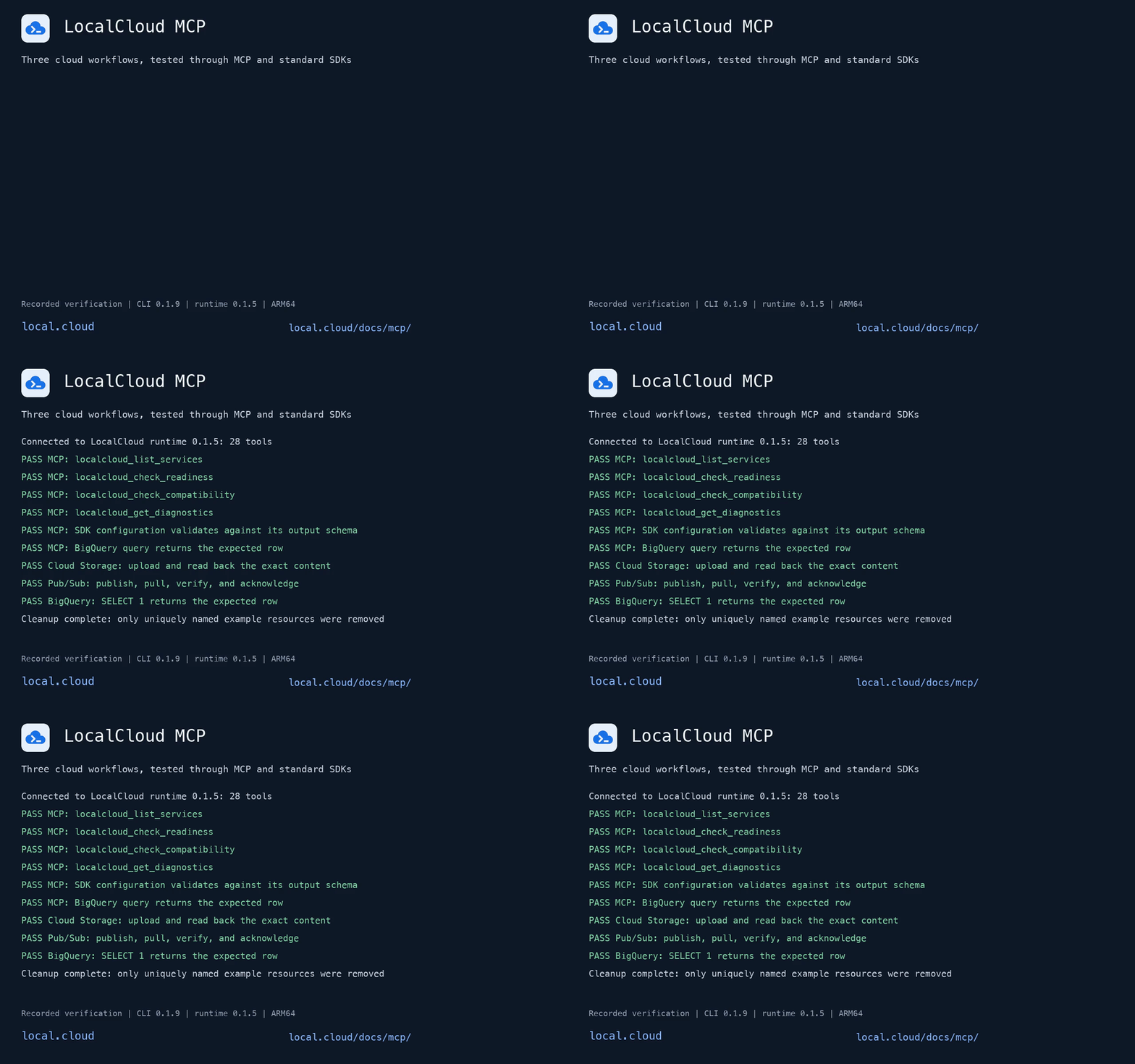
The bridge automatically checks and starts the LocalCloud container on demand and provisions any missing project requested by the agent without recreating the runtime. All agents and workspaces share the same persistent container (localcloud-data). To require manual control and disable auto-start, pass --no-start.
You can also configure clients manually in claude_desktop_config.json, .cursor/mcp.json, .claude.json, or mcp_config.json:
{
  "mcpServers": {
    "localcloud": {
      "command": "/opt/homebrew/bin/localcloud",
      "args": [
        "mcp",
        "--project-id", "local-gcp-project",
        "--user", "local-developer"
      ]
    }
  }
}
(On macOS desktop apps, an absolute path like /opt/homebrew/bin/localcloud is recommended when launched from Dock/Finder; use bare "localcloud" when launching from a terminal shell with PATH configured).
When using custom or isolated data volumes, pin --data-volume so the bridge targets that specific runtime. Get the exact block for your machine from lc start --verbose:
$ lc start --verbose | jq .mcp
{
  "command": "localcloud",
  "args": ["mcp", "--data-volume", "localcloud-data",
           "--project-id", "local-gcp-project", "--user", "local-developer"],
  "direct_url": "http://127.0.0.1:5380/mcp",
  "headers": {
    "X-LocalCloud-Project": "local-gcp-project",
    "X-LocalCloud-User": "local-developer"
  }
}
For clients that speak HTTP directly, use direct_url with every returned header so the project and
caller travel with each request.
Agents should discover operations rather than guess routes:
localcloud://api/catalog, or search it with localcloud_get_api_catalog.operation_id — never a raw route.localcloud_call_api with that operation ID and its typed parameters.localcloud_list_services, readiness, and compatibility before
sending application traffic.Write and destructive operations are gated behind the LOCALCLOUD_MCP_WRITE and
LOCALCLOUD_MCP_DESTRUCTIVE server settings, both off by default.
Sample data is owned by container startup and the Console Re-seed Data action.
The CLI does not discover, mount, or apply seed files. Existing host.seed
settings are ignored; use server.auto_seed: false to disable container bootstrap.
Managed containers with an old CLI seed mount are recreated on start/restart
with their existing data volume preserved.
Everything above works with zero configuration. When you want a versioned, shared setup, drop a
localcloud.yaml beside your project:
version: 1
context:
  project: payments-dev
  user: local-developer
host:
  data_volume: payments-data
  memory: 8g
  data: persistent
  docker_socket: auto
services:
  enabled:
    - gcs
    - pubsub
    - bigquery
    - firestore
The file is a recursive partial overlay on the packaged defaults: omitted values inherit, and a mapping
member set to null is deleted. The CLI resolves it in this order:
lc start ./custom.yamlLOCALCLOUD_CONFIG./localcloud.yaml$HOME/.localcloud/localcloud.yamlAn explicit, environment, or remembered path that is missing or unreadable fails rather than silently
falling back. CLI flags override the corresponding host values.
host.docker_socket: auto (the default) mounts the host Docker socket only when an enabled service needs
it — Compute Engine, Cloud Run, GKE, or Dataproc. Set true to always mount it, or false as a hard
opt-out.
start, restart, reset, and stop send anonymous startup-error and hourly usage events. Set
LOCALCLOUD_TELEMETRY=false or DO_NOT_TRACK=1 to turn them off; see
Telemetry for exactly what is sent.
→ Full configuration reference
| Symptom | What it means | Fix |
|---|---|---|
Error [docker_unavailable] | Docker is not installed, not running, unreachable, or denies access (details.reason) | Follow the message; lc doctor --fix installs Colima or starts your Docker app |
Error [fix_confirmation_required] | lc doctor --fix ran without a terminal (or with --verbose) | Run it in an interactive terminal; it asks before each fix |
BigQuery or another service stops soon after start on Apple Silicon | The Docker VM runs on QEMU | lc doctor, then lc doctor --fix to switch to VZ with Rosetta |
Error [docker_socket_unavailable] | A service needs the Docker socket but it is missing or blocked | Check the socket path, or set host.docker_socket: false to disable Docker-backed services |
Error [health_timeout] / runtime_readiness_timeout | The container started but services were not ready in time | lc logs --tail 200; confirm at least 4 GiB is available, or raise it with --memory 8g |
Error [port_mapping_confirmation_required] | Canonical ports are busy and the shell is non-interactive | Free the ports, or re-run with --accept-dynamic-ports |
Error [data_volume_collision] | More than one compatible container uses the same volume | lc cleanup --dry-run to inspect, then lc cleanup |
Error [ownership_mismatch] / ownership_forbidden | A Docker resource is not CLI-managed | The CLI never removes resources it does not own — remove it manually, or use a different --data-volume |
Error [unknown_project] | The project does not exist in this runtime | Only start creates projects: lc start --project-id NAME |
Error [mcp_connection_timeout] | The /mcp endpoint was not ready in 10 s | lc status to confirm the runtime is up, then lc mcp --connect-timeout 30 |
Error [dry_run_pull_conflict] | --dry-run was combined with --pull | Previews are strictly read-only — use --dry-run --no-pull, with the image already present locally |
Error [removed_flat_config] | localcloud.yaml uses a pre-1.0 flat key | The message names the replacement path — see configuration |
| Stale containers, networks, or locks | Interrupted runs left resources behind | lc cleanup --dry-run, then lc cleanup |
Still stuck? lc doctor --verbose and lc status --verbose produce the complete machine-readable state,
and --debug prints the exact docker run the CLI would use.
| Guide | Contents |
|---|---|
| CLI reference | Every command, flag, output mode, and field path |
| Configuration | localcloud.yaml, service catalog, volumes, projects, identity |
| Integrations | Python, Node, Go, Terraform/OpenTofu, and MCP client setup |
| MCP guide & architecture | Auto-start, project isolation, tool catalog, and client installers |
| Lifecycle testing | End-to-end container lifecycle test runbook and verification |
| local.cloud/docs | Product documentation, service compatibility, and the console |
LocalCloud CLI targets Python 3.11+ and uses uv.
uv sync --extra test                                      # install dependencies

uv run --extra test python -m pytest -q                   # full suite
uv run --extra test python -m pytest -q -m "not docker"   # no Docker required

uv run lc --help                                          # run from source
For live container lifecycle qualification, follow the Lifecycle test runbook.
Tests that need a live Docker engine are marked docker; deselect them with -m "not docker".
LocalCloud is proprietary software. Individual developers receive the rights described in LICENSE. LocalCloud MCP is free for the documented local development workflows.
A free local cloud environment for AI coding agents to build, test, and debug Google Cloud applications. Includes MCP discovery, SDK configuration, resource inspection, queries, and diagnostics.
See the codeA free local cloud environment for developers and AI coding agents.
Build, test, and debug Google Cloud applications from your terminal or coding agent. MCP connects your agent to local services, SDK configuration, test data, readiness, and diagnostics.
Install · Quickstart · How it works · Services · Commands · AI agents & MCP · Troubleshooting
localcloud (aliased lc) is the official host CLI for LocalCloud. It manages the
container runtime lifecycle, multi-project context, SDK environment variables, persistent Docker volumes,
and the Model Context Protocol bridge — so your application code keeps calling the same Google Cloud client
libraries it already uses, just pointed at loopback.
$ lc doctor
╭── LocalCloud v0.1.5 ────────────────────────────────────────────────────────────────────────╮
│                            │ Top commands                                                   │
│ Checking LocalCloud setup  │  localcloud (or lc)    status | start | stop | restart         │
│                            │  eval $(lc env)        Exports env vars that redirect cloud se…│
│           ╭────╮           │────────────────────────────────────────────────────────────────│
│        ╭──╯    ╰──╮        │ Context                                                        │
│       ╭─╯        ╰─╮       │  Data Volume: localcloud-data        Project: local-gcp-project│
│      ╭╯            ╰╮      │  User: local-developer                Config: built-in defaults│
│      ╰──────────────╯      │  Data: persistent                                              │
│                            │                                                                │
│      27 GCP Services       │                                                                │
│   ● 22 active · ○ 5 opt    │                                                                │
│                            │                                                                │
├────────────────────────────┴────────────────────────────────────────────────────────────────┤
│ Supported Services (● 22 enabled · ○ 5 disabled)                                            │
│  ● Storage      ● Pub/Sub      ○ Firestore    ● Bigtable     ● Spanner      ● BigQuery      │
│  ● Cloud SQL    ● AlloyDB      ● Memorystore  ● Dataproc     ● Tasks        ● Scheduler     │
│  ● Functions    ○ Cloud Run    ○ Compute      ○ GKE          ● Workflows    ○ Vertex AI     │
│  ● Sheets       ● KMS          ● Secrets      ● IAM          ● Logging      ● Monitoring    │
│  ● Resource Mgr ● Service Usage ● Billing                                                   │
╰─────────────────────────────────────────────────────────────────────────────────────────────╯
 Tip: Run localcloud guide for AI agent workflows, or lc for the fast alias.

Status  OK
Docker  29.7.2 (/opt/homebrew/bin/docker)
Image   agentcloud/localcloud:latest (Local: ID: 66026c0b0b21 ,
        sha256:66026c0b0b21398990faafb2e4a2ec71c6c10ff27c72f7cd3461d96863486011)
eval "$(lc env)" exports the emulator variables the official Google
client libraries already look for. Same calls, same objects, loopback endpoints.--verbose. --dry-run previews mutations; --debug prints the equivalent
docker run.googleapis.com address. There is no silent fallback to production.| LocalCloud | gcloud beta emulators | Testcontainers | Real GCP dev project | |
|---|---|---|---|---|
| Services | 27 | ~5 (Bigtable, Datastore/Firestore, Pub/Sub, Spanner) | Wraps the same emulators | All |
| Setup | One CLI command | One process per service | Written in test code | Project, billing, IAM |
| SDK wiring | eval "$(lc env)" | Per-emulator, manual | Per-container, in code | ADC + real credentials |
| Web console | Built in | — | — | Yes |
| Terraform / OpenTofu | lc env --format terraform | — | — | Yes |
| Agent control (MCP) | Built in | — | — | — |
| Data persistence | Docker volume, survives restarts | Process lifetime | Test lifetime | Durable |
| Cost / credentials | None | None | None | Billed, real keys |
Breadth is service availability — a callable, service-level integration. Operation-level parity is service-specific and recorded per service in the LocalCloud compatibility matrix.
Docker Desktop, Colima, OrbStack, Rancher Desktop, or Docker Engine, installed and running. LocalCloud needs at least 4 GiB of memory available to the container for stable operation.
No Docker yet? On macOS with Homebrew, lc doctor --fix (or lc start in a terminal) offers to install
Colima, a free, lightweight Docker engine, and starts it with 4 CPUs
and 8 GiB of memory.
On Apple Silicon, run the Docker VM on VZ with Rosetta rather than QEMU: it is faster, and QEMU has
known issues with LocalCloud (the BigQuery emulator can fail under it). lc doctor reports the Docker
app, its VM type and Rosetta, and lc doctor --fix offers to switch Colima or Rancher Desktop.
curl -fsSL https://local.cloud/install.sh | sh
The installer adds localcloud and the shorter lc alias when available.
brew install LocalGCloud/tap/localcloud

brew upgrade localcloud     # upgrade
brew uninstall localcloud   # remove
Update the CLI to the latest release:
lc update
lc update detects how LocalCloud was installed (script installer or Homebrew) and upgrades the CLI in place. For Homebrew, brew upgrade localcloud also works.
Signed release archives with Sigstore verification bundles are published for:
| Platform | Architectures | Minimum |
|---|---|---|
| macOS | Apple Silicon, Intel | macOS 13+ |
| Linux | x86_64, aarch64 | glibc 2.35+ (Ubuntu 22.04+) |
Windows users can run the container directly — see the Docker setup instructions.
$ lc --version
localcloud 0.1.4 (commit 0123456789ab, released 2026-09-08)
Release builds embed their exact source commit and release date, so a binary can always be traced back.
Five minutes from nothing to a working Cloud Storage bucket.
lc doctor
Confirms Docker connectivity, reports the Docker app and its VM setup, and shows the resolved LocalCloud
context. Continue when Status is OK. It creates no LocalCloud state, so it is always safe to run first.
If it lists Setup findings, lc doctor --fix offers to fix them, asking before each change.
lc start
Done          LocalCloud is ready
Status        Running
Config        built-in defaults
Data volume   localcloud-data
Origin        managed
Project       local-gcp-project
User          local-developer
Image         agentcloud/localcloud:latest
Image status  Available locally
URL           http://127.0.0.1:5380
Services      alloydb, bigquery, bigtable, cloudbilling, cloudfunctions, cloudiam,
              cloudresourcemanager, cloudscheduler, cloudsql, cloudtasks, dataproc, gcs, kms,
              logging, memorystore, monitoring, secretmanager, serviceusage, sheets, spanner,
              workflows
start checks the registry for a newer image by default (--no-pull to skip), publishes the canonical
ports on all host interfaces, waits for service readiness, and tails logs for five seconds.
Use lc start --local-only to bind published ports to 127.0.0.1 instead.
Pass --local-only on subsequent start, restart, and reset commands to keep that binding.
Running start again on a live runtime is safe.
eval "$(lc env)"
This exports the variables the official Google client libraries already read:
export STORAGE_EMULATOR_HOST="http://127.0.0.1:5382"
export BIGQUERY_EMULATOR_HOST="http://127.0.0.1:5388"
export SPANNER_EMULATOR_HOST="127.0.0.1:5386"
export BIGTABLE_EMULATOR_HOST="127.0.0.1:5385"
export GOOGLE_CLOUD_PROJECT="local-gcp-project"
export CLOUDSDK_CORE_PROJECT="local-gcp-project"
export CLOUDSDK_API_ENDPOINT_OVERRIDES_STORAGE="http://127.0.0.1:5382/"
# …one entry per enabled service, plus gcloud endpoint overrides and a local access token
No LocalCloud-specific client. No endpoint arguments. The environment does the work.
|
Python |
Node.js / TypeScript |
|
Go |
gcloud CLI |
lc console   # open the web console for the selected project
lc status    # runtime health, endpoints, and ownership
lc logs      # recent runtime logs
lc restart   # recreate runtime with current local image (--pull to check registry)
lc stop      # stop the container; the data volume is untouched
Your data survives stop and restart. lc start brings it back exactly as it was.
  your code ──► google-cloud-* SDK ──► 127.0.0.1:5380-5405 ─────────┐
  terraform ──► GOOGLE_*_CUSTOM_ENDPOINT ───────────────────────────┤
  AI agent  ──► lc mcp (stdio) / :5380/mcp (HTTP) ──────────────────┤
                                                                    │
                      ┌─────────────────────────────────────────────┘
          ┌───────────▼─────────────────────────────────────────────┐
          │  Docker container  ·  agentcloud/localcloud             │
          │                                                         │
          │   :5380  gateway · console · admin API · MCP · facades  │
          │   :5382  Cloud Storage      :5386-87  Spanner           │
          │   :5383  Pub/Sub            :5388-89  BigQuery          │
          │   :5384  Firestore          :5390     Memorystore       │
          │   :5385  Bigtable           :5391     PostgreSQL        │
          └───────────────────┬─────────────────────────────────────┘
                              │
              Docker volume:  localcloud-data
              mounted at   :  /var/lib/localcloud
The CLI never becomes a proxy — it configures and supervises. Once lc start returns, your SDK talks to
the container directly.
This is the one concept worth internalizing, because every flag follows from it:
| Axis | Flag | What it selects | Scope |
|---|---|---|---|
| Data volume | --data-volume | The durable runtime identity — a named Docker volume mounted at /var/lib/localcloud. Two volumes are two independent LocalClouds. | Docker |
| Project | --project-id | A logical Google Cloud project inside one runtime. Many projects share a volume. start and MCP startup create a missing one. | Request |
| User | --user | The attributed caller sent to LocalCloud services, normalized to <name>@localcloud.invalid where a principal is required. | Request |
Project and user are request context: switching them is instant and never touches Docker. Defaults are
localcloud-data, local-gcp-project, and local-developer.
New runtimes prefer the canonical range 5380–5405 (plus DNS 5410/udp). With Cloud SQL MySQL
enabled, the set also includes 5406, which LocalCloud's MySQL companion container publishes. If that
complete set is unavailable, the CLI proposes one contiguous alternative from 5508–5539, then
5821–5840, then 5322–5342, and asks before creating the container. Such a runtime publishes only
the ports its enabled services use, so four can run beside the canonical one. To pick the host ports
yourself, set host.port_range: 6000-6099 or pass --port-range 6000-6099. The CLI never scans the
operating system's general ephemeral range, and lc env always emits the ports actually in use.
27 Google Cloud–compatible services, 22 enabled by default:
| Group | Services |
|---|---|
| Storage & databases | Cloud Storage, Firestore, Bigtable, Spanner, BigQuery, AlloyDB, Cloud SQL, Memorystore |
| Messaging & orchestration | Pub/Sub, Cloud Tasks, Cloud Scheduler, Cloud Workflows |
| Compute & serverless | Cloud Functions, Cloud Run, Compute Engine, GKE, Dataproc |
| Security & identity | Cloud IAM, Secret Manager, Cloud KMS |
| Management & billing | Resource Manager, Service Usage, Cloud Billing |
| Observability | Cloud Logging, Cloud Monitoring |
| AI & productivity | Vertex AI, Google Sheets |
Use the ID with --services or services.enabled in localcloud.yaml.
| ID | Google Cloud service | Default |
|---|---|---|
gcs | Cloud Storage | ● on |
pubsub | Pub/Sub | ● on |
firestore | Firestore | ○ off |
bigtable | Bigtable | ● on |
spanner | Spanner | ● on |
bigquery | BigQuery | ● on |
sheets | Google Sheets | ● on |
secretmanager | Secret Manager | ● on |
cloudtasks | Cloud Tasks | ● on |
cloudscheduler | Cloud Scheduler | ● on |
cloudfunctions | Cloud Functions (2nd Gen) | ● on |
alloydb | AlloyDB | ● on |
dataproc | Dataproc | ● on |
cloudiam | Cloud IAM | ● on |
cloudresourcemanager | Cloud Resource Manager | ● on |
serviceusage | Service Usage | ● on |
cloudbilling | Cloud Billing | ● on |
logging | Cloud Logging | ● on |
monitoring | Cloud Monitoring | ● on |
gke | GKE | ○ off |
compute | Compute Engine | ○ off |
cloudrun | Cloud Run | ○ off |
memorystore | Memorystore (Redis/Valkey) | ● on |
workflows | Cloud Workflows | ● on |
vertexai | Vertex AI | ○ off |
kms | Cloud KMS | ● on |
cloudsql | Cloud SQL | ● on |
● on services start automatically
when services.enabled is unset; ○ off services are available but must be selected explicitly.
Select an explicit set at start time, or reset to the built-in default:
lc start --services gcs,pubsub,bigquery,firestore
lc start --services default
lc and localcloud are interchangeable in every example.
| Command | Purpose |
|---|---|
lc update | Update the CLI through its script installer or Homebrew |
lc doctor | Check Docker access, the Docker host setup, and legacy LocalCloud state; --fix offers fixes |
lc start | Start a runtime; prepares a project when --project-id is explicit |
lc status | Show runtime health, ownership, endpoints, and Docker details |
lc env | Generate SDK, Terraform, or Docker Compose configuration |
lc console | Open the web console for the selected project and user |
lc logs | Print recent runtime logs |
lc restart | Restart runtime with local image (default: --no-pull; --pull to check registry) |
lc reset | Reset the selected project (--all-projects prints manual recreate steps) |
lc stop | Stop the runtime without deleting persistent data |
lc cleanup | Remove malformed Docker resources, stale runtime state, and legacy files |
lc guide | Print authoritative coding-agent guidance |
lc mcp | Run the stdio MCP bridge |
Run lc COMMAND --help for command-specific flags and the valid --fields paths.
Every command speaks to a person and to a script from the same result:
| Flag | Effect |
|---|---|
| (none) | Concise terminal summary, with spinners and elapsed time in an interactive shell |
--verbose | The complete structured result as JSON on stdout |
--fields PATH[,PATH…] | Append specific JSON paths to the concise summary |
--dry-run | Validate and print every planned Docker and LocalCloud mutation, changing nothing |
--debug | Diagnostics on stderr, including a copyable equivalent docker run command |
lc status --verbose | jq '.container.url'
lc start  --fields mcp.direct_url,container.name
lc start  --dry-run                    # preview before mutating anything
NO_COLOR=1 lc doctor                   # symbols still carry status without color
Service selection is marked with ● (on) and ○ (off) as well as color, so it stays legible under
NO_COLOR or a dumb terminal.
| Code | Meaning |
|---|---|
0 | Success |
1 | Completed with failures (for example cleanup partial), or an unexpected internal error |
2 | LocalCloud error — invalid input, Docker problem, or a failed operation. Rendered as Error [code] message |
130 | Command interrupted with Ctrl-C |
An isolated environment per test suite. A second volume is a second, fully independent LocalCloud.
lc start  --data-volume ci-e2e --project-id pr-1421
lc status --data-volume ci-e2e
lc stop   --data-volume ci-e2e
Several projects on one runtime. Switching is a request-context change, not a restart.
lc start --project-id payments-dev
eval "$(lc env --project-id payments-dev)"

lc start --project-id analytics-dev
eval "$(lc env --project-id analytics-dev)"
Terraform and OpenTofu. --format terraform emits GOOGLE_*_CUSTOM_ENDPOINT variables that the Google
provider reads — evaluate them into your shell, do not redirect them into a .tf file.
$ eval "$(lc env --format terraform)"
$ env | grep GOOGLE_ | head -4
GOOGLE_STORAGE_CUSTOM_ENDPOINT=http://127.0.0.1:5382/storage/v1/
GOOGLE_BIGQUERY_CUSTOM_ENDPOINT=http://127.0.0.1:5388/
GOOGLE_PROJECT=local-gcp-project
GOOGLE_OAUTH_ACCESS_TOKEN=localcloud-user.bG9jYWwtZGV2ZWxvcGVy…

$ terraform apply
Docker Compose services. Emit the same endpoints as Compose-ready environment entries.
lc env --format docker-compose
A JSON payload for scripts.
lc env --format json | jq '.STORAGE_EMULATOR_HOST'
In CI. Skip the registry check for reproducibility, disable log tailing, and fail loudly.
lc start --data-volume ci-$GITHUB_RUN_ID --no-pull --tail 0 --verbose
# …run tests…
lc stop  --data-volume ci-$GITHUB_RUN_ID
Preview before you mutate. Lifecycle dry runs are strictly read-only and never pull.
lc start --dry-run          # every planned Docker and LocalCloud mutation, in order
lc restart --dry-run
Restart with local image vs pull. By default, lc restart recreates the container using the currently available local Docker image without checking the remote registry. Use --pull to check for and fetch newer remote images.
lc restart                  # fast restart with current local image (e.g. after building locally)
lc restart --pull           # check registry, pull newest image if available, then recreate
Reset one project without losing the others.
lc reset                    # clears the selected project; reseed from the Console
lc reset --all-projects     # prints manual recreate steps; deletes nothing
lc reset --all-projects deliberately mutates nothing. Recreating every project means deleting the data
volume, and LocalCloud never runs docker volume rm for you — it prints the steps and exits non-zero so
nothing is destroyed by accident.
The agent path is a first-class surface, not an add-on. An agent can provision, seed, query, and reset GCP-shaped state on its own.
lc guide
lc guide prints authoritative, copy-pasteable workflow guidance generated from the runtime's own service
catalog, so it cannot drift from what the image actually ships. Instruct your agent:
Before interacting with local cloud services, run
localcloud guide.
Use LocalCloud CLI 0.1.9 or newer. Install with brew install LocalGCloud/tap/localcloud, or update an existing Homebrew installation with brew update and brew upgrade localcloud. Verify with lc --version.
Configure LocalCloud for your AI coding client in one command:
lc mcp install --client cursor
MCP setup and client guide covers Claude Code/Desktop, Cursor, Codex, VS Code, Cline, Gemini CLI, Antigravity and Windsurf. The CLI 0.1.9 gemini installer alias targets Antigravity, and all configures five clients; use the guide's manual setup for Gemini CLI and Cline.
Run the three reproducible cloud workflows. This recording shows MCP checks and actual Storage, Pub/Sub, and BigQuery assertions through CLI 0.1.9 and runtime 0.1.5:
The bridge automatically checks and starts the LocalCloud container on demand and provisions any missing project requested by the agent without recreating the runtime. All agents and workspaces share the same persistent container (localcloud-data). To require manual control and disable auto-start, pass --no-start.
You can also configure clients manually in claude_desktop_config.json, .cursor/mcp.json, .claude.json, or mcp_config.json:
{
  "mcpServers": {
    "localcloud": {
      "command": "/opt/homebrew/bin/localcloud",
      "args": [
        "mcp",
        "--project-id", "local-gcp-project",
        "--user", "local-developer"
      ]
    }
  }
}
(On macOS desktop apps, an absolute path like /opt/homebrew/bin/localcloud is recommended when launched from Dock/Finder; use bare "localcloud" when launching from a terminal shell with PATH configured).
When using custom or isolated data volumes, pin --data-volume so the bridge targets that specific runtime. Get the exact block for your machine from lc start --verbose:
$ lc start --verbose | jq .mcp
{
  "command": "localcloud",
  "args": ["mcp", "--data-volume", "localcloud-data",
           "--project-id", "local-gcp-project", "--user", "local-developer"],
  "direct_url": "http://127.0.0.1:5380/mcp",
  "headers": {
    "X-LocalCloud-Project": "local-gcp-project",
    "X-LocalCloud-User": "local-developer"
  }
}
For clients that speak HTTP directly, use direct_url with every returned header so the project and
caller travel with each request.
Agents should discover operations rather than guess routes:
localcloud://api/catalog, or search it with localcloud_get_api_catalog.operation_id — never a raw route.localcloud_call_api with that operation ID and its typed parameters.localcloud_list_services, readiness, and compatibility before
sending application traffic.Write and destructive operations are gated behind the LOCALCLOUD_MCP_WRITE and
LOCALCLOUD_MCP_DESTRUCTIVE server settings, both off by default.
Sample data is owned by container startup and the Console Re-seed Data action.
The CLI does not discover, mount, or apply seed files. Existing host.seed
settings are ignored; use server.auto_seed: false to disable container bootstrap.
Managed containers with an old CLI seed mount are recreated on start/restart
with their existing data volume preserved.
Everything above works with zero configuration. When you want a versioned, shared setup, drop a
localcloud.yaml beside your project:
version: 1
context:
  project: payments-dev
  user: local-developer
host:
  data_volume: payments-data
  memory: 8g
  data: persistent
  docker_socket: auto
services:
  enabled:
    - gcs
    - pubsub
    - bigquery
    - firestore
The file is a recursive partial overlay on the packaged defaults: omitted values inherit, and a mapping
member set to null is deleted. The CLI resolves it in this order:
lc start ./custom.yamlLOCALCLOUD_CONFIG./localcloud.yaml$HOME/.localcloud/localcloud.yamlAn explicit, environment, or remembered path that is missing or unreadable fails rather than silently
falling back. CLI flags override the corresponding host values.
host.docker_socket: auto (the default) mounts the host Docker socket only when an enabled service needs
it — Compute Engine, Cloud Run, GKE, or Dataproc. Set true to always mount it, or false as a hard
opt-out.
start, restart, reset, and stop send anonymous startup-error and hourly usage events. Set
LOCALCLOUD_TELEMETRY=false or DO_NOT_TRACK=1 to turn them off; see
Telemetry for exactly what is sent.
→ Full configuration reference
| Symptom | What it means | Fix |
|---|---|---|
Error [docker_unavailable] | Docker is not installed, not running, unreachable, or denies access (details.reason) | Follow the message; lc doctor --fix installs Colima or starts your Docker app |
Error [fix_confirmation_required] | lc doctor --fix ran without a terminal (or with --verbose) | Run it in an interactive terminal; it asks before each fix |
BigQuery or another service stops soon after start on Apple Silicon | The Docker VM runs on QEMU | lc doctor, then lc doctor --fix to switch to VZ with Rosetta |
Error [docker_socket_unavailable] | A service needs the Docker socket but it is missing or blocked | Check the socket path, or set host.docker_socket: false to disable Docker-backed services |
Error [health_timeout] / runtime_readiness_timeout | The container started but services were not ready in time | lc logs --tail 200; confirm at least 4 GiB is available, or raise it with --memory 8g |
Error [port_mapping_confirmation_required] | Canonical ports are busy and the shell is non-interactive | Free the ports, or re-run with --accept-dynamic-ports |
Error [data_volume_collision] | More than one compatible container uses the same volume | lc cleanup --dry-run to inspect, then lc cleanup |
Error [ownership_mismatch] / ownership_forbidden | A Docker resource is not CLI-managed | The CLI never removes resources it does not own — remove it manually, or use a different --data-volume |
Error [unknown_project] | The project does not exist in this runtime | Only start creates projects: lc start --project-id NAME |
Error [mcp_connection_timeout] | The /mcp endpoint was not ready in 10 s | lc status to confirm the runtime is up, then lc mcp --connect-timeout 30 |
Error [dry_run_pull_conflict] | --dry-run was combined with --pull | Previews are strictly read-only — use --dry-run --no-pull, with the image already present locally |
Error [removed_flat_config] | localcloud.yaml uses a pre-1.0 flat key | The message names the replacement path — see configuration |
| Stale containers, networks, or locks | Interrupted runs left resources behind | lc cleanup --dry-run, then lc cleanup |
Still stuck? lc doctor --verbose and lc status --verbose produce the complete machine-readable state,
and --debug prints the exact docker run the CLI would use.
| Guide | Contents |
|---|---|
| CLI reference | Every command, flag, output mode, and field path |
| Configuration | localcloud.yaml, service catalog, volumes, projects, identity |
| Integrations | Python, Node, Go, Terraform/OpenTofu, and MCP client setup |
| MCP guide & architecture | Auto-start, project isolation, tool catalog, and client installers |
| Lifecycle testing | End-to-end container lifecycle test runbook and verification |
| local.cloud/docs | Product documentation, service compatibility, and the console |
LocalCloud CLI targets Python 3.11+ and uses uv.
uv sync --extra test                                      # install dependencies

uv run --extra test python -m pytest -q                   # full suite
uv run --extra test python -m pytest -q -m "not docker"   # no Docker required

uv run lc --help                                          # run from source
For live container lifecycle qualification, follow the Lifecycle test runbook.
Tests that need a live Docker engine are marked docker; deselect them with -m "not docker".
LocalCloud is proprietary software. Individual developers receive the rights described in LICENSE. LocalCloud MCP is free for the documented local development workflows.








