Show usage stats for OpenAI Codex and Claude Code, without having to login. But for Window-Native
See the codeEnglish | 简体中文 | 繁體中文(臺灣) | 日本語 | 한국어 | Español mexicano | Português (Brasil) | Türkçe
Win-CodexBar is a Windows system-tray app for keeping AI coding-tool usage visible without opening a dozen dashboards. It ports the spirit of CodexBar to a Tauri + React desktop shell backed by shared Rust provider logic.
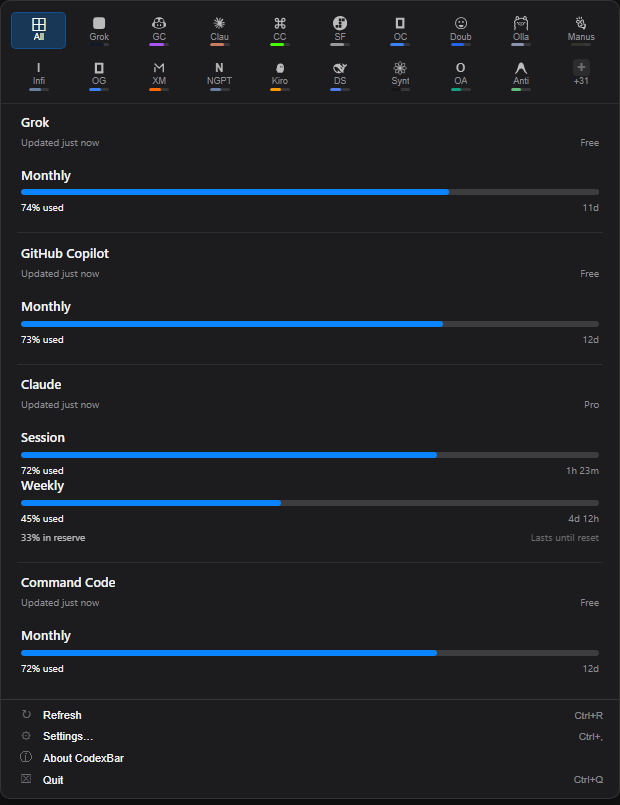
|
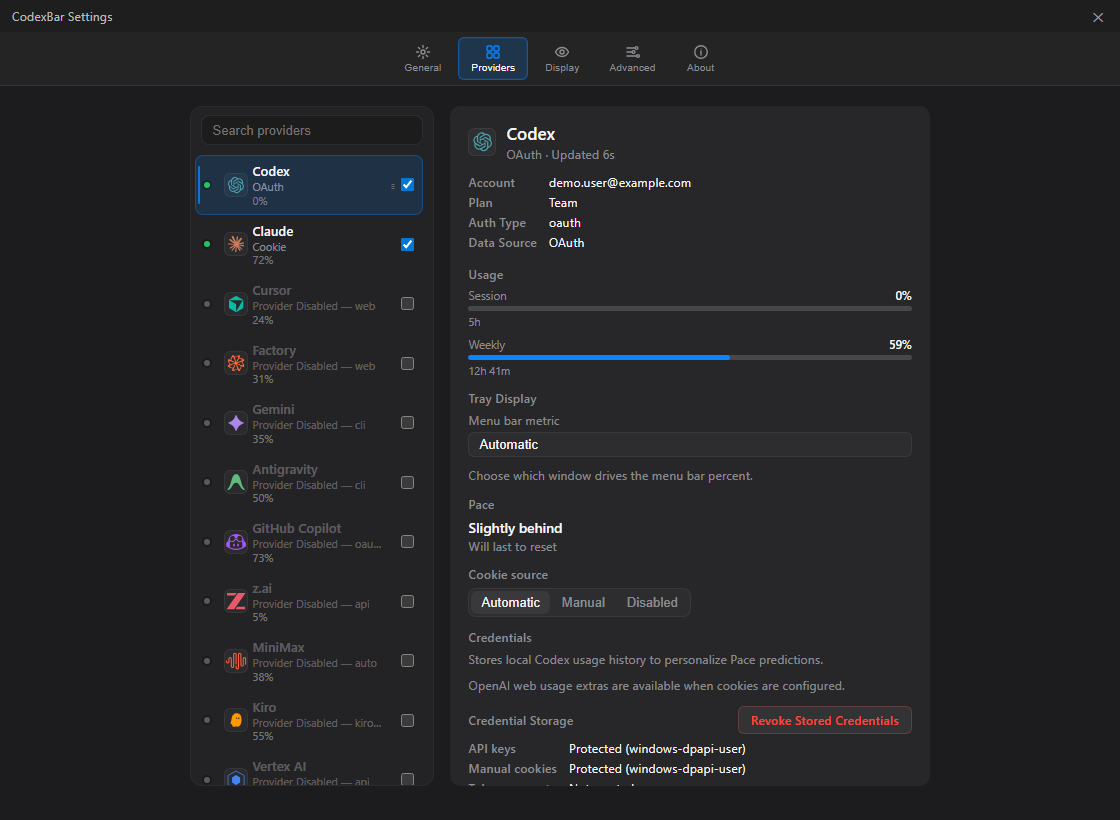
|
Install with Windows Package Manager:
winget install Finesssee.Win-CodexBar
Or download the latest installer/portable build from GitHub Releases.
CodexBar-<version>-Setup.exeCodexBar-<version>-portable.exe.sha256 filesWinget distribution is approved through microsoft/winget-pkgs. New versions can take a little time to appear because every Winget update is pinned to a specific release URL and installer hash.
Code signing: SignPath.io is wired into the GitHub Actions release path, but production signing remains fail-closed until the Release certificate 2026 is issued and the
release-signingpolicy becomes valid. See docs/CODE_SIGNING.md for the signing policy. The v0.60.3 release is immutable and unsigned; verify its SHA-256 files. The first signed release will be the next normal version after SignPath onboarding.
For Claude, browser cookies/sessionKey are preferred because they match Claude's settings-page usage. OAuth and CLI stay available as fallbacks. For CLI-based providers such as Codex and Gemini, sign in with the provider CLI first.
v0.33.2 fixes tray-panel dismissal so the popover closes on focus loss or Escape, without immediately reopening from the same tray click.
See the full history in CHANGELOG.md.
| Provider | Auth | Tracks |
|---|---|---|
| Codex | OAuth / CLI | Session, Weekly, Credits |
| Claude | Cookies / OAuth fallback / CLI fallback | Session (5h), Weekly |
| Cursor | Cookies | Plan, Usage, Billing |
| Factory | Cookies | Usage |
| Gemini | gcloud OAuth | Quota |
| Copilot | GitHub Device Flow / gh CLI / legacy token | Plan usage, Chat |
| Antigravity | Local LSP | Usage, Per-model quotas |
| z.ai | API Token | Quota |
| MiniMax | API / Cookies | Usage, Billing Summary |
| Kiro | Cookies / CLI | Monthly Credits, Overage |
| Vertex AI | gcloud OAuth | Cost |
| v0 | API Key | Billing quota, API rate limits, on-demand balance |
| Vercel AI Gateway | API Key | Team credit balance, lifetime spend |
| Augment | Cookies | Credits |
| OpenCode | Local Config | Usage |
| Kimi | Cookies | 5h Rate, Weekly |
| Kimi K2 | API Key | Credits |
| Amp | Cookies | Usage |
| Warp | Local Config | Usage |
| Ollama | Cookies / API Key | Usage, Cloud Models, Pace windows |
| Azure OpenAI | API Key | Deployment |
| T3 Chat | Cookies / cURL | Base, Overage |
| TypeSafe | Browser cookies / manual Cookie header | Billing-cycle spend, balance, expiring credits |
| OpenRouter | API Key | Credits |
| JetBrains AI | Local Config | Usage |
| Alibaba | Cookies | Usage |
| Alibaba Token Plan | Cookies | Token Plan Credits, Reset date |
| NanoGPT | API Key | Credits |
| Infini | API Key | Session, Weekly, Quota |
| Perplexity | Cookies | Credits, Plan |
| Abacus AI | Cookies | Credits |
| Mistral | Cookies | Billing, Usage |
| OpenCode Go | Cookies | Usage, Zen Balance |
| Kilo | API Key / CLI | Usage |
| Codebuff | API Key / Local Config | Credits, Weekly |
| DeepSeek | API Key | Balance, Usage summaries, Cost |
| Windsurf | Local Cache | Daily, Weekly |
| Manus | Cookies | Credits, Refresh Credits |
| Xiaomi MiMo | Cookies | Balance, Token Plan |
| Doubao | API Key | Request Limits |
| Command Code | Cookies | Monthly Credits, Purchased Credits |
| StepFun | Oasis Token | 5h, Weekly, Token refresh |
| Venice | API Key / Web session | USD / DIEM Balance, Bundled credits (web session expires in about 60 s) |
| OpenAI | Admin API / API Key | Usage, Requests, Project-scoped cost, Credit Balance |
| Grok | Cookies / auth.json | Billing |
| Helmcode (also NaN Builders) | Browser cookies / manual Cookie header | Per-model token quotas, reset windows, Helmcode prepaid balance |
| Raycast | Cookies (Chrome auto or manual) | Monthly AI credits, plan, renewal |
| Replicate | Cookies / token accounts | Monthly spend, credit balance |
| Aixy | API Key / token accounts | Applicable budget balances, 7-day key usage |
| ClawRouter | API Key | Monthly budget, requests, tokens, routed-provider spend |
| ElevenLabs | API Key | Subscription Credits, Voice Slots |
| Deepgram | API Key | Project Usage |
| Groq | API Key | Enterprise Metrics |
| LLM Proxy | API Key | Quota Stats |
| llmman | Local daemon / optional API Key | Memory in use, loaded and stored models |
| DevPass | API Key | Plan credits, Premium weekly, API-key spend |
| IBM Bob | API Key / token accounts | Monthly Bobcoins, per-team budgets |
| xKiro | API Key | Daily free tokens |
| Synthetic | API Key | Five-hour quota, Weekly tokens, Hourly search, Plan |
| Langdock | Browser cookies / manual Cookie header | Session (5h), Weekly |
| LithosAI | Browser cookies / manual Cookie header | Prepaid balance, UTC spend today and this month |
| Muse (muse.ai) | Browser cookies / manual Cookie header | Weekly usage, tokens left, top-up tokens |
| WorkBuddy | Browser cookies / manual Cookie header | Monthly credits left, plan, cycle reset |
The UI and contributor reporting currently support:
# Prerequisites: Node.js + pnpm. Rust and MinGW are installed by the script when needed.
git clone https://github.com/nesszer/Win-CodexBar.git
cd Win-CodexBar
.\scripts\dev.ps1
Useful dev flags:
.\scripts\dev.ps1 -Release      # optimized build
.\scripts\dev.ps1 -SkipBuild    # relaunch the last build
CLI examples:
codexbar-cli --help
codexbar-cli diagnose --pretty
codexbar-cli usage -p claude
codexbar-cli usage -p all
codexbar-cli cost -p codex
Installer builds include codexbar.exe as the tray app and codexbar-cli.exe as the console CLI. Start Menu shortcuts launch the desktop app; terminal commands use codexbar-cli.exe. codexbar-desktop.exe is still installed as a compatibility alias for older shortcuts and autostart entries.
For local Windows release builds, use the cached release builder:
.\scripts\windows-release-build.ps1 -Ref v0.33.2 -SmokeInstall
The script builds the real Tauri release binary plus the console CLI, verifies signed installer dependencies, packages with Inno Setup, writes installer/portable assets, writes SHA-256 sidecars, and can run a silent install/uninstall smoke test.
More release automation notes live in docs/release/ci-cd.md.
| Topic | Link |
|---|---|
| Building from source | docs/BUILDING.md |
| WSL setup and auth tips | docs/WSL.md |
| Browser cookie details | docs/COOKIES.md |
codexbar serve dashboard/API to show provider, account, quota, or payload metrics.codexbar-cli usage -p <provider> --json) and streams Claude, Codex, Copilot, Cursor, Gemini, or Antigravity limits to the display over USB serial.MIT, same as the original CodexBar.
106 followers · starred Sep 2026
21 followers · starred Mar 2026
59 followers · starred Jul 2026
927 followers · starred May 2026
Show usage stats for OpenAI Codex and Claude Code, without having to login. But for Window-Native
See the codeEnglish | 简体中文 | 繁體中文(臺灣) | 日本語 | 한국어 | Español mexicano | Português (Brasil) | Türkçe
Win-CodexBar is a Windows system-tray app for keeping AI coding-tool usage visible without opening a dozen dashboards. It ports the spirit of CodexBar to a Tauri + React desktop shell backed by shared Rust provider logic.
|
|
|
Install with Windows Package Manager:
winget install Finesssee.Win-CodexBar
Or download the latest installer/portable build from GitHub Releases.
CodexBar-<version>-Setup.exeCodexBar-<version>-portable.exe.sha256 filesWinget distribution is approved through microsoft/winget-pkgs. New versions can take a little time to appear because every Winget update is pinned to a specific release URL and installer hash.
Code signing: SignPath.io is wired into the GitHub Actions release path, but production signing remains fail-closed until the Release certificate 2026 is issued and the
release-signingpolicy becomes valid. See docs/CODE_SIGNING.md for the signing policy. The v0.60.3 release is immutable and unsigned; verify its SHA-256 files. The first signed release will be the next normal version after SignPath onboarding.
For Claude, browser cookies/sessionKey are preferred because they match Claude's settings-page usage. OAuth and CLI stay available as fallbacks. For CLI-based providers such as Codex and Gemini, sign in with the provider CLI first.
v0.33.2 fixes tray-panel dismissal so the popover closes on focus loss or Escape, without immediately reopening from the same tray click.
See the full history in CHANGELOG.md.
| Provider | Auth | Tracks |
|---|---|---|
| Codex | OAuth / CLI | Session, Weekly, Credits |
| Claude | Cookies / OAuth fallback / CLI fallback | Session (5h), Weekly |
| Cursor | Cookies | Plan, Usage, Billing |
| Factory | Cookies | Usage |
| Gemini | gcloud OAuth | Quota |
| Copilot | GitHub Device Flow / gh CLI / legacy token | Plan usage, Chat |
| Antigravity | Local LSP | Usage, Per-model quotas |
| z.ai | API Token | Quota |
| MiniMax | API / Cookies | Usage, Billing Summary |
| Kiro | Cookies / CLI | Monthly Credits, Overage |
| Vertex AI | gcloud OAuth | Cost |
| v0 | API Key | Billing quota, API rate limits, on-demand balance |
| Vercel AI Gateway | API Key | Team credit balance, lifetime spend |
| Augment | Cookies | Credits |
| OpenCode | Local Config | Usage |
| Kimi | Cookies | 5h Rate, Weekly |
| Kimi K2 | API Key | Credits |
| Amp | Cookies | Usage |
| Warp | Local Config | Usage |
| Ollama | Cookies / API Key | Usage, Cloud Models, Pace windows |
| Azure OpenAI | API Key | Deployment |
| T3 Chat | Cookies / cURL | Base, Overage |
| TypeSafe | Browser cookies / manual Cookie header | Billing-cycle spend, balance, expiring credits |
| OpenRouter | API Key | Credits |
| JetBrains AI | Local Config | Usage |
| Alibaba | Cookies | Usage |
| Alibaba Token Plan | Cookies | Token Plan Credits, Reset date |
| NanoGPT | API Key | Credits |
| Infini | API Key | Session, Weekly, Quota |
| Perplexity | Cookies | Credits, Plan |
| Abacus AI | Cookies | Credits |
| Mistral | Cookies | Billing, Usage |
| OpenCode Go | Cookies | Usage, Zen Balance |
| Kilo | API Key / CLI | Usage |
| Codebuff | API Key / Local Config | Credits, Weekly |
| DeepSeek | API Key | Balance, Usage summaries, Cost |
| Windsurf | Local Cache | Daily, Weekly |
| Manus | Cookies | Credits, Refresh Credits |
| Xiaomi MiMo | Cookies | Balance, Token Plan |
| Doubao | API Key | Request Limits |
| Command Code | Cookies | Monthly Credits, Purchased Credits |
| StepFun | Oasis Token | 5h, Weekly, Token refresh |
| Venice | API Key / Web session | USD / DIEM Balance, Bundled credits (web session expires in about 60 s) |
| OpenAI | Admin API / API Key | Usage, Requests, Project-scoped cost, Credit Balance |
| Grok | Cookies / auth.json | Billing |
| Helmcode (also NaN Builders) | Browser cookies / manual Cookie header | Per-model token quotas, reset windows, Helmcode prepaid balance |
| Raycast | Cookies (Chrome auto or manual) | Monthly AI credits, plan, renewal |
| Replicate | Cookies / token accounts | Monthly spend, credit balance |
| Aixy | API Key / token accounts | Applicable budget balances, 7-day key usage |
| ClawRouter | API Key | Monthly budget, requests, tokens, routed-provider spend |
| ElevenLabs | API Key | Subscription Credits, Voice Slots |
| Deepgram | API Key | Project Usage |
| Groq | API Key | Enterprise Metrics |
| LLM Proxy | API Key | Quota Stats |
| llmman | Local daemon / optional API Key | Memory in use, loaded and stored models |
| DevPass | API Key | Plan credits, Premium weekly, API-key spend |
| IBM Bob | API Key / token accounts | Monthly Bobcoins, per-team budgets |
| xKiro | API Key | Daily free tokens |
| Synthetic | API Key | Five-hour quota, Weekly tokens, Hourly search, Plan |
| Langdock | Browser cookies / manual Cookie header | Session (5h), Weekly |
| LithosAI | Browser cookies / manual Cookie header | Prepaid balance, UTC spend today and this month |
| Muse (muse.ai) | Browser cookies / manual Cookie header | Weekly usage, tokens left, top-up tokens |
| WorkBuddy | Browser cookies / manual Cookie header | Monthly credits left, plan, cycle reset |
The UI and contributor reporting currently support:
# Prerequisites: Node.js + pnpm. Rust and MinGW are installed by the script when needed.
git clone https://github.com/nesszer/Win-CodexBar.git
cd Win-CodexBar
.\scripts\dev.ps1
Useful dev flags:
.\scripts\dev.ps1 -Release      # optimized build
.\scripts\dev.ps1 -SkipBuild    # relaunch the last build
CLI examples:
codexbar-cli --help
codexbar-cli diagnose --pretty
codexbar-cli usage -p claude
codexbar-cli usage -p all
codexbar-cli cost -p codex
Installer builds include codexbar.exe as the tray app and codexbar-cli.exe as the console CLI. Start Menu shortcuts launch the desktop app; terminal commands use codexbar-cli.exe. codexbar-desktop.exe is still installed as a compatibility alias for older shortcuts and autostart entries.
For local Windows release builds, use the cached release builder:
.\scripts\windows-release-build.ps1 -Ref v0.33.2 -SmokeInstall
The script builds the real Tauri release binary plus the console CLI, verifies signed installer dependencies, packages with Inno Setup, writes installer/portable assets, writes SHA-256 sidecars, and can run a silent install/uninstall smoke test.
More release automation notes live in docs/release/ci-cd.md.
| Topic | Link |
|---|---|
| Building from source | docs/BUILDING.md |
| WSL setup and auth tips | docs/WSL.md |
| Browser cookie details | docs/COOKIES.md |
codexbar serve dashboard/API to show provider, account, quota, or payload metrics.codexbar-cli usage -p <provider> --json) and streams Claude, Codex, Copilot, Cursor, Gemini, or Antigravity limits to the display over USB serial.MIT, same as the original CodexBar.
106 followers · starred Sep 2026
21 followers · starred Mar 2026
59 followers · starred Jul 2026
927 followers · starred May 2026



