
Windows-focused fork of OpenUsage for tracking AI coding subscription usage from a Tauri tray app.
2
stars
366
commits
JavaScript
primary language
May 3, 2026
updated
README
Track all your AI coding subscriptions in one place
Fork Notice
This repository is a Windows-focused fork of robinebers/openusage.
- Upstream project: github.com/robinebers/openusage
- This fork keeps the original architecture and plugin model, while adapting the app for Windows and cross-platform local development.
- Credit for the original project, idea, and base implementation belongs to Robin Ebers.
See your usage at a glance from your tray or menu bar. No digging through dashboards.
Current Status
- macOS: upstream remains the best reference and release source
- Windows: this fork adds native Windows development support and Windows-oriented provider path fixes
- Linux / WSL: useful for editing, but not the primary runtime target for this fork
Download
Download the latest release (fork releases; create your first release to populate this page)
The app auto-updates. Install once and you're set.
What It Does
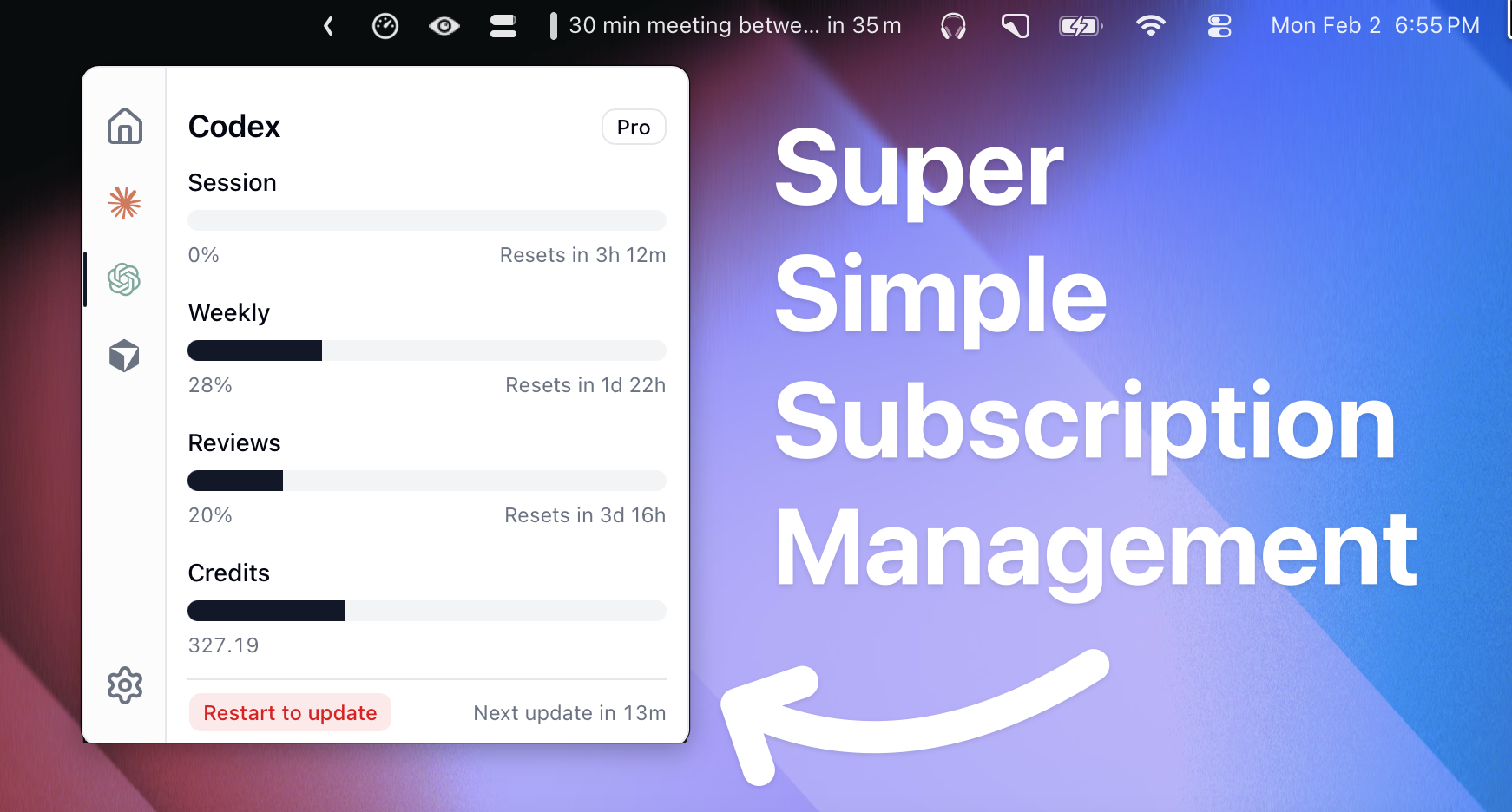
OpenUsage lives in your tray or menu bar and shows you how much of your AI coding subscriptions you've used. Progress bars, badges, and clear labels. No mental math required.
- One glance. All your AI tools, one panel.
- Always up-to-date. Refreshes automatically on a schedule you pick.
- Global shortcut. Toggle the panel from anywhere with a customizable keyboard shortcut.
- Lightweight. Opens instantly, stays out of your way.
- Plugin-based. New providers get added without updating the whole app.
- Local HTTP API. Other apps can read your usage data from
127.0.0.1:6736. - Proxy support. Route provider HTTP requests through a SOCKS5 or HTTP proxy.
Supported Providers
- Amp / free tier, bonus, credits
- Antigravity / all models
- Claude / session, weekly, peak/off-peak, extra usage, local token usage (ccusage)
- Codex / session, weekly, reviews, credits
- Copilot / premium, chat, completions
- Cursor / credits, total usage, auto usage, API usage, on-demand, CLI auth
- Factory / Droid / standard, premium tokens
- Gemini / pro, flash, workspace/free/paid tier
- JetBrains AI Assistant / quota, remaining
- Kiro / credits, bonus credits, overages
- Kimi Code / session, weekly
- MiniMax / coding plan session
- OpenCode Go / 5h, weekly, monthly spend limits
- Windsurf / prompt credits, flex credits
- Z.ai / session, weekly, web searches
Community contributions welcome.
Want a provider that's not listed? Open an issue.
Open Source, Community Driven
OpenUsage is built by its users. Hundreds of people use it daily, and the project grows through community contributions: new providers, bug fixes, and ideas.
I maintain the project as a guide and quality gatekeeper, but this is your app as much as mine. If something is missing or broken, the best way to get it fixed is to contribute by opening an issue, or submitting a PR.
Plugins are currently bundled as we build our the API, but soon will be made flexible so you can build and load their own.
How to Contribute
- Add a provider. Each one is just a plugin. See the Plugin API.
- Fix a bug. PRs welcome. Provide before/after screenshots.
- Request a feature. Open an issue and make your case.
Keep it simple. No feature creep, no AI-generated commit messages, test your changes.
Built Entirely with AI
Not a single line of code in this project was read or written by hand. 100% AI-generated, AI-reviewed, AI-shipped — using Cursor, Claude Code, and Codex CLI.
OpenUsage is a real-world example of what I teach in the AI Builder's Blueprint — a proven process for building and shipping software with AI, no coding background required.
Sponsors
OpenUsage is supported by our sponsors. Become a sponsor to get your logo here and on openusage.ai.
Credits
Inspired by CodexBar by @steipete. Same idea, very different approach.
License
Run Locally
The short version:
npm install
npm run bundle:plugins
npm run tauri dev
For the full setup, troubleshooting, and Windows-specific instructions, see docs/running-locally.md.
Keep Codex Fast
This fork includes a Windows-first Codex maintenance tool:
.\tools\keep-codex-fast\Keep-CodexFast.ps1 -IncludeWsl
It inspects by default and makes no changes unless you pass -Apply. It backs up first, archives old sessions/worktrees, rotates large logs, and can also check WSL Codex state.
See tools/keep-codex-fast/README.md.
Publishing This Fork
If you want to publish this repository publicly, you have two good options:
- Create a real GitHub fork of robinebers/openusage.
- Create a separate public repository and keep the attribution in this README.
If you choose option 2, keep this section and the Fork Notice above so the upstream relationship stays explicit.
Build From Source Notes
Warning: The
mainbranch may not be stable. It is merged directly without staging, so users are advised to use tagged versions for stable builds. Tagged versions are fully tested whilemainmay contain unreleased features.
Stack
- Tauri 2 + Rust
- React 19 + Vite
- Plugin-based provider probes
Production build
npm run build:release
This fork is being adapted for Windows. The core tray app, local HTTP API, and several provider paths are now cross-platform, but some providers still rely on macOS-only credential or storage locations and will need follow-up work.
Contributors
(top 30 of 38)


See what people are saying
Similar repos


Languages
JavaScript
50.7%
TypeScript
32.4%
Rust
14.8%
PowerShell
1.1%
Windows-focused fork of OpenUsage for tracking AI coding subscription usage from a Tauri tray app.
2
stars
366
commits
JavaScript
primary language
May 3, 2026
updated
README
Track all your AI coding subscriptions in one place
Fork Notice
This repository is a Windows-focused fork of robinebers/openusage.
- Upstream project: github.com/robinebers/openusage
- This fork keeps the original architecture and plugin model, while adapting the app for Windows and cross-platform local development.
- Credit for the original project, idea, and base implementation belongs to Robin Ebers.
See your usage at a glance from your tray or menu bar. No digging through dashboards.
Current Status
- macOS: upstream remains the best reference and release source
- Windows: this fork adds native Windows development support and Windows-oriented provider path fixes
- Linux / WSL: useful for editing, but not the primary runtime target for this fork
Download
Download the latest release (fork releases; create your first release to populate this page)
The app auto-updates. Install once and you're set.
What It Does
OpenUsage lives in your tray or menu bar and shows you how much of your AI coding subscriptions you've used. Progress bars, badges, and clear labels. No mental math required.
- One glance. All your AI tools, one panel.
- Always up-to-date. Refreshes automatically on a schedule you pick.
- Global shortcut. Toggle the panel from anywhere with a customizable keyboard shortcut.
- Lightweight. Opens instantly, stays out of your way.
- Plugin-based. New providers get added without updating the whole app.
- Local HTTP API. Other apps can read your usage data from
127.0.0.1:6736. - Proxy support. Route provider HTTP requests through a SOCKS5 or HTTP proxy.
Supported Providers
- Amp / free tier, bonus, credits
- Antigravity / all models
- Claude / session, weekly, peak/off-peak, extra usage, local token usage (ccusage)
- Codex / session, weekly, reviews, credits
- Copilot / premium, chat, completions
- Cursor / credits, total usage, auto usage, API usage, on-demand, CLI auth
- Factory / Droid / standard, premium tokens
- Gemini / pro, flash, workspace/free/paid tier
- JetBrains AI Assistant / quota, remaining
- Kiro / credits, bonus credits, overages
- Kimi Code / session, weekly
- MiniMax / coding plan session
- OpenCode Go / 5h, weekly, monthly spend limits
- Windsurf / prompt credits, flex credits
- Z.ai / session, weekly, web searches
Community contributions welcome.
Want a provider that's not listed? Open an issue.
Open Source, Community Driven
OpenUsage is built by its users. Hundreds of people use it daily, and the project grows through community contributions: new providers, bug fixes, and ideas.
I maintain the project as a guide and quality gatekeeper, but this is your app as much as mine. If something is missing or broken, the best way to get it fixed is to contribute by opening an issue, or submitting a PR.
Plugins are currently bundled as we build our the API, but soon will be made flexible so you can build and load their own.
How to Contribute
- Add a provider. Each one is just a plugin. See the Plugin API.
- Fix a bug. PRs welcome. Provide before/after screenshots.
- Request a feature. Open an issue and make your case.
Keep it simple. No feature creep, no AI-generated commit messages, test your changes.
Built Entirely with AI
Not a single line of code in this project was read or written by hand. 100% AI-generated, AI-reviewed, AI-shipped — using Cursor, Claude Code, and Codex CLI.
OpenUsage is a real-world example of what I teach in the AI Builder's Blueprint — a proven process for building and shipping software with AI, no coding background required.
Sponsors
OpenUsage is supported by our sponsors. Become a sponsor to get your logo here and on openusage.ai.
Credits
Inspired by CodexBar by @steipete. Same idea, very different approach.
License
Run Locally
The short version:
npm install
npm run bundle:plugins
npm run tauri dev
For the full setup, troubleshooting, and Windows-specific instructions, see docs/running-locally.md.
Keep Codex Fast
This fork includes a Windows-first Codex maintenance tool:
.\tools\keep-codex-fast\Keep-CodexFast.ps1 -IncludeWsl
It inspects by default and makes no changes unless you pass -Apply. It backs up first, archives old sessions/worktrees, rotates large logs, and can also check WSL Codex state.
See tools/keep-codex-fast/README.md.
Publishing This Fork
If you want to publish this repository publicly, you have two good options:
- Create a real GitHub fork of robinebers/openusage.
- Create a separate public repository and keep the attribution in this README.
If you choose option 2, keep this section and the Fork Notice above so the upstream relationship stays explicit.
Build From Source Notes
Warning: The
mainbranch may not be stable. It is merged directly without staging, so users are advised to use tagged versions for stable builds. Tagged versions are fully tested whilemainmay contain unreleased features.
Stack
- Tauri 2 + Rust
- React 19 + Vite
- Plugin-based provider probes
Production build
npm run build:release
This fork is being adapted for Windows. The core tray app, local HTTP API, and several provider paths are now cross-platform, but some providers still rely on macOS-only credential or storage locations and will need follow-up work.
See what people are saying
Similar repos
Contributors
(top 30 of 38)
Languages
JavaScript
50.7%
TypeScript
32.4%
Rust
14.8%
PowerShell
1.1%