Mirrored Repo of our Seminar Work "Optical Character Recognition on Code Screenshots – Training a Transformer based OCR Engine"
Jupyter Notebook
0
3 commits
updated Feb 27, 2023
Use Case Owner: Alexander Naumann
Team Members:
We fined tuned the TrOCR by Li et al on around 450.000 code snippets and achieved an average CER of around 0.11 (see results table below). The model was splitted into 80-10-10 sets (Train, Validation and Test Set).
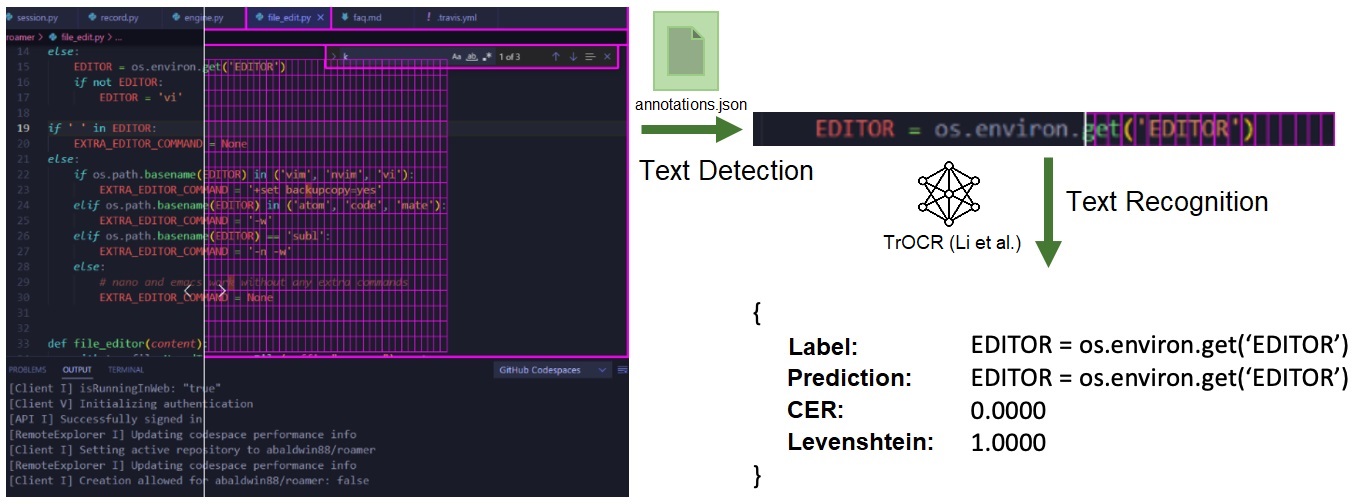 Example of the data used to train the model of this paper: A screenshot of an IDE, where
lines are cropped from using annotation-files that contained the text locations within the im-
age. These code line snippets were then used to train the model. To evaluate the model’s
performance, unseen code snippets from the test set were used to calculate evaluation met-
rics such as CER and Levenshtein distance.
Example of the data used to train the model of this paper: A screenshot of an IDE, where
lines are cropped from using annotation-files that contained the text locations within the im-
age. These code line snippets were then used to train the model. To evaluate the model’s
performance, unseen code snippets from the test set were used to calculate evaluation met-
rics such as CER and Levenshtein distance.
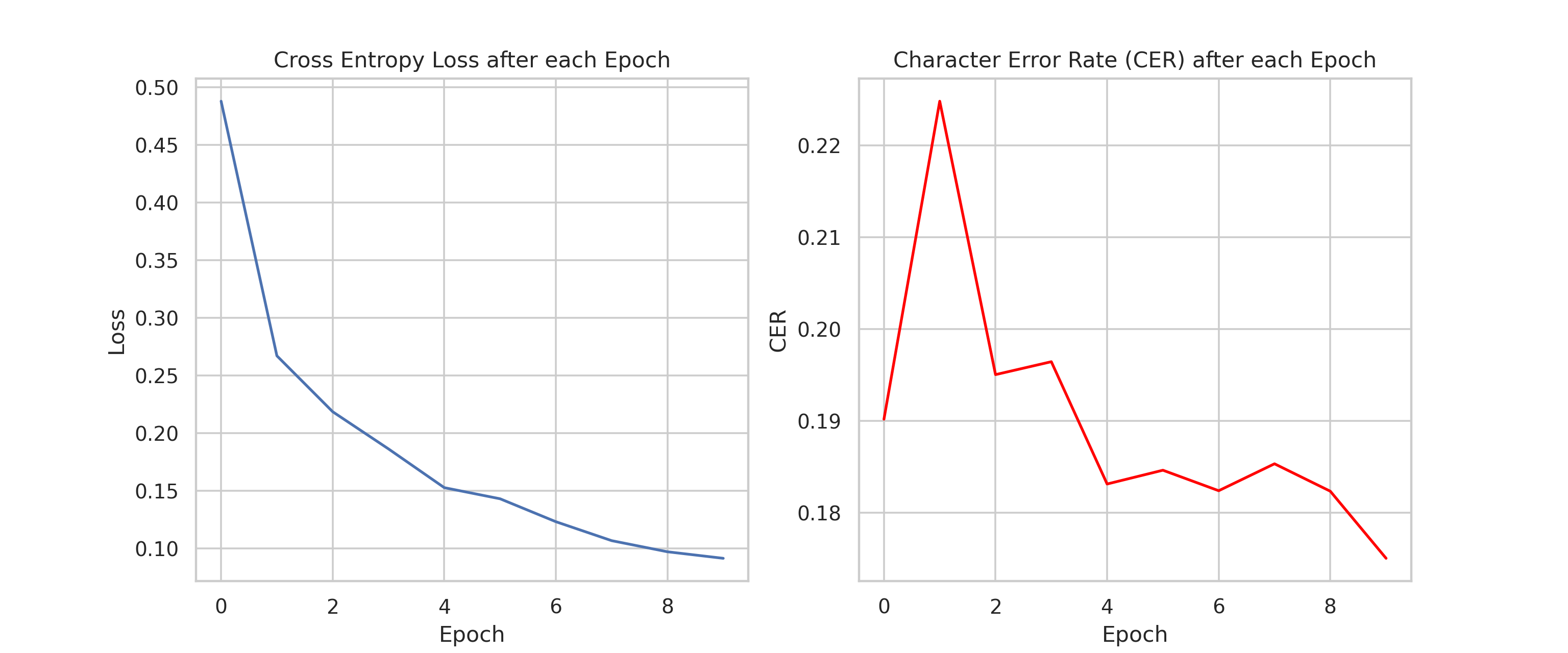 Cross Entropy Loss and mean CER after each epoch. The CER is calculated on the vali-
dation set after each epoch. The model yields a favorable result, but the CER leaves room
for improvement due to noise characters such as ’→’ and ’|’ that the model falsely predicts.
Cross Entropy Loss and mean CER after each epoch. The CER is calculated on the vali-
dation set after each epoch. The model yields a favorable result, but the CER leaves room
for improvement due to noise characters such as ’→’ and ’|’ that the model falsely predicts.
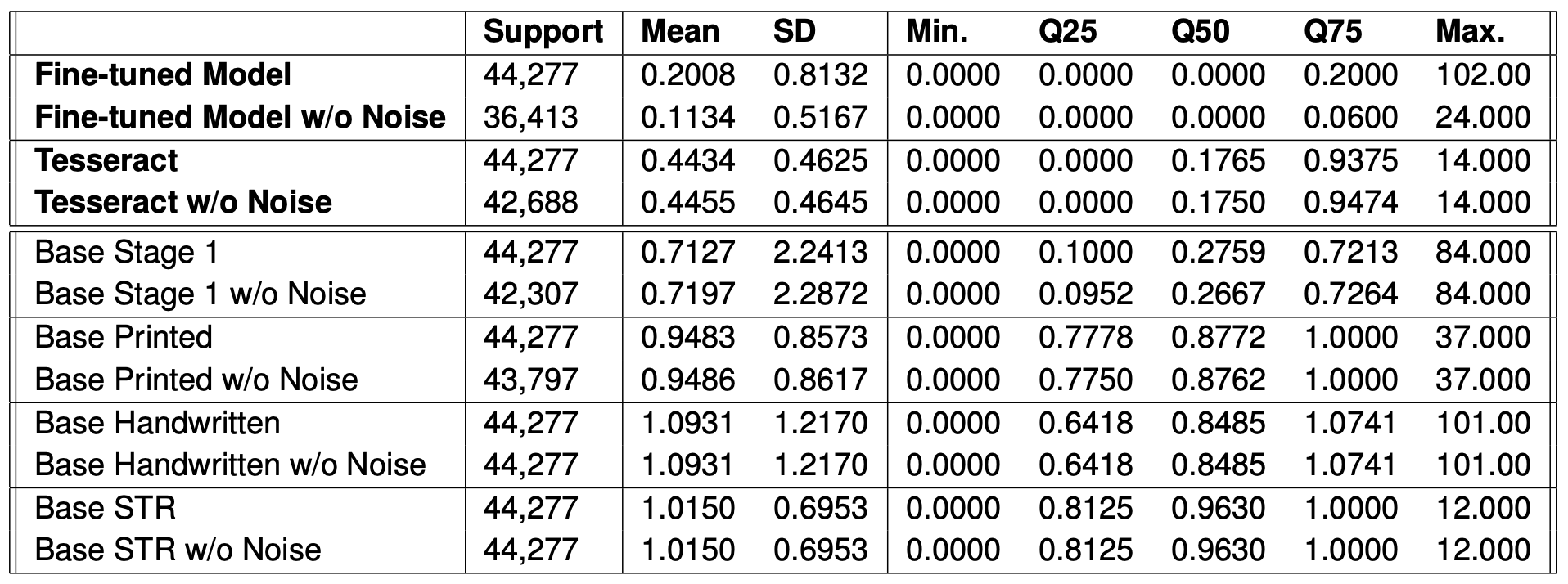 Comparison of the trained model (first two rows), which was fine-tuned on the TROCRBASE -
stage1 model with the Tesseract model and the other stage 2 models by Li et al. For
the evaluation metric the CER was used. All models were tested on the test set consisting
of unseen data samples. With a mean CER of 0.2, our fine-tuned model significantly outper-
formed Tesseract and the other models.
Comparison of the trained model (first two rows), which was fine-tuned on the TROCRBASE -
stage1 model with the Tesseract model and the other stage 2 models by Li et al. For
the evaluation metric the CER was used. All models were tested on the test set consisting
of unseen data samples. With a mean CER of 0.2, our fine-tuned model significantly outper-
formed Tesseract and the other models.
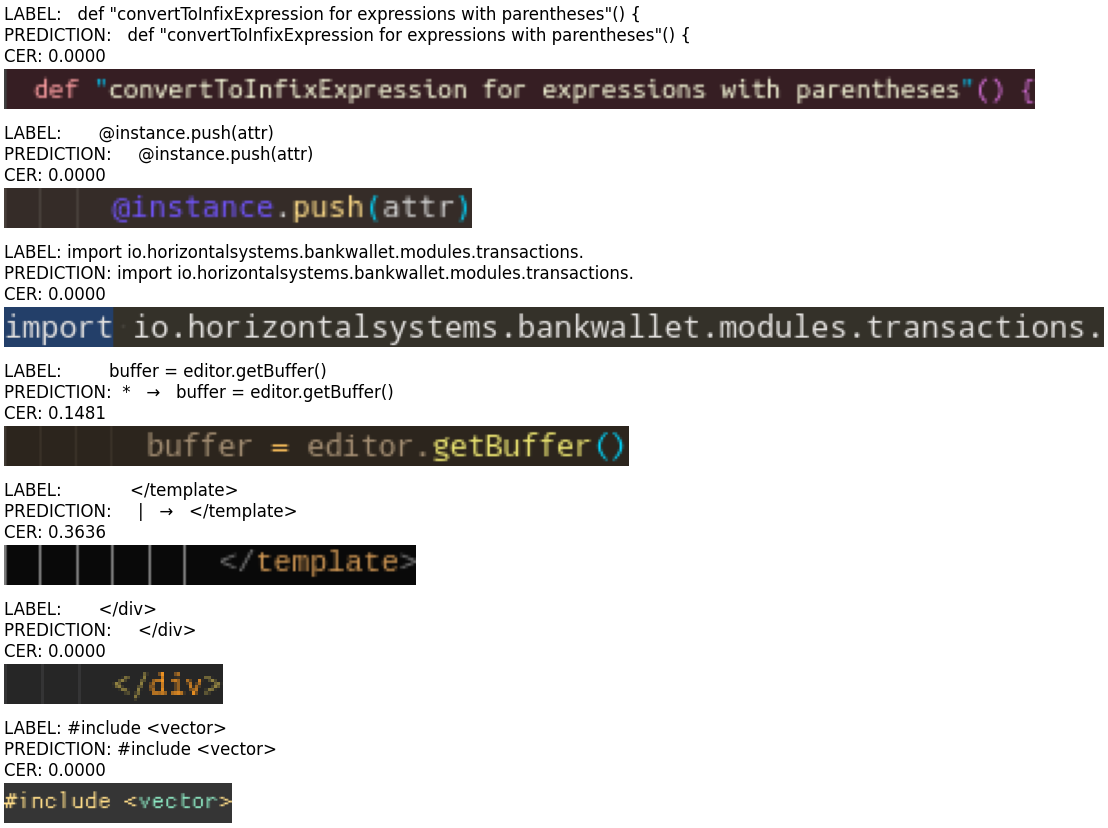 Models prediction on n = 7 random samples from the test set. For each sample, the model
prediction, label, computed CER and input-image is shown. In the third last sample, the model
predicts noise characters that increase the CER significantly, even though the actual text is
transcribed perfectly
Models prediction on n = 7 random samples from the test set. For each sample, the model
prediction, label, computed CER and input-image is shown. In the third last sample, the model
predicts noise characters that increase the CER significantly, even though the actual text is
transcribed perfectly
Operating System: Windows
Python Version: 3.9.15
Environment:
conda create -n trocr python=3.9.15
conda activate trocr
Project:
git clone https://ipe-wim-gitlab.fzi.de/video2code/trocr.git
# cd into project root directory
pip install -r requirements.txt
python setup.py install
To run Notebooks:
python -m ipykernel install --user --name=trocr
jupyter notebook # or open them in VSCode
├── README.md
├── .gitignore
├── requirements.txt
├── setup.py
├── data                                        <-- Folder containing all data files.
│   ├── extracted                               <-- Folder containing extracted data files generated by DataExtractor class.
│   └── raw                                     <-- Folder containing all raw data files. Structure is language/repository/file/relevant_data.
│       ├── language 1
│       │   ├── repo 1
│       │   │   ├── file 1
│       │   │   │   ├── annotations.json        <-- Annotation file, contains metadata about images.
│       │   │   │   ├── info.json               <-- Info file, contains metadata about images.
│       │   │   │   ├── bw.png                  <-- Black and white image.
│       │   │   │   ├── img.png                 <-- Color image.
│       │   │   │   ├── page_bw.html            <-- Black and white image as html-page.
│       │   │   │   ├── page_img.html           <-- Color image as html-page.
│       │   │   │   └── source.txt              <-- Source text within the image.
│       │   │   ├── file 2
│       │   │   └── ...
│       │   ├── repo 2
│       │   └── ...
│       ├── language 2
│       └── ...
│
├── models                                      <-- Our models & checkpoints.
├── notebooks                                   <-- Our notebooks for data analysis & modeling
├── img                                         <-- EDA plots as well as evaluation of our model(s)
└── src
     ├── custom_model.py                        <-- Our custom model based on TrOCR. Contains methods for training, evaluating, and predicting.
     └── data_extraction.py                     <-- Class that handles data extraction from json files.
     └── dataset_iterator.py                    <-- Implementation of PyTorch Dataset and Dataloader for the training of our model
     └── utils.py                               <-- Helper function for our classes
Mirrored Repo of our Seminar Work "Optical Character Recognition on Code Screenshots – Training a Transformer based OCR Engine"
Jupyter Notebook
0
3 commits
updated Feb 27, 2023
Use Case Owner: Alexander Naumann
Team Members:
We fined tuned the TrOCR by Li et al on around 450.000 code snippets and achieved an average CER of around 0.11 (see results table below). The model was splitted into 80-10-10 sets (Train, Validation and Test Set).
Example of the data used to train the model of this paper: A screenshot of an IDE, where
lines are cropped from using annotation-files that contained the text locations within the im-
age. These code line snippets were then used to train the model. To evaluate the model’s
performance, unseen code snippets from the test set were used to calculate evaluation met-
rics such as CER and Levenshtein distance.
Cross Entropy Loss and mean CER after each epoch. The CER is calculated on the vali-
dation set after each epoch. The model yields a favorable result, but the CER leaves room
for improvement due to noise characters such as ’→’ and ’|’ that the model falsely predicts.
Comparison of the trained model (first two rows), which was fine-tuned on the TROCRBASE -
stage1 model with the Tesseract model and the other stage 2 models by Li et al. For
the evaluation metric the CER was used. All models were tested on the test set consisting
of unseen data samples. With a mean CER of 0.2, our fine-tuned model significantly outper-
formed Tesseract and the other models.
Models prediction on n = 7 random samples from the test set. For each sample, the model
prediction, label, computed CER and input-image is shown. In the third last sample, the model
predicts noise characters that increase the CER significantly, even though the actual text is
transcribed perfectly
Operating System: Windows
Python Version: 3.9.15
Environment:
conda create -n trocr python=3.9.15
conda activate trocr
Project:
git clone https://ipe-wim-gitlab.fzi.de/video2code/trocr.git
# cd into project root directory
pip install -r requirements.txt
python setup.py install
To run Notebooks:
python -m ipykernel install --user --name=trocr
jupyter notebook # or open them in VSCode
├── README.md
├── .gitignore
├── requirements.txt
├── setup.py
├── data                                        <-- Folder containing all data files.
│   ├── extracted                               <-- Folder containing extracted data files generated by DataExtractor class.
│   └── raw                                     <-- Folder containing all raw data files. Structure is language/repository/file/relevant_data.
│       ├── language 1
│       │   ├── repo 1
│       │   │   ├── file 1
│       │   │   │   ├── annotations.json        <-- Annotation file, contains metadata about images.
│       │   │   │   ├── info.json               <-- Info file, contains metadata about images.
│       │   │   │   ├── bw.png                  <-- Black and white image.
│       │   │   │   ├── img.png                 <-- Color image.
│       │   │   │   ├── page_bw.html            <-- Black and white image as html-page.
│       │   │   │   ├── page_img.html           <-- Color image as html-page.
│       │   │   │   └── source.txt              <-- Source text within the image.
│       │   │   ├── file 2
│       │   │   └── ...
│       │   ├── repo 2
│       │   └── ...
│       ├── language 2
│       └── ...
│
├── models                                      <-- Our models & checkpoints.
├── notebooks                                   <-- Our notebooks for data analysis & modeling
├── img                                         <-- EDA plots as well as evaluation of our model(s)
└── src
     ├── custom_model.py                        <-- Our custom model based on TrOCR. Contains methods for training, evaluating, and predicting.
     └── data_extraction.py                     <-- Class that handles data extraction from json files.
     └── dataset_iterator.py                    <-- Implementation of PyTorch Dataset and Dataloader for the training of our model
     └── utils.py                               <-- Helper function for our classes




