Open-source AI resume builder & job application tracker. Parse resumes, maintain a master career profile, and generate tailored, ATS-friendly LaTeX & PDF resumes and cover letters using Ollama, OpenRouter, or Pydantic AI.
See the codeOpen-Source AI-Powered Resume Builder & Job Application Tracker
Tailor targeted, ATS-friendly LaTeX & PDF resumes and cover letters using local or remote Ollama models.



Features • Screenshots • Quickstart • Architecture • Ollama Setup • Deployment • Contributing
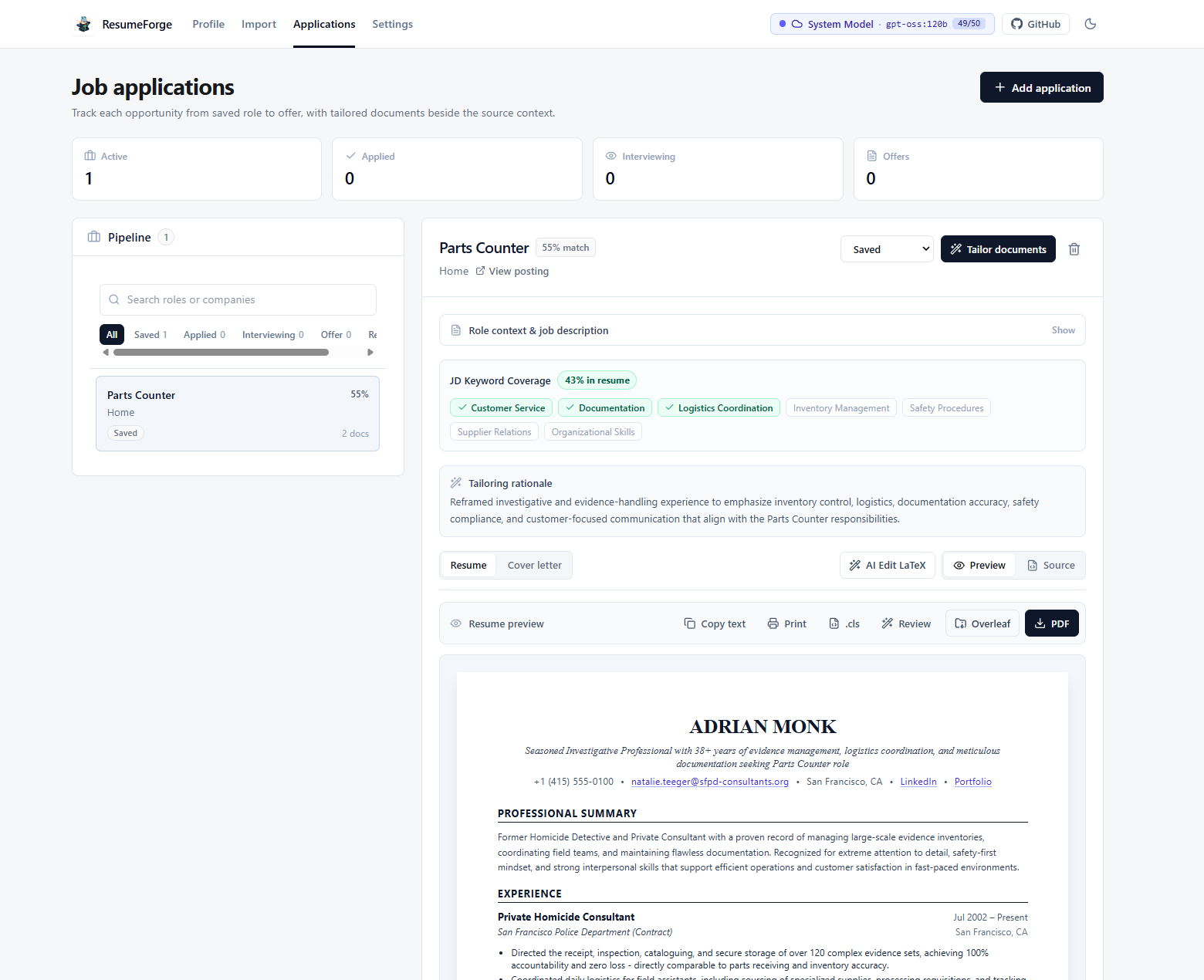
| 1. AI Section Refinement with Word-Level Diffs | 2. Job Tailoring, Keyword Coverage & Live Preview |
|---|---|
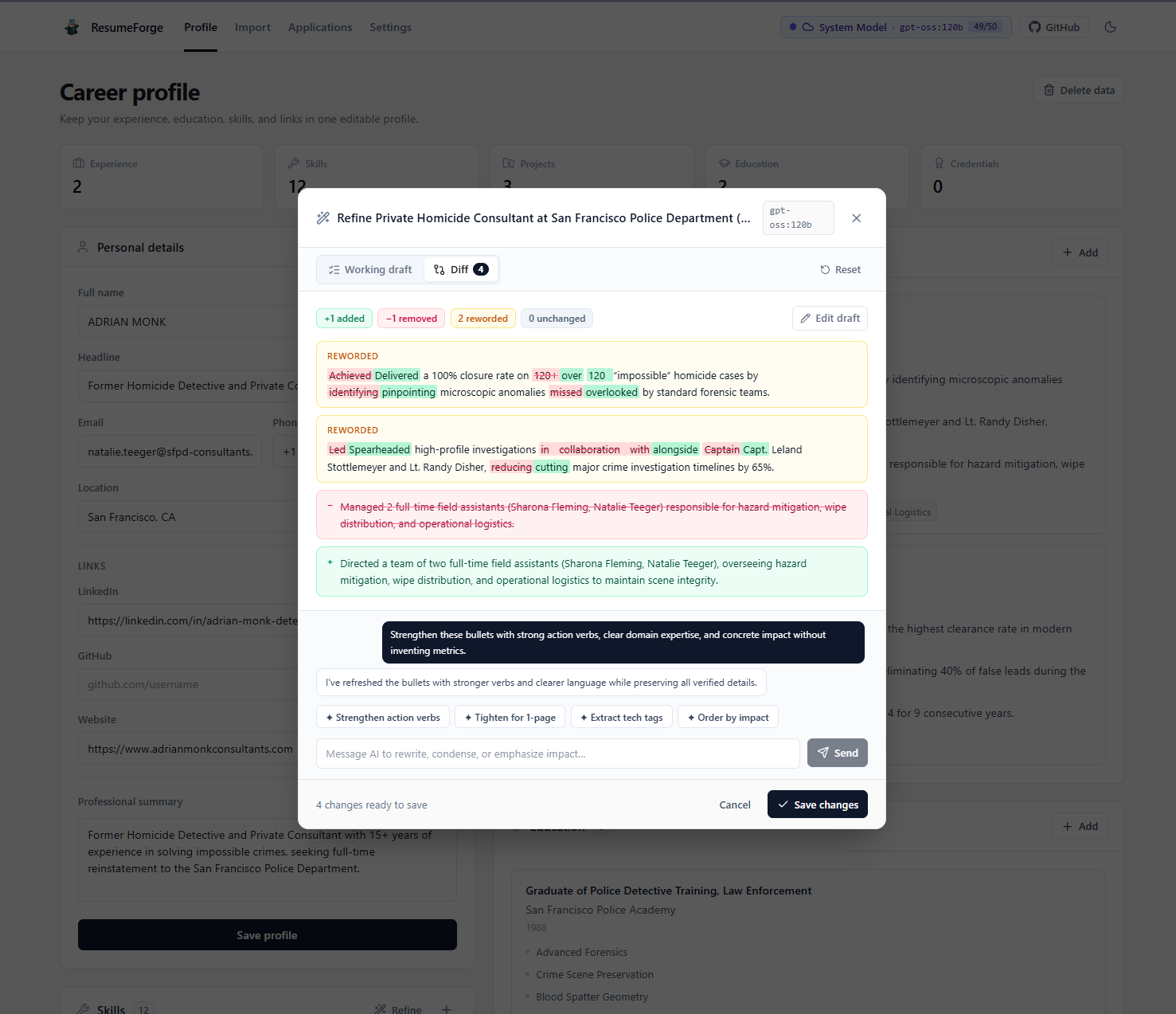 | |
| Iterate on bullet points with AI and inspect word-by-word additions, removals, and rewordings before saving. | Analyze JD keyword coverage, view tailoring rationale, and export ATS-ready LaTeX, Overleaf ZIPs, or PDFs. |
| 3. Resume Import & Auto-Parsing | 4. Master Career Profile |
|---|---|
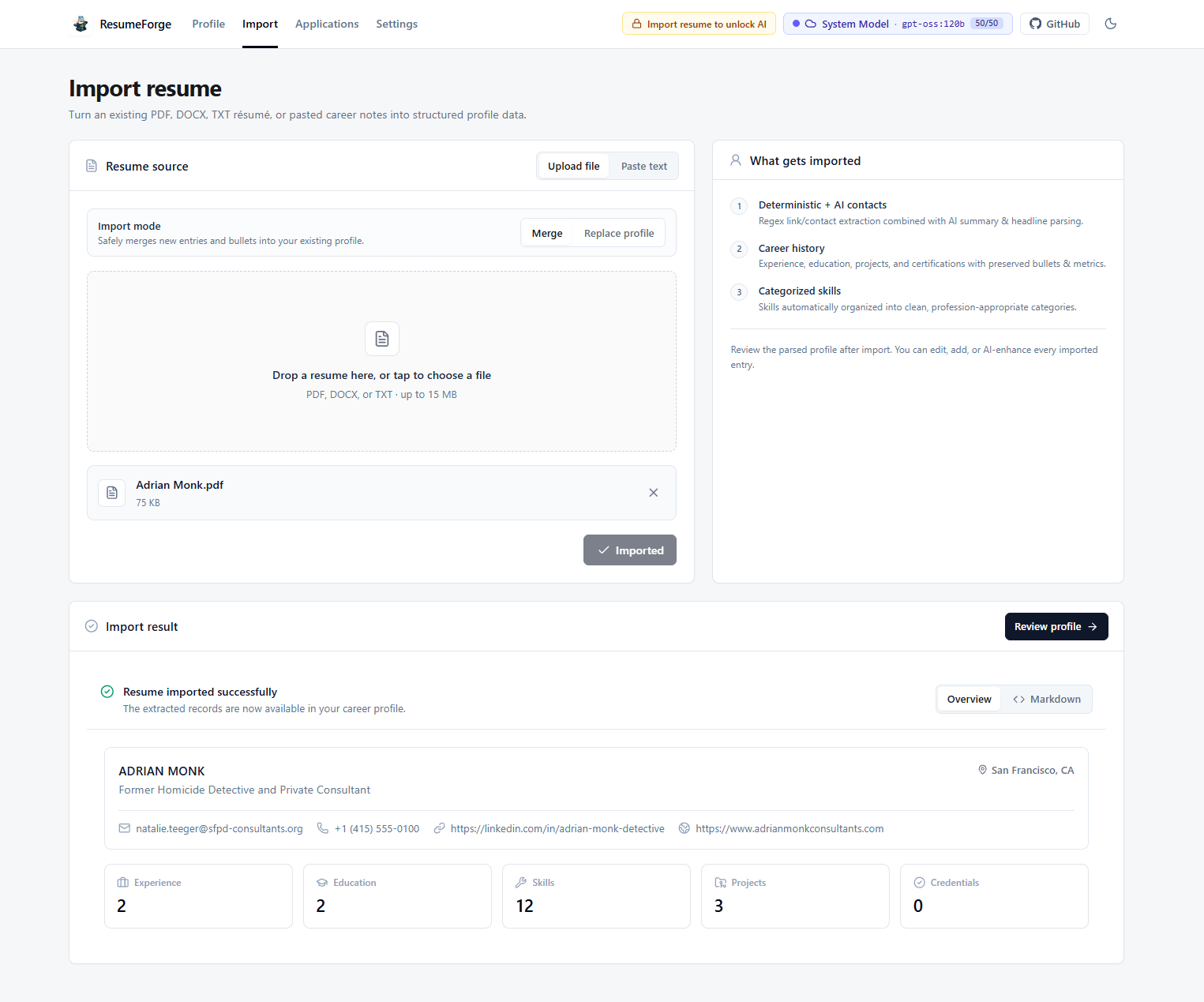 | 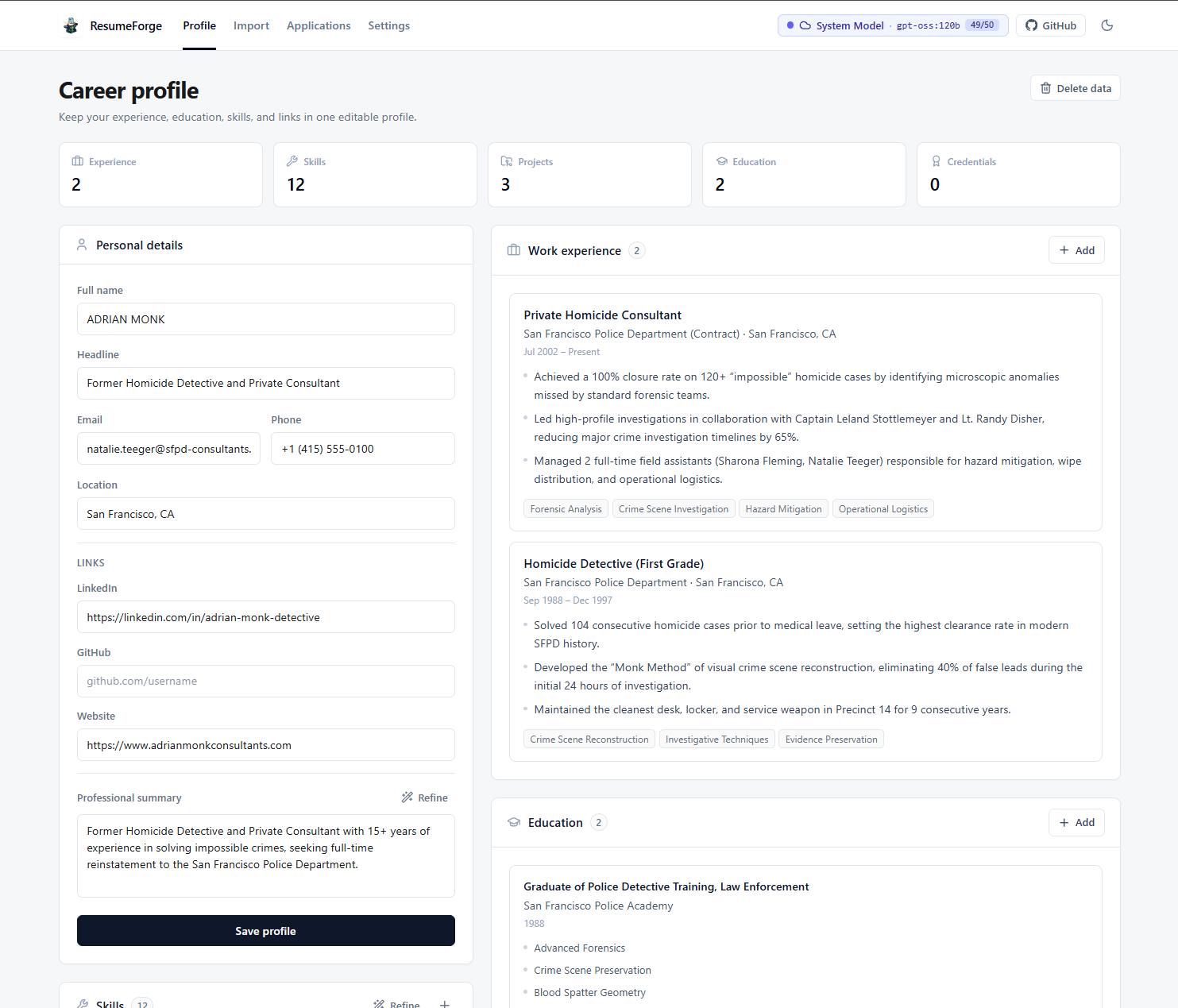 |
| Upload existing PDF, DOCX, or TXT resumes to automatically extract structured career history and skills. | Maintain a single source-of-truth profile with all your roles, achievements, projects, and credentials. |
qwen3.5:9b, llama3, gemma4, etc.) with full privacy, plus optional server-side fallback support.PDF, DOCX, or TXT resumes and automatically extract structured personal info, work experience, skills, education, and projects.pgvector: Unified database storing both relational records and semantic vector embeddings.pgvector and the backend API container automatically)cd into itgit clone https://github.com/naveedkhan1998/resume-forge.git
cd resume-forge
npm i
Default development values work out of the box, or you can copy .env.example to customize ports, database credentials, or LLM endpoints:
cp .env.example .env
npm run dev
That's it! npm run dev uses Nx to concurrently launch:
pgvector with automatic database migrations on startup)If you prefer running the Python backend directly on your host machine using uv:
# 1. Start only the PostgreSQL (pgvector) database container
docker compose up -d db

# 2. Create a Python 3.12 virtual environment and install backend dependencies
uv venv --python 3.12 .venv
uv pip install -e apps/api

# 3. Run database migrations
npm run migrate

# 4. Run frontend and local backend
npm run dev:web        # Terminal 1: http://localhost:4200
npm run dev:api:local  # Terminal 2: http://localhost:8000
All commands are run from the project root after running npm i:
| Command | Description |
|---|---|
npm i | Install all workspace Node.js & Nx dependencies |
npm run dev | Start both Frontend (:4200) and Dockerized Backend + DB (:8000) in parallel |
npm run dev:web | Start only the Vite React frontend (http://localhost:4200) |
npm run dev:api | Build and start the Dockerized API + PostgreSQL (pgvector) stack (http://localhost:8000) |
npm run dev:api:local | Run the Django development server directly from .venv on the host |
npm run build | Build all applications in the monorepo |
npm run build:web | Build the production frontend bundle (dist/apps/web) |
npm run migrate | Run Django database migrations using .venv |
npm run makemigrations | Create new Django database migrations using .venv |
npm run docker:up | Start Docker Compose services in detached mode |
npm run docker:down | Stop and remove Docker Compose containers |
npm run docker:logs | Tail logs from running Docker Compose containers |
Managed with Nx Monorepo:
resume-forge/
├── apps/
│   ├── web/                    # React 19 + Vite + Tailwind CSS v4 + Lucide UI
│   └── api/                    # Django 5 + Django Ninja + PostgreSQL (pgvector)
├── docker/
│   ├── Dockerfile.backend      # Python 3.12 + uv + Gunicorn production/dev image
│   └── entrypoint.sh           # Auto-enables pgvector extension & runs migrations
├── docs/
│   └── screenshots/            # Application UI screenshots for documentation
├── .github/
│   ├── ISSUE_TEMPLATE/         # Bug report & feature request templates
│   ├── PULL_REQUEST_TEMPLATE.md
│   └── workflows/              # CI/CD workflows (Docker Hub automated builds)
├── docker-compose.yml          # PostgreSQL (pgvector) + Backend API services
├── package.json                # Monorepo scripts & dependencies
├── CONTRIBUTING.md             # Contributor guide & workflow
├── CODE_OF_CONDUCT.md          # Contributor Covenant Code of Conduct
├── SECURITY.md                 # Security policy & vulnerability reporting
└── LICENSE                     # MIT License
ollama run qwen3.5:9b
# Or any model of your choice:
# ollama run llama3:latest
# ollama run qwen2.5-coder:14b
http://localhost:11434npm run dev): Use http://host.docker.internal:11434 (configured automatically in docker-compose.yml)0.1 and 0.3. ResumeForge requests structured JSON, validates required fields, and automatically performs a focused repair pass if a model returns malformed JSON.A prebuilt backend image is published via GitHub Actions to Docker Hub:
docker pull naveedkhan1998/resume-forge-backend:latest
The frontend (apps/web) can be deployed directly to Cloudflare Pages:
# Preview production build locally with Wrangler
npm run pages:preview

# Deploy to Cloudflare Pages
npm run pages:deploy
Cloudflare Dashboard Git Integration Settings:
None / Vitenpm run build:webdist/apps/web/We welcome contributions from the community! Whether it's fixing bugs, adding resume templates, improving AI parsing prompts, or enhancing documentation:
Distributed under the MIT License. See LICENSE for full details.
Open-source AI resume builder & job application tracker. Parse resumes, maintain a master career profile, and generate tailored, ATS-friendly LaTeX & PDF resumes and cover letters using Ollama, OpenRouter, or Pydantic AI.
See the codeOpen-Source AI-Powered Resume Builder & Job Application Tracker
Tailor targeted, ATS-friendly LaTeX & PDF resumes and cover letters using local or remote Ollama models.
Features • Screenshots • Quickstart • Architecture • Ollama Setup • Deployment • Contributing
| 1. AI Section Refinement with Word-Level Diffs | 2. Job Tailoring, Keyword Coverage & Live Preview |
|---|---|
| |
| Iterate on bullet points with AI and inspect word-by-word additions, removals, and rewordings before saving. | Analyze JD keyword coverage, view tailoring rationale, and export ATS-ready LaTeX, Overleaf ZIPs, or PDFs. |
| 3. Resume Import & Auto-Parsing | 4. Master Career Profile |
|---|---|
| |
| Upload existing PDF, DOCX, or TXT resumes to automatically extract structured career history and skills. | Maintain a single source-of-truth profile with all your roles, achievements, projects, and credentials. |
qwen3.5:9b, llama3, gemma4, etc.) with full privacy, plus optional server-side fallback support.PDF, DOCX, or TXT resumes and automatically extract structured personal info, work experience, skills, education, and projects.pgvector: Unified database storing both relational records and semantic vector embeddings.pgvector and the backend API container automatically)cd into itgit clone https://github.com/naveedkhan1998/resume-forge.git
cd resume-forge
npm i
Default development values work out of the box, or you can copy .env.example to customize ports, database credentials, or LLM endpoints:
cp .env.example .env
npm run dev
That's it! npm run dev uses Nx to concurrently launch:
pgvector with automatic database migrations on startup)If you prefer running the Python backend directly on your host machine using uv:
# 1. Start only the PostgreSQL (pgvector) database container
docker compose up -d db

# 2. Create a Python 3.12 virtual environment and install backend dependencies
uv venv --python 3.12 .venv
uv pip install -e apps/api

# 3. Run database migrations
npm run migrate

# 4. Run frontend and local backend
npm run dev:web        # Terminal 1: http://localhost:4200
npm run dev:api:local  # Terminal 2: http://localhost:8000
All commands are run from the project root after running npm i:
| Command | Description |
|---|---|
npm i | Install all workspace Node.js & Nx dependencies |
npm run dev | Start both Frontend (:4200) and Dockerized Backend + DB (:8000) in parallel |
npm run dev:web | Start only the Vite React frontend (http://localhost:4200) |
npm run dev:api | Build and start the Dockerized API + PostgreSQL (pgvector) stack (http://localhost:8000) |
npm run dev:api:local | Run the Django development server directly from .venv on the host |
npm run build | Build all applications in the monorepo |
npm run build:web | Build the production frontend bundle (dist/apps/web) |
npm run migrate | Run Django database migrations using .venv |
npm run makemigrations | Create new Django database migrations using .venv |
npm run docker:up | Start Docker Compose services in detached mode |
npm run docker:down | Stop and remove Docker Compose containers |
npm run docker:logs | Tail logs from running Docker Compose containers |
Managed with Nx Monorepo:
resume-forge/
├── apps/
│   ├── web/                    # React 19 + Vite + Tailwind CSS v4 + Lucide UI
│   └── api/                    # Django 5 + Django Ninja + PostgreSQL (pgvector)
├── docker/
│   ├── Dockerfile.backend      # Python 3.12 + uv + Gunicorn production/dev image
│   └── entrypoint.sh           # Auto-enables pgvector extension & runs migrations
├── docs/
│   └── screenshots/            # Application UI screenshots for documentation
├── .github/
│   ├── ISSUE_TEMPLATE/         # Bug report & feature request templates
│   ├── PULL_REQUEST_TEMPLATE.md
│   └── workflows/              # CI/CD workflows (Docker Hub automated builds)
├── docker-compose.yml          # PostgreSQL (pgvector) + Backend API services
├── package.json                # Monorepo scripts & dependencies
├── CONTRIBUTING.md             # Contributor guide & workflow
├── CODE_OF_CONDUCT.md          # Contributor Covenant Code of Conduct
├── SECURITY.md                 # Security policy & vulnerability reporting
└── LICENSE                     # MIT License
ollama run qwen3.5:9b
# Or any model of your choice:
# ollama run llama3:latest
# ollama run qwen2.5-coder:14b
http://localhost:11434npm run dev): Use http://host.docker.internal:11434 (configured automatically in docker-compose.yml)0.1 and 0.3. ResumeForge requests structured JSON, validates required fields, and automatically performs a focused repair pass if a model returns malformed JSON.A prebuilt backend image is published via GitHub Actions to Docker Hub:
docker pull naveedkhan1998/resume-forge-backend:latest
The frontend (apps/web) can be deployed directly to Cloudflare Pages:
# Preview production build locally with Wrangler
npm run pages:preview

# Deploy to Cloudflare Pages
npm run pages:deploy
Cloudflare Dashboard Git Integration Settings:
None / Vitenpm run build:webdist/apps/web/We welcome contributions from the community! Whether it's fixing bugs, adding resume templates, improving AI parsing prompts, or enhancing documentation:
Distributed under the MIT License. See LICENSE for full details.





