A colorful, dark color scheme for Vim.
See the codeA colorful, dark color scheme, inspired by ir_black and twilight.
Designed primarily for a graphical Vim, but includes support for 256, 88, 16,
and 8 color terminals. On a 16 or 8 color terminal, replace its colors with
those in ansi-term-colors.txt for best results.
This script is vimscript #2555 at Vim.org.
Jellybeans has also been ported to other editors and programs, listed on the Ports wiki page.
Scroll down for screenshots!
Install the color scheme by adding it to your ~/.vim/colors directory
mkdir -p ~/.vim/colors
cd ~/.vim/colors
curl -O https://raw.githubusercontent.com/nanotech/jellybeans.vim/master/colors/jellybeans.vim
Jellybeans can also be installed through plugin managers such as dein.vim, Pathogen, VAM, vim-plug, Vundle, etc.
To enable the jellybeans color scheme, use
:colorscheme jellybeans
If you are satisfied, you can add colorscheme jellybeans to your ~/.vimrc file (_vimrc in Windows).
If you prefer slightly different colors from what Jellybeans defines,
you can set g:jellybeans_overrides in your .vimrc to a dictionary of
custom highlighting parameters:
let g:jellybeans_overrides = {
\    'Todo': { 'guifg': '303030', 'guibg': 'f0f000',
\              'ctermfg': 'Black', 'ctermbg': 'Yellow',
\              'attr': 'bold' },
\    'Comment': { 'guifg': 'cccccc' },
\}
This removes the need to edit Jellybeans directly, simplifying upgrades. In addition, RGB colors specified this way are run through the same color approximation algorithm that the core theme uses, so your colors work just as well in 256-color terminals.
If you can pick better colors than the approximator, specify them
in the 256ctermfg and 256ctermbg parameters to override
its choices.
To set a custom background color, override the special
background highlight group:
let g:jellybeans_overrides = {
\    'background': { 'guibg': '000000' },
\}
Jellybeans uses the background color in multiple highlight
groups. Using the special background group overrides them all
at once.
This replaces g:jellybeans_background_color and
g:jellybeans_background_color_256 from Jellybeans versions
before 1.6.
If you would prefer to use your terminal's default background
(e.g. for transparent backgrounds, image backgrounds, or a
different color) instead of the background color that Jellybeans
applies, use this background override code:
let g:jellybeans_overrides = {
\    'background': { 'ctermbg': 'none', '256ctermbg': 'none' },
\}
if has('termguicolors') && &termguicolors
    let g:jellybeans_overrides['background']['guibg'] = 'none'
endif
MatchParen ColorsJellybeans sets alternate MatchParen colors (magenta on black)
in some terminals to be more readable out of the box:
MatchParen background color of #556779 to be
clearly distinguishable.MatchParen background color.If you use Terminal.app with a brighter cursor color, you can
use the standard MatchParen colors with this override:
let g:jellybeans_overrides = {
\    'MatchParen': { 'guifg': 'ffffff', 'guibg': '556779' },
\}
To use the standard MatchParen colors in a 16-color terminal,
configure Low-Color Black as described in the section
below.
If you prefer the alternate MatchParen colors, you can use them
everywhere with
let g:jellybeans_overrides = {
\    'MatchParen': { 'guifg': 'dd0093', 'guibg': '000000',
\                    'ctermfg': 'Magenta', 'ctermbg': '' },
\}
Added in version 1.7.
Jellybeans disables italics in terminal Vim by default, as some terminals do other things with the text's colors instead of actually italicizing the text. If your terminal does fully support italics, add
let g:jellybeans_use_term_italics = 1
to your .vimrc to enable italics in terminal Vim.
If you don't want italics even in GUI Vim, add
let g:jellybeans_use_gui_italics = 0
Since the background on a dark terminal is usually black already, Jellybeans can appropriate the black ANSI color as a dark grey and use no color when it really wants black.
After changing your terminal’s color palette (#444444 is
suggested), add this to your .vimrc:
let g:jellybeans_use_lowcolor_black = 1
This option was changed to be disabled by default in version 1.7.
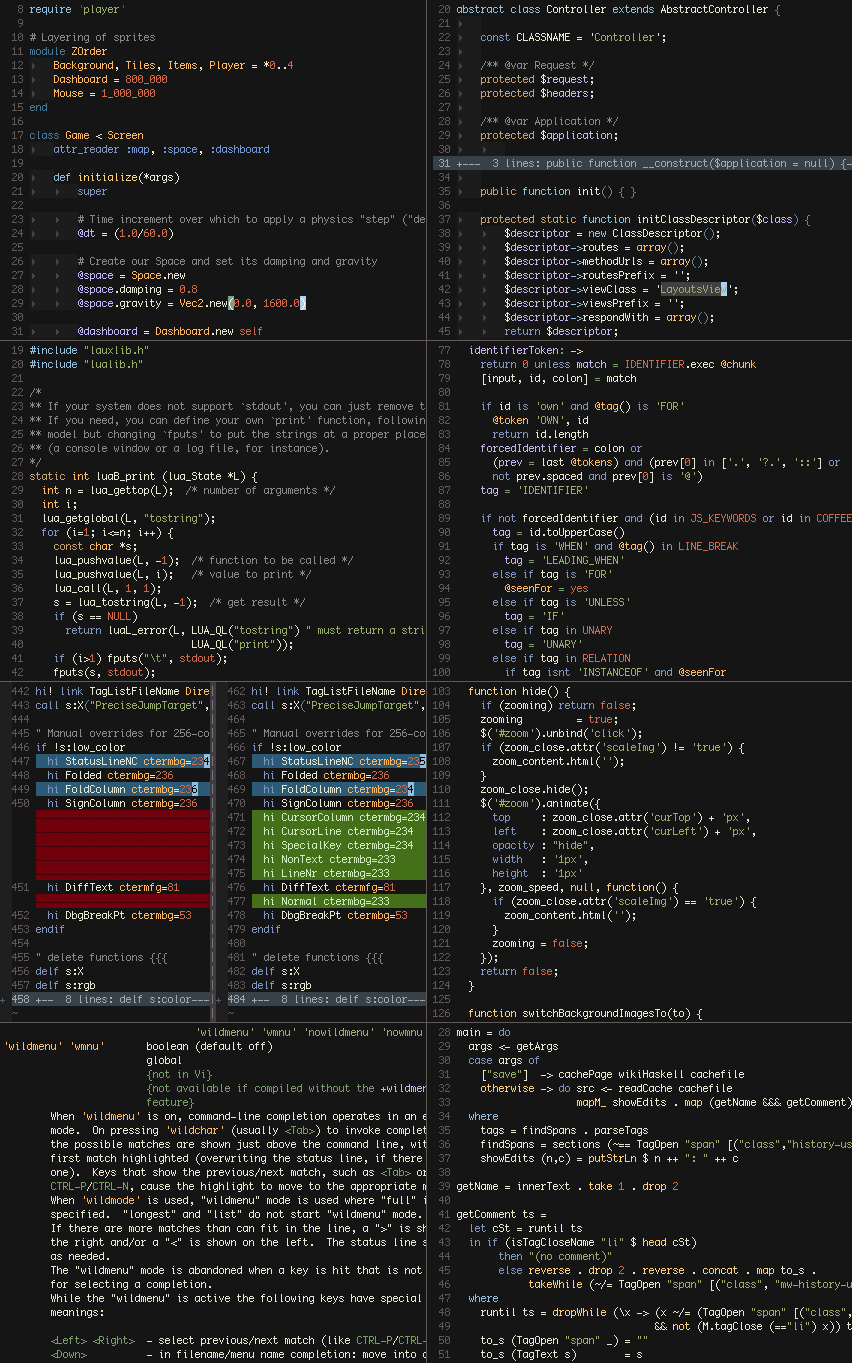
The font in the screenshot is 10pt Monaco:
set guifont=Monaco:h10 noanti
14 followers · starred Mar 2013
399 followers · starred Oct 2015
12 followers · starred May 2017
137 followers · starred Jan 2018
A colorful, dark color scheme for Vim.
See the codeA colorful, dark color scheme, inspired by ir_black and twilight.
Designed primarily for a graphical Vim, but includes support for 256, 88, 16,
and 8 color terminals. On a 16 or 8 color terminal, replace its colors with
those in ansi-term-colors.txt for best results.
This script is vimscript #2555 at Vim.org.
Jellybeans has also been ported to other editors and programs, listed on the Ports wiki page.
Scroll down for screenshots!
Install the color scheme by adding it to your ~/.vim/colors directory
mkdir -p ~/.vim/colors
cd ~/.vim/colors
curl -O https://raw.githubusercontent.com/nanotech/jellybeans.vim/master/colors/jellybeans.vim
Jellybeans can also be installed through plugin managers such as dein.vim, Pathogen, VAM, vim-plug, Vundle, etc.
To enable the jellybeans color scheme, use
:colorscheme jellybeans
If you are satisfied, you can add colorscheme jellybeans to your ~/.vimrc file (_vimrc in Windows).
If you prefer slightly different colors from what Jellybeans defines,
you can set g:jellybeans_overrides in your .vimrc to a dictionary of
custom highlighting parameters:
let g:jellybeans_overrides = {
\    'Todo': { 'guifg': '303030', 'guibg': 'f0f000',
\              'ctermfg': 'Black', 'ctermbg': 'Yellow',
\              'attr': 'bold' },
\    'Comment': { 'guifg': 'cccccc' },
\}
This removes the need to edit Jellybeans directly, simplifying upgrades. In addition, RGB colors specified this way are run through the same color approximation algorithm that the core theme uses, so your colors work just as well in 256-color terminals.
If you can pick better colors than the approximator, specify them
in the 256ctermfg and 256ctermbg parameters to override
its choices.
To set a custom background color, override the special
background highlight group:
let g:jellybeans_overrides = {
\    'background': { 'guibg': '000000' },
\}
Jellybeans uses the background color in multiple highlight
groups. Using the special background group overrides them all
at once.
This replaces g:jellybeans_background_color and
g:jellybeans_background_color_256 from Jellybeans versions
before 1.6.
If you would prefer to use your terminal's default background
(e.g. for transparent backgrounds, image backgrounds, or a
different color) instead of the background color that Jellybeans
applies, use this background override code:
let g:jellybeans_overrides = {
\    'background': { 'ctermbg': 'none', '256ctermbg': 'none' },
\}
if has('termguicolors') && &termguicolors
    let g:jellybeans_overrides['background']['guibg'] = 'none'
endif
MatchParen ColorsJellybeans sets alternate MatchParen colors (magenta on black)
in some terminals to be more readable out of the box:
MatchParen background color of #556779 to be
clearly distinguishable.MatchParen background color.If you use Terminal.app with a brighter cursor color, you can
use the standard MatchParen colors with this override:
let g:jellybeans_overrides = {
\    'MatchParen': { 'guifg': 'ffffff', 'guibg': '556779' },
\}
To use the standard MatchParen colors in a 16-color terminal,
configure Low-Color Black as described in the section
below.
If you prefer the alternate MatchParen colors, you can use them
everywhere with
let g:jellybeans_overrides = {
\    'MatchParen': { 'guifg': 'dd0093', 'guibg': '000000',
\                    'ctermfg': 'Magenta', 'ctermbg': '' },
\}
Added in version 1.7.
Jellybeans disables italics in terminal Vim by default, as some terminals do other things with the text's colors instead of actually italicizing the text. If your terminal does fully support italics, add
let g:jellybeans_use_term_italics = 1
to your .vimrc to enable italics in terminal Vim.
If you don't want italics even in GUI Vim, add
let g:jellybeans_use_gui_italics = 0
Since the background on a dark terminal is usually black already, Jellybeans can appropriate the black ANSI color as a dark grey and use no color when it really wants black.
After changing your terminal’s color palette (#444444 is
suggested), add this to your .vimrc:
let g:jellybeans_use_lowcolor_black = 1
This option was changed to be disabled by default in version 1.7.
The font in the screenshot is 10pt Monaco:
set guifont=Monaco:h10 noanti
14 followers · starred Mar 2013
399 followers · starred Oct 2015
12 followers · starred May 2017
137 followers · starred Jan 2018