
:maple_leaf: Comfortable & Pleasant Color Scheme for Vim
Vim Script
247
24 commits
updated Nov 18, 2021
README
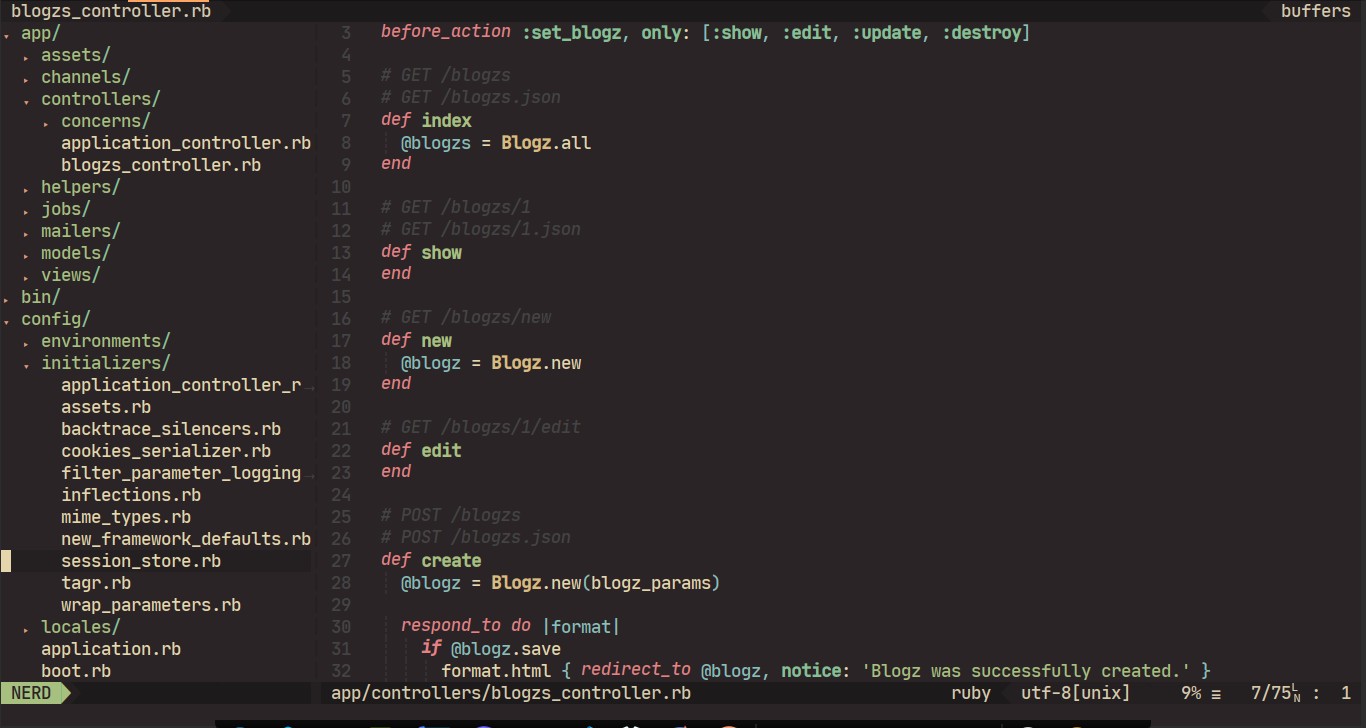
Ruby on Rails
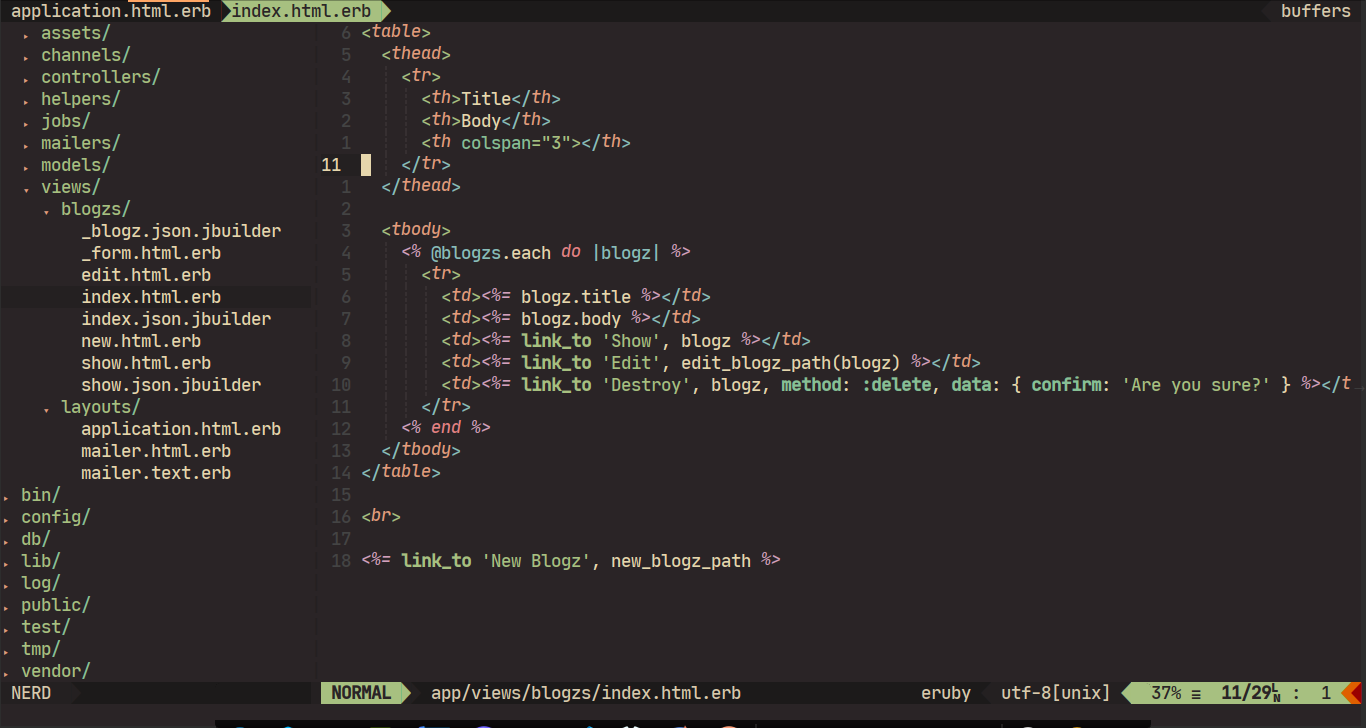
Html
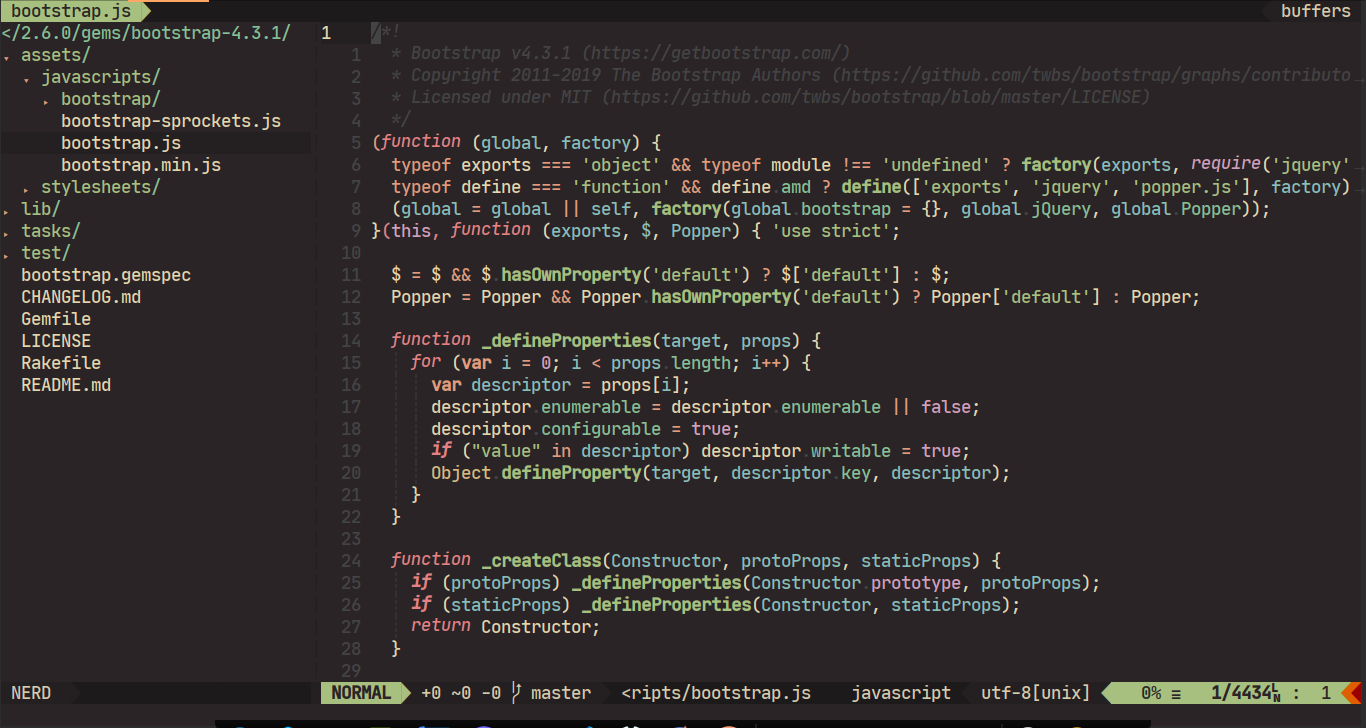
Javascript
Sass
Features
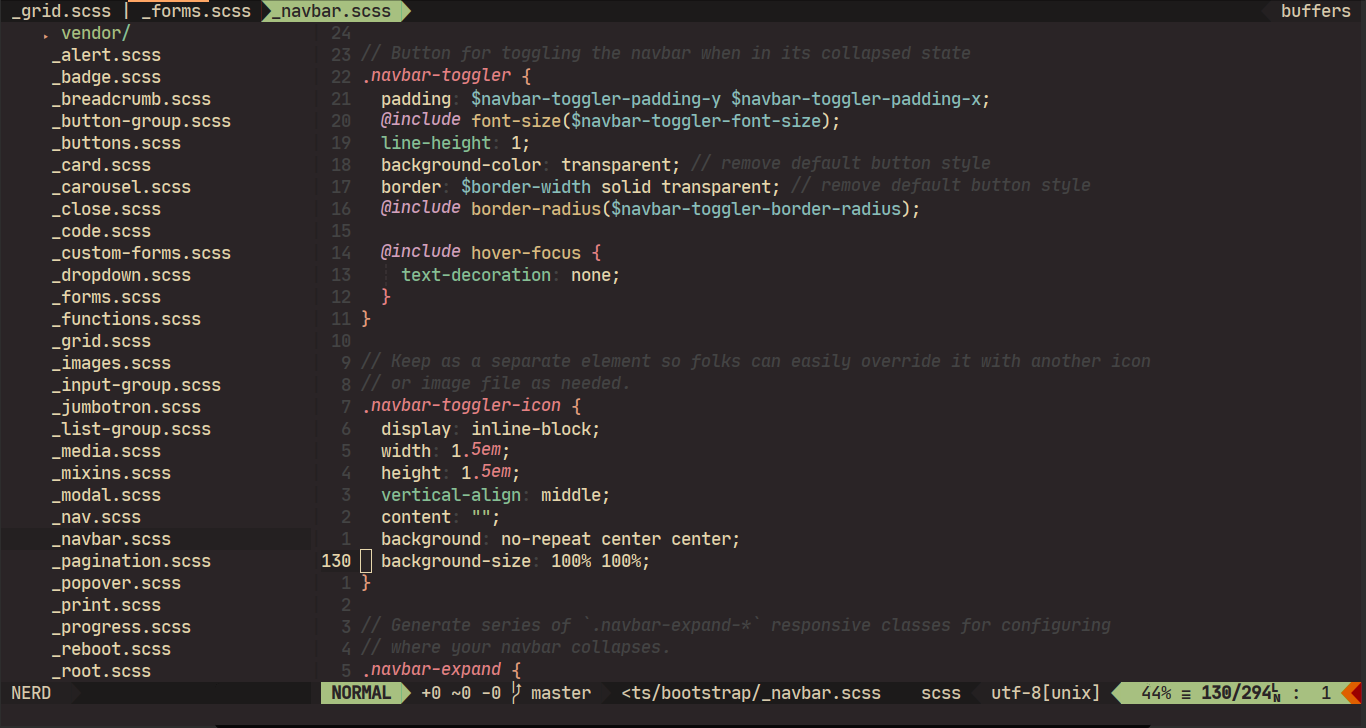
- Dark brownish warm-toned.
- Soft contrast.
- Customizable.
- Rich support for common file types and plugins.
Installation
Via Plugin Manager
Take vim-plug for example:
Plug 'franbach/miramare'
For better syntax highlighting support, please install sheerun/vim-polyglot.
Vim 8 packages
Add packloadall to your .vimrc (if you haven't already):
.vimrc:
packloadall
Clone miramare into your ./vim/pack/plugins/start directory:
mkdir -p ~/.vim/pack/plugins/start
git clone https://github.com/franbach/miramare.git ~/.vim/pack/plugins/start/miramare
Manually
- Clone this repository.
- Copy
/path/to/miramare/colors/miramare.vimto~/.vim/colors/miramare.vim - To install airline theme, copy
/path/to/miramare/autoload/airline/themes/miramare.vimto~/.vim/autoload/airline/themes/miramare.vim
Usage
Vim
Put this in your vimrc:
" important!!
set termguicolors

" the configuration options should be placed before `colorscheme miramare`
let g:miramare_enable_italic = 1
let g:miramare_disable_italic_comment = 1

colorscheme miramare
See Configuration for more options.
If you want to apply this color scheme temporarily, run this command in vim(this may cause color broken):
:colorscheme miramare
Airline
To enable airline color scheme, put this in your vimrc:
let g:airline_theme = 'miramare'
To apply it without reloading:
:AirlineTheme miramare
Configuration
Note: The configuration options should be placed before colorscheme miramare .
g:miramare_transparent_background: Set to1to enable transparent background.- Available values:
0,1 - Default value:
0
- Available values:
g:miramare_enable_italic_string: Set to1to enable italic inString.- Available values:
0,1 - Default value:
0
- Available values:
g:miramare_disable_italic_comment: Set to1to disable italic inComment.- Available values:
0,1 - Default value:
0
- Available values:
g:miramare_enable_italic: Set to1to italicize keywords. This option is designed to use with fonts that support cursive italic styles, for example Fira Code iCursive Op.- Available values:
0,1 - Default value:
0
- Available values:
g:miramare_enable_bold: Set to1to enable bold inType,Function,Constant.- Available values:
0,1 - Default value:
1
- Available values:
g:miramare_cursor: Customize the cursor color, only works in GUI clients.- Available values:
'auto','red','green','blue','purple' - Default value:
'auto'
- Available values:
g:miramare_current_word: Some plugins can highlight the word under current cursor(for example neoclide/coc-highlight), you can use this option to control their behavior.- Available values:
'bold','underline','italic','grey background' - Default value:
'grey background'when not in transparent mode,'bold'when in transparent mode.
- Available values:
g:miramare_palette: overwrite colors - sees:palettein ./colors/miramare.vim- Example (sets a lighter grey):
let g:miramare_palette = {'light_grey': ['#c0c0c0', '245', 'LightGrey']}
- Example (sets a lighter grey):
FAQ
Q: It doesn't work as expected.
A:
- This color scheme is mainly designed for true colors,
set termguicolorsis required. Check output ofvim --version, maybe your vim doesn't supporttermguicolors. - Maybe your terminal emulator doesn't support true colors, you can test it using this script.
- If you are running vim in tmux, you need to override default true colors of tmux, as tmux cannot display true colors properly: #1246 How to use true colors in vim under tmux?
- There are many highlight group links in syntax files while a color scheme may change them, enabling one color scheme based on another color scheme enabled is very likely to cause colors to break. If any color is broken, you can enable the color scheme in your vimrc instead of after vim startup.
Q: Which font am I using?
A:
- JetBrains Mono Medium (Patched - Nerd Fonts) Jetbrains.
- Enable italic keywords in this color scheme:
let g:miramare_enable_italic = 1 - Disable italic comment(optional):
let g:miramare_disable_italic_comment = 1
Inspirations
THANKS
- Creator of "Forest Night" theme. Used it to figure out how the Vim color schemes work in practise.
License
MIT © franbach
Contributors


Similar repos


Languages
Vim Script
100.0%
:maple_leaf: Comfortable & Pleasant Color Scheme for Vim
Vim Script
247
24 commits
updated Nov 18, 2021
README
Ruby on Rails
Html
Javascript
Sass
Features
- Dark brownish warm-toned.
- Soft contrast.
- Customizable.
- Rich support for common file types and plugins.
Installation
Via Plugin Manager
Take vim-plug for example:
Plug 'franbach/miramare'
For better syntax highlighting support, please install sheerun/vim-polyglot.
Vim 8 packages
Add packloadall to your .vimrc (if you haven't already):
.vimrc:
packloadall
Clone miramare into your ./vim/pack/plugins/start directory:
mkdir -p ~/.vim/pack/plugins/start
git clone https://github.com/franbach/miramare.git ~/.vim/pack/plugins/start/miramare
Manually
- Clone this repository.
- Copy
/path/to/miramare/colors/miramare.vimto~/.vim/colors/miramare.vim - To install airline theme, copy
/path/to/miramare/autoload/airline/themes/miramare.vimto~/.vim/autoload/airline/themes/miramare.vim
Usage
Vim
Put this in your vimrc:
" important!!
set termguicolors

" the configuration options should be placed before `colorscheme miramare`
let g:miramare_enable_italic = 1
let g:miramare_disable_italic_comment = 1

colorscheme miramare
See Configuration for more options.
If you want to apply this color scheme temporarily, run this command in vim(this may cause color broken):
:colorscheme miramare
Airline
To enable airline color scheme, put this in your vimrc:
let g:airline_theme = 'miramare'
To apply it without reloading:
:AirlineTheme miramare
Configuration
Note: The configuration options should be placed before colorscheme miramare .
g:miramare_transparent_background: Set to1to enable transparent background.- Available values:
0,1 - Default value:
0
- Available values:
g:miramare_enable_italic_string: Set to1to enable italic inString.- Available values:
0,1 - Default value:
0
- Available values:
g:miramare_disable_italic_comment: Set to1to disable italic inComment.- Available values:
0,1 - Default value:
0
- Available values:
g:miramare_enable_italic: Set to1to italicize keywords. This option is designed to use with fonts that support cursive italic styles, for example Fira Code iCursive Op.- Available values:
0,1 - Default value:
0
- Available values:
g:miramare_enable_bold: Set to1to enable bold inType,Function,Constant.- Available values:
0,1 - Default value:
1
- Available values:
g:miramare_cursor: Customize the cursor color, only works in GUI clients.- Available values:
'auto','red','green','blue','purple' - Default value:
'auto'
- Available values:
g:miramare_current_word: Some plugins can highlight the word under current cursor(for example neoclide/coc-highlight), you can use this option to control their behavior.- Available values:
'bold','underline','italic','grey background' - Default value:
'grey background'when not in transparent mode,'bold'when in transparent mode.
- Available values:
g:miramare_palette: overwrite colors - sees:palettein ./colors/miramare.vim- Example (sets a lighter grey):
let g:miramare_palette = {'light_grey': ['#c0c0c0', '245', 'LightGrey']}
- Example (sets a lighter grey):
FAQ
Q: It doesn't work as expected.
A:
- This color scheme is mainly designed for true colors,
set termguicolorsis required. Check output ofvim --version, maybe your vim doesn't supporttermguicolors. - Maybe your terminal emulator doesn't support true colors, you can test it using this script.
- If you are running vim in tmux, you need to override default true colors of tmux, as tmux cannot display true colors properly: #1246 How to use true colors in vim under tmux?
- There are many highlight group links in syntax files while a color scheme may change them, enabling one color scheme based on another color scheme enabled is very likely to cause colors to break. If any color is broken, you can enable the color scheme in your vimrc instead of after vim startup.
Q: Which font am I using?
A:
- JetBrains Mono Medium (Patched - Nerd Fonts) Jetbrains.
- Enable italic keywords in this color scheme:
let g:miramare_enable_italic = 1 - Disable italic comment(optional):
let g:miramare_disable_italic_comment = 1
Inspirations
THANKS
- Creator of "Forest Night" theme. Used it to figure out how the Vim color schemes work in practise.
License
MIT © franbach
Similar repos
Contributors
Languages
Vim Script
100.0%