
nanoMuse: a fully open-source, Muse-style personal agent for every device you own. One agent with a name and a face that does things, keeps working while the app is closed, remembers you, and asks before anything you cannot undo. On your Android phone today, with your own model; the phone's screen as a hand, and your PC driven from the phone.
See the codeREADME
nanoMuse
A fully open-source, Muse-style personal agent for every device you own.




nanoMuse is a fully open-source, Muse-style personal agent for every device you own: one agent with a name and a look of its own, like Meta's Muse, that does things instead of answering questions, keeps working while the app is closed, remembers you, and stops to ask before anything you could not undo. The Android app runs the whole agent on the phone: a Linux root file system, a shell, a browser, MCP, skills and scheduled tasks inside the APK, with a model you bring. It has hands for the apps that never had an API — the phone's own screen, with your permission — and reaches your computer: say it on the phone, it gets done there. A desktop app, iOS, a self-hosted web version and glasses come next. No server, no account, GPL-3.0 — and a base you can build your own Muse on.

Why nanoMuse
Four things define the project.
| Muse-style | One agent, not a toolbox: a name and a look of its own, a first conversation, a feed written for you, goals worked on in the background, memory you can read and edit, an approval before anything you could not undo. |
| Fully open | GPL-3.0-or-later, the whole repository. No closed component, no account, no server you have to trust, no model you have to use; every release is built from its tag and installed by hand. Muse, 豆包 and 千问 are products you are given; nanoMuse is one you own — and a base to build your own Muse on: rename it, redraw it, rewrite its personality, wire in your own models and tools. |
| Any app, API or not | Most of a day in China runs through apps that never had an API. The agent climbs a ladder — a skill, a CLI or an MCP server first, then a page fetched with your login, then the in-app browser, and, when you allow it, the device's own screen, looking and tapping the way you would — with the same approvals before paying, sending or deleting. Off by default. |
| Every device | One agent, and every device you own is a pair of hands and a front door: say it on the phone, it happens on your PC; say it to your glasses, it happens on both. The phone drives your computer already; a desktop app, iOS, the web on a machine of your own and glasses follow. |
How this compares with Muse and with OpenMinis, the runtime the app is built on: below. The plan and its reasoning: docs/roadmap.md.
Install
- Download
nanoMuse-<version>-arm64.apkfrom the latest release — Android 8.0 or newer, a 64-bit phone. Verify withsha256sum -c nanoMuse-<version>-arm64.apk.sha256if you like. - Open it. Android asks once to allow the install; every version is signed with the same key, so updates install over the previous one and keep your data.
- Add a model: any OpenAI-compatible endpoint with your own key, or one of the OAuth sign-ins the app ships with. The first conversation asks what to call you and lets the agent pick its own name.
- Optional — Settings → Image & video models: an image model (qwen-image-3.0 on Alibaba Cloud Model Studio, gpt-image-1, or any provider with the OpenAI images endpoint) lets the agent change its look and draw pictures; a video model (MiniMax-H3 on Model Studio) makes the look move. Muse has these built in; nanoMuse uses your own, and the agent tells you when one is missing.
The app checks this repository's releases for updates. Release notes for each version are in docs/releases/ and the CHANGELOG.
What it does
| Does things | A Linux shell, a browser, MCP servers, skills in the Agent Skills format, and — when you switch Hands on — the apps on your phone through their screens: a screenshot, one action, another screenshot, with a ladder that tries APIs first, a take-over for logins and the same approvals (0.1.12). The agent picks the hand the job needs and shows each step as a card you can open. |
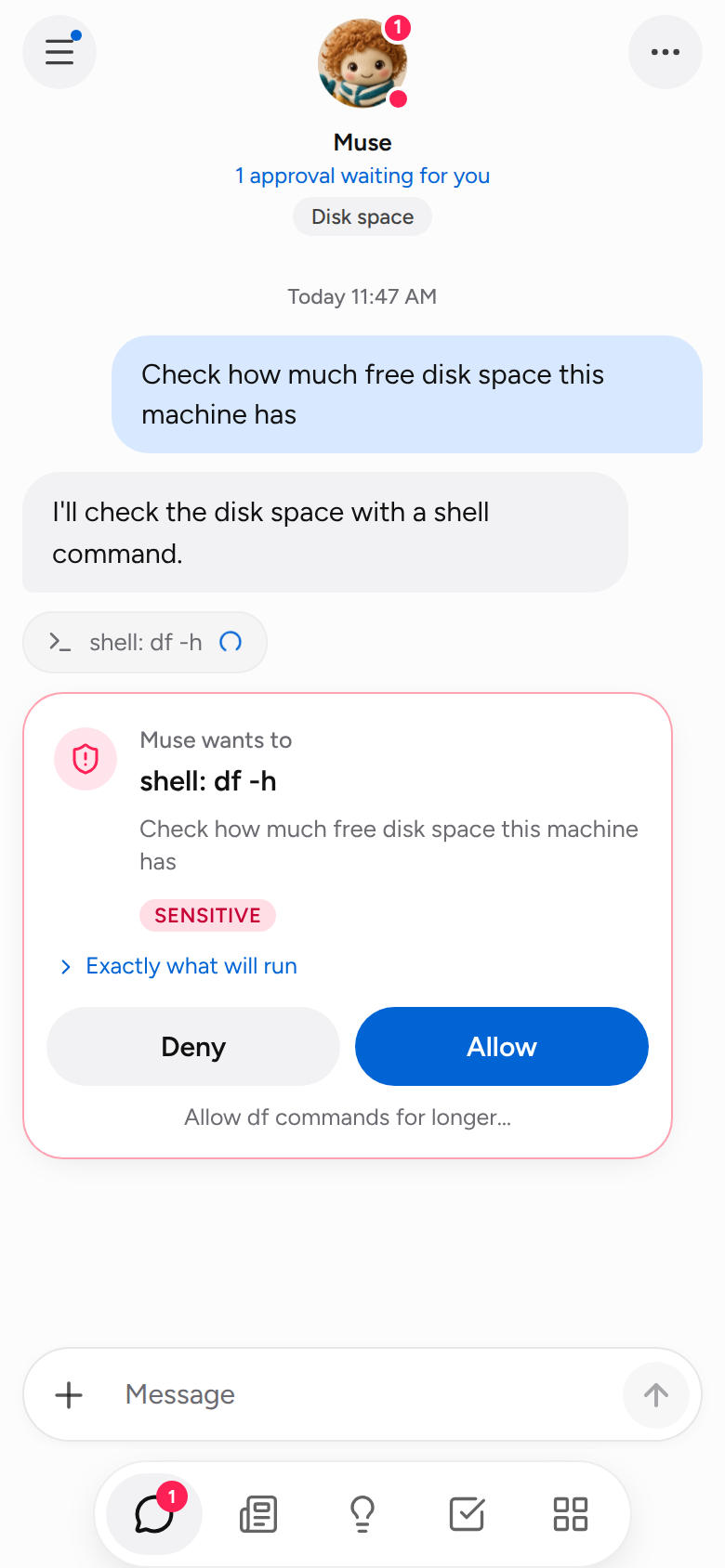
| Asks first | A stop before deleting, sending or paying — in the shell and in the browser — with an approval you scope to once, this chat, or always for this recipient, domain or folder, and can revoke under Permissions. Passwords and verification codes are always yours to type. |
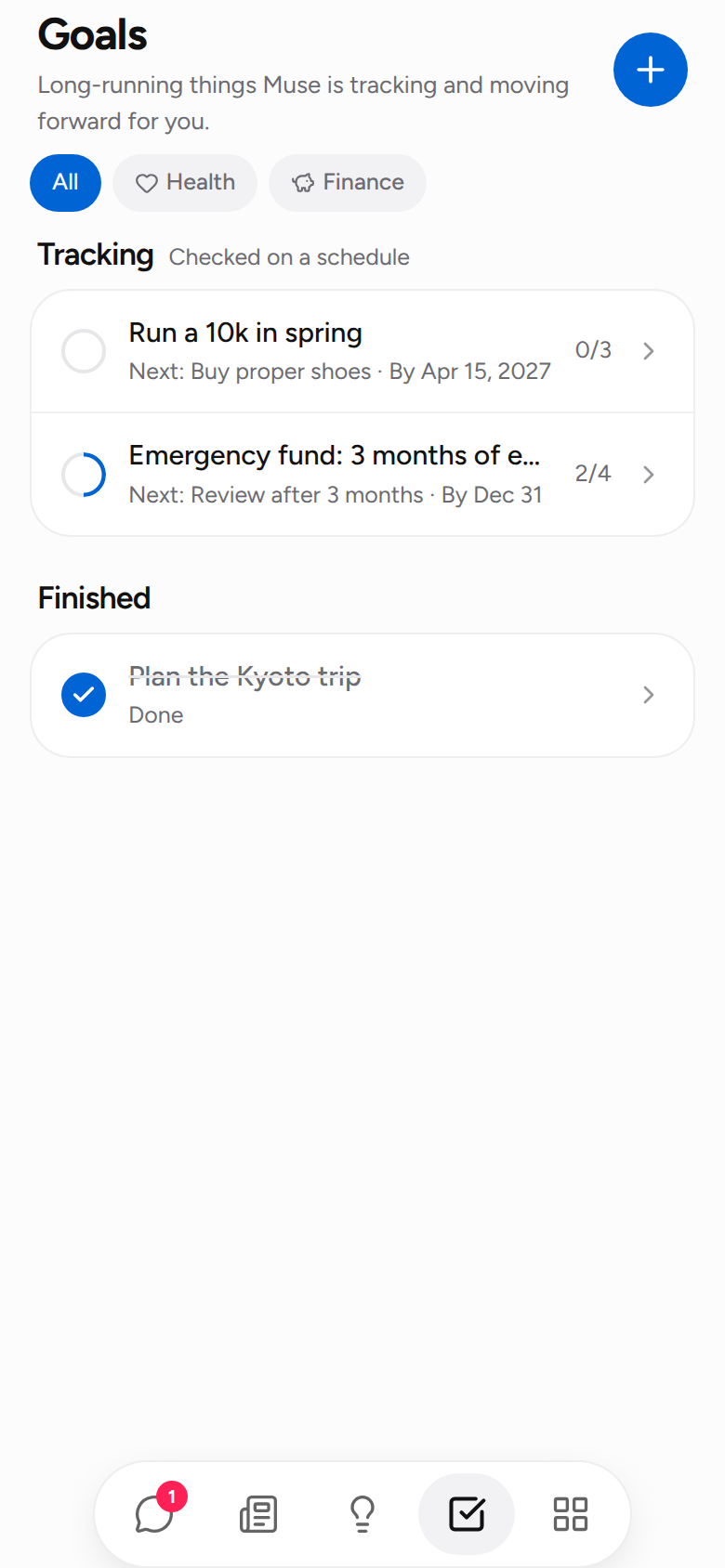
| Keeps going | Goals are shaped in the chat and checked on a schedule in their own conversation; routines run while the app is closed; the screen stays on while it drives the phone; at 200 steps it asks "continue?" instead of wrapping up early. |
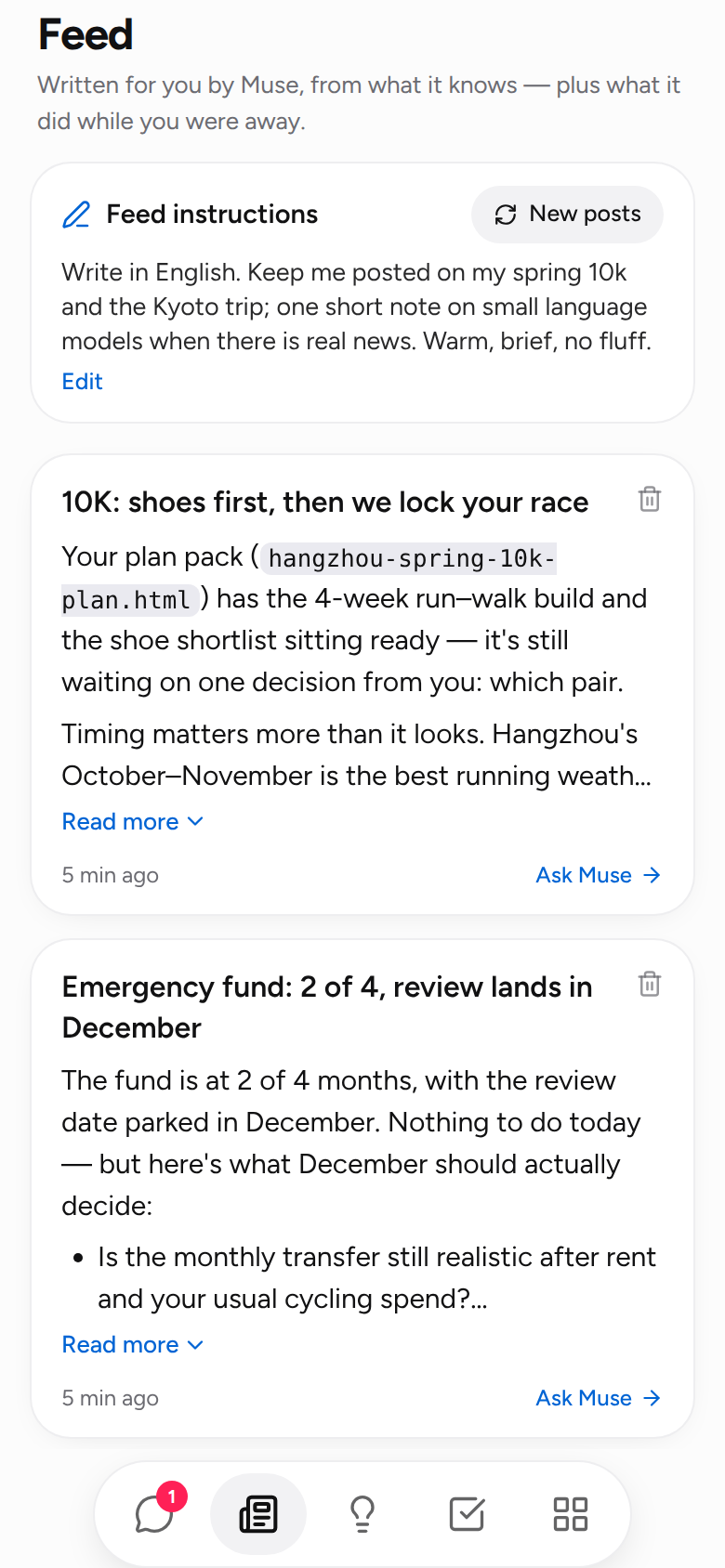
| Writes you a feed | Every morning, three to six short posts from what it knows about you and what you asked it to follow, as cards you can like, discuss in a side chat, or delete. One sentence steers it. |
| Remembers you | Who it is (SOUL.md), what it knows about you (USER.md), what it remembers (GLOBAL.md and a diary) and when it wakes (HEARTBEAT.md) are files you can read and edit in the app. Bring what another assistant knew with Import memory. |
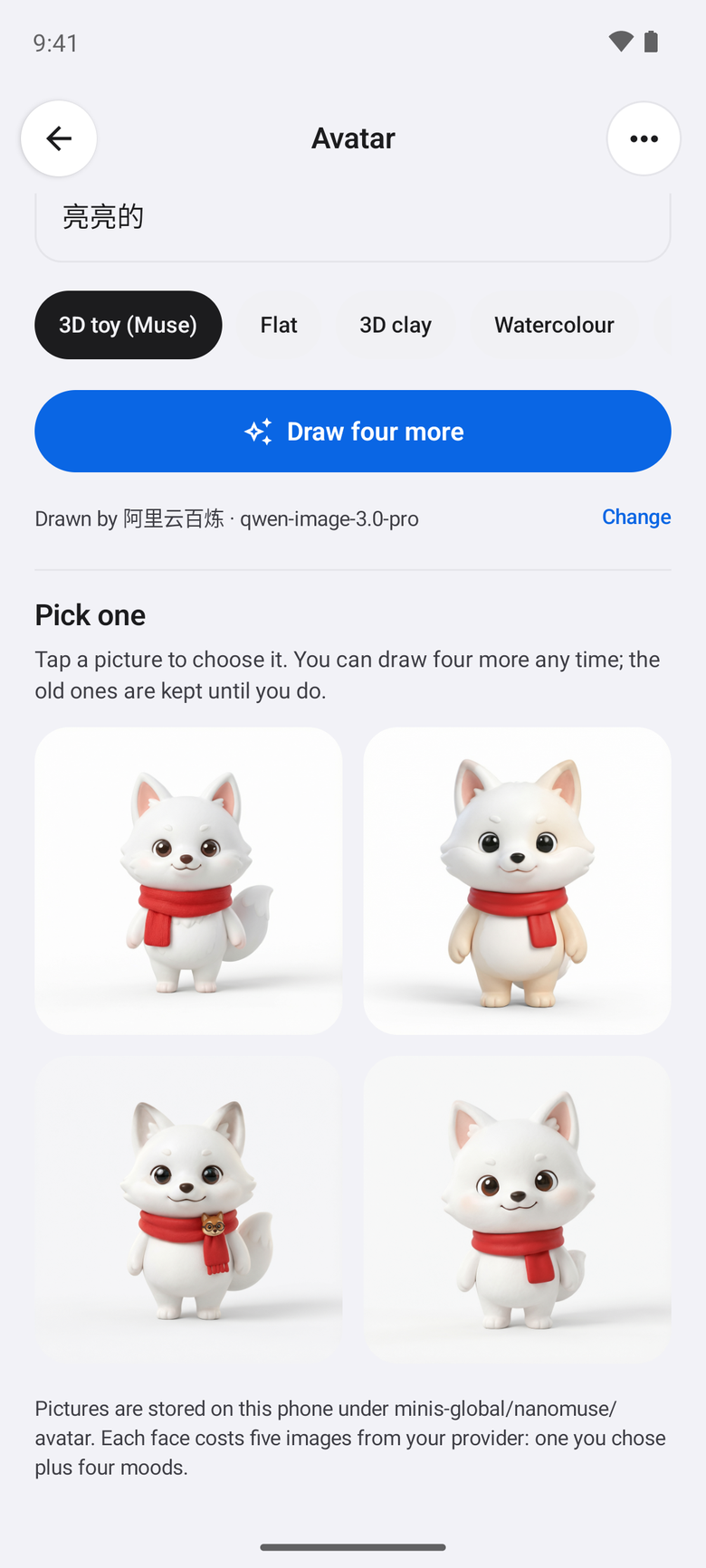
| A look of its own | Describe one in a sentence; your image model draws it; you pick the one you like. The app poses it for every state — working, waiting, pleased, sorry — and it breathes, bobs, tilts, pops and shakes with what the agent is doing; with a video model, each state is a short looping clip. A small pale-yellow dragon, stills and clips included, is the default. |
| Ideas and Library | Things to ask next, from your goals and memory; and everything it made, with previews. |
All of it runs on the phone; the rest of OpenMinis — the terminal, the in-app browser, MCP and skill management, model groups, token usage, the accessibility executor, shared folders — is kept and reachable from the same menus.
How it works
The app is OpenMinis 1.13, modified: a complete on-device agent — Alpine Linux under proot, a shell, a WebView browser, MCP, skills, scheduled tasks, an accessibility executor, any OpenAI-compatible model — imported into android/ with git subtree so upstream releases can still be merged. What nanoMuse adds lives in io.github.nanomuse.*:
| Package | What |
|---|---|
ui/home, ui/header | The home shell: one main chat, side chats in a drawer, the Feed · Ideas · Goals · Library bar, the header with the avatar, the name pill and the status line |
guard | ShellGuard and BrowserGuard classify commands and page actions; RiskGate stops the tool call and shows the approval card; grants are remembered per scope |
goals, ideas, library | Goals as scheduled conversations with a plan and a check-in; ideas from memory and goals; the library of what it wrote |
feed, sysfiles | The morning routine that writes ```nanomuse-feed blocks into minis-global/nanomuse/feed/, the cards, the steering sentence; the system-files pages and memory import |
avatar, ui/avatar | ImageGen on top of OpenMinis' image endpoints (images/generations, images/edits, DashScope's native edit), the studio, AvatarStore, and the animated AgentAvatar |
status | The two-level status (tool title under the avatar, action chips on the cards), KeepAwake, the last browser frame per step |
Edits to upstream files are marked // nanoMuse:; scripts/rebrand.py re-applies the branding after every subtree pull. Building from source: CONTRIBUTING.md. Your messages go only to the model you configured; files, memory and the avatar's pictures stay under the app's private storage.
Versions
One small version per stage, each a GitHub release with an APK. The plan and its reasoning: docs/roadmap.md.
| Version | Codename | What it added |
|---|---|---|
| 0.1.1 | Foundation | OpenMinis as nanoMuse: icon, name, brand colours, About / feedback / update source, GPL notices, one signing key |
| 0.1.2 | Identity | The red panda and a Muse-style header; a first conversation that names the agent; the name and face on every notification |
| 0.1.3 | Home | Opens on a chat, not a list; side chats in a drawer; Ideas, Goals and Library; goals shaped in the chat and checked on a schedule |
| 0.1.4 | Guardrails | Approvals with scope before deleting, sending, paying; passwords always yours |
| 0.1.5 | Memory | The feed; SOUL / USER / MEMORY / HEARTBEAT readable and editable; memory import; the screen stays on; "continue?" |
| 0.1.6 | Avatar | A face you describe, your image model draws, you choose, posed for every state and animated; pages cross-fade, cards settle, hearts pop |
| 0.1.7 | Welcome | The first run: a welcome screen with the three steps — provider, the models it serves, meet the agent |
| 0.1.8 | Polish | The shell finished: the type scale, the composer pill, only the name under the face, grey reply bubbles, the settings pages restyled to match |
| 0.1.9 | Portrait | Changing the face from the chat: "change your avatar to…", four takes to pick from, poses, a share card; the agent's page behind the face; five avatar sizes; the name pill re-measured |
| 0.1.10 | Motion | The three models named — chat, image, video — in Settings → Image & video models and in what the agent knows; with a video model the avatar gets a looping clip per state; pictures and clips on request; the agent explains a missing model instead of a fixed message |
| 0.1.11 | Hatch | The built-in dragon — stills and looping clips in the APK; the first conversation read by the chat model: a detour is answered and the name asked again later, its own names proposed in your language; one Model Studio key for all three models, or a provider per model |
| 0.1.12 | Hands | The phone's screen as a hand: the agent looks at a screenshot — never the accessibility tree — and taps, types and swipes in the apps that have no API; a skill, CLI, MCP server or the browser is tried first; a floating capsule with Stop; you take over for logins and codes; the same approvals before paying, sending or deleting; off by default |
| 0.1.13 | Reach | The phone drives your computer: run one Python file on the PC and pair it from the app by code, and a sentence on the phone runs there — the shell, the files, the browser, a look at the screen — with the results and the approvals back on the phone; one way, phone to computer, for now |
| 0.1.14 | Home | A fix: coming back to the app — from a notification, the tool capsule or Hands finishing a run — lands in its own home again, not on the OpenMinis chat screen |
| 0.1.15 | Stage | Watching the hands: a glow along the edges while they work, a turning ring with the action's name where they are about to tap, a ripple as they land, the ring riding along a swipe — after UI-TARS-desktop's ScreenMarker; the capsule lets every gesture through and steps aside; the app-icon quick actions open in the home |
| 0.1.16 | Palette | Image and video models picked like the chat model — from what the key can use, the recommended one marked; drawing on Model Studio through its native endpoint (the 404 is gone); Wan video models beside MiniMax-H3 |
| 0.2.0 | Beta | Polish from the first weeks of use; the first beta |
After that, in order: a desktop app that is an agent of its own and a client of the phone's; iOS; the web on a machine of your own — a VM, a home server — reachable from any browser; glasses. Each device you add is one more pair of hands and one more front door for the same agent. The Python line this project started with — the agent and its Sentinel, the web app, the simulated phone — is frozen at tag pre-openminis with its docs under docs/, and is the base of the desktop and web front doors.
Compared with Muse and OpenMinis
| Meta Muse | OpenMinis | nanoMuse | |
|---|---|---|---|
| What it is | A personal agent as a service: iOS, Android, web, WhatsApp and Mac clients of one cloud VM per user | An on-device agent app for iOS and Android: a Linux sandbox, a browser, device tools, skills, memory, workspaces | A Muse-style agent on OpenMinis' on-device runtime, as free software, headed for every device you own |
| Where the agent runs | Meta's cloud VM | The phone it is installed on | The phone; a sentence there runs on a computer of yours; wherever you say, later |
| Shape | One agent with a name and a look of its own, a feed, goals, a Sentinel | Sessions, tools and settings — a workbench | One agent, a name and a look of its own, a first conversation, a feed, goals on a schedule, memory you can edit |
| Before something irreversible | The Sentinel model approves | Per-tool permissions | RiskGate stops the call: allow once, this chat, always for this recipient / domain / folder, or deny; passwords and codes are never typed by the agent |
| Apps without an API | Out of reach — the VM has a browser, never your phone | An accessibility CLI (android-a11y-cli) the model can call on Android | The screen as a first-class hand: screenshots only, a ladder that tries APIs first, a take-over for logins, the same approvals — since 0.1.12 |
| Other devices | Many clients of one VM; the VM does not touch your devices | The one device it is installed on | One agent across your devices: the phone drives your PC since 0.1.13 (host/nanomuse_host.py, paired by code), then every device, both ways |
| Avatar | A plush figure that changes pose while it works | — | A look your image model draws and poses, a looping clip per state from your video model; a small dragon, already moving, by default |
| Models | Meta's | Bring your own | Bring your own — a chat, an image and a video model, or one Model Studio key for all three; the OAuth sign-ins OpenMinis ships with stay |
| Licence | Closed | GPL-3.0 | GPL-3.0-or-later, built on OpenMinis — with thanks; upstream releases can still be merged |
Contribute
Use it for a real task, report what broke, then pick something focused. CONTRIBUTING.md has the build setup (android/BUILDING.md and the toolchain scripts in scripts/android/), the conventions (com.openminis.app stays, new code in io.github.nanomuse.*, // nanoMuse: on upstream edits, Signed-off-by on commits) and how releases are cut. Issues · Pull requests.
Acknowledgements
nanoMuse stands on other people's work; THIRD_PARTY_NOTICES.md has the terms.
- OpenMinis — the on-device agent the app is built on: proot Linux, shell, browser, MCP, skills, scheduled tasks, the accessibility executor.
- proot (via nano-muse/proot) and Alpine Linux — the sandbox inside the APK.
- MobileGym, MemGUI-Bench, PhoneHarness, CopilotKit/OpenMuse, Open-AutoGLM, ClawGUI — the phone operator, the traces and the product ideas of the Python line.
Disclaimer
nanoMuse is an independent community project. It is not affiliated with, endorsed by, or derived from Meta Platforms, Inc. or its Muse product; Muse is a trademark of Meta Platforms, Inc. The dragon is the project's own.
License
GPL-3.0-or-later. The Android app is based on OpenMinis 1.13 (GPL-3.0), modified since 2026-09-24; see NOTICE and THIRD_PARTY_NOTICES.md. Earlier versions of the Python line were released under MIT (tag pre-openminis).
Contributors


Similar repos


Languages
Kotlin
81.0%
Python
11.5%
TypeScript
4.2%
C
1.1%
nanoMuse: a fully open-source, Muse-style personal agent for every device you own. One agent with a name and a face that does things, keeps working while the app is closed, remembers you, and asks before anything you cannot undo. On your Android phone today, with your own model; the phone's screen as a hand, and your PC driven from the phone.
See the codeREADME
nanoMuse
A fully open-source, Muse-style personal agent for every device you own.
nanoMuse is a fully open-source, Muse-style personal agent for every device you own: one agent with a name and a look of its own, like Meta's Muse, that does things instead of answering questions, keeps working while the app is closed, remembers you, and stops to ask before anything you could not undo. The Android app runs the whole agent on the phone: a Linux root file system, a shell, a browser, MCP, skills and scheduled tasks inside the APK, with a model you bring. It has hands for the apps that never had an API — the phone's own screen, with your permission — and reaches your computer: say it on the phone, it gets done there. A desktop app, iOS, a self-hosted web version and glasses come next. No server, no account, GPL-3.0 — and a base you can build your own Muse on.
Why nanoMuse
Four things define the project.
| Muse-style | One agent, not a toolbox: a name and a look of its own, a first conversation, a feed written for you, goals worked on in the background, memory you can read and edit, an approval before anything you could not undo. |
| Fully open | GPL-3.0-or-later, the whole repository. No closed component, no account, no server you have to trust, no model you have to use; every release is built from its tag and installed by hand. Muse, 豆包 and 千问 are products you are given; nanoMuse is one you own — and a base to build your own Muse on: rename it, redraw it, rewrite its personality, wire in your own models and tools. |
| Any app, API or not | Most of a day in China runs through apps that never had an API. The agent climbs a ladder — a skill, a CLI or an MCP server first, then a page fetched with your login, then the in-app browser, and, when you allow it, the device's own screen, looking and tapping the way you would — with the same approvals before paying, sending or deleting. Off by default. |
| Every device | One agent, and every device you own is a pair of hands and a front door: say it on the phone, it happens on your PC; say it to your glasses, it happens on both. The phone drives your computer already; a desktop app, iOS, the web on a machine of your own and glasses follow. |
How this compares with Muse and with OpenMinis, the runtime the app is built on: below. The plan and its reasoning: docs/roadmap.md.
Install
- Download
nanoMuse-<version>-arm64.apkfrom the latest release — Android 8.0 or newer, a 64-bit phone. Verify withsha256sum -c nanoMuse-<version>-arm64.apk.sha256if you like. - Open it. Android asks once to allow the install; every version is signed with the same key, so updates install over the previous one and keep your data.
- Add a model: any OpenAI-compatible endpoint with your own key, or one of the OAuth sign-ins the app ships with. The first conversation asks what to call you and lets the agent pick its own name.
- Optional — Settings → Image & video models: an image model (qwen-image-3.0 on Alibaba Cloud Model Studio, gpt-image-1, or any provider with the OpenAI images endpoint) lets the agent change its look and draw pictures; a video model (MiniMax-H3 on Model Studio) makes the look move. Muse has these built in; nanoMuse uses your own, and the agent tells you when one is missing.
The app checks this repository's releases for updates. Release notes for each version are in docs/releases/ and the CHANGELOG.
What it does
| Does things | A Linux shell, a browser, MCP servers, skills in the Agent Skills format, and — when you switch Hands on — the apps on your phone through their screens: a screenshot, one action, another screenshot, with a ladder that tries APIs first, a take-over for logins and the same approvals (0.1.12). The agent picks the hand the job needs and shows each step as a card you can open. |
| Asks first | A stop before deleting, sending or paying — in the shell and in the browser — with an approval you scope to once, this chat, or always for this recipient, domain or folder, and can revoke under Permissions. Passwords and verification codes are always yours to type. |
| Keeps going | Goals are shaped in the chat and checked on a schedule in their own conversation; routines run while the app is closed; the screen stays on while it drives the phone; at 200 steps it asks "continue?" instead of wrapping up early. |
| Writes you a feed | Every morning, three to six short posts from what it knows about you and what you asked it to follow, as cards you can like, discuss in a side chat, or delete. One sentence steers it. |
| Remembers you | Who it is (SOUL.md), what it knows about you (USER.md), what it remembers (GLOBAL.md and a diary) and when it wakes (HEARTBEAT.md) are files you can read and edit in the app. Bring what another assistant knew with Import memory. |
| A look of its own | Describe one in a sentence; your image model draws it; you pick the one you like. The app poses it for every state — working, waiting, pleased, sorry — and it breathes, bobs, tilts, pops and shakes with what the agent is doing; with a video model, each state is a short looping clip. A small pale-yellow dragon, stills and clips included, is the default. |
| Ideas and Library | Things to ask next, from your goals and memory; and everything it made, with previews. |
All of it runs on the phone; the rest of OpenMinis — the terminal, the in-app browser, MCP and skill management, model groups, token usage, the accessibility executor, shared folders — is kept and reachable from the same menus.
How it works
The app is OpenMinis 1.13, modified: a complete on-device agent — Alpine Linux under proot, a shell, a WebView browser, MCP, skills, scheduled tasks, an accessibility executor, any OpenAI-compatible model — imported into android/ with git subtree so upstream releases can still be merged. What nanoMuse adds lives in io.github.nanomuse.*:
| Package | What |
|---|---|
ui/home, ui/header | The home shell: one main chat, side chats in a drawer, the Feed · Ideas · Goals · Library bar, the header with the avatar, the name pill and the status line |
guard | ShellGuard and BrowserGuard classify commands and page actions; RiskGate stops the tool call and shows the approval card; grants are remembered per scope |
goals, ideas, library | Goals as scheduled conversations with a plan and a check-in; ideas from memory and goals; the library of what it wrote |
feed, sysfiles | The morning routine that writes ```nanomuse-feed blocks into minis-global/nanomuse/feed/, the cards, the steering sentence; the system-files pages and memory import |
avatar, ui/avatar | ImageGen on top of OpenMinis' image endpoints (images/generations, images/edits, DashScope's native edit), the studio, AvatarStore, and the animated AgentAvatar |
status | The two-level status (tool title under the avatar, action chips on the cards), KeepAwake, the last browser frame per step |
Edits to upstream files are marked // nanoMuse:; scripts/rebrand.py re-applies the branding after every subtree pull. Building from source: CONTRIBUTING.md. Your messages go only to the model you configured; files, memory and the avatar's pictures stay under the app's private storage.
Versions
One small version per stage, each a GitHub release with an APK. The plan and its reasoning: docs/roadmap.md.
| Version | Codename | What it added |
|---|---|---|
| 0.1.1 | Foundation | OpenMinis as nanoMuse: icon, name, brand colours, About / feedback / update source, GPL notices, one signing key |
| 0.1.2 | Identity | The red panda and a Muse-style header; a first conversation that names the agent; the name and face on every notification |
| 0.1.3 | Home | Opens on a chat, not a list; side chats in a drawer; Ideas, Goals and Library; goals shaped in the chat and checked on a schedule |
| 0.1.4 | Guardrails | Approvals with scope before deleting, sending, paying; passwords always yours |
| 0.1.5 | Memory | The feed; SOUL / USER / MEMORY / HEARTBEAT readable and editable; memory import; the screen stays on; "continue?" |
| 0.1.6 | Avatar | A face you describe, your image model draws, you choose, posed for every state and animated; pages cross-fade, cards settle, hearts pop |
| 0.1.7 | Welcome | The first run: a welcome screen with the three steps — provider, the models it serves, meet the agent |
| 0.1.8 | Polish | The shell finished: the type scale, the composer pill, only the name under the face, grey reply bubbles, the settings pages restyled to match |
| 0.1.9 | Portrait | Changing the face from the chat: "change your avatar to…", four takes to pick from, poses, a share card; the agent's page behind the face; five avatar sizes; the name pill re-measured |
| 0.1.10 | Motion | The three models named — chat, image, video — in Settings → Image & video models and in what the agent knows; with a video model the avatar gets a looping clip per state; pictures and clips on request; the agent explains a missing model instead of a fixed message |
| 0.1.11 | Hatch | The built-in dragon — stills and looping clips in the APK; the first conversation read by the chat model: a detour is answered and the name asked again later, its own names proposed in your language; one Model Studio key for all three models, or a provider per model |
| 0.1.12 | Hands | The phone's screen as a hand: the agent looks at a screenshot — never the accessibility tree — and taps, types and swipes in the apps that have no API; a skill, CLI, MCP server or the browser is tried first; a floating capsule with Stop; you take over for logins and codes; the same approvals before paying, sending or deleting; off by default |
| 0.1.13 | Reach | The phone drives your computer: run one Python file on the PC and pair it from the app by code, and a sentence on the phone runs there — the shell, the files, the browser, a look at the screen — with the results and the approvals back on the phone; one way, phone to computer, for now |
| 0.1.14 | Home | A fix: coming back to the app — from a notification, the tool capsule or Hands finishing a run — lands in its own home again, not on the OpenMinis chat screen |
| 0.1.15 | Stage | Watching the hands: a glow along the edges while they work, a turning ring with the action's name where they are about to tap, a ripple as they land, the ring riding along a swipe — after UI-TARS-desktop's ScreenMarker; the capsule lets every gesture through and steps aside; the app-icon quick actions open in the home |
| 0.1.16 | Palette | Image and video models picked like the chat model — from what the key can use, the recommended one marked; drawing on Model Studio through its native endpoint (the 404 is gone); Wan video models beside MiniMax-H3 |
| 0.2.0 | Beta | Polish from the first weeks of use; the first beta |
After that, in order: a desktop app that is an agent of its own and a client of the phone's; iOS; the web on a machine of your own — a VM, a home server — reachable from any browser; glasses. Each device you add is one more pair of hands and one more front door for the same agent. The Python line this project started with — the agent and its Sentinel, the web app, the simulated phone — is frozen at tag pre-openminis with its docs under docs/, and is the base of the desktop and web front doors.
Compared with Muse and OpenMinis
| Meta Muse | OpenMinis | nanoMuse | |
|---|---|---|---|
| What it is | A personal agent as a service: iOS, Android, web, WhatsApp and Mac clients of one cloud VM per user | An on-device agent app for iOS and Android: a Linux sandbox, a browser, device tools, skills, memory, workspaces | A Muse-style agent on OpenMinis' on-device runtime, as free software, headed for every device you own |
| Where the agent runs | Meta's cloud VM | The phone it is installed on | The phone; a sentence there runs on a computer of yours; wherever you say, later |
| Shape | One agent with a name and a look of its own, a feed, goals, a Sentinel | Sessions, tools and settings — a workbench | One agent, a name and a look of its own, a first conversation, a feed, goals on a schedule, memory you can edit |
| Before something irreversible | The Sentinel model approves | Per-tool permissions | RiskGate stops the call: allow once, this chat, always for this recipient / domain / folder, or deny; passwords and codes are never typed by the agent |
| Apps without an API | Out of reach — the VM has a browser, never your phone | An accessibility CLI (android-a11y-cli) the model can call on Android | The screen as a first-class hand: screenshots only, a ladder that tries APIs first, a take-over for logins, the same approvals — since 0.1.12 |
| Other devices | Many clients of one VM; the VM does not touch your devices | The one device it is installed on | One agent across your devices: the phone drives your PC since 0.1.13 (host/nanomuse_host.py, paired by code), then every device, both ways |
| Avatar | A plush figure that changes pose while it works | — | A look your image model draws and poses, a looping clip per state from your video model; a small dragon, already moving, by default |
| Models | Meta's | Bring your own | Bring your own — a chat, an image and a video model, or one Model Studio key for all three; the OAuth sign-ins OpenMinis ships with stay |
| Licence | Closed | GPL-3.0 | GPL-3.0-or-later, built on OpenMinis — with thanks; upstream releases can still be merged |
Contribute
Use it for a real task, report what broke, then pick something focused. CONTRIBUTING.md has the build setup (android/BUILDING.md and the toolchain scripts in scripts/android/), the conventions (com.openminis.app stays, new code in io.github.nanomuse.*, // nanoMuse: on upstream edits, Signed-off-by on commits) and how releases are cut. Issues · Pull requests.
Acknowledgements
nanoMuse stands on other people's work; THIRD_PARTY_NOTICES.md has the terms.
- OpenMinis — the on-device agent the app is built on: proot Linux, shell, browser, MCP, skills, scheduled tasks, the accessibility executor.
- proot (via nano-muse/proot) and Alpine Linux — the sandbox inside the APK.
- MobileGym, MemGUI-Bench, PhoneHarness, CopilotKit/OpenMuse, Open-AutoGLM, ClawGUI — the phone operator, the traces and the product ideas of the Python line.
Disclaimer
nanoMuse is an independent community project. It is not affiliated with, endorsed by, or derived from Meta Platforms, Inc. or its Muse product; Muse is a trademark of Meta Platforms, Inc. The dragon is the project's own.
License
GPL-3.0-or-later. The Android app is based on OpenMinis 1.13 (GPL-3.0), modified since 2026-09-24; see NOTICE and THIRD_PARTY_NOTICES.md. Earlier versions of the Python line were released under MIT (tag pre-openminis).
Similar repos
Contributors
Languages
Kotlin
81.0%
Python
11.5%
TypeScript
4.2%
C
1.1%