Homebrew is the standard package manager on macOS. brew-browser gives it a real native GUI.
See the codeA native macOS GUI for Homebrew — shipped in two builds.




A small, fast desktop app for browsing, searching, installing, and snapshotting Homebrew packages. Full source, MIT-licensed, no telemetry, no accounts.
Brew Browser comes in two builds that share one design and one data contract:
Same features, same brew integration, same privacy posture — see Two builds below.
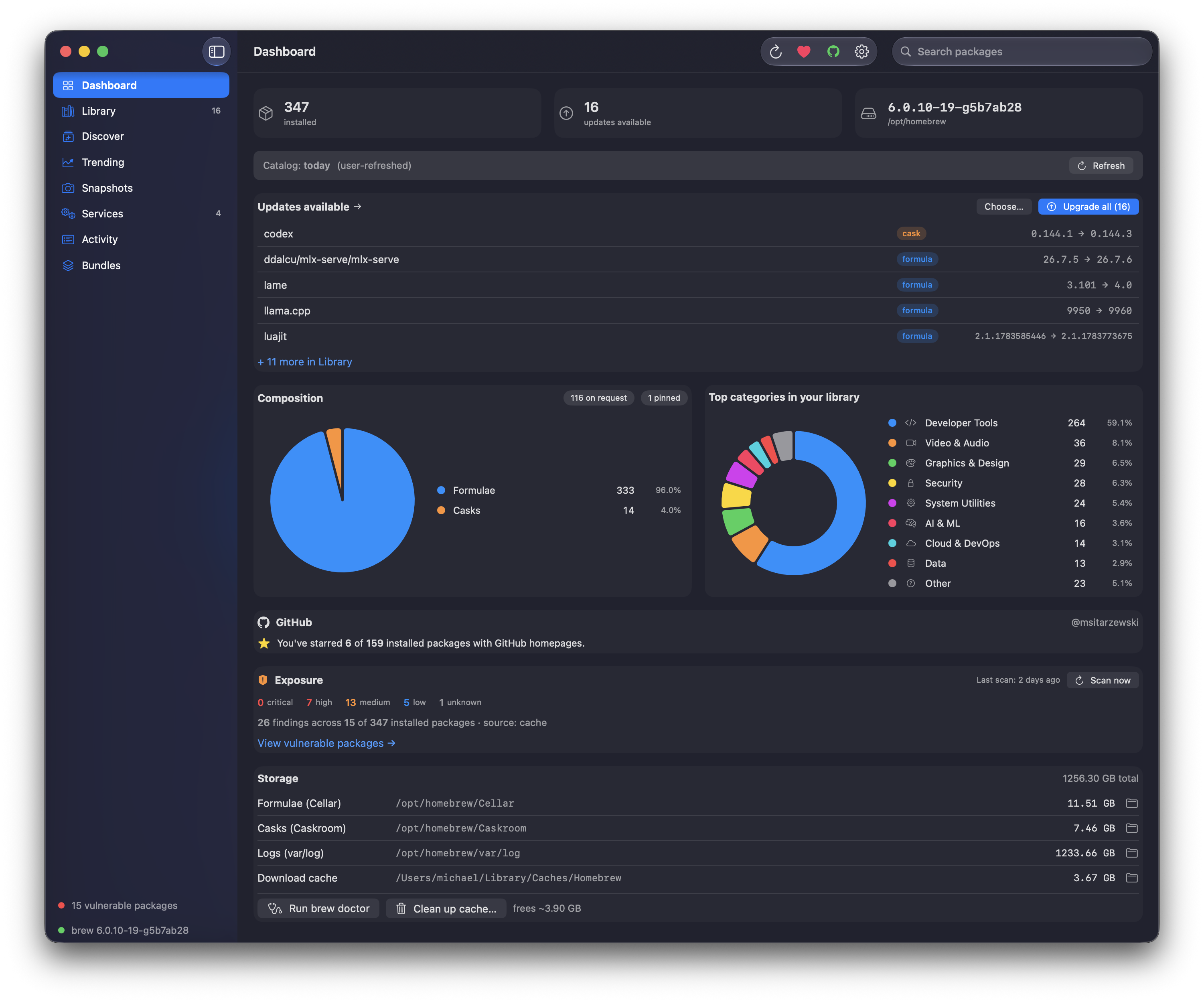
Tauri build (macOS 13+ · Linux)
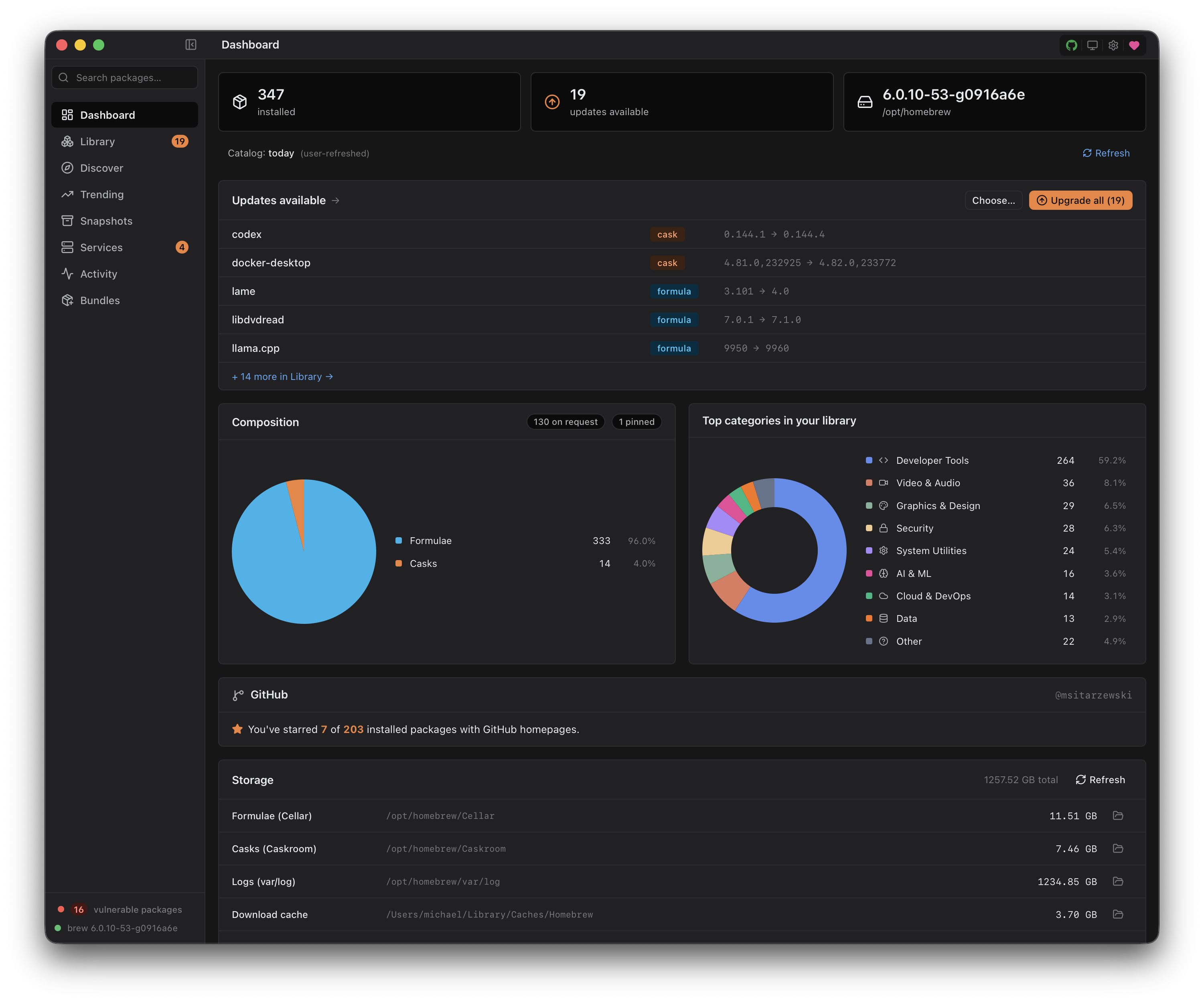
Native build (Swift / SwiftUI · macOS 26)
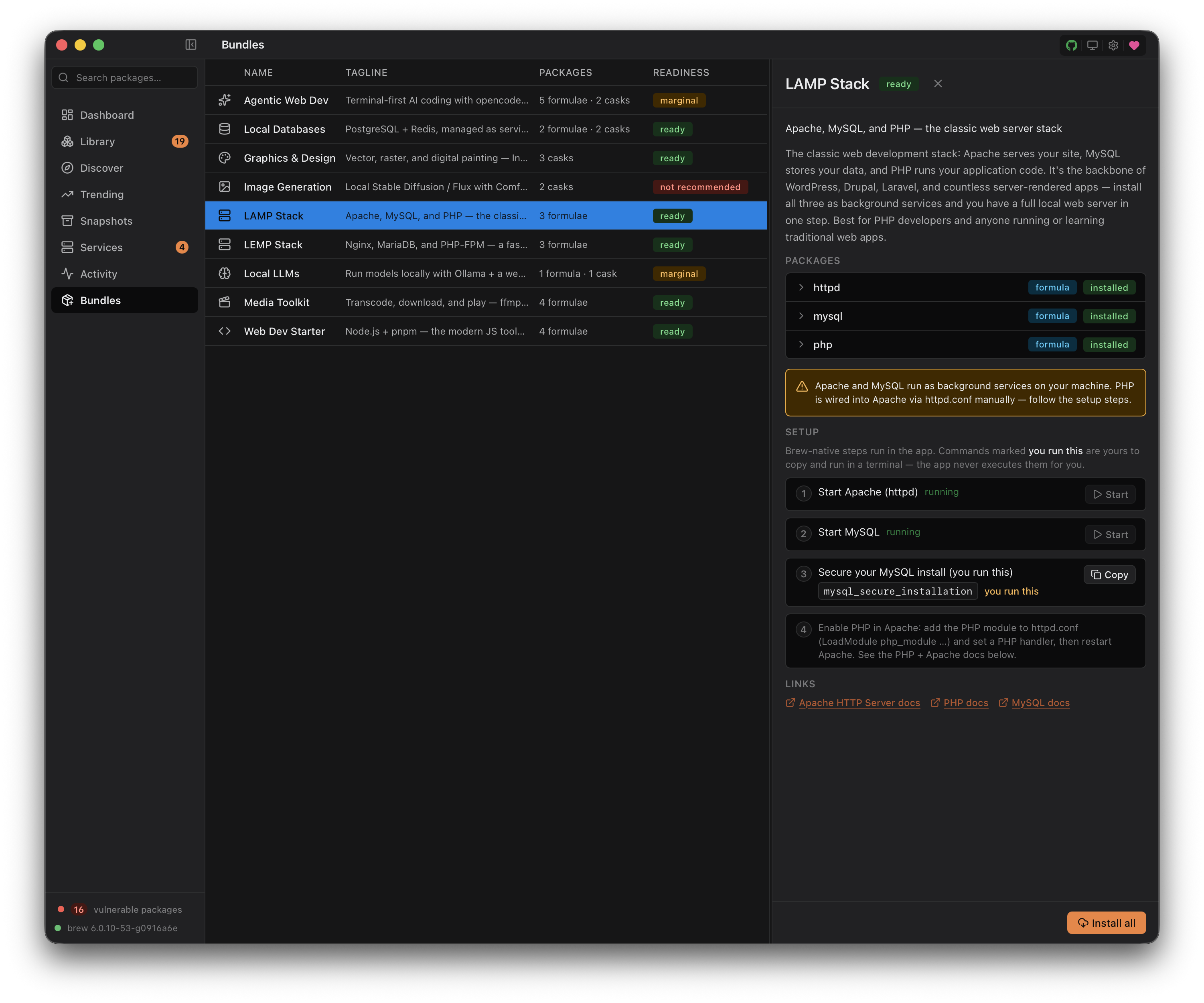
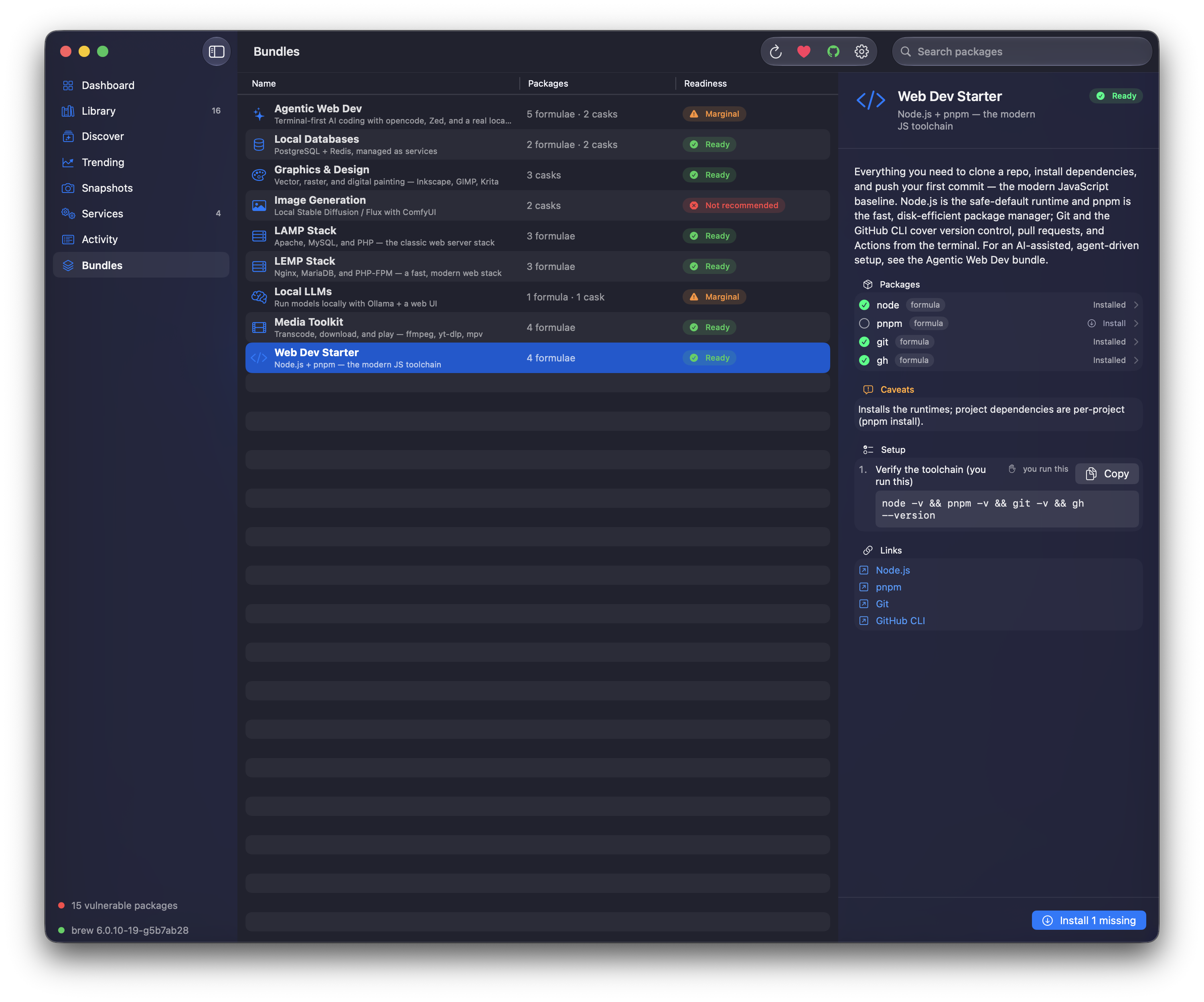
Bundles — capability-gated one-click package stacks, in both builds
Homebrew is the standard package manager on macOS. brew-browser gives it a real native GUI: browse what you have installed, search the full catalog, install / uninstall / upgrade with live output, snapshot your setup to a Brewfile and restore it on a new Mac. Trending packages come from Homebrew's published analytics. The whole thing is a thin, respectful frontend over the brew CLI itself.
formulae.brew.sh analytics, with 30 / 90 / 365-day windows, sortable columns, a velocity index (recent-month vs prior-11-month adoption signal), and opt-in per-package install-trend sparklinesbrew bundle mechanism; "set up a new Mac" in one clickbrew servicesbrew vulns subcommand (OSV.dev), with optional GHSA enrichment when you're signed into GitHub. Inline severity dots, per-package Security card with "Upgrade to fix" wired to the existing upgrade pipeline. Off by default; one-click installer for brew vulns itself when you opt inbrew invocation streams live into a resizable bottom drawer with full stdout/stderr; session history persists across launches (last 200 jobs, capped lines)A global Cmd+K command palette covers the verbs. Cmd+0 returns to the Dashboard; Cmd+1…7 jumps between sections (Bundles is ⌘7). Cmd+, opens Settings. Click the 🍺 brand to return home. Window dragging works from any panel header (native macOS overlay title bar + NSVisualEffectView vibrancy).
brew CLIBrew Browser is maintained as two implementations of the same app, kept in feature + data-contract parity. They are not competitors — they have different, non-overlapping jobs, because SwiftUI does not run on Linux and Liquid Glass is macOS-26-only.
| Tauri build | Native build | |
|---|---|---|
| Stack | Tauri 2 · SvelteKit · Rust | Swift 6 · SwiftUI · Liquid Glass |
| Runs on | macOS 13+ and Linux | macOS 26 (Tahoe) |
| Role | the shipping cross-platform app | the genuinely-native macOS flagship |
| Source | src/ (frontend) + src-tauri/ (Rust) | native/ (Swift Package) |
| Updates | in-app updater (minisign) | Sparkle 2 (ed25519) |
| Status | shipping, signed + notarized | shipping, signed + notarized |
Both read the same settings.json schema, the same bundled categories.json /
enrichment.json, the same brew / brew vulns invocations, and the same
trending + enrichment endpoints. A change to a shared data contract lands in both.
The memory bank (memory-bank/) is the single canonical spec for both. Rationale
and parity rules: memory-bank/decisions.md (2026-06-01 "keep both" ADR).
Both macOS builds ship on the latest release, signed + notarized — no Gatekeeper warning.
| Your machine | Grab |
|---|---|
| Apple Silicon (M-series), macOS 13+ | brew-browser_<version>_aarch64.dmg |
| Intel, macOS 13+ | brew-browser_<version>_x64.dmg |
| macOS 26 (Tahoe), native build | BrewBrowser-<version>-arm64.dmg (M-series) or BrewBrowser-<version>-x86_64.dmg (Intel) |
| Linux (Ubuntu 22.04+ era) | .deb / .rpm / .AppImage from the release, or the latest Linux Build workflow run |
Direct download: grab the .dmg for your Mac — brew-browser_<version>_aarch64.dmg (Apple Silicon) or brew-browser_<version>_x64.dmg (Intel) — from the latest release, open it, and drag brew-browser to Applications. Keeps you on the app's own verified updater (Settings → Network → Updates).
Homebrew:
brew tap msitarzewski/brew-browser
brew trust msitarzewski/brew-browser   # Homebrew 6.x requires trusting non-official taps
brew install --cask brew-browser
Installs the same notarized .dmg (Apple Silicon or Intel); update later with brew upgrade --cask brew-browser. The brew trust line is required on Homebrew 6.0+, which refuses to load casks from non-official taps until you trust them — a one-time step.
Linux bundles are produced by CI as .deb, .rpm, and .AppImage. For tagged releases, grab the .deb or .AppImage from the releases page; for the latest development build, download the artifacts from the most recent Linux Build workflow run. Targets Ubuntu 22.04+ (the webkit2gtk-4.1 ABI) and equivalently-recent distros. Two things to know up front:
.deb / .rpm GPG signing is a documented future step. There is no Gatekeeper/notarization equivalent to satisfy, but you are running an unsigned binary — verify your download against the release checksums.Direct download: grab the .dmg for your Mac — BrewBrowser-<version>-arm64.dmg (Apple Silicon) or BrewBrowser-<version>-x86_64.dmg (Intel) — from the latest release, open it, and drag Brew Browser to Applications. It keeps itself current via the in-app Sparkle updater. (Requires macOS 26.)
Prereqs (all platforms):
Platform build prereqs:
xcode-select --installlibwebkit2gtk-4.1-dev, libgtk-3-dev, libayatana-appindicator3-dev, librsvg2-dev, patchelf, plus build-essential). The canonical, always-current apt recipe lives in the CI workflow at .github/workflows/linux-build.yml — copy the apt-get install block from there rather than maintaining a second list here.Then (same command on every platform):
git clone https://github.com/msitarzewski/brew-browser
cd brew-browser
npm install
npm run tauri dev      # development with HMR
npm run tauri build    # macOS: .dmg · Linux: .deb / .rpm / .AppImage, all under src-tauri/target/release/bundle/

# Intel .dmg (artifacts named _x64, under src-tauri/target/x86_64-apple-darwin/release/bundle/):
rustup target add x86_64-apple-darwin   # one-time
npm run tauri build -- --target x86_64-apple-darwin
The native Swift/SwiftUI app lives in native/ as a Swift Package. Requires
macOS 26 + a recent Xcode toolchain.
cd native
swift build                 # compile the library + executable
./build-app.sh              # wrap into a launchable Brew Browser.app
open BrewBrowser.app        # run it (use the .app, not `swift run` — Sparkle needs the bundle)
swift test                  # unit tests
./release.sh                # signed + notarized release + Sparkle appcast (maintainer)
Tauri build: a Tauri 2 shell hosts a SvelteKit + Svelte 5 frontend in the system WebView. macOS is the primary target; Linux is newly supported (same codebase, built on Ubuntu 22.04+ via CI). A Rust backend exposes 150+ typed Tauri commands that shell out to brew via tokio::process and stream stdout/stderr back over typed IPC channels. Paths are derived from brew --prefix / brew --cache rather than hardcoded, so the Linuxbrew prefix (/home/linuxbrew/.linuxbrew, or ~/.linuxbrew) is picked up automatically alongside the macOS /opt/homebrew. The full Homebrew catalog is bundled at build time (~6 MiB gzipped) and refreshable on demand. Trending data comes straight from formulae.brew.sh's public analytics JSON, cached in memory for an hour. Optional GitHub integration uses OAuth Device Flow with the token stored only in the system keyring (macOS Keychain; Secret Service / gnome-keyring / KWallet on Linux). No shell plugin, no arbitrary command execution — every brew invocation is built in Rust from a small set of enumerated inputs. See docs/PLAN.md for the full design and memory-bank/backendApi.md for the complete IPC surface.
Native build: a Swift 6 + SwiftUI app (native/, a Swift Package — no .xcodeproj). Stock Apple scaffolding only — NavigationSplitView, .inspector, Settings/SettingsLink, Form, Liquid Glass materials — no custom window chrome. Stateless services (BrewService, GitHubService, VulnsService) are Sendable structs that mirror the Rust modules and shell out to brew via Foundation.Process with typed argument arrays (no shell). The same bundled JSON data contract; settings persist to the same settings.json schema; updates via Sparkle 2. See native/README.md.
MIT licensed. No CLA. No EULA. No telemetry. No account. No dark patterns.
brew-browser makes outbound network calls in exactly twelve documented circumstances. Every one is initiated by something you did and gated by Settings → Network:
https://formulae.brew.sh/api/analytics/install + /install-on-request — fetched when you open the Trending tab. The primary install endpoint includes dependency-pulled installs (which is why ca-certificates always tops the leaderboard); install-on-request excludes deps and surfaces what users actually typed brew install ... for. Both windows are fetched in parallel and the backend joins all three time horizons (30d/90d/365d) to compute a velocity index per package. Cached in process memory (TTL configurable in Settings → Network; default 60 minutes). Uses Homebrew's own published install-analytics JSON; no API key, no account.https://formulae.brew.sh/api/{formula,cask}.json — the full Homebrew catalog. Bundled at build time so the app works offline. A user-initiated Refresh button on the Dashboard (or the Discover stale-catalog banner) writes a fresh copy to ~/Library/Application Support/brew-browser/catalog/. Auto-refresh is off by default; Settings → Network offers weekly / daily opt-in.homepage field, the Rust backend probes that homepage for an icon (in order: /apple-touch-icon.png, <meta og:image> parsed from the homepage HTML, /favicon.ico). One probe per cask per week max — the result, including misses, is cached for 7 days. These probes are sandboxed: link-local, loopback, RFC1918, and cloud-metadata IPs are rejected before the request, and the same check runs again on every redirect hop to prevent SSRF. Settings → Network can scope this to installed only or disable it entirely.https://api.github.com/repos/{owner}/{repo} (read) — optional, off by default. When Settings → GitHub → "Show GitHub stats on package pages" is on, the PackageDetail panel fetches public repo metadata (stars, forks, last release date, archived state) for packages whose homepage (or urls.stable.url / urls.head.url / cask url) parses as a GitHub URL. The URL parser strictly allowlists github.com (rejects gist., raw.githubusercontent., suffix-attack domains, path traversal). Results cached to ~/Library/Application Support/brew-browser/github-cache/ for 24 hours. Anonymous rate limit is 60 reqs/hr per IP; sign-in lifts it to 5,000/hr.https://github.com/login/{device,oauth}/* — optional, only when you click Sign in with GitHub in Settings (or hit the inline Re-authorize button on a scope-required toast). Uses OAuth Device Flow (RFC 8628): you see a user code, open github.com/login/device in your browser, paste it, done. No embedded webview, no client secret, no callback URL. Scopes requested: read:user + public_repo + notifications (the minimum for username + star + file-issue + watch). Access token stored exclusively in the OS credential store under com.zerologic.brew-browser/github_access_token — the macOS Keychain on macOS, the Secret Service (gnome-keyring / KWallet, persistent across reboot) on Linux. On a Linux session with no Secret Service daemon, sign-in fails with a "keyring unavailable" message and the rest of the app is unaffected. The token is never returned to the frontend, never written to disk by us, and never logged — verified by unit tests.https://api.github.com/{user/starred,repos/.../subscription,repos/.../issues} (write) — optional, only when you click Star, Watch, or File-issue on a package detail page after signing in. Each action is gated server-side by a per-action OAuth scope check (public_repo for star + file-issue; notifications for watch/unwatch) so a token missing the right scope fails fast with a typed scope_required error before any GitHub round-trip.brew itself — every install, uninstall, upgrade, search, and snapshot shells out to the real brew CLI. Whatever network calls brew makes (GitHub, OCI registries, bottle mirrors) happen exactly as they would if you ran the command yourself in a terminal. The full stdout/stderr stream is visible in the Activity drawer.open(1). The app rejects any non-http(s) scheme before opening.https://brew-browser.zerologic.com/updater.json + https://github.com/msitarzewski/brew-browser/releases/download/v*/brew-browser_*_{aarch64,x64}.app.tar.gz — the in-app updater (Phase 15, v0.3.0+). The manifest fetch happens when you click Check for updates now in Settings → Network → Updates, or on the auto-check timer if you opt in (off by default; 24h cadence). The artifact download follows only after the manifest's version is strictly greater than the running build. Every downloaded .app.tar.gz is verified against an embedded minisign public key + the manifest's sha256 before any on-disk side effect — mismatch aborts with no install. Skipping a version is recorded locally; a future release re-triggers the indicator.https://brew-browser.zerologic.com/trending-history/* — Enhanced Trending History (v0.4.0+). Distinct trust boundary from the Homebrew first-party endpoints above: this endpoint is operated by the brew-browser project, not by upstream Homebrew. Off by default. When you opt in via Settings → Network → Enhanced Trending History, the app fetches per-package historical install trends to power inline sparklines on the Trending tab and a chart on each package's detail panel. Only the package name you're viewing is sent (one HTTP GET per package); no IP is logged at the server, no cookies, no fingerprinting (see memory-bank/security.md §16 for the Caddy config that makes the privacy claim auditable). Master Offline Mode hard-locks this off regardless of the per-feature toggle.https://brew-browser.zerologic.com/enrichment/* — Live category & description updates. Same first-party host as Enhanced Trending, distinct /enrichment/* path — still a separate trust boundary from the always-on Homebrew endpoints. Off by default. brew-browser ships with bundled AI categories + descriptions; when you opt in via Settings → Network → Live category & description updates, it refreshes them: a tiny version.json probe on catalog refresh, the full categories.json when its version is newer, and a per-package entry/<token>.json when you open that package's detail. Only the package name you're viewing is sent (one HTTP GET per token); no IP logged, no cookies. Requires AI Features on; master Offline Mode hard-locks it off regardless.https://api.osv.dev + https://github.com / https://gitlab.com / https://codeberg.org (via subprocess) + https://api.github.com/advisories/{GHSA_ID} (from our code) — opt-in Vulnerability Scanning (v0.5.0+). Distinct trust boundary because the OSV traffic and the source-forge tag resolution are opened by the brew vulns subprocess we shell out to, not by brew-browser's own binary. Off by default. When you opt in via Settings → Network → Vulnerability Scanning (and install brew vulns via the one-click affordance if you don't already have it), the app runs brew vulns --json to query OSV.dev for known CVEs against your installed formulae. When both the vulnerability-scanning toggle AND GitHub sign-in are on, each GHSA-…-prefixed finding is enriched via api.github.com/advisories/{GHSA_ID} from our Rust code (triple-defense: master Offline Mode, vuln-feature toggle, GitHub-feature toggle — all three must align for one GHSA request). brew vulns is published by Homebrew (Homebrew/homebrew-brew-vulns, by Andrew Nesbitt). Casks are not supported (brew vulns is formula-only); cask UI rows render an honest "Cask coverage isn't supported" message rather than fake clean state. Master Offline Mode hard-locks the whole feature off regardless. See memory-bank/security.md §17 for the endpoint audit and gate-composition table.Every outbound call respects the Network settings — flip on Offline Mode in Settings to block all outbound traffic in one click. Settings persist to ~/Library/Application Support/brew-browser/settings.json; a corrupt or missing file fails closed (Offline Mode effectively on) until you hit Reset to defaults.
No analytics. No crash reporting. No third-party fonts or pixels. No fetch() from the frontend — every backend call goes through typed Tauri IPC.
The full network posture is verified line-by-line in memory-bank/security.md §5. Re-audits are welcome; the source is right there.
A full security audit lives at memory-bank/security.md. Current verdict: READY-FOR-SCRUTINY (0 critical / 0 high / 0 medium / 0 low / 0 nit open). All 16 findings from the initial audit are verified-fixed with passing tests. Independent tool battery passes: cargo audit 0 vulns, cargo deny check advisories+bans+licenses+sources ok, npm audit --omit=dev 0 vulns, semgrep with security-audit + OWASP-top-10 + Rust + TypeScript rulesets 0 findings, cargo clippy -D warnings clean. Zero unsafe Rust, zero @html/innerHTML/eval in the frontend, no tauri-plugin-shell (every brew invocation is built from typed Rust enums). SSRF defense includes a redirect-policy re-check on every hop.
A pre-release security pass (2026-06-07) covered both builds — automated scans (cargo audit, npm audit, osv-scanner, gitleaks, semgrep) plus manual review of command injection, path traversal, the Tauri CSP/capabilities, update-signature verification, and token handling. Verdict: clean for release; details in memory-bank/security.md §19.
Dependency posture:
cargo audit reports 0 vulnerabilities across 566 crates. The remaining "unmaintained" warnings are all Linux-only GTK3/glib transitive deps that compile out on macOS — documented in src-tauri/.cargo/audit.toml.cookie <0.7.0 via SvelteKit) — no real surface in a desktop app; tracked, not force-patched.unsafe Rust in the entire backend; semgrep security rulesets report 0 findings; brew-output parsers are fuzzed in both languages.brew with typed argument arrays (no shell), validate package names against an allowlist, and reject ../path-separators in Brewfile/snapshot ids. The native build has its own test target (native/Tests/, swift test) covering the parity-critical parsing/classification logic with fixtures mirroring the Rust tests.Defense-in-depth choices:
tauri-plugin-shell — the frontend cannot construct arbitrary shell commands. Every brew invocation is built in Rust from typed enums.http(s) URLs reach tauri-plugin-opener.rustls-tls + webpki-roots for all outbound HTTPS — no system trust store dependency.core:default, opener:default, core:event:default, dialog:allow-open, dialog:allow-save. No fs:*, no http:*, no shell:*.Issues and PRs on security topics are welcome. See SECURITY.md for the responsible disclosure process.
Contributions welcome. See CONTRIBUTING.md for the dev loop, project map, and the short list of things worth opening an issue about first. No CLA. Your contributions stay yours, licensed under MIT to match the project.
Next release: Tauri 0.7.2 and native 0.3.2 (split-track; native 0.3.2 ≙ Tauri 0.7.2, single tag v0.7.2) — a bug-fix patch led by Homebrew 6.0+ compatibility for vulnerability scanning (the vulns subcommand moved into core; detection + the install affordance now handle it instead of chasing a deleted formula), plus no more startup macOS Keychain prompts (both shells) and a WebKit fresh-scan-time parsing fix. Community fix by @fallenmaverick. Full notes: docs/release-notes/0.7.2.md.
Current stable release: Tauri 0.7.1 + native 0.3.1 shipped signed + notarized together — a small follow-up to the Bundles release adding the resizable Activity console (community contribution by @cseelye) and a Linux-CI fix so the .deb / .rpm / .AppImage bundles publish. The prior 0.7.0 was the Bundles headline release (capability-gated one-click package stacks, 9 recipes, both shells) plus pin/unpin, in-app brew command options, Brew Doctor + Cleanup, and vulnerability-scanning hardening. Optional GitHub integration via OAuth Device Flow is intent-discovered; opt-in Enhanced Trending History (v0.4.0+) and Vulnerability Scanning (v0.5.0+) sit beyond the always-on core; Settings ships with Offline Mode and a corrupt-recovery default.
v0.7.2 / native 0.3.2 — bug-fix patch. Highlights:
vulns moved into core in brew 6.0+ and the standalone tap was deleted; detection now falls back to brew help vulns and the install affordance runs brew update instead of chasing a deleted formula. Both shells.VulnsService inherits the app's brew environment; the Tauri PATH prepend now includes Linuxbrew (#152, #155).v0.7.1 / native 0.3.1 — small follow-up. Highlights:
brew output drawer resizes in both shells, with the height persisted across launches. Community contribution by @cseelye. (Listed in the 0.7.0 notes but it landed just after that build; it ships here.).deb / .rpm / .AppImage; it now skips the unused updater artifact and publishes them.v0.7.0 / native 0.3.0 — Bundles + polish. Highlights:
--scrub opt-in, off by default) — requested by @modeezie.references shape fix (#110).v0.6.0 / native 0.2.0 — Linux + Intel + Reddit backlog. Highlights:
.deb / .rpm / .AppImage (Ubuntu 22.04+ era), with casks gated off where Homebrew has no cask concept.brew appears).v0.5.1 — reliability + first native release. Highlights:
0.5.1 remains the cross-platform macOS 13+ / Linux build; native 0.1.0 is the macOS 26 SwiftUI build with Sparkle updates.==> markers.brew upgrade post-install/link warnings no longer present as failed upgrades.v0.5.0 — opt-in vulnerability scanning. Highlights:
brew vulns integration. New Settings → Network → Vulnerability Scanning subsection (opt-in, off by default) shells out to the official Homebrew/homebrew-brew-vulns subcommand by Andrew Nesbitt to query OSV.dev for known CVEs against installed formulae. One-click installer for the brew vulns subcommand itself when you opt in — no terminal required.api.github.com/advisories. Triple-gated; best-effort; 7-day cache.brew vulns (60+ seconds on 200 packages).brew vulns is formula-only; cask Security cards say so rather than faking clean state.v0.4.0 — trending velocity + opt-in install-history endpoint. Highlights:
formulae.brew.sh). When on, inline per-row sparklines on Trending + a per-package history chart on PackageDetail, fed by a project-operated endpoint (brew-browser.zerologic.com/trending-history/*) with IP-redacted server logs (the privacy claim is auditable — Caddy block pinned in memory-bank/security.md §16).v0.3.1 — same-day cumulative point release on top of v0.3.0. Highlights:
local_search IPC; replaces the old brew search shell-out.brew upgrade <a> <b> ... streams into the Activity drawer. Pinned packages are checkbox-disabled.brew update (so brew learns about new upstream versions), refreshes the bundled catalog, AND reloads your installed list — in that order, with the brew-update output streaming to Activity.desc. Friendly name still appears below the token as a short scan-aid.dev.openbrew.browser → com.zerologic.brew-browser. v0.3.0 users re-sign-in to GitHub once via the existing Re-authorize button.startJob persists immediately. Persist + hydrate failures now log to console instead of swallowing silently.v0.3.0 (in-app updater + GitHub coverage + issue #1 fixes):
paranoid_mode to avoid a settings migration.homepage → urls.stable.url → urls.head.url (formula) or homepage → url (cask). Packages like bat, fd, ripgrep — marketing-page homepages but GitHub-hosted source — now light up the Star / Watch / File-issue / Stats card. Personal-stats counter on the Dashboard sees the bigger denominator.notifications scope), the failure toast offers a "Re-authorize" button that re-runs Device Flow requesting the full scope set. GitHub's consent screen shows only the missing scope; no sign-out needed.$effect for one-shot side effects) resolved. Star, Watch, File-issue, and the sign-in flow all work cleanly. Reported by @heyjawrsh.MIT. Do whatever you want with this.
Built with Agency Agents, by the creator of Agency Agents — the multi-agent toolkit (Backend Architect, Frontend Developer, Security Engineer, Code Reviewer, Technical Writer, and friends) that orchestrated brew-browser's design and implementation. Powered by Claude Code in the terminal, running Opus 4.8 (1M context).
If brew-browser saves you time, consider sponsoring on GitHub ♥. No paid tier — sponsorship is purely a thank-you, and it helps fund the Anthropic API spend that keeps the AI-curated catalog metadata fresh.
609 followers · starred Jun 2026
186 followers · starred Jun 2026
189 followers · starred Jun 2026
710 followers · starred May 2026
Homebrew is the standard package manager on macOS. brew-browser gives it a real native GUI.
See the codeA native macOS GUI for Homebrew — shipped in two builds.
A small, fast desktop app for browsing, searching, installing, and snapshotting Homebrew packages. Full source, MIT-licensed, no telemetry, no accounts.
Brew Browser comes in two builds that share one design and one data contract:
Same features, same brew integration, same privacy posture — see Two builds below.
Tauri build (macOS 13+ · Linux)
Native build (Swift / SwiftUI · macOS 26)
Bundles — capability-gated one-click package stacks, in both builds
Homebrew is the standard package manager on macOS. brew-browser gives it a real native GUI: browse what you have installed, search the full catalog, install / uninstall / upgrade with live output, snapshot your setup to a Brewfile and restore it on a new Mac. Trending packages come from Homebrew's published analytics. The whole thing is a thin, respectful frontend over the brew CLI itself.
formulae.brew.sh analytics, with 30 / 90 / 365-day windows, sortable columns, a velocity index (recent-month vs prior-11-month adoption signal), and opt-in per-package install-trend sparklinesbrew bundle mechanism; "set up a new Mac" in one clickbrew servicesbrew vulns subcommand (OSV.dev), with optional GHSA enrichment when you're signed into GitHub. Inline severity dots, per-package Security card with "Upgrade to fix" wired to the existing upgrade pipeline. Off by default; one-click installer for brew vulns itself when you opt inbrew invocation streams live into a resizable bottom drawer with full stdout/stderr; session history persists across launches (last 200 jobs, capped lines)A global Cmd+K command palette covers the verbs. Cmd+0 returns to the Dashboard; Cmd+1…7 jumps between sections (Bundles is ⌘7). Cmd+, opens Settings. Click the 🍺 brand to return home. Window dragging works from any panel header (native macOS overlay title bar + NSVisualEffectView vibrancy).
brew CLIBrew Browser is maintained as two implementations of the same app, kept in feature + data-contract parity. They are not competitors — they have different, non-overlapping jobs, because SwiftUI does not run on Linux and Liquid Glass is macOS-26-only.
| Tauri build | Native build | |
|---|---|---|
| Stack | Tauri 2 · SvelteKit · Rust | Swift 6 · SwiftUI · Liquid Glass |
| Runs on | macOS 13+ and Linux | macOS 26 (Tahoe) |
| Role | the shipping cross-platform app | the genuinely-native macOS flagship |
| Source | src/ (frontend) + src-tauri/ (Rust) | native/ (Swift Package) |
| Updates | in-app updater (minisign) | Sparkle 2 (ed25519) |
| Status | shipping, signed + notarized | shipping, signed + notarized |
Both read the same settings.json schema, the same bundled categories.json /
enrichment.json, the same brew / brew vulns invocations, and the same
trending + enrichment endpoints. A change to a shared data contract lands in both.
The memory bank (memory-bank/) is the single canonical spec for both. Rationale
and parity rules: memory-bank/decisions.md (2026-06-01 "keep both" ADR).
Both macOS builds ship on the latest release, signed + notarized — no Gatekeeper warning.
| Your machine | Grab |
|---|---|
| Apple Silicon (M-series), macOS 13+ | brew-browser_<version>_aarch64.dmg |
| Intel, macOS 13+ | brew-browser_<version>_x64.dmg |
| macOS 26 (Tahoe), native build | BrewBrowser-<version>-arm64.dmg (M-series) or BrewBrowser-<version>-x86_64.dmg (Intel) |
| Linux (Ubuntu 22.04+ era) | .deb / .rpm / .AppImage from the release, or the latest Linux Build workflow run |
Direct download: grab the .dmg for your Mac — brew-browser_<version>_aarch64.dmg (Apple Silicon) or brew-browser_<version>_x64.dmg (Intel) — from the latest release, open it, and drag brew-browser to Applications. Keeps you on the app's own verified updater (Settings → Network → Updates).
Homebrew:
brew tap msitarzewski/brew-browser
brew trust msitarzewski/brew-browser   # Homebrew 6.x requires trusting non-official taps
brew install --cask brew-browser
Installs the same notarized .dmg (Apple Silicon or Intel); update later with brew upgrade --cask brew-browser. The brew trust line is required on Homebrew 6.0+, which refuses to load casks from non-official taps until you trust them — a one-time step.
Linux bundles are produced by CI as .deb, .rpm, and .AppImage. For tagged releases, grab the .deb or .AppImage from the releases page; for the latest development build, download the artifacts from the most recent Linux Build workflow run. Targets Ubuntu 22.04+ (the webkit2gtk-4.1 ABI) and equivalently-recent distros. Two things to know up front:
.deb / .rpm GPG signing is a documented future step. There is no Gatekeeper/notarization equivalent to satisfy, but you are running an unsigned binary — verify your download against the release checksums.Direct download: grab the .dmg for your Mac — BrewBrowser-<version>-arm64.dmg (Apple Silicon) or BrewBrowser-<version>-x86_64.dmg (Intel) — from the latest release, open it, and drag Brew Browser to Applications. It keeps itself current via the in-app Sparkle updater. (Requires macOS 26.)
Prereqs (all platforms):
Platform build prereqs:
xcode-select --installlibwebkit2gtk-4.1-dev, libgtk-3-dev, libayatana-appindicator3-dev, librsvg2-dev, patchelf, plus build-essential). The canonical, always-current apt recipe lives in the CI workflow at .github/workflows/linux-build.yml — copy the apt-get install block from there rather than maintaining a second list here.Then (same command on every platform):
git clone https://github.com/msitarzewski/brew-browser
cd brew-browser
npm install
npm run tauri dev      # development with HMR
npm run tauri build    # macOS: .dmg · Linux: .deb / .rpm / .AppImage, all under src-tauri/target/release/bundle/

# Intel .dmg (artifacts named _x64, under src-tauri/target/x86_64-apple-darwin/release/bundle/):
rustup target add x86_64-apple-darwin   # one-time
npm run tauri build -- --target x86_64-apple-darwin
The native Swift/SwiftUI app lives in native/ as a Swift Package. Requires
macOS 26 + a recent Xcode toolchain.
cd native
swift build                 # compile the library + executable
./build-app.sh              # wrap into a launchable Brew Browser.app
open BrewBrowser.app        # run it (use the .app, not `swift run` — Sparkle needs the bundle)
swift test                  # unit tests
./release.sh                # signed + notarized release + Sparkle appcast (maintainer)
Tauri build: a Tauri 2 shell hosts a SvelteKit + Svelte 5 frontend in the system WebView. macOS is the primary target; Linux is newly supported (same codebase, built on Ubuntu 22.04+ via CI). A Rust backend exposes 150+ typed Tauri commands that shell out to brew via tokio::process and stream stdout/stderr back over typed IPC channels. Paths are derived from brew --prefix / brew --cache rather than hardcoded, so the Linuxbrew prefix (/home/linuxbrew/.linuxbrew, or ~/.linuxbrew) is picked up automatically alongside the macOS /opt/homebrew. The full Homebrew catalog is bundled at build time (~6 MiB gzipped) and refreshable on demand. Trending data comes straight from formulae.brew.sh's public analytics JSON, cached in memory for an hour. Optional GitHub integration uses OAuth Device Flow with the token stored only in the system keyring (macOS Keychain; Secret Service / gnome-keyring / KWallet on Linux). No shell plugin, no arbitrary command execution — every brew invocation is built in Rust from a small set of enumerated inputs. See docs/PLAN.md for the full design and memory-bank/backendApi.md for the complete IPC surface.
Native build: a Swift 6 + SwiftUI app (native/, a Swift Package — no .xcodeproj). Stock Apple scaffolding only — NavigationSplitView, .inspector, Settings/SettingsLink, Form, Liquid Glass materials — no custom window chrome. Stateless services (BrewService, GitHubService, VulnsService) are Sendable structs that mirror the Rust modules and shell out to brew via Foundation.Process with typed argument arrays (no shell). The same bundled JSON data contract; settings persist to the same settings.json schema; updates via Sparkle 2. See native/README.md.
MIT licensed. No CLA. No EULA. No telemetry. No account. No dark patterns.
brew-browser makes outbound network calls in exactly twelve documented circumstances. Every one is initiated by something you did and gated by Settings → Network:
https://formulae.brew.sh/api/analytics/install + /install-on-request — fetched when you open the Trending tab. The primary install endpoint includes dependency-pulled installs (which is why ca-certificates always tops the leaderboard); install-on-request excludes deps and surfaces what users actually typed brew install ... for. Both windows are fetched in parallel and the backend joins all three time horizons (30d/90d/365d) to compute a velocity index per package. Cached in process memory (TTL configurable in Settings → Network; default 60 minutes). Uses Homebrew's own published install-analytics JSON; no API key, no account.https://formulae.brew.sh/api/{formula,cask}.json — the full Homebrew catalog. Bundled at build time so the app works offline. A user-initiated Refresh button on the Dashboard (or the Discover stale-catalog banner) writes a fresh copy to ~/Library/Application Support/brew-browser/catalog/. Auto-refresh is off by default; Settings → Network offers weekly / daily opt-in.homepage field, the Rust backend probes that homepage for an icon (in order: /apple-touch-icon.png, <meta og:image> parsed from the homepage HTML, /favicon.ico). One probe per cask per week max — the result, including misses, is cached for 7 days. These probes are sandboxed: link-local, loopback, RFC1918, and cloud-metadata IPs are rejected before the request, and the same check runs again on every redirect hop to prevent SSRF. Settings → Network can scope this to installed only or disable it entirely.https://api.github.com/repos/{owner}/{repo} (read) — optional, off by default. When Settings → GitHub → "Show GitHub stats on package pages" is on, the PackageDetail panel fetches public repo metadata (stars, forks, last release date, archived state) for packages whose homepage (or urls.stable.url / urls.head.url / cask url) parses as a GitHub URL. The URL parser strictly allowlists github.com (rejects gist., raw.githubusercontent., suffix-attack domains, path traversal). Results cached to ~/Library/Application Support/brew-browser/github-cache/ for 24 hours. Anonymous rate limit is 60 reqs/hr per IP; sign-in lifts it to 5,000/hr.https://github.com/login/{device,oauth}/* — optional, only when you click Sign in with GitHub in Settings (or hit the inline Re-authorize button on a scope-required toast). Uses OAuth Device Flow (RFC 8628): you see a user code, open github.com/login/device in your browser, paste it, done. No embedded webview, no client secret, no callback URL. Scopes requested: read:user + public_repo + notifications (the minimum for username + star + file-issue + watch). Access token stored exclusively in the OS credential store under com.zerologic.brew-browser/github_access_token — the macOS Keychain on macOS, the Secret Service (gnome-keyring / KWallet, persistent across reboot) on Linux. On a Linux session with no Secret Service daemon, sign-in fails with a "keyring unavailable" message and the rest of the app is unaffected. The token is never returned to the frontend, never written to disk by us, and never logged — verified by unit tests.https://api.github.com/{user/starred,repos/.../subscription,repos/.../issues} (write) — optional, only when you click Star, Watch, or File-issue on a package detail page after signing in. Each action is gated server-side by a per-action OAuth scope check (public_repo for star + file-issue; notifications for watch/unwatch) so a token missing the right scope fails fast with a typed scope_required error before any GitHub round-trip.brew itself — every install, uninstall, upgrade, search, and snapshot shells out to the real brew CLI. Whatever network calls brew makes (GitHub, OCI registries, bottle mirrors) happen exactly as they would if you ran the command yourself in a terminal. The full stdout/stderr stream is visible in the Activity drawer.open(1). The app rejects any non-http(s) scheme before opening.https://brew-browser.zerologic.com/updater.json + https://github.com/msitarzewski/brew-browser/releases/download/v*/brew-browser_*_{aarch64,x64}.app.tar.gz — the in-app updater (Phase 15, v0.3.0+). The manifest fetch happens when you click Check for updates now in Settings → Network → Updates, or on the auto-check timer if you opt in (off by default; 24h cadence). The artifact download follows only after the manifest's version is strictly greater than the running build. Every downloaded .app.tar.gz is verified against an embedded minisign public key + the manifest's sha256 before any on-disk side effect — mismatch aborts with no install. Skipping a version is recorded locally; a future release re-triggers the indicator.https://brew-browser.zerologic.com/trending-history/* — Enhanced Trending History (v0.4.0+). Distinct trust boundary from the Homebrew first-party endpoints above: this endpoint is operated by the brew-browser project, not by upstream Homebrew. Off by default. When you opt in via Settings → Network → Enhanced Trending History, the app fetches per-package historical install trends to power inline sparklines on the Trending tab and a chart on each package's detail panel. Only the package name you're viewing is sent (one HTTP GET per package); no IP is logged at the server, no cookies, no fingerprinting (see memory-bank/security.md §16 for the Caddy config that makes the privacy claim auditable). Master Offline Mode hard-locks this off regardless of the per-feature toggle.https://brew-browser.zerologic.com/enrichment/* — Live category & description updates. Same first-party host as Enhanced Trending, distinct /enrichment/* path — still a separate trust boundary from the always-on Homebrew endpoints. Off by default. brew-browser ships with bundled AI categories + descriptions; when you opt in via Settings → Network → Live category & description updates, it refreshes them: a tiny version.json probe on catalog refresh, the full categories.json when its version is newer, and a per-package entry/<token>.json when you open that package's detail. Only the package name you're viewing is sent (one HTTP GET per token); no IP logged, no cookies. Requires AI Features on; master Offline Mode hard-locks it off regardless.https://api.osv.dev + https://github.com / https://gitlab.com / https://codeberg.org (via subprocess) + https://api.github.com/advisories/{GHSA_ID} (from our code) — opt-in Vulnerability Scanning (v0.5.0+). Distinct trust boundary because the OSV traffic and the source-forge tag resolution are opened by the brew vulns subprocess we shell out to, not by brew-browser's own binary. Off by default. When you opt in via Settings → Network → Vulnerability Scanning (and install brew vulns via the one-click affordance if you don't already have it), the app runs brew vulns --json to query OSV.dev for known CVEs against your installed formulae. When both the vulnerability-scanning toggle AND GitHub sign-in are on, each GHSA-…-prefixed finding is enriched via api.github.com/advisories/{GHSA_ID} from our Rust code (triple-defense: master Offline Mode, vuln-feature toggle, GitHub-feature toggle — all three must align for one GHSA request). brew vulns is published by Homebrew (Homebrew/homebrew-brew-vulns, by Andrew Nesbitt). Casks are not supported (brew vulns is formula-only); cask UI rows render an honest "Cask coverage isn't supported" message rather than fake clean state. Master Offline Mode hard-locks the whole feature off regardless. See memory-bank/security.md §17 for the endpoint audit and gate-composition table.Every outbound call respects the Network settings — flip on Offline Mode in Settings to block all outbound traffic in one click. Settings persist to ~/Library/Application Support/brew-browser/settings.json; a corrupt or missing file fails closed (Offline Mode effectively on) until you hit Reset to defaults.
No analytics. No crash reporting. No third-party fonts or pixels. No fetch() from the frontend — every backend call goes through typed Tauri IPC.
The full network posture is verified line-by-line in memory-bank/security.md §5. Re-audits are welcome; the source is right there.
A full security audit lives at memory-bank/security.md. Current verdict: READY-FOR-SCRUTINY (0 critical / 0 high / 0 medium / 0 low / 0 nit open). All 16 findings from the initial audit are verified-fixed with passing tests. Independent tool battery passes: cargo audit 0 vulns, cargo deny check advisories+bans+licenses+sources ok, npm audit --omit=dev 0 vulns, semgrep with security-audit + OWASP-top-10 + Rust + TypeScript rulesets 0 findings, cargo clippy -D warnings clean. Zero unsafe Rust, zero @html/innerHTML/eval in the frontend, no tauri-plugin-shell (every brew invocation is built from typed Rust enums). SSRF defense includes a redirect-policy re-check on every hop.
A pre-release security pass (2026-06-07) covered both builds — automated scans (cargo audit, npm audit, osv-scanner, gitleaks, semgrep) plus manual review of command injection, path traversal, the Tauri CSP/capabilities, update-signature verification, and token handling. Verdict: clean for release; details in memory-bank/security.md §19.
Dependency posture:
cargo audit reports 0 vulnerabilities across 566 crates. The remaining "unmaintained" warnings are all Linux-only GTK3/glib transitive deps that compile out on macOS — documented in src-tauri/.cargo/audit.toml.cookie <0.7.0 via SvelteKit) — no real surface in a desktop app; tracked, not force-patched.unsafe Rust in the entire backend; semgrep security rulesets report 0 findings; brew-output parsers are fuzzed in both languages.brew with typed argument arrays (no shell), validate package names against an allowlist, and reject ../path-separators in Brewfile/snapshot ids. The native build has its own test target (native/Tests/, swift test) covering the parity-critical parsing/classification logic with fixtures mirroring the Rust tests.Defense-in-depth choices:
tauri-plugin-shell — the frontend cannot construct arbitrary shell commands. Every brew invocation is built in Rust from typed enums.http(s) URLs reach tauri-plugin-opener.rustls-tls + webpki-roots for all outbound HTTPS — no system trust store dependency.core:default, opener:default, core:event:default, dialog:allow-open, dialog:allow-save. No fs:*, no http:*, no shell:*.Issues and PRs on security topics are welcome. See SECURITY.md for the responsible disclosure process.
Contributions welcome. See CONTRIBUTING.md for the dev loop, project map, and the short list of things worth opening an issue about first. No CLA. Your contributions stay yours, licensed under MIT to match the project.
Next release: Tauri 0.7.2 and native 0.3.2 (split-track; native 0.3.2 ≙ Tauri 0.7.2, single tag v0.7.2) — a bug-fix patch led by Homebrew 6.0+ compatibility for vulnerability scanning (the vulns subcommand moved into core; detection + the install affordance now handle it instead of chasing a deleted formula), plus no more startup macOS Keychain prompts (both shells) and a WebKit fresh-scan-time parsing fix. Community fix by @fallenmaverick. Full notes: docs/release-notes/0.7.2.md.
Current stable release: Tauri 0.7.1 + native 0.3.1 shipped signed + notarized together — a small follow-up to the Bundles release adding the resizable Activity console (community contribution by @cseelye) and a Linux-CI fix so the .deb / .rpm / .AppImage bundles publish. The prior 0.7.0 was the Bundles headline release (capability-gated one-click package stacks, 9 recipes, both shells) plus pin/unpin, in-app brew command options, Brew Doctor + Cleanup, and vulnerability-scanning hardening. Optional GitHub integration via OAuth Device Flow is intent-discovered; opt-in Enhanced Trending History (v0.4.0+) and Vulnerability Scanning (v0.5.0+) sit beyond the always-on core; Settings ships with Offline Mode and a corrupt-recovery default.
v0.7.2 / native 0.3.2 — bug-fix patch. Highlights:
vulns moved into core in brew 6.0+ and the standalone tap was deleted; detection now falls back to brew help vulns and the install affordance runs brew update instead of chasing a deleted formula. Both shells.VulnsService inherits the app's brew environment; the Tauri PATH prepend now includes Linuxbrew (#152, #155).v0.7.1 / native 0.3.1 — small follow-up. Highlights:
brew output drawer resizes in both shells, with the height persisted across launches. Community contribution by @cseelye. (Listed in the 0.7.0 notes but it landed just after that build; it ships here.).deb / .rpm / .AppImage; it now skips the unused updater artifact and publishes them.v0.7.0 / native 0.3.0 — Bundles + polish. Highlights:
--scrub opt-in, off by default) — requested by @modeezie.references shape fix (#110).v0.6.0 / native 0.2.0 — Linux + Intel + Reddit backlog. Highlights:
.deb / .rpm / .AppImage (Ubuntu 22.04+ era), with casks gated off where Homebrew has no cask concept.brew appears).v0.5.1 — reliability + first native release. Highlights:
0.5.1 remains the cross-platform macOS 13+ / Linux build; native 0.1.0 is the macOS 26 SwiftUI build with Sparkle updates.==> markers.brew upgrade post-install/link warnings no longer present as failed upgrades.v0.5.0 — opt-in vulnerability scanning. Highlights:
brew vulns integration. New Settings → Network → Vulnerability Scanning subsection (opt-in, off by default) shells out to the official Homebrew/homebrew-brew-vulns subcommand by Andrew Nesbitt to query OSV.dev for known CVEs against installed formulae. One-click installer for the brew vulns subcommand itself when you opt in — no terminal required.api.github.com/advisories. Triple-gated; best-effort; 7-day cache.brew vulns (60+ seconds on 200 packages).brew vulns is formula-only; cask Security cards say so rather than faking clean state.v0.4.0 — trending velocity + opt-in install-history endpoint. Highlights:
formulae.brew.sh). When on, inline per-row sparklines on Trending + a per-package history chart on PackageDetail, fed by a project-operated endpoint (brew-browser.zerologic.com/trending-history/*) with IP-redacted server logs (the privacy claim is auditable — Caddy block pinned in memory-bank/security.md §16).v0.3.1 — same-day cumulative point release on top of v0.3.0. Highlights:
local_search IPC; replaces the old brew search shell-out.brew upgrade <a> <b> ... streams into the Activity drawer. Pinned packages are checkbox-disabled.brew update (so brew learns about new upstream versions), refreshes the bundled catalog, AND reloads your installed list — in that order, with the brew-update output streaming to Activity.desc. Friendly name still appears below the token as a short scan-aid.dev.openbrew.browser → com.zerologic.brew-browser. v0.3.0 users re-sign-in to GitHub once via the existing Re-authorize button.startJob persists immediately. Persist + hydrate failures now log to console instead of swallowing silently.v0.3.0 (in-app updater + GitHub coverage + issue #1 fixes):
paranoid_mode to avoid a settings migration.homepage → urls.stable.url → urls.head.url (formula) or homepage → url (cask). Packages like bat, fd, ripgrep — marketing-page homepages but GitHub-hosted source — now light up the Star / Watch / File-issue / Stats card. Personal-stats counter on the Dashboard sees the bigger denominator.notifications scope), the failure toast offers a "Re-authorize" button that re-runs Device Flow requesting the full scope set. GitHub's consent screen shows only the missing scope; no sign-out needed.$effect for one-shot side effects) resolved. Star, Watch, File-issue, and the sign-in flow all work cleanly. Reported by @heyjawrsh.MIT. Do whatever you want with this.
Built with Agency Agents, by the creator of Agency Agents — the multi-agent toolkit (Backend Architect, Frontend Developer, Security Engineer, Code Reviewer, Technical Writer, and friends) that orchestrated brew-browser's design and implementation. Powered by Claude Code in the terminal, running Opus 4.8 (1M context).
If brew-browser saves you time, consider sponsoring on GitHub ♥. No paid tier — sponsorship is purely a thank-you, and it helps fund the Anthropic API spend that keeps the AI-curated catalog metadata fresh.
609 followers · starred Jun 2026
186 followers · starred Jun 2026
189 followers · starred Jun 2026
710 followers · starred May 2026






