
Homebrew GUI apps manager
300
stars
348
commits
TypeScript
primary language
Sep 14, 2026
updated
README
BrewMate
BrewMate - Homebrew GUI
BrewMate is a GUI application for Homebrew on macOS and Linux. Search, install, upgrade, and uninstall formulae and casks (where Homebrew supports them). You can also browse top downloads and manage brew services.
Includes third party apps + from awesome-brew
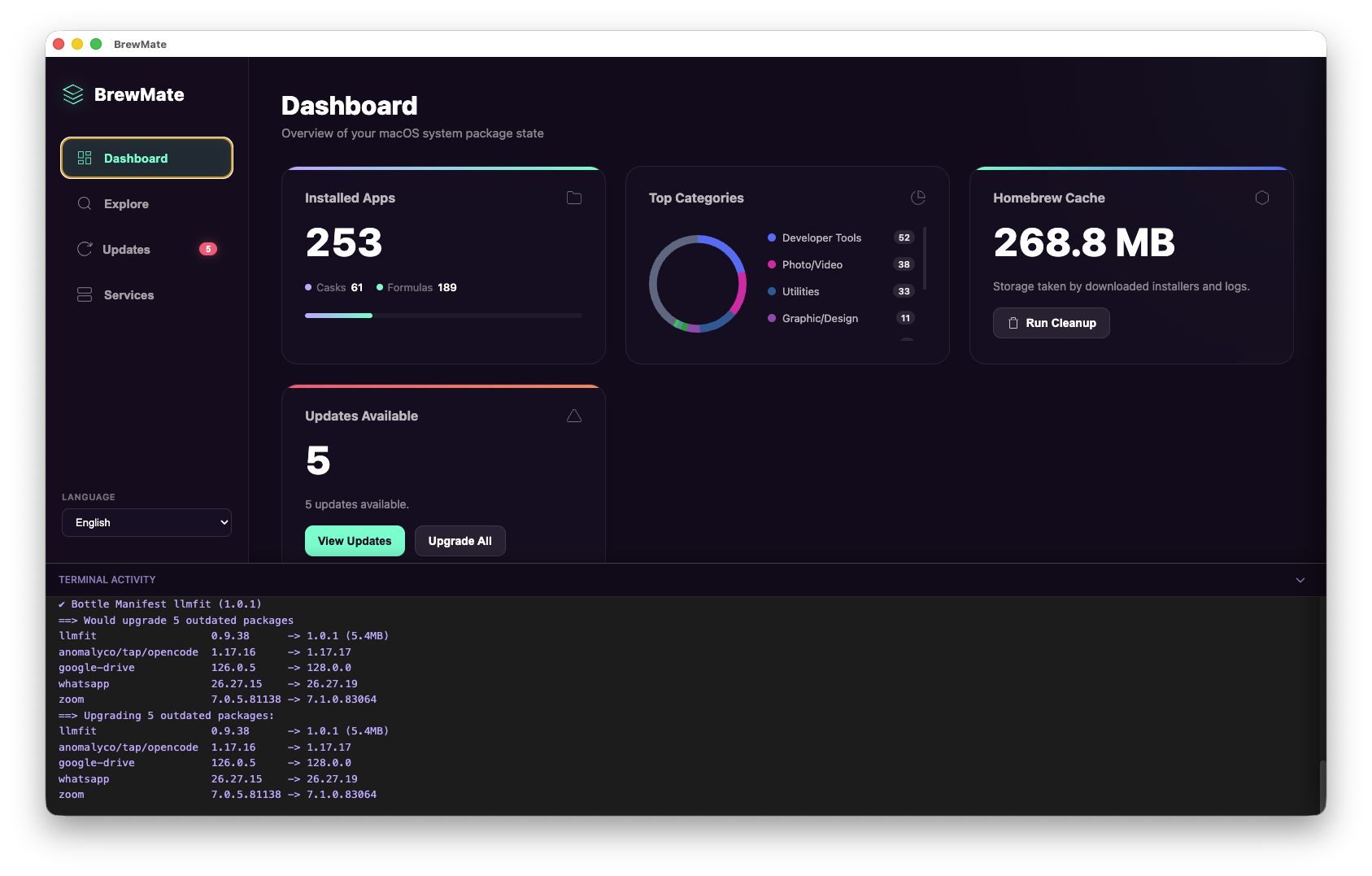
Features
- install/uninstall casks
- brew update/upgrade
- list local installed
- top installs
- show logs on install/uninstall
- Linux support (Homebrew / Linuxbrew; formula-primary)
- add 3rd party taps
- handle apps required sudo/pass on install/uninstall
Prerequisites
Before you begin, ensure you have met the following requirements:
- macOS or Linux (Ubuntu 22.04+ / Debian-class recommended for Linux)
- Homebrew: Required on both platforms. Install with:
/bin/bash -c "$(curl -fsSL https://raw.githubusercontent.com/Homebrew/install/HEAD/install.sh)"
On Linux, use the official prefix /home/linuxbrew/.linuxbrew when possible (best bottle support). Follow the installer’s “Next steps” to add brew to your PATH.
Linux system packages
For running Electron / building from source on Debian/Ubuntu:
sudo apt-get install build-essential procps curl file git \
  libgtk-3-dev libnotify-dev libnss3 libxss1 libasound2
Install
macOS — Option 1 (Homebrew cask)
brew install romankurnovskii/BrewMate/brewmate --cask
macOS — Option 2 (DMG)
- Download the latest DMG file from the releases page.
- Double-click the DMG file to open it.
- Drag the BrewMate app to your Applications folder.
Linux (from source / local package)
Linux release artifacts may be produced with electron-builder (AppImage / .deb). From a clone:
npm install
npm run build:linux
Artifacts land in dist-app/. You can also run in development after npm run build with npm start.
Note: On Linux, Homebrew is formula-primary. Casks are shown when available, but many macOS-only casks will not install. Interactive upgrades use the in-app terminal (external Terminal.app is macOS-only).
First time launch (macOS)
- Navigate to your "Applications" folder.
- Find the app
BrewMateand right-click on it. - Select "Open" from the context menu.
- When the security warning appears, click "Open" to confirm that you want to open the app.
- The app will now launch.
Requirements
- macOS 10.15 or later, or
- Linux with Homebrew (Ubuntu 22.04+ recommended)
Development / Build
- Clone the repository:
git clone https://github.com/romankurnovskii/BrewMate.git - Install dependencies:
npm install - Build the app:
npm run build - For development run
npm startornpm run start:dev
Build Types
Local Test Build (macOS)
Build a version you can run and test on your Mac (direct distribution):
npm run build:mac
This creates a DMG in dist-app/ that you can install and run locally.
Local Test Build (Linux)
npm run build:linux
This creates AppImage and/or .deb packages in dist-app/ (see electron-builder.yml).
Mac App Store Build
Build a version for App Store submission (unsigned universal build):
npm run build:mas
This creates a PKG in dist-app/ for App Store submission.
⚠️ Important: MAS builds cannot be run locally - they're only for App Store submission. If you need to test the app, use build:mac instead.
Testing & Validation Workflow
Before submitting to the App Store:
-
Test locally (on your ARM Mac):
npm run build:mac npm run test:local -
Build for App Store:
npm run build:mas -
Pre-submission validation:
npm run pre-submitThis checks architecture, code signing, entitlements, and common rejection reasons.
-
Upload to App Store Connect via Transporter app
See docs/BUILD_TYPES.md and docs/SUBMISSION_CHECKLIST.md for more details.
Available Scripts
npm run build:mac
Builds the app for production with code signing (if certificates are available).
npm run test
Runs the test suite using Jest.
npm run start:dev
Runs the app in development mode with live reloading.
CI/CD & Automation
BrewMate uses GitHub Actions for automated releases and App Store submission. For this to work, you must configure the following:
See docs/BUILD_TYPES.md and docs/SUBMISSION_CHECKLIST.md for more details.
License
BrewMate is licensed under the MIT License. See the LICENSE file for details.
Contributors

244 commits

50 commits

40 commits

9 commits
Similar repos


Languages
TypeScript
85.3%
Shell
7.1%
CSS
3.5%
HTML
3.1%
Homebrew GUI apps manager
300
stars
348
commits
TypeScript
primary language
Sep 14, 2026
updated
README
BrewMate
BrewMate - Homebrew GUI
BrewMate is a GUI application for Homebrew on macOS and Linux. Search, install, upgrade, and uninstall formulae and casks (where Homebrew supports them). You can also browse top downloads and manage brew services.
Includes third party apps + from awesome-brew
Features
- install/uninstall casks
- brew update/upgrade
- list local installed
- top installs
- show logs on install/uninstall
- Linux support (Homebrew / Linuxbrew; formula-primary)
- add 3rd party taps
- handle apps required sudo/pass on install/uninstall
Prerequisites
Before you begin, ensure you have met the following requirements:
- macOS or Linux (Ubuntu 22.04+ / Debian-class recommended for Linux)
- Homebrew: Required on both platforms. Install with:
/bin/bash -c "$(curl -fsSL https://raw.githubusercontent.com/Homebrew/install/HEAD/install.sh)"
On Linux, use the official prefix /home/linuxbrew/.linuxbrew when possible (best bottle support). Follow the installer’s “Next steps” to add brew to your PATH.
Linux system packages
For running Electron / building from source on Debian/Ubuntu:
sudo apt-get install build-essential procps curl file git \
  libgtk-3-dev libnotify-dev libnss3 libxss1 libasound2
Install
macOS — Option 1 (Homebrew cask)
brew install romankurnovskii/BrewMate/brewmate --cask
macOS — Option 2 (DMG)
- Download the latest DMG file from the releases page.
- Double-click the DMG file to open it.
- Drag the BrewMate app to your Applications folder.
Linux (from source / local package)
Linux release artifacts may be produced with electron-builder (AppImage / .deb). From a clone:
npm install
npm run build:linux
Artifacts land in dist-app/. You can also run in development after npm run build with npm start.
Note: On Linux, Homebrew is formula-primary. Casks are shown when available, but many macOS-only casks will not install. Interactive upgrades use the in-app terminal (external Terminal.app is macOS-only).
First time launch (macOS)
- Navigate to your "Applications" folder.
- Find the app
BrewMateand right-click on it. - Select "Open" from the context menu.
- When the security warning appears, click "Open" to confirm that you want to open the app.
- The app will now launch.
Requirements
- macOS 10.15 or later, or
- Linux with Homebrew (Ubuntu 22.04+ recommended)
Development / Build
- Clone the repository:
git clone https://github.com/romankurnovskii/BrewMate.git - Install dependencies:
npm install - Build the app:
npm run build - For development run
npm startornpm run start:dev
Build Types
Local Test Build (macOS)
Build a version you can run and test on your Mac (direct distribution):
npm run build:mac
This creates a DMG in dist-app/ that you can install and run locally.
Local Test Build (Linux)
npm run build:linux
This creates AppImage and/or .deb packages in dist-app/ (see electron-builder.yml).
Mac App Store Build
Build a version for App Store submission (unsigned universal build):
npm run build:mas
This creates a PKG in dist-app/ for App Store submission.
⚠️ Important: MAS builds cannot be run locally - they're only for App Store submission. If you need to test the app, use build:mac instead.
Testing & Validation Workflow
Before submitting to the App Store:
-
Test locally (on your ARM Mac):
npm run build:mac npm run test:local -
Build for App Store:
npm run build:mas -
Pre-submission validation:
npm run pre-submitThis checks architecture, code signing, entitlements, and common rejection reasons.
-
Upload to App Store Connect via Transporter app
See docs/BUILD_TYPES.md and docs/SUBMISSION_CHECKLIST.md for more details.
Available Scripts
npm run build:mac
Builds the app for production with code signing (if certificates are available).
npm run test
Runs the test suite using Jest.
npm run start:dev
Runs the app in development mode with live reloading.
CI/CD & Automation
BrewMate uses GitHub Actions for automated releases and App Store submission. For this to work, you must configure the following:
See docs/BUILD_TYPES.md and docs/SUBMISSION_CHECKLIST.md for more details.
License
BrewMate is licensed under the MIT License. See the LICENSE file for details.
Similar repos
Contributors
244 commits
50 commits
40 commits
9 commits
Languages
TypeScript
85.3%
Shell
7.1%
CSS
3.5%
HTML
3.1%