📊 Benchmark Comparison of Packages with Runtime Validation and TypeScript Support
See the code⚡⚠ Benchmark results have changed after switching to isolated node processes for each benchmarked package, see #864 ⚠⚡
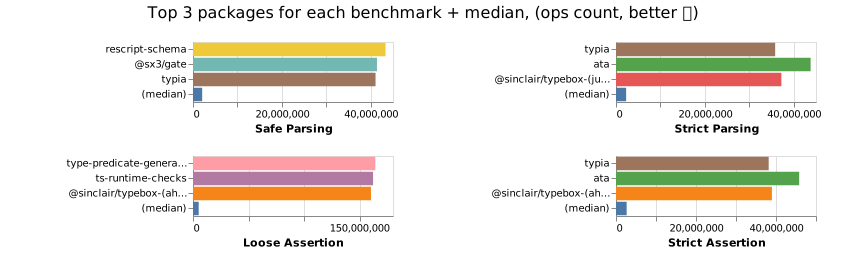
These packages are capable of validating the data for type correctness.
E.g. if string was expected, but a number was provided, the validator should fail.
It has a validator function or method that returns a valid type casted value or throws.
const data: any = {}

// `res` is now type casted to the right type
const res = isValid(data)
Or it has a type guard function that in a truthy block type casts the value.
const data: any = {}

function isMyDataValid(data: any) {
  // isValidGuard is the type guard function provided by the package
  if (isValidGuard(data)) {
    // data here is "guarded" and therefore inferred to be of the right type
    return data
  }

  throw new Error('Invalid!')
}

// `res` is now type casted to the right type
const res = isMyDataValid(data)
npm run start - run benchmarks for all modules using Node.jsnpm run start:bun - run benchmarks for all modules using bunnpm run start run zod myzod valita - run benchmarks only for a few selected modulesnpm run test - run build process and tests for all modulesnpm run test:build - run build process for all modulesA basic preact+vite app lives in /docs.
It is deployed via github pages whenever something has been pushed to the main branch.
cd docs

npm run dev     # develop / view results
npm run build   # build
npm run preview # preview the build
When viewing results locally, you will need to restart the app whenever the results are updated.
npm run lint - lint all filesnpm run lint:fix - lint all files and fix errorsnpm run download-packages-popularity - download popularity data from npmjs.comnvm use x - switch to Node.js x.xnvm use 18 - switch to Node.js 18.xnvm use 20 - switch to Node.js 20.xcurl -fsSl https://bun.sh/install | bash -s "bun-v1.0.x" to switch to a specific bun versioncurl -fsSl https://bun.sh/install | bash -s "bun-v1.1.43" - switch to bun 1.1.43deno upgrade x.x.x to switch to a specific Deno versiondeno upgrade stable - switch to Deno x.x.x.github/workflows/pr.yml and .github/workflows/release.ymlNODE_VERSIONS in docs/src/App.tsxNODE_VERSION_FOR_PREVIEW in benchmarks/helpers/main.ts.github/workflows/pr.yml and .github/workflows/release.ymlBUN_VERSIONS in docs/src/App.tsx.github/workflows/pr.yml and .github/workflows/release.ymlDENO_VERSIONS in docs/src/App.tsxSafe Parsing
Strict Parsing
Loose Assertion
Strict Assertion
(top 24 of 26)
11,411 followers · starred Jul 2025
1,744 followers · starred May 2024
370 followers · starred Jun 2023
2,676 followers · starred Sep 2019
📊 Benchmark Comparison of Packages with Runtime Validation and TypeScript Support
See the code⚡⚠ Benchmark results have changed after switching to isolated node processes for each benchmarked package, see #864 ⚠⚡
These packages are capable of validating the data for type correctness.
E.g. if string was expected, but a number was provided, the validator should fail.
It has a validator function or method that returns a valid type casted value or throws.
const data: any = {}

// `res` is now type casted to the right type
const res = isValid(data)
Or it has a type guard function that in a truthy block type casts the value.
const data: any = {}

function isMyDataValid(data: any) {
  // isValidGuard is the type guard function provided by the package
  if (isValidGuard(data)) {
    // data here is "guarded" and therefore inferred to be of the right type
    return data
  }

  throw new Error('Invalid!')
}

// `res` is now type casted to the right type
const res = isMyDataValid(data)
npm run start - run benchmarks for all modules using Node.jsnpm run start:bun - run benchmarks for all modules using bunnpm run start run zod myzod valita - run benchmarks only for a few selected modulesnpm run test - run build process and tests for all modulesnpm run test:build - run build process for all modulesA basic preact+vite app lives in /docs.
It is deployed via github pages whenever something has been pushed to the main branch.
cd docs

npm run dev     # develop / view results
npm run build   # build
npm run preview # preview the build
When viewing results locally, you will need to restart the app whenever the results are updated.
npm run lint - lint all filesnpm run lint:fix - lint all files and fix errorsnpm run download-packages-popularity - download popularity data from npmjs.comnvm use x - switch to Node.js x.xnvm use 18 - switch to Node.js 18.xnvm use 20 - switch to Node.js 20.xcurl -fsSl https://bun.sh/install | bash -s "bun-v1.0.x" to switch to a specific bun versioncurl -fsSl https://bun.sh/install | bash -s "bun-v1.1.43" - switch to bun 1.1.43deno upgrade x.x.x to switch to a specific Deno versiondeno upgrade stable - switch to Deno x.x.x.github/workflows/pr.yml and .github/workflows/release.ymlNODE_VERSIONS in docs/src/App.tsxNODE_VERSION_FOR_PREVIEW in benchmarks/helpers/main.ts.github/workflows/pr.yml and .github/workflows/release.ymlBUN_VERSIONS in docs/src/App.tsx.github/workflows/pr.yml and .github/workflows/release.ymlDENO_VERSIONS in docs/src/App.tsxSafe Parsing
Strict Parsing
Loose Assertion
Strict Assertion
(top 24 of 26)
11,411 followers · starred Jul 2025
1,744 followers · starred May 2024
370 followers · starred Jun 2023
2,676 followers · starred Sep 2019



