
README
MLMVPN for Windows
A multi-engine anti-censorship desktop application, a clean-IP scanner, and a Cloudflare infrastructure manager — in one program.




English · فارسی
What this is
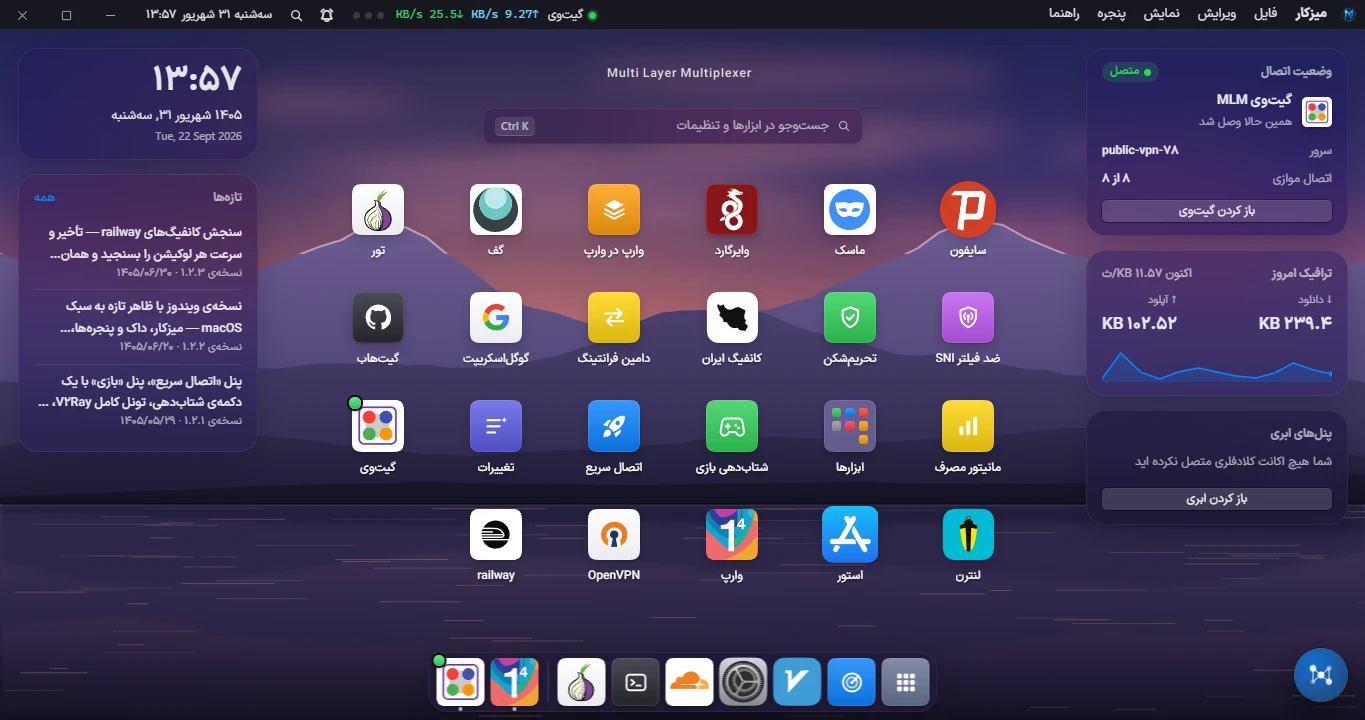
Most anti-censorship tools are one engine with a switch. This is a desktop environment for fourteen of them, and the reason for that is measured rather than decorative: no single transport survives every network. On one Iranian mobile operator a WireGuard handshake never completes while a WebSocket over TLS to a Cloudflare edge does; on another the reverse. So the application carries the engines side by side, measures them on the machine it is running on, and tells you which one is actually working here, now.
It also does the thing that makes those engines usable in the first place: finding a clean IP. A CDN edge address that a filter has not yet noticed is the difference between a config that connects and the same config timing out, and the scanner exists to find those addresses and prove they work before you trust them.
Everything runs on the user's own infrastructure or on free public networks. There is no MLMVPN server in the data path.
A note on what this software is for. It routes network traffic and changes operating-system network settings — DNS resolvers, routes, the Windows firewall, the system proxy. Whether it is lawful for you to run it is your own responsibility. See SECURITY.md for how it is built to fail closed rather than leak.
Table of contents
- Highlights
- The engines
- Requirements
- Install
- Build from source
- How it is put together
- Documentation
- Project layout
- Contributing
- Licence
- Credits and contact
Highlights
Clean-IP scanner
Sweeps CDN address ranges — Cloudflare, Fastly, Akamai and others — and reports which addresses answer, how fast, and from where. A result is only kept if it survives a real health test, not just a TCP handshake. Results can be pinned to a specific SNI, archived, and handed straight to a config.
One connect button, fourteen engines
Pick a destination and the application works out the route. When an engine cannot come up it says what failed and which rung of the ladder it fell back to, instead of showing a spinner that never resolves.
Cloudflare infrastructure manager
Deploy and adopt Workers, manage KV and D1, read usage, and generate configs — against your own Cloudflare account, with an API token you create. Supports the BPB and Zeus panel families.
Live measurement, not promises
Latency, throughput, jitter and packet loss are measured on this machine, against the servers you are actually going to use. The delay figure is a warm pooled two-shot minimum — the same method v2rayN uses — so it is comparable to the numbers you already know.
Game-latency work
A measured pipeline rather than a placebo: entry-point selection, DNS resolver ranking by real coverage and handshake time, upload-bufferbloat control (the single biggest measured lever — 126 ms → 2681 ms under load on a real line), and in-match spike detection that assigns blame.
Per-application routing and full tunnel
Route chosen executables through the tunnel and leave the rest direct, or take the whole machine. The kill switch and the DNS guard record system state to disk before touching Windows, so an interrupted change can always be undone — including after a hard crash.
Built for the machines it runs on
The UI is tested down to 1024×640 and on 32-bit Windows. Error paths use native Windows dialogs rather than application windows, so a machine that cannot draw the app can still show you why.
The engines
| Engine | Kind | Needs your own server? | Notes |
|---|---|---|---|
| Xray-core (V2Ray) | VLESS / VMess / Trojan / Shadowsocks | Yes, or a public config | WS, gRPC, XHTTP, TCP; TLS fragmenting and browser fingerprints |
| sing-box | TUN / full tunnel | — | Provides the system-wide tunnel for several engines |
| ماسک — Mask (Aether) | MASQUE over WARP | No | Userspace; has a TCP fallback for networks that drop UDP |
| وایرگارد — WireGuard (AmneziaWG) | WireGuard, obfuscated | No | |
| وارپ — WARP | Cloudflare WARP | No | Own registration and lifecycle |
| وارپ در وارپ — WARP-in-WARP | Chained WARP | No | |
| Psiphon | Multi-protocol circumvention | No | Free public network |
| Tor | Onion routing | No | Own control port; exit pinning is measurably slower, so it is not used |
| Lantern | Domain-fronted proxy | No | |
| Geph | Fronted broker | No | Anonymous account |
| OpenVPN | OpenVPN | Optional | Full gateway feature parity |
| گیتوی MLM — Gateway | SoftEther / VPN Gate | No | Free public relay pool |
| Google Script tunnel | HTTP relay via Apps Script | Yes (your own script) | Proxy mode only |
| GitHub tunnel | Disposable cloud sessions | Yes (your account) |
Public-pool importers, a serverless "Iran config" generator, domain fronting, an SNI anti-filter engine with a five-lever method ladder, and a sanction-domain router sit on top of these.
None of these binaries are in this repository. They belong to their own projects, under their own licences. docs/BUILD.md lists every one of them and where it comes from.
Requirements
| OS | Windows 10 (1809+) or Windows 11 — x64 and x86/32-bit |
| Privileges | Administrator. The TUN adapter, the firewall guard and DNS changes all need it. |
| Node.js | 18 or newer, to build from source |
| Disk | ~1.5 GB built, most of it the engine binaries |
Install
Download an installer or the portable build from the Releases page.
| File | For |
|---|---|
mlm-vpn-Setup-<version>-x64.exe | 64-bit Windows |
mlm-vpn-Setup-<version>-ia32.exe | 32-bit Windows |
mlm-vpn-Portable-<version>*.exe | No installation |
When something goes wrong: MLMVPN-Report.cmd
Download the tool (8 KB) — or, from 1.2.4 onwards, find it beside
MLM VPN.exe in the install folder. Double-click MLMVPN-Report.cmd.
It needs nothing from the application — only Windows PowerShell — so it works precisely when the
app does not: a window that opens black, a launch that hangs before the loading screen, an app that
closes itself. It reads startup.log, says in plain Persian how far the last launch got and what
stopped it, opens that verdict in Notepad, and leaves a single .zip on the Desktop with every
log worth sending.
Maintainers: this file ships through
build.extraFilesinpackage.json, which puts it next to the executable rather than insideapp.asar— it has to be reachable without the app running. The source istools/. Do not drop it fromextraFileswhen changing the build, and keep the UTF-8 byte-order mark ontools/report.ps1: PowerShell 5.1 reads a .ps1 without one as ANSI, and every Persian string becomes mojibake.
If the window opens black or white: right-click the tray icon next to the Windows clock and
turn off «کشیدن صفحه با کارت گرافیک» (draw with the graphics card), then restart. The same menu
has «باز کردن گزارش راهاندازی», which opens startup.log — please attach that file to any
report. See docs/TROUBLESHOOTING.md.
Build from source
git clone https://github.com/mlmvpn/mlmvpn_windows.git
cd mlmvpn_windows
npm install
The engine binaries are not in the repository and must be placed in core/ before the application
will run. docs/BUILD.md lists each file, its upstream project and its licence,
and explains which ones you can download and which must be compiled.
npm run electron        # run it
npm test                # the full suite
npm run build           # installers + portable, into dist/
Testing a change without a 25-minute rebuild
electron-builder packs everything into app.asar. Convert that to a plain folder once, then copy
changed files straight in:
node dev-unpack.js                       # asar -> folder (close the app first)
node dev-sync.js main.js public/app.js   # copy changed files in
Every npm run build writes a fresh app.asar, so the conversion has to be redone afterwards.
node dev-unpack.js win-ia32-unpacked does the same for the 32-bit build.
Looking at the UI safely
Do not run node server.js just to look at the interface. Its startup recovery releases stale
firewall rules, repairs "stranded" loopback DNS and re-enables the DNS bridge — with the real
application running at the same time, it will treat the live session as leftovers and tear it down.
node .claude/ui-preview.js --api # serves public/ with every /api/* answering 503
How it is put together
┌─────────────────────────────────────────────────────────────────┐
│  Renderer — public/                                             │
│  A macOS-style desktop: windows, a dock, per-feature panels      │
│  (vanilla JS, no framework; Tailwind for utility classes)        │
└───────────────────────────┬─────────────────────────────────────┘
                            │  HTTP to 127.0.0.1:<port>
┌───────────────────────────┴─────────────────────────────────────┐
│  Main process — Electron                                        │
│  ├── main.js       window, tray, startup health, watchdog        │
│  └── server.js     Express: every /api/* route the page calls    │
└───────────────────────────┬─────────────────────────────────────┘
                            │
┌───────────────────────────┴─────────────────────────────────────┐
│  Engine managers — *-manager.js                                 │
│  xray · sing-box/tun · aether · warp · psiphon · tor · lantern   │
│  geph · openvpn · gateway · dns · store · cloud                  │
└───────────────────────────┬─────────────────────────────────────┘
                            │  spawn + control ports
┌───────────────────────────┴─────────────────────────────────────┐
│  core/ — third-party binaries, not in this repository            │
└─────────────────────────────────────────────────────────────────┘
Two consequences of this shape are worth knowing before you change anything:
-
server.jsruns inside Electron's main process. A synchronous call there freezes the window and the HTTP server the page is loading from. OneexecFileSyncon a startup path cost 2167 ms of hard lock and was reported as "the app hangs my PC". Never put a sync spawn on a click path. -
Network settings have exactly one owner.
network-settings.jsholds DNS, ports, proxy mode and LAN; engines read from it and keep no copies. Two engines with their own idea of the DNS server is how a machine ends up with no internet and no explanation.
docs/ARCHITECTURE.md goes through each layer properly.
Documentation
| English | فارسی | |
|---|---|---|
| Architecture and the rules that hold it together | ARCHITECTURE.md | ARCHITECTURE.fa.md |
| Building, and where every binary comes from | BUILD.md | BUILD.fa.md |
| Using the application, panel by panel | USAGE.md | USAGE.fa.md |
| When it will not start or will not connect | TROUBLESHOOTING.md | TROUBLESHOOTING.fa.md |
| Contributing | CONTRIBUTING.md | (same file) |
| Reporting a vulnerability | SECURITY.md | (same file) |
Design notes for individual features live in docs/ as well — the game engine handoff, the Google
Script tunnel plan, the Lantern and Geph build notes, the macOS-style UI plan.
Project layout
main.js                  Electron main: window, tray, startup health, the black-screen watchdog
server.js                Express — every /api/* route (runs in the main process)
startup-health.js        Launch diary + the graphics-acceleration setting
*-manager.js             One per engine: lifecycle, config generation, health
network-settings.js      The single owner of DNS, ports, proxy mode and LAN sharing
tun-manager.js           The full tunnel (sing-box TUN), routes and the kill switch
scanner.js               The clean-IP scanner
xray-tester.js           Config measurement, v2rayN-compatible delay method
public/                  The renderer: index.html, shell/ (desktop, dock, windows), components/
store/                   Signed update channel (Ed25519); the private key lives outside the tree
netdiag/                 Internet diagnosis, transports, the repair journal
game/                    Game-latency measurement and the accelerator pipeline
tests/                   Suites per subsystem — `npm test` runs all of them
docs/                    Architecture, build, usage, troubleshooting, feature plans
core/                    Third-party binaries — NOT in this repository, see docs/BUILD.md
Contributing
Issues and pull requests are welcome. Please read CONTRIBUTING.md first — it covers the house rules that are not obvious from the code, including:
- Fix it for the people who are stuck, not for everyone. A per-user lever plus error-driven advice beats changing the default behaviour for a million working installations.
- Measure, do not assume. Nearly every wrong turn in this project's history was a plausible theory nobody tested. If you claim something is faster or fixed, put the numbers in the PR.
- Never leave a failure silent. A caught exception that shows the user nothing is how a bug survives for six months.
Licence
MLMVPN Attribution Licence 1.0 — source-available.
You may use, modify, sell and redistribute this software, provided you credit MLMVPN:
- in the product itself, where a user can see it — "Based on MLMVPN for Windows" with a link;
- in the source, by keeping the
LICENSEfile and the copyright notices intact; - wherever you announce or distribute it.
You may put your own branding beside MLMVPN's. You may not replace it, and you may not present this work as entirely your own. The full terms, in English and Persian, are in LICENSE.
The engines this application drives are separate works under their own licences and are not redistributed here — see docs/BUILD.md.
Credits and contact
Built by Ehsan — MLMVPN.
| Telegram | @mlmvpn |
| YouTube | @marketmlm |
| Issues | github.com/mlmvpn/mlmvpn_windows/issues |
| Android app | github.com/mlmvpn/mlmvpn_android |
This application would not exist without the projects it drives: Xray-core, sing-box, Tor, Psiphon, OpenVPN, Lantern, Geph, WireGuard, AmneziaWG, Cloudflare WARP and VPN Gate. Thank you to everyone who builds them.


Similar repos


Languages
JavaScript
87.7%
CSS
8.0%
HTML
4.1%
README
MLMVPN for Windows
A multi-engine anti-censorship desktop application, a clean-IP scanner, and a Cloudflare infrastructure manager — in one program.
English · فارسی
What this is
Most anti-censorship tools are one engine with a switch. This is a desktop environment for fourteen of them, and the reason for that is measured rather than decorative: no single transport survives every network. On one Iranian mobile operator a WireGuard handshake never completes while a WebSocket over TLS to a Cloudflare edge does; on another the reverse. So the application carries the engines side by side, measures them on the machine it is running on, and tells you which one is actually working here, now.
It also does the thing that makes those engines usable in the first place: finding a clean IP. A CDN edge address that a filter has not yet noticed is the difference between a config that connects and the same config timing out, and the scanner exists to find those addresses and prove they work before you trust them.
Everything runs on the user's own infrastructure or on free public networks. There is no MLMVPN server in the data path.
A note on what this software is for. It routes network traffic and changes operating-system network settings — DNS resolvers, routes, the Windows firewall, the system proxy. Whether it is lawful for you to run it is your own responsibility. See SECURITY.md for how it is built to fail closed rather than leak.
Table of contents
- Highlights
- The engines
- Requirements
- Install
- Build from source
- How it is put together
- Documentation
- Project layout
- Contributing
- Licence
- Credits and contact
Highlights
Clean-IP scanner
Sweeps CDN address ranges — Cloudflare, Fastly, Akamai and others — and reports which addresses answer, how fast, and from where. A result is only kept if it survives a real health test, not just a TCP handshake. Results can be pinned to a specific SNI, archived, and handed straight to a config.
One connect button, fourteen engines
Pick a destination and the application works out the route. When an engine cannot come up it says what failed and which rung of the ladder it fell back to, instead of showing a spinner that never resolves.
Cloudflare infrastructure manager
Deploy and adopt Workers, manage KV and D1, read usage, and generate configs — against your own Cloudflare account, with an API token you create. Supports the BPB and Zeus panel families.
Live measurement, not promises
Latency, throughput, jitter and packet loss are measured on this machine, against the servers you are actually going to use. The delay figure is a warm pooled two-shot minimum — the same method v2rayN uses — so it is comparable to the numbers you already know.
Game-latency work
A measured pipeline rather than a placebo: entry-point selection, DNS resolver ranking by real coverage and handshake time, upload-bufferbloat control (the single biggest measured lever — 126 ms → 2681 ms under load on a real line), and in-match spike detection that assigns blame.
Per-application routing and full tunnel
Route chosen executables through the tunnel and leave the rest direct, or take the whole machine. The kill switch and the DNS guard record system state to disk before touching Windows, so an interrupted change can always be undone — including after a hard crash.
Built for the machines it runs on
The UI is tested down to 1024×640 and on 32-bit Windows. Error paths use native Windows dialogs rather than application windows, so a machine that cannot draw the app can still show you why.
The engines
| Engine | Kind | Needs your own server? | Notes |
|---|---|---|---|
| Xray-core (V2Ray) | VLESS / VMess / Trojan / Shadowsocks | Yes, or a public config | WS, gRPC, XHTTP, TCP; TLS fragmenting and browser fingerprints |
| sing-box | TUN / full tunnel | — | Provides the system-wide tunnel for several engines |
| ماسک — Mask (Aether) | MASQUE over WARP | No | Userspace; has a TCP fallback for networks that drop UDP |
| وایرگارد — WireGuard (AmneziaWG) | WireGuard, obfuscated | No | |
| وارپ — WARP | Cloudflare WARP | No | Own registration and lifecycle |
| وارپ در وارپ — WARP-in-WARP | Chained WARP | No | |
| Psiphon | Multi-protocol circumvention | No | Free public network |
| Tor | Onion routing | No | Own control port; exit pinning is measurably slower, so it is not used |
| Lantern | Domain-fronted proxy | No | |
| Geph | Fronted broker | No | Anonymous account |
| OpenVPN | OpenVPN | Optional | Full gateway feature parity |
| گیتوی MLM — Gateway | SoftEther / VPN Gate | No | Free public relay pool |
| Google Script tunnel | HTTP relay via Apps Script | Yes (your own script) | Proxy mode only |
| GitHub tunnel | Disposable cloud sessions | Yes (your account) |
Public-pool importers, a serverless "Iran config" generator, domain fronting, an SNI anti-filter engine with a five-lever method ladder, and a sanction-domain router sit on top of these.
None of these binaries are in this repository. They belong to their own projects, under their own licences. docs/BUILD.md lists every one of them and where it comes from.
Requirements
| OS | Windows 10 (1809+) or Windows 11 — x64 and x86/32-bit |
| Privileges | Administrator. The TUN adapter, the firewall guard and DNS changes all need it. |
| Node.js | 18 or newer, to build from source |
| Disk | ~1.5 GB built, most of it the engine binaries |
Install
Download an installer or the portable build from the Releases page.
| File | For |
|---|---|
mlm-vpn-Setup-<version>-x64.exe | 64-bit Windows |
mlm-vpn-Setup-<version>-ia32.exe | 32-bit Windows |
mlm-vpn-Portable-<version>*.exe | No installation |
When something goes wrong: MLMVPN-Report.cmd
Download the tool (8 KB) — or, from 1.2.4 onwards, find it beside
MLM VPN.exe in the install folder. Double-click MLMVPN-Report.cmd.
It needs nothing from the application — only Windows PowerShell — so it works precisely when the
app does not: a window that opens black, a launch that hangs before the loading screen, an app that
closes itself. It reads startup.log, says in plain Persian how far the last launch got and what
stopped it, opens that verdict in Notepad, and leaves a single .zip on the Desktop with every
log worth sending.
Maintainers: this file ships through
build.extraFilesinpackage.json, which puts it next to the executable rather than insideapp.asar— it has to be reachable without the app running. The source istools/. Do not drop it fromextraFileswhen changing the build, and keep the UTF-8 byte-order mark ontools/report.ps1: PowerShell 5.1 reads a .ps1 without one as ANSI, and every Persian string becomes mojibake.
If the window opens black or white: right-click the tray icon next to the Windows clock and
turn off «کشیدن صفحه با کارت گرافیک» (draw with the graphics card), then restart. The same menu
has «باز کردن گزارش راهاندازی», which opens startup.log — please attach that file to any
report. See docs/TROUBLESHOOTING.md.
Build from source
git clone https://github.com/mlmvpn/mlmvpn_windows.git
cd mlmvpn_windows
npm install
The engine binaries are not in the repository and must be placed in core/ before the application
will run. docs/BUILD.md lists each file, its upstream project and its licence,
and explains which ones you can download and which must be compiled.
npm run electron        # run it
npm test                # the full suite
npm run build           # installers + portable, into dist/
Testing a change without a 25-minute rebuild
electron-builder packs everything into app.asar. Convert that to a plain folder once, then copy
changed files straight in:
node dev-unpack.js                       # asar -> folder (close the app first)
node dev-sync.js main.js public/app.js   # copy changed files in
Every npm run build writes a fresh app.asar, so the conversion has to be redone afterwards.
node dev-unpack.js win-ia32-unpacked does the same for the 32-bit build.
Looking at the UI safely
Do not run node server.js just to look at the interface. Its startup recovery releases stale
firewall rules, repairs "stranded" loopback DNS and re-enables the DNS bridge — with the real
application running at the same time, it will treat the live session as leftovers and tear it down.
node .claude/ui-preview.js --api # serves public/ with every /api/* answering 503
How it is put together
┌─────────────────────────────────────────────────────────────────┐
│  Renderer — public/                                             │
│  A macOS-style desktop: windows, a dock, per-feature panels      │
│  (vanilla JS, no framework; Tailwind for utility classes)        │
└───────────────────────────┬─────────────────────────────────────┘
                            │  HTTP to 127.0.0.1:<port>
┌───────────────────────────┴─────────────────────────────────────┐
│  Main process — Electron                                        │
│  ├── main.js       window, tray, startup health, watchdog        │
│  └── server.js     Express: every /api/* route the page calls    │
└───────────────────────────┬─────────────────────────────────────┘
                            │
┌───────────────────────────┴─────────────────────────────────────┐
│  Engine managers — *-manager.js                                 │
│  xray · sing-box/tun · aether · warp · psiphon · tor · lantern   │
│  geph · openvpn · gateway · dns · store · cloud                  │
└───────────────────────────┬─────────────────────────────────────┘
                            │  spawn + control ports
┌───────────────────────────┴─────────────────────────────────────┐
│  core/ — third-party binaries, not in this repository            │
└─────────────────────────────────────────────────────────────────┘
Two consequences of this shape are worth knowing before you change anything:
-
server.jsruns inside Electron's main process. A synchronous call there freezes the window and the HTTP server the page is loading from. OneexecFileSyncon a startup path cost 2167 ms of hard lock and was reported as "the app hangs my PC". Never put a sync spawn on a click path. -
Network settings have exactly one owner.
network-settings.jsholds DNS, ports, proxy mode and LAN; engines read from it and keep no copies. Two engines with their own idea of the DNS server is how a machine ends up with no internet and no explanation.
docs/ARCHITECTURE.md goes through each layer properly.
Documentation
| English | فارسی | |
|---|---|---|
| Architecture and the rules that hold it together | ARCHITECTURE.md | ARCHITECTURE.fa.md |
| Building, and where every binary comes from | BUILD.md | BUILD.fa.md |
| Using the application, panel by panel | USAGE.md | USAGE.fa.md |
| When it will not start or will not connect | TROUBLESHOOTING.md | TROUBLESHOOTING.fa.md |
| Contributing | CONTRIBUTING.md | (same file) |
| Reporting a vulnerability | SECURITY.md | (same file) |
Design notes for individual features live in docs/ as well — the game engine handoff, the Google
Script tunnel plan, the Lantern and Geph build notes, the macOS-style UI plan.
Project layout
main.js                  Electron main: window, tray, startup health, the black-screen watchdog
server.js                Express — every /api/* route (runs in the main process)
startup-health.js        Launch diary + the graphics-acceleration setting
*-manager.js             One per engine: lifecycle, config generation, health
network-settings.js      The single owner of DNS, ports, proxy mode and LAN sharing
tun-manager.js           The full tunnel (sing-box TUN), routes and the kill switch
scanner.js               The clean-IP scanner
xray-tester.js           Config measurement, v2rayN-compatible delay method
public/                  The renderer: index.html, shell/ (desktop, dock, windows), components/
store/                   Signed update channel (Ed25519); the private key lives outside the tree
netdiag/                 Internet diagnosis, transports, the repair journal
game/                    Game-latency measurement and the accelerator pipeline
tests/                   Suites per subsystem — `npm test` runs all of them
docs/                    Architecture, build, usage, troubleshooting, feature plans
core/                    Third-party binaries — NOT in this repository, see docs/BUILD.md
Contributing
Issues and pull requests are welcome. Please read CONTRIBUTING.md first — it covers the house rules that are not obvious from the code, including:
- Fix it for the people who are stuck, not for everyone. A per-user lever plus error-driven advice beats changing the default behaviour for a million working installations.
- Measure, do not assume. Nearly every wrong turn in this project's history was a plausible theory nobody tested. If you claim something is faster or fixed, put the numbers in the PR.
- Never leave a failure silent. A caught exception that shows the user nothing is how a bug survives for six months.
Licence
MLMVPN Attribution Licence 1.0 — source-available.
You may use, modify, sell and redistribute this software, provided you credit MLMVPN:
- in the product itself, where a user can see it — "Based on MLMVPN for Windows" with a link;
- in the source, by keeping the
LICENSEfile and the copyright notices intact; - wherever you announce or distribute it.
You may put your own branding beside MLMVPN's. You may not replace it, and you may not present this work as entirely your own. The full terms, in English and Persian, are in LICENSE.
The engines this application drives are separate works under their own licences and are not redistributed here — see docs/BUILD.md.
Credits and contact
Built by Ehsan — MLMVPN.
| Telegram | @mlmvpn |
| YouTube | @marketmlm |
| Issues | github.com/mlmvpn/mlmvpn_windows/issues |
| Android app | github.com/mlmvpn/mlmvpn_android |
This application would not exist without the projects it drives: Xray-core, sing-box, Tor, Psiphon, OpenVPN, Lantern, Geph, WireGuard, AmneziaWG, Cloudflare WARP and VPN Gate. Thank you to everyone who builds them.
Similar repos
Languages
JavaScript
87.7%
CSS
8.0%
HTML
4.1%