
Windows/macOS VPN client with full VLESS transport support, AmneziaWG, subscription management, and system-level TUN mode.
See the codeREADME
VeilBox
VeilBox is a modern Windows VPN client built for fast profile import, clean routing control, and a simple daily workflow.
It supports VLESS/Xray, System Proxy, TUN, split tunneling, subscriptions, and AmneziaWG import in one desktop app.
Website: https://veilbox.site/
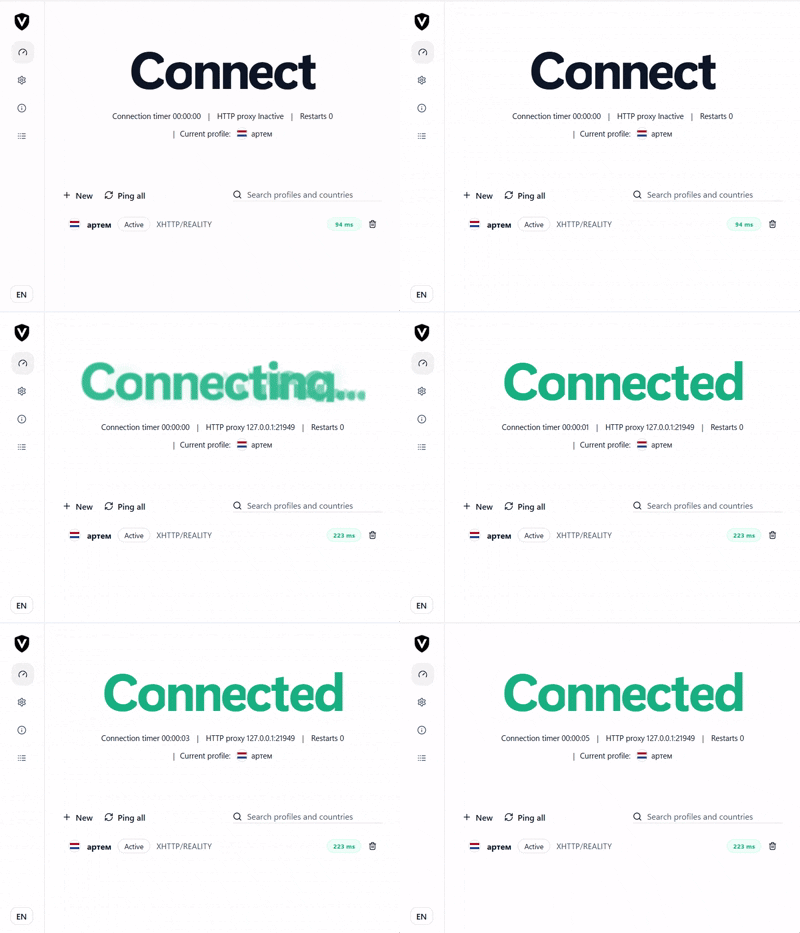
Why VeilBox
- Clean desktop UI with no overloaded panels
- Fast import from
VLESS URI,JSON, subscriptions,Amnezia, andCtrl+V System ProxyandTUNmodes in one app- Split tunneling for real daily use
- Profile ping, connection test, grouped subscriptions, and logs
- Tray support, autostart, auto reconnect, light and dark themes
What It Supports
VLESS:RAW / TCP / WS / gRPC / XHTTP / HTTPUpgrade / mKCPShadowsocks: method/password profiles andss://URI import (without plugin extensions)Hysteria2: TLS/auth profiles andhy2:///hysteria2://URI import, including Salamander obfuscation- Security:
None / TLS / Reality - Engines:
XrayAmneziaWGimport and runtime support
- Connection modes:
System ProxyTUN
Quick Start
- Download the pinned Xray 26.9.9 prerelease (SHA-256 verified) and matching GeoIP/GeoSite data:
./scripts/install-xray.ps1
The binary is ignored by Git and must be installed before packaging. Alternatively place xray.exe, geoip.dat and geosite.dat together in:
src-tauri/bin/xray.exe
src-tauri/bin/geoip.dat
src-tauri/bin/geosite.dat
- For
TUNmode, also put:
src-tauri/bin/wintun.dll
- For
AmneziaWG, put:
src-tauri/bin/amneziawg.exe
src-tauri/bin/awg.exe
- Install dependencies:
npm install
- Run in development:
npm run tauri dev
- Build installer:
npm run tauri build
The NSIS installer will be generated here:
src-tauri/target/release/bundle/nsis/
Platform
- Windows 10
- Windows 11
Routing and failover
In TUN mode, choose Bypass listed and add domain:ru, domain:рф and geoip:ru to send matching Russian destinations directly, or use the Russian preset in Settings. Routing happens in the client, not on the VPN provider's server. GeoIP is based on the resolved destination address; a CDN or DNS result can make location-based rules imperfect. Only listed accepts executable names such as telegram.exe and absolute executable paths; everything else stays direct unless separately matched by a domain/IP rule. Windows System Proxy does not capture all programs or UDP traffic.
Server balancing uses all valid Xray profiles. It downloads a 128 KiB test payload through each server on startup, then rechecks the active server and one alternative every 40 seconds. It prefers measured download performance, requires a 35% advantage and a 90-second hold-down before an elective switch, and fails over after repeated probe failures. Xray's latency-based selection remains the fallback when the download endpoint is unavailable. Only new connections use the newly selected server; existing connections are not migrated. The selected profile remains the fallback, and the profile test checks local startup/configuration rather than remote connectivity. Probing uses Cloudflare's speed-test endpoint and consumes data; disable balancing when stored profiles should not share traffic.
Support VeilBox with donations.
If the client is useful to you, you can support development using any of the wallets below.

Legal
Contributors

12 commits
Similar repos


Languages
Rust
56.1%
TypeScript
31.6%
CSS
11.8%
Windows/macOS VPN client with full VLESS transport support, AmneziaWG, subscription management, and system-level TUN mode.
See the codeREADME
VeilBox
VeilBox is a modern Windows VPN client built for fast profile import, clean routing control, and a simple daily workflow.
It supports VLESS/Xray, System Proxy, TUN, split tunneling, subscriptions, and AmneziaWG import in one desktop app.
Website: https://veilbox.site/
Why VeilBox
- Clean desktop UI with no overloaded panels
- Fast import from
VLESS URI,JSON, subscriptions,Amnezia, andCtrl+V System ProxyandTUNmodes in one app- Split tunneling for real daily use
- Profile ping, connection test, grouped subscriptions, and logs
- Tray support, autostart, auto reconnect, light and dark themes
What It Supports
VLESS:RAW / TCP / WS / gRPC / XHTTP / HTTPUpgrade / mKCPShadowsocks: method/password profiles andss://URI import (without plugin extensions)Hysteria2: TLS/auth profiles andhy2:///hysteria2://URI import, including Salamander obfuscation- Security:
None / TLS / Reality - Engines:
XrayAmneziaWGimport and runtime support
- Connection modes:
System ProxyTUN
Quick Start
- Download the pinned Xray 26.9.9 prerelease (SHA-256 verified) and matching GeoIP/GeoSite data:
./scripts/install-xray.ps1
The binary is ignored by Git and must be installed before packaging. Alternatively place xray.exe, geoip.dat and geosite.dat together in:
src-tauri/bin/xray.exe
src-tauri/bin/geoip.dat
src-tauri/bin/geosite.dat
- For
TUNmode, also put:
src-tauri/bin/wintun.dll
- For
AmneziaWG, put:
src-tauri/bin/amneziawg.exe
src-tauri/bin/awg.exe
- Install dependencies:
npm install
- Run in development:
npm run tauri dev
- Build installer:
npm run tauri build
The NSIS installer will be generated here:
src-tauri/target/release/bundle/nsis/
Platform
- Windows 10
- Windows 11
Routing and failover
In TUN mode, choose Bypass listed and add domain:ru, domain:рф and geoip:ru to send matching Russian destinations directly, or use the Russian preset in Settings. Routing happens in the client, not on the VPN provider's server. GeoIP is based on the resolved destination address; a CDN or DNS result can make location-based rules imperfect. Only listed accepts executable names such as telegram.exe and absolute executable paths; everything else stays direct unless separately matched by a domain/IP rule. Windows System Proxy does not capture all programs or UDP traffic.
Server balancing uses all valid Xray profiles. It downloads a 128 KiB test payload through each server on startup, then rechecks the active server and one alternative every 40 seconds. It prefers measured download performance, requires a 35% advantage and a 90-second hold-down before an elective switch, and fails over after repeated probe failures. Xray's latency-based selection remains the fallback when the download endpoint is unavailable. Only new connections use the newly selected server; existing connections are not migrated. The selected profile remains the fallback, and the profile test checks local startup/configuration rather than remote connectivity. Probing uses Cloudflare's speed-test endpoint and consumes data; disable balancing when stored profiles should not share traffic.
Support VeilBox with donations.
If the client is useful to you, you can support development using any of the wallets below.
Legal
Similar repos
Contributors
12 commits
Languages
Rust
56.1%
TypeScript
31.6%
CSS
11.8%