
See what people are saying
README
bsh.nvim
HIGHLY EXPERIMENTAL, AI WRITTEN, YET TO BE REVIEWED and if you already viewing this file in neovim with bsh installed, call :Bsh!
Buffer SHell: a shell that lives in a Neovim buffer instead of a terminal.
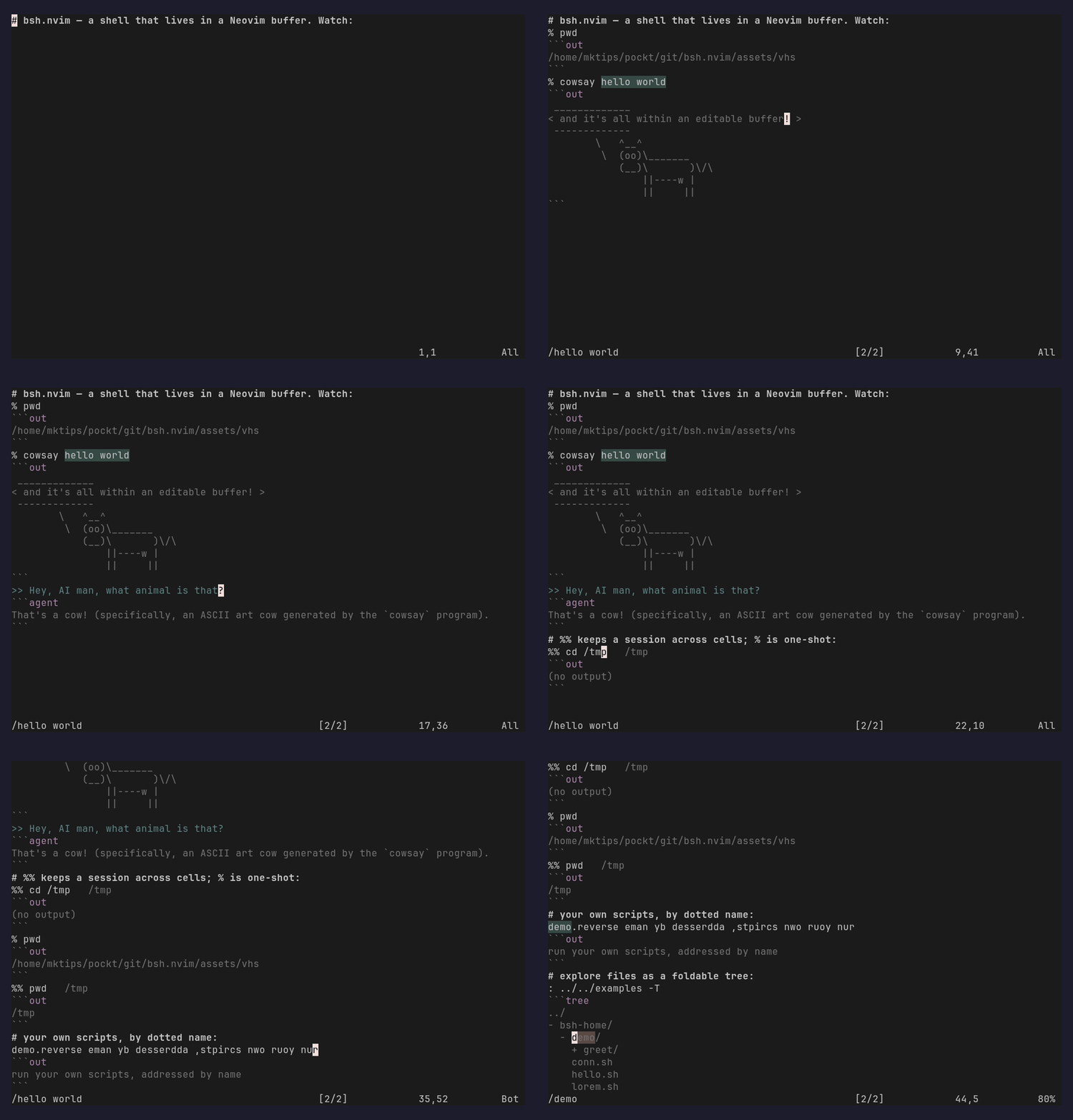
Point at a % command, press <CR>, and bsh runs it — writing the result into
an owned out fence right below. The whole session is an ordinary, editable
buffer: search it, fold it, edit the output in place, and save it as a file.
Features
- Shell cells —
% cmdruns in place; output lands in anoutfence below, and re-running rewrites that fence idempotently. - Persistent sessions —
%% cmdkeeps a shell session across cells (cwd, env, variables); a plain%is one-shot. - Remote — prefix with
user@host(e.g.user@host% cmd,user@host: ~/dir) to run over ssh; listings and files work remotely too. - Redirect & cancel —
<C-CR>(org<CR>) sends long output to a scratch buffer, leaving a linkablelogreference;<C-c>cancels a running command. - Editable output — it's just buffer text: edit it, search it, fold it, do all the nvim magic your heart desires.
- File explorer —
: pathlists a directory; add-Tfor a foldable tree;<CR>drills into folders and opens files (remote paths included). - Code fences — open a block with
lang %(e.g.python %) to run it;lang %%shares one interpreter session across blocks (python today, more language drivers planned). - LLM cells —
>>asks anllmwith the previous cell(s) as context (>none,>>one,>>>two, …); a[template]before the>s picks thellmtemplate; a trailing!shows tool calls. - Namespace commands — a dotted name like
demo.reversemaps to a script under$BSH_HOME; directories list as navigable menus, andname!edits or scaffolds the source. - Shareable & replayable — sessions are plain
*.bsh/*.bsh.mdfiles;:BshReplayre-runs a saved session's cells (typst export planned).
Motive
I'm frustrated with how uneditable the regular shell interface is, and one must rely on terminal creators to support any form of intractability with the shell outputs (highlighting urls, reverse output search, scroll). What if my shell, was an nvim buffer, where i can search, edit, do all the nvim magic my heart desires? I want to edit my terminal window however I like, and that's what this project provides me. (although I do lose... interactive commands, shell history, and... many other things, alas.. hopefully temporarily.. temporarily..)
(A secondary benefit is that I can share my shell sessions as markdown files (and hopefully soon, nicely formatted typst documents (pdf, html (maybe), etc))
Install
-- lazy.nvim
{ "mktip/bsh.nvim", config = true }   -- or just drop the repo on your runtimepath
bsh attaches automatically to *.bsh/*.bsh.md files. Turn any buffer into a shell on
demand with :Bsh!; :Bsh opens a fresh scratch one.
Optional prerequisites (i think, i didn't review it): otter.nvim (for lsp in codeblocks), conform.nvim (for formatting in codebooks), llm (for LLM integration, but any other harness with a print/headless mode should work)
In the pipeline
- Adding ruby support (and a more generic way of supporting different language drivers)
- Adding container/jails shell support (even across the seas) and means of adding different transports
- Just as the markdown-ish support, hopefully .bsh.typ will be supported too
- A better way to define and interact with menus/commands. (currently relying on unused return values to communicate certain needs)
- Reviewing it like a human being (but man is short on free time)
Credits
Xiki (seems dead), Plan9, Emacs nerds
License
Similar repos


Languages
Lua
90.3%
Typst
6.8%
Shell
2.7%
See what people are saying
README
bsh.nvim
HIGHLY EXPERIMENTAL, AI WRITTEN, YET TO BE REVIEWED and if you already viewing this file in neovim with bsh installed, call :Bsh!
Buffer SHell: a shell that lives in a Neovim buffer instead of a terminal.
Point at a % command, press <CR>, and bsh runs it — writing the result into
an owned out fence right below. The whole session is an ordinary, editable
buffer: search it, fold it, edit the output in place, and save it as a file.
Features
- Shell cells —
% cmdruns in place; output lands in anoutfence below, and re-running rewrites that fence idempotently. - Persistent sessions —
%% cmdkeeps a shell session across cells (cwd, env, variables); a plain%is one-shot. - Remote — prefix with
user@host(e.g.user@host% cmd,user@host: ~/dir) to run over ssh; listings and files work remotely too. - Redirect & cancel —
<C-CR>(org<CR>) sends long output to a scratch buffer, leaving a linkablelogreference;<C-c>cancels a running command. - Editable output — it's just buffer text: edit it, search it, fold it, do all the nvim magic your heart desires.
- File explorer —
: pathlists a directory; add-Tfor a foldable tree;<CR>drills into folders and opens files (remote paths included). - Code fences — open a block with
lang %(e.g.python %) to run it;lang %%shares one interpreter session across blocks (python today, more language drivers planned). - LLM cells —
>>asks anllmwith the previous cell(s) as context (>none,>>one,>>>two, …); a[template]before the>s picks thellmtemplate; a trailing!shows tool calls. - Namespace commands — a dotted name like
demo.reversemaps to a script under$BSH_HOME; directories list as navigable menus, andname!edits or scaffolds the source. - Shareable & replayable — sessions are plain
*.bsh/*.bsh.mdfiles;:BshReplayre-runs a saved session's cells (typst export planned).
Motive
I'm frustrated with how uneditable the regular shell interface is, and one must rely on terminal creators to support any form of intractability with the shell outputs (highlighting urls, reverse output search, scroll). What if my shell, was an nvim buffer, where i can search, edit, do all the nvim magic my heart desires? I want to edit my terminal window however I like, and that's what this project provides me. (although I do lose... interactive commands, shell history, and... many other things, alas.. hopefully temporarily.. temporarily..)
(A secondary benefit is that I can share my shell sessions as markdown files (and hopefully soon, nicely formatted typst documents (pdf, html (maybe), etc))
Install
-- lazy.nvim
{ "mktip/bsh.nvim", config = true }   -- or just drop the repo on your runtimepath
bsh attaches automatically to *.bsh/*.bsh.md files. Turn any buffer into a shell on
demand with :Bsh!; :Bsh opens a fresh scratch one.
Optional prerequisites (i think, i didn't review it): otter.nvim (for lsp in codeblocks), conform.nvim (for formatting in codebooks), llm (for LLM integration, but any other harness with a print/headless mode should work)
In the pipeline
- Adding ruby support (and a more generic way of supporting different language drivers)
- Adding container/jails shell support (even across the seas) and means of adding different transports
- Just as the markdown-ish support, hopefully .bsh.typ will be supported too
- A better way to define and interact with menus/commands. (currently relying on unused return values to communicate certain needs)
- Reviewing it like a human being (but man is short on free time)
Credits
Xiki (seems dead), Plan9, Emacs nerds
License
Similar repos
Languages
Lua
90.3%
Typst
6.8%
Shell
2.7%