
See what people are saying
README
nvjup
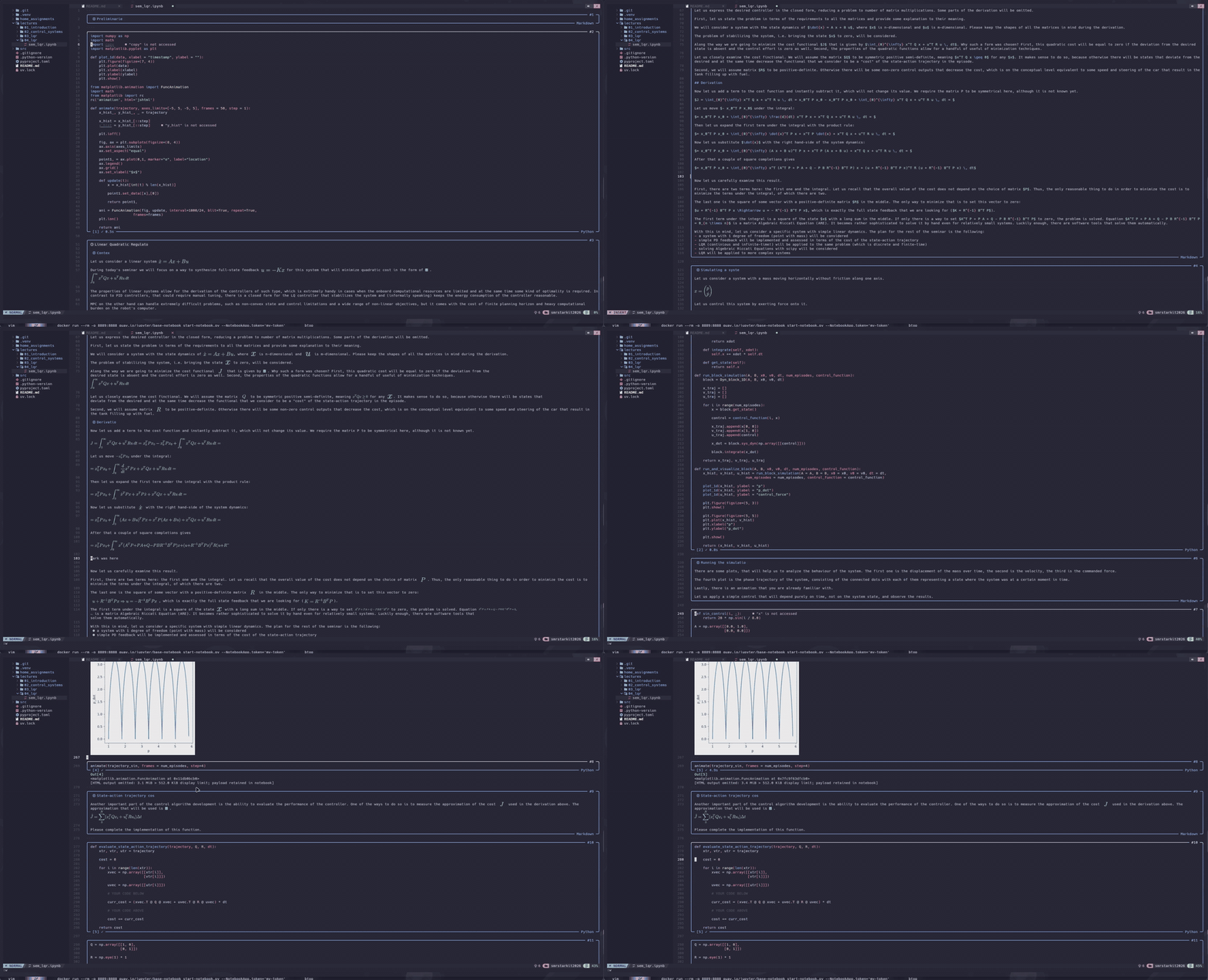
A Neovim-native editor for Jupyter notebooks. Open an .ipynb file and work with cells, Markdown, kernels, rich output, LSP, and remote Jupyter servers without converting the notebook to another format.
Features
- Notebook editing — navigate, insert, delete, move, split, merge, duplicate, and convert cells.
- Lossless nbformat — preserves metadata, attachments, outputs, MIME bundles, cell IDs, and unknown fields.
- Language tooling — per-language Tree-sitter highlighting and cross-cell LSP diagnostics, completion, navigation, rename, symbols, and code actions.
- Kernel execution — run one cell or a batch, stream output, answer stdin, interrupt, restart, and persist execution results.
- Rich output — text, tracebacks, tables, sanitized HTML, images, PDF, progress bars, widgets, ipympl, and inline
matplotlib.animationplayback. - Markdown and LaTeX — rendered notebook cells through
render-markdown.nvimandSnacks.image, while code cells remain code. - Interactive figures — sandboxed Plotly and Bokeh rendering with an in-Neovim focus view or an optional Awrit window.
- Remote Jupyter and Colab — connect to a server or provision a CPU/GPU/TPU Colab runtime, then browse local/remote files in a two-panel Telescope UI.
- Large notebook support — dirty-cell highlighting/rendering, targeted output updates, bounded payloads, and coalesced event processing.
Notebook HTML and arbitrary notebook JavaScript are never executed. Existing interactive output is blocked until explicitly trusted; output produced by a local kernel receives revision-scoped ephemeral trust.
Requirements
Core
- Neovim 0.11+;
- Python 3.11+;
uv;ipykernelin the selected Python environment, or a registered kernelspec for a non-Python kernel.
The install command below creates a plugin-local Python environment containing jupyter_client, aiohttp, Plotly, Bokeh, and Playwright. Kernel environments are independent: for a Python project, install ipykernel in the project's .venv or venv.
Optional integrations
| Feature | Dependency |
|---|---|
| syntax highlighting | nvim-treesitter and parsers for the notebook languages |
| completion UI and live-kernel completion | nvim-cmp |
| outline/variable Telescope pickers; remote files | telescope.nvim (required for remote files) |
| managed Google Colab runtimes | optional google-colab-cli 0.6.0+ executable |
| rendered Markdown | render-markdown.nvim plus Markdown parsers |
| LaTeX and image integration | snacks.nvim, pdflatex, ImageMagick |
| terminal images | Kitty or Ghostty; chafa is the fallback |
| Matplotlib HTML5/GIF animations | ffmpeg (to_jshtml() needs no converter) |
| SVG conversion | rsvg-convert |
| interactive figures | Chromium |
| external interactive window | Awrit and Kitty remote control |
| Python LSP defaults | pyright-langserver and ruff |
Missing optional dependencies degrade to simpler output rather than preventing notebook editing.
Installation
lazy.nvim
{
  "LumbaBalumba/nvjup",
  lazy = false, -- nvjup must register BufReadCmd before an .ipynb is opened
  build = "uv sync --frozen",
  dependencies = {
    "nvim-treesitter/nvim-treesitter",

    -- Optional, remove integrations you do not use.
    "hrsh7th/nvim-cmp",
    "nvim-telescope/telescope.nvim",
    "MeanderingProgrammer/render-markdown.nvim",
    "folke/snacks.nvim",
  },
  opts = {},
}
Install Chromium separately if interactive Plotly/Bokeh output is needed. nvjup uses a system chromium, chromium-browser, or Google Chrome executable when available; set NVJUP_CHROMIUM for a custom path.
Native packages
git clone https://github.com/LumbaBalumba/nvjup \
  "${XDG_DATA_HOME:-$HOME/.local/share}/nvim/site/pack/nvjup/start/nvjup"

cd "${XDG_DATA_HOME:-$HOME/.local/share}/nvim/site/pack/nvjup/start/nvjup"
uv sync --frozen
Then add this to init.lua:
require("nvjup").setup({})
Run :checkhealth nvjup after installation.
Quick start
:edit notebook.ipynb
Common mappings:
| Mapping | Action |
|---|---|
]c / [c | next / previous cell |
]C / [C | next / previous code cell |
<leader>na / <leader>nb | insert a cell above / below |
<leader>nd | delete cell |
<leader>nk / <leader>nj | move cell up / down |
<leader>nt | cycle code → Markdown → raw |
<leader>nz | toggle rendered Markdown/source |
<C-CR> | run current cell |
<S-CR> | run current cell and advance |
<leader>nR | run all code cells |
<leader>ni / <leader>nx | interrupt / restart kernel |
<leader>np | open full output |
<leader>nf / <leader>nF | interactive TUI / Awrit focus |
<leader>nv | inspect kernel variables |
<leader>nK | connect to a remote Jupyter server |
<leader>ne | local/remote file manager |
Normal LSP mappings such as gd, gr, K, <leader>ra, and <leader>ca work across code cells. All mappings are buffer-local and configurable.
See :help nvjup-navigation, :help nvjup-commands, and :help nvjup-setup for the complete list.
Configuration
The defaults work without calling setup. A typical configuration only changes a few options:
require("nvjup").setup({
  render = {
    max_output_lines = 16,
    images = {
      backend = "auto", -- auto, kitty, chafa, or text
      max_width = 72,
      max_height = 28,
    },
  },

  execution = {
    clear_before_run = true,
    repeat_policy = "queue", -- queue, cancel, or replace
    stop_on_error = true,
    trust_local_kernel = true,
  },

  completion = {
    kernel = false, -- optional lower-priority live-kernel cmp source
  },

  lsp = {
    auto_start = true,
    -- Python uses Pyright and Ruff when they are available.
    -- Supply lsp.servers to replace the defaults.
  },
})
Python kernels use kernel.python_path when set, then an ipykernel-capable project .venv or venv, kernel.system_python, and finally a system Python. Non-Python notebooks use their registered kernelspec. The Python running nvjup's sidecar is selected separately.
Matplotlib animations use safe native Kitty frames rather than executing generated HTML/JavaScript. Return HTML(animation.to_jshtml()) or HTML(animation.to_html5_video()); direct video/mp4 and image/gif outputs are supported too, and those formats require ffmpeg. MP4 files exceeding max_frames stream at their source clock through a bounded frame buffer: late frames are dropped to preserve real-time playback, two auxiliary Kitty frames are updated alternately while the root and virtual placement remain stable, and playback stops at EOF. Local animation uploads and streams use Kitty temporary-file transfer so frame pixels never flood Neovim's TUI channel, and streaming frame commands pause around window layout changes so APC escapes cannot leak text into adjacent buffers such as nvim-tree. direct transport remains available for hosts where Kitty cannot access Neovim's temporary directory. GIF and shorter animations retain the bounded preload path. max_total_pixels bounds one preloaded animation, while max_active_pixels covers animations retained across the notebook. As in Jupyter, setting matplotlib.rcParams["animation.html"] also enables the animation object's rich representation.
For a remote server, the simplest setup is interactive:
:NvJupRemoteConnect
Choose Jupyter Lab to enter a URL, hidden token, TLS/origin policy, and kernelspec. For managed runtimes, install any supported official CLI release with uv tool install --python 3.12 'google-colab-cli>=0.6,<1' (the AUR package also works), then choose Google Colab or run :NvJupColabConnect. nvjup supports CLI 0.6.0+ for CPU/GPU/TPU; high-memory choices are opt-in with colab.high_memory = true and require CLI 0.7.0+. nvjup keeps only its imported connection copy in Neovim memory; the official CLI persists OAuth credentials and the runtime proxy/session token in its protected config/state files and owns the keepalive. Disconnecting nvjup does not stop the VM; nvjup reports a safely quoted stop command that preserves the allocation's CLI auth provider and state file. Static Jupyter configuration remains available under kernel.remote; see :help nvjup-stage7.
All defaults and advanced limits are documented in :help nvjup-setup.
Output and trust
- HTML is sanitized and rendered as terminal text/tables; it is not executed.
- SVG, images, text, RPC messages, filesystem transfers, renderer queues, and Chromium frames have configurable bounds.
- Loaded Plotly/Bokeh and Matplotlib animation output requires
:NvJupTrustInteractive. :NvJupTrustRevokeremoves persisted trust.- Editing a cell invalidates revision-scoped local execution trust.
- Remote kernel output never receives automatic local trust.
See docs/spec/trust.md for the complete model.
Documentation
:help nvjup— user guide, mappings, commands, and options;:checkhealth nvjup— dependency and integration diagnostics;docs/spec/README.md— format, protocol, state-machine, and trust contracts;docs/stage6.md— interactive renderer and sandbox;docs/stage7.md— live tooling and remote kernels;docs/stage8.md— remote file manager.
Development
./scripts/test
docker compose run --build --rm test
Tests use isolated XDG directories and do not load or modify the user's Neovim configuration.
Similar repos


Languages
Lua
72.3%
Python
27.2%
See what people are saying
README
nvjup
A Neovim-native editor for Jupyter notebooks. Open an .ipynb file and work with cells, Markdown, kernels, rich output, LSP, and remote Jupyter servers without converting the notebook to another format.
Features
- Notebook editing — navigate, insert, delete, move, split, merge, duplicate, and convert cells.
- Lossless nbformat — preserves metadata, attachments, outputs, MIME bundles, cell IDs, and unknown fields.
- Language tooling — per-language Tree-sitter highlighting and cross-cell LSP diagnostics, completion, navigation, rename, symbols, and code actions.
- Kernel execution — run one cell or a batch, stream output, answer stdin, interrupt, restart, and persist execution results.
- Rich output — text, tracebacks, tables, sanitized HTML, images, PDF, progress bars, widgets, ipympl, and inline
matplotlib.animationplayback. - Markdown and LaTeX — rendered notebook cells through
render-markdown.nvimandSnacks.image, while code cells remain code. - Interactive figures — sandboxed Plotly and Bokeh rendering with an in-Neovim focus view or an optional Awrit window.
- Remote Jupyter and Colab — connect to a server or provision a CPU/GPU/TPU Colab runtime, then browse local/remote files in a two-panel Telescope UI.
- Large notebook support — dirty-cell highlighting/rendering, targeted output updates, bounded payloads, and coalesced event processing.
Notebook HTML and arbitrary notebook JavaScript are never executed. Existing interactive output is blocked until explicitly trusted; output produced by a local kernel receives revision-scoped ephemeral trust.
Requirements
Core
- Neovim 0.11+;
- Python 3.11+;
uv;ipykernelin the selected Python environment, or a registered kernelspec for a non-Python kernel.
The install command below creates a plugin-local Python environment containing jupyter_client, aiohttp, Plotly, Bokeh, and Playwright. Kernel environments are independent: for a Python project, install ipykernel in the project's .venv or venv.
Optional integrations
| Feature | Dependency |
|---|---|
| syntax highlighting | nvim-treesitter and parsers for the notebook languages |
| completion UI and live-kernel completion | nvim-cmp |
| outline/variable Telescope pickers; remote files | telescope.nvim (required for remote files) |
| managed Google Colab runtimes | optional google-colab-cli 0.6.0+ executable |
| rendered Markdown | render-markdown.nvim plus Markdown parsers |
| LaTeX and image integration | snacks.nvim, pdflatex, ImageMagick |
| terminal images | Kitty or Ghostty; chafa is the fallback |
| Matplotlib HTML5/GIF animations | ffmpeg (to_jshtml() needs no converter) |
| SVG conversion | rsvg-convert |
| interactive figures | Chromium |
| external interactive window | Awrit and Kitty remote control |
| Python LSP defaults | pyright-langserver and ruff |
Missing optional dependencies degrade to simpler output rather than preventing notebook editing.
Installation
lazy.nvim
{
  "LumbaBalumba/nvjup",
  lazy = false, -- nvjup must register BufReadCmd before an .ipynb is opened
  build = "uv sync --frozen",
  dependencies = {
    "nvim-treesitter/nvim-treesitter",

    -- Optional, remove integrations you do not use.
    "hrsh7th/nvim-cmp",
    "nvim-telescope/telescope.nvim",
    "MeanderingProgrammer/render-markdown.nvim",
    "folke/snacks.nvim",
  },
  opts = {},
}
Install Chromium separately if interactive Plotly/Bokeh output is needed. nvjup uses a system chromium, chromium-browser, or Google Chrome executable when available; set NVJUP_CHROMIUM for a custom path.
Native packages
git clone https://github.com/LumbaBalumba/nvjup \
  "${XDG_DATA_HOME:-$HOME/.local/share}/nvim/site/pack/nvjup/start/nvjup"

cd "${XDG_DATA_HOME:-$HOME/.local/share}/nvim/site/pack/nvjup/start/nvjup"
uv sync --frozen
Then add this to init.lua:
require("nvjup").setup({})
Run :checkhealth nvjup after installation.
Quick start
:edit notebook.ipynb
Common mappings:
| Mapping | Action |
|---|---|
]c / [c | next / previous cell |
]C / [C | next / previous code cell |
<leader>na / <leader>nb | insert a cell above / below |
<leader>nd | delete cell |
<leader>nk / <leader>nj | move cell up / down |
<leader>nt | cycle code → Markdown → raw |
<leader>nz | toggle rendered Markdown/source |
<C-CR> | run current cell |
<S-CR> | run current cell and advance |
<leader>nR | run all code cells |
<leader>ni / <leader>nx | interrupt / restart kernel |
<leader>np | open full output |
<leader>nf / <leader>nF | interactive TUI / Awrit focus |
<leader>nv | inspect kernel variables |
<leader>nK | connect to a remote Jupyter server |
<leader>ne | local/remote file manager |
Normal LSP mappings such as gd, gr, K, <leader>ra, and <leader>ca work across code cells. All mappings are buffer-local and configurable.
See :help nvjup-navigation, :help nvjup-commands, and :help nvjup-setup for the complete list.
Configuration
The defaults work without calling setup. A typical configuration only changes a few options:
require("nvjup").setup({
  render = {
    max_output_lines = 16,
    images = {
      backend = "auto", -- auto, kitty, chafa, or text
      max_width = 72,
      max_height = 28,
    },
  },

  execution = {
    clear_before_run = true,
    repeat_policy = "queue", -- queue, cancel, or replace
    stop_on_error = true,
    trust_local_kernel = true,
  },

  completion = {
    kernel = false, -- optional lower-priority live-kernel cmp source
  },

  lsp = {
    auto_start = true,
    -- Python uses Pyright and Ruff when they are available.
    -- Supply lsp.servers to replace the defaults.
  },
})
Python kernels use kernel.python_path when set, then an ipykernel-capable project .venv or venv, kernel.system_python, and finally a system Python. Non-Python notebooks use their registered kernelspec. The Python running nvjup's sidecar is selected separately.
Matplotlib animations use safe native Kitty frames rather than executing generated HTML/JavaScript. Return HTML(animation.to_jshtml()) or HTML(animation.to_html5_video()); direct video/mp4 and image/gif outputs are supported too, and those formats require ffmpeg. MP4 files exceeding max_frames stream at their source clock through a bounded frame buffer: late frames are dropped to preserve real-time playback, two auxiliary Kitty frames are updated alternately while the root and virtual placement remain stable, and playback stops at EOF. Local animation uploads and streams use Kitty temporary-file transfer so frame pixels never flood Neovim's TUI channel, and streaming frame commands pause around window layout changes so APC escapes cannot leak text into adjacent buffers such as nvim-tree. direct transport remains available for hosts where Kitty cannot access Neovim's temporary directory. GIF and shorter animations retain the bounded preload path. max_total_pixels bounds one preloaded animation, while max_active_pixels covers animations retained across the notebook. As in Jupyter, setting matplotlib.rcParams["animation.html"] also enables the animation object's rich representation.
For a remote server, the simplest setup is interactive:
:NvJupRemoteConnect
Choose Jupyter Lab to enter a URL, hidden token, TLS/origin policy, and kernelspec. For managed runtimes, install any supported official CLI release with uv tool install --python 3.12 'google-colab-cli>=0.6,<1' (the AUR package also works), then choose Google Colab or run :NvJupColabConnect. nvjup supports CLI 0.6.0+ for CPU/GPU/TPU; high-memory choices are opt-in with colab.high_memory = true and require CLI 0.7.0+. nvjup keeps only its imported connection copy in Neovim memory; the official CLI persists OAuth credentials and the runtime proxy/session token in its protected config/state files and owns the keepalive. Disconnecting nvjup does not stop the VM; nvjup reports a safely quoted stop command that preserves the allocation's CLI auth provider and state file. Static Jupyter configuration remains available under kernel.remote; see :help nvjup-stage7.
All defaults and advanced limits are documented in :help nvjup-setup.
Output and trust
- HTML is sanitized and rendered as terminal text/tables; it is not executed.
- SVG, images, text, RPC messages, filesystem transfers, renderer queues, and Chromium frames have configurable bounds.
- Loaded Plotly/Bokeh and Matplotlib animation output requires
:NvJupTrustInteractive. :NvJupTrustRevokeremoves persisted trust.- Editing a cell invalidates revision-scoped local execution trust.
- Remote kernel output never receives automatic local trust.
See docs/spec/trust.md for the complete model.
Documentation
:help nvjup— user guide, mappings, commands, and options;:checkhealth nvjup— dependency and integration diagnostics;docs/spec/README.md— format, protocol, state-machine, and trust contracts;docs/stage6.md— interactive renderer and sandbox;docs/stage7.md— live tooling and remote kernels;docs/stage8.md— remote file manager.
Development
./scripts/test
docker compose run --build --rm test
Tests use isolated XDG directories and do not load or modify the user's Neovim configuration.
Similar repos
Languages
Lua
72.3%
Python
27.2%