
See what people are saying
README
Awesome Jupyter AI 
AI extensions for JupyterLab and Jupyter Notebook 7.
We are excited to see the Jupyter extension ecosystem thrive in the era of AI. The variety of ideas and implementations demonstrates the utility of the extension platform and the API stability offered by JupyterLab. This list collects over a hundred AI extensions for JupyterLab and Jupyter Notebook 7. They range from chat panels and inline completers to teaching tools and the building blocks of Jupyter AI. Each one installs into a JupyterLab or Notebook 7 you already run.
The authors include individuals, universities, research institutes and corporations. Listing an extension here is not an endorsement.
Contents
- How this list is organised
- At a glance
- Chat panels and agents
- Inline completion
- In-cell edits and magics
- Agent CLI bridges
- Domain, teaching and platform
- Building blocks
- Beyond the JupyterLab UI
How this list is organised
Sections group the extensions by what they do. Inside a section, each entry has a marker for how recently the project was worked on:
| Marker | Name | Last commit |
|---|---|---|
| 🟢 | active | Within 4 months |
| 🟡 | maintained | Within 12 months |
| ⚪ | quiet | 1 to 2 years ago |
Anything older lives in HISTORICAL.md, together with the archived projects and the ones whose model service has been switched off. The date is derived from the last commit on the default branch, or the latest PyPI release when there is no public repository.
 marks a project maintained by Project Jupyter, in one of its official GitHub organisations.
🪐 marks a project in jupyter-ai-contrib, the community organisation where Jupyter AI v3 is built as separate packages. It is not under Project Jupyter governance.
Star counts in the table are for orientation only. Read the licence before you depend on an extension: Notebook Intelligence is GPL-3.0, and several entries have an open licence but no public repository.
At a glance
This lists major projects, but each has a few alternatives listed in sections below.
| Project | What it adds | Stars | Last commit | License |
|---|---|---|---|---|
| Jupyter AI | Chat with external agents over ACP |  |  | BSD-3-Clause |
| JupyterLite AI | Completion and chat, runs in the browser |  |  | BSD-3-Clause |
| Notebook Intelligence | Chat, inline edit, completion, agent mode |  |  | GPL-3.0 |
| Mito AI | Context aware chat and error debugging |  |  | Mixed |
| Jupyter AI Agents | Agent that edits and runs cells |  |  | BSD-3-Clause |
| genai | Magics that read your error and your dataframes, then suggest the fix |  |  | BSD-3-Clause |
| jupyter-copilot | GitHub Copilot inline completion |  |  | MIT |
| 🪐 Magic Wand | In-cell assistant with a diff view |  |  | BSD-3-Clause |
Chat panels and agents
Generally these include a panel you type into and, can read and edit your notebook.
- Jupyter AI 🟢 - The official extension from the JupyterLab team. Version 3 connects Claude, Codex, GitHub Copilot, Gemini, Goose, Kiro, Mistral Vibe and OpenCode through the Agent Client Protocol. It asks permission before writing files or running commands, and several people can share one chat.
- JupyterLite AI 🟢 - Completion and chat for JupyterLab, Notebook 7 and JupyterLite. It runs in the browser, so it works on a static site with no server. Try it in the browser.
- Notebook Intelligence 🟢 - Chat, inline edit, autocomplete and an agent that operates the notebook. Models come from GitHub Copilot, any OpenAI or LiteLLM compatible endpoint, local Ollama models, or the Claude Code CLI. GPL-3.0, so check your distribution rules before bundling it.
- Mito AI 🟢 - Context aware chat, error debugging and an agent, installed together with the Mito spreadsheet. It is the most starred entry after Jupyter AI. The licence is mixed, so read
LICENSEbefore deploying it. - Jupyter AI Agents 🟢 - Datalayer's agent panel, built on Pydantic AI. It starts the Jupyter MCP Server as a server extension so the agent can read, write and run cells.
- RunCell 🟢 - Agent panel from the Kanaries team, using Claude, GPT or Gemini through MCP. PyPI classifies it BSD, the shipped
LICENSEis a copyright line with no grant, and there is no public repository (runcell.dev). - Jupyter Claude Plugin 🟢 - Side panel built on the Claude Agent SDK that edits notebook code and markdown in place.
- AI Terminal 🟢 - Workspace of mixed AI and shell cells saved as
.agentnbfiles. The AI cells are answered by the Claude Agent SDK on the server. BSD-3-Clause, no public repository. - LangStage 🟢 - Chat panel for a LangGraph DeepAgents agent, with a walkthrough video. Formerly published as
jupyter-deepagentsanddeepagent-lab. - JupyDeep 🟢 - Agent engine built on Pydantic AI and MCP, for multi-step work inside one notebook.
- Mynerva 🟢 - Assistant from Japan's National Institute of Informatics that reads notebook structure and outputs before generating code, with a separate exploration mode.
- jupyterlab-llm-assistant 🟢 - Small chat panel against an OpenAI compatible endpoint, with cell context.
- jupyterlab-chat (Antony-X) 🟢 - Floating chat panel that sends requests to OpenRouter. The package name is the same as the official
jupyterlab-chat, so this one installs from source. - Kepler Copilot 🟢 - Chat assistant panel. BSD-3-Clause, no public repository.
- Reasonix Chat 🟢 - Chat panel that manages remote Linux servers over SSH, including running cells in a chosen conda environment.
- HDSP Agent 🟢 - Thin client for a LangGraph DeepAgents server, with 161 releases on PyPI. MIT, no public repository.
- Cellsistant 🟡 - Chat agent that creates, runs, updates and deletes cells, and reads plots back as images.
- pynote 🟡 - Claude-powered chat side panel for JupyterLab 4 and Notebook 7.
- Tqrar 🟡 - Assistant panel that analyses code, explains errors and edits cells. The name is the Arabic and Urdu word for conversation. Video.
- ainotebookdev 🟡 - Agent tab on the right hand side. The PyPI description is a three line quick start. BSD-3-Clause, no public repository.
- mcp-client-jupyter-chat ⚪ - Early MCP client in a chat panel, from one of the MCP authors.
- jupyterlab-notechat ⚪ - Chat that treats the notebook itself as the conversation, with reference marks between cells.
- jupyter-ollama-ai ⚪ - Ollama chat and cell actions, entirely local.
- jupyterchatz ⚪ - Chat panel with MCP support.
- Pieces for JupyterLab ⚪ - Snippet capture and workstream context, shared with the vendor's editor plugins. MIT, and the repository it points at is not public (docs.pieces.app).
- Jovyan AI ⚪ - Completion and chat. BSD-3-Clause, no public repository.
- Sage Agent ⚪ - Notebook assistant. BSD-3-Clause, no public repository (sagebook.ai).
- escobar ⚪ - Chat extension with 142 releases and a placeholder repository URL that has never been filled in. BSD-3-Clause.
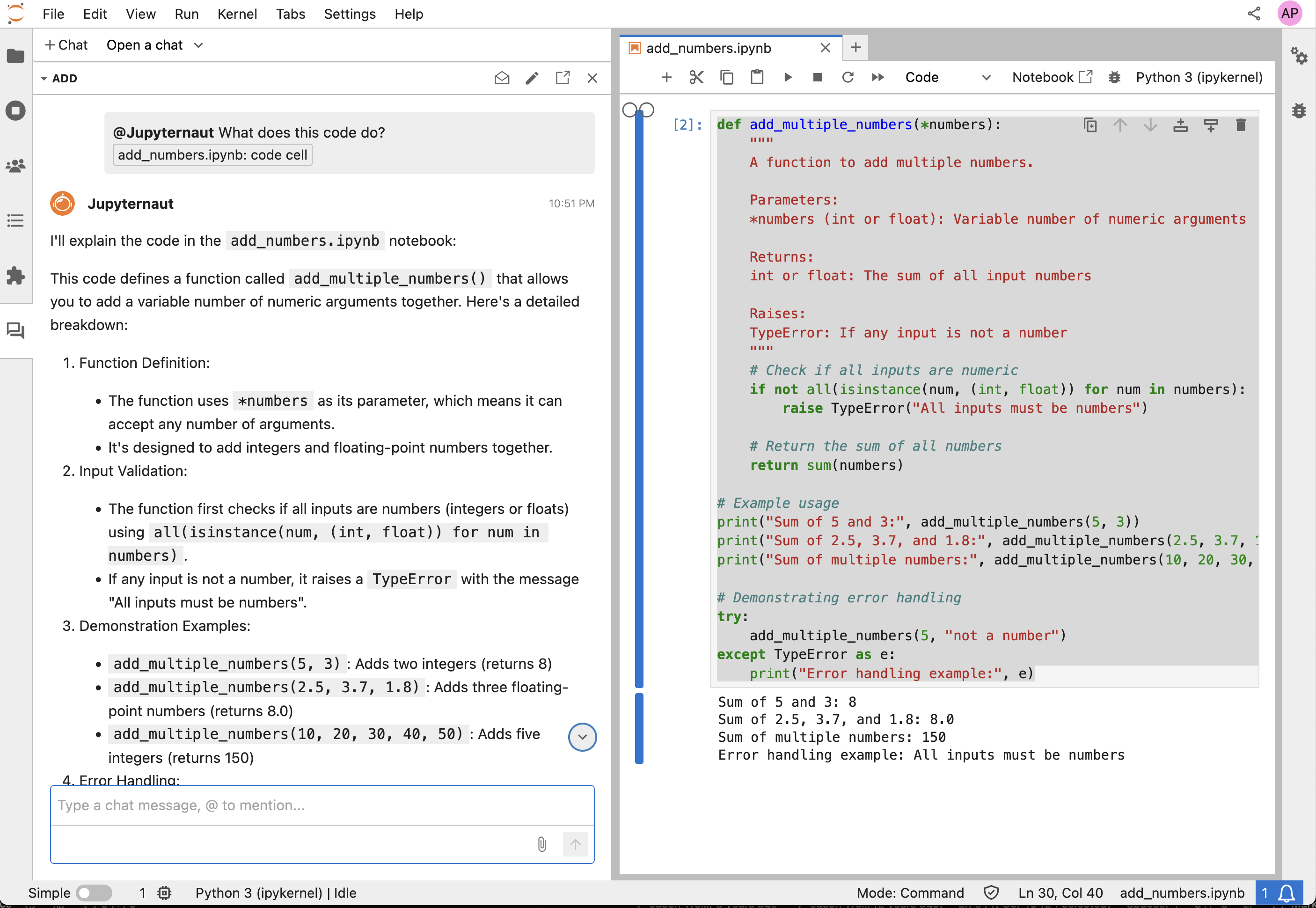 Jupyter AI: Jupyternaut explaining the cell you dropped into the chat | 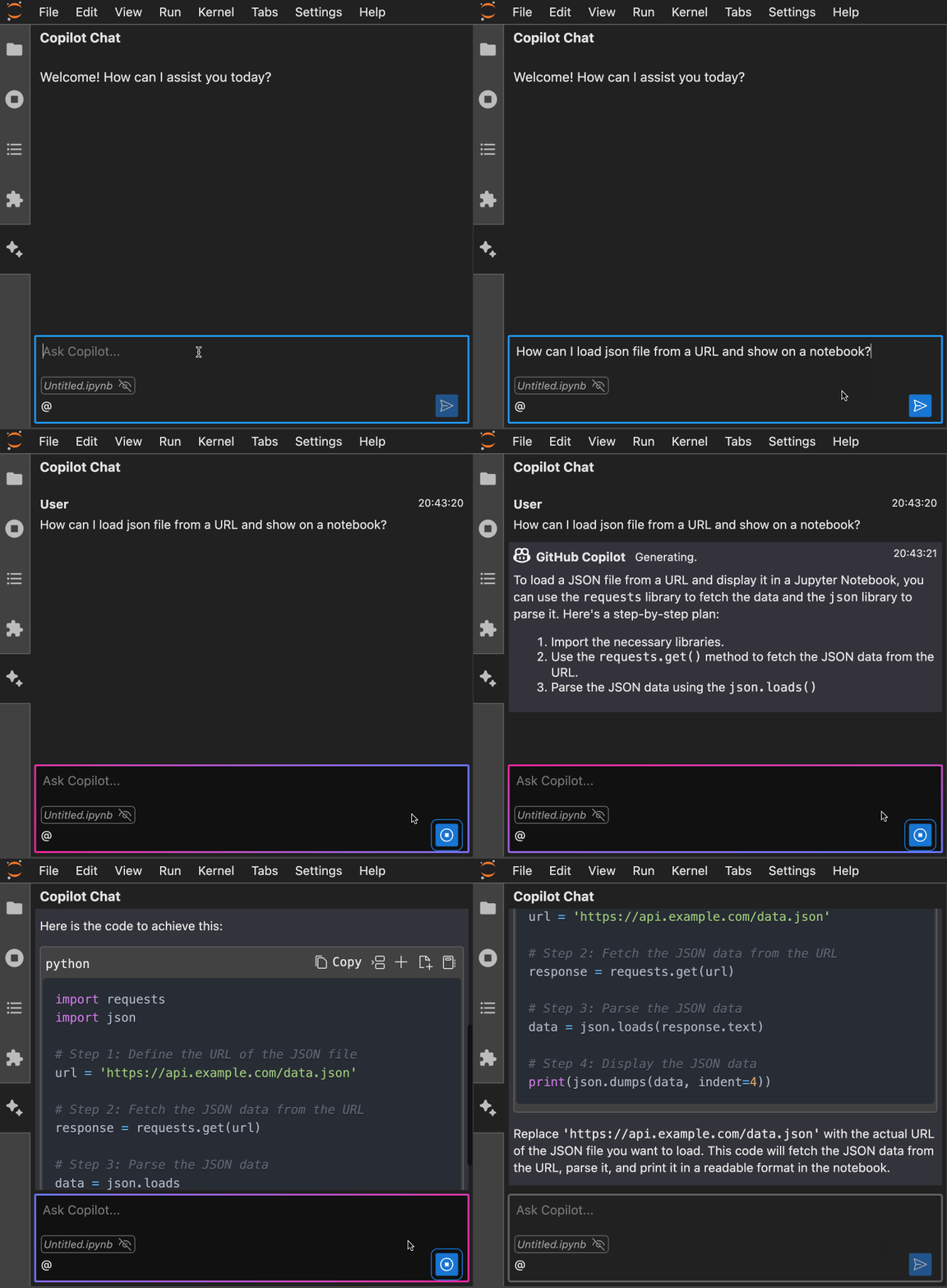 Notebook Intelligence: asking about the open notebook | 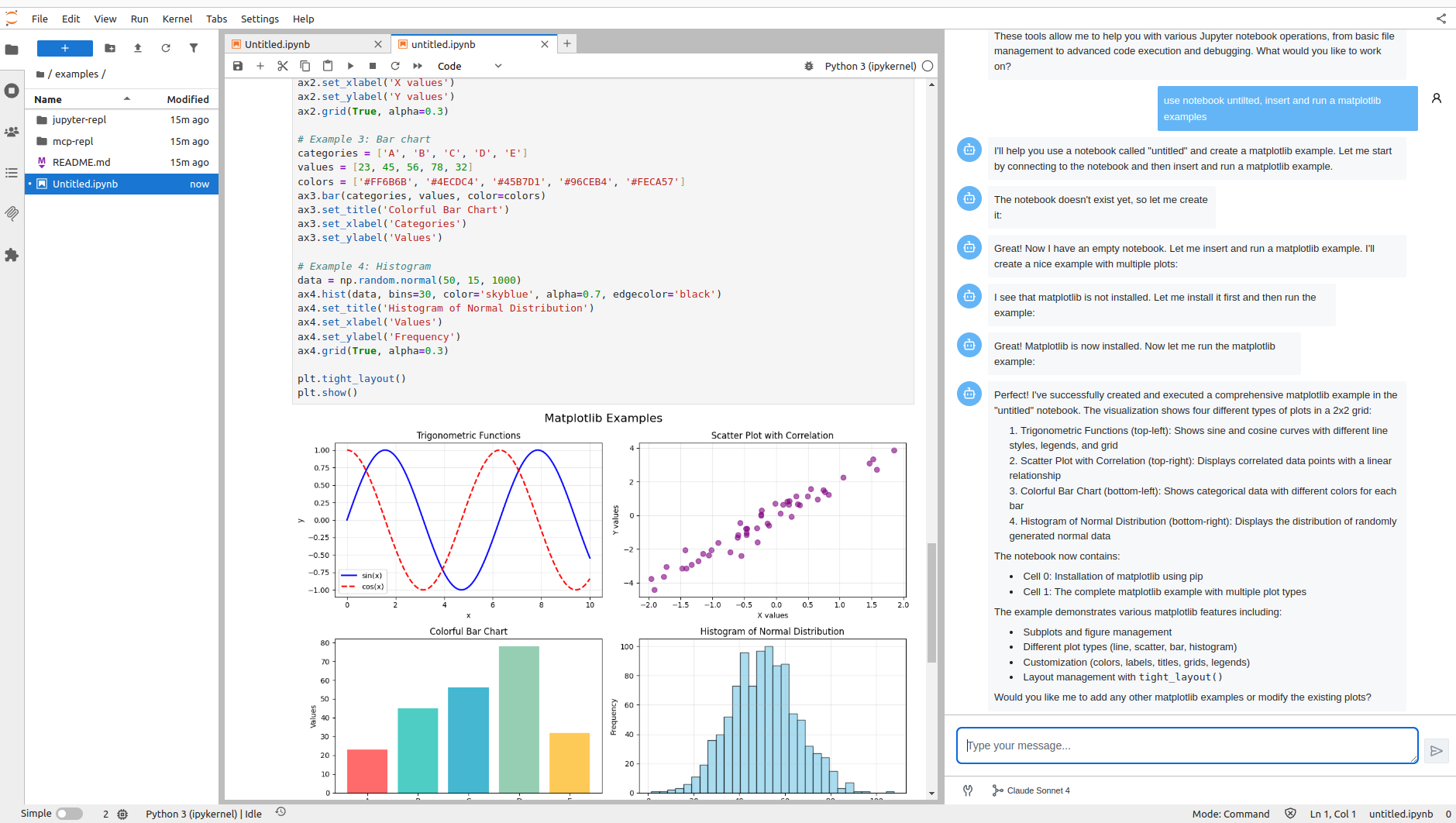 Jupyter AI Agents: the agent creates the notebook, installs matplotlib and runs it |
Inline completion
Ghost text as you type, through the JupyterLab completer API.
- jupyter-copilot ⚪ - Runs the
copilot.vimlanguage server as the backend of the JupyterLab completer. It is the simplest way to get GitHub Copilot in a notebook. Authentication on the extension server is disabled, so do not use it over SSH. - jupyterlab-browser-ai 🟡 - Uses Chrome's built-in AI APIs, so it needs no API key and sends no data off the machine. Needs Chrome flags turned on. Try it in the browser.
- llm-complete 🟡 - Minimal inline completion provider, useful as a template.
- Pocket Coder 🟡 - A 1.2B model on Ollama giving offline completion in notebooks and VS Code. Fine-tuned from LiquidAI LFM 2.5.
- jupyter-copilot-completer ⚪ - Also runs the Copilot language server through the completer API.
- codeium.jupyter ⚪ - Codeium's own JupyterLab client. It has not been updated since Codeium became Windsurf.
 jupyter-copilot: GitHub Copilot suggesting the next line |
In-cell edits and magics
Help inside the cell you are editing: a button on the cell toolbar, a magic, or a diff you accept.
- 🪐 Magic Wand ⚪ - In-cell assistant: describe what you want in the cell and accept or reject the diff. Its diff view and cell footer were split out into jupyterlab-diff and jupyterlab-cell-input-footer. Try it on Binder.
- ai-jup 🟡 - Prompt cells with
$`variable`to inject kernel values and&`function`to expose Python functions as tools, inspired by fast.ai's Solveit. The author states it is an experiment and not maintained long term. GPL-3.0. - jupyter-vibe-coding 🟡 - Explain, Fix and Generate buttons on the cell toolbar. Explain and Fix trigger on a traceback. The code is short, so read it first if you are writing your own.
- jupyterlite-ai-kernels 🟡 - Registers one kernel per configured provider, so a cell is a prompt and the reply streams back as output. Try it in the browser.
- jupyter-ext-ai 🟡 - Magic commands for chatting with OpenAI, Gemini and Claude from a cell.
- CoML ⚪ - Microsoft Research assistant with three modes, including one that suggests what to try next on a machine learning task. The readme has demo GIFs.
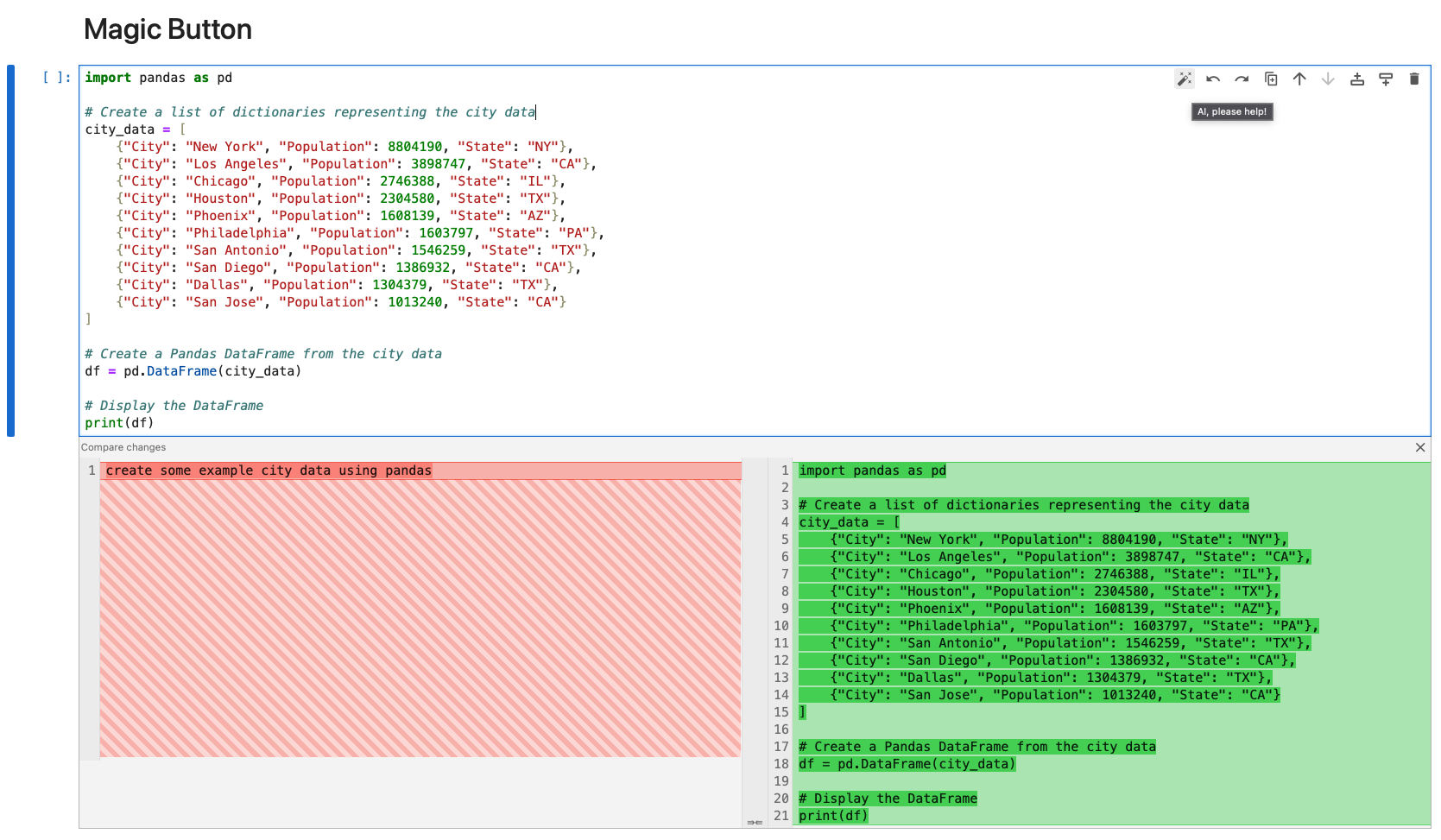 Magic Wand: describe the cell you want, accept the diff | 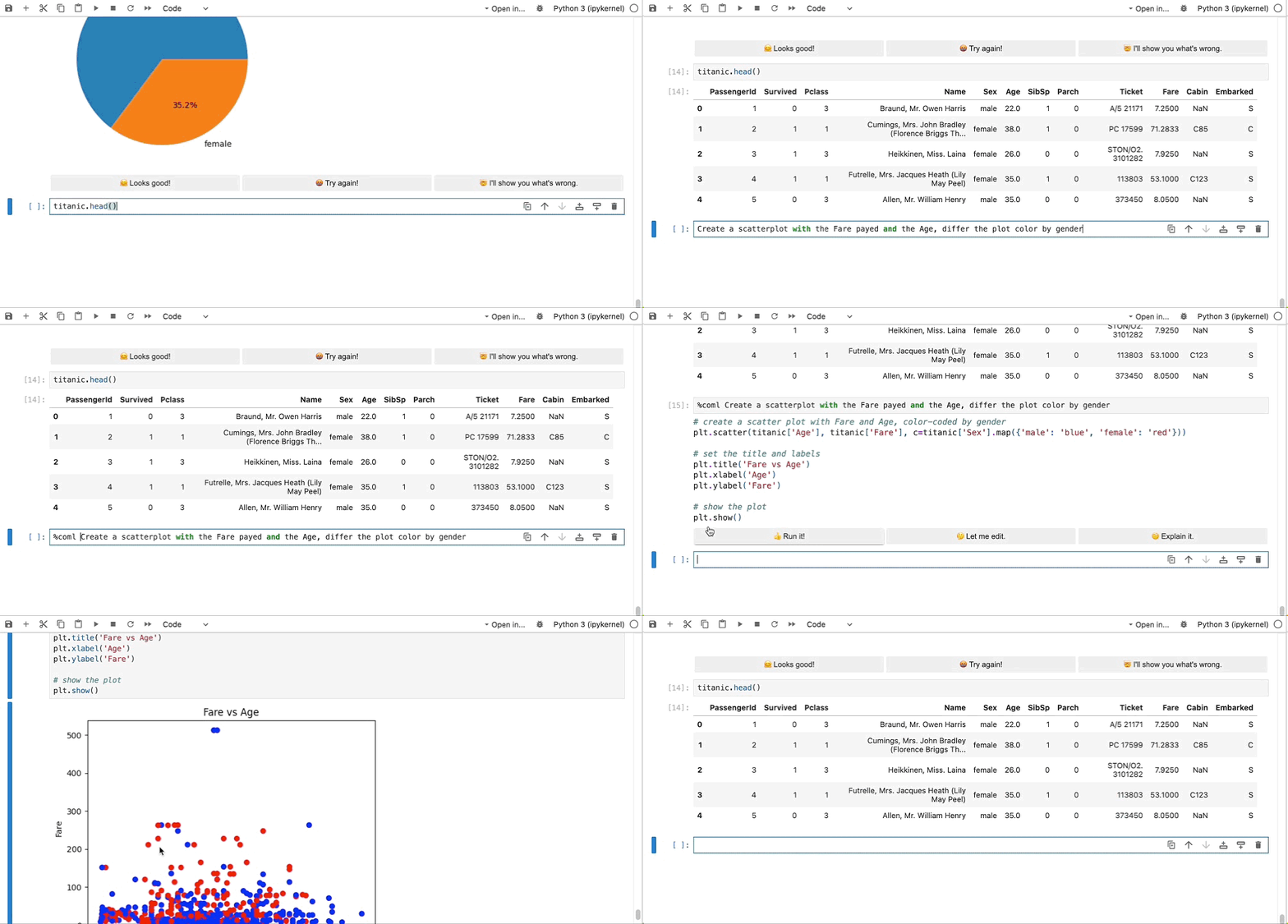 CoML: a magic that fills in the next step |
Agent CLI bridges
Claude Code, Codex and the other CLI agents run in a terminal. These extensions connect the notebook to that agent, through a side panel, a magic or cell comments.
- AI Code Assistants 🟢 - Start, resume, fork and clean up CLI sessions for Claude Code, Codex, Kimi, Gemini and DeepSeek from one side panel per assistant. It replaces the author's separate
jupyterlab_claude_code_extensionandjupyterlab_codex_extensionpackages and migrates their settings. - jupyterlab-codex 🟢 - Codex CLI in a sidebar, with a server extension to keep the session alive.
- Yukti 🟢 - A
%%askmagic that sends everything visible above the current cell, markdown and outputs included, to the Codex CLI. - jupyter-codex 🟡 - Opens an OpenAI Codex chat in the left sidebar.
- nb-margin 🟡 - Annotate cells with comments, then send them all to Claude Code. Claude Code edits the
.ipynbfile and the notebook reloads. MIT, copyright Anthropic, and the repository it points at is not public.
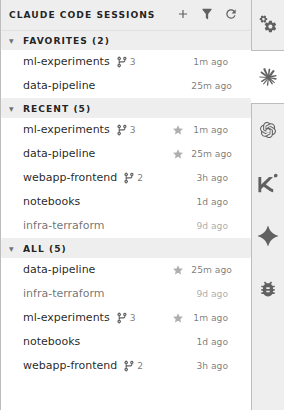 AI Code Assistants: one side panel per assistant | 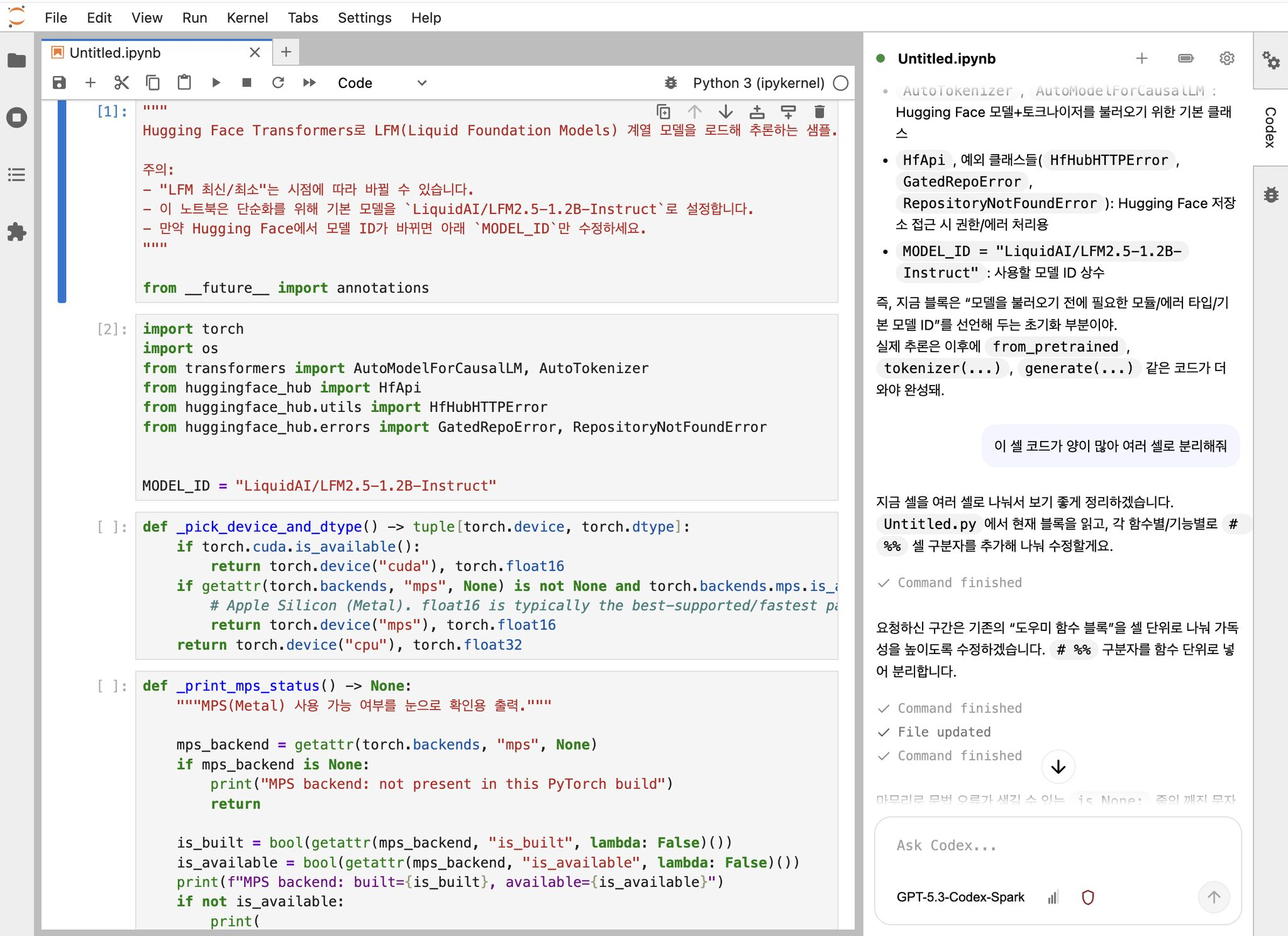 jupyterlab-codex: the Codex CLI in a sidebar |
Domain, teaching and platform
Built for one scientific field, one classroom or one vendor platform.
- Jupyter AI Tutor 🟢 - Adds an Explain Code button to every code cell. The button opens a chat with the cell, its output and the surrounding notebook as context. Built for teaching. Try it on Binder.
- jupytutor 🟢 - Gives students LLM feedback based on their autograder results plus course context supplied by the instructor.
- FlowBook 🟢 - Marks cells whose inputs have changed, so re-running any cell gives the same answer as a top to bottom run. For each violation it reports, it can ask an LLM to diagnose the cause and offer one-click fixes. Without an API key the LLM part is off and the rest still works.
- CRANE-LLM 🟢 - Research extension that predicts and diagnoses notebook crashes at runtime, against OpenAI, Gemini or Ollama.
- jupyter-geoagent 🟢 - Map explorer for STAC catalogs with an MCP query interface over DuckDB, and reproducible exports of what the agent did.
- GeoCopilot 🟢 - Codex-powered notebook agent for geospatial work, on top of
jupyter-server-mcp. MIT, no public repository. - InstrMCP 🟢 - MCP server suite that lets a model read QCodes instruments and measurement databases from a JupyterLab session in a physics lab.
- smarts.bio 🟢 - Bioinformatics agent that runs GPU pipelines such as RFdiffusion and Boltz, searches NCBI, UniProt and PDB, and opens FASTA, BAM, VCF and PDB files natively. Commercial, with an MIT wrapper package (smarts.bio).
- Lightcone Lab 🟢 - Research workbench that connects analyses, cited papers and materialised outputs, with optional Jupyter AI integration. BSD-3-Clause, no public repository.
- SageMaker GenAI extension 🟢 - Amazon's GenAI and Q Developer extensions, published for the JupyterLab images inside SageMaker Studio.
- Xavier 🟡 - Research prototype from a CHI'25 paper on tabular data wrangling. It keeps the data in view while it suggests code. Paper, video.
- Auto Dashboards 🟡 - Turns a notebook into a Streamlit, Dash or Solara dashboard and previews it beside the notebook.
- WWC Copilot 🟡 - Academic research library with Semantic Scholar and OpenAlex import, PDF parsing and AI metadata extraction.
- LLM Attributor ⚪ - Georgia Tech widget that attributes generated text back to training data.
- hintbot ⚪ - Asks for a hint on the current cell in a teaching setting, and logs the request.
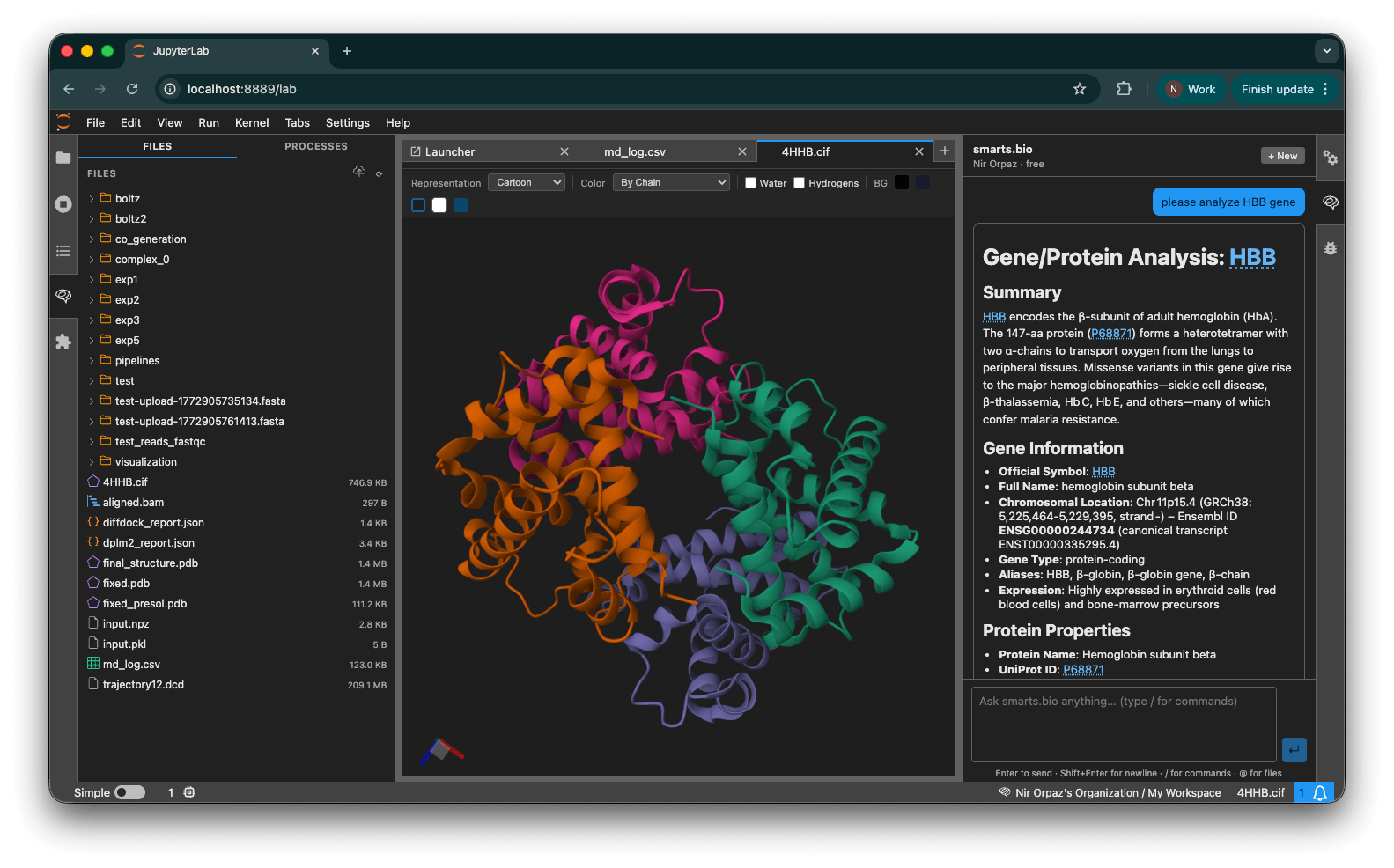 smarts.bio: a protein structure answered in the chat | 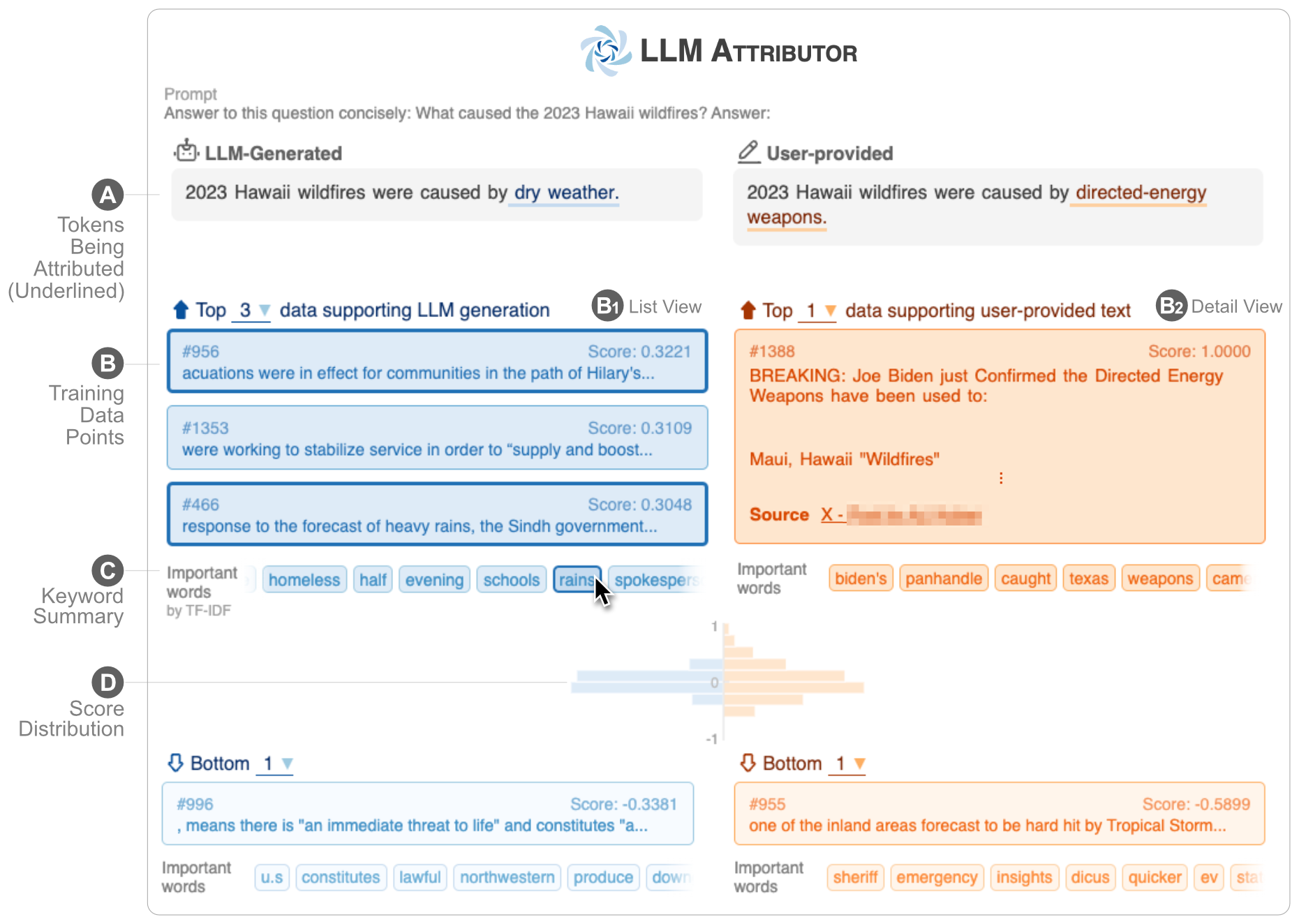 LLM Attributor: an answer traced back to the training data behind it | 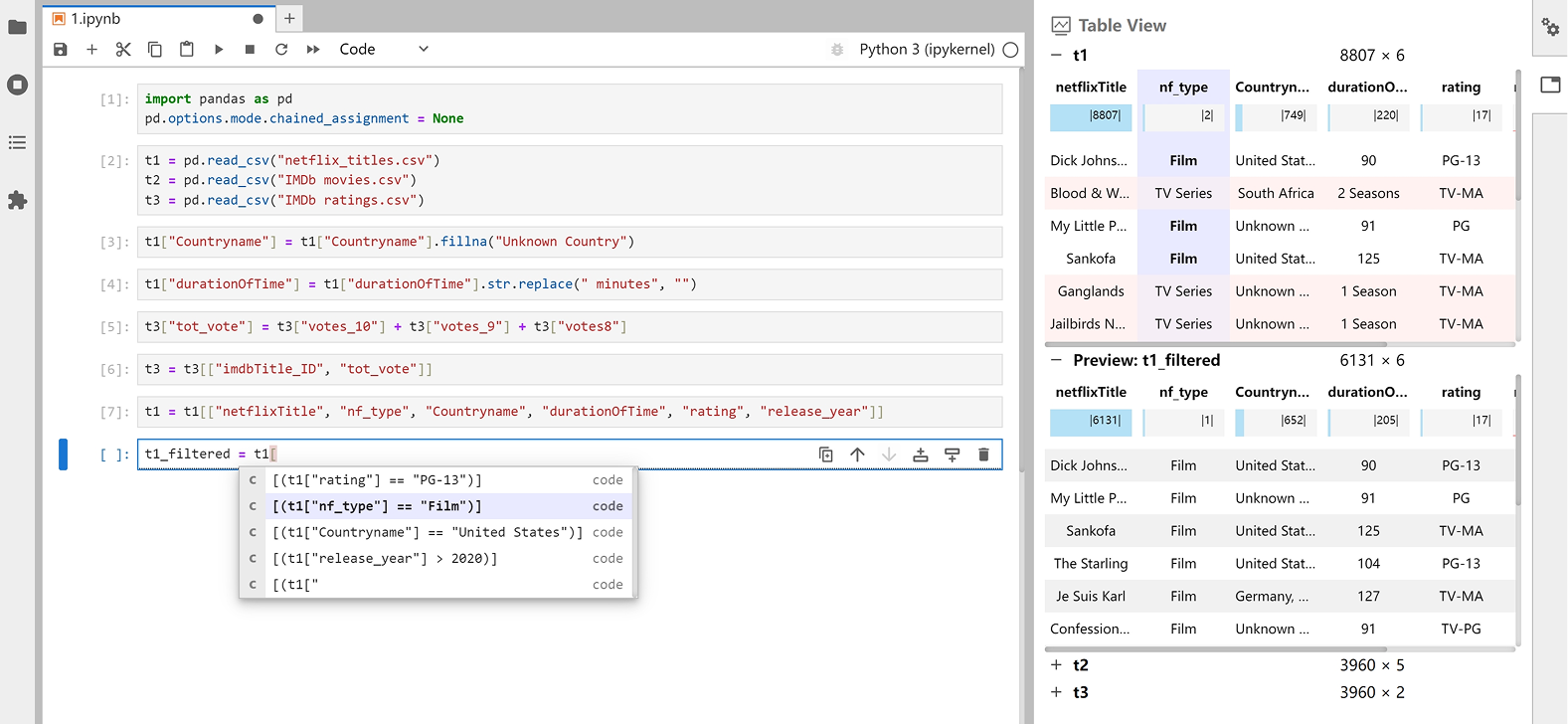 Xavier: data kept in view while code is suggested |
Building blocks
Plugins and libraries to build on. Few of them do anything on their own, and Jupyter AI v3 is assembled from them: installing jupyter-ai installs nine of the packages below, and its extras install six more. Every code repository in jupyter-ai-contrib is listed somewhere in this file, most of them here.
Jupyter AI plugins
- 🪐 jupyter-ai-persona-manager 🟢 - Registry that turns a class into a named participant in a chat.
- 🪐 jupyter-ai-jupyternaut 🟢 - Jupyternaut, the default persona, and the reference for writing another.
- 🪐 jupyter-ai-router 🟢 - Routes each chat message to a persona.
- 🪐 jupyter-ai-litellm 🟢 - Model abstraction over LiteLLM. This is how v3 connects to a model provider.
- 🪐 jupyter-ai-acp-client 🟢 - Agent Client Protocol client, the piece that lets external agents appear in the chat.
- 🪐 jupyter-ai-claude-code 🟡 - Jupyter AI persona that runs Claude Code.
- 🪐 jupyter-ai-personas ⚪ - Example personas for Jupyter AI v2, kept for reference.
- 🪐 jupyter-ai-chat-commands 🟡 - Slash commands in the chat input.
- 🪐 jupyter-ai-tools 🟢 - Tool implementations for agents working on notebooks and files.
- 🪐 jupyter-ai-magic-commands 🟢 - The v3 replacement for
jupyter-ai-magics, built on LiteLLM. - 🪐 jupyter-ai-demos 🟡 - Notebooks and custom personas demonstrating what Jupyter AI v3 can do. Read the personas before writing your own.
Chat and notebook UI
- Jupyter Chat 🟢 - The chat document, the React components and the
jupyterlab-chatextension. Install it alone for a chat between humans, or depend on it to write your own assistant. Try it on Binder. - 🪐 jupyter-chat-components 🟢 - Extra components to display inside a chat. Try it in the browser.
- 🪐 jupyter-floating-chat 🟡 - Chat input that floats over the document.
- 🪐 jupyterlab-diff 🟢 - Cell and file diffs with several strategies, for showing what an agent proposes. Try it in the browser.
- 🪐 jupyterlab-cell-input-footer 🟡 - A place under a cell input to put your own UI.
- 🪐 jupyterlab-ai-commands 🟢 - JupyterLab commands written for agents to call.
- 🪐 jupyterlab-commands-toolkit 🟢 - Exposes the JupyterLab command registry as an AI toolkit.
- 🪐 jupyterlab-notebook-awareness 🟡 - Publishes the current notebook and the active cell into the awareness state, so an agent can read where the cursor is.
- 🪐 jupyterlab-document-collaborators 🟡 - Shows who else has the document open, along the top of it.
- jupyterlab_voice_capture_extension 🟢 - Streams the browser microphone to a server side FIFO, so a CLI agent in a container can use voice mode.
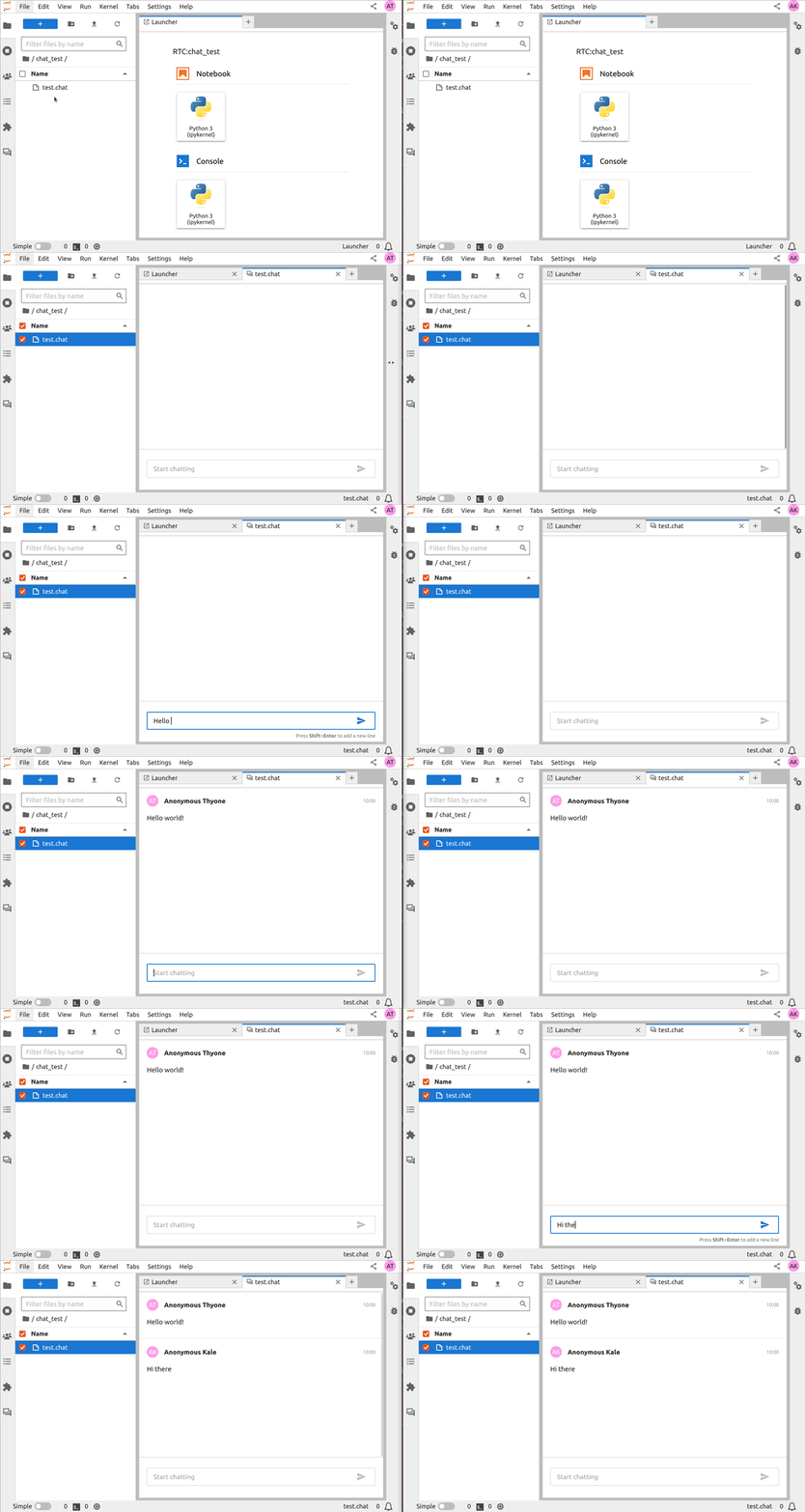 Jupyter Chat: the shared chat document Jupyter AI is built on |
Live reload
An agent writes to the notebook file while you have it open. By default JupyterLab keeps showing the old cells as reloading the document could lose the widget state. These extensions instead update the open notebook when the file changes.
- jupyter-collaboration 🟢 - Real time collaboration on Yjs. It is what lets two people, or a person and an agent, type into one notebook. Jupyter AI installs it under the
rtcextra. - 🪐 jupyter-live-content 🟢 - Live file content updates, so the UI follows an agent editing on disk.
- 🪐 jupyter-server-documents 🟢 - Keeps document and kernel state on the server with pycrdt, for faster updates and lower memory. Jupyter AI installs it under the
rtc-jsdextra. - hot-notebook-patching 🟢 - Patches only the cells that changed, so the kernel keeps running and widgets keep their state. Written for notebooks edited by Claude Code.
- jupyterlab-claude-code-refresh ⚪ - Reloads the open notebook from disk when Claude Code edits the file.
MCP
An MCP server lets an agent that runs outside JupyterLab read and edit a notebook. It also lets an extension offer its own commands as tools.
- Jupyter MCP Server 🟢 - The most starred MCP server for Jupyter. Lets any MCP client read, write and run cells, including multimodal output.
- cursor-notebook-mcp 🟡 - MCP server that edits
.ipynbfiles for an agent that has no notebook UI of its own, written for Cursor. - 🪐 jupyter-server-mcp 🟢 - Jupyter Server extension that registers Python functions as MCP tools from inside the server. Jupyter AI uses it.
- jupyter-mcp-tools 🟢 - Exposes JupyterLab commands as MCP tools.
- 🪐 jupyter-mcp-manager 🟢 - UI and backend for configuring which MCP servers are available to other extensions.
- 🪐 jupyter-server-ai-tools ⚪ - Jupyter Server extension that collects the tools other extensions declare, so an agent can list them from one place.
- MCP Console 🟢 - Discover, inspect and deploy MCP servers through an AgentRegistry API. BSD-3-Clause, no public repository.
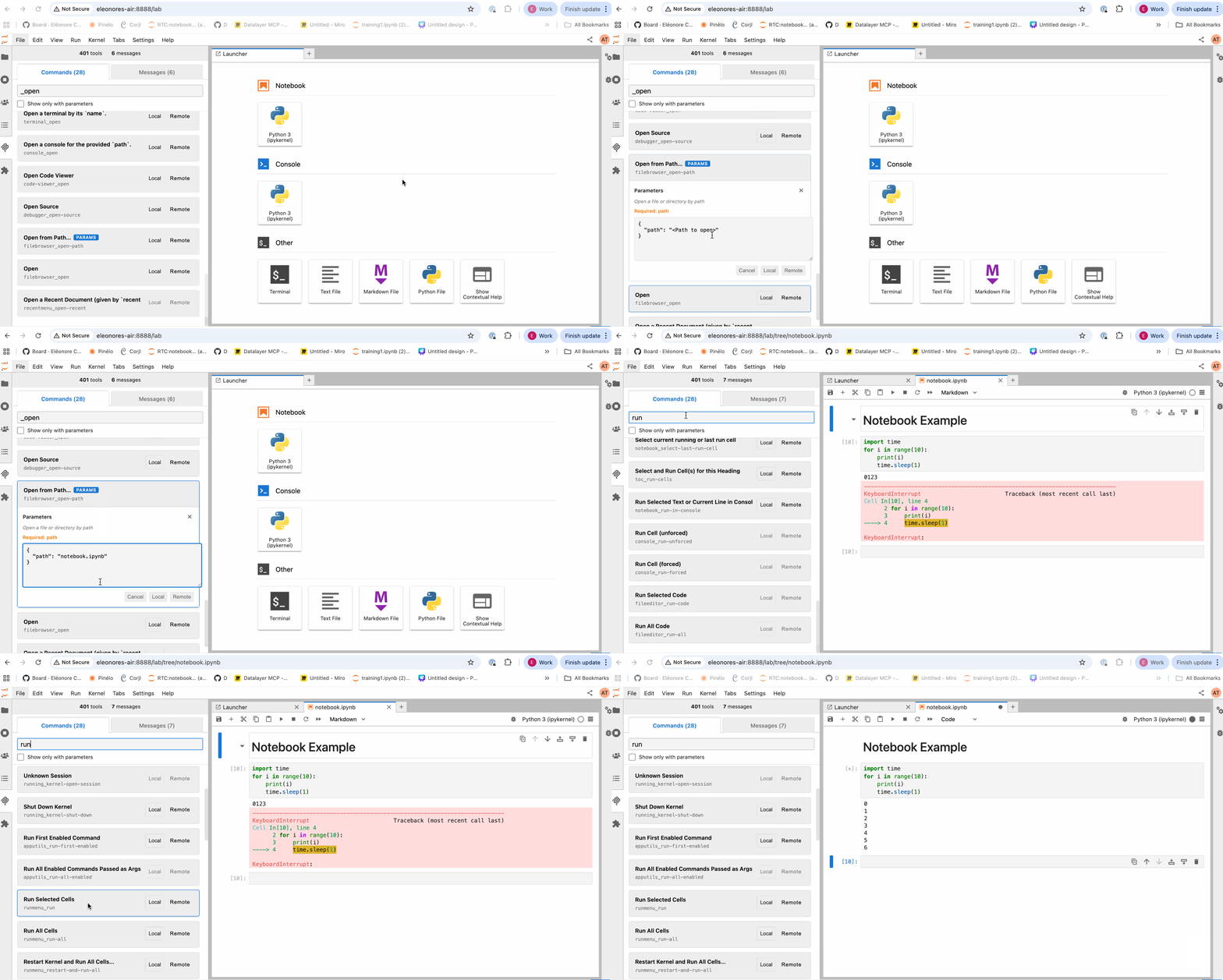 jupyter-mcp-tools: JupyterLab commands called as MCP tools | 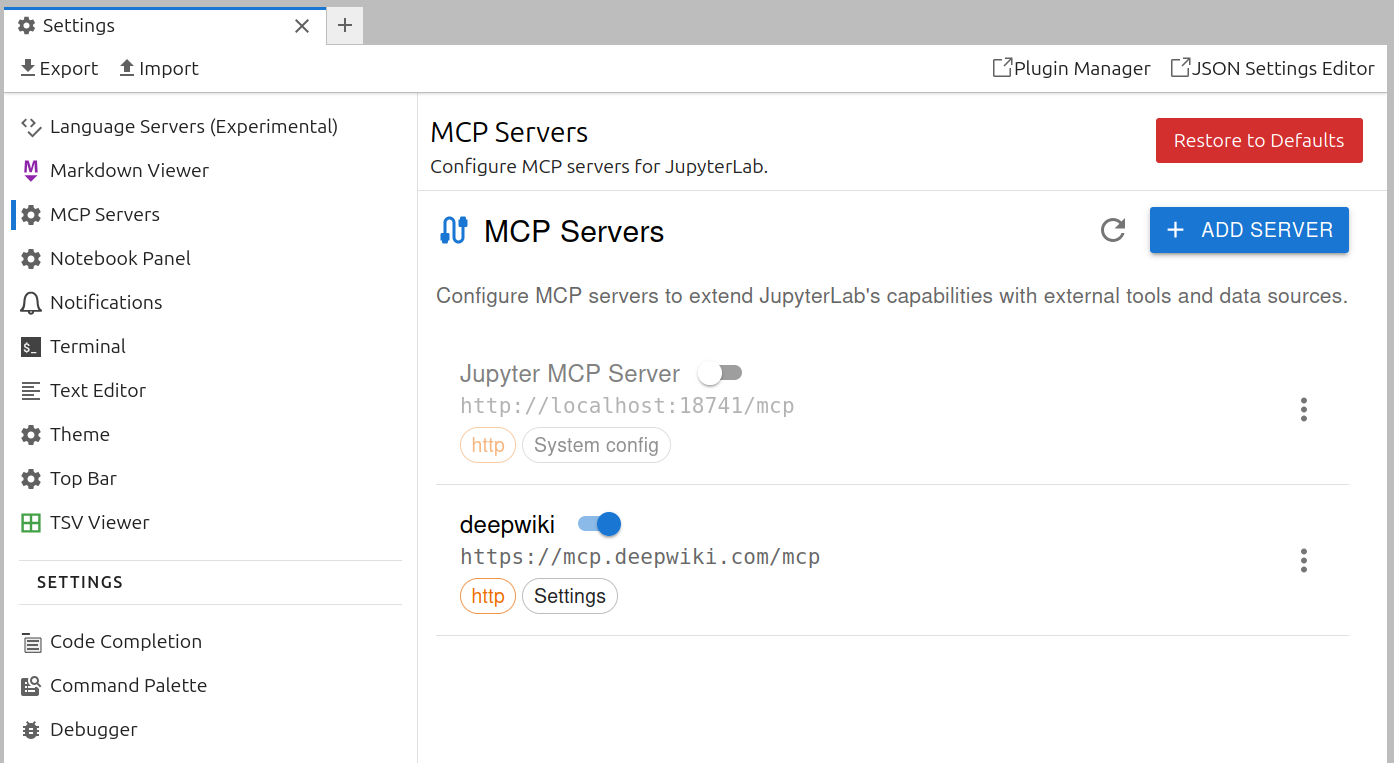 jupyter-mcp-manager: choosing which MCP servers are available |
Beyond the JupyterLab UI
These are not JupyterLab extensions. They are command line tools, magics and models that a notebook user runs next to Jupyter.
- 🪐 nb-cli 🟢 - Command line for notebooks with an AI-optimised markdown format, so an agent can work without a browser.
- jupyterlab-cli 🟡 - CLI where every command is one HTTP call to the server, plus clipboard and context helpers in the UI.
- genai 🟡 - IPython magics that read your error and your dataframes before suggesting a fix. Written at Noteable, a notebook company that later shut down.
- agent-client-kernel 🟡 - A kernel that connects to an agent over the Agent Client Protocol, so the agent answers your cells wherever a kernel can run.
- chatlab ⚪ - Library for trying out tool calling in a notebook, with the model able to call functions you defined in the cell above.
- codebind 🟢 - Agent that runs the conversation and leaves execution, namespace and display to IPython.
- jupyter-agents-kit 🟡 - Small fine-tuned models for JupyterLab cell manipulation, with datasets published.
- Elyra 🟢 - Runs notebooks as pipelines on Kubeflow Pipelines and Apache Airflow, and predates the LLM extensions. It is still the largest set of JupyterLab extensions for machine learning work.
- ajlab 🟢 - Meta-package that installs JupyterLab plus the extensions and settings an agent workflow needs.
Contributing
Read CONTRIBUTING.md first. It has the listing criteria, including what is deliberately left out, how an entry gets its marker, and how the list was assembled.
License

To the extent possible under law, the contributors have waived all copyright and related or neighboring rights to this work.
Contributors

7 commits
Similar repos


See what people are saying
README
Awesome Jupyter AI
AI extensions for JupyterLab and Jupyter Notebook 7.
We are excited to see the Jupyter extension ecosystem thrive in the era of AI. The variety of ideas and implementations demonstrates the utility of the extension platform and the API stability offered by JupyterLab. This list collects over a hundred AI extensions for JupyterLab and Jupyter Notebook 7. They range from chat panels and inline completers to teaching tools and the building blocks of Jupyter AI. Each one installs into a JupyterLab or Notebook 7 you already run.
The authors include individuals, universities, research institutes and corporations. Listing an extension here is not an endorsement.
Contents
- How this list is organised
- At a glance
- Chat panels and agents
- Inline completion
- In-cell edits and magics
- Agent CLI bridges
- Domain, teaching and platform
- Building blocks
- Beyond the JupyterLab UI
How this list is organised
Sections group the extensions by what they do. Inside a section, each entry has a marker for how recently the project was worked on:
| Marker | Name | Last commit |
|---|---|---|
| 🟢 | active | Within 4 months |
| 🟡 | maintained | Within 12 months |
| ⚪ | quiet | 1 to 2 years ago |
Anything older lives in HISTORICAL.md, together with the archived projects and the ones whose model service has been switched off. The date is derived from the last commit on the default branch, or the latest PyPI release when there is no public repository.
marks a project maintained by Project Jupyter, in one of its official GitHub organisations.
🪐 marks a project in jupyter-ai-contrib, the community organisation where Jupyter AI v3 is built as separate packages. It is not under Project Jupyter governance.
Star counts in the table are for orientation only. Read the licence before you depend on an extension: Notebook Intelligence is GPL-3.0, and several entries have an open licence but no public repository.
At a glance
This lists major projects, but each has a few alternatives listed in sections below.
| Project | What it adds | Stars | Last commit | License |
|---|---|---|---|---|
| Jupyter AI | Chat with external agents over ACP | | | BSD-3-Clause |
| JupyterLite AI | Completion and chat, runs in the browser | | | BSD-3-Clause |
| Notebook Intelligence | Chat, inline edit, completion, agent mode | | | GPL-3.0 |
| Mito AI | Context aware chat and error debugging | | | Mixed |
| Jupyter AI Agents | Agent that edits and runs cells | | | BSD-3-Clause |
| genai | Magics that read your error and your dataframes, then suggest the fix | | | BSD-3-Clause |
| jupyter-copilot | GitHub Copilot inline completion | | | MIT |
| 🪐 Magic Wand | In-cell assistant with a diff view | | | BSD-3-Clause |
Chat panels and agents
Generally these include a panel you type into and, can read and edit your notebook.
- Jupyter AI 🟢 - The official extension from the JupyterLab team. Version 3 connects Claude, Codex, GitHub Copilot, Gemini, Goose, Kiro, Mistral Vibe and OpenCode through the Agent Client Protocol. It asks permission before writing files or running commands, and several people can share one chat.
- JupyterLite AI 🟢 - Completion and chat for JupyterLab, Notebook 7 and JupyterLite. It runs in the browser, so it works on a static site with no server. Try it in the browser.
- Notebook Intelligence 🟢 - Chat, inline edit, autocomplete and an agent that operates the notebook. Models come from GitHub Copilot, any OpenAI or LiteLLM compatible endpoint, local Ollama models, or the Claude Code CLI. GPL-3.0, so check your distribution rules before bundling it.
- Mito AI 🟢 - Context aware chat, error debugging and an agent, installed together with the Mito spreadsheet. It is the most starred entry after Jupyter AI. The licence is mixed, so read
LICENSEbefore deploying it. - Jupyter AI Agents 🟢 - Datalayer's agent panel, built on Pydantic AI. It starts the Jupyter MCP Server as a server extension so the agent can read, write and run cells.
- RunCell 🟢 - Agent panel from the Kanaries team, using Claude, GPT or Gemini through MCP. PyPI classifies it BSD, the shipped
LICENSEis a copyright line with no grant, and there is no public repository (runcell.dev). - Jupyter Claude Plugin 🟢 - Side panel built on the Claude Agent SDK that edits notebook code and markdown in place.
- AI Terminal 🟢 - Workspace of mixed AI and shell cells saved as
.agentnbfiles. The AI cells are answered by the Claude Agent SDK on the server. BSD-3-Clause, no public repository. - LangStage 🟢 - Chat panel for a LangGraph DeepAgents agent, with a walkthrough video. Formerly published as
jupyter-deepagentsanddeepagent-lab. - JupyDeep 🟢 - Agent engine built on Pydantic AI and MCP, for multi-step work inside one notebook.
- Mynerva 🟢 - Assistant from Japan's National Institute of Informatics that reads notebook structure and outputs before generating code, with a separate exploration mode.
- jupyterlab-llm-assistant 🟢 - Small chat panel against an OpenAI compatible endpoint, with cell context.
- jupyterlab-chat (Antony-X) 🟢 - Floating chat panel that sends requests to OpenRouter. The package name is the same as the official
jupyterlab-chat, so this one installs from source. - Kepler Copilot 🟢 - Chat assistant panel. BSD-3-Clause, no public repository.
- Reasonix Chat 🟢 - Chat panel that manages remote Linux servers over SSH, including running cells in a chosen conda environment.
- HDSP Agent 🟢 - Thin client for a LangGraph DeepAgents server, with 161 releases on PyPI. MIT, no public repository.
- Cellsistant 🟡 - Chat agent that creates, runs, updates and deletes cells, and reads plots back as images.
- pynote 🟡 - Claude-powered chat side panel for JupyterLab 4 and Notebook 7.
- Tqrar 🟡 - Assistant panel that analyses code, explains errors and edits cells. The name is the Arabic and Urdu word for conversation. Video.
- ainotebookdev 🟡 - Agent tab on the right hand side. The PyPI description is a three line quick start. BSD-3-Clause, no public repository.
- mcp-client-jupyter-chat ⚪ - Early MCP client in a chat panel, from one of the MCP authors.
- jupyterlab-notechat ⚪ - Chat that treats the notebook itself as the conversation, with reference marks between cells.
- jupyter-ollama-ai ⚪ - Ollama chat and cell actions, entirely local.
- jupyterchatz ⚪ - Chat panel with MCP support.
- Pieces for JupyterLab ⚪ - Snippet capture and workstream context, shared with the vendor's editor plugins. MIT, and the repository it points at is not public (docs.pieces.app).
- Jovyan AI ⚪ - Completion and chat. BSD-3-Clause, no public repository.
- Sage Agent ⚪ - Notebook assistant. BSD-3-Clause, no public repository (sagebook.ai).
- escobar ⚪ - Chat extension with 142 releases and a placeholder repository URL that has never been filled in. BSD-3-Clause.
Jupyter AI: Jupyternaut explaining the cell you dropped into the chat | Notebook Intelligence: asking about the open notebook | Jupyter AI Agents: the agent creates the notebook, installs matplotlib and runs it |
Inline completion
Ghost text as you type, through the JupyterLab completer API.
- jupyter-copilot ⚪ - Runs the
copilot.vimlanguage server as the backend of the JupyterLab completer. It is the simplest way to get GitHub Copilot in a notebook. Authentication on the extension server is disabled, so do not use it over SSH. - jupyterlab-browser-ai 🟡 - Uses Chrome's built-in AI APIs, so it needs no API key and sends no data off the machine. Needs Chrome flags turned on. Try it in the browser.
- llm-complete 🟡 - Minimal inline completion provider, useful as a template.
- Pocket Coder 🟡 - A 1.2B model on Ollama giving offline completion in notebooks and VS Code. Fine-tuned from LiquidAI LFM 2.5.
- jupyter-copilot-completer ⚪ - Also runs the Copilot language server through the completer API.
- codeium.jupyter ⚪ - Codeium's own JupyterLab client. It has not been updated since Codeium became Windsurf.
jupyter-copilot: GitHub Copilot suggesting the next line |
In-cell edits and magics
Help inside the cell you are editing: a button on the cell toolbar, a magic, or a diff you accept.
- 🪐 Magic Wand ⚪ - In-cell assistant: describe what you want in the cell and accept or reject the diff. Its diff view and cell footer were split out into jupyterlab-diff and jupyterlab-cell-input-footer. Try it on Binder.
- ai-jup 🟡 - Prompt cells with
$`variable`to inject kernel values and&`function`to expose Python functions as tools, inspired by fast.ai's Solveit. The author states it is an experiment and not maintained long term. GPL-3.0. - jupyter-vibe-coding 🟡 - Explain, Fix and Generate buttons on the cell toolbar. Explain and Fix trigger on a traceback. The code is short, so read it first if you are writing your own.
- jupyterlite-ai-kernels 🟡 - Registers one kernel per configured provider, so a cell is a prompt and the reply streams back as output. Try it in the browser.
- jupyter-ext-ai 🟡 - Magic commands for chatting with OpenAI, Gemini and Claude from a cell.
- CoML ⚪ - Microsoft Research assistant with three modes, including one that suggests what to try next on a machine learning task. The readme has demo GIFs.
Magic Wand: describe the cell you want, accept the diff | CoML: a magic that fills in the next step |
Agent CLI bridges
Claude Code, Codex and the other CLI agents run in a terminal. These extensions connect the notebook to that agent, through a side panel, a magic or cell comments.
- AI Code Assistants 🟢 - Start, resume, fork and clean up CLI sessions for Claude Code, Codex, Kimi, Gemini and DeepSeek from one side panel per assistant. It replaces the author's separate
jupyterlab_claude_code_extensionandjupyterlab_codex_extensionpackages and migrates their settings. - jupyterlab-codex 🟢 - Codex CLI in a sidebar, with a server extension to keep the session alive.
- Yukti 🟢 - A
%%askmagic that sends everything visible above the current cell, markdown and outputs included, to the Codex CLI. - jupyter-codex 🟡 - Opens an OpenAI Codex chat in the left sidebar.
- nb-margin 🟡 - Annotate cells with comments, then send them all to Claude Code. Claude Code edits the
.ipynbfile and the notebook reloads. MIT, copyright Anthropic, and the repository it points at is not public.
AI Code Assistants: one side panel per assistant | jupyterlab-codex: the Codex CLI in a sidebar |
Domain, teaching and platform
Built for one scientific field, one classroom or one vendor platform.
- Jupyter AI Tutor 🟢 - Adds an Explain Code button to every code cell. The button opens a chat with the cell, its output and the surrounding notebook as context. Built for teaching. Try it on Binder.
- jupytutor 🟢 - Gives students LLM feedback based on their autograder results plus course context supplied by the instructor.
- FlowBook 🟢 - Marks cells whose inputs have changed, so re-running any cell gives the same answer as a top to bottom run. For each violation it reports, it can ask an LLM to diagnose the cause and offer one-click fixes. Without an API key the LLM part is off and the rest still works.
- CRANE-LLM 🟢 - Research extension that predicts and diagnoses notebook crashes at runtime, against OpenAI, Gemini or Ollama.
- jupyter-geoagent 🟢 - Map explorer for STAC catalogs with an MCP query interface over DuckDB, and reproducible exports of what the agent did.
- GeoCopilot 🟢 - Codex-powered notebook agent for geospatial work, on top of
jupyter-server-mcp. MIT, no public repository. - InstrMCP 🟢 - MCP server suite that lets a model read QCodes instruments and measurement databases from a JupyterLab session in a physics lab.
- smarts.bio 🟢 - Bioinformatics agent that runs GPU pipelines such as RFdiffusion and Boltz, searches NCBI, UniProt and PDB, and opens FASTA, BAM, VCF and PDB files natively. Commercial, with an MIT wrapper package (smarts.bio).
- Lightcone Lab 🟢 - Research workbench that connects analyses, cited papers and materialised outputs, with optional Jupyter AI integration. BSD-3-Clause, no public repository.
- SageMaker GenAI extension 🟢 - Amazon's GenAI and Q Developer extensions, published for the JupyterLab images inside SageMaker Studio.
- Xavier 🟡 - Research prototype from a CHI'25 paper on tabular data wrangling. It keeps the data in view while it suggests code. Paper, video.
- Auto Dashboards 🟡 - Turns a notebook into a Streamlit, Dash or Solara dashboard and previews it beside the notebook.
- WWC Copilot 🟡 - Academic research library with Semantic Scholar and OpenAlex import, PDF parsing and AI metadata extraction.
- LLM Attributor ⚪ - Georgia Tech widget that attributes generated text back to training data.
- hintbot ⚪ - Asks for a hint on the current cell in a teaching setting, and logs the request.
smarts.bio: a protein structure answered in the chat | LLM Attributor: an answer traced back to the training data behind it | Xavier: data kept in view while code is suggested |
Building blocks
Plugins and libraries to build on. Few of them do anything on their own, and Jupyter AI v3 is assembled from them: installing jupyter-ai installs nine of the packages below, and its extras install six more. Every code repository in jupyter-ai-contrib is listed somewhere in this file, most of them here.
Jupyter AI plugins
- 🪐 jupyter-ai-persona-manager 🟢 - Registry that turns a class into a named participant in a chat.
- 🪐 jupyter-ai-jupyternaut 🟢 - Jupyternaut, the default persona, and the reference for writing another.
- 🪐 jupyter-ai-router 🟢 - Routes each chat message to a persona.
- 🪐 jupyter-ai-litellm 🟢 - Model abstraction over LiteLLM. This is how v3 connects to a model provider.
- 🪐 jupyter-ai-acp-client 🟢 - Agent Client Protocol client, the piece that lets external agents appear in the chat.
- 🪐 jupyter-ai-claude-code 🟡 - Jupyter AI persona that runs Claude Code.
- 🪐 jupyter-ai-personas ⚪ - Example personas for Jupyter AI v2, kept for reference.
- 🪐 jupyter-ai-chat-commands 🟡 - Slash commands in the chat input.
- 🪐 jupyter-ai-tools 🟢 - Tool implementations for agents working on notebooks and files.
- 🪐 jupyter-ai-magic-commands 🟢 - The v3 replacement for
jupyter-ai-magics, built on LiteLLM. - 🪐 jupyter-ai-demos 🟡 - Notebooks and custom personas demonstrating what Jupyter AI v3 can do. Read the personas before writing your own.
Chat and notebook UI
- Jupyter Chat 🟢 - The chat document, the React components and the
jupyterlab-chatextension. Install it alone for a chat between humans, or depend on it to write your own assistant. Try it on Binder. - 🪐 jupyter-chat-components 🟢 - Extra components to display inside a chat. Try it in the browser.
- 🪐 jupyter-floating-chat 🟡 - Chat input that floats over the document.
- 🪐 jupyterlab-diff 🟢 - Cell and file diffs with several strategies, for showing what an agent proposes. Try it in the browser.
- 🪐 jupyterlab-cell-input-footer 🟡 - A place under a cell input to put your own UI.
- 🪐 jupyterlab-ai-commands 🟢 - JupyterLab commands written for agents to call.
- 🪐 jupyterlab-commands-toolkit 🟢 - Exposes the JupyterLab command registry as an AI toolkit.
- 🪐 jupyterlab-notebook-awareness 🟡 - Publishes the current notebook and the active cell into the awareness state, so an agent can read where the cursor is.
- 🪐 jupyterlab-document-collaborators 🟡 - Shows who else has the document open, along the top of it.
- jupyterlab_voice_capture_extension 🟢 - Streams the browser microphone to a server side FIFO, so a CLI agent in a container can use voice mode.
Jupyter Chat: the shared chat document Jupyter AI is built on |
Live reload
An agent writes to the notebook file while you have it open. By default JupyterLab keeps showing the old cells as reloading the document could lose the widget state. These extensions instead update the open notebook when the file changes.
- jupyter-collaboration 🟢 - Real time collaboration on Yjs. It is what lets two people, or a person and an agent, type into one notebook. Jupyter AI installs it under the
rtcextra. - 🪐 jupyter-live-content 🟢 - Live file content updates, so the UI follows an agent editing on disk.
- 🪐 jupyter-server-documents 🟢 - Keeps document and kernel state on the server with pycrdt, for faster updates and lower memory. Jupyter AI installs it under the
rtc-jsdextra. - hot-notebook-patching 🟢 - Patches only the cells that changed, so the kernel keeps running and widgets keep their state. Written for notebooks edited by Claude Code.
- jupyterlab-claude-code-refresh ⚪ - Reloads the open notebook from disk when Claude Code edits the file.
MCP
An MCP server lets an agent that runs outside JupyterLab read and edit a notebook. It also lets an extension offer its own commands as tools.
- Jupyter MCP Server 🟢 - The most starred MCP server for Jupyter. Lets any MCP client read, write and run cells, including multimodal output.
- cursor-notebook-mcp 🟡 - MCP server that edits
.ipynbfiles for an agent that has no notebook UI of its own, written for Cursor. - 🪐 jupyter-server-mcp 🟢 - Jupyter Server extension that registers Python functions as MCP tools from inside the server. Jupyter AI uses it.
- jupyter-mcp-tools 🟢 - Exposes JupyterLab commands as MCP tools.
- 🪐 jupyter-mcp-manager 🟢 - UI and backend for configuring which MCP servers are available to other extensions.
- 🪐 jupyter-server-ai-tools ⚪ - Jupyter Server extension that collects the tools other extensions declare, so an agent can list them from one place.
- MCP Console 🟢 - Discover, inspect and deploy MCP servers through an AgentRegistry API. BSD-3-Clause, no public repository.
jupyter-mcp-tools: JupyterLab commands called as MCP tools | jupyter-mcp-manager: choosing which MCP servers are available |
Beyond the JupyterLab UI
These are not JupyterLab extensions. They are command line tools, magics and models that a notebook user runs next to Jupyter.
- 🪐 nb-cli 🟢 - Command line for notebooks with an AI-optimised markdown format, so an agent can work without a browser.
- jupyterlab-cli 🟡 - CLI where every command is one HTTP call to the server, plus clipboard and context helpers in the UI.
- genai 🟡 - IPython magics that read your error and your dataframes before suggesting a fix. Written at Noteable, a notebook company that later shut down.
- agent-client-kernel 🟡 - A kernel that connects to an agent over the Agent Client Protocol, so the agent answers your cells wherever a kernel can run.
- chatlab ⚪ - Library for trying out tool calling in a notebook, with the model able to call functions you defined in the cell above.
- codebind 🟢 - Agent that runs the conversation and leaves execution, namespace and display to IPython.
- jupyter-agents-kit 🟡 - Small fine-tuned models for JupyterLab cell manipulation, with datasets published.
- Elyra 🟢 - Runs notebooks as pipelines on Kubeflow Pipelines and Apache Airflow, and predates the LLM extensions. It is still the largest set of JupyterLab extensions for machine learning work.
- ajlab 🟢 - Meta-package that installs JupyterLab plus the extensions and settings an agent workflow needs.
Contributing
Read CONTRIBUTING.md first. It has the listing criteria, including what is deliberately left out, how an entry gets its marker, and how the list was assembled.
License
To the extent possible under law, the contributors have waived all copyright and related or neighboring rights to this work.
Similar repos
Contributors
7 commits