

The interactive scratchpad for hackers.
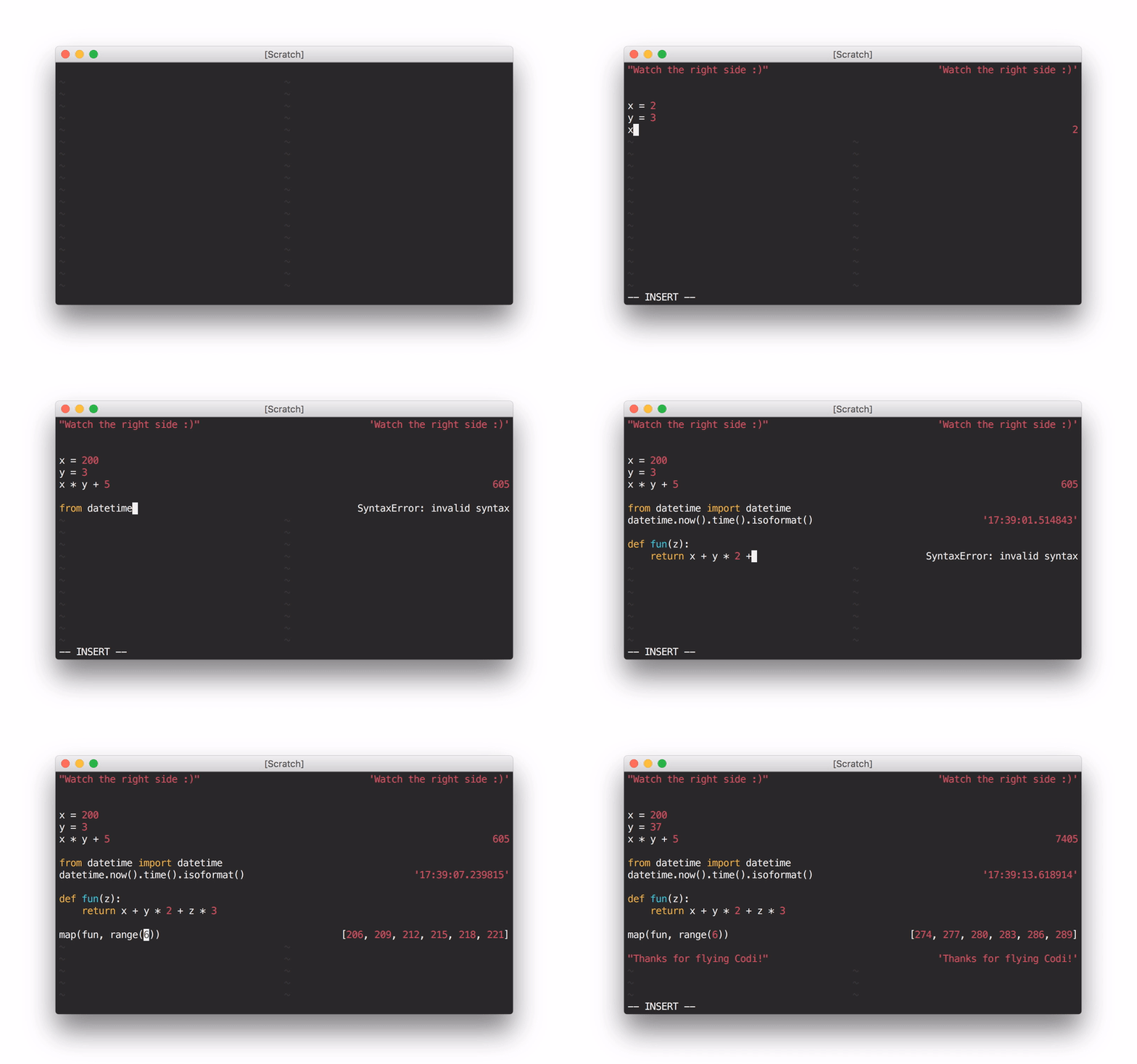
Using Codi as a Python scratchpad through the shell wrapper
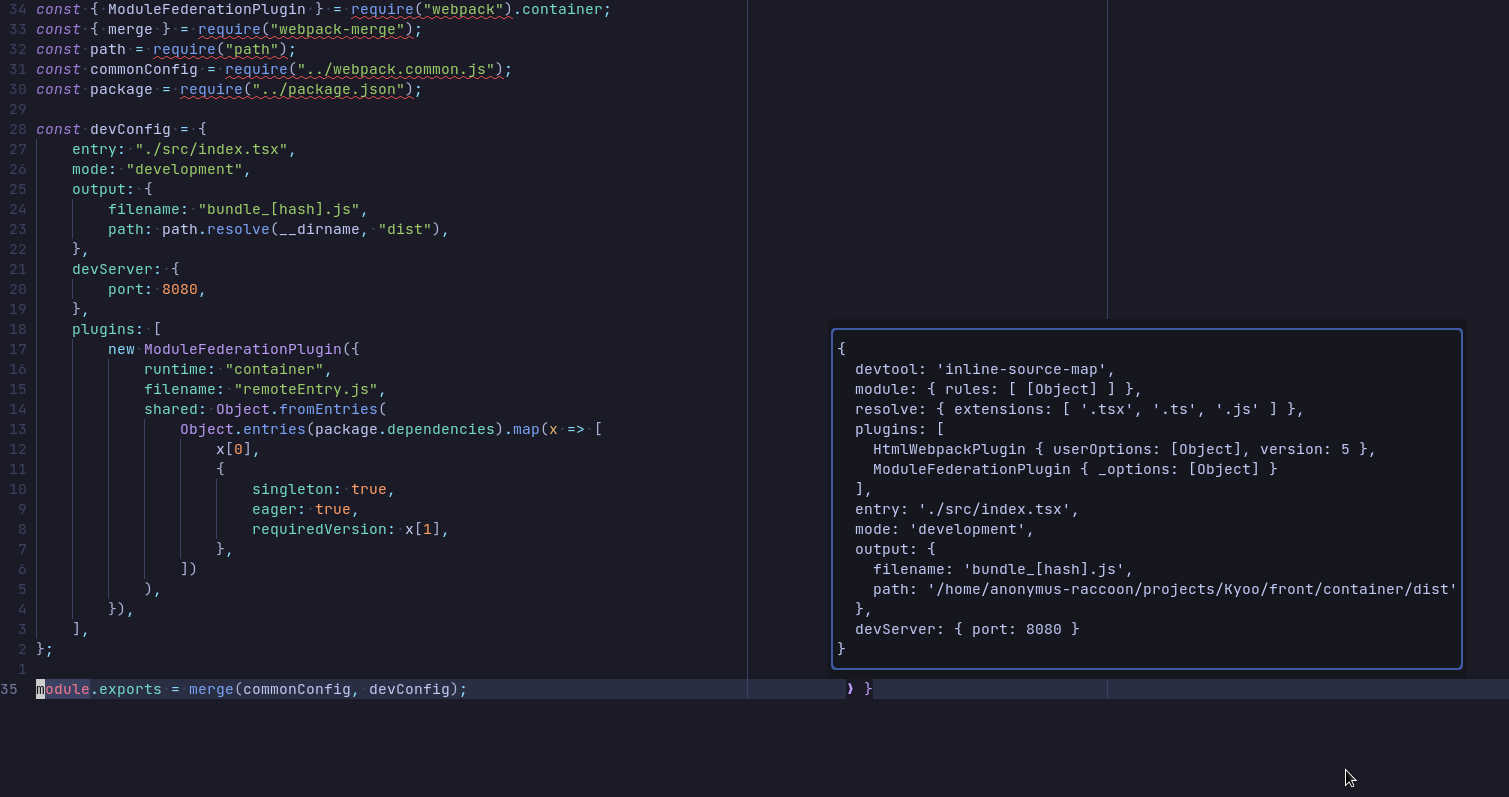
Using :CodiExpand on a javascript object
Codi is an interactive scratchpad for hackers, with a similar interface to
Numi. It opens a pane synchronized to your main buffer
which displays the results of evaluating each line as you type (with NeoVim
or Vim with +job and +channel, asynchronously). It's extensible to nearly
any language that provides a REPL (interactive interpreter)!
Languages with built-in support: Python, JavaScript, CoffeeScript, Haskell, PureScript, Ruby, OCaml, R, Clojure/ClojureScript, PHP, Lua, C++, Julia, Elm, Elixir, TypeScript, Mathjs, Haxe
Pull requests for new language support welcome!
Note: without async support, evaluation will trigger on cursor hold rather than text change.
For more information, check out the documentation.
Use your favorite package manager (vim-plug, Vundle, pathogen.vim), or add this directory to your Vim runtime path.
For example, if you're using vim-plug, add the following line to ~/.vimrc:
Plug 'metakirby5/codi.vim'
+job and +channel for asynchronous evaluation) or
NeoVim (still in its infancy - please report bugs!)unamescript (BSD or Linux, man page should say at least
2013)Each interpreter also depends on its REPL. These are loaded on-demand. For
example, if you only want to use the Python Codi interpreter, you will not
need ghci.
Default interpreter dependencies:
python (Note: Python 3 requires config - see :h codi-configuration)nodecoffeeghci (be really careful with lazy evaluation!)pulp psciirbocamlRplanckpsyshluaclingjuliaelmiextsunmathjsihx (installed with haxelib install ihx)Codi [filetype] activates Codi for the current buffer, using the provided
filetype or the buffer's filetype.Codi! deactivates Codi for the current buffer.Codi!! [filetype] toggles Codi for the current buffer, using the provided
filetype or the buffer's filetype.CodiNew [filetype] creates a new scratch buffer with Codi in it.CodiSelect opens a select menu and creates a new scratch buffer with the
selected filetype and Codi in it. Only available on neovim.CodiExpand expands the output of the current line in a popup menu to
display multi-line content. Only available on neovim.A nice way to use Codi is through a shell wrapper that you can stick in your
~/.bashrc:
# Codi
# Usage: codi [filetype] [filename]
codi() {
  local syntax="${1:-python}"
  shift
  vim -c \
    "let g:startify_disable_at_vimenter = 1 |\
    set bt=nofile ls=0 noru nonu nornu |\
    hi ColorColumn ctermbg=NONE |\
    hi VertSplit ctermbg=NONE |\
    hi NonText ctermfg=0 |\
    Codi $syntax" "$@"
}
g:codi#interpreters is a list of user-defined interpreters.
See the documentation for more information.g:codi#aliases is a list of user-defined interpreter filetype aliases.
See the documentation for more information.The below options can also be set on a per-interpreter basis via
g:codi#interpreters:
g:codi#autocmd determines what autocommands trigger updates.
See the documentation for more information.g:codi#width is the width of the Codi split.g:codi#rightsplit is whether or not Codi spawns on the right side.g:codi#rightalign is whether or not to right-align the Codi buffer.g:codi#autoclose is whether or not to close Codi when the associated
buffer is closed.g:codi#raw is whether or not to display interpreter results without
alignment formatting (useful for debugging).g:codi#sync is whether or not to force synchronous execution. No reason to
touch this unless you want to compare async to sync.CodiEnterPre, CodiEnterPost: When a Codi pane enters.CodiUpdatePre, CodiUpdatePost: When a Codi pane updates.CodiLeavePre, CodiLeavePost: When a Codi pane leaves.;;.:h codi-introduction-warnings for more information.:h codi-introduction-gotchas.(top 24 of 43)
1,437 followers · starred Jun 2017
13,895 followers · starred Aug 2016
50 followers · starred Nov 2019
357 followers · starred Aug 2016
The interactive scratchpad for hackers.
Using Codi as a Python scratchpad through the shell wrapper
Using :CodiExpand on a javascript object
Codi is an interactive scratchpad for hackers, with a similar interface to
Numi. It opens a pane synchronized to your main buffer
which displays the results of evaluating each line as you type (with NeoVim
or Vim with +job and +channel, asynchronously). It's extensible to nearly
any language that provides a REPL (interactive interpreter)!
Languages with built-in support: Python, JavaScript, CoffeeScript, Haskell, PureScript, Ruby, OCaml, R, Clojure/ClojureScript, PHP, Lua, C++, Julia, Elm, Elixir, TypeScript, Mathjs, Haxe
Pull requests for new language support welcome!
Note: without async support, evaluation will trigger on cursor hold rather than text change.
For more information, check out the documentation.
Use your favorite package manager (vim-plug, Vundle, pathogen.vim), or add this directory to your Vim runtime path.
For example, if you're using vim-plug, add the following line to ~/.vimrc:
Plug 'metakirby5/codi.vim'
+job and +channel for asynchronous evaluation) or
NeoVim (still in its infancy - please report bugs!)unamescript (BSD or Linux, man page should say at least
2013)Each interpreter also depends on its REPL. These are loaded on-demand. For
example, if you only want to use the Python Codi interpreter, you will not
need ghci.
Default interpreter dependencies:
python (Note: Python 3 requires config - see :h codi-configuration)nodecoffeeghci (be really careful with lazy evaluation!)pulp psciirbocamlRplanckpsyshluaclingjuliaelmiextsunmathjsihx (installed with haxelib install ihx)Codi [filetype] activates Codi for the current buffer, using the provided
filetype or the buffer's filetype.Codi! deactivates Codi for the current buffer.Codi!! [filetype] toggles Codi for the current buffer, using the provided
filetype or the buffer's filetype.CodiNew [filetype] creates a new scratch buffer with Codi in it.CodiSelect opens a select menu and creates a new scratch buffer with the
selected filetype and Codi in it. Only available on neovim.CodiExpand expands the output of the current line in a popup menu to
display multi-line content. Only available on neovim.A nice way to use Codi is through a shell wrapper that you can stick in your
~/.bashrc:
# Codi
# Usage: codi [filetype] [filename]
codi() {
  local syntax="${1:-python}"
  shift
  vim -c \
    "let g:startify_disable_at_vimenter = 1 |\
    set bt=nofile ls=0 noru nonu nornu |\
    hi ColorColumn ctermbg=NONE |\
    hi VertSplit ctermbg=NONE |\
    hi NonText ctermfg=0 |\
    Codi $syntax" "$@"
}
g:codi#interpreters is a list of user-defined interpreters.
See the documentation for more information.g:codi#aliases is a list of user-defined interpreter filetype aliases.
See the documentation for more information.The below options can also be set on a per-interpreter basis via
g:codi#interpreters:
g:codi#autocmd determines what autocommands trigger updates.
See the documentation for more information.g:codi#width is the width of the Codi split.g:codi#rightsplit is whether or not Codi spawns on the right side.g:codi#rightalign is whether or not to right-align the Codi buffer.g:codi#autoclose is whether or not to close Codi when the associated
buffer is closed.g:codi#raw is whether or not to display interpreter results without
alignment formatting (useful for debugging).g:codi#sync is whether or not to force synchronous execution. No reason to
touch this unless you want to compare async to sync.CodiEnterPre, CodiEnterPost: When a Codi pane enters.CodiUpdatePre, CodiUpdatePost: When a Codi pane updates.CodiLeavePre, CodiLeavePost: When a Codi pane leaves.;;.:h codi-introduction-warnings for more information.:h codi-introduction-gotchas.(top 24 of 43)
1,437 followers · starred Jun 2017
13,895 followers · starred Aug 2016
50 followers · starred Nov 2019
357 followers · starred Aug 2016



