A vim plugin to give you some slime. (Emacs)
Vim Script
2,072
654 commits
updated Aug 16, 2026
What is SLIME?
SLIME is an Emacs plugin to turn Emacs into a Lisp IDE. You can type text
in a file, send it to a live REPL, and avoid having to reload all your code
every time you make a change.
So, what is vim-slime?
vim-slime is a humble attempt at getting _some_ of the SLIME features into Vim.
It works with any REPL and isn't tied to Lisp.
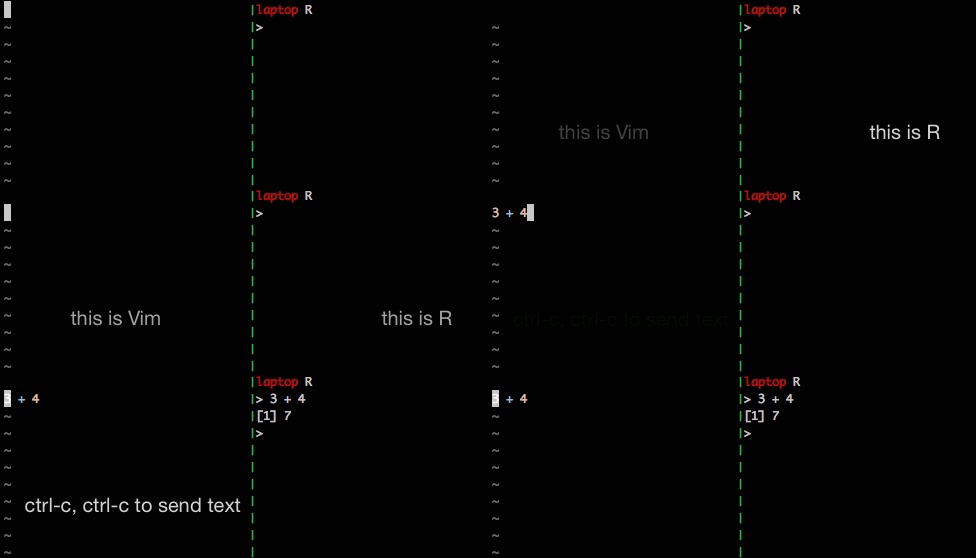
Grab some text and send it to a target:
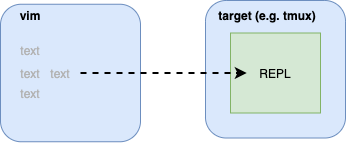
The target contains a REPL, maybe Clojure, R or python. If you can type text into it, vim-slime can send text to it.
Why do this? Because you want the benefits of a REPL (instant feedback, no need to reload ...) and the benefits of using Vim (familiar environment, syntax highlighting, persistence ...).
More details in the blog post.
Configure vim-slime for your desired target:
" for all buffers
let g:slime_target = "tmux"

" and/or as a buffer-level override
let b:slime_target = "wezterm"

" if not explicitly configured, it defaults to `screen`
Many targets are supported, check their documentation for details:
Use your favorite package manager, or use Vim's built-in package support (since Vim 7.4.1528):
mkdir -p ~/.vim/pack/plugins/start
cd ~/.vim/pack/plugins/start
git clone https://github.com/jpalardy/vim-slime.git
You can try vim-slime in Docker before committing to anything else.
Put your cursor over the text you want to send and type:
ctrl-c ctrl-c --- the same as slime
(You can just hold ctrl and double-tap c.)
The current paragraph — what would be selected if you typed vip — is automatically selected.
To control exactly what is sent, you can manually select text before calling vim-slime.
To send text using vim-style mappings, such as slime operator+motion or slime operator+text object see the appropriate section of the advanced configuration documentation.
vim-slime needs to know where to send your text, it will prompt you.
It will remember your answers and won't prompt you again.
If you want to reconfigure, type:
ctrl-c v --- mnemonic: "variables"
or call:
:SlimeConfig
vim-slime might have to modify its behavior according to the language or REPL
you want to use.
Many languages are supported without modifications, while others might tweak the text without explicit configuration:
If plain vim-slime isn't doing exactly what you want, have a look
at advanced configuration.
297 followers · starred May 2025
112 followers · starred Apr 2021
274 followers · starred May 2022
532 followers · starred Jul 2024
A vim plugin to give you some slime. (Emacs)
Vim Script
2,072
654 commits
updated Aug 16, 2026
What is SLIME?
SLIME is an Emacs plugin to turn Emacs into a Lisp IDE. You can type text
in a file, send it to a live REPL, and avoid having to reload all your code
every time you make a change.
So, what is vim-slime?
vim-slime is a humble attempt at getting _some_ of the SLIME features into Vim.
It works with any REPL and isn't tied to Lisp.
Grab some text and send it to a target:
The target contains a REPL, maybe Clojure, R or python. If you can type text into it, vim-slime can send text to it.
Why do this? Because you want the benefits of a REPL (instant feedback, no need to reload ...) and the benefits of using Vim (familiar environment, syntax highlighting, persistence ...).
More details in the blog post.
Configure vim-slime for your desired target:
" for all buffers
let g:slime_target = "tmux"

" and/or as a buffer-level override
let b:slime_target = "wezterm"

" if not explicitly configured, it defaults to `screen`
Many targets are supported, check their documentation for details:
Use your favorite package manager, or use Vim's built-in package support (since Vim 7.4.1528):
mkdir -p ~/.vim/pack/plugins/start
cd ~/.vim/pack/plugins/start
git clone https://github.com/jpalardy/vim-slime.git
You can try vim-slime in Docker before committing to anything else.
Put your cursor over the text you want to send and type:
ctrl-c ctrl-c --- the same as slime
(You can just hold ctrl and double-tap c.)
The current paragraph — what would be selected if you typed vip — is automatically selected.
To control exactly what is sent, you can manually select text before calling vim-slime.
To send text using vim-style mappings, such as slime operator+motion or slime operator+text object see the appropriate section of the advanced configuration documentation.
vim-slime needs to know where to send your text, it will prompt you.
It will remember your answers and won't prompt you again.
If you want to reconfigure, type:
ctrl-c v --- mnemonic: "variables"
or call:
:SlimeConfig
vim-slime might have to modify its behavior according to the language or REPL
you want to use.
Many languages are supported without modifications, while others might tweak the text without explicit configuration:
If plain vim-slime isn't doing exactly what you want, have a look
at advanced configuration.
297 followers · starred May 2025
112 followers · starred Apr 2021
274 followers · starred May 2022
532 followers · starred Jul 2024