A lightweight, local OpenTelemetry trace, logs and metrics viewer
TypeScript
192
290 commits
updated Oct 16, 2026




A lightweight, zero-config OpenTelemetry viewer for local development — traces, logs, and metrics in one place.
Drop-in replacement for a collector endpoint — point your OTLP exporter at it and see your telemetry immediately. No database required.
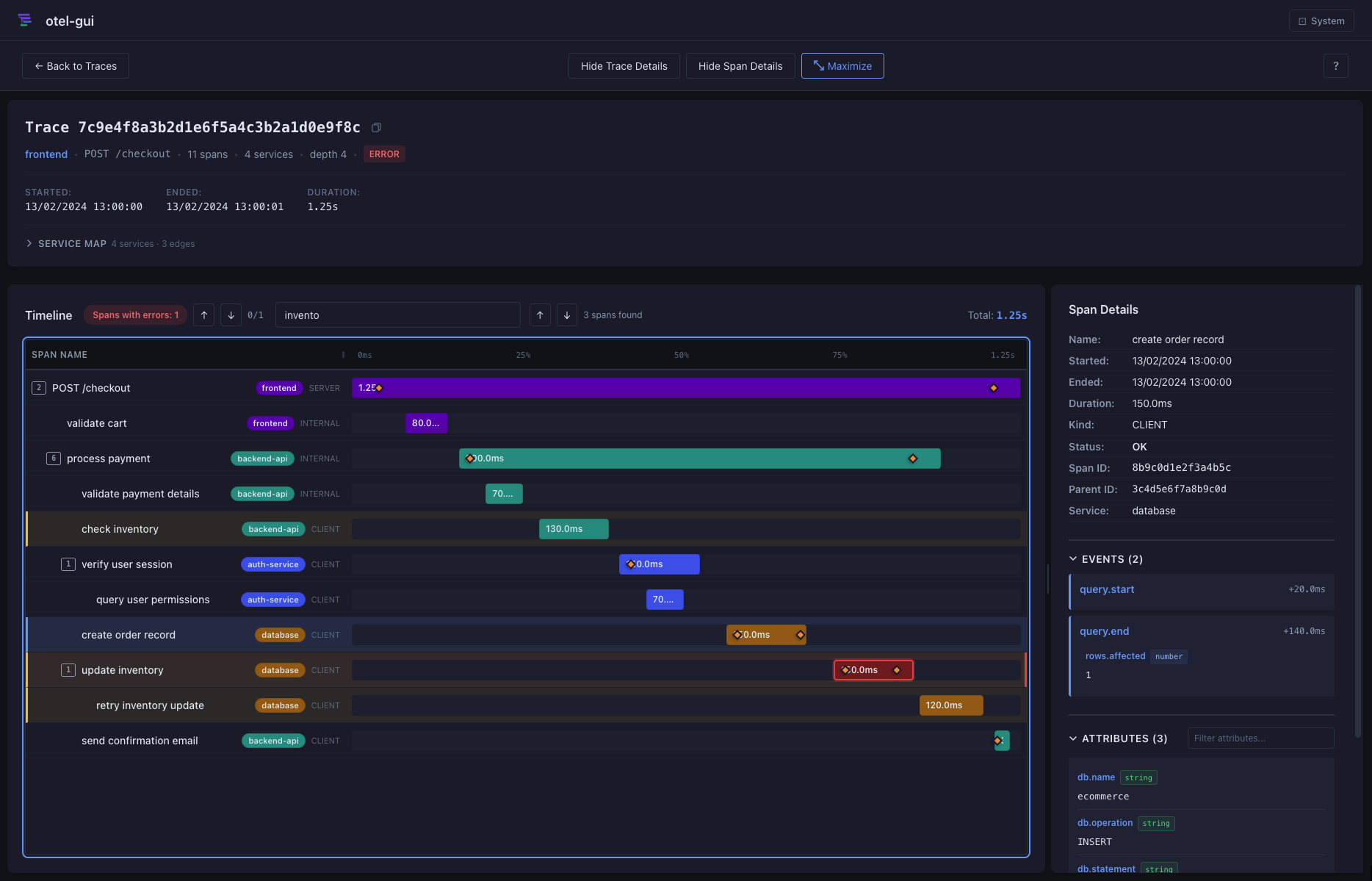
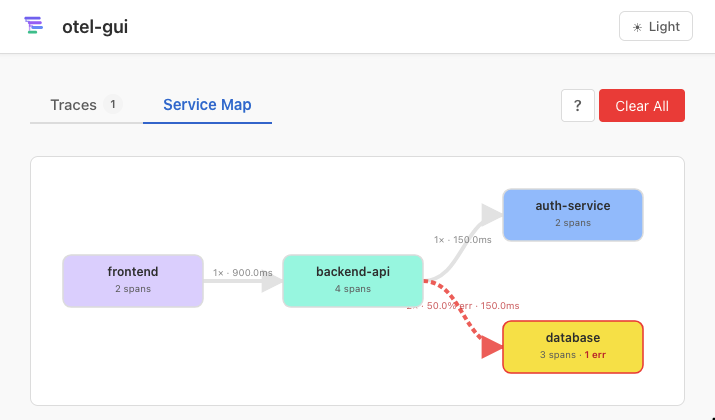
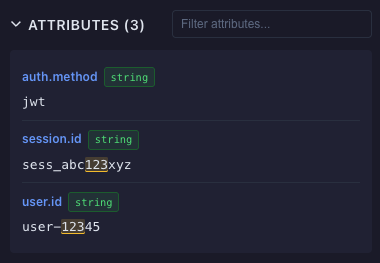
application/json and application/x-protobuf payloadsClear All + Delete Selected (n))/ to search, t/l/m/s to jump to Traces/Logs/Metrics/Service Map tabs, Enter/Space to activate focused rows in the Traces and Logs grids, escape key to clear search and go back to the list, ? for shortcuts help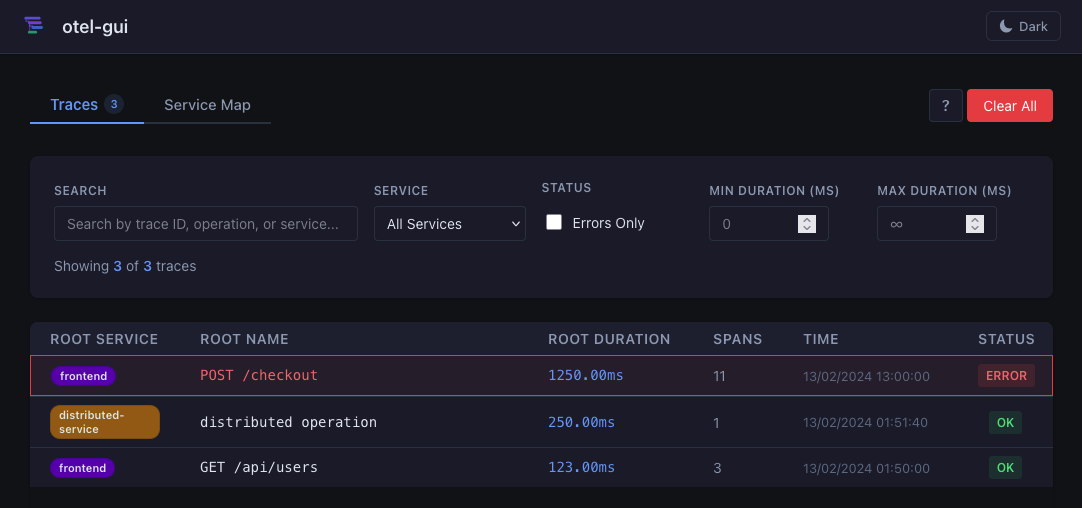
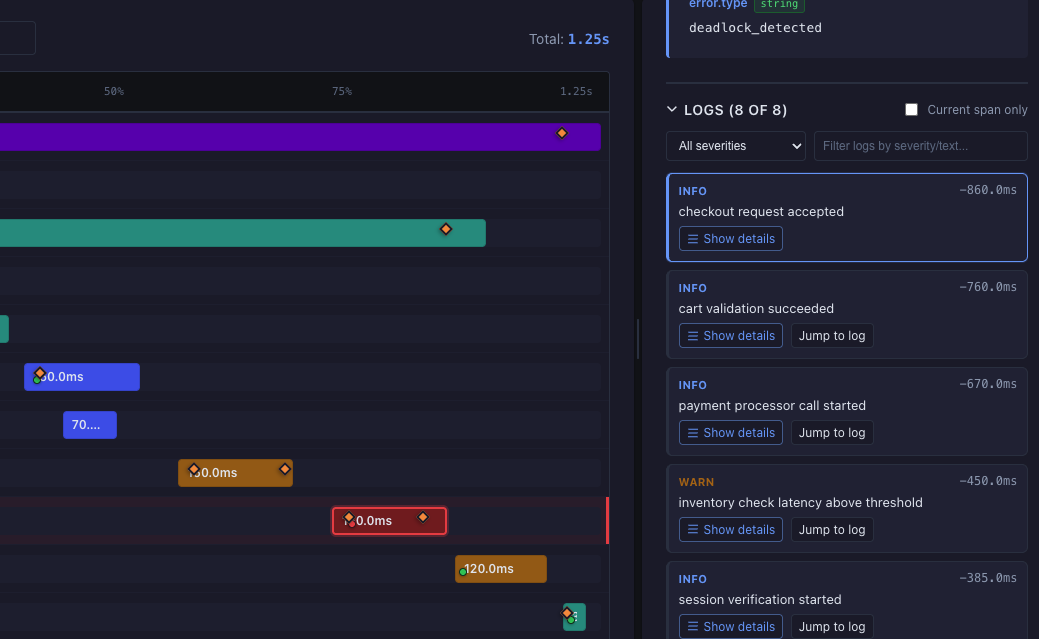
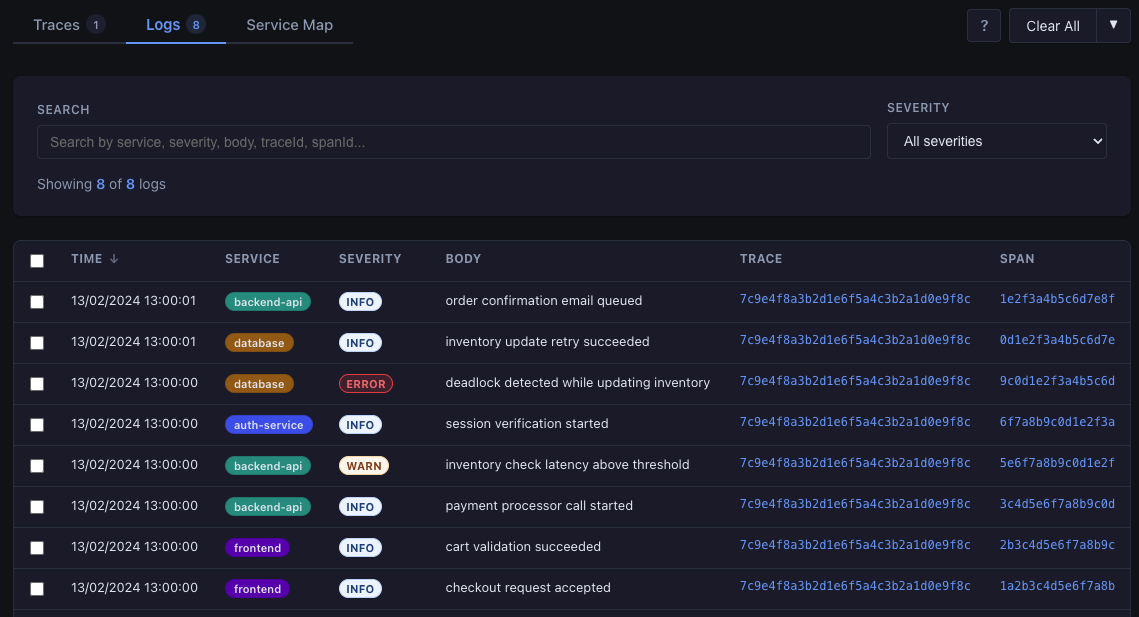
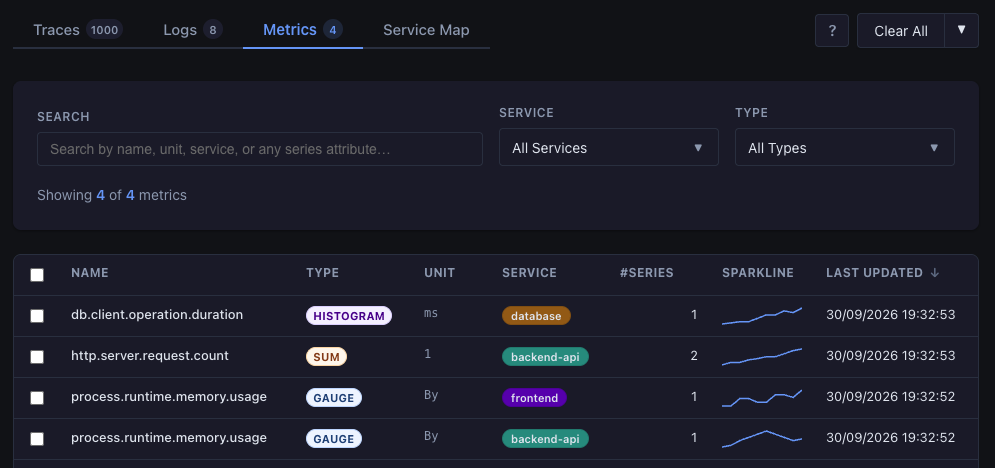
otel-gui can be installed from a custom Homebrew tap:
brew install metafab/tap/otel-gui
Then run:
otel-gui
# or override default port (4318)
PORT=55681 otel-gui
# open the UI in your default browser on startup
otel-gui --open # or -o
# show usage
otel-gui -h # or --help
Notes:
v*) by the release workflow.To update to the latest version, you'll use:
brew update
brew upgrade metafab/tap/otel-gui
Pull and run the published GHCR image:
docker pull ghcr.io/metafab/otel-gui:latest
docker run --rm --name otel-gui -p 4318:4318 ghcr.io/metafab/otel-gui:latest
Container tags are published from Git refs:
latest for the default branchv* tags (for example, v1.1.0)sha-<commit> immutable tagsBuild and run locally with Docker:
docker build -t otel-gui .
docker run --rm -p 4318:4318 otel-gui
Then use the standard OTLP endpoint:
export OTEL_EXPORTER_OTLP_ENDPOINT=http://localhost:4318
The container reads PORT (default 4318). You can override it at runtime:
docker run --rm -e PORT=55681 -p 55681:55681 otel-gui
Using port 4318 is recommended for zero-config OTLP exporters.
Run with Docker Compose:
docker compose up --build
Run in background:
docker compose up -d --build
Stop:
docker compose down
To use a different port:
PORT=55681 docker compose up --build
Requires: Node.js ≥ 20, pnpm
git clone https://github.com/metafab/otel-gui
cd otel-gui
pnpm install
pnpm dev
Open http://localhost:4318 — the OTLP endpoint is live at the same address.
pnpm run dev        # Start dev server on port 4318
pnpm run lint       # Lint TypeScript, JavaScript, and Svelte files
pnpm run format     # Format files with Prettier
pnpm run format:check # Check formatting without writing changes
pnpm run check      # TypeScript type-check
pnpm run test       # Run unit tests (Vitest)
pnpm run test:watch # Tests in watch mode
pnpm run build      # Production build
Point any OpenTelemetry SDK exporter at the viewer:
export OTEL_EXPORTER_OTLP_ENDPOINT=http://localhost:4318
No other configuration needed. The viewer accepts the standard POST /v1/traces endpoint.
Requests with Content-Encoding: gzip are also supported.
The viewer also accepts OTLP logs at:
POST /v1/logs
Use the same traceId/spanId values as your spans to get correlated logs in trace detail sidebar.
The viewer also accepts OTLP metrics at:
POST /v1/metrics
Gauges, sums, histograms, exponential histograms, and summaries are all supported and appear in the Metrics tab. Sums get a server-computed per-second rate (with counter-reset detection); histograms render as both a distribution and a time/bucket heatmap.
Run the bundled e-commerce demo to see all features immediately:
./demo-ecommerce.sh
On Windows (PowerShell):
.\demo-ecommerce.ps1
If script execution is blocked, run it for the current shell session only:
Set-ExecutionPolicy -Scope Process -ExecutionPolicy Bypass
.\demo-ecommerce.ps1
This sends a realistic multi-service trace (frontend → backend-api → auth-service + database) with errors, retries, incremental span arrival across two requests, correlated logs, and staged metrics.
Run the dedicated metrics-only demo:
./demo-metrics.sh
On Windows (PowerShell):
.\demo-metrics.ps1
# Simple 3-span trace
curl -X POST http://localhost:4318/v1/traces \
  -H "Content-Type: application/json" \
  -d @samples/sample-trace.json

# Correlated logs for the simple trace
curl -X POST http://localhost:4318/v1/logs \
  -H "Content-Type: application/json" \
  -d @samples/sample-log.json

# E-commerce trace — part 1 (frontend + backend-api)
curl -X POST http://localhost:4318/v1/traces \
  -H "Content-Type: application/json" \
  -d @samples/sample-trace-ecommerce-part1.json

# E-commerce correlated logs — part 1
curl -X POST http://localhost:4318/v1/logs \
  -H "Content-Type: application/json" \
  -d @samples/sample-log-ecommerce-part1.json

# E-commerce trace — part 2 (auth-service + database with errors)
curl -X POST http://localhost:4318/v1/traces \
  -H "Content-Type: application/json" \
  -d @samples/sample-trace-ecommerce-part2.json

# E-commerce correlated logs — part 2
curl -X POST http://localhost:4318/v1/logs \
  -H "Content-Type: application/json" \
  -d @samples/sample-log-ecommerce-part2.json

# Trace with error spans (status.code = 2)
curl -X POST http://localhost:4318/v1/traces \
  -H "Content-Type: application/json" \
  -d @samples/sample-trace-error.json

# Trace with span links
curl -X POST http://localhost:4318/v1/traces \
  -H "Content-Type: application/json" \
  -d @samples/sample-trace-links.json

# Gauge metrics (memory usage)
curl -X POST http://localhost:4318/v1/metrics \
  -H "Content-Type: application/json" \
  -d @samples/sample-metrics-gauge.json

# Sum/Counter metrics (request count with cumulative points)
curl -X POST http://localhost:4318/v1/metrics \
  -H "Content-Type: application/json" \
  -d @samples/sample-metrics-sum-counter.json

# Histogram metrics (database latency distribution)
curl -X POST http://localhost:4318/v1/metrics \
  -H "Content-Type: application/json" \
  -d @samples/sample-metrics-histogram.json

# E-commerce metrics staged flow (part 1 then part 2)
curl -X POST http://localhost:4318/v1/metrics \
  -H "Content-Type: application/json" \
  -d @samples/sample-metrics-ecommerce-part1.json

curl -X POST http://localhost:4318/v1/metrics \
  -H "Content-Type: application/json" \
  -d @samples/sample-metrics-ecommerce-part2.json
See SAMPLE_TRACES.md for a full feature exploration guide.
| Variable | Default | Description |
|---|---|---|
PORT | 4318 | HTTP port the server listens on |
OTEL_GUI_CORS_ALLOWED_ORIGINS | * | Allowed CORS origin(s) for the OTLP ingest (/v1/*) and read API (/api/*) endpoints, so browser-based OTLP exporters can post telemetry cross-origin. Use * to allow any origin, or a comma-separated list of exact origins (e.g. https://app.example.com,http://localhost:5173). For non-local/public deployments, prefer an explicit origin list to avoid exposing trace data to arbitrary websites. |
OTEL_GUI_MAX_TRACES | 1000 | Maximum number of traces kept in memory (1–10 000). Oldest traces are evicted first when the limit is reached. Requires a restart. |
OTEL_GUI_MAX_LOGS | 1000 | Maximum number of log records kept in memory (1–10 000). Oldest records are evicted first when the limit is reached. Requires a restart. |
OTEL_GUI_MAX_METRICS | 1000 | Maximum number of metric entries keyed by service.name + metric name (1–10 000). Each entry may contain multiple attribute series; this does not cap series cardinality or points per series. Oldest-created entries are evicted first. Requires a restart. |
OTEL_GUI_MAX_METRIC_POINTS | 600 | Maximum number of data points retained per metric series (10–10 000). Oldest points are evicted first. Requires a restart. |
OTEL_GUI_PERSISTENCE_MODE | memory | Persistence backend mode. Use memory (default, no disk writes) or pglite (requires an external backend module, typically enterprise). |
OTEL_GUI_PERSISTENCE_PATH | .otel-gui/pglite | Directory path for local PGlite data when persistence mode is pglite. |
OTEL_GUI_PERSISTENCE_FLUSH_MS | 750 | Debounce interval for batched persistence flushes in milliseconds (50–60000). |
OTEL_GUI_PERSISTENCE_BACKEND_MODULE | (empty) | Optional module id/path dynamically loaded at startup to register persistence backends. Relative file paths resolve from the otel-gui project root (examples: @otel-gui/enterprise-persistence/register, ../otel-gui-enterprise/enterprise-persistence/dist/register.js). |
OTEL_GUI_LICENSE_KEY | (empty) | Optional enterprise license key consumed by private persistence backend modules. |
OTEL_GUI_LICENSE_PUBLIC_KEY_PATH | (empty) | Optional filesystem path to the PEM-encoded public key used by enterprise modules for offline license verification. |
Copy .env.example to .env to customize:
cp .env.example .env
# then edit .env
For external backend registration details, see docs/enterprise-persistence-module.md.
When OTEL_GUI_PERSISTENCE_MODE=pglite falls back to memory, check GET /api/config -> persistence.unavailableReason for a precise cause.
pnpm build
PORT=4318 node build
The production build uses @sveltejs/adapter-node. In-memory state is kept alive by the Node.js process — no external store required for local use.
In Docker, with the default configuration,traces are in-memory only and are lost when the container stops.
otel-gui can be packaged as a self-contained executable using Node 22 SEA (Single Executable Applications).
Requirements:
pnpmBuild for your current OS/arch:
pnpm run build
pnpm run sea:package
Generate for a specific target platform:
pnpm run sea:bundle
pnpm run sea:package:target -- --target linux-x64
Supported targets:
linux-x64linux-arm64macos-x64macos-arm64win-x64win-arm64Cross-target note:
linux-x64 on macOS), provide a matching Node 22 target binary:pnpm run sea:package:target -- \
--target linux-x64 \
--node-binary /absolute/path/to/node-linux-x64
Output directory:
dist/binaries/otel-gui-<platform>/
  otel-gui[.exe]
  build/
  proto/
Run from that directory:
./otel-gui
# or override default port (4318)
PORT=55681 ./otel-gui
# open the UI in your default browser on startup
./otel-gui --open # or -o
# show usage
./otel-gui -h # or --help
# print version + platform/runtime details
./otel-gui --version # or -v
Notes:
otel-gui[.exe], build/, and proto/ together in the same output folder.| Key | Where | Action |
|---|---|---|
/ | Everywhere | Focus search |
Esc | Everywhere | Clear search / go back |
t | Everywhere | Switch to Traces tab |
l | Everywhere | Switch to Logs tab |
m | Everywhere | Switch to Metrics tab |
s | Trace list | Switch to Service Map tab |
s | Trace detail | Toggle Service Map |
Alt+Backspace | Trace list | Clear all traces |
↑↓←→ / Enter | Trace detail | Navigate span tree |
n / N | Trace detail | Next / prev search match |
e / E | Trace detail | Next / prev error span |
? | Everywhere | Toggle shortcuts overlay |
POST /v1/traces          ← OTLP receiver (JSON + Protobuf)
POST /v1/logs            ← OTLP logs receiver (JSON + Protobuf)
POST /v1/metrics         ← OTLP metrics receiver (JSON + Protobuf)

GET  /api/traces         ← trace list for the UI
DELETE /api/traces       ← clear all traces or delete selected traceIds
GET  /api/traces/:id     ← single trace
GET  /api/traces/:id/logs ← trace-scoped correlated logs
GET  /api/traces/:id/logs/:logId ← single trace-scoped log detail
GET  /api/traces/:id/export ← export a single trace envelope
POST /api/traces/export  ← export filtered/selected traceIds
POST /api/traces/import/preview ← validate + preview import metadata
POST /api/traces/import  ← import otel-gui envelope or raw OTLP JSON

GET  /api/logs           ← global log list for the UI
DELETE /api/logs         ← clear all logs or delete selected logIds
GET  /api/logs/:id       ← single log detail

GET  /api/metrics        ← metric list for the UI
DELETE /api/metrics      ← clear all metrics or delete selected ids
GET  /api/metrics/:id    ← metric detail and chart data
GET  /api/metrics/:id/stream ← SSE stream for metric detail updates

GET  /api/service-map    ← aggregated service graph
GET  /api/stream         ← multiplexed SSE stream for traces, logs, and metrics
GET  /api/config         ← runtime limits and persistence status
Server-only state lives in src/lib/server/traceStore.ts with swappable backends behind the TraceStore interface. In default memory mode, runtime state is kept in memory with FIFO eviction. The retention limits default to 1000 traces (OTEL_GUI_MAX_TRACES), 1000 log records (OTEL_GUI_MAX_LOGS), 1000 metric entries (OTEL_GUI_MAX_METRICS), and 600 points per metric series (OTEL_GUI_MAX_METRIC_POINTS).
SSE subscribers are notified on every write and receive a debounced event: traces message.
Additional persistence backends (including pglite) are loaded via OTEL_GUI_PERSISTENCE_BACKEND_MODULE and can be distributed separately (for example in an enterprise package).


$state, $derived, $effect)@sveltejs/adapter-node for persistent in-memory stateprotobufjs for Protobuf decodingYou can submit a new idea.
And of course, you can develop an existing or a new idea 😀:
git checkout -b feature/amazing-feature)pnpm run lint && pnpm run format:check && pnpm run check && pnpm run test to validategit commit -m 'Add amazing feature')git push origin feature/amazing-feature)This project is open source. See the LICENSE file for details.
1,186 followers · starred May 2026
732 followers · starred Apr 2026
598 followers · starred Jul 2026
383 followers · starred Oct 2026
A lightweight, local OpenTelemetry trace, logs and metrics viewer
TypeScript
192
290 commits
updated Oct 16, 2026
A lightweight, zero-config OpenTelemetry viewer for local development — traces, logs, and metrics in one place.
Drop-in replacement for a collector endpoint — point your OTLP exporter at it and see your telemetry immediately. No database required.
application/json and application/x-protobuf payloadsClear All + Delete Selected (n))/ to search, t/l/m/s to jump to Traces/Logs/Metrics/Service Map tabs, Enter/Space to activate focused rows in the Traces and Logs grids, escape key to clear search and go back to the list, ? for shortcuts help
otel-gui can be installed from a custom Homebrew tap:
brew install metafab/tap/otel-gui
Then run:
otel-gui
# or override default port (4318)
PORT=55681 otel-gui
# open the UI in your default browser on startup
otel-gui --open # or -o
# show usage
otel-gui -h # or --help
Notes:
v*) by the release workflow.To update to the latest version, you'll use:
brew update
brew upgrade metafab/tap/otel-gui
Pull and run the published GHCR image:
docker pull ghcr.io/metafab/otel-gui:latest
docker run --rm --name otel-gui -p 4318:4318 ghcr.io/metafab/otel-gui:latest
Container tags are published from Git refs:
latest for the default branchv* tags (for example, v1.1.0)sha-<commit> immutable tagsBuild and run locally with Docker:
docker build -t otel-gui .
docker run --rm -p 4318:4318 otel-gui
Then use the standard OTLP endpoint:
export OTEL_EXPORTER_OTLP_ENDPOINT=http://localhost:4318
The container reads PORT (default 4318). You can override it at runtime:
docker run --rm -e PORT=55681 -p 55681:55681 otel-gui
Using port 4318 is recommended for zero-config OTLP exporters.
Run with Docker Compose:
docker compose up --build
Run in background:
docker compose up -d --build
Stop:
docker compose down
To use a different port:
PORT=55681 docker compose up --build
Requires: Node.js ≥ 20, pnpm
git clone https://github.com/metafab/otel-gui
cd otel-gui
pnpm install
pnpm dev
Open http://localhost:4318 — the OTLP endpoint is live at the same address.
pnpm run dev        # Start dev server on port 4318
pnpm run lint       # Lint TypeScript, JavaScript, and Svelte files
pnpm run format     # Format files with Prettier
pnpm run format:check # Check formatting without writing changes
pnpm run check      # TypeScript type-check
pnpm run test       # Run unit tests (Vitest)
pnpm run test:watch # Tests in watch mode
pnpm run build      # Production build
Point any OpenTelemetry SDK exporter at the viewer:
export OTEL_EXPORTER_OTLP_ENDPOINT=http://localhost:4318
No other configuration needed. The viewer accepts the standard POST /v1/traces endpoint.
Requests with Content-Encoding: gzip are also supported.
The viewer also accepts OTLP logs at:
POST /v1/logs
Use the same traceId/spanId values as your spans to get correlated logs in trace detail sidebar.
The viewer also accepts OTLP metrics at:
POST /v1/metrics
Gauges, sums, histograms, exponential histograms, and summaries are all supported and appear in the Metrics tab. Sums get a server-computed per-second rate (with counter-reset detection); histograms render as both a distribution and a time/bucket heatmap.
Run the bundled e-commerce demo to see all features immediately:
./demo-ecommerce.sh
On Windows (PowerShell):
.\demo-ecommerce.ps1
If script execution is blocked, run it for the current shell session only:
Set-ExecutionPolicy -Scope Process -ExecutionPolicy Bypass
.\demo-ecommerce.ps1
This sends a realistic multi-service trace (frontend → backend-api → auth-service + database) with errors, retries, incremental span arrival across two requests, correlated logs, and staged metrics.
Run the dedicated metrics-only demo:
./demo-metrics.sh
On Windows (PowerShell):
.\demo-metrics.ps1
# Simple 3-span trace
curl -X POST http://localhost:4318/v1/traces \
  -H "Content-Type: application/json" \
  -d @samples/sample-trace.json

# Correlated logs for the simple trace
curl -X POST http://localhost:4318/v1/logs \
  -H "Content-Type: application/json" \
  -d @samples/sample-log.json

# E-commerce trace — part 1 (frontend + backend-api)
curl -X POST http://localhost:4318/v1/traces \
  -H "Content-Type: application/json" \
  -d @samples/sample-trace-ecommerce-part1.json

# E-commerce correlated logs — part 1
curl -X POST http://localhost:4318/v1/logs \
  -H "Content-Type: application/json" \
  -d @samples/sample-log-ecommerce-part1.json

# E-commerce trace — part 2 (auth-service + database with errors)
curl -X POST http://localhost:4318/v1/traces \
  -H "Content-Type: application/json" \
  -d @samples/sample-trace-ecommerce-part2.json

# E-commerce correlated logs — part 2
curl -X POST http://localhost:4318/v1/logs \
  -H "Content-Type: application/json" \
  -d @samples/sample-log-ecommerce-part2.json

# Trace with error spans (status.code = 2)
curl -X POST http://localhost:4318/v1/traces \
  -H "Content-Type: application/json" \
  -d @samples/sample-trace-error.json

# Trace with span links
curl -X POST http://localhost:4318/v1/traces \
  -H "Content-Type: application/json" \
  -d @samples/sample-trace-links.json

# Gauge metrics (memory usage)
curl -X POST http://localhost:4318/v1/metrics \
  -H "Content-Type: application/json" \
  -d @samples/sample-metrics-gauge.json

# Sum/Counter metrics (request count with cumulative points)
curl -X POST http://localhost:4318/v1/metrics \
  -H "Content-Type: application/json" \
  -d @samples/sample-metrics-sum-counter.json

# Histogram metrics (database latency distribution)
curl -X POST http://localhost:4318/v1/metrics \
  -H "Content-Type: application/json" \
  -d @samples/sample-metrics-histogram.json

# E-commerce metrics staged flow (part 1 then part 2)
curl -X POST http://localhost:4318/v1/metrics \
  -H "Content-Type: application/json" \
  -d @samples/sample-metrics-ecommerce-part1.json

curl -X POST http://localhost:4318/v1/metrics \
  -H "Content-Type: application/json" \
  -d @samples/sample-metrics-ecommerce-part2.json
See SAMPLE_TRACES.md for a full feature exploration guide.
| Variable | Default | Description |
|---|---|---|
PORT | 4318 | HTTP port the server listens on |
OTEL_GUI_CORS_ALLOWED_ORIGINS | * | Allowed CORS origin(s) for the OTLP ingest (/v1/*) and read API (/api/*) endpoints, so browser-based OTLP exporters can post telemetry cross-origin. Use * to allow any origin, or a comma-separated list of exact origins (e.g. https://app.example.com,http://localhost:5173). For non-local/public deployments, prefer an explicit origin list to avoid exposing trace data to arbitrary websites. |
OTEL_GUI_MAX_TRACES | 1000 | Maximum number of traces kept in memory (1–10 000). Oldest traces are evicted first when the limit is reached. Requires a restart. |
OTEL_GUI_MAX_LOGS | 1000 | Maximum number of log records kept in memory (1–10 000). Oldest records are evicted first when the limit is reached. Requires a restart. |
OTEL_GUI_MAX_METRICS | 1000 | Maximum number of metric entries keyed by service.name + metric name (1–10 000). Each entry may contain multiple attribute series; this does not cap series cardinality or points per series. Oldest-created entries are evicted first. Requires a restart. |
OTEL_GUI_MAX_METRIC_POINTS | 600 | Maximum number of data points retained per metric series (10–10 000). Oldest points are evicted first. Requires a restart. |
OTEL_GUI_PERSISTENCE_MODE | memory | Persistence backend mode. Use memory (default, no disk writes) or pglite (requires an external backend module, typically enterprise). |
OTEL_GUI_PERSISTENCE_PATH | .otel-gui/pglite | Directory path for local PGlite data when persistence mode is pglite. |
OTEL_GUI_PERSISTENCE_FLUSH_MS | 750 | Debounce interval for batched persistence flushes in milliseconds (50–60000). |
OTEL_GUI_PERSISTENCE_BACKEND_MODULE | (empty) | Optional module id/path dynamically loaded at startup to register persistence backends. Relative file paths resolve from the otel-gui project root (examples: @otel-gui/enterprise-persistence/register, ../otel-gui-enterprise/enterprise-persistence/dist/register.js). |
OTEL_GUI_LICENSE_KEY | (empty) | Optional enterprise license key consumed by private persistence backend modules. |
OTEL_GUI_LICENSE_PUBLIC_KEY_PATH | (empty) | Optional filesystem path to the PEM-encoded public key used by enterprise modules for offline license verification. |
Copy .env.example to .env to customize:
cp .env.example .env
# then edit .env
For external backend registration details, see docs/enterprise-persistence-module.md.
When OTEL_GUI_PERSISTENCE_MODE=pglite falls back to memory, check GET /api/config -> persistence.unavailableReason for a precise cause.
pnpm build
PORT=4318 node build
The production build uses @sveltejs/adapter-node. In-memory state is kept alive by the Node.js process — no external store required for local use.
In Docker, with the default configuration,traces are in-memory only and are lost when the container stops.
otel-gui can be packaged as a self-contained executable using Node 22 SEA (Single Executable Applications).
Requirements:
pnpmBuild for your current OS/arch:
pnpm run build
pnpm run sea:package
Generate for a specific target platform:
pnpm run sea:bundle
pnpm run sea:package:target -- --target linux-x64
Supported targets:
linux-x64linux-arm64macos-x64macos-arm64win-x64win-arm64Cross-target note:
linux-x64 on macOS), provide a matching Node 22 target binary:pnpm run sea:package:target -- \
--target linux-x64 \
--node-binary /absolute/path/to/node-linux-x64
Output directory:
dist/binaries/otel-gui-<platform>/
  otel-gui[.exe]
  build/
  proto/
Run from that directory:
./otel-gui
# or override default port (4318)
PORT=55681 ./otel-gui
# open the UI in your default browser on startup
./otel-gui --open # or -o
# show usage
./otel-gui -h # or --help
# print version + platform/runtime details
./otel-gui --version # or -v
Notes:
otel-gui[.exe], build/, and proto/ together in the same output folder.| Key | Where | Action |
|---|---|---|
/ | Everywhere | Focus search |
Esc | Everywhere | Clear search / go back |
t | Everywhere | Switch to Traces tab |
l | Everywhere | Switch to Logs tab |
m | Everywhere | Switch to Metrics tab |
s | Trace list | Switch to Service Map tab |
s | Trace detail | Toggle Service Map |
Alt+Backspace | Trace list | Clear all traces |
↑↓←→ / Enter | Trace detail | Navigate span tree |
n / N | Trace detail | Next / prev search match |
e / E | Trace detail | Next / prev error span |
? | Everywhere | Toggle shortcuts overlay |
POST /v1/traces          ← OTLP receiver (JSON + Protobuf)
POST /v1/logs            ← OTLP logs receiver (JSON + Protobuf)
POST /v1/metrics         ← OTLP metrics receiver (JSON + Protobuf)

GET  /api/traces         ← trace list for the UI
DELETE /api/traces       ← clear all traces or delete selected traceIds
GET  /api/traces/:id     ← single trace
GET  /api/traces/:id/logs ← trace-scoped correlated logs
GET  /api/traces/:id/logs/:logId ← single trace-scoped log detail
GET  /api/traces/:id/export ← export a single trace envelope
POST /api/traces/export  ← export filtered/selected traceIds
POST /api/traces/import/preview ← validate + preview import metadata
POST /api/traces/import  ← import otel-gui envelope or raw OTLP JSON

GET  /api/logs           ← global log list for the UI
DELETE /api/logs         ← clear all logs or delete selected logIds
GET  /api/logs/:id       ← single log detail

GET  /api/metrics        ← metric list for the UI
DELETE /api/metrics      ← clear all metrics or delete selected ids
GET  /api/metrics/:id    ← metric detail and chart data
GET  /api/metrics/:id/stream ← SSE stream for metric detail updates

GET  /api/service-map    ← aggregated service graph
GET  /api/stream         ← multiplexed SSE stream for traces, logs, and metrics
GET  /api/config         ← runtime limits and persistence status
Server-only state lives in src/lib/server/traceStore.ts with swappable backends behind the TraceStore interface. In default memory mode, runtime state is kept in memory with FIFO eviction. The retention limits default to 1000 traces (OTEL_GUI_MAX_TRACES), 1000 log records (OTEL_GUI_MAX_LOGS), 1000 metric entries (OTEL_GUI_MAX_METRICS), and 600 points per metric series (OTEL_GUI_MAX_METRIC_POINTS).
SSE subscribers are notified on every write and receive a debounced event: traces message.
Additional persistence backends (including pglite) are loaded via OTEL_GUI_PERSISTENCE_BACKEND_MODULE and can be distributed separately (for example in an enterprise package).
$state, $derived, $effect)@sveltejs/adapter-node for persistent in-memory stateprotobufjs for Protobuf decodingYou can submit a new idea.
And of course, you can develop an existing or a new idea 😀:
git checkout -b feature/amazing-feature)pnpm run lint && pnpm run format:check && pnpm run check && pnpm run test to validategit commit -m 'Add amazing feature')git push origin feature/amazing-feature)This project is open source. See the LICENSE file for details.
1,186 followers · starred May 2026
732 followers · starred Apr 2026
598 followers · starred Jul 2026
383 followers · starred Oct 2026