
Automatically quit macOS apps when their last window closes. Zero-bloat, 0.00s idle CPU footprint, with a smart whitelist.
Swift
2
8 commits
updated Oct 4, 2026
See what people are saying
README
DotQuit
Zero-bloat macOS menu bar utility that automatically quits apps when their last window is closed.
Native Swift + AppKit, ~19 MB resident, zero idle CPU — it keeps your RAM clean without becoming the thing that eats it.






🚀 Product Hunt Launch Special
Use code PRODUCTHUNT at checkout for 100% off DotQuit Pro — free for the first 100 people.

Why DotQuit?
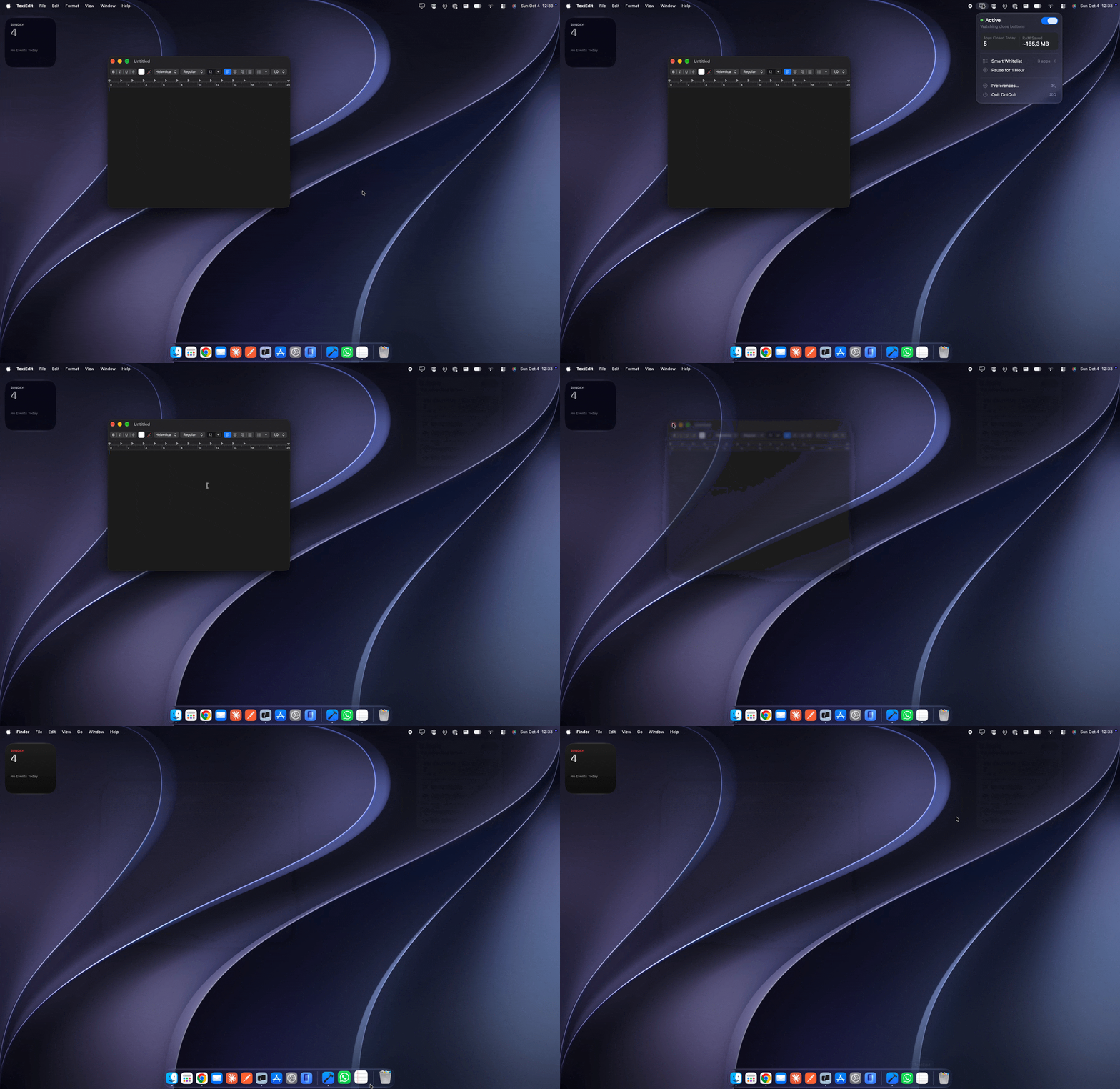
On macOS the red ✕ doesn't quit anything — it closes a window. The app stays resident, holding its memory and keeping its Dock indicator lit, waiting for a ⌘Q that never comes. Open Preview for one PDF, close it, and it's still there an hour later.
DotQuit watches for the one event that matters — a window being destroyed — and asks whether the app has anything left on screen. If not, it sends a normal quit request. Exactly what ⌘Q does, nothing more violent.
window destroyed
      ↓
  wait 600ms              ← fullscreen transitions destroy and recreate windows
      ↓
is it a regular GUI app?  ← menu bar items and daemons are never touched
      ↓
is it whitelisted?        ← hold ⌥ to invert this for one close
      ↓
any windows left?         ← on-screen (CoreGraphics) + minimized (Accessibility)
      ↓
  app.terminate()         ← never kill(9), never force
Unsaved work still triggers the app's own "Save changes?" sheet. Cancel it and the app stays open.
Features
- Zero-idle architecture — no polling, no timers. Driven entirely by
AXObserverwindow notifications andNSWorkspacelifecycle events. - Smart Whitelist flyout — hover the whitelist row and a panel slides out to the left: running apps on top, protected apps below, one click to move between them.
- Option (⌥) to invert — hold Option while closing to flip the decision for that one window.
- Safe by construction —
terminate()only, never a force-kill. Finder, Dock and loginwindow are permanently exempt, and.accessorymenu bar items are never even observed. - Native settings — a real System Settings-style window with behavior, whitelist, license, shortcuts, appearance and general panes.
- Privacy-friendly telemetry — anonymous counters via TelemetryDeck, one toggle to switch off entirely.
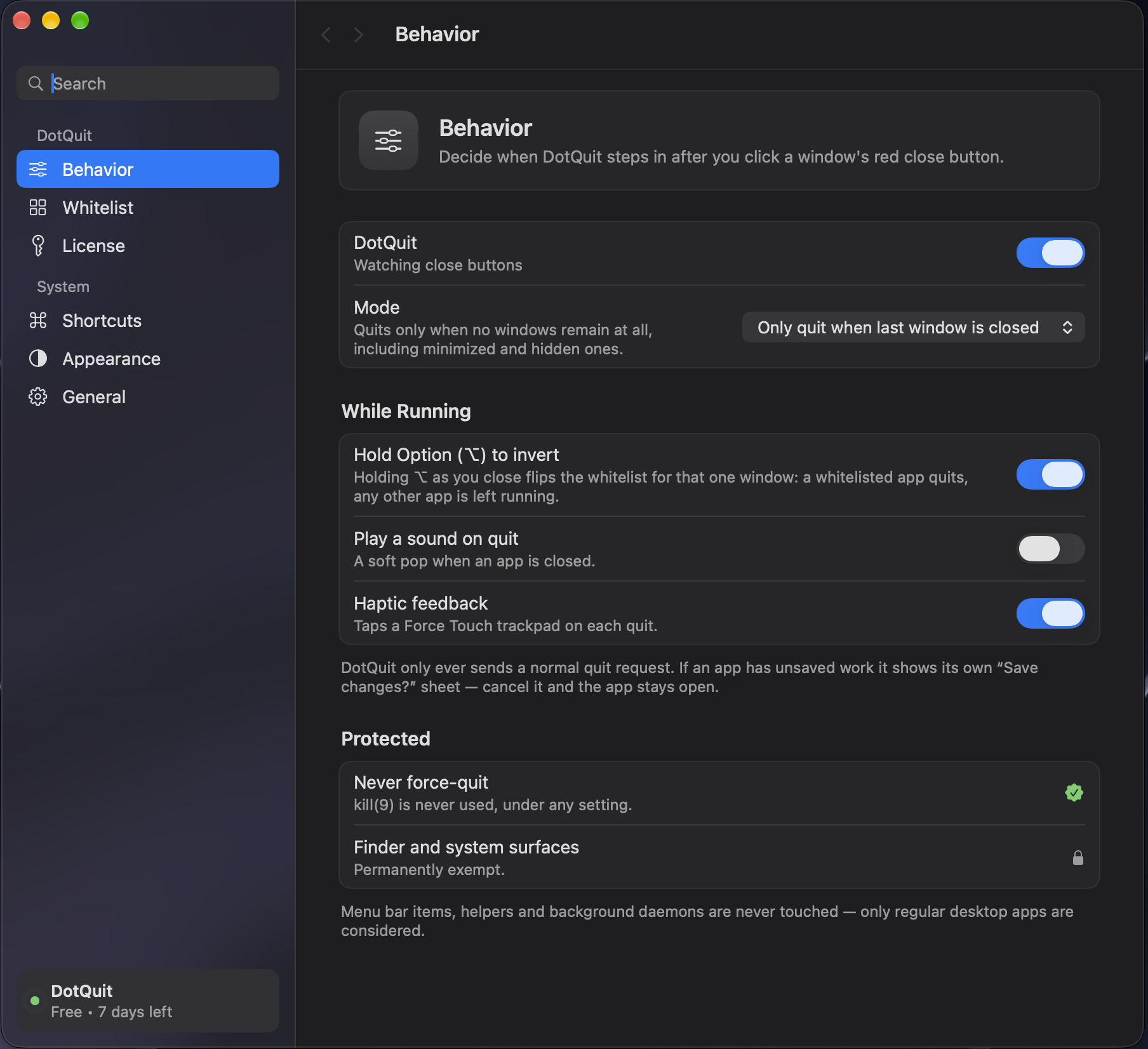
The native settings window — behavior, whitelist, license, shortcuts, appearance and general panes.
Key specs
| Language | Native Swift + SwiftUI, no Electron, no helpers |
| Memory | ~19 MB resident |
| Idle CPU | 0.00 s measured over 45 s |
| Binary | Universal — Apple Silicon arm64 + Intel x86_64 |
| Signing | Developer ID, hardened runtime, Apple notarized |
| Requires | macOS 14.0 Sonoma or later |
Installation
1. Direct Download (DMG) — recommended
- Open the DMG and drag DotQuit.app into Applications.
- Launch it — DotQuit lives in the menu bar, with no Dock icon by default.
- Grant Accessibility access when prompted.
The build is code-signed with an Apple Developer ID, notarized by Apple, and stapled. It opens on first launch like any other app — no right-click → Open, no xattr -d, no Privacy & Security override. Gatekeeper reports it as source=Notarized Developer ID.
2. Homebrew
Homebrew support is coming soon (pending official homebrew-cask submission).
3. Build from Source
For developers, and always free:
git clone https://github.com/mehmettalhairmak/dotquit.git
cd dotquit
open DotQuit.xcodeproj          # build and run, or:
./Scripts/build-release.sh      # universal build -> ./dist
Requires macOS 14.0+ and Xcode 16 or newer. Dependencies resolve through SwiftPM (TelemetryDeck, pinned in Package.resolved).
DotQuit cannot be sandboxed — cross-process
AXObserver,AXUIElementCopyAttributeValueandNSRunningApplication.terminate()are all blocked inside a sandbox container. It ships as a hardened-runtime Developer ID app with a deliberately minimal entitlements file.
Granting Accessibility access
System Settings → Privacy & Security → Accessibility → enable DotQuit
DotQuit cannot see window events without it. The Shortcuts & Permissions pane shows live status with a button that takes you straight there; until access is granted the menu bar icon stays dimmed and DotQuit does nothing.
Using it
| Action | How |
|---|---|
| Open the popover | Click the dot in the menu bar |
| Whitelist an app | Hover Smart Whitelist → click + |
| Spare one app, once | Hold ⌥ while closing its window |
| Pause for an hour | Pause for 1 Hour in the popover |
| Toggle DotQuit | ⌥⇧Q (configurable) |
| Open settings | ⌘, |
Support & Commercial Licensing
$2.99 once. Two Macs. Every future update. There's a 7-day trial, and activation lives under Settings → License.
🚀 Product Hunt launch special — enter code
PRODUCTHUNTat checkout for 100% off DotQuit Pro. Free for the first 100 people.
The source is GPLv3 and you can always build it yourself for free. A license funds the signed, notarized builds, support, and continued development — it isn't a key that unlocks the code. Activation is bound to the machine's hardware UUID, so reinstalling never burns a seat, and deactivating releases it.
Privacy
DotQuit observes window lifecycle events. It cannot read window contents, text, keystrokes, clipboard or any app's private data.
Telemetry is anonymous, powered by TelemetryDeck, and switched off under Settings → General → Share anonymous usage diagnostics — off means the SDK is never initialized, not merely muted. Five counters are sent; well-known public bundle identifiers go in the clear so the numbers mean something, and everything else becomes a salted SHA-256 digest, so a private or enterprise app never appears by name. Window titles, file paths, keystrokes and your license key are never transmitted.
License
DotQuit is free software under the GNU General Public License v3.0 — full text in LICENSE. You may use, study, modify and redistribute the source, and distribute builds you make from it, provided derivative works stay under GPLv3 and ship their corresponding source.
TelemetryDeck SwiftClient is MIT-licensed, which is GPLv3-compatible.
Author
Built by Mehmet Talha Irmak.
If DotQuit saves you a few gigabytes and a lot of ⌘Q, a lifetime license is $2.99.
Similar repos


Automatically quit macOS apps when their last window closes. Zero-bloat, 0.00s idle CPU footprint, with a smart whitelist.
Swift
2
8 commits
updated Oct 4, 2026
See what people are saying
README
DotQuit
Zero-bloat macOS menu bar utility that automatically quits apps when their last window is closed.
Native Swift + AppKit, ~19 MB resident, zero idle CPU — it keeps your RAM clean without becoming the thing that eats it.
🚀 Product Hunt Launch Special
Use code PRODUCTHUNT at checkout for 100% off DotQuit Pro — free for the first 100 people.
Why DotQuit?
On macOS the red ✕ doesn't quit anything — it closes a window. The app stays resident, holding its memory and keeping its Dock indicator lit, waiting for a ⌘Q that never comes. Open Preview for one PDF, close it, and it's still there an hour later.
DotQuit watches for the one event that matters — a window being destroyed — and asks whether the app has anything left on screen. If not, it sends a normal quit request. Exactly what ⌘Q does, nothing more violent.
window destroyed
      ↓
  wait 600ms              ← fullscreen transitions destroy and recreate windows
      ↓
is it a regular GUI app?  ← menu bar items and daemons are never touched
      ↓
is it whitelisted?        ← hold ⌥ to invert this for one close
      ↓
any windows left?         ← on-screen (CoreGraphics) + minimized (Accessibility)
      ↓
  app.terminate()         ← never kill(9), never force
Unsaved work still triggers the app's own "Save changes?" sheet. Cancel it and the app stays open.
Features
- Zero-idle architecture — no polling, no timers. Driven entirely by
AXObserverwindow notifications andNSWorkspacelifecycle events. - Smart Whitelist flyout — hover the whitelist row and a panel slides out to the left: running apps on top, protected apps below, one click to move between them.
- Option (⌥) to invert — hold Option while closing to flip the decision for that one window.
- Safe by construction —
terminate()only, never a force-kill. Finder, Dock and loginwindow are permanently exempt, and.accessorymenu bar items are never even observed. - Native settings — a real System Settings-style window with behavior, whitelist, license, shortcuts, appearance and general panes.
- Privacy-friendly telemetry — anonymous counters via TelemetryDeck, one toggle to switch off entirely.
The native settings window — behavior, whitelist, license, shortcuts, appearance and general panes.
Key specs
| Language | Native Swift + SwiftUI, no Electron, no helpers |
| Memory | ~19 MB resident |
| Idle CPU | 0.00 s measured over 45 s |
| Binary | Universal — Apple Silicon arm64 + Intel x86_64 |
| Signing | Developer ID, hardened runtime, Apple notarized |
| Requires | macOS 14.0 Sonoma or later |
Installation
1. Direct Download (DMG) — recommended
- Open the DMG and drag DotQuit.app into Applications.
- Launch it — DotQuit lives in the menu bar, with no Dock icon by default.
- Grant Accessibility access when prompted.
The build is code-signed with an Apple Developer ID, notarized by Apple, and stapled. It opens on first launch like any other app — no right-click → Open, no xattr -d, no Privacy & Security override. Gatekeeper reports it as source=Notarized Developer ID.
2. Homebrew
Homebrew support is coming soon (pending official homebrew-cask submission).
3. Build from Source
For developers, and always free:
git clone https://github.com/mehmettalhairmak/dotquit.git
cd dotquit
open DotQuit.xcodeproj          # build and run, or:
./Scripts/build-release.sh      # universal build -> ./dist
Requires macOS 14.0+ and Xcode 16 or newer. Dependencies resolve through SwiftPM (TelemetryDeck, pinned in Package.resolved).
DotQuit cannot be sandboxed — cross-process
AXObserver,AXUIElementCopyAttributeValueandNSRunningApplication.terminate()are all blocked inside a sandbox container. It ships as a hardened-runtime Developer ID app with a deliberately minimal entitlements file.
Granting Accessibility access
System Settings → Privacy & Security → Accessibility → enable DotQuit
DotQuit cannot see window events without it. The Shortcuts & Permissions pane shows live status with a button that takes you straight there; until access is granted the menu bar icon stays dimmed and DotQuit does nothing.
Using it
| Action | How |
|---|---|
| Open the popover | Click the dot in the menu bar |
| Whitelist an app | Hover Smart Whitelist → click + |
| Spare one app, once | Hold ⌥ while closing its window |
| Pause for an hour | Pause for 1 Hour in the popover |
| Toggle DotQuit | ⌥⇧Q (configurable) |
| Open settings | ⌘, |
Support & Commercial Licensing
$2.99 once. Two Macs. Every future update. There's a 7-day trial, and activation lives under Settings → License.
🚀 Product Hunt launch special — enter code
PRODUCTHUNTat checkout for 100% off DotQuit Pro. Free for the first 100 people.
The source is GPLv3 and you can always build it yourself for free. A license funds the signed, notarized builds, support, and continued development — it isn't a key that unlocks the code. Activation is bound to the machine's hardware UUID, so reinstalling never burns a seat, and deactivating releases it.
Privacy
DotQuit observes window lifecycle events. It cannot read window contents, text, keystrokes, clipboard or any app's private data.
Telemetry is anonymous, powered by TelemetryDeck, and switched off under Settings → General → Share anonymous usage diagnostics — off means the SDK is never initialized, not merely muted. Five counters are sent; well-known public bundle identifiers go in the clear so the numbers mean something, and everything else becomes a salted SHA-256 digest, so a private or enterprise app never appears by name. Window titles, file paths, keystrokes and your license key are never transmitted.
License
DotQuit is free software under the GNU General Public License v3.0 — full text in LICENSE. You may use, study, modify and redistribute the source, and distribute builds you make from it, provided derivative works stay under GPLv3 and ship their corresponding source.
TelemetryDeck SwiftClient is MIT-licensed, which is GPLv3-compatible.
Author
Built by Mehmet Talha Irmak.
If DotQuit saves you a few gigabytes and a lot of ⌘Q, a lifetime license is $2.99.