🍔 A practical and cloud-native food delivery microservices, built with .Net Aspire, .Net 10, Wolverine, Domain-Driven Design, CQRS, Vertical Slice Architecture, Event-Driven Architecture, and the latest technologies.
C#
1,013
139 commits
updated Oct 14, 2026

Food Delivery Microservices is a practical and cloud-native food delivery microservices built with .NET Aspire, .Net Core and different software architecture and technologies like Microservices Architecture, Vertical Slice Architecture , CQRS Pattern, Domain Driven Design (DDD), Event Driven Architecture. For communication between independent services, we use asynchronous messaging with RabbitMQ and Wolverine, and sometimes we use synchronous communication for real-time communications with REST and gRPC calls.
💡 This application is not business oriented and my focus is mostly on technical part, I just want to implement a sample with using different technologies, software architecture design, principles and all the thing we need for creating a microservices app.
Warning This project is in progress. I add new features over the time. You can check the Release Notes.
🎯 This Application ported to modular monolith approach in food-delivery-modular-monolith repository, we can choose best fit architecture for our projects based on production needs.
Other versions of this project are available in these repositories, We can choose best fit architecture for our projects based on production needs:
For your simplest .net core projects, you can use my vertical-slice-api-template project template:
🌟 Don't forget to star (🌟) this repo to find it easier later and Support.
Microservices and Vertical Slice Architecture as a high level architectureEvent Driven Architecture on top of RabbitMQ Message Broker and WolverineDomain Driven Designin most of services like Customers, Catalogs, ...Event Sourcing and EventStoreDB in Audit Based services like Orders, PaymentData Centeric Architecture based on CRUD in Identity ServiceCQRS Pattern on top of MediatR library and spliting read models and write modelsOpenTelemetry Collector to receive, process, and export telemetry data to various backends, including Jaeger and Tempo for tracing, Loki and Kibana for logs, and Prometheus for metrics.Outbox, Inbox, and durable local processing in a transactional boundary with EF CoreUnitTests and NSubstitute for mocking dependenciesIntegration Tests and End To End Tests on top of testcontainers-dotnet library for cleanup our test enviroment through docker containersMinimal APIs for handling requestsFluent Validation and a Validation Pipeline Behaviour on top of MediatRPostgres for write database as relational DB and MongoDB and Elasric Search for read databasedocker-compose for deploymentUnit Tests, Integration Tests, End-To-End Tests and testcontainers for testing in isolationOpenTelemetry for collecting Metrics and Distributed TracesHelm, Kubernetes and Kustomize for deploymentThis project is in progress, new features will be added over time.
| Feature | Architecture Pattern | Status | CI-CD |
|---|
.NET 9 - .NET Framework and .NET Core, including ASP.NET and ASP.NET CoreWolverine - Message bus and transactional messaging framework for .NETStackExchange.Redis - General purpose redis clientNpgsql Entity Framework Core Provider - Npgsql has an Entity Framework (EF) Core provider. It behaves like other EF Core providers (e.g. SQL Server), so the general EF Core docs apply here as wellEventStore-Client-Dotnet - Dotnet Client SDK for the Event Store gRPC Client API written in C#FluentValidation - Popular .NET validation library for building strongly-typed validation rulesSwagger & Swagger UI - Swagger tools for documenting API's built on ASP.NET CoreSerilog - Simple .NET logging with fully-structured eventsPolly - Polly is a .NET resilience and transient-fault-handling library that allows developers to express policies such as Retry, Circuit Breaker, Timeout, Bulkhead Isolation, and Fallback in a fluent and thread-safe mannerScrutor - Assembly scanning and decoration extensions for Microsoft.Extensions.DependencyInjectionOpentelemetry-dotnet - The OpenTelemetry .NET ClientDuendeSoftware IdentityServer - The most flexible and standards-compliant OpenID Connect and OAuth 2.x framework for ASP.NET CoreNewtonsoft.Json - Json.NET is a popular high-performance JSON framework for .NETRabbitmq-dotnet-client - RabbitMQ .NET client for .NET Standard 2.0+ and .NET 4.6.1+AspNetCore.Diagnostics.HealthChecks - Enterprise HealthChecks for ASP.NET Core Diagnostics PackageMicrosoft.AspNetCore.Authentication.JwtBearer - Handling Jwt Authentication and authorization in .Net CoreNSubstitute - A friendly substitute for .NET mocking libraries.StyleCopAnalyzers - An implementation of StyleCop rules using the .NET Compiler PlatformMapperly - A .NET source generator for generating object mappings, No runtime reflection.IdGen - Twitter Snowflake-alike ID generator for .NetTODO
The bellow architecture shows that there is one public API (API Gateway) which is accessible for the clients and this is done via HTTP request/response. The API gateway then routes the HTTP request to the corresponding microservice. The HTTP request is received by the microservice that hosts its own REST API. Each microservice is running within its own AppDomain and has directly access to its own dependencies such as databases, files, local transaction, etc. All these dependencies are only accessible for that microservice and not to the outside world. In fact microservices are decoupled from each other and are autonomous. This also means that the microservice does not rely on other parts in the system and can run independently of other services.
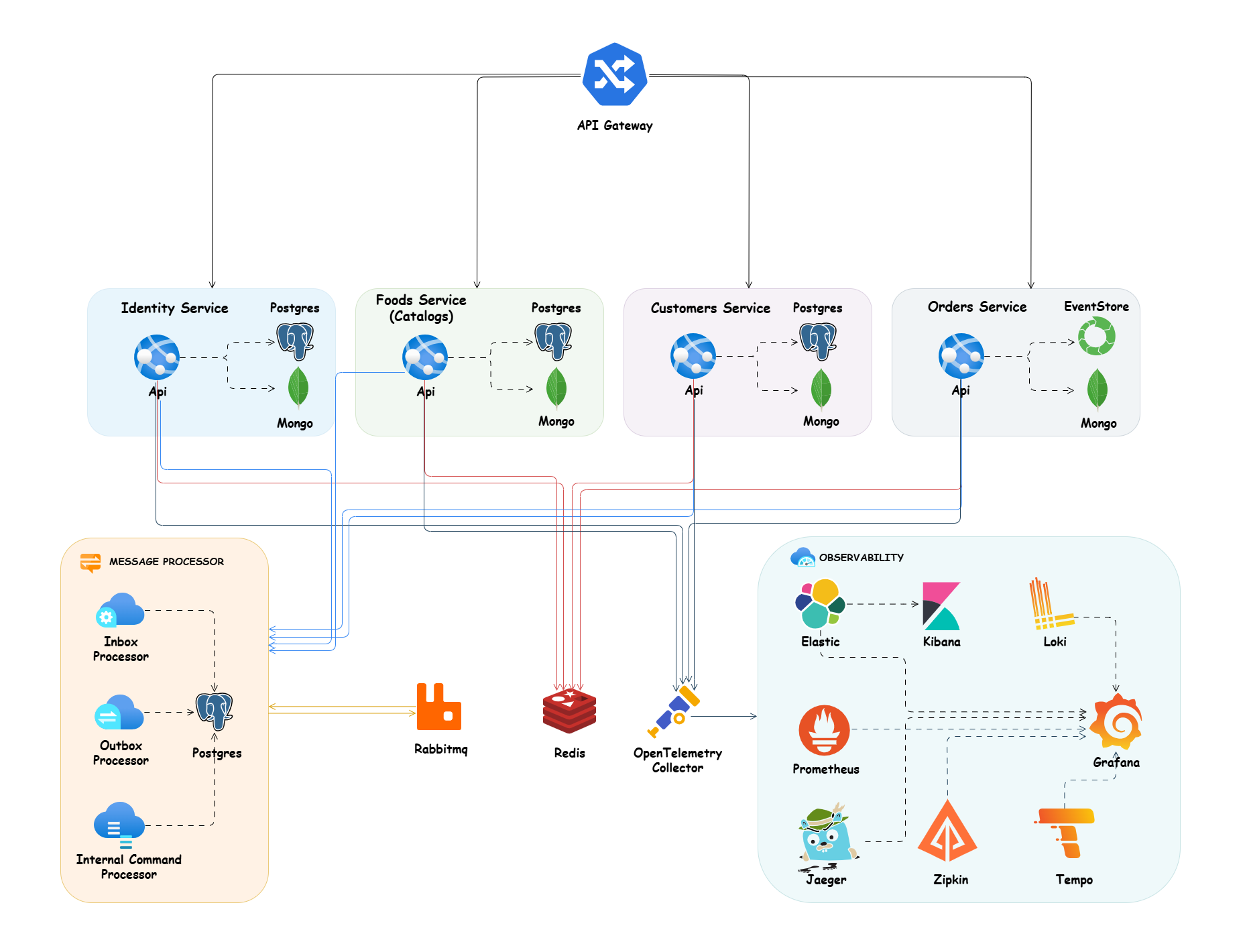
Microservices are event based which means they can publish and/or subscribe to any events occurring in the setup. By using this approach for communicating between services, each microservice does not need to know about the other services or handle errors occurred in other microservices.
In this architecture we use CQRS Pattern for separating read and write model beside of other CQRS Advantages. Here for now I don't use Event Sourcing for simplicity but I will use it in future for syncing read and write side with sending streams and using Projection Feature for some subscribers to syncing their data through sent streams and creating our Custom Read Models in subscribers side.
Here I have a write model that uses a postgres database for handling better Consistency and ACID Transaction guaranty. beside o this write side I use a read side model that uses MongoDB for better performance of our read side without any joins with suing some nested document, also better scalability with some good scaling features in MongoDB.
This repository now uses Wolverine as the single durable messaging runtime for broker publishing, inbound idempotency, and internal asynchronous processing. The old custom polling outbox and inbox implementation is replaced in the active Wolverine-based services by Wolverine durability primitives.
Outbox: integration events are written through Wolverine using PostgreSQL durability and flushed in the same application transaction boundary as EF Core changes.Inbox: RabbitMQ consumers use Wolverine durable inbox so duplicate deliveries are detected and skipped by Wolverine instead of our own inbox table and background worker.Internal processor: internal commands and domain notifications are sent to durable local queues, so asynchronous in-process work is persisted and retried by Wolverine.Broker transport: Wolverine continues to own RabbitMQ publishing and consuming with the same message contracts.For command handling we keep the existing EF Core transactional pipeline and enroll the active DbContext into Wolverine's EF Core outbox support. That means one logical unit of work covers:
If the transaction fails, none of those messages are committed. If the transaction succeeds, Wolverine owns delivery and retries. This keeps messaging code smaller while preserving the same reliability goal as the custom outbox/inbox implementation.
For syncing our read side and write side we have 2 options with using Event Driven Architecture (without using events streams in event sourcing):
If our Read Sides are in Same Service, during saving data in write side I enqueue a durable local message with Wolverine. After committing write side, Wolverine dispatches that internal command or notification to its handler in same service and that handler can update MongoDB read models.
If our Read Sides are in Another Services we publish an integration event through Wolverine durable messaging after committing our write side and all of our Subscribers could get this event and save it in their read models (MongoDB).
All of this is optional in the application and it is possible to only use what that the service needs. Eg. if the service does not want to Use DDD because of business is very simple and it is mostly CRUD we can use Data Centric Architecture or If our application is not Task based instead of CQRS and separating read side and write side again we can just use a simple CRUD based application.
Here I used Outbox for Guaranteed Delivery, but the implementation is now Wolverine durability instead of a custom message persistence worker.
Outbox pattern ensures that a message is stored durably as part of same transaction as business data changes and then delivered to the broker with retries. In this repository Wolverine persists those outgoing messages in PostgreSQL and flushes them after the EF Core transaction commits. We still get At-least-once Delivery, but we no longer need our own polling MessagePersistenceBackgroundService to push records to RabbitMQ.
We should remember this and try to design receivers of our messages as Idempotents, which means:
In Messaging this concepts translates into a message that has the same effect whether it is received once or multiple times. This means that a message can safely be resent without causing any problems even if the receiver receives duplicates of the same message.
For handling Idempotency and Exactly-once Delivery in receiver side, we use Wolverine durable inbox.
This pattern is similar to Outbox Pattern. It’s used to handle incoming messages (e.g. from a queue) for unique processing of a single message only once even when RabbitMQ redelivers the same message. Wolverine stores and checks message identity for us, retries failures, and acknowledges successful processing back to the broker. That keeps consumer code focused on business handling instead of custom deduplication infrastructure.
Also here I used RabbitMQ as my Message Broker for my async communication between the microservices with using eventually consistency mechanism, and Wolverine for broker communications. beside of this eventually consistency we have a synchronous call with using REST (in future I will use gRpc) for our immediate consistency needs.
We use a Api Gateway and here I used YARP that is microsoft reverse proxy (we could use envoy, traefik, Ocelot, ...), in front of our services, we could also have multiple Api Gateway for reaching BFF pattern. for example one Gateway for mobile apps, One Gateway for web apps and etc.
With using api Gateway our internal microservices are transparent and user can not access them directly and all requests will serve through this Gateway.
Also we could use gateway for load balancing, authentication and authorization, caching ,...
In this project I used vertical slice architecture or Restructuring to a Vertical Slice Architecture also I used feature folder structure in this project.
Minimize coupling between slices, and maximize coupling in a slice.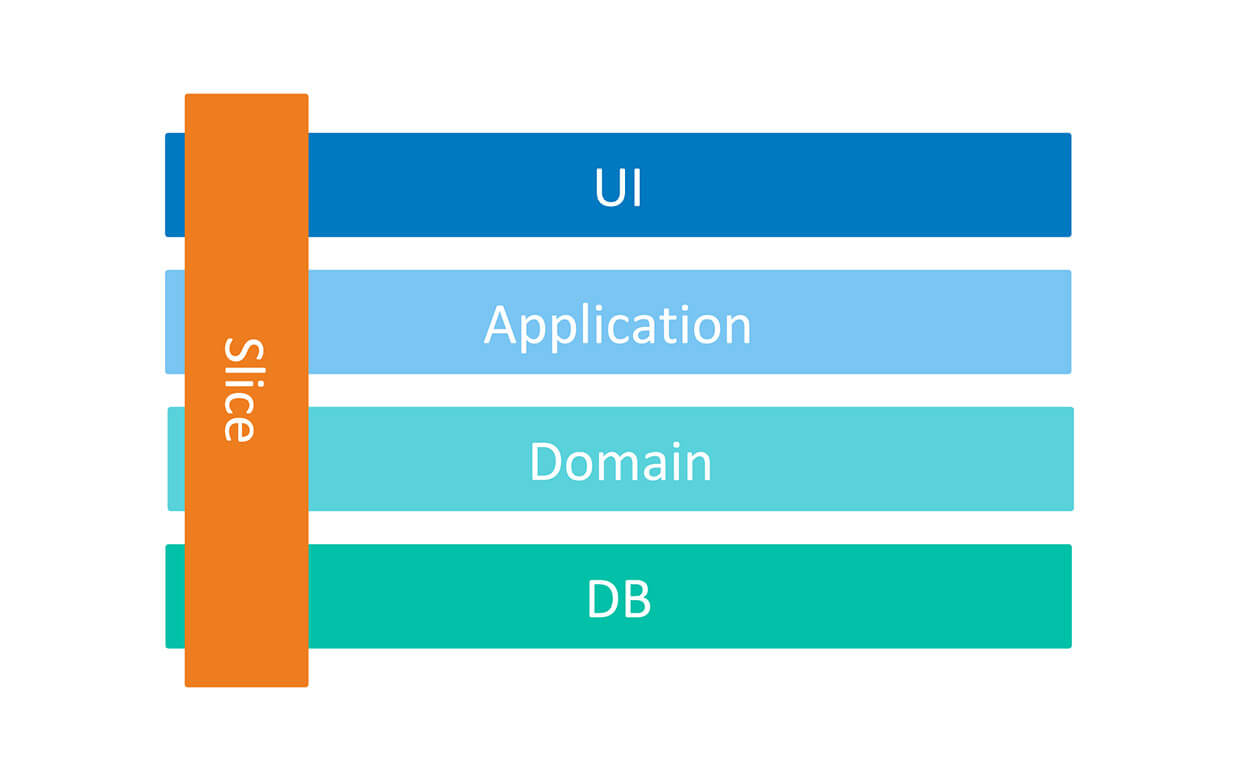
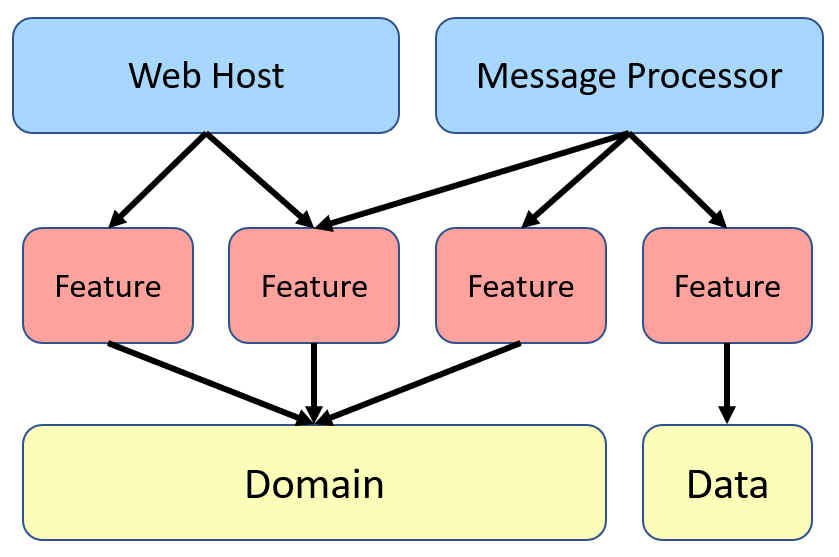
Also here I used CQRS for decompose my features to very small parts that makes our application:
With using CQRS, our code will be more aligned with SOLID principles, especially with:
Here instead of some Technical Splitting for example a folder or layer for our services, controllers and data models which increase dependencies between our technical splitting and also jump between layers or folders, We cut each business functionality into some vertical slices, and inner each of these slices we have Technical Folders Structure specific to that feature (command, handlers, infrastructure, repository, controllers, data models, ...).
Usually, when we work on a given functionality we need some technical things for example:
Now we could all of these things beside each other and it decrease jumping and dependencies between some layers or folders.
Keeping such a split works great with CQRS. It segregates our operations and slices the application code vertically instead of horizontally. In Our CQRS pattern each command/query handler is a separate slice. This is where you can reduce coupling between layers. Each handler can be a separated code unit, even copy/pasted. Thanks to that, we can tune down the specific method to not follow general conventions (e.g. use custom SQL query or even different storage). In a traditional layered architecture, when we change the core generic mechanism in one layer, it can impact all methods.
TODO
TODO
Https for hosting apis, to setup a valid certificate on your machine, you can create a Self-Signed Certificate, see more about enforce certificate here.Clone the project together with its Squirrel BuildingBlocks submodule:
git clone --recurse-submodules https://github.com/mehdihadeli/food-delivery-microservices.git
cd food-delivery-microservices
This clones the Squirrel BuildingBlocks source into src/BuildingBlocks. If the repository was already cloned without submodules, run:
git submodule update --init --recursive
Open food-delivery-microservices.slnx in your IDE.
The reusable building blocks come from the Squirrel repository and are included automatically when you clone this project with --recurse-submodules. The source is placed under src/BuildingBlocks and is ready to use; you do not need to clone Squirrel separately or run any additional submodule commands.
This application uses Https for hosting apis, to setup a valid certificate on your machine, you can create a Self-Signed Certificate, see more about enforce certificate here and here.
powershell:dotnet dev-certs https --clean
dotnet dev-certs https -ep $env:USERPROFILE\.aspnet\https\aspnetapp.pfx -p <CREDENTIAL_PLACEHOLDER>
dotnet dev-certs https --trust
linux and wsl:dotnet dev-certs https --clean
dotnet dev-certs https -ep ${HOME}/.aspnet/https/aspnetapp.pfx -p <CREDENTIAL_PLACEHOLDER>
dotnet dev-certs https --trust
dotnet dev-certs https --trust is only supported on macOS and Windows. You need to trust certs on Linux in the way that is supported by your distribution. It is likely that you need to trust the certificate in your browser(with this certificate we don't get an exception for https port because of not found certificate but browser shows us this certificate is not trusted).
In this app I use Conventional Commit and enforce it with Husky.Net and the repository hook scripts in .husky. The commit message validation lives in .husky/commit-msg, so there is no npm husky or commitlint dependency to install.
Hook setup for contributors:
dotnet tool restore
dotnet tool run husky -- install
make prepare
.husky/commit-msg:<type>(<optional scope>)!: <description>
Example:
feat(catalogs): add inventory filter
Available hook groups are defined in .husky/task-runner.json:
pre-commit: formatting, style checks, analyzer checkspre-push: release build and gitleaks scanYou can run them manually with Husky.Net:
dotnet tool run husky -- run --group pre-commit
dotnet tool run husky -- run --group pre-push
For formatting, I use mix of belav/csharpier and dotnet format.
dotnet format rules. For Rider it is like this:FileType: C#
Scope: Open Files
Program: Write dotnet
Arguments: format $SolutionPath$ -verbosity diagnostic --include $FileRelativePath$
Advanced (Options)
Disabled all advanced option checkboxes.
All other values were left default
Here formatting is wired through Husky.Net and the task definitions in .husky/task-runner.json.
The CI formatting check applies to this repository's projects and excludes the Squirrel git submodule at src/BuildingBlocks, whose formatting is maintained in the upstream Squirrel repository. To run the same parent-repository check locally:
dotnet format style food-delivery-microservices.slnx --verify-no-changes --severity error --verbosity diagnostic --exclude src/BuildingBlocks
dotnet new tool-manifest because it doesn't exist at first time and then install our required packages as dependency with dotnet tool install, that will add to dotnet-tools.json file in a .config directory:dotnet new tool-manifest
dotnet tool install csharpier
dotnet tool restore
dotnet tool run husky -- install
For roslyn analizers I use serveral analyzers and config the in .editorconfig file:
The recommended local development path is the .NET Aspire AppHost. It starts the services and infrastructure resources defined in FoodDelivery.AppHost.
dotnet run --project src/Aspire/FoodDelivery.AppHost
Open the Aspire dashboard URL printed by the AppHost. The dashboard provides links to the gateway, service endpoints, logs, traces, and metrics. The gateway's direct HTTPS profile is https://localhost:3001.
For infrastructure-only startup, use docker-compose.infrastructure.yaml:
docker compose -f deployments/docker-compose/docker-compose.infrastructure.yaml up -d
To run the services in development containers, use the base service file with its development override:
Create the local Compose environment files first. Review the values in .env, especially the development credentials:
Copy-Item deployments/docker-compose/.env.sample deployments/docker-compose/.env
Copy-Item deployments/docker-compose/.env.dev.sample deployments/docker-compose/.env.dev
docker compose `
  -f deployments/docker-compose/docker-compose.services.yaml `
  -f deployments/docker-compose/docker-compose.services.dev.yaml `
  --env-file deployments/docker-compose/.env `
  --env-file deployments/docker-compose/.env.dev up --build
For testing apis I used REST Client plugin of VSCode its related file scenarios are available in _httpclients folder. also after running api you have access to swagger open api for all microservices in /swagger route path.
In this application I use a fake email sender with name of ethereal as a SMTP provider for sending email. after sending email by the application you can see the list of sent emails in ethereal messages panel. My temp username and password is available inner the all of appsettings file.
dotnet dev-certs https --clean
dotnet dev-certs https -ep ${HOME}/.aspnet/https/aspnetapp.pfx -p $CREDENTIAL_PLACEHOLDER$
dotnet dev-certs https --trust
This local certificate will mapped to our containers in docker-compose file with setting ~/.aspnet/https:/https:ro volume mount
docker-compose -f ./deployments/docker-compose/docker-compose.infrastructure.yaml up -d command.docker-compose -f ./deployments/docker-compose/docker-compose.services.yaml for production mode that uses pushed docker images for services or for development mode you can use docker-compose.services.dev.yaml override docker-compose file with docker-compose -f ./deployments/docker-compose/docker-compose.services.yaml -f ${workspaceFolder}/deployments/docker-compose/docker-compose.services.dev.yaml up command for building dockerfiles instead of using images in docker registry. Also for debugging purpose of docker-containers in vscode you can use ./deployments/docker-compose/docker-compose.services.debug.yaml override docker-compose file with running docker-compose -f ./deployments/docker-compose/docker-compose.services.yaml -f ${workspaceFolder}/deployments/docker-compose/docker-compose.services.debug.yaml up -d, I defined some tasks for vscode for executing this command easier. For debugging in vscode we should use launch.json.Some useful docker commands:
// start dockers
docker-compose -f .\docker-compose.yaml up

// build without caching
docker-compose -f .\docker-compose.yaml build --no-cache

// to stop running dockers
docker-compose kill

// to clean stopped dockers
docker-compose down -v

// showing running dockers
docker ps

// to show all dockers (also stopped)
docker ps -a
For using kubernetes we can use multiple approach with different tools like plain kubernetes, kustomize and helm and here I will use show use of all of them.
Here I uses plain kubernetes command and resources for applying kubernetes manifest to the cluster. If you're a Docker/Compose user new to Kubernetes, you might have noticed that you can’t substitutes and replace the environment variables in your kubernetes manifest files (exception is substitutes and replace environment variables in env attribute, with using environment dependent variable). we often have some personal .env files for projects that we use to store credentials and configurations.
For substitutes and replace environment variables in our kubernetes manifest or resource files we can use envsubst tools, and we can even pipe it into other commands like Kubernetes kubectl, read more in this and this articles.
So here we should first install this tools on our OS with this guid.
Now for running manifest files, firstly we should load our environment variables inner .env file in our current shell session by using source .env command (after closing our shell environments will destroy).
Make sure to use
export, otherwise our variables are considered shell variables and might not be accessible toenvsubst
Here is a example of .env file:
export ASPNETCORE_ENVIRONMENT=docker
export REGISTRY=ghcr.io
After loading environment variables to the our shell session we can run manifests with using envsubst and pipe envsubst output to kubectl command as a input like this example:
# pipe a deployment "deploy.yml" into kubectl apply
envsubst < deploy.yml | kubectl apply -f -
Also it is also possible to write our substitution to a new file (envsubst < input.tmpl > output.text):
envsubst < deploy.yml > compiled_deploy.yaml
I've create a shell script kubectl, we can call this script just like we would kubectl. This script sources any .env file in the manifests directory , If we're running ./kubectl apply or ./kubectl delete with kubectl script, it calls envsubst to swap out your environment variables, then it passes the code on to the real kubectl.
#!/bin/bash
ENV_FILE=.env

source $ENV_FILE

if [[ "$1" == "apply" ]] || [[ "$1" == "delete" ]]; then
    envsubst < $3 | kubectl $1 $2 -
else
    kubectl "$@"
fi
Infrastructure manifests for kubernetes cluster we run bellow command with kubectl script:./kubectl apply -f ./deployments/k8s/kubernetes/infrastructure.yaml
The application is in development status. You are feel free to submit pull request or create the issue.
The project is under MIT license.
1,186 followers · starred Oct 2024
3 followers · starred May 2022
517 followers · starred May 2023
36 followers · starred Jul 2023
🍔 A practical and cloud-native food delivery microservices, built with .Net Aspire, .Net 10, Wolverine, Domain-Driven Design, CQRS, Vertical Slice Architecture, Event-Driven Architecture, and the latest technologies.
C#
1,013
139 commits
updated Oct 14, 2026
Food Delivery Microservices is a practical and cloud-native food delivery microservices built with .NET Aspire, .Net Core and different software architecture and technologies like Microservices Architecture, Vertical Slice Architecture , CQRS Pattern, Domain Driven Design (DDD), Event Driven Architecture. For communication between independent services, we use asynchronous messaging with RabbitMQ and Wolverine, and sometimes we use synchronous communication for real-time communications with REST and gRPC calls.
💡 This application is not business oriented and my focus is mostly on technical part, I just want to implement a sample with using different technologies, software architecture design, principles and all the thing we need for creating a microservices app.
Warning This project is in progress. I add new features over the time. You can check the Release Notes.
🎯 This Application ported to modular monolith approach in food-delivery-modular-monolith repository, we can choose best fit architecture for our projects based on production needs.
Other versions of this project are available in these repositories, We can choose best fit architecture for our projects based on production needs:
For your simplest .net core projects, you can use my vertical-slice-api-template project template:
🌟 Don't forget to star (🌟) this repo to find it easier later and Support.
Microservices and Vertical Slice Architecture as a high level architectureEvent Driven Architecture on top of RabbitMQ Message Broker and WolverineDomain Driven Designin most of services like Customers, Catalogs, ...Event Sourcing and EventStoreDB in Audit Based services like Orders, PaymentData Centeric Architecture based on CRUD in Identity ServiceCQRS Pattern on top of MediatR library and spliting read models and write modelsOpenTelemetry Collector to receive, process, and export telemetry data to various backends, including Jaeger and Tempo for tracing, Loki and Kibana for logs, and Prometheus for metrics.Outbox, Inbox, and durable local processing in a transactional boundary with EF CoreUnitTests and NSubstitute for mocking dependenciesIntegration Tests and End To End Tests on top of testcontainers-dotnet library for cleanup our test enviroment through docker containersMinimal APIs for handling requestsFluent Validation and a Validation Pipeline Behaviour on top of MediatRPostgres for write database as relational DB and MongoDB and Elasric Search for read databasedocker-compose for deploymentUnit Tests, Integration Tests, End-To-End Tests and testcontainers for testing in isolationOpenTelemetry for collecting Metrics and Distributed TracesHelm, Kubernetes and Kustomize for deploymentThis project is in progress, new features will be added over time.
| Feature | Architecture Pattern | Status | CI-CD |
|---|
.NET 9 - .NET Framework and .NET Core, including ASP.NET and ASP.NET CoreWolverine - Message bus and transactional messaging framework for .NETStackExchange.Redis - General purpose redis clientNpgsql Entity Framework Core Provider - Npgsql has an Entity Framework (EF) Core provider. It behaves like other EF Core providers (e.g. SQL Server), so the general EF Core docs apply here as wellEventStore-Client-Dotnet - Dotnet Client SDK for the Event Store gRPC Client API written in C#FluentValidation - Popular .NET validation library for building strongly-typed validation rulesSwagger & Swagger UI - Swagger tools for documenting API's built on ASP.NET CoreSerilog - Simple .NET logging with fully-structured eventsPolly - Polly is a .NET resilience and transient-fault-handling library that allows developers to express policies such as Retry, Circuit Breaker, Timeout, Bulkhead Isolation, and Fallback in a fluent and thread-safe mannerScrutor - Assembly scanning and decoration extensions for Microsoft.Extensions.DependencyInjectionOpentelemetry-dotnet - The OpenTelemetry .NET ClientDuendeSoftware IdentityServer - The most flexible and standards-compliant OpenID Connect and OAuth 2.x framework for ASP.NET CoreNewtonsoft.Json - Json.NET is a popular high-performance JSON framework for .NETRabbitmq-dotnet-client - RabbitMQ .NET client for .NET Standard 2.0+ and .NET 4.6.1+AspNetCore.Diagnostics.HealthChecks - Enterprise HealthChecks for ASP.NET Core Diagnostics PackageMicrosoft.AspNetCore.Authentication.JwtBearer - Handling Jwt Authentication and authorization in .Net CoreNSubstitute - A friendly substitute for .NET mocking libraries.StyleCopAnalyzers - An implementation of StyleCop rules using the .NET Compiler PlatformMapperly - A .NET source generator for generating object mappings, No runtime reflection.IdGen - Twitter Snowflake-alike ID generator for .NetTODO
The bellow architecture shows that there is one public API (API Gateway) which is accessible for the clients and this is done via HTTP request/response. The API gateway then routes the HTTP request to the corresponding microservice. The HTTP request is received by the microservice that hosts its own REST API. Each microservice is running within its own AppDomain and has directly access to its own dependencies such as databases, files, local transaction, etc. All these dependencies are only accessible for that microservice and not to the outside world. In fact microservices are decoupled from each other and are autonomous. This also means that the microservice does not rely on other parts in the system and can run independently of other services.
Microservices are event based which means they can publish and/or subscribe to any events occurring in the setup. By using this approach for communicating between services, each microservice does not need to know about the other services or handle errors occurred in other microservices.
In this architecture we use CQRS Pattern for separating read and write model beside of other CQRS Advantages. Here for now I don't use Event Sourcing for simplicity but I will use it in future for syncing read and write side with sending streams and using Projection Feature for some subscribers to syncing their data through sent streams and creating our Custom Read Models in subscribers side.
Here I have a write model that uses a postgres database for handling better Consistency and ACID Transaction guaranty. beside o this write side I use a read side model that uses MongoDB for better performance of our read side without any joins with suing some nested document, also better scalability with some good scaling features in MongoDB.
This repository now uses Wolverine as the single durable messaging runtime for broker publishing, inbound idempotency, and internal asynchronous processing. The old custom polling outbox and inbox implementation is replaced in the active Wolverine-based services by Wolverine durability primitives.
Outbox: integration events are written through Wolverine using PostgreSQL durability and flushed in the same application transaction boundary as EF Core changes.Inbox: RabbitMQ consumers use Wolverine durable inbox so duplicate deliveries are detected and skipped by Wolverine instead of our own inbox table and background worker.Internal processor: internal commands and domain notifications are sent to durable local queues, so asynchronous in-process work is persisted and retried by Wolverine.Broker transport: Wolverine continues to own RabbitMQ publishing and consuming with the same message contracts.For command handling we keep the existing EF Core transactional pipeline and enroll the active DbContext into Wolverine's EF Core outbox support. That means one logical unit of work covers:
If the transaction fails, none of those messages are committed. If the transaction succeeds, Wolverine owns delivery and retries. This keeps messaging code smaller while preserving the same reliability goal as the custom outbox/inbox implementation.
For syncing our read side and write side we have 2 options with using Event Driven Architecture (without using events streams in event sourcing):
If our Read Sides are in Same Service, during saving data in write side I enqueue a durable local message with Wolverine. After committing write side, Wolverine dispatches that internal command or notification to its handler in same service and that handler can update MongoDB read models.
If our Read Sides are in Another Services we publish an integration event through Wolverine durable messaging after committing our write side and all of our Subscribers could get this event and save it in their read models (MongoDB).
All of this is optional in the application and it is possible to only use what that the service needs. Eg. if the service does not want to Use DDD because of business is very simple and it is mostly CRUD we can use Data Centric Architecture or If our application is not Task based instead of CQRS and separating read side and write side again we can just use a simple CRUD based application.
Here I used Outbox for Guaranteed Delivery, but the implementation is now Wolverine durability instead of a custom message persistence worker.
Outbox pattern ensures that a message is stored durably as part of same transaction as business data changes and then delivered to the broker with retries. In this repository Wolverine persists those outgoing messages in PostgreSQL and flushes them after the EF Core transaction commits. We still get At-least-once Delivery, but we no longer need our own polling MessagePersistenceBackgroundService to push records to RabbitMQ.
We should remember this and try to design receivers of our messages as Idempotents, which means:
In Messaging this concepts translates into a message that has the same effect whether it is received once or multiple times. This means that a message can safely be resent without causing any problems even if the receiver receives duplicates of the same message.
For handling Idempotency and Exactly-once Delivery in receiver side, we use Wolverine durable inbox.
This pattern is similar to Outbox Pattern. It’s used to handle incoming messages (e.g. from a queue) for unique processing of a single message only once even when RabbitMQ redelivers the same message. Wolverine stores and checks message identity for us, retries failures, and acknowledges successful processing back to the broker. That keeps consumer code focused on business handling instead of custom deduplication infrastructure.
Also here I used RabbitMQ as my Message Broker for my async communication between the microservices with using eventually consistency mechanism, and Wolverine for broker communications. beside of this eventually consistency we have a synchronous call with using REST (in future I will use gRpc) for our immediate consistency needs.
We use a Api Gateway and here I used YARP that is microsoft reverse proxy (we could use envoy, traefik, Ocelot, ...), in front of our services, we could also have multiple Api Gateway for reaching BFF pattern. for example one Gateway for mobile apps, One Gateway for web apps and etc.
With using api Gateway our internal microservices are transparent and user can not access them directly and all requests will serve through this Gateway.
Also we could use gateway for load balancing, authentication and authorization, caching ,...
In this project I used vertical slice architecture or Restructuring to a Vertical Slice Architecture also I used feature folder structure in this project.
Minimize coupling between slices, and maximize coupling in a slice.
Also here I used CQRS for decompose my features to very small parts that makes our application:
With using CQRS, our code will be more aligned with SOLID principles, especially with:
Here instead of some Technical Splitting for example a folder or layer for our services, controllers and data models which increase dependencies between our technical splitting and also jump between layers or folders, We cut each business functionality into some vertical slices, and inner each of these slices we have Technical Folders Structure specific to that feature (command, handlers, infrastructure, repository, controllers, data models, ...).
Usually, when we work on a given functionality we need some technical things for example:
Now we could all of these things beside each other and it decrease jumping and dependencies between some layers or folders.
Keeping such a split works great with CQRS. It segregates our operations and slices the application code vertically instead of horizontally. In Our CQRS pattern each command/query handler is a separate slice. This is where you can reduce coupling between layers. Each handler can be a separated code unit, even copy/pasted. Thanks to that, we can tune down the specific method to not follow general conventions (e.g. use custom SQL query or even different storage). In a traditional layered architecture, when we change the core generic mechanism in one layer, it can impact all methods.
TODO
TODO
Https for hosting apis, to setup a valid certificate on your machine, you can create a Self-Signed Certificate, see more about enforce certificate here.Clone the project together with its Squirrel BuildingBlocks submodule:
git clone --recurse-submodules https://github.com/mehdihadeli/food-delivery-microservices.git
cd food-delivery-microservices
This clones the Squirrel BuildingBlocks source into src/BuildingBlocks. If the repository was already cloned without submodules, run:
git submodule update --init --recursive
Open food-delivery-microservices.slnx in your IDE.
The reusable building blocks come from the Squirrel repository and are included automatically when you clone this project with --recurse-submodules. The source is placed under src/BuildingBlocks and is ready to use; you do not need to clone Squirrel separately or run any additional submodule commands.
This application uses Https for hosting apis, to setup a valid certificate on your machine, you can create a Self-Signed Certificate, see more about enforce certificate here and here.
powershell:dotnet dev-certs https --clean
dotnet dev-certs https -ep $env:USERPROFILE\.aspnet\https\aspnetapp.pfx -p <CREDENTIAL_PLACEHOLDER>
dotnet dev-certs https --trust
linux and wsl:dotnet dev-certs https --clean
dotnet dev-certs https -ep ${HOME}/.aspnet/https/aspnetapp.pfx -p <CREDENTIAL_PLACEHOLDER>
dotnet dev-certs https --trust
dotnet dev-certs https --trust is only supported on macOS and Windows. You need to trust certs on Linux in the way that is supported by your distribution. It is likely that you need to trust the certificate in your browser(with this certificate we don't get an exception for https port because of not found certificate but browser shows us this certificate is not trusted).
In this app I use Conventional Commit and enforce it with Husky.Net and the repository hook scripts in .husky. The commit message validation lives in .husky/commit-msg, so there is no npm husky or commitlint dependency to install.
Hook setup for contributors:
dotnet tool restore
dotnet tool run husky -- install
make prepare
.husky/commit-msg:<type>(<optional scope>)!: <description>
Example:
feat(catalogs): add inventory filter
Available hook groups are defined in .husky/task-runner.json:
pre-commit: formatting, style checks, analyzer checkspre-push: release build and gitleaks scanYou can run them manually with Husky.Net:
dotnet tool run husky -- run --group pre-commit
dotnet tool run husky -- run --group pre-push
For formatting, I use mix of belav/csharpier and dotnet format.
dotnet format rules. For Rider it is like this:FileType: C#
Scope: Open Files
Program: Write dotnet
Arguments: format $SolutionPath$ -verbosity diagnostic --include $FileRelativePath$
Advanced (Options)
Disabled all advanced option checkboxes.
All other values were left default
Here formatting is wired through Husky.Net and the task definitions in .husky/task-runner.json.
The CI formatting check applies to this repository's projects and excludes the Squirrel git submodule at src/BuildingBlocks, whose formatting is maintained in the upstream Squirrel repository. To run the same parent-repository check locally:
dotnet format style food-delivery-microservices.slnx --verify-no-changes --severity error --verbosity diagnostic --exclude src/BuildingBlocks
dotnet new tool-manifest because it doesn't exist at first time and then install our required packages as dependency with dotnet tool install, that will add to dotnet-tools.json file in a .config directory:dotnet new tool-manifest
dotnet tool install csharpier
dotnet tool restore
dotnet tool run husky -- install
For roslyn analizers I use serveral analyzers and config the in .editorconfig file:
The recommended local development path is the .NET Aspire AppHost. It starts the services and infrastructure resources defined in FoodDelivery.AppHost.
dotnet run --project src/Aspire/FoodDelivery.AppHost
Open the Aspire dashboard URL printed by the AppHost. The dashboard provides links to the gateway, service endpoints, logs, traces, and metrics. The gateway's direct HTTPS profile is https://localhost:3001.
For infrastructure-only startup, use docker-compose.infrastructure.yaml:
docker compose -f deployments/docker-compose/docker-compose.infrastructure.yaml up -d
To run the services in development containers, use the base service file with its development override:
Create the local Compose environment files first. Review the values in .env, especially the development credentials:
Copy-Item deployments/docker-compose/.env.sample deployments/docker-compose/.env
Copy-Item deployments/docker-compose/.env.dev.sample deployments/docker-compose/.env.dev
docker compose `
  -f deployments/docker-compose/docker-compose.services.yaml `
  -f deployments/docker-compose/docker-compose.services.dev.yaml `
  --env-file deployments/docker-compose/.env `
  --env-file deployments/docker-compose/.env.dev up --build
For testing apis I used REST Client plugin of VSCode its related file scenarios are available in _httpclients folder. also after running api you have access to swagger open api for all microservices in /swagger route path.
In this application I use a fake email sender with name of ethereal as a SMTP provider for sending email. after sending email by the application you can see the list of sent emails in ethereal messages panel. My temp username and password is available inner the all of appsettings file.
dotnet dev-certs https --clean
dotnet dev-certs https -ep ${HOME}/.aspnet/https/aspnetapp.pfx -p $CREDENTIAL_PLACEHOLDER$
dotnet dev-certs https --trust
This local certificate will mapped to our containers in docker-compose file with setting ~/.aspnet/https:/https:ro volume mount
docker-compose -f ./deployments/docker-compose/docker-compose.infrastructure.yaml up -d command.docker-compose -f ./deployments/docker-compose/docker-compose.services.yaml for production mode that uses pushed docker images for services or for development mode you can use docker-compose.services.dev.yaml override docker-compose file with docker-compose -f ./deployments/docker-compose/docker-compose.services.yaml -f ${workspaceFolder}/deployments/docker-compose/docker-compose.services.dev.yaml up command for building dockerfiles instead of using images in docker registry. Also for debugging purpose of docker-containers in vscode you can use ./deployments/docker-compose/docker-compose.services.debug.yaml override docker-compose file with running docker-compose -f ./deployments/docker-compose/docker-compose.services.yaml -f ${workspaceFolder}/deployments/docker-compose/docker-compose.services.debug.yaml up -d, I defined some tasks for vscode for executing this command easier. For debugging in vscode we should use launch.json.Some useful docker commands:
// start dockers
docker-compose -f .\docker-compose.yaml up

// build without caching
docker-compose -f .\docker-compose.yaml build --no-cache

// to stop running dockers
docker-compose kill

// to clean stopped dockers
docker-compose down -v

// showing running dockers
docker ps

// to show all dockers (also stopped)
docker ps -a
For using kubernetes we can use multiple approach with different tools like plain kubernetes, kustomize and helm and here I will use show use of all of them.
Here I uses plain kubernetes command and resources for applying kubernetes manifest to the cluster. If you're a Docker/Compose user new to Kubernetes, you might have noticed that you can’t substitutes and replace the environment variables in your kubernetes manifest files (exception is substitutes and replace environment variables in env attribute, with using environment dependent variable). we often have some personal .env files for projects that we use to store credentials and configurations.
For substitutes and replace environment variables in our kubernetes manifest or resource files we can use envsubst tools, and we can even pipe it into other commands like Kubernetes kubectl, read more in this and this articles.
So here we should first install this tools on our OS with this guid.
Now for running manifest files, firstly we should load our environment variables inner .env file in our current shell session by using source .env command (after closing our shell environments will destroy).
Make sure to use
export, otherwise our variables are considered shell variables and might not be accessible toenvsubst
Here is a example of .env file:
export ASPNETCORE_ENVIRONMENT=docker
export REGISTRY=ghcr.io
After loading environment variables to the our shell session we can run manifests with using envsubst and pipe envsubst output to kubectl command as a input like this example:
# pipe a deployment "deploy.yml" into kubectl apply
envsubst < deploy.yml | kubectl apply -f -
Also it is also possible to write our substitution to a new file (envsubst < input.tmpl > output.text):
envsubst < deploy.yml > compiled_deploy.yaml
I've create a shell script kubectl, we can call this script just like we would kubectl. This script sources any .env file in the manifests directory , If we're running ./kubectl apply or ./kubectl delete with kubectl script, it calls envsubst to swap out your environment variables, then it passes the code on to the real kubectl.
#!/bin/bash
ENV_FILE=.env

source $ENV_FILE

if [[ "$1" == "apply" ]] || [[ "$1" == "delete" ]]; then
    envsubst < $3 | kubectl $1 $2 -
else
    kubectl "$@"
fi
Infrastructure manifests for kubernetes cluster we run bellow command with kubectl script:./kubectl apply -f ./deployments/k8s/kubernetes/infrastructure.yaml
The application is in development status. You are feel free to submit pull request or create the issue.
The project is under MIT license.
1,186 followers · starred Oct 2024
3 followers · starred May 2022
517 followers · starred May 2023
36 followers · starred Jul 2023



