
clodfarm (say it out loud): a farm of Claude Code agents. Plant a mission, they split it into sub-agents, open the work, and pace themselves on each account's real 5-hour and weekly usage. Steer it from the Claude app.
See the codeSee what people are saying
README
Quick start · How it works · Multi-seat · Docs · FAQ






Your Claude Code agents keep working while you sleep, and stop before they eat your week.
clodfarm (say it out loud) is a farm of Claude Code agents running around the clock in a container. A clod is a lump of soil, and this is where your agents grow.
- You talk to your Claude from the Claude app on your phone. It does the work, or starts sub-agents for it.
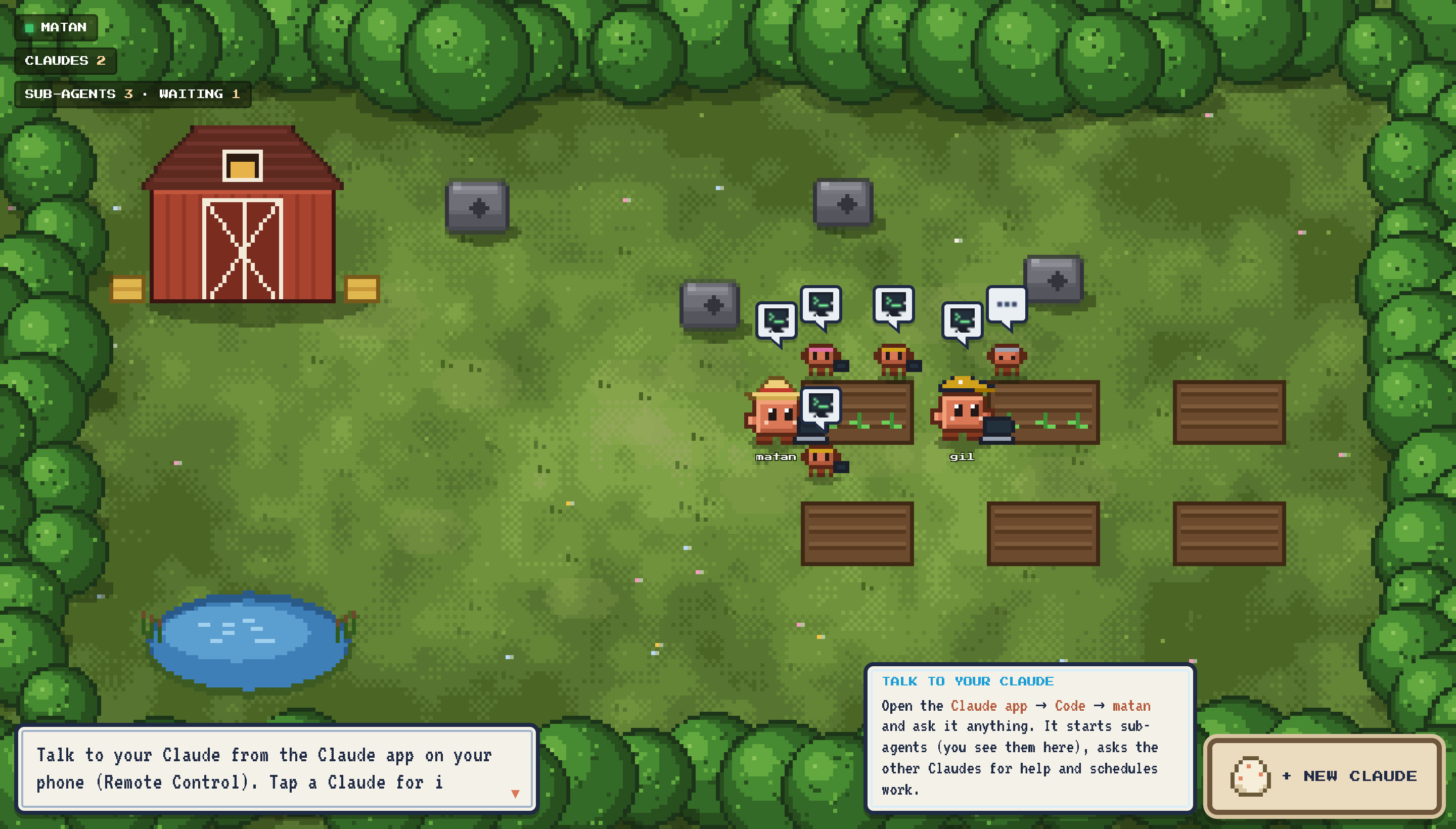
- You see every sub-agent on the farm: mini Claudes working at the plot of the Claude that started them.
- Claudes work together: each one is a person's own account. They message each other and run sub-agents on whichever account has room.
- Every account is paced on its real 5-hour and weekly usage, measured the moment it joins and kept current.
| 01 · Install One line on any box with Docker, or one command on AWS with no open ports. | 02 · Add your Claudes Tap the egg in the farm UI and log in. Teammates add theirs the same way. | 03 · Talk to yours Claude app → Code → your farm. Ask for anything, from anywhere. | 04 · Watch it grow Sub-agents, messages between Claudes and schedules, all on the farm, paced on real usage. |
Why clodfarm
A while true; claude -p loop gets you an agent that forgets what it did, can't split work, can't be reached from
your phone, and runs until it hits the wall and locks you out of your own Claude. clodfarm is the missing
operations layer:
| 🌙 Always on | Claudes restart, leases expire, crashed sub-agents are retried, and timed-out ones continue in their own session. |
| 📱 Talk to it from your phone | Every Claude keeps claude remote-control up, so it is a session in its person's Claude app and at claude.ai/code. |
| 🌱 Sub-agents you can see | clodfarm spawn starts one: a mini Claude on the farm, in its own git worktree. A sub-agent's own sub-agents are its children, and it is resumed in its own session to merge their work. |
| 🌕 Paced on real usage | Every run reports the account's actual 5-hour and weekly utilization (rate_limit_event). The governor paces the week, leaves you 20% by default, sleeps through rejections, and never touches paid overage. |
| 👥 Many boxes, many seats | Point containers on several accounts at one table: one farm, one repo, a separate budget per account. |
| ✅ Nothing lands untested | FARM_VERIFY_CMD runs your tests on the rebased branch, and a failing check sends the agent back to fix it. |
| 🤝 Claudes that work together | clodfarm agents shows every Claude and how much of its usage it has used. A sub-agent without --on runs on whichever account has room, --on gil picks one, and clodfarm msg gil "..." lands in Gil's next turn. |
| ⏰ Schedules | "Every weekday at 9, summarize the open PRs": clodfarm schedule add ... --cron "0 9 * * 1-5" --tz Asia/Jerusalem, or --every 2h, or --at "in 3h". |
| 🔔 Tells you when it matters | Notifications to ntfy, Slack or Discord for failures, a tripped circuit breaker and usage limits. |
| 📈 Usage in real time | A new Claude's usage is measured the moment it logs in; every run reports it live, and an idle Claude is re-measured every 5 minutes (FARM_USAGE_REFRESH). |
| 🕹️ A farm you can watch | Open http://localhost:8080: one pixel Claude per account, its sub-agents around its plot, napping when its budget says so. Tap a Claude for its budget, its sub-agents and a link to talk to it in the Claude app; hatch new Claudes (each its own login) from the browser. |
You talk to your Claude in the Claude app; the farm UI shows who is working on what; the Claudes and you use the same CLI.
Quick start
One container, no config, no database to run:
curl -fsSL https://raw.githubusercontent.com/matank001/clodfarm/main/scripts/install.sh | sh
It pulls the image, starts clodfarm (restarting on reboot), and opens the login: a URL you approve on any
device, then paste the code back. Then open Claude app → Code → [clodfarm] clodfarm on your phone and just talk to it:
"add CSV export to the report page", "have gil's Claude review it", "every morning at 9, triage new issues".
Or from a shell:
docker exec clodfarm clodfarm spawn "Add CSV export" --prompt "Add CSV export to the report page, with tests."
docker exec clodfarm clodfarm status
The farm UI is at http://localhost:8080
(see docs/ui.md): the password is printed once in docker logs clodfarm, or set FARM_UI_PASSWORD.
From the UI you can also log the farm in: tap the egg, open the Claude login link and paste the code back.
Prefer plain Docker, or Compose?
docker run -d --name clodfarm --restart unless-stopped \
  -v clodfarm_claude-home:/home/farm/.claude -v clodfarm_workspace:/workspace \
  ghcr.io/matank001/clodfarm
docker exec -it clodfarm clodfarm login
Or clone the repo and run docker compose up -d. A .env is optional: copy .env.example to change any setting.
Either way the farm's state lives in a SQLite file inside the workspace volume, so there's nothing else to run.
[!TIP] Point it at a real repo with
FARM_REPO_URL(plus a deploy key) and setFARM_VERIFY_CMD="pytest -q". The farm clones the repo, and every sub-agent's work lands onmainonly when your tests pass.
Deploy
| What you get | |
|---|---|
| Single deployment | One box, one Claude account. Everything in one container. |
| Multiple deployments, one farm | Several boxes on your account or teammates' own accounts: one farm and one repo, each account paced on its own budget. |
You can start single and add boxes later. A new box simply joins the first one's table.
Single deployment
Any Docker host: run the one-line installer on the server (ssh myserver, then the curl … | sh above). Or
start it there and log in from your laptop with ssh -t myserver docker exec -it clodfarm clodfarm login.
AWS (about 10 minutes, one box, no inbound ports):
deploy/aws/deploy.sh up       # CloudFormation: VPC, EC2 t4g.medium, DynamoDB table, IAM role limited to that table
deploy/aws/deploy.sh login    # over SSM Session Manager: URL + code, same as above
deploy/aws/deploy.sh status   # also: logs · shell · down
You need the AWS CLI v2 and the Session Manager plugin. Remote Control, the Claude API and SSM all use outbound HTTPS only. See docs/deploy-aws.md.
Multiple deployments, one farm
A single box keeps its farm in a local SQLite file. To spread one farm over several boxes, the boxes share a
DynamoDB table instead (FARM_STORE=dynamodb; the AWS deploy sets it for you).
- Shared: every box pointed at that table is one farm (sub-agents, messages, schedules) with one git repo.
- Per account: each box is paced on the budget of the Claude account it's logged in to (its seat). When one seat hits a limit, only its boxes pause.
You need:
- real DynamoDB (the AWS deploy creates it);
- a shared git repo every box can push to (
--workspace-repo/FARM_REPO_URL); sub-agent branches travel through it.
# box 1 creates the farm (table "clodfarm")
deploy/aws/deploy.sh up --workspace-repo git@github.com:you/repo.git && deploy/aws/deploy.sh login

# more boxes on your account: more room to run, never extra usage
STACK=farm-2 deploy/aws/deploy.sh up --table clodfarm --workspace-repo git@github.com:you/repo.git
STACK=farm-2 deploy/aws/deploy.sh login

# a teammate's box, logged in to THEIR account: a second seat, with its own budget
STACK=farm-gil deploy/aws/deploy.sh up --table clodfarm --workspace-repo git@github.com:you/repo.git
STACK=farm-gil deploy/aws/deploy.sh login

clodfarm budget   # every seat: usage bars, its boxes, what it may run right now
- A sub-agent can run on Gil's box and be merged by its parent on yours.
- A resumed parent waits a few minutes for the box that holds its conversation.
Join from any Docker host, or start sub-agents from your laptop
A Docker host joining an existing farm:
- In
.env, setFARM_STORE=dynamodb,FARM_TABLE=<table>,AWS_REGION=<region>andFARM_REPO_URL=<shared repo>. - Give the box AWS credentials for the table.
- Run
docker compose up -d && docker exec -it clodfarm clodfarm login.
Start a sub-agent from your laptop without running a box:
pip install git+https://github.com/matank001/clodfarm
export FARM_STORE=dynamodb FARM_TABLE=clodfarm AWS_REGION=<region>   # plus AWS credentials for the table
clodfarm spawn "Refactor the parser" --prompt "..." && clodfarm status
Full guide: docs/multi-seat.md.
How it works
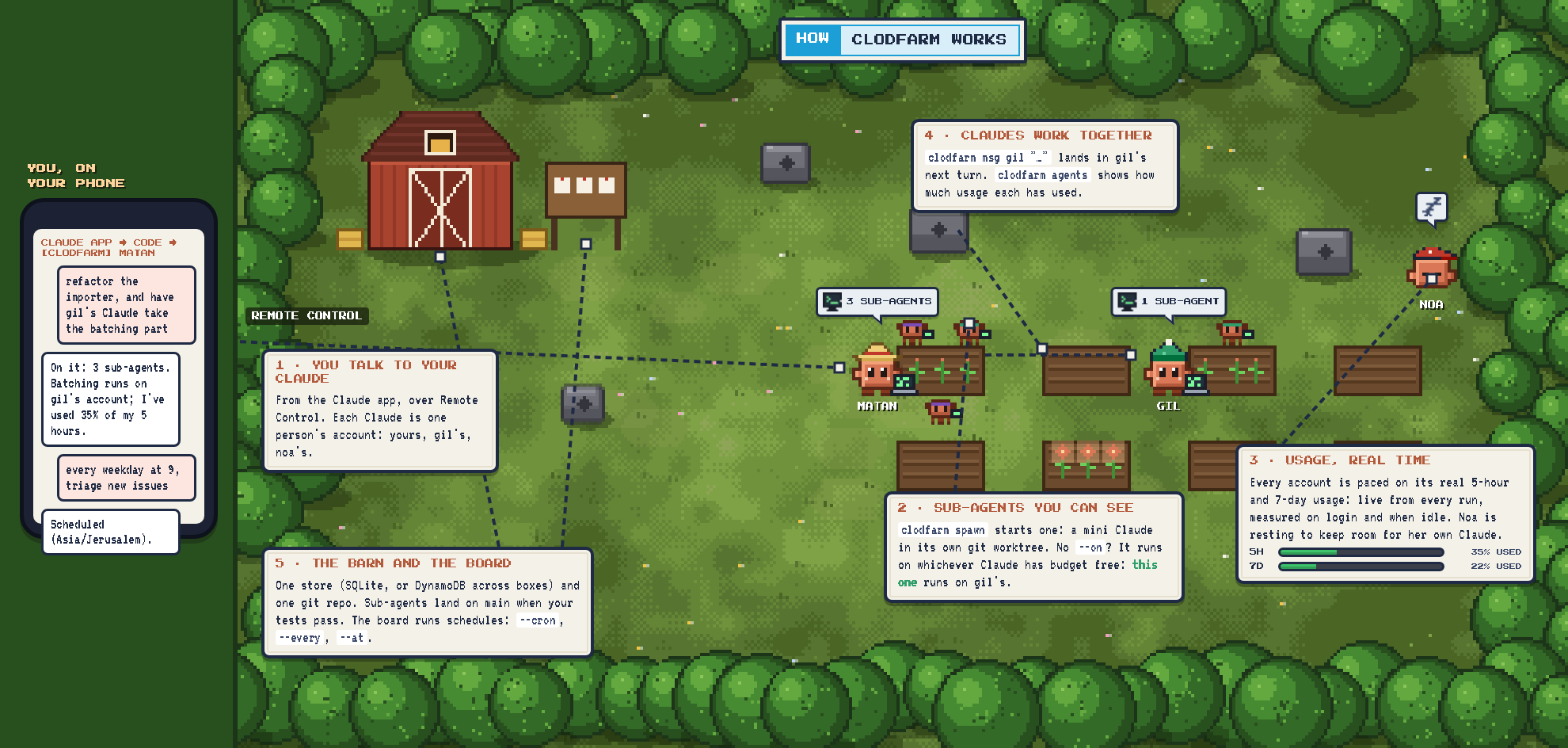
The picture at the top, step by step:
- You talk to your Claude in the Claude app (Remote Control). Every Claude on the farm is one person's
account, kept reachable by its own
clodfarm run. - It starts sub-agents with
clodfarm spawn: a headlessclaude -pin its own git worktree, shown on the farm as a mini Claude next to it. Any Claude whose account has budget free runs it, unless--on <name>pins it. A sub-agent's own sub-agents are its children; it ends its run and is resumed in its own session with their results to merge them. - The budget governor decides, per account, how many sub-agents may run right now. Usage comes from Claude
Code's own
rate_limit_events during every run, from a one-word probe the moment a Claude logs in, and again whenever it has been idle forFARM_USAGE_REFRESHseconds. - Claudes talk to each other:
clodfarm msg gil "..."shows up in Gil's next conversation turn (a Claude Code hook), andclodfarm agentsshows how much of its usage each Claude has used, so one that is running high sends work elsewhere. - When a sub-agent finishes, its branch is rebased onto
main,FARM_VERIFY_CMDruns, andmainmoves only if the check passes. Otherwise the sub-agent is resumed with the failure output. - Schedules start sub-agents on a cron line (in your time zone), every N minutes or once at a time. Every box checks; each firing is claimed atomically, so it runs once.
Everything lives in one store: a SQLite file on one box, or a DynamoDB table shared by several boxes and accounts.
The budget governor, in detail
Utilization comes from Claude Code itself and covers the whole account, including your own chats, so the farm backs off when you use Claude. Per seat:
- Weekly window: agents stop at
FARM_WEEKLY_TARGET(80%). Before that, a pace line (target × fraction of the week elapsed + 5%) spreads the week out. Ahead of the line the governor slows down or stops until the line catches up; behind it, it runs at full concurrency. - 5-hour window: never past
FARM_FIVE_HOUR_CEILING(85%). The pace is loose, so bursts are fine. - Rejected or paid overage: that seat stops until the reset time Claude reported.
- API key: no windows apply. It stops for the day at
FARM_DAILY_BUDGET_USD.
It's a pure, unit-tested function: clodfarm/governor.py · docs/budget.md.
More: architecture · what agents are told · login options · security · how it's tested.
How it compares
while loop | Single-loop runners (e.g. ralph, continuous-claude) | clodfarm | |
|---|---|---|---|
| Runs unattended, survives crashes | ❌ | ✅ | ✅ |
| Parallel agents | ❌ | via separate instances | ✅ visible sub-agents |
| Sub-agent tree, parent resumes in its own session | ❌ | ❌ | ✅ |
| Paces on the real 5-hour and weekly utilization | ❌ | waits out limits | ✅ per seat |
| Several boxes and accounts in one farm | ❌ | ❌ | ✅ |
| Merge only when tests pass | ❌ | ✅ (continuous-claude) | ✅ |
| Steer it from the Claude app | ❌ | ❌ | ✅ Remote Control |
| Cloud deploy with no open ports | ❌ | ❌ | ✅ |
Both runners are great at what they do, and we learned from them. See related projects.
Logging in
Your login stays in the container's claude-home volume. clodfarm never reads or prints it.
| How | Good for | |
|---|---|---|
| A. Remote login | clodfarm login: a URL on any device, then paste the code back | servers (the default) |
| B. Token | claude setup-token on your laptop, then CLAUDE_CODE_OAUTH_TOKEN=... in .env | headless workers, CI |
| C. Existing profile | mount a Linux ~/.claude (macOS keeps it in the Keychain: use A or B) | moving a box |
| D. API key | ANTHROPIC_API_KEY + FARM_DAILY_BUDGET_USD | teams, services, pay per token |
Details and caveats: docs/auth.md.
Commands
| Command | |
|---|---|
clodfarm status | the Claudes, their budget, the links to talk to them, the sub-agents at work |
clodfarm agents | every Claude on the farm and its usage (% used, like Claude's usage page) |
clodfarm budget [--refresh] | every seat's usage and what the governor allows it now |
clodfarm spawn TITLE --prompt ... [--on NAME] | start a sub-agent (the Claudes use the same command) |
clodfarm subagents [--all] · result ID [--wait] · cancel ID · retry ID | follow and manage sub-agents |
clodfarm msg NAME TEXT · inbox | messages between the Claudes |
clodfarm sessions · session ID | every Claude session on the farm, and its whole conversation |
clodfarm schedule add TITLE (--cron ... [--tz ...] | --every 2h | --at ...) / list / remove ID | scheduled tasks |
clodfarm events [-f] | the event log: sub-agents, merges, checks, messages, pauses, limits |
clodfarm pause [reason] / resume | stop and restart new sub-agents on every box |
clodfarm login / whoami / doctor | login and a setup check |
Every command takes --json.
Configuration (all environment variables; .env.example documents every one)
| Variable | Default | |
|---|---|---|
FARM_MAX_WORKERS | 3 | sub-agents one Claude may run at once (upper bound; the governor decides) |
FARM_NAME / FARM_CLAUDE_NAME | clodfarm / from the login | the farm's name / its own Claude's name (default: the login email before @) |
FARM_USAGE_REFRESH | 300 | re-measure an idle Claude's usage after this many seconds (0 = only from runs) |
FARM_TZ | UTC | default time zone for clodfarm schedule |
FARM_MODEL / FARM_EFFORT | opus / default | model and effort for every agent |
FARM_WEEKLY_TARGET | 0.80 | agents stop at 80% of the weekly window |
FARM_FIVE_HOUR_CEILING | 0.85 | max share of a 5-hour window |
FARM_DAILY_BUDGET_USD | 0 | API-key mode: daily cap (0 = none) |
FARM_REPO_URL | (empty) | repo to work in (required for more than one box) |
FARM_VERIFY_CMD | (empty) | check that must pass before landing, e.g. pytest -q |
FARM_NOTIFY_URL | (empty) | ntfy, Slack or Discord webhook |
FARM_STALL_THRESHOLD | 5 | failed runs in a row that pause the farm |
FARM_REMOTE_CONTROL | 1 | keep a Remote Control session up |
FARM_PERMISSION_MODE | bypassPermissions | the container is the sandbox (security) |
FARM_STORE | sqlite | dynamodb to share one farm across boxes and accounts (setting FARM_TABLE implies it) |
FARM_TABLE / FARM_SEAT | clodfarm / from login | which DynamoDB farm to join / override the seat name |
FAQ
Is this allowed?
clodfarm drives the official Claude Code CLI, headless mode and Remote Control as documented. On a subscription it's meant for your own projects, on your own login. Anthropic's consumer terms say plan limits assume ordinary, individual use, and they forbid reselling or intermediating Claude usage. So:
- don't run it as a service for others on a subscription;
- don't share logins;
- for people working together, use Team or Enterprise seats, each person on their own login;
- for commercial workloads, use an API key.
clodfarm never shares or rotates logins, and it paces every seat well under its limits. Read the current Consumer Terms and Usage Policy yourself; this isn't legal advice.
Will it lock me out of my own Claude?
That's what the governor is for. By default agents stop at 80% of your week and 85% of any 5-hour window, and the numbers include your own usage, so the farm backs off when you're working.
What does it cost?
On a subscription, nothing beyond your plan. Locally or on your own server it's free: a single box needs no database. The AWS box is roughly $25/month for a t4g.medium, plus cents of DynamoDB (an estimate; check AWS pricing).
Is it safe to give agents a shell?
They run as an unprivileged user inside the container. Mount only what they may change, give git a deploy key
for one repo, and consider FARM_PERMISSION_MODE=auto. A prompt is not a security boundary: read
docs/security.md.
Does it work with an API key, Bedrock or Vertex?
API keys: yes, with a daily dollar cap instead of subscription pacing. Bedrock and Vertex should work through Claude Code's own environment variables but aren't tested yet. PRs welcome.
Related projects
- ralph-claude-code is a hardened single loop with a circuit
breaker and exit detection. From its bug history we took three rules:
- never trust the agent's text for limit detection;
- a timeout is not a limit;
- keep progress after a timeout.
- continuous-claude is a loop that opens a PR per iteration
and merges only when CI passes. That's the idea behind
FARM_VERIFY_CMD. - sleepless-agent is a 24/7 daemon with a task queue and Slack control.
- Several small images keep
claude remote-controlrunning in a container.
clodfarm is the first open piece of Pluribus, an experiment in running a small company with a swarm of Claude agents. This repo is the engine that keeps a swarm like that working.
Contributing
Issues and PRs welcome. Start with CONTRIBUTING.md. The whole loop is tested without a
subscription, using a fake claude that speaks the stream-json protocol:
python3 -m venv .venv && .venv/bin/pip install -e ".[test]" && .venv/bin/pytest
Security issues: see SECURITY.md.
License
MIT. clodfarm is an independent open-source project, not affiliated with or endorsed by Anthropic. "Claude" and "Claude Code" are trademarks of Anthropic, PBC.
Contributors

42 commits
Similar repos


Languages
Python
55.2%
JavaScript
32.6%
HTML
5.2%
CSS
4.9%
Shell
1.7%
clodfarm (say it out loud): a farm of Claude Code agents. Plant a mission, they split it into sub-agents, open the work, and pace themselves on each account's real 5-hour and weekly usage. Steer it from the Claude app.
See the codeSee what people are saying
README
Quick start · How it works · Multi-seat · Docs · FAQ
Your Claude Code agents keep working while you sleep, and stop before they eat your week.
clodfarm (say it out loud) is a farm of Claude Code agents running around the clock in a container. A clod is a lump of soil, and this is where your agents grow.
- You talk to your Claude from the Claude app on your phone. It does the work, or starts sub-agents for it.
- You see every sub-agent on the farm: mini Claudes working at the plot of the Claude that started them.
- Claudes work together: each one is a person's own account. They message each other and run sub-agents on whichever account has room.
- Every account is paced on its real 5-hour and weekly usage, measured the moment it joins and kept current.
| 01 · Install One line on any box with Docker, or one command on AWS with no open ports. | 02 · Add your Claudes Tap the egg in the farm UI and log in. Teammates add theirs the same way. | 03 · Talk to yours Claude app → Code → your farm. Ask for anything, from anywhere. | 04 · Watch it grow Sub-agents, messages between Claudes and schedules, all on the farm, paced on real usage. |
Why clodfarm
A while true; claude -p loop gets you an agent that forgets what it did, can't split work, can't be reached from
your phone, and runs until it hits the wall and locks you out of your own Claude. clodfarm is the missing
operations layer:
| 🌙 Always on | Claudes restart, leases expire, crashed sub-agents are retried, and timed-out ones continue in their own session. |
| 📱 Talk to it from your phone | Every Claude keeps claude remote-control up, so it is a session in its person's Claude app and at claude.ai/code. |
| 🌱 Sub-agents you can see | clodfarm spawn starts one: a mini Claude on the farm, in its own git worktree. A sub-agent's own sub-agents are its children, and it is resumed in its own session to merge their work. |
| 🌕 Paced on real usage | Every run reports the account's actual 5-hour and weekly utilization (rate_limit_event). The governor paces the week, leaves you 20% by default, sleeps through rejections, and never touches paid overage. |
| 👥 Many boxes, many seats | Point containers on several accounts at one table: one farm, one repo, a separate budget per account. |
| ✅ Nothing lands untested | FARM_VERIFY_CMD runs your tests on the rebased branch, and a failing check sends the agent back to fix it. |
| 🤝 Claudes that work together | clodfarm agents shows every Claude and how much of its usage it has used. A sub-agent without --on runs on whichever account has room, --on gil picks one, and clodfarm msg gil "..." lands in Gil's next turn. |
| ⏰ Schedules | "Every weekday at 9, summarize the open PRs": clodfarm schedule add ... --cron "0 9 * * 1-5" --tz Asia/Jerusalem, or --every 2h, or --at "in 3h". |
| 🔔 Tells you when it matters | Notifications to ntfy, Slack or Discord for failures, a tripped circuit breaker and usage limits. |
| 📈 Usage in real time | A new Claude's usage is measured the moment it logs in; every run reports it live, and an idle Claude is re-measured every 5 minutes (FARM_USAGE_REFRESH). |
| 🕹️ A farm you can watch | Open http://localhost:8080: one pixel Claude per account, its sub-agents around its plot, napping when its budget says so. Tap a Claude for its budget, its sub-agents and a link to talk to it in the Claude app; hatch new Claudes (each its own login) from the browser. |
You talk to your Claude in the Claude app; the farm UI shows who is working on what; the Claudes and you use the same CLI.
Quick start
One container, no config, no database to run:
curl -fsSL https://raw.githubusercontent.com/matank001/clodfarm/main/scripts/install.sh | sh
It pulls the image, starts clodfarm (restarting on reboot), and opens the login: a URL you approve on any
device, then paste the code back. Then open Claude app → Code → [clodfarm] clodfarm on your phone and just talk to it:
"add CSV export to the report page", "have gil's Claude review it", "every morning at 9, triage new issues".
Or from a shell:
docker exec clodfarm clodfarm spawn "Add CSV export" --prompt "Add CSV export to the report page, with tests."
docker exec clodfarm clodfarm status
The farm UI is at http://localhost:8080
(see docs/ui.md): the password is printed once in docker logs clodfarm, or set FARM_UI_PASSWORD.
From the UI you can also log the farm in: tap the egg, open the Claude login link and paste the code back.
Prefer plain Docker, or Compose?
docker run -d --name clodfarm --restart unless-stopped \
  -v clodfarm_claude-home:/home/farm/.claude -v clodfarm_workspace:/workspace \
  ghcr.io/matank001/clodfarm
docker exec -it clodfarm clodfarm login
Or clone the repo and run docker compose up -d. A .env is optional: copy .env.example to change any setting.
Either way the farm's state lives in a SQLite file inside the workspace volume, so there's nothing else to run.
[!TIP] Point it at a real repo with
FARM_REPO_URL(plus a deploy key) and setFARM_VERIFY_CMD="pytest -q". The farm clones the repo, and every sub-agent's work lands onmainonly when your tests pass.
Deploy
| What you get | |
|---|---|
| Single deployment | One box, one Claude account. Everything in one container. |
| Multiple deployments, one farm | Several boxes on your account or teammates' own accounts: one farm and one repo, each account paced on its own budget. |
You can start single and add boxes later. A new box simply joins the first one's table.
Single deployment
Any Docker host: run the one-line installer on the server (ssh myserver, then the curl … | sh above). Or
start it there and log in from your laptop with ssh -t myserver docker exec -it clodfarm clodfarm login.
AWS (about 10 minutes, one box, no inbound ports):
deploy/aws/deploy.sh up       # CloudFormation: VPC, EC2 t4g.medium, DynamoDB table, IAM role limited to that table
deploy/aws/deploy.sh login    # over SSM Session Manager: URL + code, same as above
deploy/aws/deploy.sh status   # also: logs · shell · down
You need the AWS CLI v2 and the Session Manager plugin. Remote Control, the Claude API and SSM all use outbound HTTPS only. See docs/deploy-aws.md.
Multiple deployments, one farm
A single box keeps its farm in a local SQLite file. To spread one farm over several boxes, the boxes share a
DynamoDB table instead (FARM_STORE=dynamodb; the AWS deploy sets it for you).
- Shared: every box pointed at that table is one farm (sub-agents, messages, schedules) with one git repo.
- Per account: each box is paced on the budget of the Claude account it's logged in to (its seat). When one seat hits a limit, only its boxes pause.
You need:
- real DynamoDB (the AWS deploy creates it);
- a shared git repo every box can push to (
--workspace-repo/FARM_REPO_URL); sub-agent branches travel through it.
# box 1 creates the farm (table "clodfarm")
deploy/aws/deploy.sh up --workspace-repo git@github.com:you/repo.git && deploy/aws/deploy.sh login

# more boxes on your account: more room to run, never extra usage
STACK=farm-2 deploy/aws/deploy.sh up --table clodfarm --workspace-repo git@github.com:you/repo.git
STACK=farm-2 deploy/aws/deploy.sh login

# a teammate's box, logged in to THEIR account: a second seat, with its own budget
STACK=farm-gil deploy/aws/deploy.sh up --table clodfarm --workspace-repo git@github.com:you/repo.git
STACK=farm-gil deploy/aws/deploy.sh login

clodfarm budget   # every seat: usage bars, its boxes, what it may run right now
- A sub-agent can run on Gil's box and be merged by its parent on yours.
- A resumed parent waits a few minutes for the box that holds its conversation.
Join from any Docker host, or start sub-agents from your laptop
A Docker host joining an existing farm:
- In
.env, setFARM_STORE=dynamodb,FARM_TABLE=<table>,AWS_REGION=<region>andFARM_REPO_URL=<shared repo>. - Give the box AWS credentials for the table.
- Run
docker compose up -d && docker exec -it clodfarm clodfarm login.
Start a sub-agent from your laptop without running a box:
pip install git+https://github.com/matank001/clodfarm
export FARM_STORE=dynamodb FARM_TABLE=clodfarm AWS_REGION=<region>   # plus AWS credentials for the table
clodfarm spawn "Refactor the parser" --prompt "..." && clodfarm status
Full guide: docs/multi-seat.md.
How it works
The picture at the top, step by step:
- You talk to your Claude in the Claude app (Remote Control). Every Claude on the farm is one person's
account, kept reachable by its own
clodfarm run. - It starts sub-agents with
clodfarm spawn: a headlessclaude -pin its own git worktree, shown on the farm as a mini Claude next to it. Any Claude whose account has budget free runs it, unless--on <name>pins it. A sub-agent's own sub-agents are its children; it ends its run and is resumed in its own session with their results to merge them. - The budget governor decides, per account, how many sub-agents may run right now. Usage comes from Claude
Code's own
rate_limit_events during every run, from a one-word probe the moment a Claude logs in, and again whenever it has been idle forFARM_USAGE_REFRESHseconds. - Claudes talk to each other:
clodfarm msg gil "..."shows up in Gil's next conversation turn (a Claude Code hook), andclodfarm agentsshows how much of its usage each Claude has used, so one that is running high sends work elsewhere. - When a sub-agent finishes, its branch is rebased onto
main,FARM_VERIFY_CMDruns, andmainmoves only if the check passes. Otherwise the sub-agent is resumed with the failure output. - Schedules start sub-agents on a cron line (in your time zone), every N minutes or once at a time. Every box checks; each firing is claimed atomically, so it runs once.
Everything lives in one store: a SQLite file on one box, or a DynamoDB table shared by several boxes and accounts.
The budget governor, in detail
Utilization comes from Claude Code itself and covers the whole account, including your own chats, so the farm backs off when you use Claude. Per seat:
- Weekly window: agents stop at
FARM_WEEKLY_TARGET(80%). Before that, a pace line (target × fraction of the week elapsed + 5%) spreads the week out. Ahead of the line the governor slows down or stops until the line catches up; behind it, it runs at full concurrency. - 5-hour window: never past
FARM_FIVE_HOUR_CEILING(85%). The pace is loose, so bursts are fine. - Rejected or paid overage: that seat stops until the reset time Claude reported.
- API key: no windows apply. It stops for the day at
FARM_DAILY_BUDGET_USD.
It's a pure, unit-tested function: clodfarm/governor.py · docs/budget.md.
More: architecture · what agents are told · login options · security · how it's tested.
How it compares
while loop | Single-loop runners (e.g. ralph, continuous-claude) | clodfarm | |
|---|---|---|---|
| Runs unattended, survives crashes | ❌ | ✅ | ✅ |
| Parallel agents | ❌ | via separate instances | ✅ visible sub-agents |
| Sub-agent tree, parent resumes in its own session | ❌ | ❌ | ✅ |
| Paces on the real 5-hour and weekly utilization | ❌ | waits out limits | ✅ per seat |
| Several boxes and accounts in one farm | ❌ | ❌ | ✅ |
| Merge only when tests pass | ❌ | ✅ (continuous-claude) | ✅ |
| Steer it from the Claude app | ❌ | ❌ | ✅ Remote Control |
| Cloud deploy with no open ports | ❌ | ❌ | ✅ |
Both runners are great at what they do, and we learned from them. See related projects.
Logging in
Your login stays in the container's claude-home volume. clodfarm never reads or prints it.
| How | Good for | |
|---|---|---|
| A. Remote login | clodfarm login: a URL on any device, then paste the code back | servers (the default) |
| B. Token | claude setup-token on your laptop, then CLAUDE_CODE_OAUTH_TOKEN=... in .env | headless workers, CI |
| C. Existing profile | mount a Linux ~/.claude (macOS keeps it in the Keychain: use A or B) | moving a box |
| D. API key | ANTHROPIC_API_KEY + FARM_DAILY_BUDGET_USD | teams, services, pay per token |
Details and caveats: docs/auth.md.
Commands
| Command | |
|---|---|
clodfarm status | the Claudes, their budget, the links to talk to them, the sub-agents at work |
clodfarm agents | every Claude on the farm and its usage (% used, like Claude's usage page) |
clodfarm budget [--refresh] | every seat's usage and what the governor allows it now |
clodfarm spawn TITLE --prompt ... [--on NAME] | start a sub-agent (the Claudes use the same command) |
clodfarm subagents [--all] · result ID [--wait] · cancel ID · retry ID | follow and manage sub-agents |
clodfarm msg NAME TEXT · inbox | messages between the Claudes |
clodfarm sessions · session ID | every Claude session on the farm, and its whole conversation |
clodfarm schedule add TITLE (--cron ... [--tz ...] | --every 2h | --at ...) / list / remove ID | scheduled tasks |
clodfarm events [-f] | the event log: sub-agents, merges, checks, messages, pauses, limits |
clodfarm pause [reason] / resume | stop and restart new sub-agents on every box |
clodfarm login / whoami / doctor | login and a setup check |
Every command takes --json.
Configuration (all environment variables; .env.example documents every one)
| Variable | Default | |
|---|---|---|
FARM_MAX_WORKERS | 3 | sub-agents one Claude may run at once (upper bound; the governor decides) |
FARM_NAME / FARM_CLAUDE_NAME | clodfarm / from the login | the farm's name / its own Claude's name (default: the login email before @) |
FARM_USAGE_REFRESH | 300 | re-measure an idle Claude's usage after this many seconds (0 = only from runs) |
FARM_TZ | UTC | default time zone for clodfarm schedule |
FARM_MODEL / FARM_EFFORT | opus / default | model and effort for every agent |
FARM_WEEKLY_TARGET | 0.80 | agents stop at 80% of the weekly window |
FARM_FIVE_HOUR_CEILING | 0.85 | max share of a 5-hour window |
FARM_DAILY_BUDGET_USD | 0 | API-key mode: daily cap (0 = none) |
FARM_REPO_URL | (empty) | repo to work in (required for more than one box) |
FARM_VERIFY_CMD | (empty) | check that must pass before landing, e.g. pytest -q |
FARM_NOTIFY_URL | (empty) | ntfy, Slack or Discord webhook |
FARM_STALL_THRESHOLD | 5 | failed runs in a row that pause the farm |
FARM_REMOTE_CONTROL | 1 | keep a Remote Control session up |
FARM_PERMISSION_MODE | bypassPermissions | the container is the sandbox (security) |
FARM_STORE | sqlite | dynamodb to share one farm across boxes and accounts (setting FARM_TABLE implies it) |
FARM_TABLE / FARM_SEAT | clodfarm / from login | which DynamoDB farm to join / override the seat name |
FAQ
Is this allowed?
clodfarm drives the official Claude Code CLI, headless mode and Remote Control as documented. On a subscription it's meant for your own projects, on your own login. Anthropic's consumer terms say plan limits assume ordinary, individual use, and they forbid reselling or intermediating Claude usage. So:
- don't run it as a service for others on a subscription;
- don't share logins;
- for people working together, use Team or Enterprise seats, each person on their own login;
- for commercial workloads, use an API key.
clodfarm never shares or rotates logins, and it paces every seat well under its limits. Read the current Consumer Terms and Usage Policy yourself; this isn't legal advice.
Will it lock me out of my own Claude?
That's what the governor is for. By default agents stop at 80% of your week and 85% of any 5-hour window, and the numbers include your own usage, so the farm backs off when you're working.
What does it cost?
On a subscription, nothing beyond your plan. Locally or on your own server it's free: a single box needs no database. The AWS box is roughly $25/month for a t4g.medium, plus cents of DynamoDB (an estimate; check AWS pricing).
Is it safe to give agents a shell?
They run as an unprivileged user inside the container. Mount only what they may change, give git a deploy key
for one repo, and consider FARM_PERMISSION_MODE=auto. A prompt is not a security boundary: read
docs/security.md.
Does it work with an API key, Bedrock or Vertex?
API keys: yes, with a daily dollar cap instead of subscription pacing. Bedrock and Vertex should work through Claude Code's own environment variables but aren't tested yet. PRs welcome.
Related projects
- ralph-claude-code is a hardened single loop with a circuit
breaker and exit detection. From its bug history we took three rules:
- never trust the agent's text for limit detection;
- a timeout is not a limit;
- keep progress after a timeout.
- continuous-claude is a loop that opens a PR per iteration
and merges only when CI passes. That's the idea behind
FARM_VERIFY_CMD. - sleepless-agent is a 24/7 daemon with a task queue and Slack control.
- Several small images keep
claude remote-controlrunning in a container.
clodfarm is the first open piece of Pluribus, an experiment in running a small company with a swarm of Claude agents. This repo is the engine that keeps a swarm like that working.
Contributing
Issues and PRs welcome. Start with CONTRIBUTING.md. The whole loop is tested without a
subscription, using a fake claude that speaks the stream-json protocol:
python3 -m venv .venv && .venv/bin/pip install -e ".[test]" && .venv/bin/pytest
Security issues: see SECURITY.md.
License
MIT. clodfarm is an independent open-source project, not affiliated with or endorsed by Anthropic. "Claude" and "Claude Code" are trademarks of Anthropic, PBC.
Similar repos
Contributors
42 commits
Languages
Python
55.2%
JavaScript
32.6%
HTML
5.2%
CSS
4.9%
Shell
1.7%