A free, open-source developer workspace. Snippets, notes, HTTP requests, calculations, and dev tools in one local-first app.
See the code
A free, open-source developer workspace.
Snippets, notes, HTTP requests, calculations, drawings, and dev tools in one local-first app.
Your workspace is stored locally as plain Markdown files.




Download | Documentation | Changelog
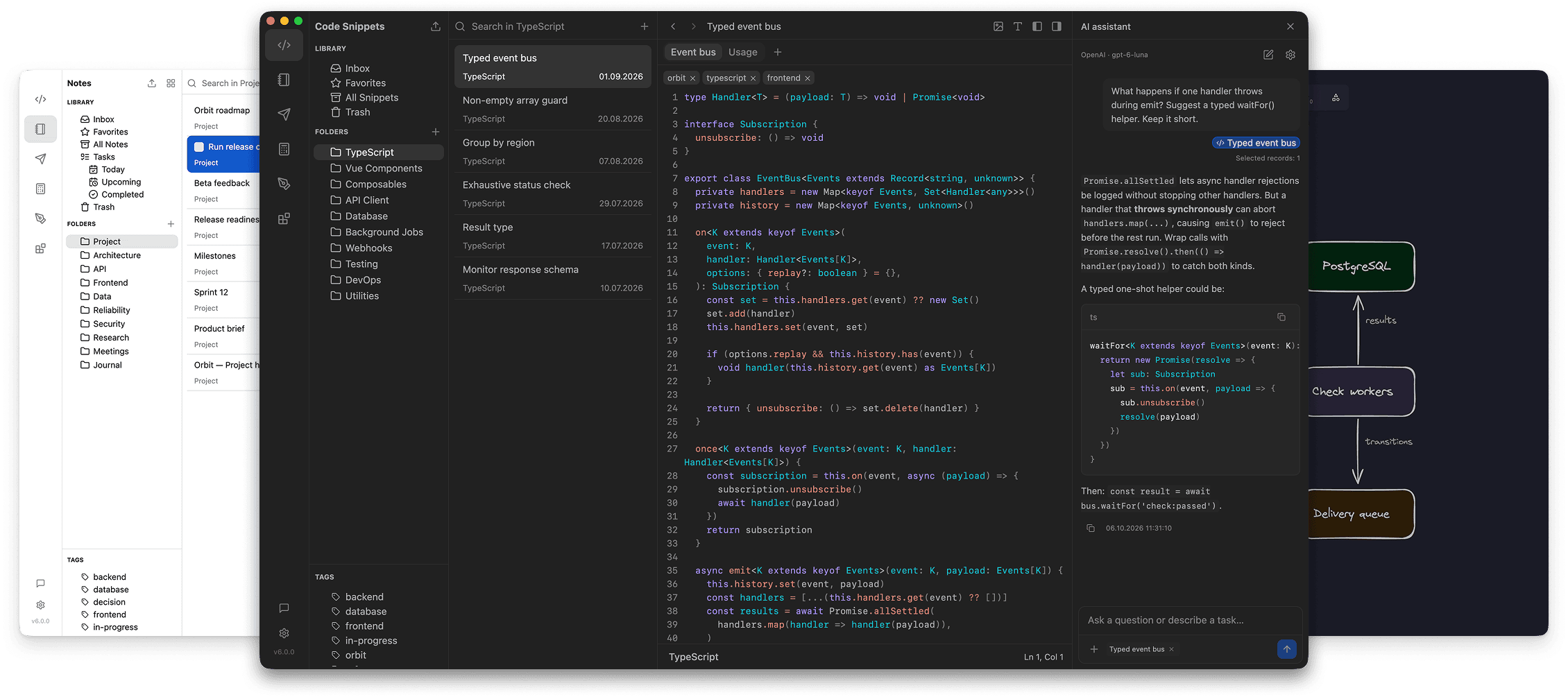
Available for macOS, Windows, and Linux
massCode is free and open source. But building and maintaining a quality tool takes time. Your support helps keep development going and new features coming.



SPONSORS

Originally a snippet manager, massCode now brings together snippets, notes, HTTP requests, calculations, drawings, and developer tools in one desktop app, so everyday work stays in one place.
Use massCode as a focused snippet workspace with multi-level folders, tags, and fragments for organizing reusable code across projects and languages.
.tmLanguage)Write longer markdown documents right next to your snippets: project docs, drafts, research notes, and personal knowledge bases.
Build and test API workflows alongside your code snippets and project notes.
See the HTTP documentation to get started.
A calculator-style notebook for natural-language calculations, conversions, and date math without leaving your workflow.
Sketch diagrams, wireframes, and whiteboard ideas on an Excalidraw-powered canvas next to your snippets and notes.
Built-in utilities for the small tasks that usually send you to a browser tab:
Jump to spaces, snippets, notes, HTTP requests, and common actions from anywhere with a keyboard-first command palette.
@ or open command mode with >Bring existing work into your vault with preview-first imports for snippets, notes, and API collections.
Save web content from Chrome, Firefox, or Safari into the local massCode app.
GET requestsAsk the built-in assistant to carry out tasks across Code, Notes, and HTTP using your own AI provider account or a local model.
Cloud providers receive the context used for the task; use a model running on your computer for local processing. See the AI Assistant guide for setup and examples.
Connect Codex, Claude Code, Cursor, or VS Code Copilot to your massCode vault through the built-in MCP server.
See the MCP setup guide to connect your agent.
Your snippets, notes, and HTTP requests live as plain .md files on disk with frontmatter metadata, so the data stays readable and portable.
Customize the app UI and editor syntax highlighting with JSON theme files. Supports light and dark themes with live reload. See the theme docs.
massCode accepts external pull requests only for localizations and new syntax highlighting languages. To report a bug, please open an issue. For feature requests and ideas, start a discussion in GitHub Discussions.
See CONTRIBUTING.md for details.
pnpm install
To build for current platform:
pnpm build
To build for a specific platform:
pnpm build:mac    # macOS
pnpm build:win    # Windows
pnpm build:linux  # Linux
To run in development mode:
pnpm dev
Copyright (c) 2019-present, Anton Reshetov.
931 followers · starred Jun 2026
2,228 followers · starred Jul 2022
415 followers · starred Dec 2022
80 followers · starred May 2026
A free, open-source developer workspace. Snippets, notes, HTTP requests, calculations, and dev tools in one local-first app.
See the code
A free, open-source developer workspace.
Snippets, notes, HTTP requests, calculations, drawings, and dev tools in one local-first app.
Your workspace is stored locally as plain Markdown files.
Download | Documentation | Changelog
Available for macOS, Windows, and Linux
massCode is free and open source. But building and maintaining a quality tool takes time. Your support helps keep development going and new features coming.
SPONSORS
Originally a snippet manager, massCode now brings together snippets, notes, HTTP requests, calculations, drawings, and developer tools in one desktop app, so everyday work stays in one place.
Use massCode as a focused snippet workspace with multi-level folders, tags, and fragments for organizing reusable code across projects and languages.
.tmLanguage)Write longer markdown documents right next to your snippets: project docs, drafts, research notes, and personal knowledge bases.
Build and test API workflows alongside your code snippets and project notes.
See the HTTP documentation to get started.
A calculator-style notebook for natural-language calculations, conversions, and date math without leaving your workflow.
Sketch diagrams, wireframes, and whiteboard ideas on an Excalidraw-powered canvas next to your snippets and notes.
Built-in utilities for the small tasks that usually send you to a browser tab:
Jump to spaces, snippets, notes, HTTP requests, and common actions from anywhere with a keyboard-first command palette.
@ or open command mode with >Bring existing work into your vault with preview-first imports for snippets, notes, and API collections.
Save web content from Chrome, Firefox, or Safari into the local massCode app.
GET requestsAsk the built-in assistant to carry out tasks across Code, Notes, and HTTP using your own AI provider account or a local model.
Cloud providers receive the context used for the task; use a model running on your computer for local processing. See the AI Assistant guide for setup and examples.
Connect Codex, Claude Code, Cursor, or VS Code Copilot to your massCode vault through the built-in MCP server.
See the MCP setup guide to connect your agent.
Your snippets, notes, and HTTP requests live as plain .md files on disk with frontmatter metadata, so the data stays readable and portable.
Customize the app UI and editor syntax highlighting with JSON theme files. Supports light and dark themes with live reload. See the theme docs.
massCode accepts external pull requests only for localizations and new syntax highlighting languages. To report a bug, please open an issue. For feature requests and ideas, start a discussion in GitHub Discussions.
See CONTRIBUTING.md for details.
pnpm install
To build for current platform:
pnpm build
To build for a specific platform:
pnpm build:mac    # macOS
pnpm build:win    # Windows
pnpm build:linux  # Linux
To run in development mode:
pnpm dev
Copyright (c) 2019-present, Anton Reshetov.
931 followers · starred Jun 2026
2,228 followers · starred Jul 2022
415 followers · starred Dec 2022
80 followers · starred May 2026



