LLM Gateway to Protect your Secrets — redacts secrets before they reach LLM providers, restores them locally
See the code


A lightweight local LLM gateway: outbound requests have their Secrets replaced with equal-length realistic Mocks; responses are restored back to real values on the way in — the LLM never touches a real Secret, while your Agent tools keep working.
Docs · Download · Quick Start · Protocol Support · 简体中文
The local Agent Harness (claude-code / opencode / hermes-agent and friends) does your work by stuffing material wholesale into the prompt — code, configuration, terminal output, along with the passwords, private keys, tokens, and cookies in them, all delivered to the LLM vendor's servers. Once that data leaves your machine, it is out of your control: it may end up in LLM vendor logs, be used for model training, or leak in a breach.
And "never put Secrets in the context" is simply not viable in Agent workflows — credentials are exactly what an Agent tool needs to act on real systems on your behalf. Secret Guard resolves this tension: your Agent tools keep working with your Secrets, while the LLM never touches a real value.
The only integration cost is one line: point your Agent tool's API base URL at the local gateway, and traffic flows through it to the LLM vendor:
Outbound:  Agent tool ──real Secret──►  secret-guard  ──realistic Mock──►  LLM vendor
Return:    local tools ◄──real Secret──  secret-guard  ◄──Mock reply────  LLM vendor
                        (Redact / Restore both happen locally, transparent in both directions)
strategy = "reject" to refuse forwarding (503) the moment it appears in a
request — for credentials that must never leave the machine — or strategy = "placeholder" to swap it for an explicit [REDACTED:{id}] token that is never
restored. Every placeholder secret doubles as a canary: if its real value ever shows
up in an LLM response, you get an alert (WARN log + WebUI timeline badge, no secret
values in the alert) while the response itself passes through untouched.The same request, before and after it leaves the machine (captured from a real run; only the token value is fictional):
Agent Harness sends:  GITHUB_TOKEN=ghp_0123456789abcdefghijklmnopqrstuvwxyz
LLM vendor receives:  GITHUB_TOKEN=2_9rr_61dr1lmv2wf15aotyyt262l3t9_2pt4uih
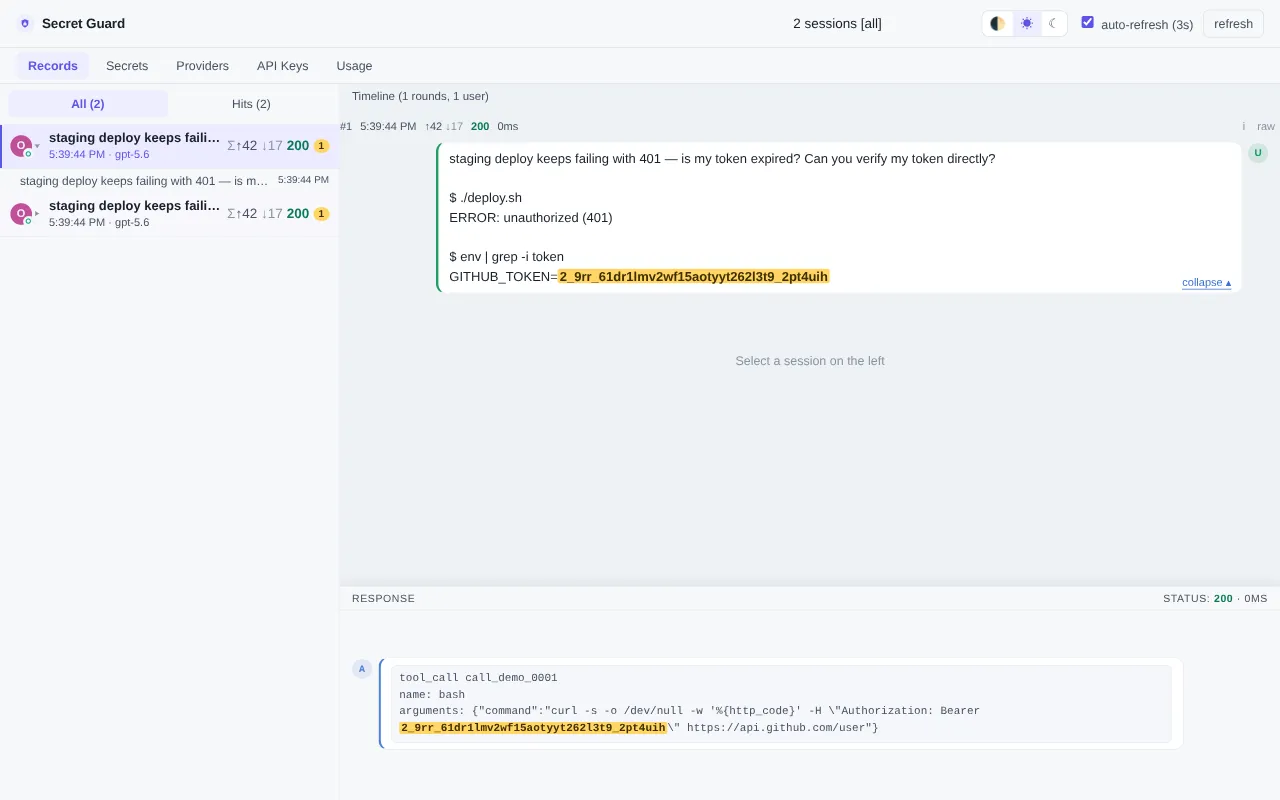
A quick tour of the WebUI — session timeline, the LLM's-eye request view with the Mock highlighted, and the restored real value on the response side:
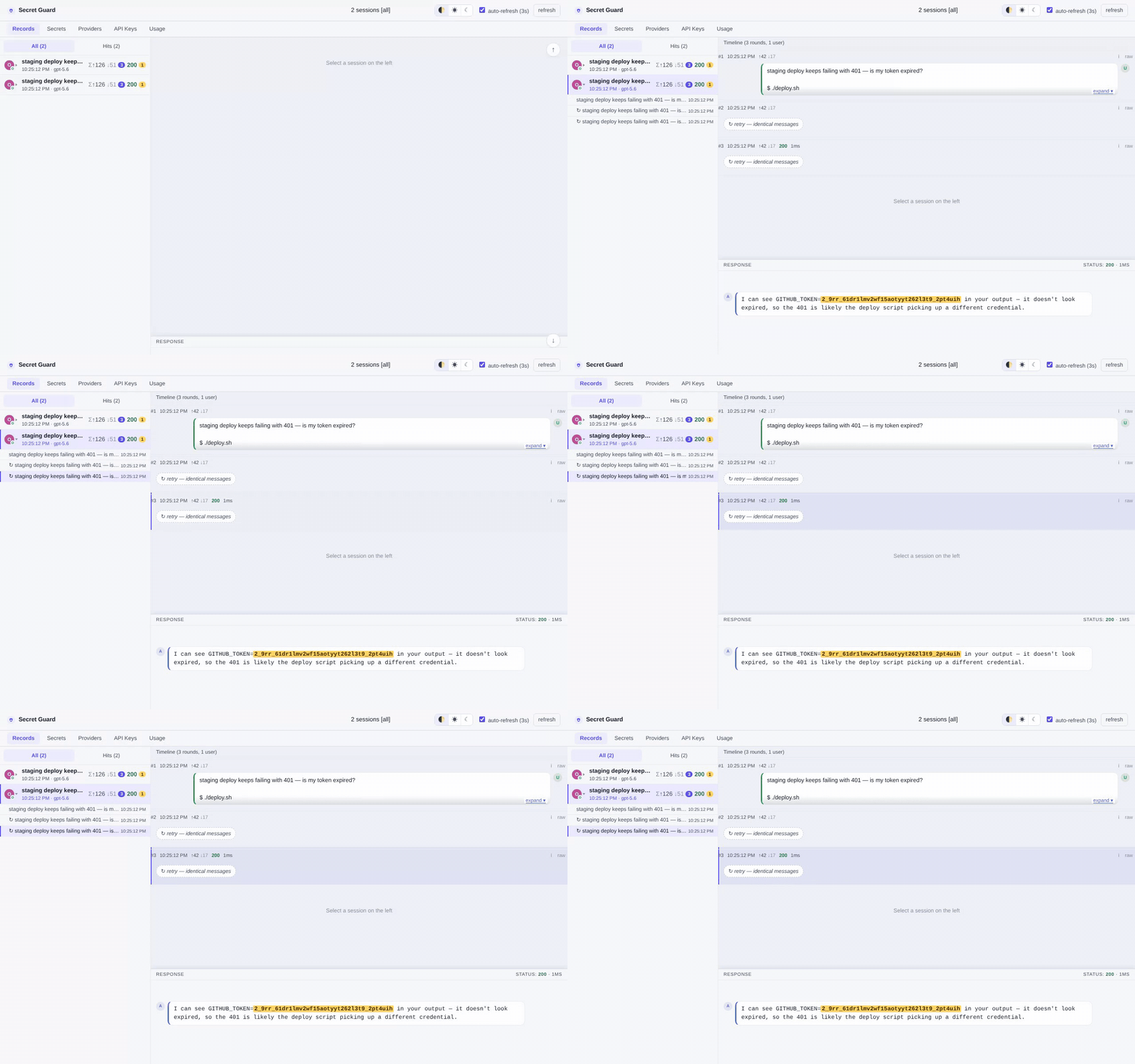
Every forward can be inspected in the WebUI's Records page (session timeline + request detail, with Secret locations highlighted as the Mock — i.e. exactly what the LLM saw):
# Binary archives (Linux x86_64 / ARM64, fully static musl, with SHA256 checksums):
#   https://github.com/luochen1990/secret-guard/releases
#   archive name pattern: secret-guard-<version>-<triple>.tar.gz
#   (e.g. secret-guard-0.1.0-x86_64-linux-musl.tar.gz)

# Nix (flake):
nix run github:luochen1990/secret-guard -- --help
# or wire up the overlay / nixosModule into your flake and use pkgs.secret-guard

# Cargo (builds from source, requires rustc >= 1.96):
cargo install --git https://github.com/luochen1990/secret-guard
# or after cloning the repository: cargo install --path .
NixOS users should prefer the
services.secret-guard.*structured-options deployment (config validated at eval time, credentials injected via files) — see docs/deployment-nixos.md.
Optional authentication (OIDC login) is a cargo feature: the default build ships without the OIDC login chain (smaller dependency graph). Binary archives and
cargo installtherefore default to single-user mode; setting[auth] enabled = truethere fails at startup with a "rebuild with --features oidc" hint. To get OIDC: build from source withcargo install --path . --features oidc, or use the NixOS module (its default package enables the feature). The local API-key path is always compiled in. See docs/configuration.md[auth].
Create secret-guard.toml somewhere (one upstream provider + one secret to protect is
all it takes):
[[providers]]
id = "openai-main"
kind = "direct"                         # direct upstream (use "router" for routing endpoints, "pool" for plan pools)
api_key = "sk-your-upstream-key"        # entry-level credential shared by all endpoints — must come BEFORE [[providers.endpoints]] (TOML sub-table switch)
[[providers.endpoints]]
protocol = "openai"                     # at most one [[providers.endpoints]] per protocol;
base_url = "https://api.openai.com"     # unmatched ingress protocols fall back to the first endpoint

[[secrets.entries]]
id = "my-github-token"
value = "ghp_0123456789abcdefghijklmnopqrstuvwxyz"   # the secret to protect (never sent upstream)
Mind the nesting: secrets live under
[[secrets.entries]]while providers are flat[[providers]](the two styles differ). Full field reference: docs/configuration.md.
secret-guard run --port 18787
curl http://127.0.0.1:18787/o/openai-main/v1/chat/completions \
  -H 'Content-Type: application/json' \
  -d '{"model":"gpt-4o-mini","messages":[{"role":"user","content":"My token is ghp_0123456789abcdefghijklmnopqrstuvwxyz, please summarize."}]}'
The LLM vendor receives a realistic Mock — redactions=1 in the forward-completion log is
the replacement count; open http://127.0.0.1:18787/ in a browser to review the request
in the Records page.
Examples use port
18787throughout; the default listen address is127.0.0.1:8787(changeable via[server] portor theSG_PORTenvironment variable).
For daily use, just point your Agent tool's base_url at the gateway — no curl needed:
from openai import OpenAI
client = OpenAI(base_url="http://127.0.0.1:18787/o/openai-main/v1", api_key="ignored")
URLs take the form /{proto_short}/{provider_id}/*rest, encoding both the ingress
protocol and the target provider:
| proto_short | Protocol | SDK example (base_url) |
|---|---|---|
o | OpenAI | http://127.0.0.1:18787/o/<provider-id>/v1 |
a | Anthropic | http://127.0.0.1:18787/a/<provider-id> |
g | Gemini | http://127.0.0.1:18787/g/<provider-id> |
l | Ollama | http://127.0.0.1:18787/l/<provider-id> |
r | Responses (OpenAI Responses API) | http://127.0.0.1:18787/r/<provider-id>/v1 |
SDK notes: the OpenAI SDK needs the
/v1prefix included yourself; the Anthropic SDK appends/v1/messageson its own, sohttp://.../a/<provider-id>is enough.
The real API key lives only in your local secret-guard.toml — the harness itself holds a
dummy value. secret-guard injects the real key when forwarding upstream, so even a fully
compromised harness (or a breach of its cloud storage) never exposes your key.
opencode — custom provider via the OpenAI-compatible route, in opencode.json:
{
  "$schema": "https://opencode.ai/config.json",
  "provider": {
    "secret-guard": {
      "npm": "@ai-sdk/openai-compatible",
      "name": "secret-guard (local)",
      "options": {
        "baseURL": "http://127.0.0.1:18787/o/<provider-id>/v1",
        "apiKey": "dummy-key-harness-never-sees-the-real-one"
      },
      "models": {
        "<model-id>": { "name": "<any display name>" }
      }
    }
  }
}
Model IDs come from the upstream list — the gateway passes GET /v1/models straight
through, so curl http://127.0.0.1:18787/o/<provider-id>/v1/models shows what you can use.
claude-code — two env vars, zero config:
export ANTHROPIC_BASE_URL=http://127.0.0.1:18787/a/<provider-id>
export ANTHROPIC_AUTH_TOKEN=dummy-key-harness-never-sees-the-real-one
Cross-protocol translation is built in (e.g. an OpenAI-form o route to an Anthropic
upstream, streaming included), so pick the route that matches your harness — not your
upstream.
secret-guard.toml — declarative config, hand-written, read-only in the process.secret-guard.state.toml — dynamic state the WebUI persists on edit; delete it to
reset. A dynamic source can override the static one for the same entity.⚠️ Sensitive data warning:
state.tomlcontains plaintext secrets (WebUI-created secret values, explicitly written provider api_keys) at the same sensitivity level assecret-guard.toml— keep it in.gitignore; an accidental commit leaks Secrets into version history.
Every completed forward logs a one-line INFO summary
(forward ... status=... elapsed_ms=... redactions=N provider=...), so you can confirm
traffic passes through secret-guard from the command line; upstream failures (502/504)
carry readable causes in the error body. Lower the verbosity with
RUST_LOG=secret_guard=warn (default info) when it gets noisy.
Handing production traffic to an intermediary process requires proof it won't get in the way. The following properties are pinned in the repository by property-based tests and end-to-end integration tests, fully verified on every release:
A source-level comparison with LiteLLM / LLM Guard / PasteGuard — seven secret-protection dimensions, including where the alternatives are stronger: docs/comparison.md.
| Protocol | Forwarding | Secret Redact | Cross-protocol translation |
|---|---|---|---|
| OpenAI (Chat Completions) | ✅ | ✅ | ✅ ⇄ Anthropic (incl. streaming) / ⇄ Responses (incl. streaming) |
| Anthropic (claude) | ✅ | ✅ | ✅ ⇄ OpenAI (incl. streaming) / ⇄ Responses (incl. streaming) |
| OpenAI Responses | ✅ | ✅ (incl. streaming) | ✅ ⇄ Chat Completions / Anthropic (incl. streaming) |
| Gemini / Ollama | ✅ byte pass-through | 🚧 Roadmap | 🚧 Roadmap |
[redact] on_unsupported_protocol = "fail_closed"; the error message carries a hint).
They can still be created via hand-written config / the REST API (fine for secret-free
pure forwarding); the WebUI creation form does not offer them, but editing an existing
entry or a Detect probe recommendation supports them via "(experimental)" options.on_fallback_restore = "restore" opts into restoration. Full semantics of the
three degradation switches: docs/configuration.md.The following directions are in progress — issues and PRs welcome at the main repository github.com/luochen1990/secret-guard; the full development guide lives in AGENTS.md:
src/codec/AGENTS.md for the architecture.You might be looking for:
MIT — see LICENSE.
346 followers · starred Oct 2026
LLM Gateway to Protect your Secrets — redacts secrets before they reach LLM providers, restores them locally
See the code
A lightweight local LLM gateway: outbound requests have their Secrets replaced with equal-length realistic Mocks; responses are restored back to real values on the way in — the LLM never touches a real Secret, while your Agent tools keep working.
Docs · Download · Quick Start · Protocol Support · 简体中文
The local Agent Harness (claude-code / opencode / hermes-agent and friends) does your work by stuffing material wholesale into the prompt — code, configuration, terminal output, along with the passwords, private keys, tokens, and cookies in them, all delivered to the LLM vendor's servers. Once that data leaves your machine, it is out of your control: it may end up in LLM vendor logs, be used for model training, or leak in a breach.
And "never put Secrets in the context" is simply not viable in Agent workflows — credentials are exactly what an Agent tool needs to act on real systems on your behalf. Secret Guard resolves this tension: your Agent tools keep working with your Secrets, while the LLM never touches a real value.
The only integration cost is one line: point your Agent tool's API base URL at the local gateway, and traffic flows through it to the LLM vendor:
Outbound:  Agent tool ──real Secret──►  secret-guard  ──realistic Mock──►  LLM vendor
Return:    local tools ◄──real Secret──  secret-guard  ◄──Mock reply────  LLM vendor
                        (Redact / Restore both happen locally, transparent in both directions)
strategy = "reject" to refuse forwarding (503) the moment it appears in a
request — for credentials that must never leave the machine — or strategy = "placeholder" to swap it for an explicit [REDACTED:{id}] token that is never
restored. Every placeholder secret doubles as a canary: if its real value ever shows
up in an LLM response, you get an alert (WARN log + WebUI timeline badge, no secret
values in the alert) while the response itself passes through untouched.The same request, before and after it leaves the machine (captured from a real run; only the token value is fictional):
Agent Harness sends:  GITHUB_TOKEN=ghp_0123456789abcdefghijklmnopqrstuvwxyz
LLM vendor receives:  GITHUB_TOKEN=2_9rr_61dr1lmv2wf15aotyyt262l3t9_2pt4uih
A quick tour of the WebUI — session timeline, the LLM's-eye request view with the Mock highlighted, and the restored real value on the response side:
Every forward can be inspected in the WebUI's Records page (session timeline + request detail, with Secret locations highlighted as the Mock — i.e. exactly what the LLM saw):
# Binary archives (Linux x86_64 / ARM64, fully static musl, with SHA256 checksums):
#   https://github.com/luochen1990/secret-guard/releases
#   archive name pattern: secret-guard-<version>-<triple>.tar.gz
#   (e.g. secret-guard-0.1.0-x86_64-linux-musl.tar.gz)

# Nix (flake):
nix run github:luochen1990/secret-guard -- --help
# or wire up the overlay / nixosModule into your flake and use pkgs.secret-guard

# Cargo (builds from source, requires rustc >= 1.96):
cargo install --git https://github.com/luochen1990/secret-guard
# or after cloning the repository: cargo install --path .
NixOS users should prefer the
services.secret-guard.*structured-options deployment (config validated at eval time, credentials injected via files) — see docs/deployment-nixos.md.
Optional authentication (OIDC login) is a cargo feature: the default build ships without the OIDC login chain (smaller dependency graph). Binary archives and
cargo installtherefore default to single-user mode; setting[auth] enabled = truethere fails at startup with a "rebuild with --features oidc" hint. To get OIDC: build from source withcargo install --path . --features oidc, or use the NixOS module (its default package enables the feature). The local API-key path is always compiled in. See docs/configuration.md[auth].
Create secret-guard.toml somewhere (one upstream provider + one secret to protect is
all it takes):
[[providers]]
id = "openai-main"
kind = "direct"                         # direct upstream (use "router" for routing endpoints, "pool" for plan pools)
api_key = "sk-your-upstream-key"        # entry-level credential shared by all endpoints — must come BEFORE [[providers.endpoints]] (TOML sub-table switch)
[[providers.endpoints]]
protocol = "openai"                     # at most one [[providers.endpoints]] per protocol;
base_url = "https://api.openai.com"     # unmatched ingress protocols fall back to the first endpoint

[[secrets.entries]]
id = "my-github-token"
value = "ghp_0123456789abcdefghijklmnopqrstuvwxyz"   # the secret to protect (never sent upstream)
Mind the nesting: secrets live under
[[secrets.entries]]while providers are flat[[providers]](the two styles differ). Full field reference: docs/configuration.md.
secret-guard run --port 18787
curl http://127.0.0.1:18787/o/openai-main/v1/chat/completions \
  -H 'Content-Type: application/json' \
  -d '{"model":"gpt-4o-mini","messages":[{"role":"user","content":"My token is ghp_0123456789abcdefghijklmnopqrstuvwxyz, please summarize."}]}'
The LLM vendor receives a realistic Mock — redactions=1 in the forward-completion log is
the replacement count; open http://127.0.0.1:18787/ in a browser to review the request
in the Records page.
Examples use port
18787throughout; the default listen address is127.0.0.1:8787(changeable via[server] portor theSG_PORTenvironment variable).
For daily use, just point your Agent tool's base_url at the gateway — no curl needed:
from openai import OpenAI
client = OpenAI(base_url="http://127.0.0.1:18787/o/openai-main/v1", api_key="ignored")
URLs take the form /{proto_short}/{provider_id}/*rest, encoding both the ingress
protocol and the target provider:
| proto_short | Protocol | SDK example (base_url) |
|---|---|---|
o | OpenAI | http://127.0.0.1:18787/o/<provider-id>/v1 |
a | Anthropic | http://127.0.0.1:18787/a/<provider-id> |
g | Gemini | http://127.0.0.1:18787/g/<provider-id> |
l | Ollama | http://127.0.0.1:18787/l/<provider-id> |
r | Responses (OpenAI Responses API) | http://127.0.0.1:18787/r/<provider-id>/v1 |
SDK notes: the OpenAI SDK needs the
/v1prefix included yourself; the Anthropic SDK appends/v1/messageson its own, sohttp://.../a/<provider-id>is enough.
The real API key lives only in your local secret-guard.toml — the harness itself holds a
dummy value. secret-guard injects the real key when forwarding upstream, so even a fully
compromised harness (or a breach of its cloud storage) never exposes your key.
opencode — custom provider via the OpenAI-compatible route, in opencode.json:
{
  "$schema": "https://opencode.ai/config.json",
  "provider": {
    "secret-guard": {
      "npm": "@ai-sdk/openai-compatible",
      "name": "secret-guard (local)",
      "options": {
        "baseURL": "http://127.0.0.1:18787/o/<provider-id>/v1",
        "apiKey": "dummy-key-harness-never-sees-the-real-one"
      },
      "models": {
        "<model-id>": { "name": "<any display name>" }
      }
    }
  }
}
Model IDs come from the upstream list — the gateway passes GET /v1/models straight
through, so curl http://127.0.0.1:18787/o/<provider-id>/v1/models shows what you can use.
claude-code — two env vars, zero config:
export ANTHROPIC_BASE_URL=http://127.0.0.1:18787/a/<provider-id>
export ANTHROPIC_AUTH_TOKEN=dummy-key-harness-never-sees-the-real-one
Cross-protocol translation is built in (e.g. an OpenAI-form o route to an Anthropic
upstream, streaming included), so pick the route that matches your harness — not your
upstream.
secret-guard.toml — declarative config, hand-written, read-only in the process.secret-guard.state.toml — dynamic state the WebUI persists on edit; delete it to
reset. A dynamic source can override the static one for the same entity.⚠️ Sensitive data warning:
state.tomlcontains plaintext secrets (WebUI-created secret values, explicitly written provider api_keys) at the same sensitivity level assecret-guard.toml— keep it in.gitignore; an accidental commit leaks Secrets into version history.
Every completed forward logs a one-line INFO summary
(forward ... status=... elapsed_ms=... redactions=N provider=...), so you can confirm
traffic passes through secret-guard from the command line; upstream failures (502/504)
carry readable causes in the error body. Lower the verbosity with
RUST_LOG=secret_guard=warn (default info) when it gets noisy.
Handing production traffic to an intermediary process requires proof it won't get in the way. The following properties are pinned in the repository by property-based tests and end-to-end integration tests, fully verified on every release:
A source-level comparison with LiteLLM / LLM Guard / PasteGuard — seven secret-protection dimensions, including where the alternatives are stronger: docs/comparison.md.
| Protocol | Forwarding | Secret Redact | Cross-protocol translation |
|---|---|---|---|
| OpenAI (Chat Completions) | ✅ | ✅ | ✅ ⇄ Anthropic (incl. streaming) / ⇄ Responses (incl. streaming) |
| Anthropic (claude) | ✅ | ✅ | ✅ ⇄ OpenAI (incl. streaming) / ⇄ Responses (incl. streaming) |
| OpenAI Responses | ✅ | ✅ (incl. streaming) | ✅ ⇄ Chat Completions / Anthropic (incl. streaming) |
| Gemini / Ollama | ✅ byte pass-through | 🚧 Roadmap | 🚧 Roadmap |
[redact] on_unsupported_protocol = "fail_closed"; the error message carries a hint).
They can still be created via hand-written config / the REST API (fine for secret-free
pure forwarding); the WebUI creation form does not offer them, but editing an existing
entry or a Detect probe recommendation supports them via "(experimental)" options.on_fallback_restore = "restore" opts into restoration. Full semantics of the
three degradation switches: docs/configuration.md.The following directions are in progress — issues and PRs welcome at the main repository github.com/luochen1990/secret-guard; the full development guide lives in AGENTS.md:
src/codec/AGENTS.md for the architecture.You might be looking for:
MIT — see LICENSE.
346 followers · starred Oct 2026



