
Secure, cross-platform file sending. Peer-to-peer when both devices are online; otherwise a self-hostable, zero-knowledge relay holds the end-to-end-encrypted file until the recipient appears — then it expires and is gone. HPKE encryption with sender authenticity. Open-core and fully self-hostable.
See the codeSee what people are saying
README
Arvolo
Leggilo in italiano · Lisez-le en français · Lies es auf Deutsch.
Send files to anyone — end-to-end encrypted, no account, even if they're offline.
Try it in 60 seconds
One machine, nobody else needed.
1. Install it.
curl -fsSL https://raw.githubusercontent.com/lords82/arvolo/main/install.sh | sh
macOS and Linux; on Windows, and for the desktop app, see Install below.
2. Send something.
arvolo send --link ./report.pdf
#   ->  https://arvolo.duckdns.org/dl/7k2m…#Yk9f…
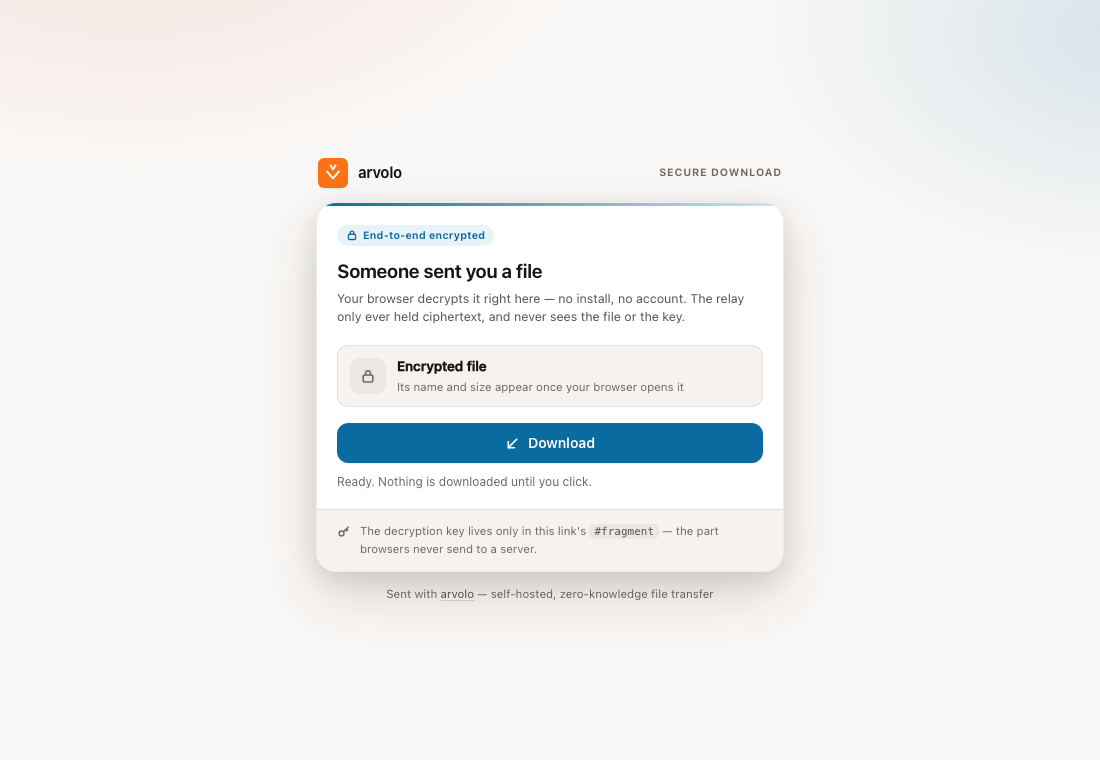
Open that URL in any browser, on any machine. The file downloads and decrypts right there — no account on either side, nothing installed on theirs. This is what whoever opens it sees:
That works out of the box because Arvolo ships pointed at a public relay. It
never sees your key — that lives only in the link's #fragment, which browsers
never send to a server — but it is a small machine run by the project: files up
to 100 MB, links live for 6 hours, and it can be busy. For anything that
matters, point Arvolo at a relay you run — one docker run,
thirty seconds. A browser link is also the one path where the relay serves the
JavaScript that does the decrypting, which is a good reason for it to be yours.
Using the public one means accepting its terms — short, and worth the
two minutes if what you send is not yours to send.
Send to a person
The link is the demo. This is the daily use, and here the relay never sees the file at all: it travels straight from your machine to theirs.
# you
arvolo send --code ./photo.jpg
#   ->  4821-crater-mango

# them
arvolo recv 4821-crater-mango
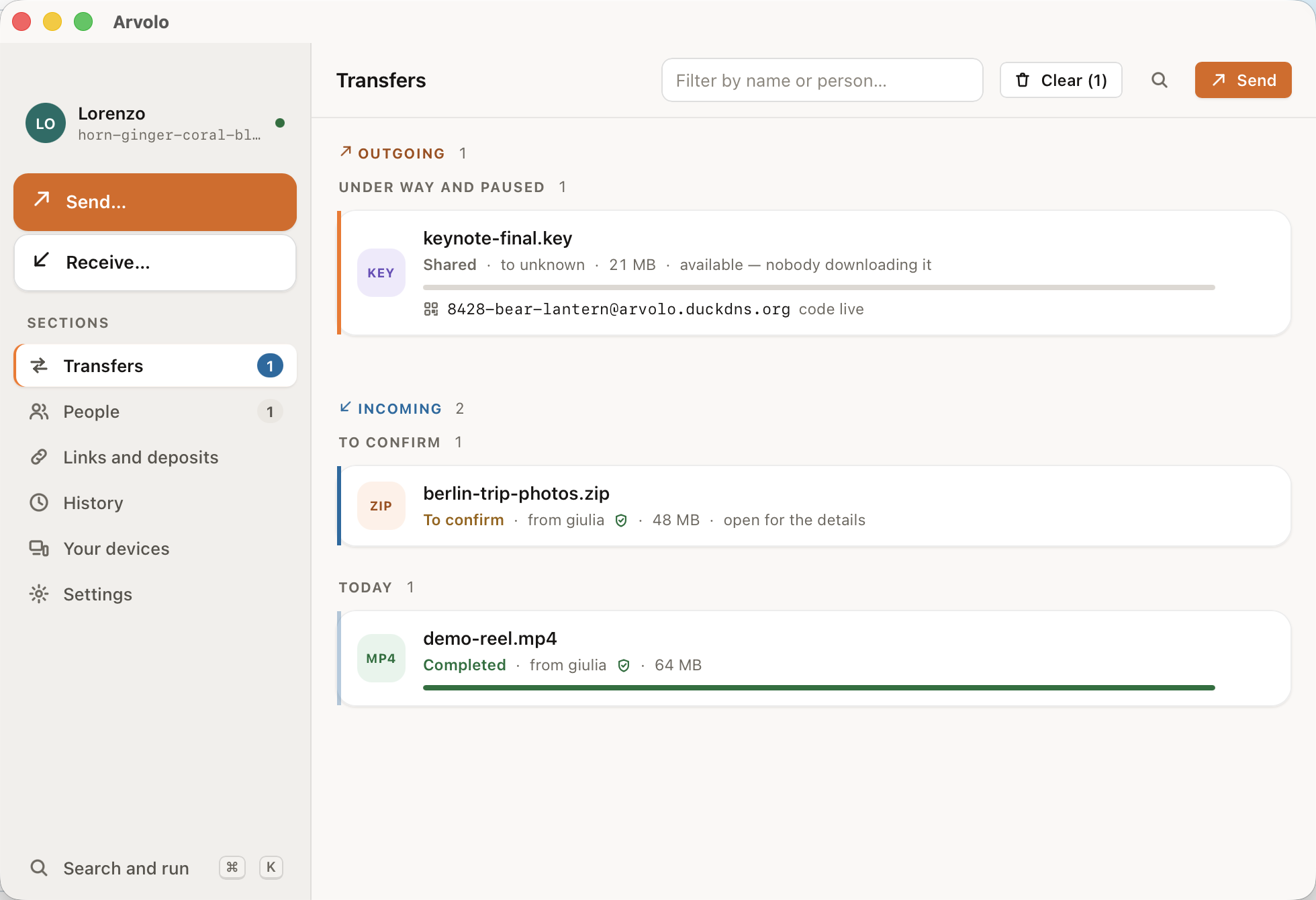
In the app: drag a file into the window and share the short code it gives you.
A bare arvolo send ./photo.jpg writes a small photo.jpg.arvolo ticket file
instead — share it over any channel, like a .torrent, and the other side runs
arvolo recv photo.jpg.arvolo.
And when they are not there at all, arvolo send --to <them> ./photo.jpg leaves
it sealed in a mailbox on the relay. It waits for them, then burns after
being read.
Why not just…
| magic-wormhole, croc | Both sides have to be online at the same moment. Arvolo does that too, and when they're away it leaves the file sealed in a mailbox instead of failing. |
| WeTransfer, Dropbox links | Their server can read your file, and the account is theirs. Arvolo's relay only ever holds ciphertext, and you can run it yourself. |
| Firefox Send | Gone since 2020. arvolo send --link is the same idea — a link anyone can open in a browser — still here, and self-hostable. |
| Syncthing | Keeps folders in sync between machines you own. Arvolo sends one thing, once, to somebody else. |
| Signal, email | Fine, until the file is too big or the person isn't in your contacts. That's the gap this fills. |
How it works
When both devices are online, files travel peer-to-peer — straight from one machine to the other, never through a server. When the recipient is away, the file waits sealed in a mailbox on a relay: a small server you can self-host, which only ever stores ciphertext and cannot read a thing. And for someone with nothing installed, a link downloads and decrypts the file in any browser.
- End-to-end encrypted, always — keys never touch a server.
- No account, no vendor in the middle — your files move through infrastructure you control.
- Reaches people who are offline — sealed deposits wait for them, then burn after read.
- App and command line, one engine — macOS (signed and notarized), Windows and Linux.
Install
| macOS | The .dmg from the latest release — signed and notarized, no warnings — or the curl … | sh line above for the command line. |
| Linux | The .AppImage for the app, .deb / .rpm for the command line, or the same one-liner. |
| Windows | The .msi from the latest release, which also puts arvolo on your PATH. Prefer to install nothing? Take the .zip and run it where it lands. |
| From source | cargo install --git https://github.com/lords82/arvolo arvolo-cli (Rust ≥ 1.88). |
The Windows installer isn't code-signed yet — an EV certificate costs a few
hundred euro a year — so SmartScreen will stop you once: More info → Run
anyway. Every release ships a SHA256SUMS if you would rather check what you
downloaded.
Run your own relay
docker run -d --name arvolo-relay -p 6282:6282 -v arvolo-data:/data \
  ghcr.io/lords82/arvolo-relay:latest
Point Arvolo at it under Settings → Network in the app, or with --relay on
the command line. Then it is your files, your retention, your size limits, and
nothing of yours waits on somebody else's machine. Deploying
covers doing it properly, with TLS.
Where to go next
| The manual | Every command, every flag, every setting — and how it all works inside. |
| Quickstart | Standing up a relay properly, LAN and behind nginx + TLS, end to end. |
| Deploying | Production self-hosting: systemd, Docker, abuse hardening. |
| The desktop app | The GUI in detail, with its CLI parity table. |
| The protocol | The wire format and every flow, for the curious and the auditing. |
| Terms of use | The conditions of the public relay: what may not be sent, who answers for it, what is logged and for how long. |
Security
No external audit yet, and the protocol is written down in full so that it can have one — see SECURITY.md for what is and isn't reviewed, and for how to report something privately.
License
Open core: the client and the relay are free software under AGPL-3.0-only; a separate commercial license covers proprietary use and business features. "Arvolo" is a trademark of the project owner — see CONTRIBUTING.md.


Secure, cross-platform file sending. Peer-to-peer when both devices are online; otherwise a self-hostable, zero-knowledge relay holds the end-to-end-encrypted file until the recipient appears — then it expires and is gone. HPKE encryption with sender authenticity. Open-core and fully self-hostable.
See the codeSee what people are saying
README
Arvolo
Leggilo in italiano · Lisez-le en français · Lies es auf Deutsch.
Send files to anyone — end-to-end encrypted, no account, even if they're offline.
Try it in 60 seconds
One machine, nobody else needed.
1. Install it.
curl -fsSL https://raw.githubusercontent.com/lords82/arvolo/main/install.sh | sh
macOS and Linux; on Windows, and for the desktop app, see Install below.
2. Send something.
arvolo send --link ./report.pdf
#   ->  https://arvolo.duckdns.org/dl/7k2m…#Yk9f…
Open that URL in any browser, on any machine. The file downloads and decrypts right there — no account on either side, nothing installed on theirs. This is what whoever opens it sees:
That works out of the box because Arvolo ships pointed at a public relay. It
never sees your key — that lives only in the link's #fragment, which browsers
never send to a server — but it is a small machine run by the project: files up
to 100 MB, links live for 6 hours, and it can be busy. For anything that
matters, point Arvolo at a relay you run — one docker run,
thirty seconds. A browser link is also the one path where the relay serves the
JavaScript that does the decrypting, which is a good reason for it to be yours.
Using the public one means accepting its terms — short, and worth the
two minutes if what you send is not yours to send.
Send to a person
The link is the demo. This is the daily use, and here the relay never sees the file at all: it travels straight from your machine to theirs.
# you
arvolo send --code ./photo.jpg
#   ->  4821-crater-mango

# them
arvolo recv 4821-crater-mango
In the app: drag a file into the window and share the short code it gives you.
A bare arvolo send ./photo.jpg writes a small photo.jpg.arvolo ticket file
instead — share it over any channel, like a .torrent, and the other side runs
arvolo recv photo.jpg.arvolo.
And when they are not there at all, arvolo send --to <them> ./photo.jpg leaves
it sealed in a mailbox on the relay. It waits for them, then burns after
being read.
Why not just…
| magic-wormhole, croc | Both sides have to be online at the same moment. Arvolo does that too, and when they're away it leaves the file sealed in a mailbox instead of failing. |
| WeTransfer, Dropbox links | Their server can read your file, and the account is theirs. Arvolo's relay only ever holds ciphertext, and you can run it yourself. |
| Firefox Send | Gone since 2020. arvolo send --link is the same idea — a link anyone can open in a browser — still here, and self-hostable. |
| Syncthing | Keeps folders in sync between machines you own. Arvolo sends one thing, once, to somebody else. |
| Signal, email | Fine, until the file is too big or the person isn't in your contacts. That's the gap this fills. |
How it works
When both devices are online, files travel peer-to-peer — straight from one machine to the other, never through a server. When the recipient is away, the file waits sealed in a mailbox on a relay: a small server you can self-host, which only ever stores ciphertext and cannot read a thing. And for someone with nothing installed, a link downloads and decrypts the file in any browser.
- End-to-end encrypted, always — keys never touch a server.
- No account, no vendor in the middle — your files move through infrastructure you control.
- Reaches people who are offline — sealed deposits wait for them, then burn after read.
- App and command line, one engine — macOS (signed and notarized), Windows and Linux.
Install
| macOS | The .dmg from the latest release — signed and notarized, no warnings — or the curl … | sh line above for the command line. |
| Linux | The .AppImage for the app, .deb / .rpm for the command line, or the same one-liner. |
| Windows | The .msi from the latest release, which also puts arvolo on your PATH. Prefer to install nothing? Take the .zip and run it where it lands. |
| From source | cargo install --git https://github.com/lords82/arvolo arvolo-cli (Rust ≥ 1.88). |
The Windows installer isn't code-signed yet — an EV certificate costs a few
hundred euro a year — so SmartScreen will stop you once: More info → Run
anyway. Every release ships a SHA256SUMS if you would rather check what you
downloaded.
Run your own relay
docker run -d --name arvolo-relay -p 6282:6282 -v arvolo-data:/data \
  ghcr.io/lords82/arvolo-relay:latest
Point Arvolo at it under Settings → Network in the app, or with --relay on
the command line. Then it is your files, your retention, your size limits, and
nothing of yours waits on somebody else's machine. Deploying
covers doing it properly, with TLS.
Where to go next
| The manual | Every command, every flag, every setting — and how it all works inside. |
| Quickstart | Standing up a relay properly, LAN and behind nginx + TLS, end to end. |
| Deploying | Production self-hosting: systemd, Docker, abuse hardening. |
| The desktop app | The GUI in detail, with its CLI parity table. |
| The protocol | The wire format and every flow, for the curious and the auditing. |
| Terms of use | The conditions of the public relay: what may not be sent, who answers for it, what is logged and for how long. |
Security
No external audit yet, and the protocol is written down in full so that it can have one — see SECURITY.md for what is and isn't reviewed, and for how to report something privately.
License
Open core: the client and the relay are free software under AGPL-3.0-only; a separate commercial license covers proprietary use and business features. "Arvolo" is a trademark of the project owner — see CONTRIBUTING.md.