
README
Agate for ComfyUI
ComfyUI nodes for Agate, the 260M-parameter text-to-image model from LogoLabs, in all three releases:
| Release | Resolution | |
|---|---|---|
| Preview 003 (default) | 512 × 512 (or 256) | multi-resolution model; built-in prompt pipeline: quoted text is spelled out, object counts are coded, "no X" becomes a negative prompt |
| Preview 002 | 256 × 256 | same network as 001, trained longer |
| Preview 001 | 256 × 256 | the first preview (GenEval 0.550, official scorer) |
Agate samples in the SD 1.x latent space, so it plugs into ComfyUI's own VAE, preview, upscale and img2img nodes. Every image the Agate nodes produce is marked as AI-generated (see AI-generated output marking). Workflows made with earlier versions of the pack keep working unchanged.

"a minimalist logo of a fox head, orange, flat design, white background", seed 0, 50 steps, cfg 3
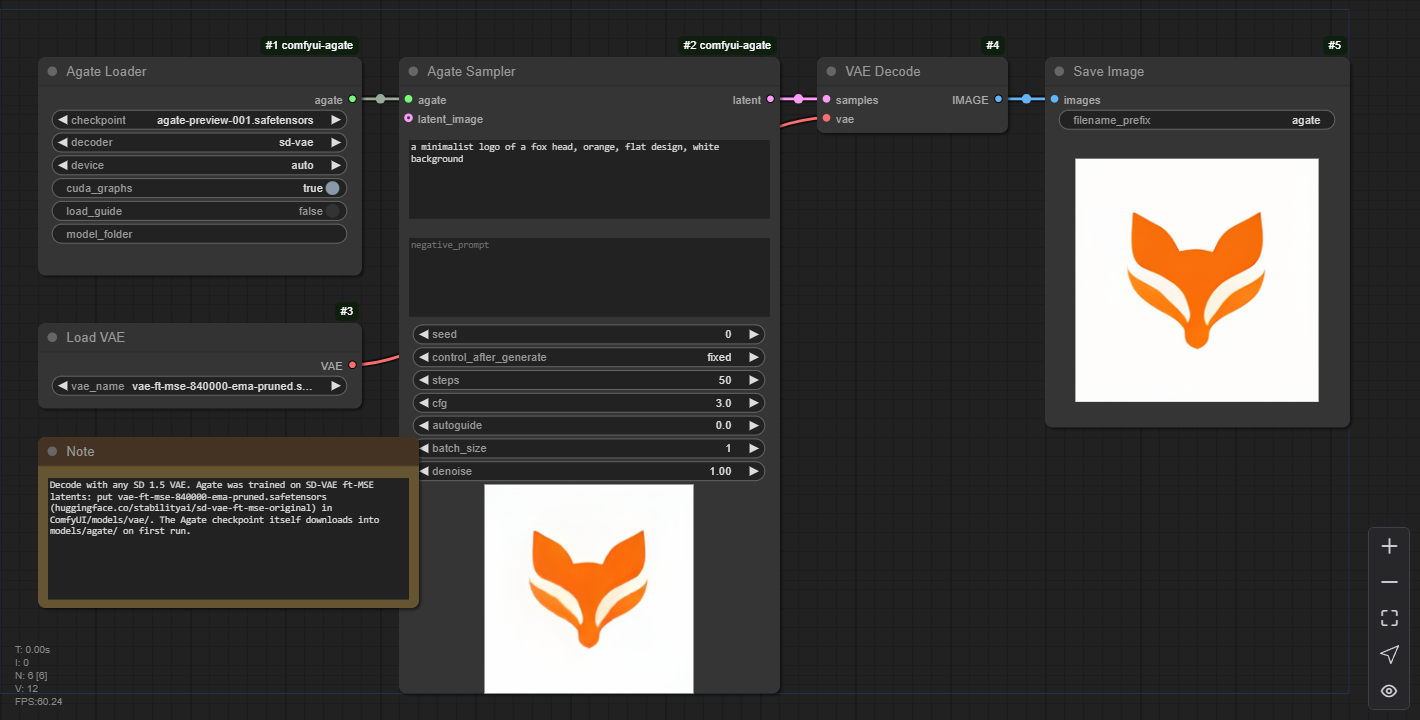
Try it in the browser first, without installing anything: Agate WebGPU demo.
Why we built Agate. Agate is LogoLabs' search for the best architecture for small-scale image generation, as groundwork for glyph and symbol generation: we want to generate vector-native fonts to go with the wordmarks we make at LogoLabs. We trained a general text-to-image model because general image generation is a good proxy for how an architecture performs on those tasks, and it is very benchmark-friendly (GenEval, Qwen-Image-Bench, FID), unlike tasks such as SDF generation, which have almost no established benchmarks. Next, we plan to build on it to generate SVGs with our vectoriser, Inkvec, and to improve Inkvec's prior with flow matching to help trace the fonts. We decided to release Agate to share these architectural efforts.
Install
ComfyUI Manager / Registry: Search for Agate or agate-comfyui in ComfyUI Manager and click Install. You can also find it directly on the Comfy Registry. Alternatively, use Manager → Install via Git URL with https://github.com/logolabs/agate-comfyui, then restart ComfyUI.
By hand:
cd ComfyUI/custom_nodes
git clone https://github.com/logolabs/agate-comfyui
pip install -r agate-comfyui/requirements.txt     # with ComfyUI's Python; portable build:
                                                  # ..\python_embeded\python.exe -m pip install -r agate-comfyui\requirements.txt
Restart ComfyUI. The nodes appear under LogoLabs → Agate. Drag one of the example workflows onto the canvas.
Requirements: ComfyUI's own PyTorch (CUDA, CPU or other devices), plus diffusers>=0.30 and
transformers>=4.48 (ModernBERT, which the Ettin text encoder uses; older ComfyUI installs ship an older
transformers). Nothing in requirements.txt pins or replaces torch.
Model files
| File | Where | |
|---|---|---|
agate-preview-003.safetensors (529 MB) | ComfyUI/models/agate/ | Preview 003: generator + text encoder, tokenizer and config in one file. Downloaded automatically on first use from Logolabs/agate-preview-003 |
agate-preview-002.safetensors (522 MB) | ComfyUI/models/agate/ | Preview 002, from Logolabs/agate-preview-002 |
agate-preview-001.safetensors (522 MB) | ComfyUI/models/agate/ | Preview 001, from Logolabs/agate-preview-001 |
agate-guide-27600.safetensors (522 MB) | ComfyUI/models/agate/ | Only for autoguide > 0 with 001 / 002 (003 has no guide). Downloaded automatically the first time you use it |
vae-ft-mse-840000-ema-pruned.safetensors (335 MB) | ComfyUI/models/vae/ | The SD 1.5 VAE, for the stock VAE Decode after Agate Sampler. Get it from stabilityai/sd-vae-ft-mse-original; most SD 1.5 setups already have it |
Only the release you pick is downloaded. To install offline, download the file from the comfyui/ folder of
its model repo and put it in ComfyUI/models/agate/ (an agate: entry in extra_model_paths.yaml works too). The model is
public; no Hugging Face login is needed. Agate Generate also fetches its own decoder the first time
(the diffusers copies of stabilityai/sd-vae-ft-mse or madebyollin/taesd, into the Hugging Face cache).
Example workflows
In example_workflows/ (ComfyUI Manager and the Comfy Registry show these as templates):
| Workflow | Graph |
|---|---|
agate_txt2img.json | Agate Loader → Agate Sampler → VAE Decode (SD 1.5 VAE) → Save Image |
agate_generate.json | Agate Loader → Agate Generate → Save Image. No VAE file needed |
agate_upscale_4x.json | txt2img → Upscale Image By (lanczos, 4×) → Save Image, for 1024 × 1024 output |
agate_003_generate.json | Agate Loader (003) → Agate Generate (512 px) → Agate Save Image (PNG with the provenance fields) |
agate_003_txt2img_watermark.json | Agate Loader (003) → Agate Sampler → VAE Decode → Agate Watermark → Save Image |
agate_plan_viewer.json | Agate Loader → Agate Plan Viewer → Save Image (final image), Preview Image (per-step panels), Save Animated WEBP (panels at 12 fps), Preview Image (change curve). See See the plan |
Nodes
Agate Loader → AGATE_MODEL
| Input | Default | |
|---|---|---|
checkpoint | agate-preview-003.safetensors | The release: agate-preview-003 / -002 / -001, or any other single file in models/agate/. The official files are downloaded if they are missing |
decoder | sd-vae | Only used by Agate Generate: sd-vae (SD-VAE ft-MSE, best quality) or taesd (tiny decoder: faster and lighter, a little softer) |
device | auto | auto uses ComfyUI's device; or force cuda / cpu |
cuda_graphs | on | Records each denoising step as a CUDA graph and replays it. Agate is small enough that kernel launches, not arithmetic, dominate an eager step. Ignored off CUDA |
load_guide | off | Preloads the guide model that autoguide uses. Otherwise it loads the first time a sampler asks for it |
model_folder (optional) | empty | Advanced: load a release-layout folder (config.json, generator.safetensors, text_encoder/) or a Hugging Face repo id instead of the checkpoint |
Agate Sampler → LATENT
| Input | Default | |
|---|---|---|
agate | From Agate Loader | |
prompt | English prompt; up to 512 tokens are read | |
negative_prompt | empty | The unconditional side of classifier-free guidance. Agate was trained with the empty prompt there, so leave it empty unless you want to push away from something |
seed | 0 | With the usual control_after_generate (fixed / increment / randomize) |
steps | 50 | Euler steps over the flow path (over the remaining part of it for img2img) |
cfg | 3.0 | Classifier-free guidance scale |
autoguide | 0.0 | 0–3. Also steers away from Agate's own early (step 27,600) checkpoint, which sharpens faces and fine detail. Try 1.0 with cfg 4. Costs about 50% more time |
batch_size | 1 | Images per run from one seed. Ignored when latent_image is connected |
denoise | 1.0 | With latent_image: how much to change it. 1.0 ignores its content (plain txt2img), 0.0 returns it unchanged |
latent_image (optional) | An SD 1.x LATENT to start from: VAE Encode of an image, or an earlier Agate Sampler | |
resolution (optional) | auto | Preview 003: auto = 512 px, or 256 (about 4× faster). 001 / 002: 256 px only |
Preview 003's prompt pipeline runs inside the sampler, exactly as in its Python package: the prompt is normalised (SHOUTED or Title Cased prompts lower-cased outside quotes, "3" → "three"), "without X" / "no X" move to the negative prompt, text in double quotes is also spelled out letter by letter, and object counts are passed to the model as a count code. The console logs what the model sees. 512 px uses the SD3 timestep shift 2 it was trained with. On CUDA the node reproduces the package's images to within 1/255.
The output is a standard SD 1.x LATENT (unscaled VAE latents, 4 × 32 × 32 for 256 px, the same
convention as VAE Encode / VAE Decode). Decode it with VAE Decode and an SD 1.5 VAE, save it, or feed
it into anything that takes SD 1.x latents. The node shows ComfyUI's live preview while it samples
(latent2rgb or TAESD, whichever --preview-method selects), and Cancel stops it at the next step.
img2img. Agate is a rectified flow from noise at t = 0 to the image at t = 1, x_t = (1 − t)·noise + t·x.
With a latent_image and denoise = d, the sampler noises the latent to t = 1 − d and runs steps Euler
steps from there. Load Image → VAE Encode → Agate Sampler with denoise below 1 re-renders an image (at
0.6 the layout and colours survive, and the prompt changes details); an Agate latent fed back in at a
low denoise gives variations. Agate was trained at 256 px only: other
latent sizes run (sides divisible by 32 px) but are out of distribution.
Agate Generate → IMAGE
The all-in-one node: the same inputs as Agate Sampler without the img2img ones, decoded with the loader's
decoder into a standard image batch (B × 256 × 256 × 3, floats in 0–1). Use it when you do not have
an SD 1.5 VAE file. Without marking, its images match Sampler → VAE Decode to within 5/255 per pixel (mean
0.2/255), the difference between the diffusers and ComfyUI VAE implementations. Extra inputs: resolution
(as above), watermark and metadata (both on; see below).
Agate Watermark → IMAGE, Agate Save Image
Agate Watermark adds the Agate watermark to any image batch, for the Sampler → VAE Decode path (a LATENT
cannot carry it). Connect the loader's agate output, or pick the release. Agate Save Image saves PNGs
with the exact provenance text fields the Python packages write; release: auto reads the release from the
watermark, and ensure_watermark marks images that lack it.
AI-generated output marking
Every image made by Agate Generate and Agate Plan Viewer carries two marks (EU AI Act Art. 50(2)), the same as the Python packages and the WebGPU Space:
- An invisible watermark: invisible-watermark's
dwtDctSvdmethod, payloadAGATE+ release (AGATE003...).agate_comfy/marking.pyimplements it in plain numpy, bit-identical to the library, so no extra dependency is needed. Read it withagate.detect_watermark(img)from the model packages, oragate_comfy.marking.detect_watermark.detectedmeans "an Agate image";releasenames the release only when the payload reads exactly. On roughly 1-2% of images, mostly flat logos on pure white, the mark cannot be read back even fresh; the metadata still marks those. - Provenance metadata:
ai_generated,generator,model,watermark. The prompt is not included. ComfyUI's stock Save Image writes only the workflow'sextra_pnginfo, JSON-encoded, so the nodes addai_generated(true) and anagateobject with the other fields there. Agate Save Image writes the exact keys as plain text. Both also write ComfyUI's workflow chunks, which contain the prompt (turn offinclude_workflow, or run ComfyUI with--disable-metadata, to leave them out).
Both are options on the nodes (watermark, metadata, on by default). Neither is tamper-proof. If you
publish images made with Agate, label them as AI-generated.
See the plan
Agate does not paint pixels straight from the prompt. Its thinker first writes a plan: a 640-channel map on a 16 × 16 grid (one cell per 16 × 16 pixels) that says what goes where. The renderer then paints the image from that plan alone. Agate Plan Viewer samples one image and records the plan at every denoising step, so you can watch the layout being decided.

"a dog sitting to the left of a cat", seed 0, 50 steps: plan · regions · change · prediction

"a minimalist logo of a fox head, orange, flat design, white background", seed 0, 50 steps
Inputs are the Sampler's (one image; autoguide is not available here) plus regions (k, default 6) and
frame_size (default 256 px). All outputs except latent are ComfyUI IMAGE batches with one frame per step:
| Output | What it shows |
|---|---|
image | The final image, decoded like Agate Generate. It is the same image Agate Sampler gives for the same seed: recording the plan does not change sampling (tested bit for bit, with and without CUDA graphs) |
plan_frames | The plan as colours: its 640 channels projected to RGB with PCA, fitted once over all steps, so a colour means the same thing at every step |
region_frames | The plan split into regions parts: one k-means over the (per-step centred, normalised) plan cells of all steps, so a region keeps its colour over time |
prediction_frames | What the model expects the final image to be at that step: x̂₁ = z + (1 − t)·v, decoded with TAESD |
change_frames | How much each cell of the plan changed since the previous step (1 − cosine similarity; dark blue = unchanged, red = most) |
panel | The four side by side with a step label. Feed it to Save Animated WEBP or VideoHelperSuite's Video Combine |
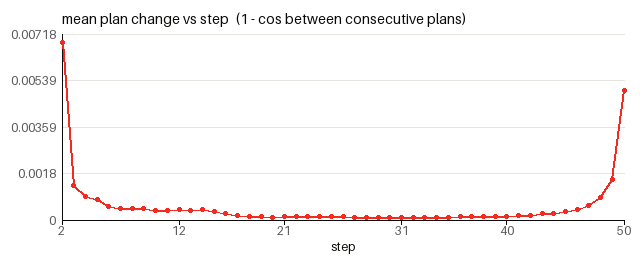
change_curve | One image: the mean plan change per step |
latent | The final SD 1.x LATENT, as Agate Sampler outputs it |
What it shows: the plan is decided in the first few steps. In the dog-and-cat example the two animals are separate regions by step 6 of 50, long before the predicted image is sharp, and the plan then stays almost frozen through the middle of the trajectory while the renderer adds detail. The change curve drops by an order of magnitude after the first steps and only rises again in the last few steps, where the plan is refined at the edges.
The viewer runs at about the speed of a normal sample: 6.8 s per queued prompt for 50 steps on the RTX 4060, most of it ComfyUI encoding the 50 preview PNGs and the animated WEBP (the first run of a session is slower, as for the other nodes). The analysis runs on the GPU and needs no extra packages.
Tips
- 256 px is native. For bigger images, upscale the output: Upscale Image By (as in
agate_upscale_4x.json), or Load Upscale Model + Upscale Image (using Model) with a 4× ESRGAN-type model for sharper 1024 × 1024. Logos also trace cleanly to SVG with Inkvec. - Defaults: 50 steps, cfg 3. 30 steps is a good draft setting: on a four-prompt check it kept the composition of the 50-step image (mean pixel difference 2–10/255) at 60% of the time. At 15–20 steps images are still clean, but the composition can drift from the 50-step one.
- Faces and fine detail:
autoguide1.0 withcfg4. - What Agate is bad at: exact text, counting above three, negation ("a bowl with no fruit" comes back full of fruit), and anything above 256 px. It is a research preview and not yet converged. The model card has the full evaluation.
Memory and speed
Agate registers its weights with ComfyUI's model manager like any built-in model: it is loaded to the GPU
when a sampler runs, stays there between runs, and is moved back to system RAM when another model needs
the VRAM (or when you press Unload Models). In bf16 the generator and text encoder take 494 MB of VRAM,
the guide model another 494 MB, and the SD 1.5 VAE 160 MB. Agate always loads whole (also under
--lowvram, where it was tested); --cpu or device = cpu runs it in fp32 on the CPU.
Measured in ComfyUI on an RTX 4060 (8 GB) with TAESD live previews on, CUDA graphs on, wall time per queued prompt including the PNG save:
| Time | |
|---|---|
| txt2img, 50 steps (Sampler → VAE Decode → Save) | 1.7 s |
| txt2img, 30 steps | 1.05 s |
| Agate Generate, 50 steps | 1.7 s |
| Batch of 4, 50 steps | 4.6 s |
autoguide 1.0 (cfg 4), 50 steps | 2.5 s |
| 4× upscale workflow | 1.75 s |
| After Unload Models (weights come back from RAM, CUDA graph re-recorded) | 3.8 s |
| First run after starting ComfyUI | 26–28 s: weights load, cuDNN picks its kernels, the CUDA graph is recorded |
CPU (device = cpu) | about 2–2.7 s per step |
The slow first run happens once per session, and again briefly for each new batch size or prompt-length
bucket (64 / 128 / 256 / 512 tokens), because each input shape gets its own CUDA graph (a new batch size
took 20 s the first time). If you change batch_size a lot, turn cuda_graphs off: every step then pays
the kernel-launch overhead, but no shape is ever slow.
Note: on CUDA, loading Agate sets torch.backends.cudnn.benchmark = True and disables PyTorch's cuDNN
attention backend (enable_cudnn_sdp(False)) for the ComfyUI process, because those are the kernels Agate
was trained with. Other models keep working, but they then run with those settings too.
How it works
The pack vendors Agate's MIT-licensed inference code: agate_comfy/agate/ from the agate-preview-001
release (also runs 002, the same network) and agate_comfy/agate003/, an unmodified copy of 003's package
(the multi-resolution generator, its prompt pipeline and its sampler pieces). The generator is a 191M thinker-steered convolutional flow model, the
text encoder is a fine-tuned Ettin-68M (ModernBERT), and the image comes from the SD-VAE decoder.
agate_comfy/runtime.py is the ComfyUI side: the release sampler generalised to start part-way along the
flow path, ModelPatcher-managed weights, previews. agate_comfy/checkpoint.py builds the single-file
checkpoints from the release folder (python -m agate_comfy.checkpoint <release dir> <out dir>): bf16
weights with the config and tokenizer in the safetensors metadata.
Parity. On CUDA the single-file checkpoint reproduces the release pipeline bit for bit (maximum pixel
difference 0, checked at 50 steps on two prompts and with autoguide at batch 2): the release already runs
in bf16 there. On the CPU the release uses the fp32 originals, and the bf16-rounded weights give a mean
difference of 0.24/255 per pixel (a few pixels up to 73/255 at 50 steps). Load the release folder with
model_folder if you need the exact fp32 CPU result.
Tests
AGATE_CKPT=/path/to/agate-preview-001.safetensors AGATE_SOURCE=/path/to/agate-preview-001 python -m pytest -q tests
# 002 / 003: AGATE_CKPT_002 / AGATE_CKPT_003 (single files) and AGATE_RELEASES (the folder holding the
# agate-preview-00X release folders) for the parity tests against the packages
Runs the nodes end to end with comfy.* stubbed: LATENT format and scale, Sampler vs Generate, img2img at
denoise 1 (identical to txt2img) and below, progress and preview callbacks, determinism, batching,
unload/reload, the single file against the release pipeline, and the Plan Viewer (output shapes, same image as the Sampler with and without CUDA graphs, stable k-means). Without AGATE_CKPT the checkpoint is
downloaded. tests/workflows_api/ holds the example workflows in API format for posting to a running
ComfyUI's /prompt. Set AGATE_EXAMPLE=docs/example.png to re-render the example image.
License
MIT; see LICENSE. The Agate weights are MIT-licensed as well; see the model card. More at logolabs.org.
Acknowledgement
We acknowledge EuroHPC JU for awarding the project ID EHPC-AIF-2026PG01-907 access to resources on Arrhenius GPU at NAISS, Sweden.
Similar repos


README
Agate for ComfyUI
ComfyUI nodes for Agate, the 260M-parameter text-to-image model from LogoLabs, in all three releases:
| Release | Resolution | |
|---|---|---|
| Preview 003 (default) | 512 × 512 (or 256) | multi-resolution model; built-in prompt pipeline: quoted text is spelled out, object counts are coded, "no X" becomes a negative prompt |
| Preview 002 | 256 × 256 | same network as 001, trained longer |
| Preview 001 | 256 × 256 | the first preview (GenEval 0.550, official scorer) |
Agate samples in the SD 1.x latent space, so it plugs into ComfyUI's own VAE, preview, upscale and img2img nodes. Every image the Agate nodes produce is marked as AI-generated (see AI-generated output marking). Workflows made with earlier versions of the pack keep working unchanged.
"a minimalist logo of a fox head, orange, flat design, white background", seed 0, 50 steps, cfg 3
Try it in the browser first, without installing anything: Agate WebGPU demo.
Why we built Agate. Agate is LogoLabs' search for the best architecture for small-scale image generation, as groundwork for glyph and symbol generation: we want to generate vector-native fonts to go with the wordmarks we make at LogoLabs. We trained a general text-to-image model because general image generation is a good proxy for how an architecture performs on those tasks, and it is very benchmark-friendly (GenEval, Qwen-Image-Bench, FID), unlike tasks such as SDF generation, which have almost no established benchmarks. Next, we plan to build on it to generate SVGs with our vectoriser, Inkvec, and to improve Inkvec's prior with flow matching to help trace the fonts. We decided to release Agate to share these architectural efforts.
Install
ComfyUI Manager / Registry: Search for Agate or agate-comfyui in ComfyUI Manager and click Install. You can also find it directly on the Comfy Registry. Alternatively, use Manager → Install via Git URL with https://github.com/logolabs/agate-comfyui, then restart ComfyUI.
By hand:
cd ComfyUI/custom_nodes
git clone https://github.com/logolabs/agate-comfyui
pip install -r agate-comfyui/requirements.txt     # with ComfyUI's Python; portable build:
                                                  # ..\python_embeded\python.exe -m pip install -r agate-comfyui\requirements.txt
Restart ComfyUI. The nodes appear under LogoLabs → Agate. Drag one of the example workflows onto the canvas.
Requirements: ComfyUI's own PyTorch (CUDA, CPU or other devices), plus diffusers>=0.30 and
transformers>=4.48 (ModernBERT, which the Ettin text encoder uses; older ComfyUI installs ship an older
transformers). Nothing in requirements.txt pins or replaces torch.
Model files
| File | Where | |
|---|---|---|
agate-preview-003.safetensors (529 MB) | ComfyUI/models/agate/ | Preview 003: generator + text encoder, tokenizer and config in one file. Downloaded automatically on first use from Logolabs/agate-preview-003 |
agate-preview-002.safetensors (522 MB) | ComfyUI/models/agate/ | Preview 002, from Logolabs/agate-preview-002 |
agate-preview-001.safetensors (522 MB) | ComfyUI/models/agate/ | Preview 001, from Logolabs/agate-preview-001 |
agate-guide-27600.safetensors (522 MB) | ComfyUI/models/agate/ | Only for autoguide > 0 with 001 / 002 (003 has no guide). Downloaded automatically the first time you use it |
vae-ft-mse-840000-ema-pruned.safetensors (335 MB) | ComfyUI/models/vae/ | The SD 1.5 VAE, for the stock VAE Decode after Agate Sampler. Get it from stabilityai/sd-vae-ft-mse-original; most SD 1.5 setups already have it |
Only the release you pick is downloaded. To install offline, download the file from the comfyui/ folder of
its model repo and put it in ComfyUI/models/agate/ (an agate: entry in extra_model_paths.yaml works too). The model is
public; no Hugging Face login is needed. Agate Generate also fetches its own decoder the first time
(the diffusers copies of stabilityai/sd-vae-ft-mse or madebyollin/taesd, into the Hugging Face cache).
Example workflows
In example_workflows/ (ComfyUI Manager and the Comfy Registry show these as templates):
| Workflow | Graph |
|---|---|
agate_txt2img.json | Agate Loader → Agate Sampler → VAE Decode (SD 1.5 VAE) → Save Image |
agate_generate.json | Agate Loader → Agate Generate → Save Image. No VAE file needed |
agate_upscale_4x.json | txt2img → Upscale Image By (lanczos, 4×) → Save Image, for 1024 × 1024 output |
agate_003_generate.json | Agate Loader (003) → Agate Generate (512 px) → Agate Save Image (PNG with the provenance fields) |
agate_003_txt2img_watermark.json | Agate Loader (003) → Agate Sampler → VAE Decode → Agate Watermark → Save Image |
agate_plan_viewer.json | Agate Loader → Agate Plan Viewer → Save Image (final image), Preview Image (per-step panels), Save Animated WEBP (panels at 12 fps), Preview Image (change curve). See See the plan |
Nodes
Agate Loader → AGATE_MODEL
| Input | Default | |
|---|---|---|
checkpoint | agate-preview-003.safetensors | The release: agate-preview-003 / -002 / -001, or any other single file in models/agate/. The official files are downloaded if they are missing |
decoder | sd-vae | Only used by Agate Generate: sd-vae (SD-VAE ft-MSE, best quality) or taesd (tiny decoder: faster and lighter, a little softer) |
device | auto | auto uses ComfyUI's device; or force cuda / cpu |
cuda_graphs | on | Records each denoising step as a CUDA graph and replays it. Agate is small enough that kernel launches, not arithmetic, dominate an eager step. Ignored off CUDA |
load_guide | off | Preloads the guide model that autoguide uses. Otherwise it loads the first time a sampler asks for it |
model_folder (optional) | empty | Advanced: load a release-layout folder (config.json, generator.safetensors, text_encoder/) or a Hugging Face repo id instead of the checkpoint |
Agate Sampler → LATENT
| Input | Default | |
|---|---|---|
agate | From Agate Loader | |
prompt | English prompt; up to 512 tokens are read | |
negative_prompt | empty | The unconditional side of classifier-free guidance. Agate was trained with the empty prompt there, so leave it empty unless you want to push away from something |
seed | 0 | With the usual control_after_generate (fixed / increment / randomize) |
steps | 50 | Euler steps over the flow path (over the remaining part of it for img2img) |
cfg | 3.0 | Classifier-free guidance scale |
autoguide | 0.0 | 0–3. Also steers away from Agate's own early (step 27,600) checkpoint, which sharpens faces and fine detail. Try 1.0 with cfg 4. Costs about 50% more time |
batch_size | 1 | Images per run from one seed. Ignored when latent_image is connected |
denoise | 1.0 | With latent_image: how much to change it. 1.0 ignores its content (plain txt2img), 0.0 returns it unchanged |
latent_image (optional) | An SD 1.x LATENT to start from: VAE Encode of an image, or an earlier Agate Sampler | |
resolution (optional) | auto | Preview 003: auto = 512 px, or 256 (about 4× faster). 001 / 002: 256 px only |
Preview 003's prompt pipeline runs inside the sampler, exactly as in its Python package: the prompt is normalised (SHOUTED or Title Cased prompts lower-cased outside quotes, "3" → "three"), "without X" / "no X" move to the negative prompt, text in double quotes is also spelled out letter by letter, and object counts are passed to the model as a count code. The console logs what the model sees. 512 px uses the SD3 timestep shift 2 it was trained with. On CUDA the node reproduces the package's images to within 1/255.
The output is a standard SD 1.x LATENT (unscaled VAE latents, 4 × 32 × 32 for 256 px, the same
convention as VAE Encode / VAE Decode). Decode it with VAE Decode and an SD 1.5 VAE, save it, or feed
it into anything that takes SD 1.x latents. The node shows ComfyUI's live preview while it samples
(latent2rgb or TAESD, whichever --preview-method selects), and Cancel stops it at the next step.
img2img. Agate is a rectified flow from noise at t = 0 to the image at t = 1, x_t = (1 − t)·noise + t·x.
With a latent_image and denoise = d, the sampler noises the latent to t = 1 − d and runs steps Euler
steps from there. Load Image → VAE Encode → Agate Sampler with denoise below 1 re-renders an image (at
0.6 the layout and colours survive, and the prompt changes details); an Agate latent fed back in at a
low denoise gives variations. Agate was trained at 256 px only: other
latent sizes run (sides divisible by 32 px) but are out of distribution.
Agate Generate → IMAGE
The all-in-one node: the same inputs as Agate Sampler without the img2img ones, decoded with the loader's
decoder into a standard image batch (B × 256 × 256 × 3, floats in 0–1). Use it when you do not have
an SD 1.5 VAE file. Without marking, its images match Sampler → VAE Decode to within 5/255 per pixel (mean
0.2/255), the difference between the diffusers and ComfyUI VAE implementations. Extra inputs: resolution
(as above), watermark and metadata (both on; see below).
Agate Watermark → IMAGE, Agate Save Image
Agate Watermark adds the Agate watermark to any image batch, for the Sampler → VAE Decode path (a LATENT
cannot carry it). Connect the loader's agate output, or pick the release. Agate Save Image saves PNGs
with the exact provenance text fields the Python packages write; release: auto reads the release from the
watermark, and ensure_watermark marks images that lack it.
AI-generated output marking
Every image made by Agate Generate and Agate Plan Viewer carries two marks (EU AI Act Art. 50(2)), the same as the Python packages and the WebGPU Space:
- An invisible watermark: invisible-watermark's
dwtDctSvdmethod, payloadAGATE+ release (AGATE003...).agate_comfy/marking.pyimplements it in plain numpy, bit-identical to the library, so no extra dependency is needed. Read it withagate.detect_watermark(img)from the model packages, oragate_comfy.marking.detect_watermark.detectedmeans "an Agate image";releasenames the release only when the payload reads exactly. On roughly 1-2% of images, mostly flat logos on pure white, the mark cannot be read back even fresh; the metadata still marks those. - Provenance metadata:
ai_generated,generator,model,watermark. The prompt is not included. ComfyUI's stock Save Image writes only the workflow'sextra_pnginfo, JSON-encoded, so the nodes addai_generated(true) and anagateobject with the other fields there. Agate Save Image writes the exact keys as plain text. Both also write ComfyUI's workflow chunks, which contain the prompt (turn offinclude_workflow, or run ComfyUI with--disable-metadata, to leave them out).
Both are options on the nodes (watermark, metadata, on by default). Neither is tamper-proof. If you
publish images made with Agate, label them as AI-generated.
See the plan
Agate does not paint pixels straight from the prompt. Its thinker first writes a plan: a 640-channel map on a 16 × 16 grid (one cell per 16 × 16 pixels) that says what goes where. The renderer then paints the image from that plan alone. Agate Plan Viewer samples one image and records the plan at every denoising step, so you can watch the layout being decided.
"a dog sitting to the left of a cat", seed 0, 50 steps: plan · regions · change · prediction
"a minimalist logo of a fox head, orange, flat design, white background", seed 0, 50 steps
Inputs are the Sampler's (one image; autoguide is not available here) plus regions (k, default 6) and
frame_size (default 256 px). All outputs except latent are ComfyUI IMAGE batches with one frame per step:
| Output | What it shows |
|---|---|
image | The final image, decoded like Agate Generate. It is the same image Agate Sampler gives for the same seed: recording the plan does not change sampling (tested bit for bit, with and without CUDA graphs) |
plan_frames | The plan as colours: its 640 channels projected to RGB with PCA, fitted once over all steps, so a colour means the same thing at every step |
region_frames | The plan split into regions parts: one k-means over the (per-step centred, normalised) plan cells of all steps, so a region keeps its colour over time |
prediction_frames | What the model expects the final image to be at that step: x̂₁ = z + (1 − t)·v, decoded with TAESD |
change_frames | How much each cell of the plan changed since the previous step (1 − cosine similarity; dark blue = unchanged, red = most) |
panel | The four side by side with a step label. Feed it to Save Animated WEBP or VideoHelperSuite's Video Combine |
change_curve | One image: the mean plan change per step |
latent | The final SD 1.x LATENT, as Agate Sampler outputs it |
What it shows: the plan is decided in the first few steps. In the dog-and-cat example the two animals are separate regions by step 6 of 50, long before the predicted image is sharp, and the plan then stays almost frozen through the middle of the trajectory while the renderer adds detail. The change curve drops by an order of magnitude after the first steps and only rises again in the last few steps, where the plan is refined at the edges.
The viewer runs at about the speed of a normal sample: 6.8 s per queued prompt for 50 steps on the RTX 4060, most of it ComfyUI encoding the 50 preview PNGs and the animated WEBP (the first run of a session is slower, as for the other nodes). The analysis runs on the GPU and needs no extra packages.
Tips
- 256 px is native. For bigger images, upscale the output: Upscale Image By (as in
agate_upscale_4x.json), or Load Upscale Model + Upscale Image (using Model) with a 4× ESRGAN-type model for sharper 1024 × 1024. Logos also trace cleanly to SVG with Inkvec. - Defaults: 50 steps, cfg 3. 30 steps is a good draft setting: on a four-prompt check it kept the composition of the 50-step image (mean pixel difference 2–10/255) at 60% of the time. At 15–20 steps images are still clean, but the composition can drift from the 50-step one.
- Faces and fine detail:
autoguide1.0 withcfg4. - What Agate is bad at: exact text, counting above three, negation ("a bowl with no fruit" comes back full of fruit), and anything above 256 px. It is a research preview and not yet converged. The model card has the full evaluation.
Memory and speed
Agate registers its weights with ComfyUI's model manager like any built-in model: it is loaded to the GPU
when a sampler runs, stays there between runs, and is moved back to system RAM when another model needs
the VRAM (or when you press Unload Models). In bf16 the generator and text encoder take 494 MB of VRAM,
the guide model another 494 MB, and the SD 1.5 VAE 160 MB. Agate always loads whole (also under
--lowvram, where it was tested); --cpu or device = cpu runs it in fp32 on the CPU.
Measured in ComfyUI on an RTX 4060 (8 GB) with TAESD live previews on, CUDA graphs on, wall time per queued prompt including the PNG save:
| Time | |
|---|---|
| txt2img, 50 steps (Sampler → VAE Decode → Save) | 1.7 s |
| txt2img, 30 steps | 1.05 s |
| Agate Generate, 50 steps | 1.7 s |
| Batch of 4, 50 steps | 4.6 s |
autoguide 1.0 (cfg 4), 50 steps | 2.5 s |
| 4× upscale workflow | 1.75 s |
| After Unload Models (weights come back from RAM, CUDA graph re-recorded) | 3.8 s |
| First run after starting ComfyUI | 26–28 s: weights load, cuDNN picks its kernels, the CUDA graph is recorded |
CPU (device = cpu) | about 2–2.7 s per step |
The slow first run happens once per session, and again briefly for each new batch size or prompt-length
bucket (64 / 128 / 256 / 512 tokens), because each input shape gets its own CUDA graph (a new batch size
took 20 s the first time). If you change batch_size a lot, turn cuda_graphs off: every step then pays
the kernel-launch overhead, but no shape is ever slow.
Note: on CUDA, loading Agate sets torch.backends.cudnn.benchmark = True and disables PyTorch's cuDNN
attention backend (enable_cudnn_sdp(False)) for the ComfyUI process, because those are the kernels Agate
was trained with. Other models keep working, but they then run with those settings too.
How it works
The pack vendors Agate's MIT-licensed inference code: agate_comfy/agate/ from the agate-preview-001
release (also runs 002, the same network) and agate_comfy/agate003/, an unmodified copy of 003's package
(the multi-resolution generator, its prompt pipeline and its sampler pieces). The generator is a 191M thinker-steered convolutional flow model, the
text encoder is a fine-tuned Ettin-68M (ModernBERT), and the image comes from the SD-VAE decoder.
agate_comfy/runtime.py is the ComfyUI side: the release sampler generalised to start part-way along the
flow path, ModelPatcher-managed weights, previews. agate_comfy/checkpoint.py builds the single-file
checkpoints from the release folder (python -m agate_comfy.checkpoint <release dir> <out dir>): bf16
weights with the config and tokenizer in the safetensors metadata.
Parity. On CUDA the single-file checkpoint reproduces the release pipeline bit for bit (maximum pixel
difference 0, checked at 50 steps on two prompts and with autoguide at batch 2): the release already runs
in bf16 there. On the CPU the release uses the fp32 originals, and the bf16-rounded weights give a mean
difference of 0.24/255 per pixel (a few pixels up to 73/255 at 50 steps). Load the release folder with
model_folder if you need the exact fp32 CPU result.
Tests
AGATE_CKPT=/path/to/agate-preview-001.safetensors AGATE_SOURCE=/path/to/agate-preview-001 python -m pytest -q tests
# 002 / 003: AGATE_CKPT_002 / AGATE_CKPT_003 (single files) and AGATE_RELEASES (the folder holding the
# agate-preview-00X release folders) for the parity tests against the packages
Runs the nodes end to end with comfy.* stubbed: LATENT format and scale, Sampler vs Generate, img2img at
denoise 1 (identical to txt2img) and below, progress and preview callbacks, determinism, batching,
unload/reload, the single file against the release pipeline, and the Plan Viewer (output shapes, same image as the Sampler with and without CUDA graphs, stable k-means). Without AGATE_CKPT the checkpoint is
downloaded. tests/workflows_api/ holds the example workflows in API format for posting to a running
ComfyUI's /prompt. Set AGATE_EXAMPLE=docs/example.png to re-render the example image.
License
MIT; see LICENSE. The Agate weights are MIT-licensed as well; see the model card. More at logolabs.org.
Acknowledgement
We acknowledge EuroHPC JU for awarding the project ID EHPC-AIF-2026PG01-907 access to resources on Arrhenius GPU at NAISS, Sweden.