PosterChan AI is a Nostr-powered personal cloud and a self-hosted AI powerhouse, running on one box you own.
Python
25
8 commits
updated Oct 19, 2026

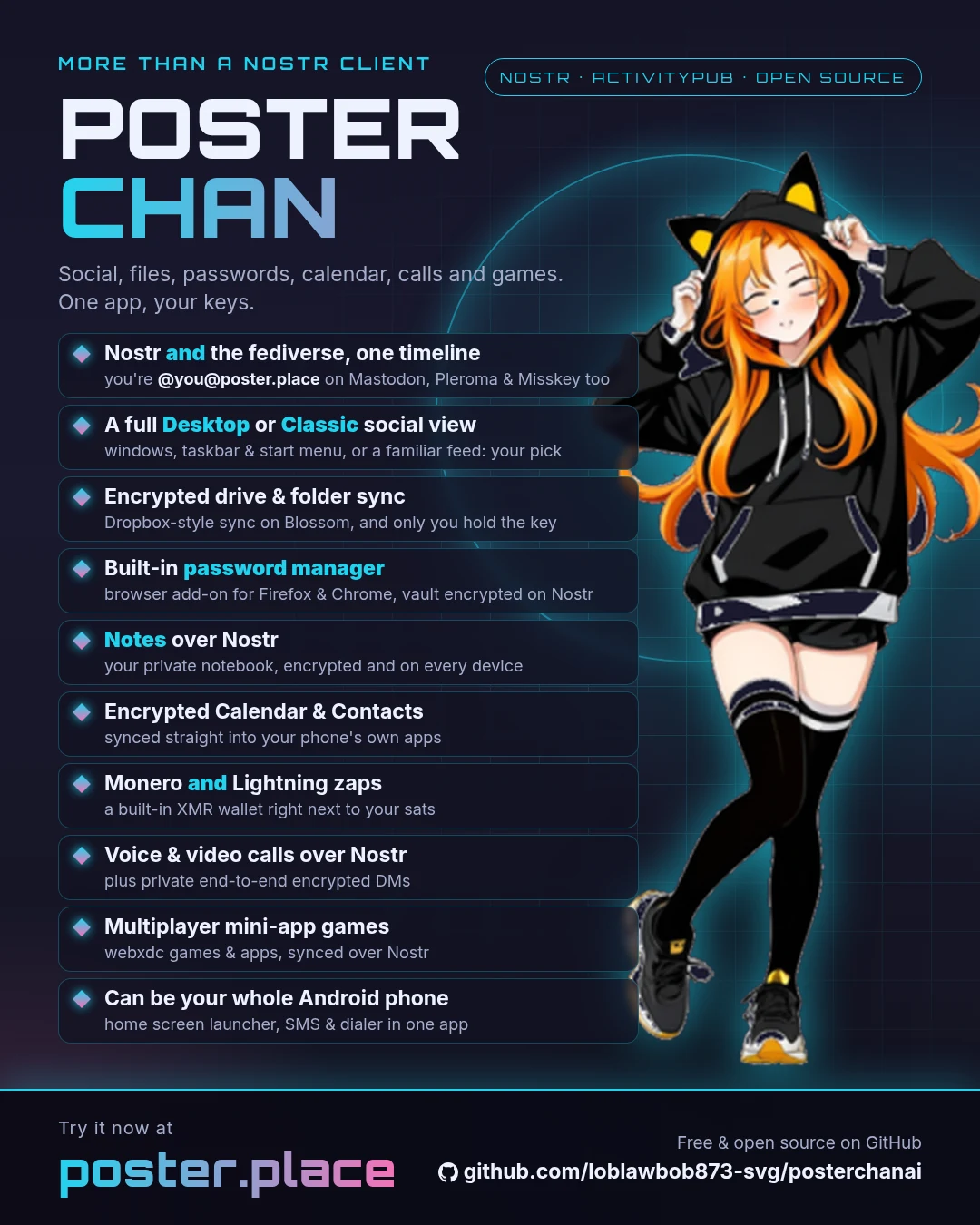
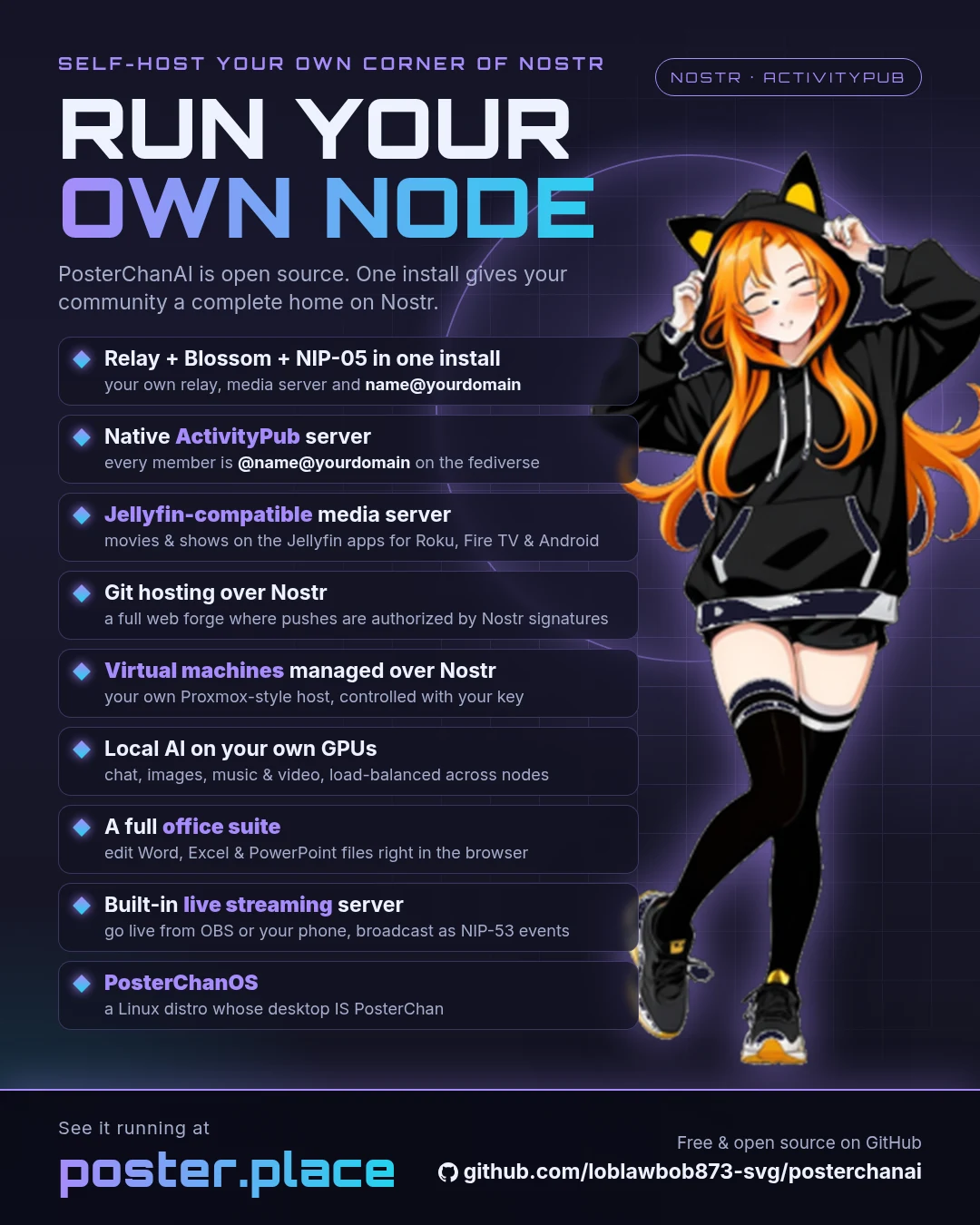
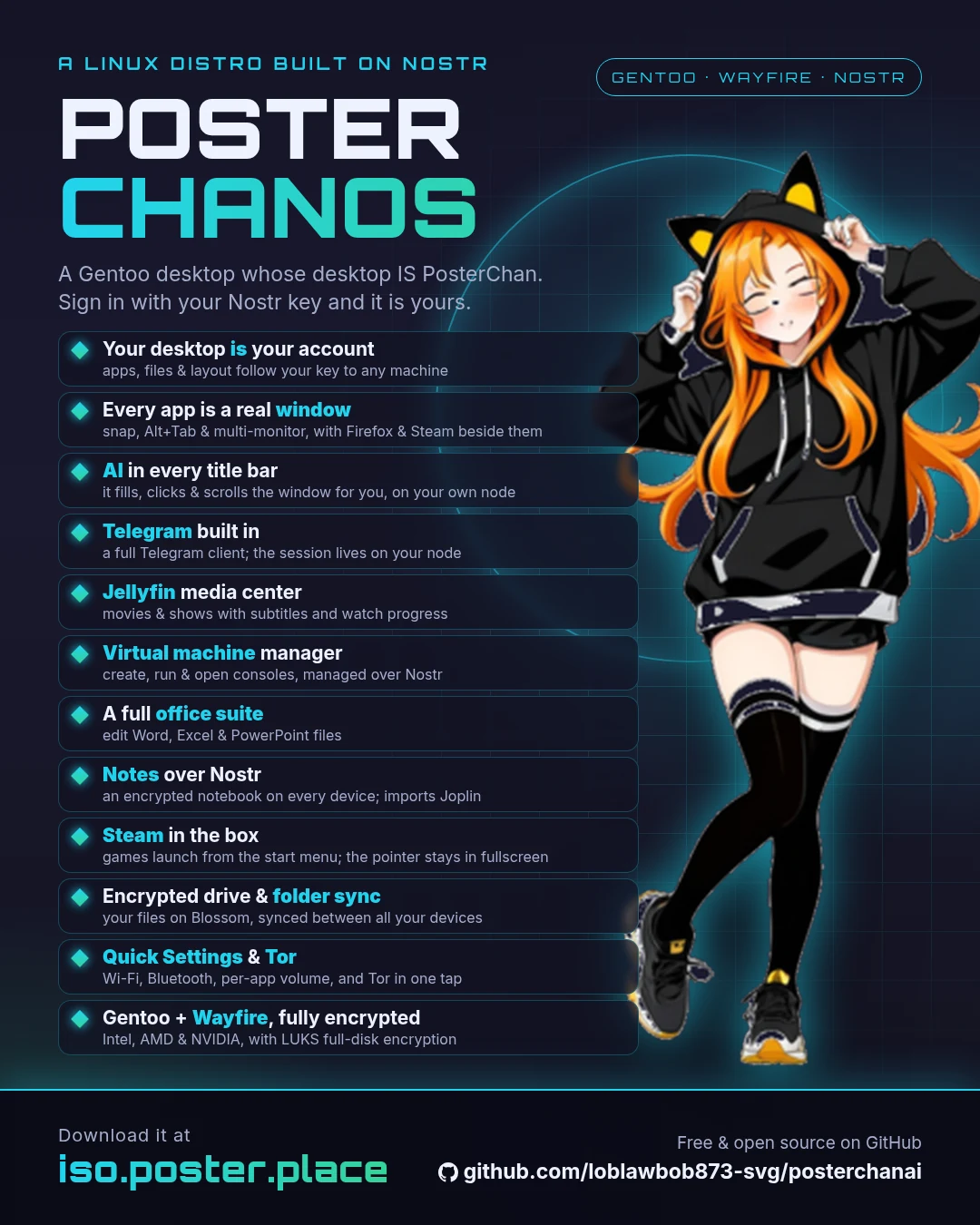
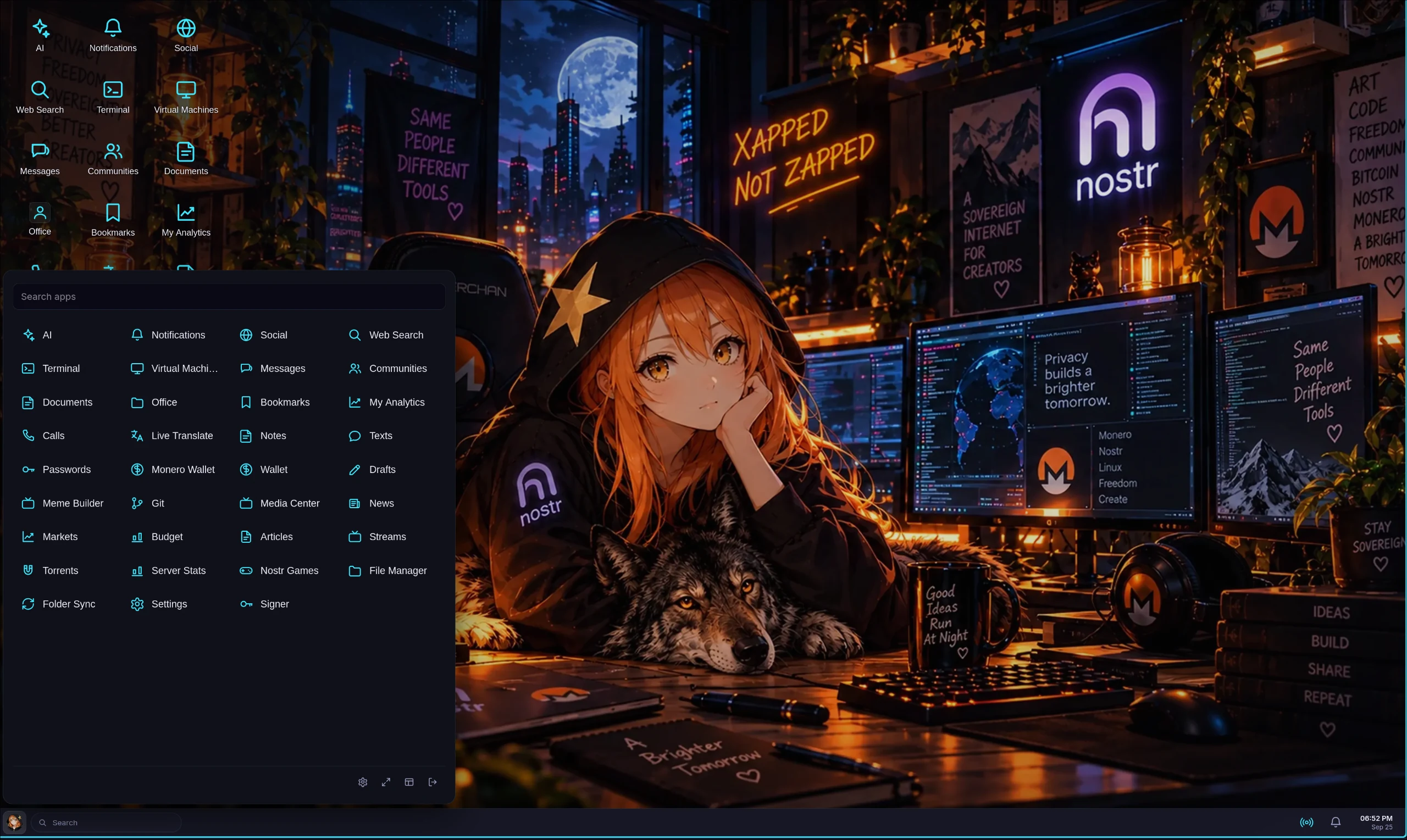 Desktop — PosterChanOS, the Nostr-native desktop operating system | 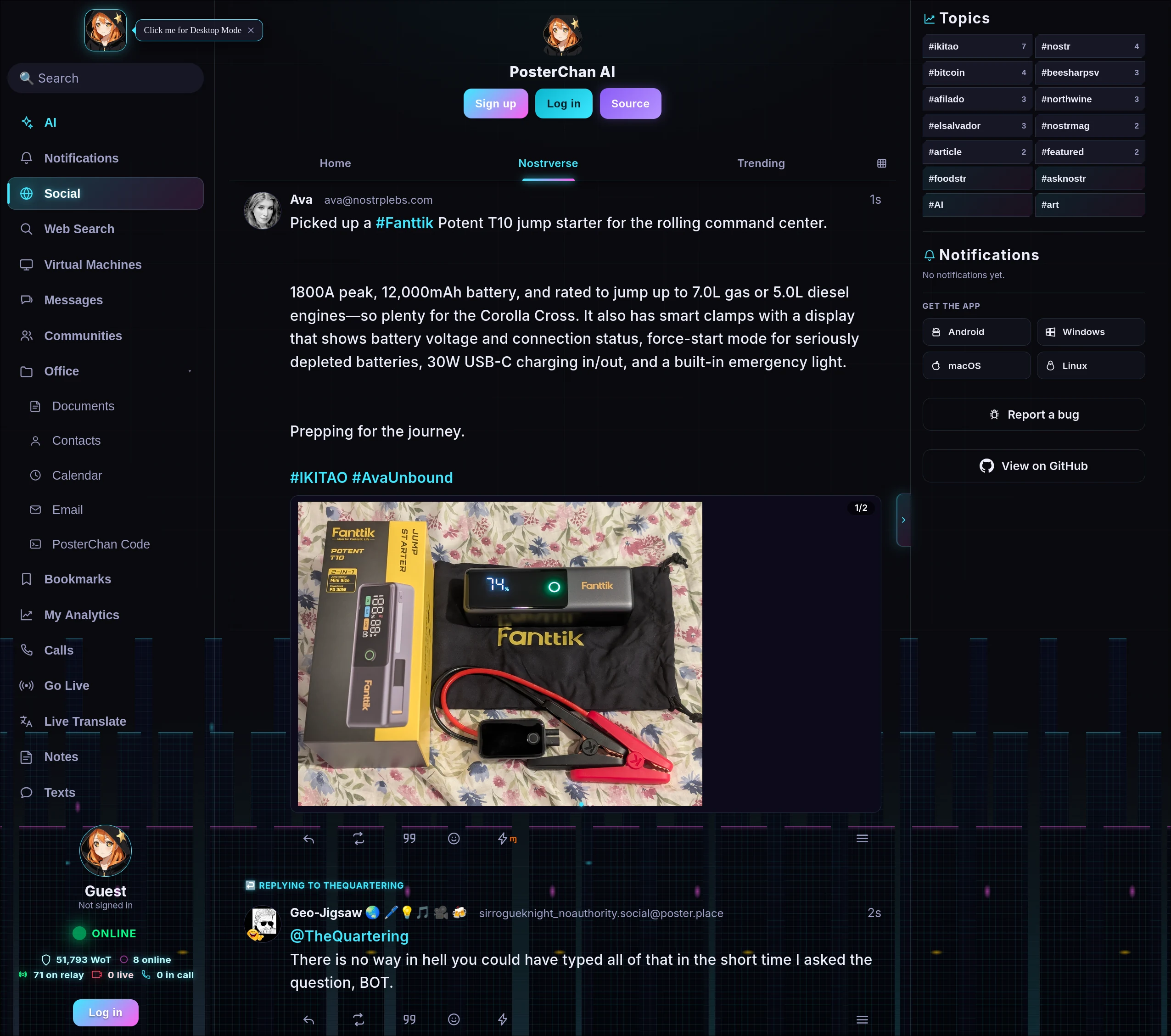 Classic — the Nostr web client in Classic mode |
Replace the cloud, then put a GPU behind it. Your notes, calendar, contacts, addressbook, files, photos, passwords, bookmarks, mail, music and folder sync — all of it living as encrypted Nostr events on a relay you run, reachable from a web client, a desktop app, an Android app, and from any CalDAV/CardDAV phone client you already own. No account with anybody, no per-seat billing, no vendor holding the keys.
Your own Jellyfin-compatible media server: Media Center turns server or NAS folders into private, folder-sorted libraries with cover cards, mobile/TV playback and full-screen video. Connect supported Jellyfin clients to https://your-instance/jellyfin using Quick Connect (tested clients and compatibility scope), share with approved Nostr users, stream through a NAS proxy, and transcode with NVIDIA, AMD/VA-API or CPU fallback. Catalogs stay as encrypted events on your local relay; media files stay on disk and are not federated. Bandwidth defaults to 200 KB/s per viewer, with bounded transcoding and a /tmp cache.
Then the part a cloud drive can't do: the same box runs your own models. Chat, image, voice, video and music generation, a private metasearch engine, live streaming, a fediverse (ActivityPub) server, and autonomous bots on Telegram, Nostr & Pleroma — driven by cloud LLMs or the built-in native llama.cpp (CPU / CUDA / ROCm / Intel Arc). One FastAPI backend, an OpenAI-compatible /v1/, and a web-of-trust relay that is the datastore.







Try it · Quick start · Features · PosterChanOS · Bots & social · Documentation
Docker, no configuration, nothing to sign up for:
git clone https://github.com/loblawbob873-svg/posterchanai.git && cd posterchanai
docker compose --profile nostr up -d --build
Then open http://localhost:3051/client — a self-hosted Nostr relay + full web client +
Blossom media server, with no AI stack (a ~2 GB image, not ~70 GB). Sign in with a browser
extension like Alby, or let the app generate you a key. There is no database server to run —
the relay keeps its events in its own store (PosterChanDB) on the data volume; you don't need a
.env, a domain or a certificate to look around.
Then, when you want more:
| Put it on a server other people use | docs/NOSTR_DOCKER.md — empty VPS to public instance: HTTPS with one extra profile, claiming admin, relay config, backups |
| Add the AI | swap --profile nostr for cpu, cuda, rocm or intel — docs/DOCKER.md |
| Bare metal instead | the interactive installer — Option B |
Local trials skip HTTPS because browsers treat
localhostas a secure origin — so the client can sign events there. On any other address you need TLS, which is what thetlsprofile is for.
kind-30078 events signed by your node. Log in with your Nostr key (NIP-07/NIP-46). No SQLite, no proprietary schema, nothing to export because you already hold it.nsec.sudo dd if=posterchanos.iso of=/dev/sdX bs=4M status=progress oflag=sync (or Rufus / balenaEtcher),
then boot it to try the desktop live or install it. Every published image has first installed and
booted itself in a VM — see docs/RELEASE.md.npub provisions a stable,
separate Linux account and a private 0700 home directory. Multiple Nostr identities can use one
computer without sharing files. The first identity to claim a new installation becomes its
administrator; later identities are ordinary users, and root is not the daily login.update-posterchan updates both the packaged desktop and the PosterChanOS
session integration. The canonical installer is os/gentoo.sh, and the design is
explained in the PosterChanOS article.llama.cpp backend (CPU / CUDA / HIP / Intel Arc SYCL), round-robin load-balanced across several boxes with a shared GPU lock so one card serves chat, images, video and music without thrashing.@[email protected] on Mastodon, Pleroma, Akkoma and Misskey, with Nostr as the only store./v1/ that agentic coding clients (e.g. opencode) can drive against your local models.Point any OpenAI-compatible tool at
http://your-box:3051/v1/and you've got a private, function-calling-capable model server. Open the web UI and you've got your files, mail, calendar and assistant in one place. Link a bot and it's in your pocket.
/v1/ for compatible clients and tools, including function/tool calling so agentic coding clients (e.g. opencode) can drive your local models
IQ4_XS, MoE ~3B active, ~16GB) — by far the most reliable local model here for multi-step agentic builds; it 1-shots small apps where 8–14B models stall. Needs a 12GB+ GPU (partial CPU offload on 12–16GB cards; leave the context size on auto). For smaller GPUs, Qwen3.5-9B-Claude-Code is the lightweight fallback. Set it once server-wide in Admin → AI Settings → Agentic / Tools Model (llm_tools_model) — used for every tool-bearing /v1 request and the node agent command (web UI + Telegram), while plain chat stays on the default model./mail, /image, /search)The app's face is a full cyberpunk Nostr web client (PWA at /client, plus an installable Android APK) — feed, profiles, DMs, notifications, articles, communities, bookmarks, and more. Highlights:
kind-30078), cached locally and hydrated from the relay so they sync across devices. Per-article Share as a note and LLM Summarize, mark-read-as-you-scroll, OPML import/export (Miniflux-compatible), and YouTube-channel thumbnails. Hardened: defusedxml parsing, SSRF-guarded fetches (per-redirect-hop revalidation), and streamed size caps.kind-25050) with a built-in Pion TURN relay for NAT traversal. Audio-first with a mid-call video toggle and screen-share.kind-30311) under Discover → Streams, so it also shows up in the wider Nostr stream directories. Auth reuses your per-user API key; off by default (install.sh --stream).glow, alive 3-D parallax), meme/caption formats, character overlays, and a large library of audio-gag reaction clips — all also usable as commands in the web UI, Telegram, and the fediverse bots, and now composable as Meme Builder layers..xdc (a webxdc game, poll or shared editor, the same file Delta Chat runs) and everyone with the post in their timeline plays the same instance: moves are Nostr events, with an ephemeral realtime channel for continuous play (Quake III and a Half-Life port both work). Apps are untrusted code and get no network access at all, so they run on a separate origin — xdc.<your-domain>, which is the one thing a fresh deployment must add: ./install.sh --webxdc (DNS record + its own certificate + vhost), one line for Caddy/Traefik, or already seeded in the Docker proxy service. See docs/WEBXDC.md.A companion browser extension (Firefox, and Chrome / Brave via MV3) makes your self-hosted relay double as a private password manager and cross-browser bookmark sync — with nothing readable server-side. Pair a browser to your vault (a QR/paste code) as read-only (fill only) or full (also save & publish):
kind-30078 events, AES-GCM-encrypted to your key; the relay only ever holds ciphertext, and it's decrypted on-device. Autofill on the matching site (exact-origin only — never a sibling subdomain), TOTP one-time codes, and a password generator. New logins saved from a read-only browser queue locally until the app publishes them.chrome.alarms keeps an idle browser syncing.nsec into a page.Firefox: get it on addons.mozilla.org — Mozilla-signed, so it installs permanently on release Firefox and Firefox for Android (where passwords, one-time codes and signing work; bookmark sync needs a bookmarks API Android's Firefox doesn't have), and auto-updates. Chrome/Edge/Brave load it unpacked, and you can sideload your own Firefox build too — both in extension/README.md, which also covers pairing and switching on bookmark sync. Build both bundles with bash extension/build.sh (Firefox .xpi + Chrome unpacked-dist/chrome); CI publishes fresh unsigned artifacts to poster.place/extension/unpacked and /chrome.
voice): zero-shot — attach a few seconds of someone speaking, then voice <text> and it says your words in that voice, learned from the clip (no training step). Runs native in-process (no sidecar), on the app's own GPU lock and VRAM swap like image/music/video gen. The same cloned voice also drives talk — a still face lip-syncing a line in that voice. Web UI + Telegram.musicgeni): text-to-song with ACE-Step 1.5 running native in-process — the app's own venv, torch and GPU lock, no sidecar service and no HTTP hop (fits a 12 GB GPU); load-balanced + VRAM-swapped across nodes like image gen. With no lyrics supplied the LLM writes them, so you get vocals by default (instrumental skips it); each song comes back as a branded MP4 — the track over a PosterChan background with the end-card outro. Web UI + Telegram. See docs/MUSIC.mdvideogeni): native in-process text-to-video via diffusers — point it at any model (Wan2.1 / LTX / CogVideoX, auto-detected) to match your GPU; runs on CUDA / Intel Arc (XPU) / AMD (ROCm), load-balanced + VRAM-swapped across nodes like image gen, with a branded watermark and optional 720p/1080p upscale. Web UI + Telegram. See docs/VIDEO.mdscreenshot <url> command (also shot / ss) — works in the web UI and Telegram. Uses headless Chrome (JS-aware, so SPAs render), Firefox fallback (see Requirements).ytdl command — in the web UI, Telegram, and the bots. A video download can be trimmed and/or shrunk in one command (ytdl video <url> clip 0:10 0:30 compress); Telegram also offers these as buttons after the download.pc-trash inside the folder rather than away, an exclusion means "stop looking at this" and can
never delete anything, and large files move in chunks so an interrupted transfer resumes instead of
restarting. Desktop app and Android; a browser has no filesystem to sync, but can still browse and
download from a synced folder. See docs/FOLDER_SYNC.md/caldav — your phone and desktop
calendar app sync with it like any other CalDAV server, no extra service to run. Events are
encrypted Nostr events; the web client has a month grid, an event editor, .ics import/export and
recurring-event support, and an event's own alarm becomes a reminder that reaches a locked phone.
See docs/CALENDAR.md.vcf import/export, and reuse in the mail composer. See
docs/CONTACTS.mdtodo)torrents, nyaa)POSTERCHANAI_OFFICE=1 docker compose --profile nostr --profile office up -d; bare metal: ./install.sh --office. Encrypted files are decrypted in the
browser into an expiring edit session, then encrypted again when saved back to Files.compress it (image/video — H.264 with GPU acceleration when available), clip <start> <end> a video to a time span, or convert images↔PDF — all shared across the web UI and Telegramflashcards (or cards/study/quiz) to generate an interactive multiple-choice quiz — the LLM writes the questions, options and explanations (math problems include worked steps). The web UI shows animated cards with instant ✓/✗ feedback and KaTeX-rendered math; Telegram shows image cards with answer buttons (tap 🎴 Flashcards after uploading) and a running score. Text PDFs/slides work best; image OCR is weaker (on Telegram, send screenshots as a file, not a compressed photo)remind): set a reminder in plain language — remind open the oven in 10m, remind me next tuesday to call mom — and the LLM parses the time (exact relative phrases like in 10s are parsed directly). A background scheduler alerts you in the web UI (a full-screen pop-up + beep if you're online, plus a dedicated "⏰ Reminders" conversation) and on Telegram if linked. reminders lists your pending ones, each with a clickable Cancel. Your timezone is auto-detected from the browser (IANA zone, DST-aware) — no setup — so times follow you when you travel.@[email protected] on the fediverse. The bot framework is
bundled in this repo (botframework/) and supervised in-process. See Bot manager.post command (rewrite, verbatim, or with your own instructions) — it reaches the fediverse too, through this node's ActivityPub server. See Social posting from the bots.nsec to post & reply. Handles mentions, replies, comments (NIP-22), reactions, reposts, plus geni/image effects; publishes to multiple relays; uploads media to a Blossom (BUD-02) or NIP-96 host (e.g. nostr.build) embedded with imeta; supports NIP-05 verification. The bot only replies when actually addressed (first mention / direct reply — no thread-spam), is rate-limited per sender (with an exempt list), and all bot/social egress can route through the built-in Tor proxy. Pure-Python signing (BIP-340) — no native deps.translate), shared across the web UI and Telegram./workspace, and you can pull a file — or the agent's whole workspace — back out as an encrypted Blossom download with node get <path> / node backup (every sandbox agent run auto-archives its workspace too). See Remote node management.screenshot command (driven over the DevTools protocol — full-page and JS-aware, so SPAs render instead of coming out blank; no Selenium/chromedriver). Firefox is used as a fallback if Chrome is absent:
emerge www-client/google-chrome (or www-client/chromium)apt install chromium (or install google-chrome-stable)Recommended: Docker Compose (Option A). No setup needs a database server: the app's data is encrypted documents on the built-in Nostr relay, and the relay stores into PosterChanDB, its own append-only store on the data volume (docs/POSTERCHANDB.md). The bare-metal installer (B) and manual setup (C) work too, and install no PostgreSQL.
One Ubuntu image builds for CPU, NVIDIA (CUDA), AMD (ROCm), or Intel Arc (XPU) —
pick the accelerator with a build-arg. It comes up turnkey: native local LLM +
image backends, auto-downloads the recommended chat model on first run, and (on AMD)
auto-detects the GPU override and persists the MIOpen kernel cache for fast image gen.
There is no database container: the relay's store lives on the pc-data volume.
# compose (recommended):  cpu | cuda | rocm | intel | nostr
docker compose --profile rocm up -d --build
Open http://localhost:3051/client and log in with your Nostr key (NIP-07/NIP-46). The GPU
kernel driver comes from the host (CUDA toolkit / amdgpu / i915); the userspace + a
GPU-compiled llama-cpp are baked into the image. Full matrix — GPU run flags, model
auto-download, opt-ins (Tor/proxy/torrenting), and the opencode/OpenAI-client config —
in docs/DOCKER.md.
🟣 Just want a Nostr relay + client, no AI?
docker compose --profile nostr --profile tls up -d --buildbuilds a small (~2 GB) image with no AI stack — self-hosted relay + Nostr web client + Blossom — and serves it over HTTPS. Step-by-step from an empty VPS: docs/NOSTR_DOCKER.md.
Production: add --profile tls and the stack brings up its own nginx+certbot container — HTTPS
immediately on a self-signed cert, certbot --nginx when you have a domain
(docs/DOCKER.md). Prefer to run nginx yourself? Template +
guide in docs/NGINX.md.
The installer sets up the virtual environment, dependencies, optional GPU backends (LLM and image), the relay's PosterChanDB directory, and can configure a systemd service. It installs no database server.
Clone and enter the project:
git clone <your-repo-url> posterchanai
cd posterchanai
Run the installer:
chmod +x install.sh
./install.sh
Follow the prompts: it first asks Full vs Nostr-only (relay + Nostr web client + Blossom, no AI — light, no GPU). For Full it then detects your GPU, sets up the native llama-cpp LLM backend and native diffusers image generation, creates the venv, installs Python deps, and optionally sets up a systemd service.
Start the server (if not using systemd):
./start.sh
Or with systemd: sudo systemctl start posterchanai-cpu (or the service name chosen during install).
Open the web UI at http://localhost:3051 (or your machine’s IP). Log in or register if enabled.
Installer options: ./install.sh --help for usage; ./install.sh --packages to print required system packages for your distro.
Clone and enter the project:
cd posterchanai
Create a virtual environment and install dependencies:
python -m venv venv
source venv/bin/activate   # Windows: venv\Scripts\activate
pip install -r requirements.txt
Run the server:
python run.py
Default: http://0.0.0.0:3051
Open the web UI in a browser: http://localhost:3051. Log in or register if enabled.
python run.py --port 8080 or set POSTERCHANAI_PORT=8080./start.sh (if present) to launch the server after manual or installer setup..env.example to .env and adjust (optional).docs/ for detailed setup (IPEX, nginx, etc.).Link your nsec in User Settings → Nostr, then use the post command from the Telegram
bot to publish. What you post reaches the fediverse as well, from @[email protected].
Telegram — reply to any message (a bot answer, a link, a photo) and send:
| Command | What it does |
|---|---|
post | Rewrites the replied-to content into a viral, engaging post |
post raw | Shares the reply exactly as written — no rewrite (aliases: verbatim, as-is, exact) |
post <instructions> | Rewrites following your instructions, e.g. post professional, post funny and short, post don't include links |
The bot then shows a 📣 Nostr share button (and ❌ Skip). Replying to a photo shares the
image itself. The source URL is appended by default; post don't include links (or "no links",
"without url", …) omits it.
Forward new Nostr notifications to your linked Telegram chat, and reply to them without leaving Telegram. Enable it per-user in User Settings → Telegram → "Relay social notifications to Telegram" (the admin must also turn on the global switch in Admin → Social → Social Notification Relay, where the poll interval is set).
PosterChan is a fediverse server: Mastodon, Pleroma, Akkoma, Misskey and GoToSocial can find, follow, reply to, boost, react to and message this node's users, and they can follow fediverse accounts back. It is on out of the box (Admin → Social → Fediverse server) once the node has a public domain.
@[email protected], and — with the second switch — any Nostr user this relay holds a profile for
has a readable handle too (@[email protected], never a 63-character npub).[email protected]) and every
account it follows is followed from your new one.user@host),
plus the relay's own blocklists; a fediverse user's Block is honoured and cuts both follows./ap/*, /.well-known/webfinger, /.well-known/nodeinfo and
/.well-known/host-meta must reach the app uncached with the Host header intact — see
nginx/posterchanai.conf.example.Details: docs/ACTIVITYPUB.md.
Run OS commands on a fleet of machines from chat or Telegram. Enable it in
Admin → Nodes → Agentic Node Management, list your nodes (one per line as
name|user@host, or name|local for this host), and pick which users may use it
(admins always can). Remote nodes are reached over SSH — they need nothing
installed, just the posterchanai host's SSH public key in their authorized_keys.
This works for any SSH-reachable device: servers, routers, switches, etc.
| Command | What it does |
|---|---|
node <name> <command> | Runs a shell command on the node. Fast commands return inline; long-running ones become a background job |
node all <command> | Runs the command on every configured node in parallel and shows each result (all is reserved as a node name) |
node agent <name> <goal> | Agentic mode — the AI calls a run_command tool, reads each result, and iterates toward your goal. Uses native tool-calling and an agentic-tuned model; each step streams live to your chat |
node agent all <goal> | Run the agent on every configured node toward the same goal (sequential; per-node labelled output) |
node list | Show configured nodes |
node jobs | List your recent jobs |
node log <id> | Show a job's output |
node kill <id> | Stop a running job |
Background jobs keep running server-side; when one finishes you get a Telegram DM
(if your account is linked) with the result, or check it with node log <id>. In
agentic mode each command is bounded by a per-step timeout (kills and reports
runaway/hung commands so the loop can't deadlock) and runs in its own process
group so nothing is left orphaned.
⚠️ This is unrestricted command execution by design — there is no confirmation step or command allowlist. Only enable it on a trusted, private deployment, and keep the allowed-users list tight. Set a Job Timeout (and Agent Step Timeout) if you want a hard kill switch.
The cloud Telegram Bot API limits the bot to downloading files up to 20 MB, so
compress/clip/convert/translate only work on small uploads there (the web UI
has no such limit). To lift this to ~2 GB, run a local Bot API server:
./install.sh and pick option 5 (Telegram Bot API
server — add-on only, which sets up just the server against your existing install
and reads the credentials from the database), or run it directly:
./scripts/setup-telegram-local-api.sh # uses sudo internally as needed
To upgrade an existing install, re-run ./install.sh and pick option 6 (Update).
It upgrades the posterchanai Python dependencies and optionally rebuilds the local
Telegram Bot API server (REBUILD), then restarts the services. On Intel Arc
installs it freezes the fragile pins (torch/torchvision XPU build, the transformers
stack) in the unified venv to their installed versions first, so an upgrade can never pull a
CPU torch over the XPU build — a conflicting upgrade is skipped rather than allowed to break
the Arc environment.
Note:
sync.shdeploys code (git pull + restart); it does not touch Python deps or the Telegram server binary. Use option 6 for dependency upgrades.
| Path | Description |
|---|---|
app/ | FastAPI app, routers (auth, chat, admin, TTS, STT, mail, torrent, bots, etc.), services |
botframework/ | Merged autonomous bot framework (Nostr + Pleroma listeners, daemons); spawned by app/services/bot_manager_service.py. See docs/BOTS.md |
templates/ | Jinja2 HTML (login, chat, admin, modals) |
static/ | CSS, JS, icons, mascot assets |
os/ | PosterChanOS installer, Sway session, boot theme, system helpers and Gentoo overlay |
run.py | Server entry (uvicorn) |
requirements.txt | Python dependencies |
install.sh | Interactive installer (Linux) |
docs/ | ADVANCED.md (LLM, image, load balancing), IPEX, nginx, etc. |
tls profile, and OpenAI-client/opencode setupbotframework/, Admin → Bots, per-bot config, the single server endpoint, and per-node cutoverPoster-chan AI is free software, released under the GNU General Public License v3.0.
You may use, study, share, and modify it — and if you distribute a modified version, you must
pass on the same freedoms under the GPLv3. See LICENSE for the full text.
Issues and pull requests are welcome. Keep changes small and consistent with the existing
patterns (thin routers, logic in services); see CLAUDE.md for a tour of the
codebase conventions.
145 followers · starred Aug 2026
PosterChan AI is a Nostr-powered personal cloud and a self-hosted AI powerhouse, running on one box you own.
Python
25
8 commits
updated Oct 19, 2026
Desktop — PosterChanOS, the Nostr-native desktop operating system | Classic — the Nostr web client in Classic mode |
Replace the cloud, then put a GPU behind it. Your notes, calendar, contacts, addressbook, files, photos, passwords, bookmarks, mail, music and folder sync — all of it living as encrypted Nostr events on a relay you run, reachable from a web client, a desktop app, an Android app, and from any CalDAV/CardDAV phone client you already own. No account with anybody, no per-seat billing, no vendor holding the keys.
Your own Jellyfin-compatible media server: Media Center turns server or NAS folders into private, folder-sorted libraries with cover cards, mobile/TV playback and full-screen video. Connect supported Jellyfin clients to https://your-instance/jellyfin using Quick Connect (tested clients and compatibility scope), share with approved Nostr users, stream through a NAS proxy, and transcode with NVIDIA, AMD/VA-API or CPU fallback. Catalogs stay as encrypted events on your local relay; media files stay on disk and are not federated. Bandwidth defaults to 200 KB/s per viewer, with bounded transcoding and a /tmp cache.
Then the part a cloud drive can't do: the same box runs your own models. Chat, image, voice, video and music generation, a private metasearch engine, live streaming, a fediverse (ActivityPub) server, and autonomous bots on Telegram, Nostr & Pleroma — driven by cloud LLMs or the built-in native llama.cpp (CPU / CUDA / ROCm / Intel Arc). One FastAPI backend, an OpenAI-compatible /v1/, and a web-of-trust relay that is the datastore.
Try it · Quick start · Features · PosterChanOS · Bots & social · Documentation
Docker, no configuration, nothing to sign up for:
git clone https://github.com/loblawbob873-svg/posterchanai.git && cd posterchanai
docker compose --profile nostr up -d --build
Then open http://localhost:3051/client — a self-hosted Nostr relay + full web client +
Blossom media server, with no AI stack (a ~2 GB image, not ~70 GB). Sign in with a browser
extension like Alby, or let the app generate you a key. There is no database server to run —
the relay keeps its events in its own store (PosterChanDB) on the data volume; you don't need a
.env, a domain or a certificate to look around.
Then, when you want more:
| Put it on a server other people use | docs/NOSTR_DOCKER.md — empty VPS to public instance: HTTPS with one extra profile, claiming admin, relay config, backups |
| Add the AI | swap --profile nostr for cpu, cuda, rocm or intel — docs/DOCKER.md |
| Bare metal instead | the interactive installer — Option B |
Local trials skip HTTPS because browsers treat
localhostas a secure origin — so the client can sign events there. On any other address you need TLS, which is what thetlsprofile is for.
kind-30078 events signed by your node. Log in with your Nostr key (NIP-07/NIP-46). No SQLite, no proprietary schema, nothing to export because you already hold it.nsec.sudo dd if=posterchanos.iso of=/dev/sdX bs=4M status=progress oflag=sync (or Rufus / balenaEtcher),
then boot it to try the desktop live or install it. Every published image has first installed and
booted itself in a VM — see docs/RELEASE.md.npub provisions a stable,
separate Linux account and a private 0700 home directory. Multiple Nostr identities can use one
computer without sharing files. The first identity to claim a new installation becomes its
administrator; later identities are ordinary users, and root is not the daily login.update-posterchan updates both the packaged desktop and the PosterChanOS
session integration. The canonical installer is os/gentoo.sh, and the design is
explained in the PosterChanOS article.llama.cpp backend (CPU / CUDA / HIP / Intel Arc SYCL), round-robin load-balanced across several boxes with a shared GPU lock so one card serves chat, images, video and music without thrashing.@[email protected] on Mastodon, Pleroma, Akkoma and Misskey, with Nostr as the only store./v1/ that agentic coding clients (e.g. opencode) can drive against your local models.Point any OpenAI-compatible tool at
http://your-box:3051/v1/and you've got a private, function-calling-capable model server. Open the web UI and you've got your files, mail, calendar and assistant in one place. Link a bot and it's in your pocket.
/v1/ for compatible clients and tools, including function/tool calling so agentic coding clients (e.g. opencode) can drive your local models
IQ4_XS, MoE ~3B active, ~16GB) — by far the most reliable local model here for multi-step agentic builds; it 1-shots small apps where 8–14B models stall. Needs a 12GB+ GPU (partial CPU offload on 12–16GB cards; leave the context size on auto). For smaller GPUs, Qwen3.5-9B-Claude-Code is the lightweight fallback. Set it once server-wide in Admin → AI Settings → Agentic / Tools Model (llm_tools_model) — used for every tool-bearing /v1 request and the node agent command (web UI + Telegram), while plain chat stays on the default model./mail, /image, /search)The app's face is a full cyberpunk Nostr web client (PWA at /client, plus an installable Android APK) — feed, profiles, DMs, notifications, articles, communities, bookmarks, and more. Highlights:
kind-30078), cached locally and hydrated from the relay so they sync across devices. Per-article Share as a note and LLM Summarize, mark-read-as-you-scroll, OPML import/export (Miniflux-compatible), and YouTube-channel thumbnails. Hardened: defusedxml parsing, SSRF-guarded fetches (per-redirect-hop revalidation), and streamed size caps.kind-25050) with a built-in Pion TURN relay for NAT traversal. Audio-first with a mid-call video toggle and screen-share.kind-30311) under Discover → Streams, so it also shows up in the wider Nostr stream directories. Auth reuses your per-user API key; off by default (install.sh --stream).glow, alive 3-D parallax), meme/caption formats, character overlays, and a large library of audio-gag reaction clips — all also usable as commands in the web UI, Telegram, and the fediverse bots, and now composable as Meme Builder layers..xdc (a webxdc game, poll or shared editor, the same file Delta Chat runs) and everyone with the post in their timeline plays the same instance: moves are Nostr events, with an ephemeral realtime channel for continuous play (Quake III and a Half-Life port both work). Apps are untrusted code and get no network access at all, so they run on a separate origin — xdc.<your-domain>, which is the one thing a fresh deployment must add: ./install.sh --webxdc (DNS record + its own certificate + vhost), one line for Caddy/Traefik, or already seeded in the Docker proxy service. See docs/WEBXDC.md.A companion browser extension (Firefox, and Chrome / Brave via MV3) makes your self-hosted relay double as a private password manager and cross-browser bookmark sync — with nothing readable server-side. Pair a browser to your vault (a QR/paste code) as read-only (fill only) or full (also save & publish):
kind-30078 events, AES-GCM-encrypted to your key; the relay only ever holds ciphertext, and it's decrypted on-device. Autofill on the matching site (exact-origin only — never a sibling subdomain), TOTP one-time codes, and a password generator. New logins saved from a read-only browser queue locally until the app publishes them.chrome.alarms keeps an idle browser syncing.nsec into a page.Firefox: get it on addons.mozilla.org — Mozilla-signed, so it installs permanently on release Firefox and Firefox for Android (where passwords, one-time codes and signing work; bookmark sync needs a bookmarks API Android's Firefox doesn't have), and auto-updates. Chrome/Edge/Brave load it unpacked, and you can sideload your own Firefox build too — both in extension/README.md, which also covers pairing and switching on bookmark sync. Build both bundles with bash extension/build.sh (Firefox .xpi + Chrome unpacked-dist/chrome); CI publishes fresh unsigned artifacts to poster.place/extension/unpacked and /chrome.
voice): zero-shot — attach a few seconds of someone speaking, then voice <text> and it says your words in that voice, learned from the clip (no training step). Runs native in-process (no sidecar), on the app's own GPU lock and VRAM swap like image/music/video gen. The same cloned voice also drives talk — a still face lip-syncing a line in that voice. Web UI + Telegram.musicgeni): text-to-song with ACE-Step 1.5 running native in-process — the app's own venv, torch and GPU lock, no sidecar service and no HTTP hop (fits a 12 GB GPU); load-balanced + VRAM-swapped across nodes like image gen. With no lyrics supplied the LLM writes them, so you get vocals by default (instrumental skips it); each song comes back as a branded MP4 — the track over a PosterChan background with the end-card outro. Web UI + Telegram. See docs/MUSIC.mdvideogeni): native in-process text-to-video via diffusers — point it at any model (Wan2.1 / LTX / CogVideoX, auto-detected) to match your GPU; runs on CUDA / Intel Arc (XPU) / AMD (ROCm), load-balanced + VRAM-swapped across nodes like image gen, with a branded watermark and optional 720p/1080p upscale. Web UI + Telegram. See docs/VIDEO.mdscreenshot <url> command (also shot / ss) — works in the web UI and Telegram. Uses headless Chrome (JS-aware, so SPAs render), Firefox fallback (see Requirements).ytdl command — in the web UI, Telegram, and the bots. A video download can be trimmed and/or shrunk in one command (ytdl video <url> clip 0:10 0:30 compress); Telegram also offers these as buttons after the download.pc-trash inside the folder rather than away, an exclusion means "stop looking at this" and can
never delete anything, and large files move in chunks so an interrupted transfer resumes instead of
restarting. Desktop app and Android; a browser has no filesystem to sync, but can still browse and
download from a synced folder. See docs/FOLDER_SYNC.md/caldav — your phone and desktop
calendar app sync with it like any other CalDAV server, no extra service to run. Events are
encrypted Nostr events; the web client has a month grid, an event editor, .ics import/export and
recurring-event support, and an event's own alarm becomes a reminder that reaches a locked phone.
See docs/CALENDAR.md.vcf import/export, and reuse in the mail composer. See
docs/CONTACTS.mdtodo)torrents, nyaa)POSTERCHANAI_OFFICE=1 docker compose --profile nostr --profile office up -d; bare metal: ./install.sh --office. Encrypted files are decrypted in the
browser into an expiring edit session, then encrypted again when saved back to Files.compress it (image/video — H.264 with GPU acceleration when available), clip <start> <end> a video to a time span, or convert images↔PDF — all shared across the web UI and Telegramflashcards (or cards/study/quiz) to generate an interactive multiple-choice quiz — the LLM writes the questions, options and explanations (math problems include worked steps). The web UI shows animated cards with instant ✓/✗ feedback and KaTeX-rendered math; Telegram shows image cards with answer buttons (tap 🎴 Flashcards after uploading) and a running score. Text PDFs/slides work best; image OCR is weaker (on Telegram, send screenshots as a file, not a compressed photo)remind): set a reminder in plain language — remind open the oven in 10m, remind me next tuesday to call mom — and the LLM parses the time (exact relative phrases like in 10s are parsed directly). A background scheduler alerts you in the web UI (a full-screen pop-up + beep if you're online, plus a dedicated "⏰ Reminders" conversation) and on Telegram if linked. reminders lists your pending ones, each with a clickable Cancel. Your timezone is auto-detected from the browser (IANA zone, DST-aware) — no setup — so times follow you when you travel.@[email protected] on the fediverse. The bot framework is
bundled in this repo (botframework/) and supervised in-process. See Bot manager.post command (rewrite, verbatim, or with your own instructions) — it reaches the fediverse too, through this node's ActivityPub server. See Social posting from the bots.nsec to post & reply. Handles mentions, replies, comments (NIP-22), reactions, reposts, plus geni/image effects; publishes to multiple relays; uploads media to a Blossom (BUD-02) or NIP-96 host (e.g. nostr.build) embedded with imeta; supports NIP-05 verification. The bot only replies when actually addressed (first mention / direct reply — no thread-spam), is rate-limited per sender (with an exempt list), and all bot/social egress can route through the built-in Tor proxy. Pure-Python signing (BIP-340) — no native deps.translate), shared across the web UI and Telegram./workspace, and you can pull a file — or the agent's whole workspace — back out as an encrypted Blossom download with node get <path> / node backup (every sandbox agent run auto-archives its workspace too). See Remote node management.screenshot command (driven over the DevTools protocol — full-page and JS-aware, so SPAs render instead of coming out blank; no Selenium/chromedriver). Firefox is used as a fallback if Chrome is absent:
emerge www-client/google-chrome (or www-client/chromium)apt install chromium (or install google-chrome-stable)Recommended: Docker Compose (Option A). No setup needs a database server: the app's data is encrypted documents on the built-in Nostr relay, and the relay stores into PosterChanDB, its own append-only store on the data volume (docs/POSTERCHANDB.md). The bare-metal installer (B) and manual setup (C) work too, and install no PostgreSQL.
One Ubuntu image builds for CPU, NVIDIA (CUDA), AMD (ROCm), or Intel Arc (XPU) —
pick the accelerator with a build-arg. It comes up turnkey: native local LLM +
image backends, auto-downloads the recommended chat model on first run, and (on AMD)
auto-detects the GPU override and persists the MIOpen kernel cache for fast image gen.
There is no database container: the relay's store lives on the pc-data volume.
# compose (recommended):  cpu | cuda | rocm | intel | nostr
docker compose --profile rocm up -d --build
Open http://localhost:3051/client and log in with your Nostr key (NIP-07/NIP-46). The GPU
kernel driver comes from the host (CUDA toolkit / amdgpu / i915); the userspace + a
GPU-compiled llama-cpp are baked into the image. Full matrix — GPU run flags, model
auto-download, opt-ins (Tor/proxy/torrenting), and the opencode/OpenAI-client config —
in docs/DOCKER.md.
🟣 Just want a Nostr relay + client, no AI?
docker compose --profile nostr --profile tls up -d --buildbuilds a small (~2 GB) image with no AI stack — self-hosted relay + Nostr web client + Blossom — and serves it over HTTPS. Step-by-step from an empty VPS: docs/NOSTR_DOCKER.md.
Production: add --profile tls and the stack brings up its own nginx+certbot container — HTTPS
immediately on a self-signed cert, certbot --nginx when you have a domain
(docs/DOCKER.md). Prefer to run nginx yourself? Template +
guide in docs/NGINX.md.
The installer sets up the virtual environment, dependencies, optional GPU backends (LLM and image), the relay's PosterChanDB directory, and can configure a systemd service. It installs no database server.
Clone and enter the project:
git clone <your-repo-url> posterchanai
cd posterchanai
Run the installer:
chmod +x install.sh
./install.sh
Follow the prompts: it first asks Full vs Nostr-only (relay + Nostr web client + Blossom, no AI — light, no GPU). For Full it then detects your GPU, sets up the native llama-cpp LLM backend and native diffusers image generation, creates the venv, installs Python deps, and optionally sets up a systemd service.
Start the server (if not using systemd):
./start.sh
Or with systemd: sudo systemctl start posterchanai-cpu (or the service name chosen during install).
Open the web UI at http://localhost:3051 (or your machine’s IP). Log in or register if enabled.
Installer options: ./install.sh --help for usage; ./install.sh --packages to print required system packages for your distro.
Clone and enter the project:
cd posterchanai
Create a virtual environment and install dependencies:
python -m venv venv
source venv/bin/activate   # Windows: venv\Scripts\activate
pip install -r requirements.txt
Run the server:
python run.py
Default: http://0.0.0.0:3051
Open the web UI in a browser: http://localhost:3051. Log in or register if enabled.
python run.py --port 8080 or set POSTERCHANAI_PORT=8080./start.sh (if present) to launch the server after manual or installer setup..env.example to .env and adjust (optional).docs/ for detailed setup (IPEX, nginx, etc.).Link your nsec in User Settings → Nostr, then use the post command from the Telegram
bot to publish. What you post reaches the fediverse as well, from @[email protected].
Telegram — reply to any message (a bot answer, a link, a photo) and send:
| Command | What it does |
|---|---|
post | Rewrites the replied-to content into a viral, engaging post |
post raw | Shares the reply exactly as written — no rewrite (aliases: verbatim, as-is, exact) |
post <instructions> | Rewrites following your instructions, e.g. post professional, post funny and short, post don't include links |
The bot then shows a 📣 Nostr share button (and ❌ Skip). Replying to a photo shares the
image itself. The source URL is appended by default; post don't include links (or "no links",
"without url", …) omits it.
Forward new Nostr notifications to your linked Telegram chat, and reply to them without leaving Telegram. Enable it per-user in User Settings → Telegram → "Relay social notifications to Telegram" (the admin must also turn on the global switch in Admin → Social → Social Notification Relay, where the poll interval is set).
PosterChan is a fediverse server: Mastodon, Pleroma, Akkoma, Misskey and GoToSocial can find, follow, reply to, boost, react to and message this node's users, and they can follow fediverse accounts back. It is on out of the box (Admin → Social → Fediverse server) once the node has a public domain.
@[email protected], and — with the second switch — any Nostr user this relay holds a profile for
has a readable handle too (@[email protected], never a 63-character npub).[email protected]) and every
account it follows is followed from your new one.user@host),
plus the relay's own blocklists; a fediverse user's Block is honoured and cuts both follows./ap/*, /.well-known/webfinger, /.well-known/nodeinfo and
/.well-known/host-meta must reach the app uncached with the Host header intact — see
nginx/posterchanai.conf.example.Details: docs/ACTIVITYPUB.md.
Run OS commands on a fleet of machines from chat or Telegram. Enable it in
Admin → Nodes → Agentic Node Management, list your nodes (one per line as
name|user@host, or name|local for this host), and pick which users may use it
(admins always can). Remote nodes are reached over SSH — they need nothing
installed, just the posterchanai host's SSH public key in their authorized_keys.
This works for any SSH-reachable device: servers, routers, switches, etc.
| Command | What it does |
|---|---|
node <name> <command> | Runs a shell command on the node. Fast commands return inline; long-running ones become a background job |
node all <command> | Runs the command on every configured node in parallel and shows each result (all is reserved as a node name) |
node agent <name> <goal> | Agentic mode — the AI calls a run_command tool, reads each result, and iterates toward your goal. Uses native tool-calling and an agentic-tuned model; each step streams live to your chat |
node agent all <goal> | Run the agent on every configured node toward the same goal (sequential; per-node labelled output) |
node list | Show configured nodes |
node jobs | List your recent jobs |
node log <id> | Show a job's output |
node kill <id> | Stop a running job |
Background jobs keep running server-side; when one finishes you get a Telegram DM
(if your account is linked) with the result, or check it with node log <id>. In
agentic mode each command is bounded by a per-step timeout (kills and reports
runaway/hung commands so the loop can't deadlock) and runs in its own process
group so nothing is left orphaned.
⚠️ This is unrestricted command execution by design — there is no confirmation step or command allowlist. Only enable it on a trusted, private deployment, and keep the allowed-users list tight. Set a Job Timeout (and Agent Step Timeout) if you want a hard kill switch.
The cloud Telegram Bot API limits the bot to downloading files up to 20 MB, so
compress/clip/convert/translate only work on small uploads there (the web UI
has no such limit). To lift this to ~2 GB, run a local Bot API server:
./install.sh and pick option 5 (Telegram Bot API
server — add-on only, which sets up just the server against your existing install
and reads the credentials from the database), or run it directly:
./scripts/setup-telegram-local-api.sh # uses sudo internally as needed
To upgrade an existing install, re-run ./install.sh and pick option 6 (Update).
It upgrades the posterchanai Python dependencies and optionally rebuilds the local
Telegram Bot API server (REBUILD), then restarts the services. On Intel Arc
installs it freezes the fragile pins (torch/torchvision XPU build, the transformers
stack) in the unified venv to their installed versions first, so an upgrade can never pull a
CPU torch over the XPU build — a conflicting upgrade is skipped rather than allowed to break
the Arc environment.
Note:
sync.shdeploys code (git pull + restart); it does not touch Python deps or the Telegram server binary. Use option 6 for dependency upgrades.
| Path | Description |
|---|---|
app/ | FastAPI app, routers (auth, chat, admin, TTS, STT, mail, torrent, bots, etc.), services |
botframework/ | Merged autonomous bot framework (Nostr + Pleroma listeners, daemons); spawned by app/services/bot_manager_service.py. See docs/BOTS.md |
templates/ | Jinja2 HTML (login, chat, admin, modals) |
static/ | CSS, JS, icons, mascot assets |
os/ | PosterChanOS installer, Sway session, boot theme, system helpers and Gentoo overlay |
run.py | Server entry (uvicorn) |
requirements.txt | Python dependencies |
install.sh | Interactive installer (Linux) |
docs/ | ADVANCED.md (LLM, image, load balancing), IPEX, nginx, etc. |
tls profile, and OpenAI-client/opencode setupbotframework/, Admin → Bots, per-bot config, the single server endpoint, and per-node cutoverPoster-chan AI is free software, released under the GNU General Public License v3.0.
You may use, study, share, and modify it — and if you distribute a modified version, you must
pass on the same freedoms under the GPLv3. See LICENSE for the full text.
Issues and pull requests are welcome. Keep changes small and consistent with the existing
patterns (thin routers, logic in services); see CLAUDE.md for a tour of the
codebase conventions.
145 followers · starred Aug 2026



