
See what people are saying
README

Ledge
The notebook that runs code.
Markdown notes for developers and DevOps, on macOS, Linux, Windows, iPhone, and Android.
Website · Documentation · Download


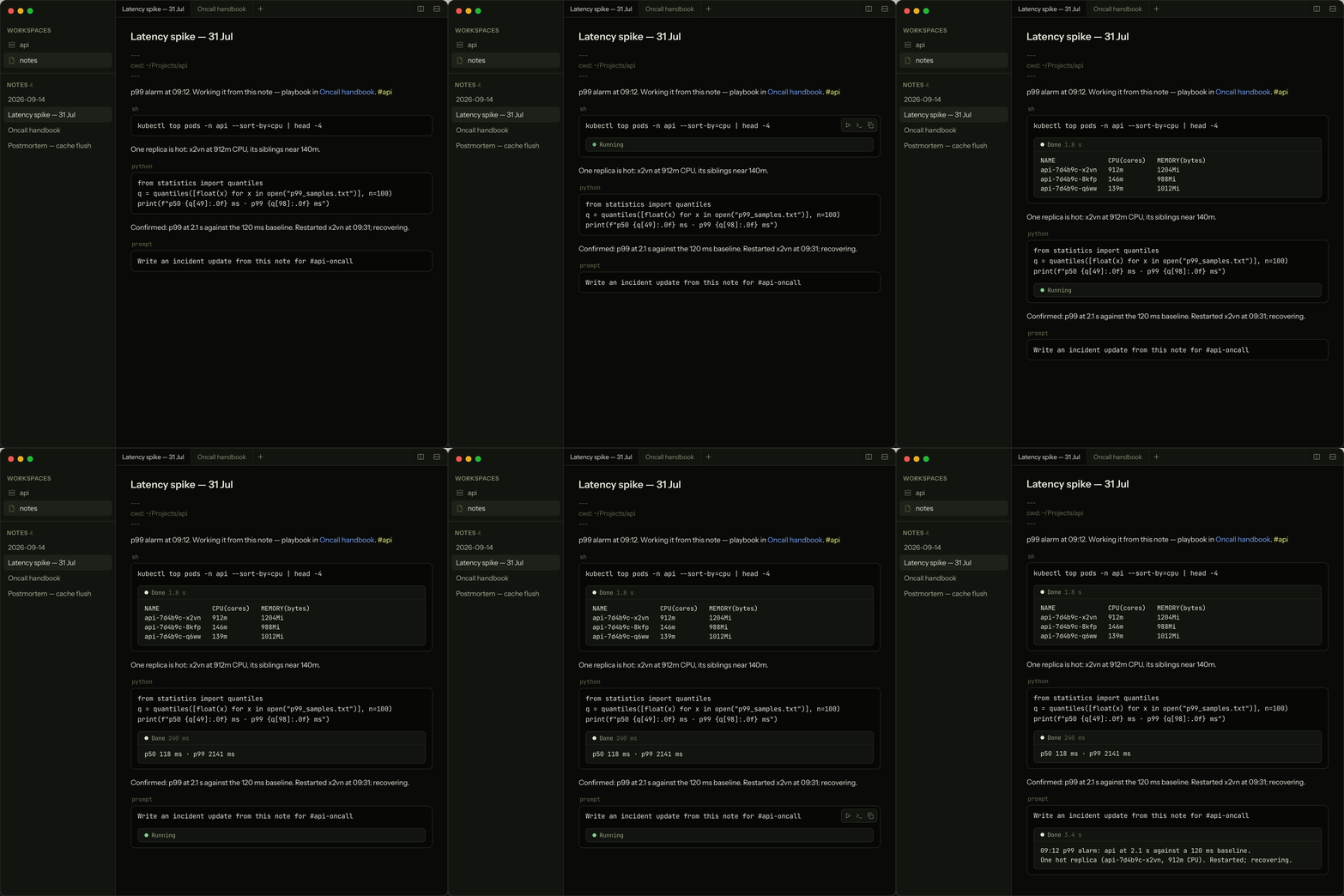
Ledge is a Markdown notebook that runs the code in your notes. Press ⌘↩
(Ctrl+Enter on Linux and Windows) on a fenced block and its output streams in beneath it:
shell commands, Python, Node, Ruby, PHP, and TypeScript out of the box, SQL
and Redis against the database the note points at, and prompt blocks that
send their text to an AI agent.
Notes are plain .md files in folders you choose. They can live on your own
computer, or on a Linux or Mac server you reach over ssh, and the same notes
open on your iPhone, iPad, or Android phone. There is no account, no service, and no database
on the side.
Install
Mac. Download the DMG and drag Ledge to Applications. Ledge runs on macOS 13 or newer on Apple Silicon, and updates itself.
Linux. Download the installer for your architecture,
x64
or arm64,
extract it, and run ./installer. It puts the app under
~/.local/share/sh.ledge.app with a desktop entry, needs no root, and updates
itself. Ledge needs a desktop with GTK 3 and WebKitGTK 4.1, which is Ubuntu
22.04, Debian 12, Fedora 38 or newer; on Ubuntu, apt install libgtk-3-0 libwebkit2gtk-4.1-0 libayatana-appindicator3-1 librsvg2-2 covers the
libraries, and libsecret-tools and enchant-2 add server passwords in the
keyring and spelling suggestions.
Windows. Download
the installer zip,
right-click it and choose Extract All, then run Ledge-Setup.exe from the
extracted folder. It needs the .installer folder beside it, so it cannot
run from inside the zip. Until the signed installer has built up a
download history, Windows may say it protected your PC: choose More info,
then Run anyway.
Ledge runs on Windows 11 on x64, keeps your notes and runs your code in WSL,
and updates itself along with the server it installs there. When WSL is
missing, Ledge asks you to install it first: wsl --install in an
administrator PowerShell, then a restart.
iPhone and iPad. Get Ledge for iPhone on the App Store. It holds no notes of its own: it connects over ssh to a Linux server or to your own computer, and reads, edits, and runs the same notes from anywhere.
Android. Ledge for Android is in an open beta on Google Play, and anyone can join: ledge.sh/android walks through joining the testers group, opting in, and installing. It runs on Android 10 or newer and connects to a server the same way the iPhone app does.
Server. Host your notes on a Linux server or a Mac, run their blocks there, and reach them from every device over ssh. Signed in as the account Ledge should use:
curl -fsSL https://ledge.sh/server.sh | sh
Then ledge pair prints a pairing code to scan from the phone or paste into
the desktop app, and ledge backup keeps an encrypted copy of the notes in any
S3-compatible bucket. See
Keep Notes on a Remote Server
and the server tutorial.
CLI and agents. Run "Install Shell Command (ledge)" from the command
palette (⇧⌘P, or Ctrl+Shift+P on Linux), or on Windows open a WSL terminal,
where the app has already put it. The ledge command then lists,
reads, searches, creates, and appends to notes from any terminal, and the app
follows along live (The ledge CLI). The
same command serves Ledge's MCP server, so one line connects Claude Code or
any other MCP agent:
claude mcp add ledge -- ledge mcp
What Ledge does
- Runs code blocks in place. ⌘↩ runs the block under the caret and its
output streams in beneath it. ⇧⌘↩ sends it to the note's terminal drawer
instead. A running block takes input, so a
sudoprompt or a[y/N]gets answered in the output panel.sh,python,node,ruby,php, andtsrun out of the box, and adding an interpreter is one line in Settings. Running Code - Gives each note its own shell. A
cd, an exported variable, or an activated virtualenv carries into the next run.cwd:andenv:in the frontmatter set where the note's shells start, or attach a project folder as a workspace and its Markdown files run in the project. Frontmatter and Environments - Runs blocks on other machines. A
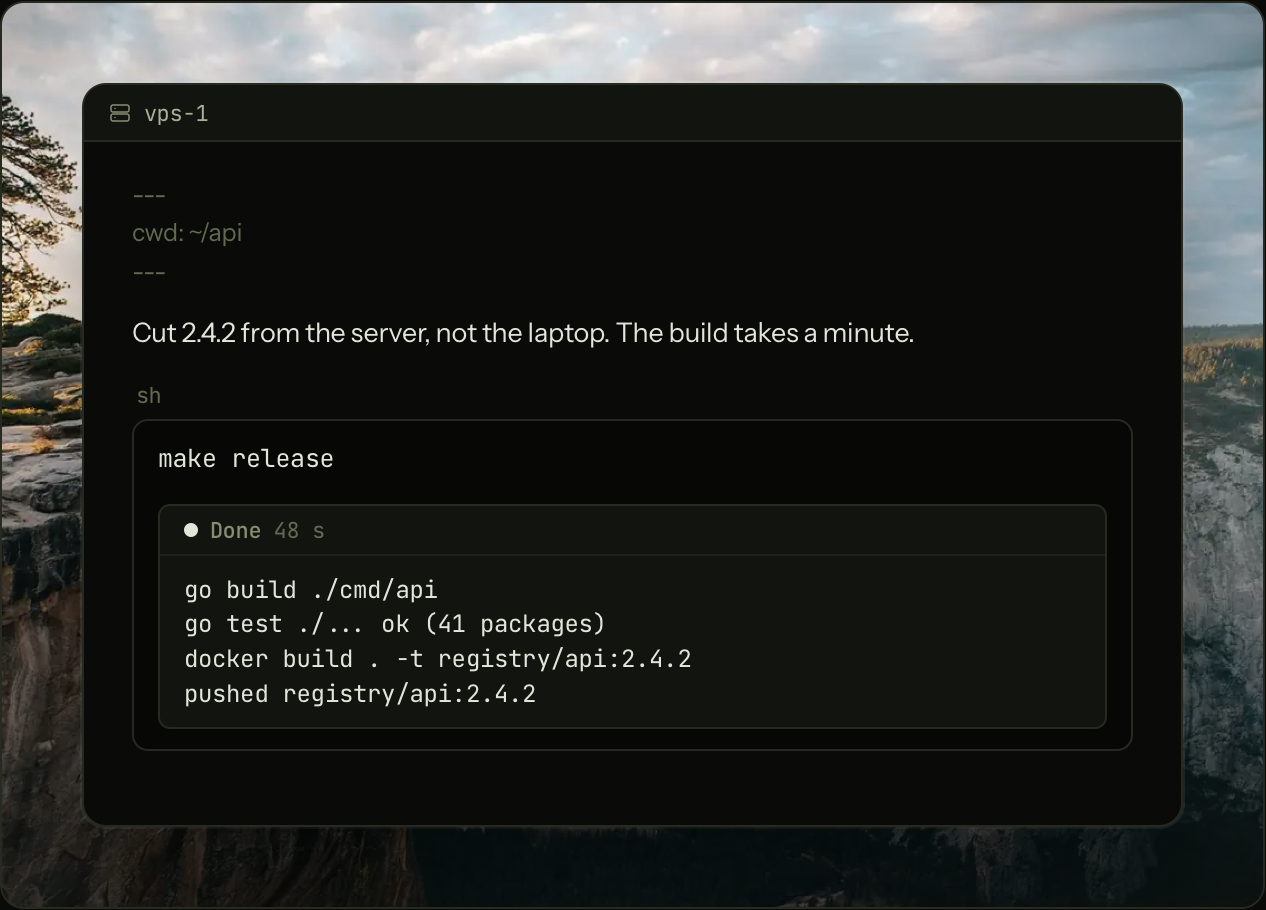
host:line in the frontmatter sends every run in the note over ssh to that host while the note stays put. Mark a blockconfirmand Ledge names the machine and asks first. Run Code on Remote Hosts - Keeps notes on a server. Point Ledge at a machine and the notes live there: the server holds the files and runs the shells, and the app is the window onto it. Running blocks survive a dropped connection, and your Mac, your phone, and a second window can all be on one server at once. Keep Notes on a Remote Server
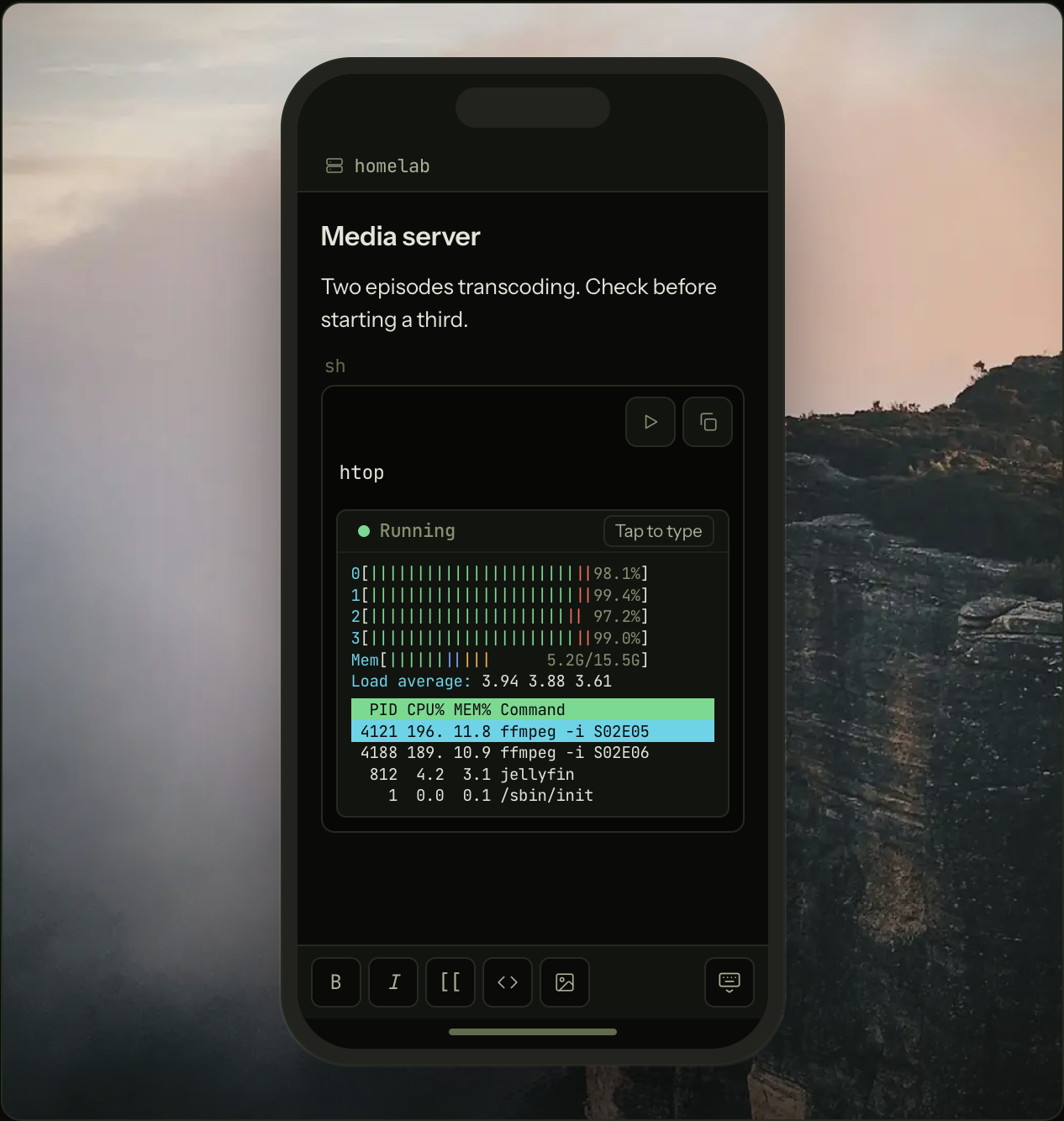
- Works on your phone. Pair the iPhone or Android app with a server by scanning a code. Tap Run on a block and it runs on the server, and keeps running when you switch apps. Ledge on Your Phone
- Keeps secrets out of notes. A profile is a dotenv file kept outside the
notes folder.
profile: deployin the frontmatter loads it into the note's shells, and the note carries only the name. Profiles and Secrets - Is built to be worked by agents. Notes are addressed by title, a
terminal opened inside a note knows which note it is in, and a
promptfence pipes its text toclaude -pwith ⌘↩. There is no delete tool. Agents and Ledge - Locks the notes that matter. Locking encrypts a note's body on disk behind a passphrase. Agents, search, and sync services see ciphertext until you unlock, and images pasted into a locked note are sealed with it. Note Locking
- Is a notes app underneath. Live preview,
[[wikilinks]]by title, backlinks, tags, full-text search, daily notes and templates, split panes with tabs, paste from the web as Markdown, and a trash with undo. Getting Started - Syncs with anything. Notes are files in a folder, so iCloud Drive, Dropbox, Syncthing, or a git remote sync them, and Ledge follows outside changes live, even in an open note. Keep Notes Synced
Documentation
The manual is at ledge.sh/docs. The same pages ship inside the app: choose Documentation from the Help menu or the command palette. Their source is docs/user/, and the pages from 16 onward are tutorials that combine the features into working routines.
docs/contributor/ describes how Ledge is built, from the process and trust boundaries in architecture.md to the ssh protocol in remote.md and the phone clients in ios.md and android.md.
Build from source
Ledge is built on Electrobun: a Bun process owns
the files and the shells, and a React app with a CodeMirror editor runs in
the system WebView. The same Bun code, without the window, is the
ledge-server package. The iOS app is a Swift shell and the Android app a
Kotlin shell around the same React view.
You need Bun, and either a Mac with the Xcode Command Line
Tools or a Linux desktop with a C compiler and WebKitGTK. On Windows you need
Bun and WSL, and a dev build dials the server already in WSL, so install one
there with server.sh first.
bun install
bun run dev
The first launch downloads the Electrobun core and assembles the app bundle
under build/.
bunx tsc --noEmit     # typecheck
bunx vite build       # build the view
bun test              # unit and filesystem tests
bun run test:e2e      # UI behavior in headless WebKit
CONTRIBUTING.md covers what "done" means here, how to send
a change, and which standard in docs/contributor/ governs it.
License
Apache License 2.0. Copyright 2026 Dan Stevens.
Similar repos


Languages
TypeScript
91.4%
Swift
4.4%
Kotlin
2.6%
See what people are saying
README
Ledge
The notebook that runs code.
Markdown notes for developers and DevOps, on macOS, Linux, Windows, iPhone, and Android.
Website · Documentation · Download
Ledge is a Markdown notebook that runs the code in your notes. Press ⌘↩
(Ctrl+Enter on Linux and Windows) on a fenced block and its output streams in beneath it:
shell commands, Python, Node, Ruby, PHP, and TypeScript out of the box, SQL
and Redis against the database the note points at, and prompt blocks that
send their text to an AI agent.
Notes are plain .md files in folders you choose. They can live on your own
computer, or on a Linux or Mac server you reach over ssh, and the same notes
open on your iPhone, iPad, or Android phone. There is no account, no service, and no database
on the side.
Install
Mac. Download the DMG and drag Ledge to Applications. Ledge runs on macOS 13 or newer on Apple Silicon, and updates itself.
Linux. Download the installer for your architecture,
x64
or arm64,
extract it, and run ./installer. It puts the app under
~/.local/share/sh.ledge.app with a desktop entry, needs no root, and updates
itself. Ledge needs a desktop with GTK 3 and WebKitGTK 4.1, which is Ubuntu
22.04, Debian 12, Fedora 38 or newer; on Ubuntu, apt install libgtk-3-0 libwebkit2gtk-4.1-0 libayatana-appindicator3-1 librsvg2-2 covers the
libraries, and libsecret-tools and enchant-2 add server passwords in the
keyring and spelling suggestions.
Windows. Download
the installer zip,
right-click it and choose Extract All, then run Ledge-Setup.exe from the
extracted folder. It needs the .installer folder beside it, so it cannot
run from inside the zip. Until the signed installer has built up a
download history, Windows may say it protected your PC: choose More info,
then Run anyway.
Ledge runs on Windows 11 on x64, keeps your notes and runs your code in WSL,
and updates itself along with the server it installs there. When WSL is
missing, Ledge asks you to install it first: wsl --install in an
administrator PowerShell, then a restart.
iPhone and iPad. Get Ledge for iPhone on the App Store. It holds no notes of its own: it connects over ssh to a Linux server or to your own computer, and reads, edits, and runs the same notes from anywhere.
Android. Ledge for Android is in an open beta on Google Play, and anyone can join: ledge.sh/android walks through joining the testers group, opting in, and installing. It runs on Android 10 or newer and connects to a server the same way the iPhone app does.
Server. Host your notes on a Linux server or a Mac, run their blocks there, and reach them from every device over ssh. Signed in as the account Ledge should use:
curl -fsSL https://ledge.sh/server.sh | sh
Then ledge pair prints a pairing code to scan from the phone or paste into
the desktop app, and ledge backup keeps an encrypted copy of the notes in any
S3-compatible bucket. See
Keep Notes on a Remote Server
and the server tutorial.
CLI and agents. Run "Install Shell Command (ledge)" from the command
palette (⇧⌘P, or Ctrl+Shift+P on Linux), or on Windows open a WSL terminal,
where the app has already put it. The ledge command then lists,
reads, searches, creates, and appends to notes from any terminal, and the app
follows along live (The ledge CLI). The
same command serves Ledge's MCP server, so one line connects Claude Code or
any other MCP agent:
claude mcp add ledge -- ledge mcp
What Ledge does
- Runs code blocks in place. ⌘↩ runs the block under the caret and its
output streams in beneath it. ⇧⌘↩ sends it to the note's terminal drawer
instead. A running block takes input, so a
sudoprompt or a[y/N]gets answered in the output panel.sh,python,node,ruby,php, andtsrun out of the box, and adding an interpreter is one line in Settings. Running Code - Gives each note its own shell. A
cd, an exported variable, or an activated virtualenv carries into the next run.cwd:andenv:in the frontmatter set where the note's shells start, or attach a project folder as a workspace and its Markdown files run in the project. Frontmatter and Environments - Runs blocks on other machines. A
host:line in the frontmatter sends every run in the note over ssh to that host while the note stays put. Mark a blockconfirmand Ledge names the machine and asks first. Run Code on Remote Hosts - Keeps notes on a server. Point Ledge at a machine and the notes live there: the server holds the files and runs the shells, and the app is the window onto it. Running blocks survive a dropped connection, and your Mac, your phone, and a second window can all be on one server at once. Keep Notes on a Remote Server
- Works on your phone. Pair the iPhone or Android app with a server by scanning a code. Tap Run on a block and it runs on the server, and keeps running when you switch apps. Ledge on Your Phone
- Keeps secrets out of notes. A profile is a dotenv file kept outside the
notes folder.
profile: deployin the frontmatter loads it into the note's shells, and the note carries only the name. Profiles and Secrets - Is built to be worked by agents. Notes are addressed by title, a
terminal opened inside a note knows which note it is in, and a
promptfence pipes its text toclaude -pwith ⌘↩. There is no delete tool. Agents and Ledge - Locks the notes that matter. Locking encrypts a note's body on disk behind a passphrase. Agents, search, and sync services see ciphertext until you unlock, and images pasted into a locked note are sealed with it. Note Locking
- Is a notes app underneath. Live preview,
[[wikilinks]]by title, backlinks, tags, full-text search, daily notes and templates, split panes with tabs, paste from the web as Markdown, and a trash with undo. Getting Started - Syncs with anything. Notes are files in a folder, so iCloud Drive, Dropbox, Syncthing, or a git remote sync them, and Ledge follows outside changes live, even in an open note. Keep Notes Synced
Documentation
The manual is at ledge.sh/docs. The same pages ship inside the app: choose Documentation from the Help menu or the command palette. Their source is docs/user/, and the pages from 16 onward are tutorials that combine the features into working routines.
docs/contributor/ describes how Ledge is built, from the process and trust boundaries in architecture.md to the ssh protocol in remote.md and the phone clients in ios.md and android.md.
Build from source
Ledge is built on Electrobun: a Bun process owns
the files and the shells, and a React app with a CodeMirror editor runs in
the system WebView. The same Bun code, without the window, is the
ledge-server package. The iOS app is a Swift shell and the Android app a
Kotlin shell around the same React view.
You need Bun, and either a Mac with the Xcode Command Line
Tools or a Linux desktop with a C compiler and WebKitGTK. On Windows you need
Bun and WSL, and a dev build dials the server already in WSL, so install one
there with server.sh first.
bun install
bun run dev
The first launch downloads the Electrobun core and assembles the app bundle
under build/.
bunx tsc --noEmit     # typecheck
bunx vite build       # build the view
bun test              # unit and filesystem tests
bun run test:e2e      # UI behavior in headless WebKit
CONTRIBUTING.md covers what "done" means here, how to send
a change, and which standard in docs/contributor/ governs it.
License
Apache License 2.0. Copyright 2026 Dan Stevens.
Similar repos
Languages
TypeScript
91.4%
Swift
4.4%
Kotlin
2.6%