
See what your AI sees. Framework-agnostic LLM context window visualizer.
TypeScript
400
361 commits
updated Sep 21, 2026
README
Context Lens


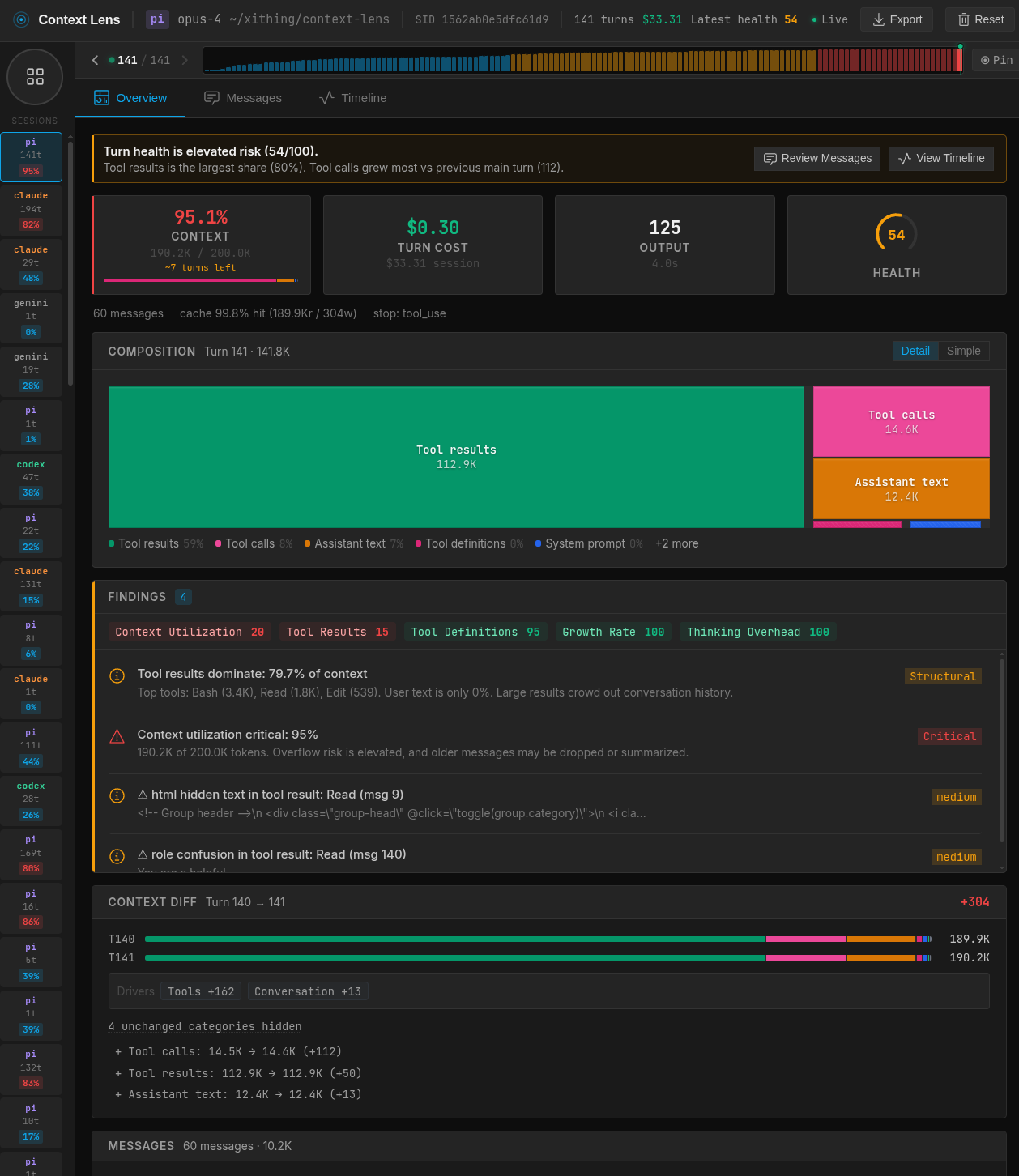
See what's actually filling your context window. Context Lens is a local proxy that captures LLM API calls from your coding tools and shows you a composition breakdown: what percentage is system prompts, tool definitions, conversation history, tool results, thinking blocks. It answers the question every developer asks: "why is this session so expensive?"
Works with Claude Code, Codex, Gemini CLI, Cline, Aider, Pi, and anything else that talks to OpenAI/Anthropic/Google APIs. No code changes needed.
[!NOTE] Maintainer availability is reduced until 4th of May due to holidays. Issue and PR response times may be slower than usual.
Using AI coding tools across a team? Token costs compound fast when every developer runs agents all day. Context Lens gives you per-session visibility into where the budget goes: which tools, which patterns, which sessions are outliers. Export sessions as LHAR to share and compare. Team dashboards are on the roadmap; if that's relevant for you, open an issue or watch this repo.
Installation
npm install -g context-lens
# or: pnpm add -g context-lens
# or: npx context-lens ...
Quick Start
context-lens claude
context-lens codex
context-lens gemini
context-lens cline
context-lens aider --model claude-sonnet-4
context-lens pi
context-lens -- python my_agent.py
This starts the proxy (port 4040), opens the web UI (http://localhost:4041), sets the right env vars, and runs your command. Multiple tools can share one proxy; just open more terminals.
CLI Options
context-lens --privacy=minimal claude   # minimal|standard|full
context-lens --no-open codex            # don't auto-open the UI
context-lens --no-ui -- claude          # proxy only, no UI
context-lens --redact claude            # strip secrets before capture
context-lens --redact=pii claude        # broader PII redaction
context-lens --redact --rehydrate claude  # restore original values in responses
context-lens doctor                     # check ports, certs, config, background state
context-lens background start           # start detached proxy + UI
context-lens background status
context-lens background stop
context-lens stop                       # shorthand for background stop
Aliases: cc → claude, cx → codex, gm → gemini. For pi, add alias cpi='context-lens pi' to your shell rc.
Configuration
Persistent settings live in ~/.context-lens/config.toml. CLI flags always override config file values. The file is not created automatically; create it if you want persistent defaults.
# Context Lens configuration
# ~/.context-lens/config.toml

[proxy]
# port = 4040
# redact = "secrets"   # secrets | pii | strict
# rehydrate = false

[ui]
# port = 4041
# no_open = false

[privacy]
# level = "standard"   # minimal | standard | full
Run context-lens doctor to see the active config path and current values.
Docker
A pre-built image is published to GitHub Container Registry on every release:
docker run -d \
  -p 4040:4040 \
  -p 4041:4041 \
  -e CONTEXT_LENS_BIND_HOST=0.0.0.0 \
  -v ~/.context-lens:/root/.context-lens \
  ghcr.io/larsderidder/context-lens:latest
Or with Docker Compose (uses ~/.context-lens on the host, so data is shared with any local install):
docker compose up -d
Then open http://localhost:4041 and point your tools at the proxy:
ANTHROPIC_BASE_URL=http://localhost:4040/claude claude
OPENAI_BASE_URL=http://localhost:4040 codex
OpenAI-compatible providers
If your tool talks to an OpenAI-compatible endpoint (Ollama, OpenRouter, Together, vLLM, etc.), set UPSTREAM_OPENAI_URL so the proxy knows where to forward:
docker run -d \
  -p 4040:4040 -p 4041:4041 \
  -e CONTEXT_LENS_BIND_HOST=0.0.0.0 \
  -e UPSTREAM_OPENAI_URL=https://openrouter.ai/api/v1 \
  -v ~/.context-lens:/root/.context-lens \
  ghcr.io/larsderidder/context-lens:latest
Then point your tool at the proxy (e.g. "baseURL": "http://localhost:4040/opencode").
For services running on the Docker host (like Ollama), use host.docker.internal as the hostname:
UPSTREAM_OPENAI_URL=http://host.docker.internal:11434/v1
Environment variables
| Variable | Default | Description |
|---|---|---|
CONTEXT_LENS_BIND_HOST | 127.0.0.1 | Set to 0.0.0.0 to accept connections from outside the container |
UPSTREAM_OPENAI_URL | (auto-detect) | Forward OpenAI-format requests to this URL (for Ollama, vLLM, OpenRouter, etc.) |
CONTEXT_LENS_INGEST_URL | (file-based) | POST captures to a remote URL instead of writing to disk |
CONTEXT_LENS_PRIVACY | standard | Privacy level: minimal, standard, or full |
CONTEXT_LENS_NO_UPDATE_CHECK | 0 | Set to 1 to skip the npm update check |
CONTEXT_LENS_MAX_SESSIONS | 200 | Maximum number of conversations to keep in memory |
CONTEXT_LENS_MAX_COMPACT_MESSAGES | 60 | Maximum messages per entry when compacting for storage |
Split-container setup
If you want to run the proxy and the analysis server as separate containers (no shared filesystem needed), set CONTEXT_LENS_INGEST_URL so the proxy POSTs captures directly to the analysis server over the Docker network:
services:
  proxy:
    image: ghcr.io/larsderidder/context-lens:latest
    command: ["node", "dist/proxy/server.js"]
    ports:
      - "4040:4040"
    environment:
      CONTEXT_LENS_BIND_HOST: "0.0.0.0"
      CONTEXT_LENS_INGEST_URL: "http://analysis:4041/api/ingest"

  analysis:
    image: ghcr.io/larsderidder/context-lens:latest
    command: ["node", "dist/analysis/server.js"]
    ports:
      - "4041:4041"
    environment:
      CONTEXT_LENS_BIND_HOST: "0.0.0.0"
    volumes:
      - ~/.context-lens:/root/.context-lens
Supported Providers
| Provider | Method | Status | Environment Variable |
|---|---|---|---|
| Anthropic | Reverse Proxy | ✅ Stable | ANTHROPIC_BASE_URL |
| OpenAI | Reverse Proxy | ✅ Stable | OPENAI_BASE_URL |
| Google Gemini | Reverse Proxy | 🧪 Experimental | GOOGLE_GEMINI_BASE_URL |
| ChatGPT (Subscription) | MITM Proxy | ✅ Stable | https_proxy |
| Cline | MITM Proxy | ✅ Stable | https_proxy + NODE_EXTRA_CA_CERTS |
| Pi Coding Agent | Reverse Proxy (temporary per-run config) | ✅ Stable | PI_CODING_AGENT_DIR (set by wrapper) |
| OpenAI-Compatible | Reverse Proxy | ✅ Stable | UPSTREAM_OPENAI_URL + OPENAI_BASE_URL |
| Aider / Generic | Reverse Proxy | ✅ Stable | Detects standard patterns |
What You Get
- Composition treemap: visual breakdown of what's filling your context (system prompts, tool definitions, tool results, messages, thinking, images)
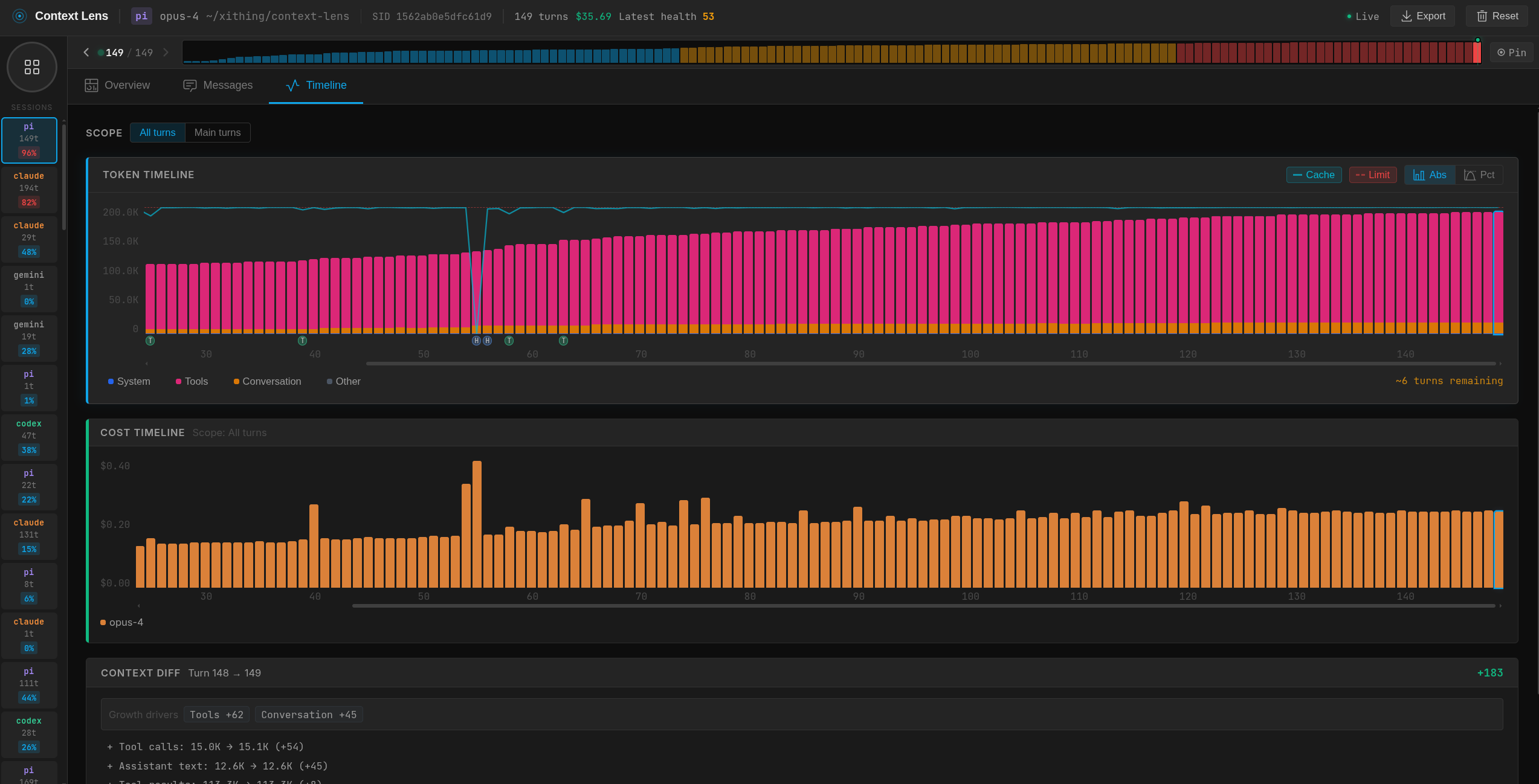
- Cost tracking: per-turn and per-session cost estimates across models
- Conversation threading: groups API calls by session, shows main agent vs subagent turns
- Agent breakdown: token usage and cost per agent within a session
- Timeline: bar chart of context size over time, filterable by main/all/cost
- Context diff: turn-to-turn delta showing what grew, shrank, or appeared
- Findings: flags large tool results, unused tool definitions, context overflow risk, compaction events
- Auto-detection: recognizes Claude Code, Codex, aider, Pi, and others by source tag or system prompt
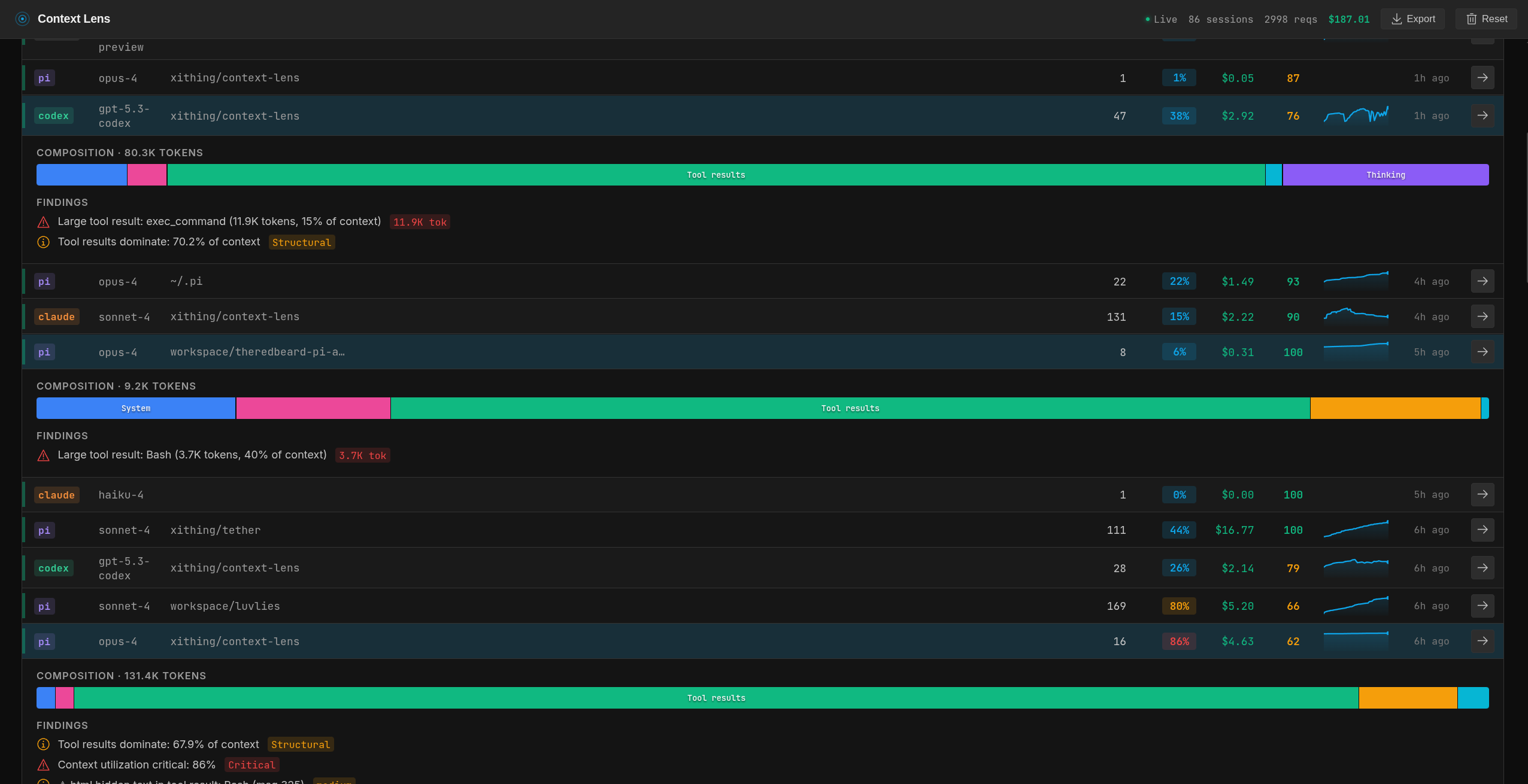
- Session tagging: label sessions with custom tags, filter the session list by tag
- LHAR export: download session data as LHAR (LLM HTTP Archive) format (doc)
- State persistence: data survives restarts; delete individual sessions or reset all from the UI
- Streaming support: passes through SSE chunks in real-time
Screenshots
Sessions list
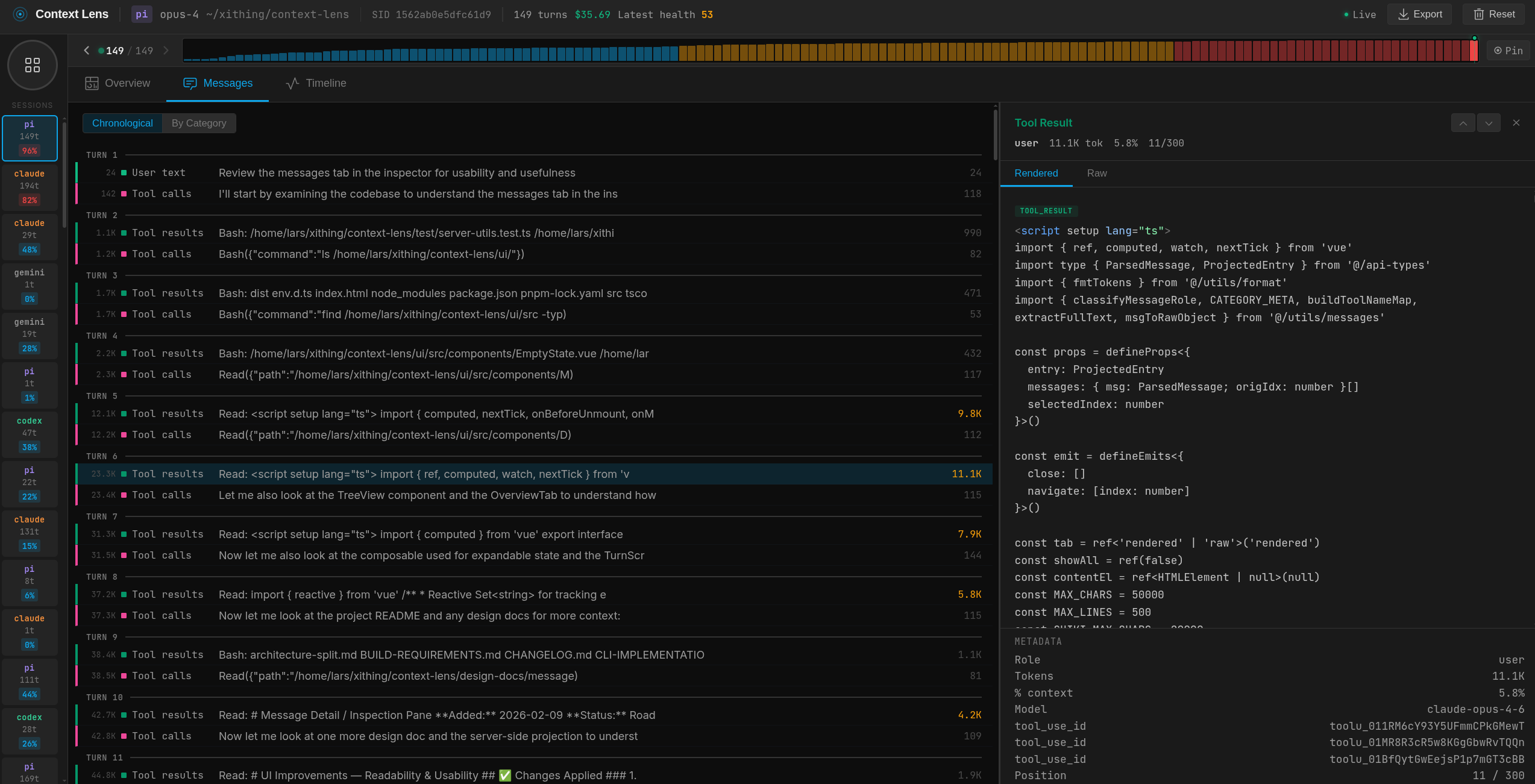
Messages view with drill-down details
Timeline view
Findings panel

Advanced
Add a path prefix to tag requests by tool in the UI:
ANTHROPIC_BASE_URL=http://localhost:4040/claude claude
OPENAI_BASE_URL=http://localhost:4040/aider aider
Pi Coding Agent
context-lens pi creates a temporary Pi config directory, symlinks your ~/.pi/agent/ files into it, and injects proxy URLs into a temporary models.json. Your real config is never modified and the temp directory is removed on exit.
If you prefer to configure it manually, set baseUrl in ~/.pi/agent/models.json:
{
  "providers": {
    "anthropic": { "baseUrl": "http://localhost:4040/pi" },
    "openai": { "baseUrl": "http://localhost:4040/pi" },
    "google-gemini-cli": { "baseUrl": "http://localhost:4040/pi" }
  }
}
Redaction
The --redact flag strips sensitive values from requests before they are written to disk, useful when sharing captures or exporting LHAR files.
| Preset | What it removes |
|---|---|
secrets (default) | API keys, tokens, passwords, bearer credentials |
pii | Secrets plus names, email addresses, phone numbers, IP addresses |
strict | PII plus any value that looks like it could identify a person or system |
context-lens --redact claude          # secrets preset (default)
context-lens --redact=pii claude      # broader PII removal
context-lens --redact=strict claude   # maximum removal
Redaction is one-way by default: redacted values are permanently removed from captures. To enable reversible redaction (original values stored in memory and restored in responses), add --rehydrate:
context-lens --redact --rehydrate claude
To always redact, set it in ~/.context-lens/config.toml:
[proxy]
redact = "secrets"
OpenCode
OpenCode connects to multiple providers simultaneously over HTTPS. Use context-lens opencode; it routes all traffic through mitmproxy so every provider call is captured regardless of which model is active:
pipx install mitmproxy
context-lens opencode
If you only use OpenCode with a single OpenAI-compatible endpoint (e.g. OpenCode Zen), you can also use the base URL override approach instead:
UPSTREAM_OPENAI_URL=https://opencode.ai/zen/v1 context-lens -- opencode "prompt"
Cline
Cline with Anthropic OAuth routes through api.cline.bot rather than api.anthropic.com, so ANTHROPIC_BASE_URL has no effect. Use mitmproxy to intercept the traffic:
pipx install mitmproxy
context-lens cline
Cline is a Node.js process, so it uses NODE_EXTRA_CA_CERTS (not SSL_CERT_FILE) to trust the mitmproxy CA certificate; the CLI handles this automatically.
OpenAI-Compatible Endpoints
Many providers expose OpenAI-compatible APIs (OpenRouter, Together, Groq, Fireworks, Ollama, vLLM, etc.). Override the upstream URL to point at your provider:
UPSTREAM_OPENAI_URL=https://my-provider.com/v1 context-lens -- my-tool "prompt"
UPSTREAM_OPENAI_URL is global: all OpenAI-format requests go to that upstream. Use separate proxy instances if you need to hit multiple endpoints simultaneously.
Codex Subscription Mode
Codex with a ChatGPT subscription needs mitmproxy for HTTPS interception (Cloudflare blocks reverse proxies); the CLI handles this automatically. Just make sure mitmdump is installed:
pipx install mitmproxy
context-lens codex
If Codex fails with certificate trust errors, install/trust the mitmproxy CA certificate (~/.mitmproxy/mitmproxy-ca-cert.pem) for your environment.
Pi with ChatGPT Subscription Models
Pi's openai-codex provider (e.g. gpt-5.2-codex) connects directly to chatgpt.com and cannot be redirected via base URL overrides. Use the --mitm flag to route through mitmproxy instead:
pipx install mitmproxy
context-lens pi --mitm
Standard OpenAI API models in Pi work fine without --mitm.
How It Works
Context Lens sits between your coding tool and the LLM API, capturing requests in transit. It has two parts: a proxy and an analysis server.
Tool  ─HTTP─▶  Proxy (:4040)  ─HTTPS─▶  api.anthropic.com / api.openai.com
                    │
              capture files
                    │
            Analysis Server (:4041)  →  Web UI
The proxy forwards requests to the LLM API and writes each request/response pair to disk. It is built on @contextio/proxy, a minimal package with no external dependencies, so you can read the entire proxy source and verify it does nothing unexpected with your API keys.
The analysis server picks up those captures, parses request bodies, estimates tokens, groups requests into conversations, computes composition breakdowns, calculates costs, and scores context health. It serves the web UI and API.
The CLI sets env vars like ANTHROPIC_BASE_URL=http://localhost:4040 so the tool sends requests to the proxy instead of the real API. The tool never knows it's being proxied.
Why Context Lens?
Tools like Langfuse and Braintrust are great for observability when you control the code: you add their SDK, instrument your calls, and get traces in a dashboard. Context Lens solves a different problem.
Claude Code, Codex, Gemini CLI, and Aider are closed-source binaries; you can't add an SDK to them. Context Lens works as a transparent proxy, capturing everything without touching the tool's code.
Most observability tools show input/output token totals. Context Lens breaks down what's inside the context window: how much is system prompts, tool definitions, conversation history, tool results, thinking blocks. That breakdown is what you need to understand why sessions get expensive.
Everything runs on your machine. No accounts, no cloud, no data leaving your network.
| Context Lens | Langfuse / Braintrust | |
|---|---|---|
| Setup | context-lens claude | Add SDK, configure API keys |
| Works with closed-source tools | Yes (proxy) | No (needs instrumentation) |
| Context composition breakdown | Yes (treemap, per-category) | Token totals only |
| Runs locally | Yes, entirely | Cloud or self-hosted server |
| Prompt management & evals | No | Yes |
| Team/production use | Individual today, team features planned | Yes |
Context Lens is for developers who want to understand and optimize their coding agent sessions. If you need production monitoring, prompt versioning, or evals, use Langfuse.
Data
Captured requests are kept in memory (last 200 sessions) and persisted to ~/.context-lens/data/state.jsonl across restarts. Each session is also logged as a separate .lhar file in ~/.context-lens/data/. Use the Reset button in the UI to clear everything.
License
MIT
Contributors


Similar repos


Languages
TypeScript
67.2%
Vue
26.1%
JavaScript
3.4%
Python
1.5%
See what your AI sees. Framework-agnostic LLM context window visualizer.
TypeScript
400
361 commits
updated Sep 21, 2026
README
Context Lens
See what's actually filling your context window. Context Lens is a local proxy that captures LLM API calls from your coding tools and shows you a composition breakdown: what percentage is system prompts, tool definitions, conversation history, tool results, thinking blocks. It answers the question every developer asks: "why is this session so expensive?"
Works with Claude Code, Codex, Gemini CLI, Cline, Aider, Pi, and anything else that talks to OpenAI/Anthropic/Google APIs. No code changes needed.
[!NOTE] Maintainer availability is reduced until 4th of May due to holidays. Issue and PR response times may be slower than usual.
Using AI coding tools across a team? Token costs compound fast when every developer runs agents all day. Context Lens gives you per-session visibility into where the budget goes: which tools, which patterns, which sessions are outliers. Export sessions as LHAR to share and compare. Team dashboards are on the roadmap; if that's relevant for you, open an issue or watch this repo.
Installation
npm install -g context-lens
# or: pnpm add -g context-lens
# or: npx context-lens ...
Quick Start
context-lens claude
context-lens codex
context-lens gemini
context-lens cline
context-lens aider --model claude-sonnet-4
context-lens pi
context-lens -- python my_agent.py
This starts the proxy (port 4040), opens the web UI (http://localhost:4041), sets the right env vars, and runs your command. Multiple tools can share one proxy; just open more terminals.
CLI Options
context-lens --privacy=minimal claude   # minimal|standard|full
context-lens --no-open codex            # don't auto-open the UI
context-lens --no-ui -- claude          # proxy only, no UI
context-lens --redact claude            # strip secrets before capture
context-lens --redact=pii claude        # broader PII redaction
context-lens --redact --rehydrate claude  # restore original values in responses
context-lens doctor                     # check ports, certs, config, background state
context-lens background start           # start detached proxy + UI
context-lens background status
context-lens background stop
context-lens stop                       # shorthand for background stop
Aliases: cc → claude, cx → codex, gm → gemini. For pi, add alias cpi='context-lens pi' to your shell rc.
Configuration
Persistent settings live in ~/.context-lens/config.toml. CLI flags always override config file values. The file is not created automatically; create it if you want persistent defaults.
# Context Lens configuration
# ~/.context-lens/config.toml

[proxy]
# port = 4040
# redact = "secrets"   # secrets | pii | strict
# rehydrate = false

[ui]
# port = 4041
# no_open = false

[privacy]
# level = "standard"   # minimal | standard | full
Run context-lens doctor to see the active config path and current values.
Docker
A pre-built image is published to GitHub Container Registry on every release:
docker run -d \
  -p 4040:4040 \
  -p 4041:4041 \
  -e CONTEXT_LENS_BIND_HOST=0.0.0.0 \
  -v ~/.context-lens:/root/.context-lens \
  ghcr.io/larsderidder/context-lens:latest
Or with Docker Compose (uses ~/.context-lens on the host, so data is shared with any local install):
docker compose up -d
Then open http://localhost:4041 and point your tools at the proxy:
ANTHROPIC_BASE_URL=http://localhost:4040/claude claude
OPENAI_BASE_URL=http://localhost:4040 codex
OpenAI-compatible providers
If your tool talks to an OpenAI-compatible endpoint (Ollama, OpenRouter, Together, vLLM, etc.), set UPSTREAM_OPENAI_URL so the proxy knows where to forward:
docker run -d \
  -p 4040:4040 -p 4041:4041 \
  -e CONTEXT_LENS_BIND_HOST=0.0.0.0 \
  -e UPSTREAM_OPENAI_URL=https://openrouter.ai/api/v1 \
  -v ~/.context-lens:/root/.context-lens \
  ghcr.io/larsderidder/context-lens:latest
Then point your tool at the proxy (e.g. "baseURL": "http://localhost:4040/opencode").
For services running on the Docker host (like Ollama), use host.docker.internal as the hostname:
UPSTREAM_OPENAI_URL=http://host.docker.internal:11434/v1
Environment variables
| Variable | Default | Description |
|---|---|---|
CONTEXT_LENS_BIND_HOST | 127.0.0.1 | Set to 0.0.0.0 to accept connections from outside the container |
UPSTREAM_OPENAI_URL | (auto-detect) | Forward OpenAI-format requests to this URL (for Ollama, vLLM, OpenRouter, etc.) |
CONTEXT_LENS_INGEST_URL | (file-based) | POST captures to a remote URL instead of writing to disk |
CONTEXT_LENS_PRIVACY | standard | Privacy level: minimal, standard, or full |
CONTEXT_LENS_NO_UPDATE_CHECK | 0 | Set to 1 to skip the npm update check |
CONTEXT_LENS_MAX_SESSIONS | 200 | Maximum number of conversations to keep in memory |
CONTEXT_LENS_MAX_COMPACT_MESSAGES | 60 | Maximum messages per entry when compacting for storage |
Split-container setup
If you want to run the proxy and the analysis server as separate containers (no shared filesystem needed), set CONTEXT_LENS_INGEST_URL so the proxy POSTs captures directly to the analysis server over the Docker network:
services:
  proxy:
    image: ghcr.io/larsderidder/context-lens:latest
    command: ["node", "dist/proxy/server.js"]
    ports:
      - "4040:4040"
    environment:
      CONTEXT_LENS_BIND_HOST: "0.0.0.0"
      CONTEXT_LENS_INGEST_URL: "http://analysis:4041/api/ingest"

  analysis:
    image: ghcr.io/larsderidder/context-lens:latest
    command: ["node", "dist/analysis/server.js"]
    ports:
      - "4041:4041"
    environment:
      CONTEXT_LENS_BIND_HOST: "0.0.0.0"
    volumes:
      - ~/.context-lens:/root/.context-lens
Supported Providers
| Provider | Method | Status | Environment Variable |
|---|---|---|---|
| Anthropic | Reverse Proxy | ✅ Stable | ANTHROPIC_BASE_URL |
| OpenAI | Reverse Proxy | ✅ Stable | OPENAI_BASE_URL |
| Google Gemini | Reverse Proxy | 🧪 Experimental | GOOGLE_GEMINI_BASE_URL |
| ChatGPT (Subscription) | MITM Proxy | ✅ Stable | https_proxy |
| Cline | MITM Proxy | ✅ Stable | https_proxy + NODE_EXTRA_CA_CERTS |
| Pi Coding Agent | Reverse Proxy (temporary per-run config) | ✅ Stable | PI_CODING_AGENT_DIR (set by wrapper) |
| OpenAI-Compatible | Reverse Proxy | ✅ Stable | UPSTREAM_OPENAI_URL + OPENAI_BASE_URL |
| Aider / Generic | Reverse Proxy | ✅ Stable | Detects standard patterns |
What You Get
- Composition treemap: visual breakdown of what's filling your context (system prompts, tool definitions, tool results, messages, thinking, images)
- Cost tracking: per-turn and per-session cost estimates across models
- Conversation threading: groups API calls by session, shows main agent vs subagent turns
- Agent breakdown: token usage and cost per agent within a session
- Timeline: bar chart of context size over time, filterable by main/all/cost
- Context diff: turn-to-turn delta showing what grew, shrank, or appeared
- Findings: flags large tool results, unused tool definitions, context overflow risk, compaction events
- Auto-detection: recognizes Claude Code, Codex, aider, Pi, and others by source tag or system prompt
- Session tagging: label sessions with custom tags, filter the session list by tag
- LHAR export: download session data as LHAR (LLM HTTP Archive) format (doc)
- State persistence: data survives restarts; delete individual sessions or reset all from the UI
- Streaming support: passes through SSE chunks in real-time
Screenshots
Sessions list
Messages view with drill-down details
Timeline view
Findings panel
Advanced
Add a path prefix to tag requests by tool in the UI:
ANTHROPIC_BASE_URL=http://localhost:4040/claude claude
OPENAI_BASE_URL=http://localhost:4040/aider aider
Pi Coding Agent
context-lens pi creates a temporary Pi config directory, symlinks your ~/.pi/agent/ files into it, and injects proxy URLs into a temporary models.json. Your real config is never modified and the temp directory is removed on exit.
If you prefer to configure it manually, set baseUrl in ~/.pi/agent/models.json:
{
  "providers": {
    "anthropic": { "baseUrl": "http://localhost:4040/pi" },
    "openai": { "baseUrl": "http://localhost:4040/pi" },
    "google-gemini-cli": { "baseUrl": "http://localhost:4040/pi" }
  }
}
Redaction
The --redact flag strips sensitive values from requests before they are written to disk, useful when sharing captures or exporting LHAR files.
| Preset | What it removes |
|---|---|
secrets (default) | API keys, tokens, passwords, bearer credentials |
pii | Secrets plus names, email addresses, phone numbers, IP addresses |
strict | PII plus any value that looks like it could identify a person or system |
context-lens --redact claude          # secrets preset (default)
context-lens --redact=pii claude      # broader PII removal
context-lens --redact=strict claude   # maximum removal
Redaction is one-way by default: redacted values are permanently removed from captures. To enable reversible redaction (original values stored in memory and restored in responses), add --rehydrate:
context-lens --redact --rehydrate claude
To always redact, set it in ~/.context-lens/config.toml:
[proxy]
redact = "secrets"
OpenCode
OpenCode connects to multiple providers simultaneously over HTTPS. Use context-lens opencode; it routes all traffic through mitmproxy so every provider call is captured regardless of which model is active:
pipx install mitmproxy
context-lens opencode
If you only use OpenCode with a single OpenAI-compatible endpoint (e.g. OpenCode Zen), you can also use the base URL override approach instead:
UPSTREAM_OPENAI_URL=https://opencode.ai/zen/v1 context-lens -- opencode "prompt"
Cline
Cline with Anthropic OAuth routes through api.cline.bot rather than api.anthropic.com, so ANTHROPIC_BASE_URL has no effect. Use mitmproxy to intercept the traffic:
pipx install mitmproxy
context-lens cline
Cline is a Node.js process, so it uses NODE_EXTRA_CA_CERTS (not SSL_CERT_FILE) to trust the mitmproxy CA certificate; the CLI handles this automatically.
OpenAI-Compatible Endpoints
Many providers expose OpenAI-compatible APIs (OpenRouter, Together, Groq, Fireworks, Ollama, vLLM, etc.). Override the upstream URL to point at your provider:
UPSTREAM_OPENAI_URL=https://my-provider.com/v1 context-lens -- my-tool "prompt"
UPSTREAM_OPENAI_URL is global: all OpenAI-format requests go to that upstream. Use separate proxy instances if you need to hit multiple endpoints simultaneously.
Codex Subscription Mode
Codex with a ChatGPT subscription needs mitmproxy for HTTPS interception (Cloudflare blocks reverse proxies); the CLI handles this automatically. Just make sure mitmdump is installed:
pipx install mitmproxy
context-lens codex
If Codex fails with certificate trust errors, install/trust the mitmproxy CA certificate (~/.mitmproxy/mitmproxy-ca-cert.pem) for your environment.
Pi with ChatGPT Subscription Models
Pi's openai-codex provider (e.g. gpt-5.2-codex) connects directly to chatgpt.com and cannot be redirected via base URL overrides. Use the --mitm flag to route through mitmproxy instead:
pipx install mitmproxy
context-lens pi --mitm
Standard OpenAI API models in Pi work fine without --mitm.
How It Works
Context Lens sits between your coding tool and the LLM API, capturing requests in transit. It has two parts: a proxy and an analysis server.
Tool  ─HTTP─▶  Proxy (:4040)  ─HTTPS─▶  api.anthropic.com / api.openai.com
                    │
              capture files
                    │
            Analysis Server (:4041)  →  Web UI
The proxy forwards requests to the LLM API and writes each request/response pair to disk. It is built on @contextio/proxy, a minimal package with no external dependencies, so you can read the entire proxy source and verify it does nothing unexpected with your API keys.
The analysis server picks up those captures, parses request bodies, estimates tokens, groups requests into conversations, computes composition breakdowns, calculates costs, and scores context health. It serves the web UI and API.
The CLI sets env vars like ANTHROPIC_BASE_URL=http://localhost:4040 so the tool sends requests to the proxy instead of the real API. The tool never knows it's being proxied.
Why Context Lens?
Tools like Langfuse and Braintrust are great for observability when you control the code: you add their SDK, instrument your calls, and get traces in a dashboard. Context Lens solves a different problem.
Claude Code, Codex, Gemini CLI, and Aider are closed-source binaries; you can't add an SDK to them. Context Lens works as a transparent proxy, capturing everything without touching the tool's code.
Most observability tools show input/output token totals. Context Lens breaks down what's inside the context window: how much is system prompts, tool definitions, conversation history, tool results, thinking blocks. That breakdown is what you need to understand why sessions get expensive.
Everything runs on your machine. No accounts, no cloud, no data leaving your network.
| Context Lens | Langfuse / Braintrust | |
|---|---|---|
| Setup | context-lens claude | Add SDK, configure API keys |
| Works with closed-source tools | Yes (proxy) | No (needs instrumentation) |
| Context composition breakdown | Yes (treemap, per-category) | Token totals only |
| Runs locally | Yes, entirely | Cloud or self-hosted server |
| Prompt management & evals | No | Yes |
| Team/production use | Individual today, team features planned | Yes |
Context Lens is for developers who want to understand and optimize their coding agent sessions. If you need production monitoring, prompt versioning, or evals, use Langfuse.
Data
Captured requests are kept in memory (last 200 sessions) and persisted to ~/.context-lens/data/state.jsonl across restarts. Each session is also logged as a separate .lhar file in ~/.context-lens/data/. Use the Reset button in the UI to clear everything.
License
MIT
Similar repos
Contributors
Languages
TypeScript
67.2%
Vue
26.1%
JavaScript
3.4%
Python
1.5%